
Squarespace Ishimoto Template: One Fullscreen Carousel, and What It Weighs
Ishimoto is a Squarespace version 7.0 photography template and the only member of its own family. We fetched ishimoto-demo.squarespace.com in August 2026: HTTP 200, "templateVersion":"7", template ID 4fb7a14224ac99c5fee12515. Squarespace describes it as "designed especially for portfolios… a striking choice for photographers and other artists." Almost the entire template is one idea — a full-bleed, horizontally scrolling gallery carousel — and the practical question for an Ishimoto owner in 2026 is not whether it still looks good. It does. It is what that image-first pattern costs on a phone, and what replaces it in Squarespace 7.1.
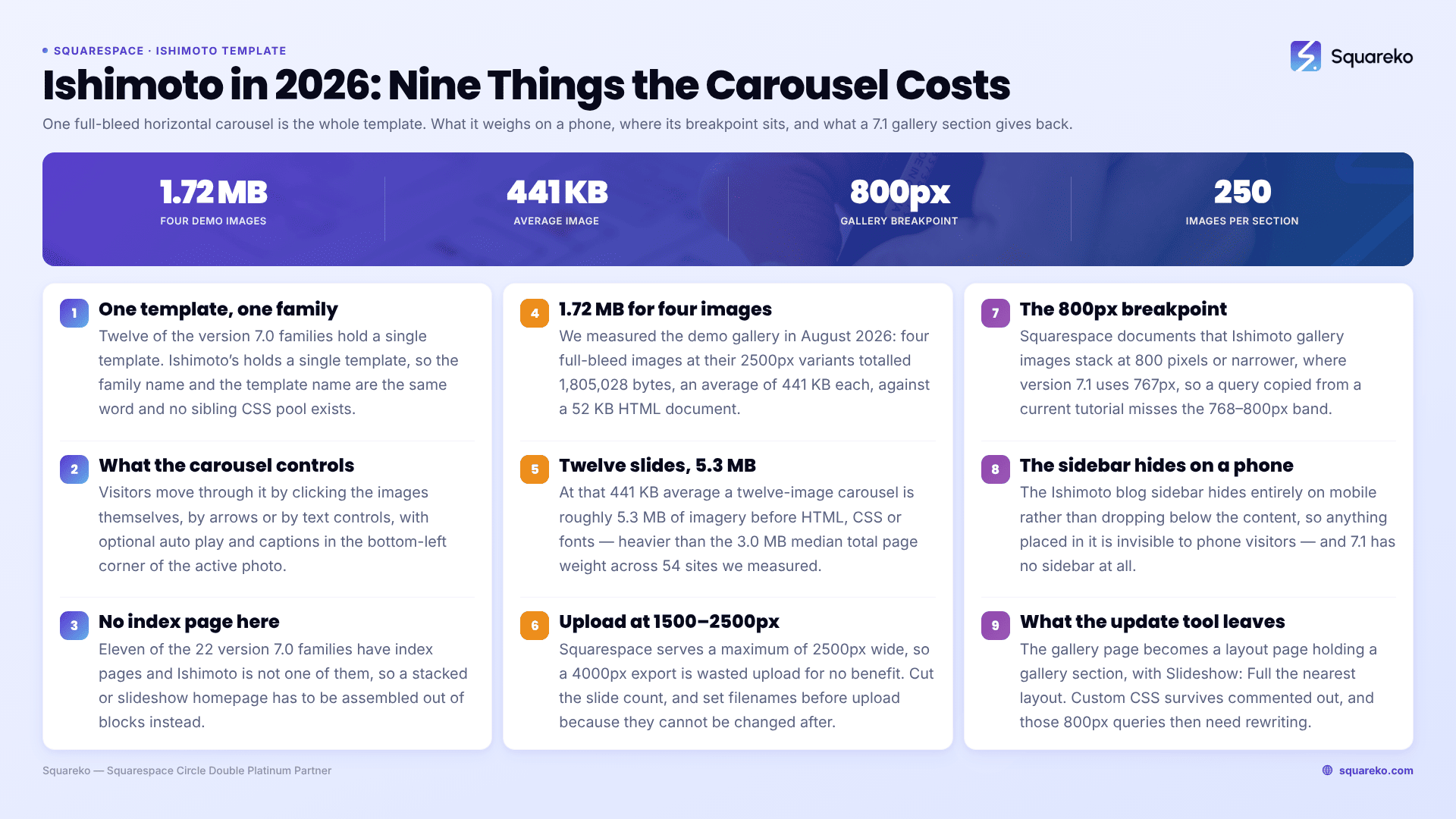
Should you stay on Ishimoto, restyle it, or move to 7.1?
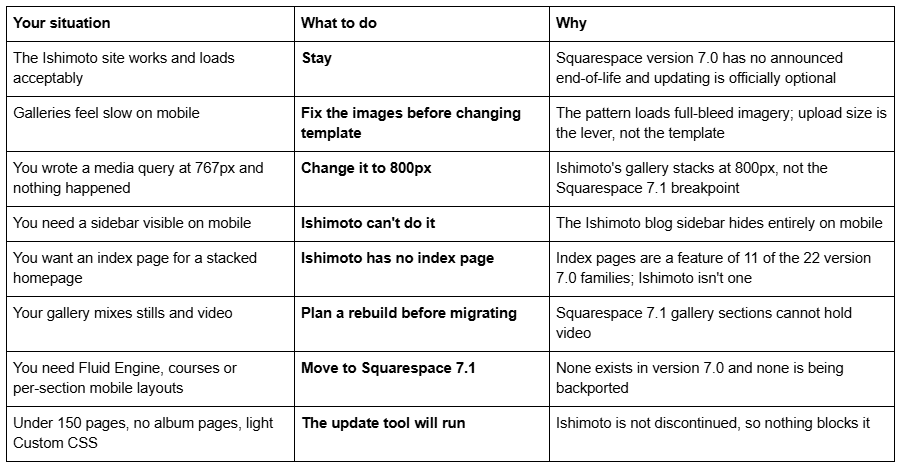
The Squarespace Ishimoto template is a family of one
Squarespace version 7.0 has 22 template families and 121 templates. Ishimoto's family contains exactly one template.
Verified in August 2026: ishimoto-demo.squarespace.com returned HTTP 200 and reports "templateVersion":"7" with template ID 4fb7a14224ac99c5fee12515. Version 7.0 always reports "7" in page source, never "7.0" — a detail that trips up template-detector results. And templateId identifies the family rather than the individual template, which on a Brine or Bedford site means a detector reports the family name instead of yours. On Ishimoto that ambiguity does not exist, because the family name and the template name are the same word.
The single-member families in Squarespace 7.0 are Adirondack, Avenue, Five, Flatiron, Forte, Galapagos, Ishimoto, Momentum, Native, Supply, Wells and Wexley. The consequence for Ishimoto specifically: there is no larger family pool of CSS snippets to borrow from. Where a Brine owner can search the family name and find hundreds of working answers, an Ishimoto owner has Squarespace's guide and a handful of forum threads. The full list of Squarespace 7.0 templates sets out all 22 families and their members.
What the Ishimoto gallery carousel actually does
The Ishimoto gallery page is a full-bleed carousel that scrolls horizontally. Squarespace's description of the controls, which is more flexible than most people realise:
Visitors navigate by clicking the images themselves, by arrows, or by text controls
Auto play is optional
Image captions appear in the bottom-left corner of the active photo
Everything else on the page is chrome: site title or logo, tagline, navigation, and a footer with a content area on the right and social icons on the left
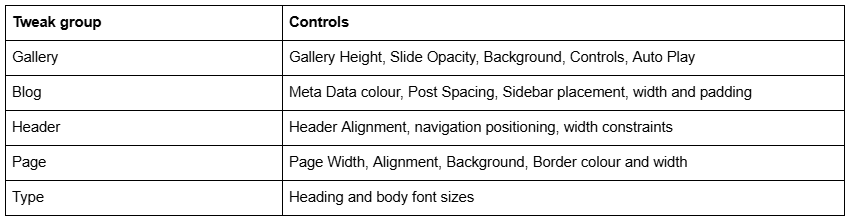
The tweaks you actually have, in site styles:
Ishimoto supports Album, Blog (List layout), Cover, Events, Gallery (Carousel layout), Layout and Store (Classic layout) pages. There is no index page. Eleven of the 22 version 7.0 families have one — Avenue, Bedford, Brine, Flatiron, Forte, Marquee, Momentum, Montauk, Pacific, Supply, Tremont and York — and Ishimoto is not among them, so a stacked or slideshow homepage is not something you can build here without rebuilding it in blocks. The Squarespace 7.0 template comparison chart sets the feature grid out family by family.
What an image-first template like Ishimoto costs in page weight
This is the part nobody writes about, and it is the part that decides whether an Ishimoto site is still fit for purpose.
We measured the Ishimoto demo's own gallery page in August 2026. The four full-bleed images on it, requested at their 2500px variants from the Squarespace CDN, totalled 1,805,028 bytes — 1.72 MB — averaging 441 KB each. The HTML document itself was 52 KB. Four images is a demo; a working photographer's gallery is not four images.
At that 441 KB average, a twelve-image Ishimoto carousel is roughly 5.3 MB of imagery before HTML, CSS, fonts or anything else on the page.
For scale, across 54 Squareko-built client sites measured in August 2026 (Playwright/Chromium lab test, cloud datacenter, unthrottled, single run per site, load-only CLS), the median total page weight was 3.0 MB across 93 requests, with median mobile LCP at 2.01 seconds and 74% of sites under Google's 2.5-second "good" threshold. A twelve-slide Ishimoto gallery is comfortably heavier than the median entire page in that set — and it is one page type doing it.
Squarespace's own documented Ishimoto complaint is the same fact wearing different clothes: the gallery may require time to load all images before scrolling works. That is not a template defect. That is what happens when a template's core interaction depends on a set of full-bleed images being present.
What you can actually do about it, without leaving version 7.0:
Upload at 1500–2500px wide. Squarespace serves a maximum of 2500px, so anything larger is wasted upload and no benefit. A 4000px export straight out of Lightroom is the most common cause of a heavy Squarespace gallery.
Export at sensible quality. The Squarespace CDN serves WebP, but it re-encodes what you give it; a 3 MB source JPEG does not become small because of the CDN. Across our 54 measured sites the median site served 86% of its images as WebP, and 16 sites hit 100%.
Cut the slide count. Twelve strong photographs outperform forty on every metric that matters, including the one where the visitor waits.
Set filenames before upload. Squarespace filenames cannot be changed after upload, and on a gallery-led site those filenames are most of your image SEO.
Ishimoto's mobile breakpoint is 800px, not 767px
This is the single most useful technical fact about the template and it appears on no ranking page.
Squarespace documents that Ishimoto gallery images stack on screens 800 pixels or narrower. Squarespace 7.1's mobile breakpoint is 767px. Every current Squarespace CSS tutorial is written at 767px, so a media query copied from one of them fires at the wrong moment on an Ishimoto site — or appears to do nothing at all in the 768–800px band.
The ranking forum thread for this template is exactly this problem. The question — "Could somebody please help me add padding between my images on the mobile version of my website — imagine I need custom CSS?" — got this answer, and it is worth reading for the breakpoint as much as the rule:
@media screen and (max-width: 800px) {
#slideshowWrapper.mobile-gallery #slideshow .slide {
margin-bottom: 10px;
}
}
Two other Ishimoto mobile behaviours to know before you spend an evening debugging them:
The blog sidebar hides entirely on mobile. Not "moves below the content" — hides. Anything you put in it is invisible to phone visitors, which on a site where most traffic is mobile means it may as well not exist.
Navigation collapses to a menu link at the top-centre, not a hamburger at the top right.
The Custom CSS panel is at Website → Website Tools → Custom CSS and requires a Core plan or above.
What breaks or feels dated on a Squarespace Ishimoto site in 2026
No Fluid Engine. Version 7.0 editing is the classic block editor — a 12-column grid, no drag-anywhere canvas, no overlapping elements without Custom CSS. Fluid Engine is 7.1-only and is not coming to Ishimoto.
One inherited mobile layout. You get whatever the template decides at 800px. Squarespace 7.1 with Fluid Engine keeps a genuinely separate mobile layout per section.
A Classic store page, capped at 200 products. Ishimoto is on Squarespace's Classic store list alongside Adirondack, Avenue, Aviator, Bedford, Five, Flatiron, Forte, Momentum, Montauk, Native, Pacific, Wells and Wexley. Classic store pages have no Quick View, no image zoom and no waitlists. For a photographer selling prints, that is the practical ceiling.
No index page, so no stacked or slideshow homepage without building one out of blocks.
Navigation height varies with page content length, another documented Ishimoto behaviour, and the reason the header sits differently on a long blog post than on a gallery.
Squarespace's stated position on all of this is not ambiguous: "Although we still support Squarespace version 7.0, fixing bugs or issues is a lower priority for us while we focus on our current platform, version 7.1."
Is the Squarespace Ishimoto template still available?
Yes, on an existing version 7.0 site, via Design → Template → Install new template. Ishimoto is not on Squarespace's discontinued list, which names Adversary, Alex, Amelie, Atelier, Beatrice, Boutique, Bricktop, Bryler, Custom Template, Devlin, Dovetail, Eamon, Encore, Faye, Frontrow, Fulton, Ginger, Hudson, Jensen, Jirick, Jones, Lincoln, Marquee, Metro, Minsk, Mint, Particle, Peak, Qubert, Shift, Takk and Taylor. That matters because the version update tool refuses to run on a discontinued template — Ishimoto owners are not blocked the way Bryler, Fulton, Taylor and Jones owners are.
You cannot start a new site on Ishimoto. The live gallery at squarespace.com/templates returned 198 templates in August 2026, all version 7.1, and squarespace.com/templates/ishimoto-demo now serves that generic gallery. The working demo is the subdomain, ishimoto-demo.squarespace.com.
Version 7.0 has no announced end-of-life and Squarespace calls the move optional. Competing pages that claim particular 7.0 templates have "no upgrade path" are wrong about Ishimoto. Whether old Squarespace templates are still supported covers the support position in full.
Moving a Squarespace Ishimoto portfolio to version 7.1
The tool is at Design → Update to Version 7.1. It is permanent, caps at 150 pages, errors above 200 products, requires developer mode off, and leaves Custom CSS commented out — including the 800px media queries above, which you will want to rewrite at 767px rather than simply uncomment.
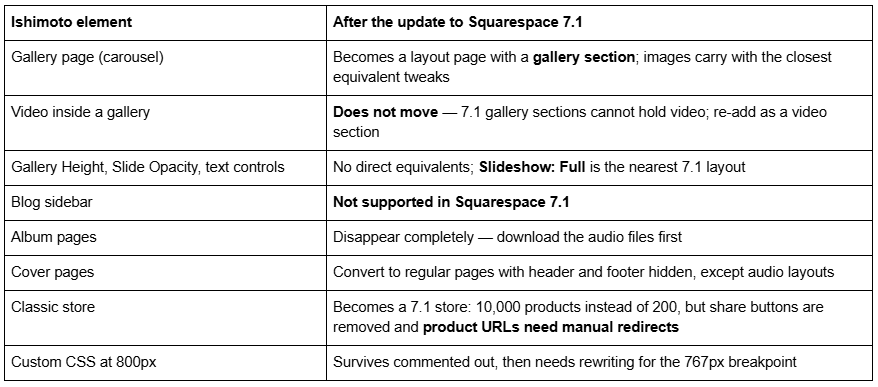
Gallery sections give you six layouts — Grid: Simple, Grid: Strips, Grid: Masonry, Slideshow: Simple, Slideshow: Full and Slideshow: Reel — and cap at 250 images. You cannot upload video into one or add blocks inside one, though you can put block sections above and below it.
The genuine gain for an image-first site is the one nobody advertises: in Squarespace 7.1 you set section height per section and edit a separate mobile layout per section, so the gallery no longer dictates the whole page. The genuine loss is the horizontal click-through carousel itself, which has no exact 7.1 equivalent.
And the expensive one: changing a page slug on Squarespace creates no automatic 301 redirect, ever. Add every orphaned URL by hand in Settings → Advanced → URL Mappings using the /old -> /new 301 format. The Squarespace 7.0 to 7.1 guide covers the full sequence.
So: stay on Ishimoto, or move?
Stay if the site loads well, the carousel is genuinely how people look at your work, and nothing on your roadmap needs Fluid Engine. Ishimoto is not discontinued and version 7.0 has no announced end-of-life.
Fix the images before you change anything structural. On the Ishimoto sites we are sent complaining of slowness, the template is rarely the cause — 3,000px uploads are, and re-exporting at 2500px and cutting the slide count usually resolves it in an afternoon without touching the platform version.
Move if you want per-section mobile layouts, a store past 200 products, or a homepage that is not one carousel. Across 54 Squareko-built client sites measured in August 2026 (Playwright/Chromium lab test, cloud datacenter, unthrottled, single run per site), 53 of 54 run Squarespace 7.1 — version 7.0 is the minority case now, but a working Ishimoto portfolio is not an emergency.
Where we do get involved is the photographer whose entire site is galleries and whose whole visual identity is the full-bleed carousel: there the update tool converts the images correctly and leaves you with a layout that no longer does the thing the site was for, and starting from a premium Squarespace template designed around 7.1 gallery and slideshow sections is the shorter path. The Squarespace Brine template guide works through the same stay-or-move decision for the largest 7.0 family. For most Ishimoto owners the table at the top of this page settles it without spending anything.
FAQ
-
Its own. Ishimoto is the sole member of the Ishimoto family, one of 22 version 7.0 families. We fetched ishimoto-demo.squarespace.com in August 2026 and it returned HTTP 200 with "templateVersion":"7" and template ID 4fb7a14224ac99c5fee12515. Because Ishimoto has no siblings, the family name and the template name are identical.
-
800px. Squarespace documents that Ishimoto gallery images stack on screens 800 pixels or narrower. That differs from Squarespace 7.1's 767px breakpoint, so a media query copied from a current 7.1 tutorial will miss the 768–800px band entirely on an Ishimoto site.
-
Use a media query at 800px targeting the mobile gallery slides: @media screen and (max-width: 800px) { #slideshowWrapper.mobile-gallery #slideshow .slide { margin-bottom: 10px; } }. Add it in Website → Website Tools → Custom CSS, which requires a Core plan or above.
-
Almost always upload size. Ishimoto loads full-bleed imagery, and Squarespace serves a maximum of 2500px wide, so anything larger is wasted. On the Ishimoto demo we measured four full-bleed images at 1.72 MB combined — an average of 441 KB each — in August 2026. Cut the slide count and re-export at 1500–2500px.
-
No. Squarespace documents that the Ishimoto blog sidebar hides entirely on mobile rather than moving below the content. Anything placed in it is invisible to phone visitors. The sidebar is also not supported at all in Squarespace 7.1, so it does not survive the version update either.
-
It becomes a layout page containing a gallery section, with images carried across at the closest equivalent style settings. Gallery sections offer six layouts and cap at 250 images, and Slideshow: Full is the nearest equivalent to Ishimoto's carousel. Video inside a gallery does not transfer, because 7.1 gallery sections cannot hold video.

Author Bio
I'm Walid Hasan, a Certified Squarespace Expert and Squarespace Circle Platinum Partner with over 12 years of hands-on experience designing and optimizing high-performing websites. Over the years, I've had the privilege of building more than 2,000 Squarespace websites for clients around the world, always focusing on clean design, strong user experience, and conversion-driven results.
