
Squarespace Forte Template: The Creative Portfolio That Held Audio and Video
Forte is a Squarespace version 7.0 portfolio template and it is the only member of its own family. We fetched forte-demo.squarespace.com in August 2026: HTTP 200, "templateVersion":"7", template ID 51e6b9e4e4b062dafa7099b9. Squarespace describes it as "a portfolio template ideal for creative firms, designers, and artists." Two things make Forte matter to musicians and film people specifically: its gallery pages hold video as well as images in a carousel, and it supports album pages for audio. Both of those are the parts that do not come with you to Squarespace 7.1.
Should you stay on Forte, restyle it, or move to 7.1?
The Squarespace Forte template is a family of one
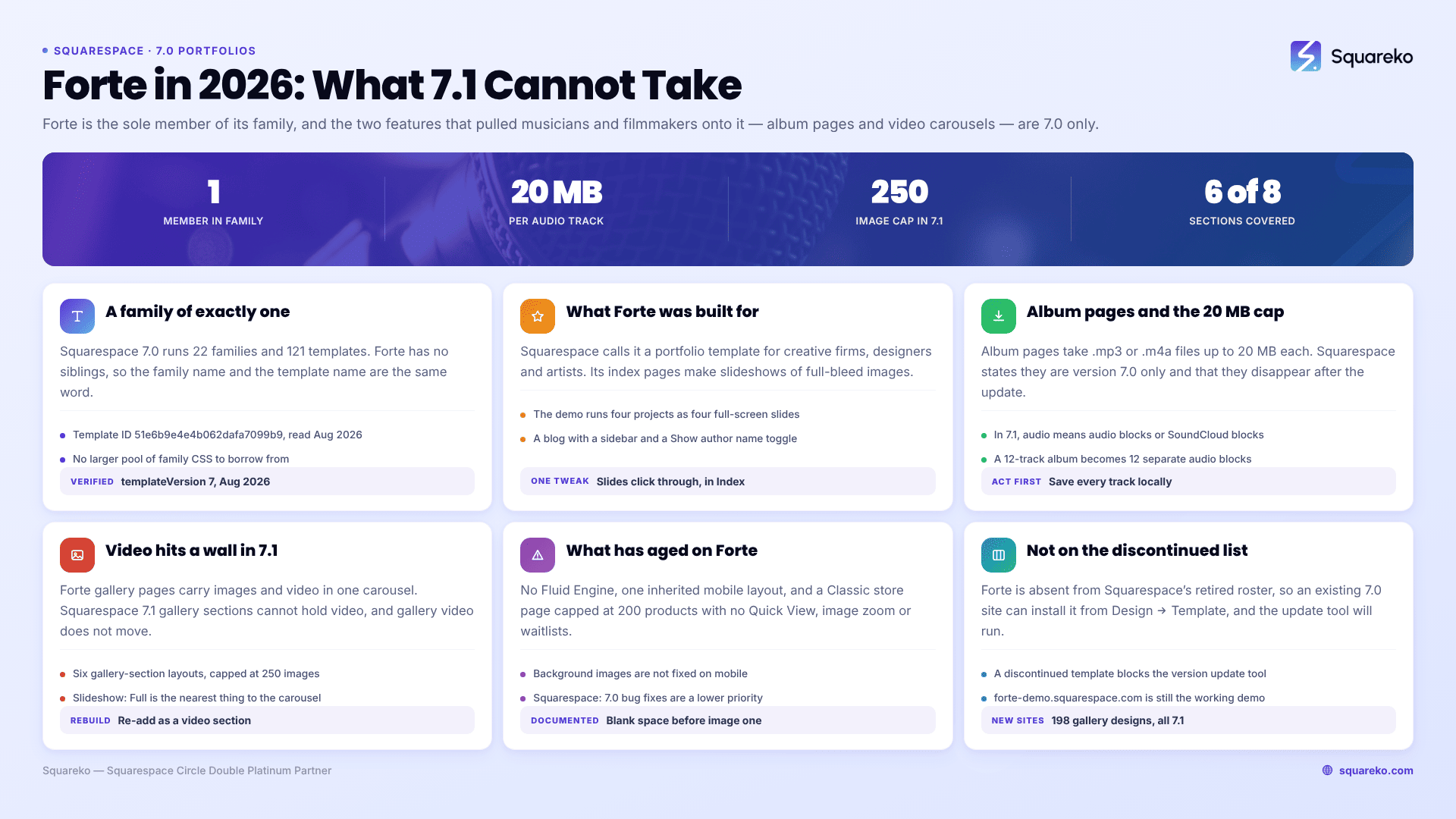
Squarespace version 7.0 has 22 template families and 121 templates. Most families have siblings — Brine has 47 members, Bedford has four. Forte has one: itself.
We verified it in August 2026. forte-demo.squarespace.com returned HTTP 200 and reports "templateVersion":"7" with template ID 51e6b9e4e4b062dafa7099b9. Note the version string: Squarespace version 7.0 always reports "7" in page source, never "7.0". And templateId identifies the family rather than the individual template — which is normally a trap, because a detector will report a Mercer site as "Brine". On Forte it is not a trap at all. The family name and the template name are the same word.
That has one practical consequence worth stating, because it cuts the other way from the Brine advice you will read elsewhere. On a Brine family template you search for the family name to find working CSS. On Forte there is no larger pool to search. Squarespace's Forte template guide and the handful of forum threads are effectively the entire corpus, which is why the same four questions circulate. The single-template families are Adirondack, Avenue, Five, Flatiron, Forte, Galapagos, Ishimoto, Momentum, Native, Supply, Wells and Wexley — the full list of Squarespace 7.0 templates sets out all 22 families and their members.
What the Squarespace Forte template does well for a creative portfolio
A full-bleed slideshow index. Squarespace's own description: "Forte index pages create slideshows of full-bleed images, each representing a page on your site." The Forte demo uses it exactly as intended — four project pages named Beast, Rust, Storm and Water, each represented by one full-screen image on the homepage. For a photographer, a director or a design studio, that is a homepage and a portfolio navigation in one object.
The Slides click through tweak. Squarespace: "Choose if clicking the slide opens the connected page or moves to the next slide with the Slides click through tweak under Index." One setting decides whether your homepage behaves like a menu or like a showreel. Most Forte owners never find it.
Gallery carousels that hold video. "Forte gallery pages display images and videos in a carousel." Captions slide up on hover and images open in a lightbox. This is the feature that pulls musicians, filmmakers and motion designers onto Forte, and it is the feature with no equivalent in Squarespace 7.1. Section below.
Album pages for audio. Forte supports album pages, which Squarespace describes as a way to "create a page with audio tracks and customized album art". Also 7.0 only.
A blog with a sidebar, in list layout, with a Show author name toggle — useful for a studio with multiple contributors.
Cover pages, events pages and a Classic store page, so a Forte site can sell prints or take bookings without leaving the template.
Audio on a Squarespace Forte site: album pages and the 20 MB ceiling
If you run a music site on Forte, album pages are almost certainly where your tracks live. The specifications, from Squarespace's documentation:
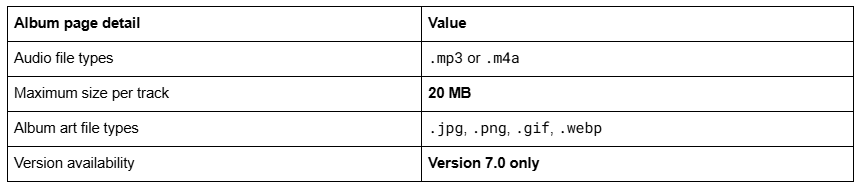
The sentence that decides your migration is Squarespace's own: "Album pages are only available in version 7.0. To add audio for visitors to listen to in version 7.1, use audio blocks or SoundCloud blocks."
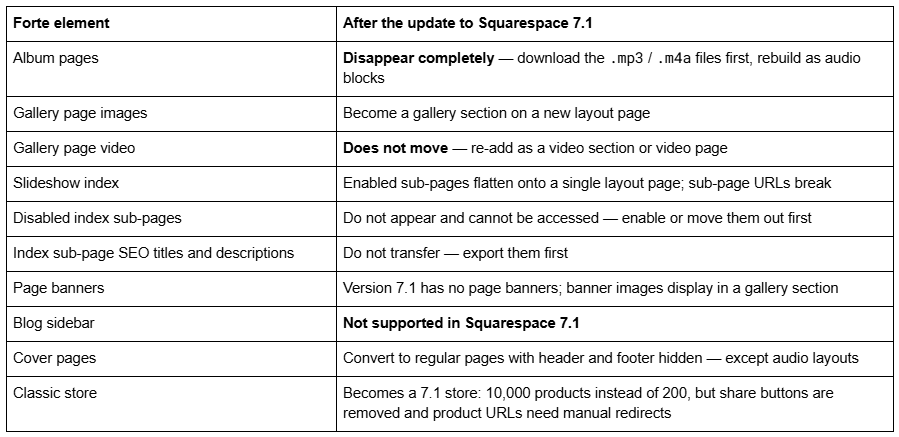
And in the migration documentation, about album pages: "These pages and their content will disappear after the update." Not "convert imperfectly" — disappear. Cover pages behave the same way where audio is involved: they convert to regular pages with the header and footer hidden, except audio layouts, which won't import.
Before you touch the update tool on a Forte site, download every audio file to your own machine. Squarespace is not a backup for them, and once the update runs there is no revert. Then rebuild the tracks in Squarespace 7.1 as audio blocks — one block per track — or as SoundCloud blocks if you would rather host elsewhere. A 12-track album becomes 12 audio blocks on one page. It works, but it is not an album page, and track ordering, album art and the tags and categories an album page supported are all things you re-create by hand.
Video on a Squarespace Forte site, and the wall it hits in 7.1
This is the single most expensive thing on a Forte migration and no ranking page says it.
Forte gallery pages hold images and video in one carousel. Squarespace 7.1 has no gallery page — it has gallery sections — and the documentation is unambiguous: "It's not possible to upload videos or add blocks to the section, but you can add block sections above and below a gallery."
The migration guide says the matching half: "Videos on gallery pages don't move to the new layout page." You are told to add them separately using video sections or pages.
So the sequence on a Forte gallery with mixed stills and clips is:
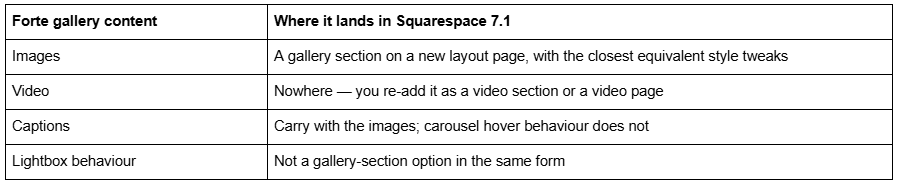
What you get instead is six gallery-section layouts — Grid: Simple, Grid: Strips, Grid: Masonry, Slideshow: Simple, Slideshow: Full and Slideshow: Reel — with a ceiling of 250 images per section. Slideshow: Full is the closest thing to a Forte carousel, and it is stills only.
If your Forte portfolio is photography, this costs you very little. If it is a showreel, an interleaved stills-and-motion carousel, or a music site where video sat next to audio, this is a rebuild of your primary content page, and it should be scoped as one before the update tool runs rather than discovered afterwards.
What breaks or feels dated on a Squarespace Forte site in 2026
No Fluid Engine. Version 7.0 editing is the classic block editor — a 12-column grid, no drag-anywhere canvas, no overlapping elements without Custom CSS. Fluid Engine is 7.1-only.
A Classic store page, capped at 200 products. Forte is on Squarespace's Classic store list alongside Adirondack, Avenue, Aviator, Bedford, Five, Flatiron, Ishimoto, Momentum, Montauk, Native, Pacific, Wells and Wexley. Classic store pages have no Quick View, no image zoom and no waitlists; hover shows product details only. The Advanced store families are Brine, Farro, Skye, Tremont and York.
Mobile is one inherited layout. Squarespace documents three Forte behaviours specifically: "Slides don't click through on mobile. Instead, tap the page name to go to the connected page." "Navigation arrows usually display on mobile." "On mobile, the sidebar displays below the page content." You get what the template decides. Squarespace 7.1 with Fluid Engine keeps a separate mobile layout per section at a 767px breakpoint.
Background images are not fixed on mobile. A documented Forte behaviour, and the reason a site-wide background image that looks deliberate on desktop reads as an accident on a phone.
A documented gallery bug that is not going to be fixed. Squarespace's own wording: "Gallery pages on Forte sometimes load with extra blank space to the left of the first image." Squarespace's stated position on version 7.0 bugs generally is that "fixing bugs or issues is a lower priority for us while we focus on our current platform, version 7.1." Header padding also varies between gallery and index pages when images exceed the window height.
Is the Squarespace Forte template still available?
Yes, on an existing version 7.0 site, via Design → Template → Install new template. Forte is not on Squarespace's discontinued list, which names Adversary, Alex, Amelie, Atelier, Beatrice, Boutique, Bricktop, Bryler, Custom Template, Devlin, Dovetail, Eamon, Encore, Faye, Frontrow, Fulton, Ginger, Hudson, Jensen, Jirick, Jones, Lincoln, Marquee, Metro, Minsk, Mint, Particle, Peak, Qubert, Shift, Takk and Taylor. That matters, because the version update tool refuses to run on a discontinued template — Forte owners are not blocked the way Bryler, Fulton, Taylor and Jones owners are.
You cannot start a new site on Forte. The live gallery at squarespace.com/templates returned 198 templates in August 2026, all version 7.1. squarespace.com/templates/forte-demo now serves that generic gallery, which is why old "Forte demo" links land somewhere unrecognisable. The real demo, forte-demo.squarespace.com, is still up and still Forte.
Version 7.0 has no announced end-of-life and Squarespace calls the move optional. Several competing pages claim particular 7.0 templates have "no upgrade path"; that is false for Forte. Whether old Squarespace templates are still supported covers the support position in full.
Moving a Squarespace Forte portfolio to version 7.1
The tool is at Design → Update to Version 7.1. It is permanent, caps at 150 pages and errors above 200 products, requires developer mode off, and leaves Custom CSS commented out — you remove the comment tags in the CSS editor afterwards.
So: stay on Forte, or move?
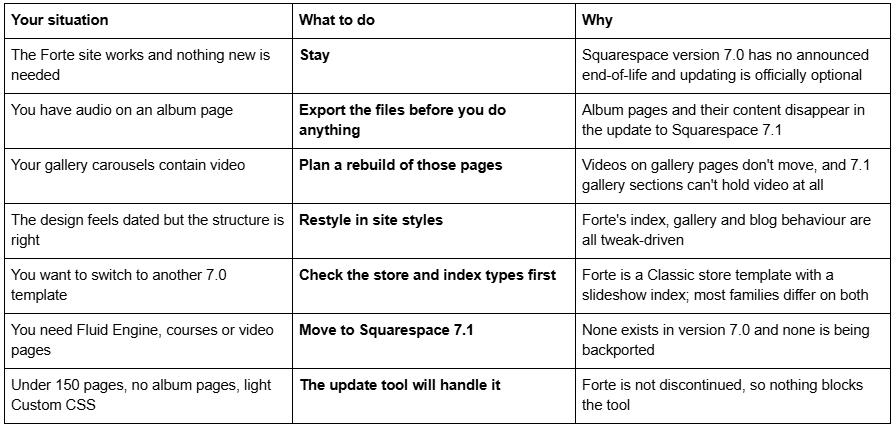
Stay if the Forte site is doing its job, your portfolio is stills, and nothing on your roadmap needs Fluid Engine. Forte is not discontinued and version 7.0 has no announced end-of-life.
Restyle if the objection is aesthetic. The index transition, auto play, slides click through, lightbox transition, sidebar position and blog border are all site styles values, and none of them requires leaving version 7.0.
Move if you need Fluid Engine, courses, video pages or an independently editable mobile layout — and scope the audio and video content first, because that is where the work actually is. Across 54 Squareko-built client sites measured in August 2026 (Playwright/Chromium lab test, cloud datacenter, unthrottled, single run per site), 53 of 54 run Squarespace 7.1; version 7.0 is the minority case now, but a working Forte site is not an emergency.
The Forte sites we get sent divide cleanly. A stills portfolio goes through the update tool and needs a few days of tidying. A music or motion site — album pages, video carousels, a showreel that is the whole point of the homepage — is a redesign wearing a migration's clothes, and it is worth starting from a premium Squarespace template built for 7.1 video and audio sections rather than converting a template whose two best features 7.1 does not have. The Squarespace Brine template guide works through the same stay-or-move decision for the largest 7.0 family. The table at the top of this page settles it for most people without spending anything.
FAQ
-
Its own. Forte is the sole member of the Forte family, one of 22 version 7.0 families. We fetched forte-demo.squarespace.com in August 2026 and it returned HTTP 200 with "templateVersion":"7" and template ID 51e6b9e4e4b062dafa7099b9. Because Forte has no siblings, the family name and the template name are identical.
-
Yes, on an existing version 7.0 site via Design → Template → Install new template. Forte is not on Squarespace's discontinued list, so the version update tool will also run on it. You cannot start a new site on Forte — the live gallery returned 198 templates in August 2026, all version 7.1.
-
Yes. Squarespace states that Forte gallery pages display images and videos in a carousel, with captions that slide up on hover. This does not survive a move to Squarespace 7.1: videos on gallery pages don't transfer, and 7.1 gallery sections cannot hold video at all.
-
No. Squarespace states that album pages are only available in version 7.0, and that album pages and their content disappear after the update to 7.1. For audio in Squarespace 7.1, use audio blocks or SoundCloud blocks. Download every .mp3 or .m4a file before updating — tracks cap at 20 MB each.
-
No. Squarespace's documentation says it is not possible to upload videos or add blocks to a gallery section, though you can add block sections above and below one. Gallery sections offer six layouts and cap at 250 images. Video goes in a separate video section or video page.
-
It is a documented Forte behaviour, not a fault in your setup. Squarespace's own wording is that gallery pages on Forte sometimes load with extra blank space to the left of the first image. Squarespace also states that fixing version 7.0 bugs is a lower priority while it focuses on version 7.1.

Author Bio
I'm Walid Hasan, a Certified Squarespace Expert and Squarespace Circle Platinum Partner with over 12 years of hands-on experience designing and optimizing high-performing websites. Over the years, I've had the privilege of building more than 2,000 Squarespace websites for clients around the world, always focusing on clean design, strong user experience, and conversion-driven results.
