
Squarespace Crosby Template: A 7.1 Store Design, Not a Legacy 7.0 Template
Crosby is a Squarespace version 7.1 template, not a version 7.0 one, and it is not in the Brine family. We fetched crosby-demo.squarespace.com in August 2026: it returned HTTP 200 and reports "templateVersion":"7.1" with template ID 5c5a519771c10ba3470d8101 — the one universal ID every 7.1 site shares. That matters commercially, because in Squarespace 7.1 a template is a starting layout, not a feature set. Choosing Crosby gets you a set of pre-built sections and style values for a small product shop. It does not unlock anything another 7.1 site cannot do.
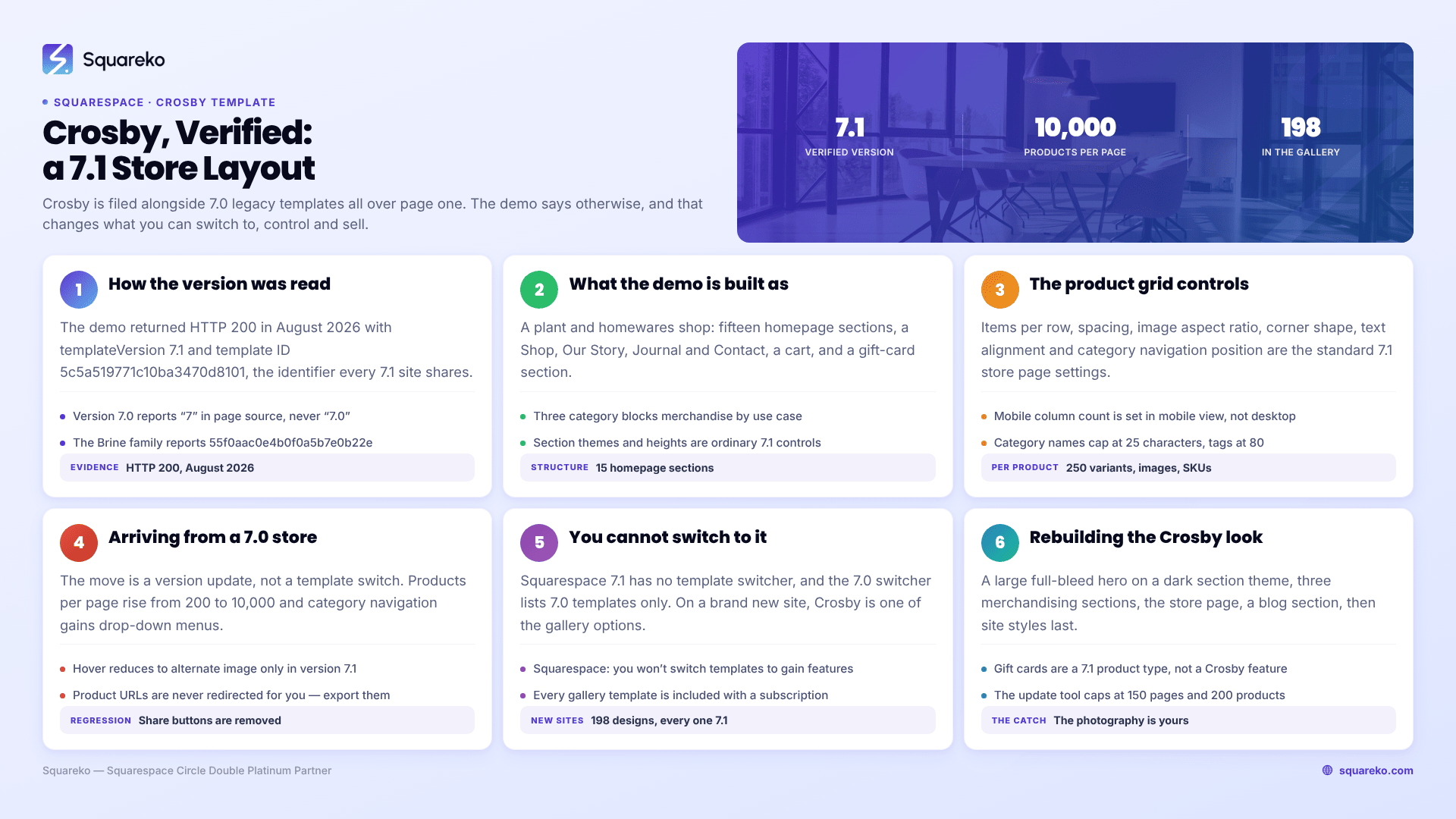
Should you use Crosby, and what does it actually decide?
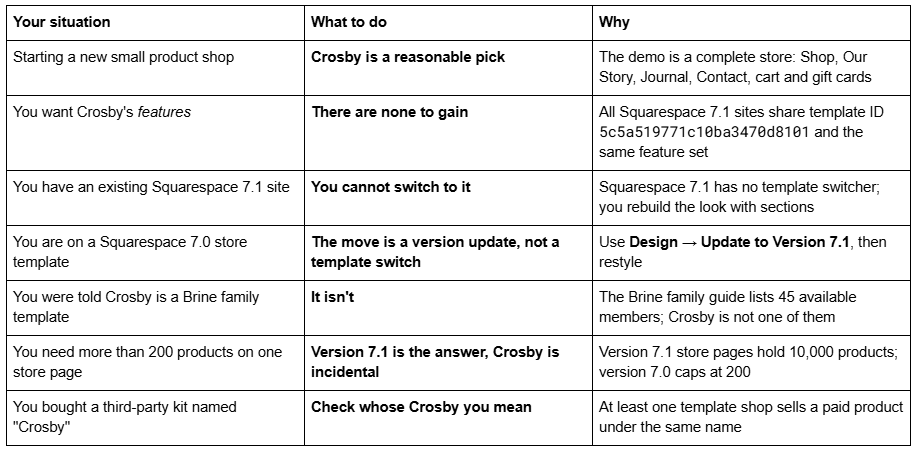
How we verified which version the Squarespace Crosby template is
Squarespace publishes the version and template family of every site in its page source. Two fields matter:

Fetching the Crosby demo in August 2026 returned this:

5c5a519771c10ba3470d8101 is the universal version 7.1 template ID. Every 7.1 site on the platform reports it, which is exactly the point Squarespace makes in its own documentation: "All version 7.1 sites are part of the same template family, so every site has the same features and style options."
For contrast, a genuine Brine family template such as Nueva reports "templateVersion":"7" and template ID 55f0aac0e4b0f0a5b7e0b22e. Crosby reports neither. If you need to run this check on your own site, how to tell which Squarespace template you are using walks through it, and the full list of Squarespace 7.0 templates covers all 121 legacy templates across 22 families — Crosby appears on neither list.
One more thing worth knowing: squarespace.com/templates/crosby-fluid-demo no longer serves a Crosby demo. In August 2026 it returned Squarespace's generic template gallery, as every old per-template demo URL now does. The working demo is the subdomain, not the marketing path.
What the Squarespace Crosby demo is actually built as
The Crosby demo is a plant and homewares shop. Reading its live page source in August 2026, the homepage is built from fifteen sections, and the structure is a small-catalogue store rather than a general business site:
Navigation: Shop, Our Story, Journal, Contact, plus a cart
Hero: a full-bleed image section, headline "Plants and Pots For Your Home"
Three category blocks: Lil' Guys, Bigger Statements, Low Maintenance — this is the pattern worth copying, because it merchandises by use case rather than dumping one flat product grid on the visitor
The Journal: a blog section, positioned as content marketing for the store
Gift cards: "Give the Gift of Greenery"
The sections use Squarespace 7.1's section themes — the demo mixes black, bright and dark — and per-section heights (large, medium, custom). Those are ordinary 7.1 controls. Nothing on the Crosby demo is Crosby-only.
That is the single most useful thing to understand about a Squarespace 7.1 template: you are buying a layout and a colour and type system, not capability. If you like the Crosby demo, what you actually like is a merchandising structure and a palette, both of which you can build on any 7.1 site.
The Crosby product grid: what you genuinely control
Because Crosby is a version 7.1 store, its product grid is the standard 7.1 store page, and the controls are the same ones every 7.1 site gets. Worth listing, because most Crosby reviews describe the demo's look without saying which parts are adjustable:
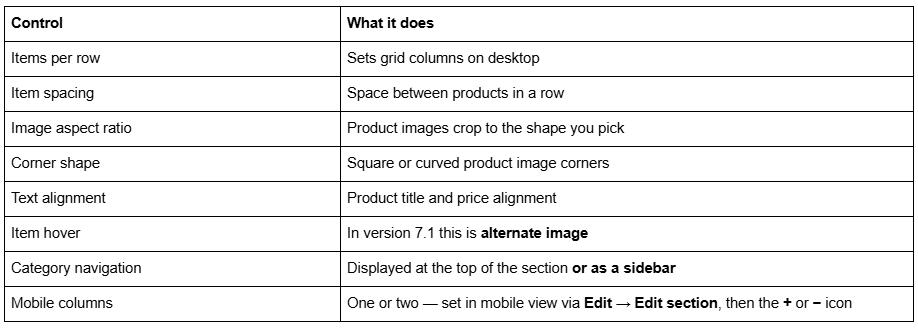
The hard limits behind the grid:
10,000 products per store page in version 7.1. Version 7.0 caps at 200, on both Classic and Advanced store pages.
250 variants, images and SKUs combined per product.
Category names cap at 25 characters; tags at 80.
Multiple store pages are allowed in 7.1, though Squarespace recommends a single store page.
Version 7.1 store pages have category navigation with drop-down menus; version 7.0 category navigation has no drop-downs.
The mobile column control is the one people miss. It is not in the desktop editor — you have to switch to mobile view first.
If you are on a Squarespace 7.0 store and want a Crosby-style shop
This is the reason most people arrive at a Crosby page. You have a version 7.0 store on Brine, Bedford, Pacific or similar, you have seen the Crosby demo, and you want to know what it costs to get there. The move is a version update, not a template switch, and here is what changes in commerce specifically:
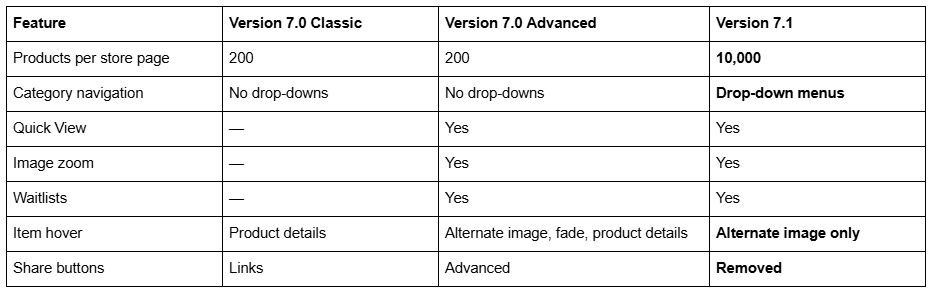
Classic store families include Adirondack, Avenue, Aviator, Bedford, Five, Flatiron, Forte, Ishimoto, Momentum, Montauk, Native, Pacific, Wells and Wexley. Advanced store families are Brine, Farro, Skye, Tremont and York. Galapagos and Supply have their own store types.
So a Bedford or Pacific store owner gains a great deal. A Brine or York store owner gains the product ceiling and drop-down categories but loses two hover styles and product share buttons — small things, but they are real regressions and no competing page mentions them.
The expensive line is not in that table. Squarespace's own migration guide is explicit that converted index page URLs are redirected automatically but product URLs are not. Slug changes on Squarespace create no automatic 301 redirect, ever. Export every product URL before you run the update tool and rebuild the redirects by hand in Settings → Advanced → URL Mappings using the /old -> /new 301 format.
The rest of the update-tool constraints apply as normal: it is permanent, it caps at 150 pages and errors above 200 products on a store page, developer mode must be off, and Custom CSS survives commented out — you remove the comment tags in the CSS editor afterwards. The Squarespace 7.0 to 7.1 guide covers the whole sequence screen by screen.
Can you switch an existing Squarespace site to Crosby?
Not on a version 7.1 site. Squarespace states it plainly: "You won't change templates to gain access to new features or styles." There is no Design → Template panel on 7.1. If you have a 7.1 site and want the Crosby look, you rebuild it with sections — hero, three category sections, blog section, gift-card section — and set the palette and fonts in site styles. That is genuinely most of the work of "switching to Crosby".
On a version 7.0 site, the switcher exists but Crosby is not in it. Design → Template → Install new template lists version 7.0 templates only. Crosby is a 7.1 design and never appears there. Changing your Squarespace template covers what the switcher does and does not do, including the detail that installing a new template leaves the CSS editor blank.
On a new site, Crosby is one of the gallery options. The live gallery at squarespace.com/templates returned 198 templates in August 2026, every one of them version 7.1. Crosby sits among them, at no extra cost — every template in the Squarespace gallery is included with a subscription.
Rebuilding the Crosby layout on an existing Squarespace 7.1 site
Since you cannot switch a live Squarespace 7.1 site to Crosby, the practical route is to reproduce the structure. On a 7.1 site that is a short job, because the Crosby demo uses nothing exotic:
Hero. One full-bleed image section, section height set to large, a dark or black section theme, headline and a single button.
Three merchandising sections. Not a product grid — three separate sections, each an image and a short label linking to a product category. This is the part of Crosby actually worth copying: it sells by use case (Lil' Guys, Bigger Statements, Low Maintenance) rather than making the visitor filter a catalogue themselves.
The store page itself. Set items per row, item spacing, image aspect ratio, corner shape, text alignment and category navigation position. Then switch to mobile view and set the column count with the + or − icon in Edit → Edit section.
A blog section for the journal, and a gift-card product for the gift section. Gift cards are a product type in Squarespace 7.1 commerce, not a template feature.
Site styles last. Fonts, colours and button shapes are site-wide in Squarespace 7.1 and will restyle everything above in one pass.
The one thing you cannot copy from a demo is its imagery. Crosby's look leans hard on consistent, well-lit product photography against plain backgrounds; the layout does very little for you without it.
So: is the Squarespace Crosby template worth choosing?
If you are starting a small product shop from scratch, yes — the demo's merchandising structure is better thought through than most, and starting from a working store beats assembling one section at a time.
If you are on version 7.0 and shopping for a fix, Crosby is not the decision. The decision is whether to run the version update at all, and that turns on your product count, your redirect exposure and whether you rely on share buttons or hover styles that version 7.1 drops. Whether old Squarespace templates are still supported sets out the support position: version 7.0 has no announced end-of-life, and Squarespace calls updating optional.
For scale, across 54 Squareko-built client sites measured in August 2026 (Playwright/Chromium lab test, cloud datacenter, unthrottled, single run per site), 53 of 54 run Squarespace 7.1. Version 7.0 is the minority now, but a working 7.0 store is not an emergency.
Where we get called in is the catalogue store: several hundred products spread across multiple 7.0 store pages because of the 200-per-page cap, with inbound links and paid traffic pointing at individual product URLs. Consolidating those onto a single 7.1 store page is straightforward; rebuilding several hundred redirects by hand is not, and that is the part that goes wrong unattended. If that is your situation, our premium Squarespace templates are built for 7.1 commerce and come with the redirect mapping handled. If you have thirty products and no legacy URLs to protect, the update tool and an afternoon of restyling will get you there without spending anything. The Squarespace Brine template guide works through the same stay-or-move decision for the largest 7.0 family.
FAQ
-
Version 7.1. We fetched crosby-demo.squarespace.com in August 2026 and it returned HTTP 200 with "templateVersion":"7.1" and template ID 5c5a519771c10ba3470d8101, the universal version 7.1 ID. A version 7.0 template reports "templateVersion":"7" and a family-specific ID instead.
-
No. Squarespace's Brine family guide lists 45 available members and Crosby is not one of them. The Brine family reports template ID 55f0aac0e4b0f0a5b7e0b22e and "templateVersion":"7"; the Crosby demo reports the version 7.1 universal ID. Crosby also does not appear on the list of 121 version 7.0 templates.
-
Yes, in the sense that every template in Squarespace's own gallery is included with a subscription at no extra cost. The gallery returned 198 templates in August 2026, all version 7.1, Crosby among them. Note that at least one third-party shop sells a separate paid kit under the same name.
-
Not on a version 7.1 site — 7.1 has no template switcher, and Squarespace states you won't change templates to gain features or styles. On a version 7.0 site, Design → Template → Install new template lists 7.0 templates only, so Crosby never appears. On a new site, Crosby is a gallery option.
-
10,000 per store page, against 200 per page on both Classic and Advanced version 7.0 store pages. Each product supports up to 250 variants, images and SKUs combined. Category names cap at 25 characters and tags at 80 characters.
-
The product ceiling rises from 200 per page to 10,000 and category navigation gains drop-down menus, but share buttons are removed and hover options reduce to alternate image only. Critically, product URLs are not redirected automatically — export them first and rebuild redirects in Settings → Advanced → URL Mappings.

Author Bio
I'm Walid Hasan, a Certified Squarespace Expert and Squarespace Circle Platinum Partner with over 12 years of hands-on experience designing and optimizing high-performing websites. Over the years, I've had the privilege of building more than 2,000 Squarespace websites for clients around the world, always focusing on clean design, strong user experience, and conversion-driven results.
