How to Tell What Squarespace Template You're Using
Check your version first, because on Squarespace 7.1 this question has no meaningful answer. Every 7.1 site runs the same single template family and shares one template ID, so there is no template name to find. On Squarespace 7.0 there is a real answer, and it is in one place: Design → Template, where the template currently in use carries a Live label.
Everything else — the Pages panel, the page source, third-party detector tools — gives you the template family rather than the specific template. That distinction is the source of most of the confusion around this question, and it is worth understanding before you go looking.
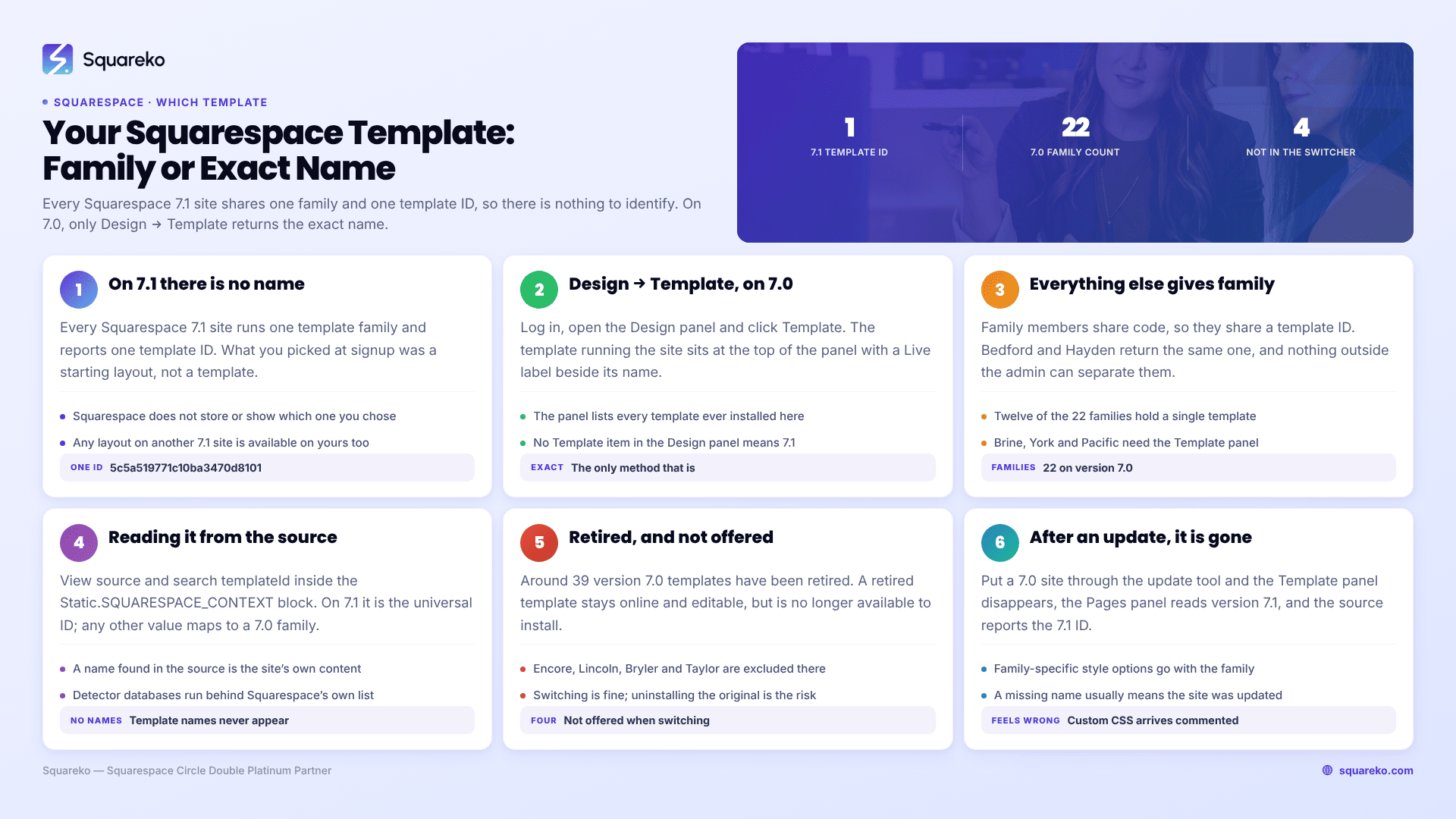
What "my template" means on each Squarespace version
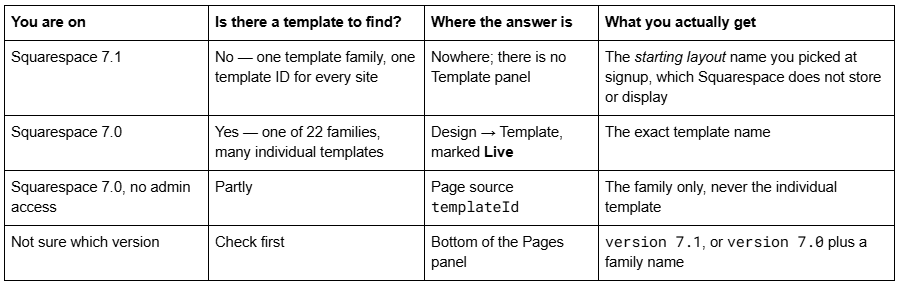
If you do not yet know your version, what version of Squarespace am I on? settles it in about ten seconds. The rest of this article assumes you know.
On Squarespace 7.1 there is no template to identify
This is the answer most people looking for their Squarespace template actually need, and almost nobody states it plainly.
Squarespace 7.1 has one template family. Every 7.1 site — every single one — runs the same codebase, the same page types, the same style options, and reports the same template ID in its page source: 5c5a519771c10ba3470d8101. Squarespace's own documentation says "all templates in 7.1 are part of the same template family", and that it is not possible to switch templates on version 7.1.
What you chose at signup was a starting layout: a set of pre-built sections with a colour palette and font pairing applied. The moment you edit it, that starting point stops describing your site. Squarespace does not record which one you picked, does not display it anywhere in the admin, and does not expose it in the markup.
The practical consequence is good news. Because there is only one 7.1 template, any layout, feature or style you have seen on another 7.1 site is available on yours. There is no "my template can't do that" on 7.1. If you like how a 7.1 site looks, the gap is styling and section choice, not template capability — which is why 7.1 template products are sold as section libraries and style presets rather than as templates in the 7.0 sense.
If someone asks what template your 7.1 site uses, the accurate answer is "7.1 has one template family; the starting layout was X, if I still remember it."
Squarespace 7.0: Design → Template is the only exact answer
On a version 7.0 site, this is definitive and takes about fifteen seconds.
Log in and open the Design panel.
Click Template.
The template currently running your site sits at the top of the panel with a Live label beside its name.
That panel lists every template installed on the site, not just the active one — a site that has been through two or three redesigns may show several. Only the one marked Live is in use.
This is the only method that returns the individual template rather than the family. Nothing outside the Squarespace admin can do it, for reasons covered in the next section.
If there is no Template item in your Design panel, you are on 7.1, not on an unusual 7.0 setup. The Template panel does not exist on version 7.1.
Why every other method returns a family, not a template
Version 7.0 organises its templates into 22 families. Templates within a family share the same underlying code, the same features and the same style options — they differ in their default styling and demo content. Squarespace states it directly: "all templates in a family share the same features and style options."
Because they share code, they share a template ID. In August 2026 we fetched all 22 official 7.0 template demo sites and read the templateId value each one reports. Bedford and Hayden both return 52a74dafe4b073a80cd253c5. Encore and Aviator both return 507c1fdf84ae362b5e7be44e. The identifier is a family identifier, so the page source cannot distinguish members of the same family — not because the method is bad, but because the data is not there.
The 22 version 7.0 families, as listed in Squarespace's own template documentation:
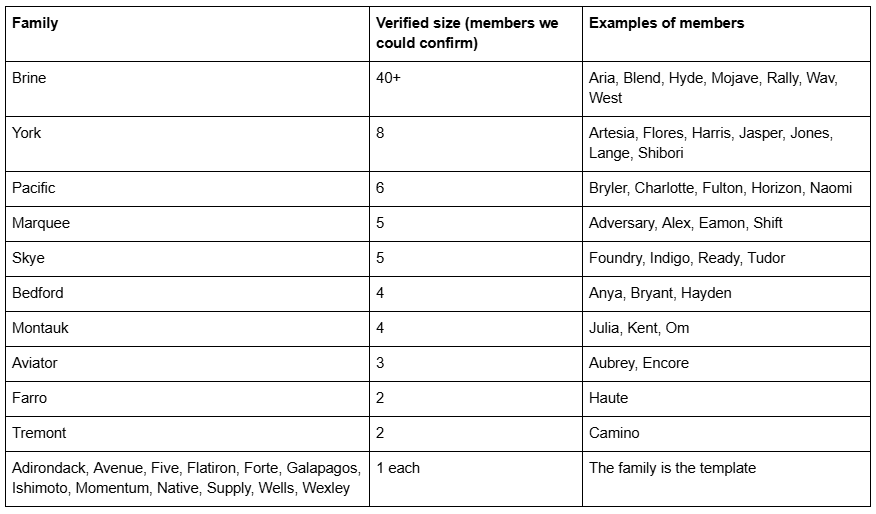
Twelve of the 22 families contain a single template, so for those the family name is the template name and the page-source method gives you a complete answer. For Brine, York and Pacific it does not, and only Design → Template will.
Reading the template family from the page source
Use this when you have no login — a client site before handover, a site you are quoting on, or your own site while logged out.
Open the site, view source with Ctrl + U (Windows) or Cmd + Option + U (Mac), then search for: templateId
You will find it inside the Static.SQUARESPACE_CONTEXT script block, alongside templateVersion. Two readings:
"templateId":"5c5a519771c10ba3470d8101" — this is Squarespace 7.1. Every 7.1 site returns this value. There is nothing further to identify.
Any other value — this is Squarespace 7.0, and the value maps to one of the 22 families.
The full verified ID-to-family lookup table, tested against every official demo site in August 2026, is in the Squarespace template detector guide, which also covers identifying sites you do not own.
What does not work: searching the source for the template name. Squarespace does not put "Brine" or "Bedford" in the markup on either version. If you find a template name in a page's source, you are almost certainly reading the site's own content — a template demo site's title, or a designer's portfolio copy.
Discontinued 7.0 templates, and the four you cannot get back
Two edge cases catch people out when they finally identify their template.
Your template may be discontinued. Squarespace has retired around 39 version 7.0 templates, including Adversary, Alex, Amelie, Atelier, Bryler, Devlin, Eamon, Encore, Hudson, Jones, Lincoln, Marquee, Shift and Taylor. A discontinued template is simply no longer available for new installation. Squarespace states that if yours is one of them, "your site will stay online, and you can continue to use and edit the template as you've always been able to", and that it "may receive our latest features and functionality, as well as fixes for any critical issue that may arise, but this is not guaranteed for every template we've retired.”
Four templates are not offered in the template switcher at all. Squarespace's switching documentation names them: Encore (Aviator family), Lincoln (Brine family), Bryler (Pacific family) and Taylor (York family). They "aren't available when switching templates", so if your 7.0 site is running one of them and you install a different template and uninstall the original, there is no route back to it. Identify the template before you touch the Template panel, not after.
More generally: on 7.0 you can switch to another template and switch back, as long as you do not uninstall the original. Uninstalling is the irreversible step, not switching.
What happens to your template name after updating to Squarespace 7.1
Worth knowing before you go looking for a name that no longer exists.
When a version 7.0 site is put through Squarespace's Design → Update to Version 7.1 tool, the site stops belonging to a 7.0 family. The Template panel disappears from the Design panel, the bottom of the Pages panel changes from version 7.0 · Brine to version 7.1, and the page source starts reporting "templateVersion":"7.1" with the universal template ID.
So if you are hunting for a template name on a site that used to have one and no longer does, the site has almost certainly been updated. Nothing has been lost — the layout is still yours — but the family-specific style options and any family-specific CSS are gone, which is the usual reason people go looking in the first place. The update also leaves Custom CSS commented out, which produces exactly the "my template changed" feeling that sends people to this question.
That whole sequence is documented in the full 7.0 to 7.1 upgrade guide.
Four mistakes people make identifying a Squarespace template
Reading the wrong name off the Template panel. The Template panel lists every template ever installed on the site, not just the live one. Only the entry with the Live label is running. On a site with a redesign history, the first name in the list is often an old one.
Assuming the demo site name is the template name. Squarespace's template demos live at addresses like brine-demo.squarespace.com, and the demo's own site title is the template name. That is content, not markup — it tells you nothing about any other site built on that template.
Treating a starting layout as a 7.1 template. Squarespace markets 7.1 starting points with names, which reads like a template list. It is not one. All of them install the same template family, and after your first round of edits the name describes nothing about your site.
Trusting a detector tool's family list as a complete list. Third-party detectors map template IDs to family members using databases that have not been fully maintained. The tool we tested in August 2026 returned 40 Brine-family members, while Squarespace's own documentation describes the Brine family as containing over 50 — Lincoln, among others, was missing from the tool's list. Use a detector for the family, and Design → Template for the template.
What to do once you know your Squarespace template
The name is rarely the goal. What it unlocks:
Finding CSS and tutorials that will actually work. Version 7.0 class names are family-specific. A Brine snippet will not work on Bedford, and neither will work on 7.1. Searching for your family name rather than your template name gets you far more usable results — "Brine header CSS" beats "Mojave header CSS" every time, because they are the same code.
Knowing what your template can and cannot do. Feature availability on 7.0 is per-family: sidebars, secondary navigation, index page styles and banner behaviours all differ. If a feature is missing, the family is usually the reason, and no amount of CSS will add it.
Deciding about 7.1. If your template is discontinued, Squarespace's 7.0 to 7.1 update tool will not run until you switch to a supported template first — and if you are on Encore, Lincoln, Bryler or Taylor, uninstalling is one-way. That constraint belongs in the decision, which is worked through in should I upgrade to Squarespace 7.1? and in the full 7.0 to 7.1 upgrade guide.
For context on how much of a minority position this now is: across 54 Squareko-built client sites measured in August 2026 (Playwright/Chromium lab test, cloud datacenter, unthrottled, single run per site), 53 of 54 run Squarespace 7.1 — where the template question does not arise at all.
If you have identified a discontinued 7.0 template and the honest next question is whether the site is worth converting or worth rebuilding, that is a judgement call rather than a lookup, and it is where a rebuild on one of our premium Squarespace templates usually starts. Most readers of this page will find their answer in the Design panel in fifteen seconds and need nothing more.
FAQ
-
On version 7.0, open the Design panel and click Template. The template running your site sits at the top with a Live label. On version 7.1 there is no Template panel and no template name, because every 7.1 site belongs to the same single template family.
-
Load yourdomain.com/sitemap.xml and copy every URL into a spreadsheet. Squarespace generates the sitemap automatically and it cannot be edited, so it is a reliable inventory of what is currently indexable. Diff the new sitemap against it after the switch.
-
A family is a group of version 7.0 templates that share the same code, features and style options, differing only in default styling. Squarespace has 22 families. Because family members share a template ID, the page source can identify the family but never the individual template.
-
Keep every URL identical where you can, and write a manual 301 in Settings → Developer Tools → URL Mappings for every URL that changes. Squarespace never creates redirects automatically. Old index sub-page URLs need particular attention, because index pages have no version 7.1 equivalent.
-
Usually yes — you can switch templates and switch back as long as you do not uninstall the original. The exceptions are the 32 discontinued templates, which Squarespace does not offer in the switcher, so they cannot be reinstalled once removed.
-
The site must be 150 pages or fewer, no store page may hold more than 200 products, Developer Mode must be switched off, and the template must not be discontinued. Over either limit, build a new 7.1 site and migrate manually instead.

Author Bio
I'm Walid Hasan, a Certified Squarespace Expert and Squarespace Circle Platinum Partner with over 12 years of hands-on experience designing and optimizing high-performing websites. Over the years, I've had the privilege of building more than 2,000 Squarespace websites for clients around the world, always focusing on clean design, strong user experience, and conversion-driven results.