
Squarespace 7.0 End of Life: What's Announced and What Isn't
Squarespace has not announced an end-of-life date for version 7.0. There is no published retirement date, no forced-migration deadline, and no shutdown notice anywhere in Squarespace's documentation. Its own guide to moving from 7.0 to 7.1 answers the question directly: "Updating your site from version 7.0 to 7.1 is optional." What is true is narrower — you cannot create a new 7.0 site, no new 7.0 templates are being made, and platform development is 7.1-only.
Those are different things, and conflating them is where most of the urgency around this topic comes from.
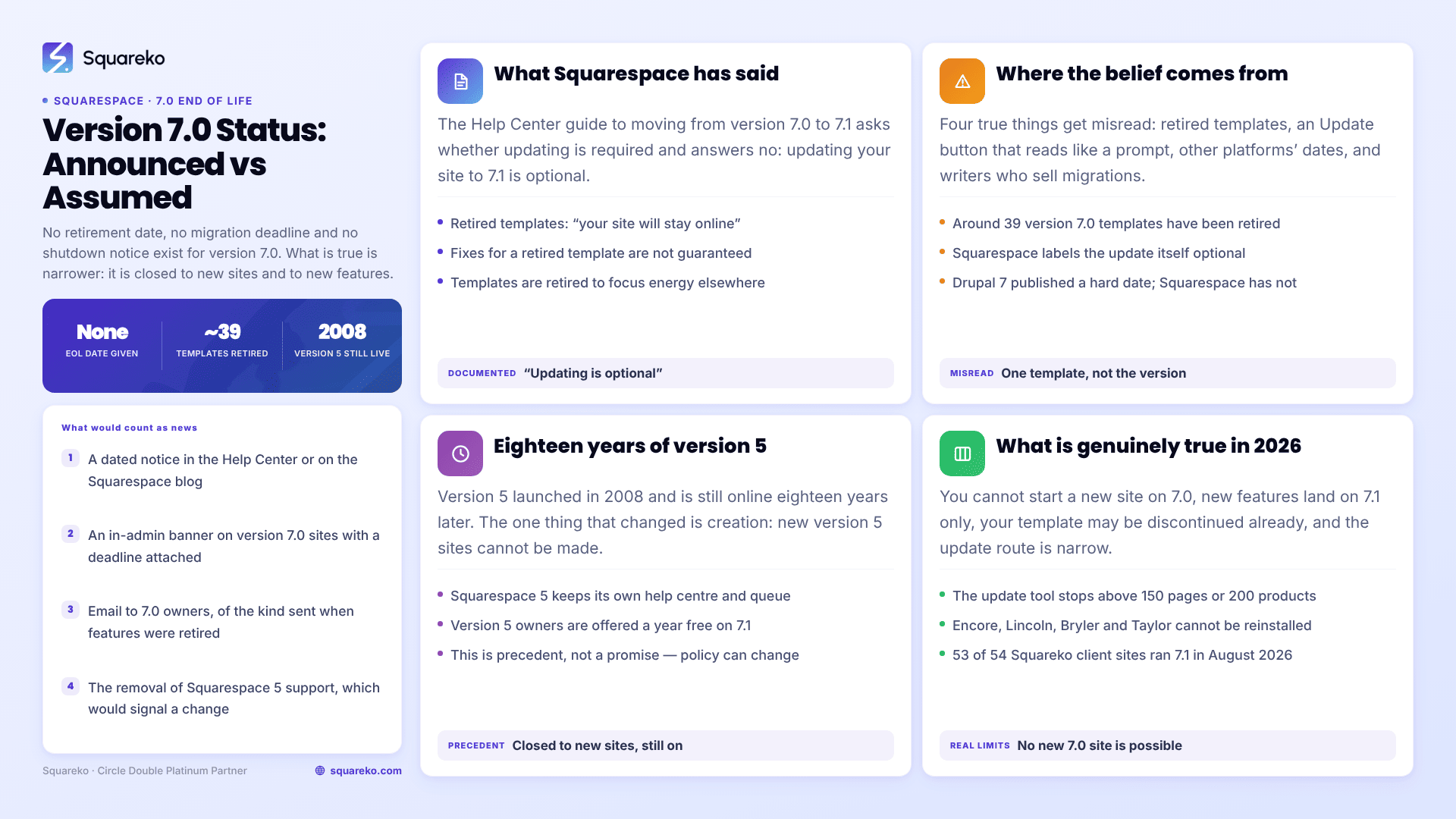
Squarespace 7.0 status: claim versus verified position
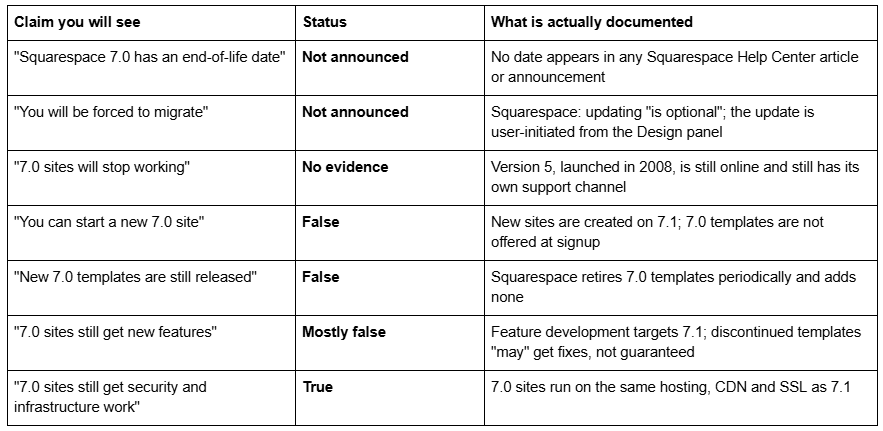
What Squarespace has actually said about version 7.0
Three statements from Squarespace's own documentation carry the weight here, and none of them announces an end of life.
On whether you have to move. The Help Center guide to moving from version 7.0 to version 7.1 asks whether updating is required and answers: "No. Updating your site from version 7.0 to 7.1 is optional." That is the closest thing to an official position on 7.0's future, and it is the opposite of a deadline.
On discontinued 7.0 templates. Squarespace retires individual 7.0 templates from time to time — around 39 of them so far, including Encore, Lincoln, Bryler, Taylor, Marquee, Shift and Hudson. Its guidance for owners of those sites: "Your site will stay online, and you can continue to use and edit the template as you've always been able to." On features it is careful rather than reassuring: a discontinued template "may receive our latest features and functionality, as well as fixes for any critical issue that may arise, but this is not guaranteed for every template we've retired."
On why templates get retired at all. The Discontinued features article explains the reasoning: "In version 7.0, different templates have different features and style options. We occasionally discontinue 7.0 templates to focus energy on improving other parts of the platform."
Read together, that is a platform in maintenance, not a platform with a switch-off date.
Where the Squarespace 7.0 end-of-life belief comes from
Nobody invented this out of nothing. Four real things feed it, and each one is a misreading of something true.
Template discontinuations get read as version retirement. Squarespace has retired around 39 version 7.0 templates. A site owner who gets told their template is discontinued reasonably hears "7.0 is being wound down". What was retired is one template, not the version.
The update tool implies a deadline that is not there. A prominent Update to Version 7.1 button in the Design panel reads like a prompt. It is an option, and Squarespace's documentation labels it optional.
Other platforms did set dates. Drupal 7 and a long series of Microsoft products published hard end-of-support dates, so the pattern feels like the industry norm. Squarespace is a hosted platform with no self-managed installs to patch, and it has not followed that pattern with any version so far.
Everyone writing about it has a reason to want you to move. Most pages ranking for this keyword are written by designers and template sellers, including us. Migration work is billable. That does not make the advice wrong, but it does mean urgency claims deserve a citation, and on this topic there isn't one to give.
The Squarespace 5 precedent, and why it matters
The best available evidence for how Squarespace treats a superseded version is Squarespace 5, which launched in 2008 and was superseded by version 7 in 2014.
Eighteen years after launch, Squarespace 5 sites are still online. Squarespace still runs a separate Squarespace 5 help centre and a separate Squarespace 5 customer support queue. The one thing that changed is creation: "It's no longer possible to create new Squarespace 5 sites." Squarespace also offers version 5 owners a year free on a subscription if they move to 7.1 — an incentive, not an eviction notice.
That is exactly the shape of version 7.0's position today: closed to new sites, still supported, actively encouraged to move but not compelled. If Squarespace were going to shut down old versions, version 5 would have gone first, and it has had eighteen years to do so.
This is precedent, not a promise. Squarespace could announce something different tomorrow. But a company that has kept a 2008 platform running is not the profile of one about to force a deadline on a 2014 one.
What is genuinely true about Squarespace 7.0 in 2026
Set aside end of life, and there is a real list of constraints worth taking seriously.
You cannot start a new site on 7.0. Every site created through squarespace.com today is version 7.1, and the template picker at signup contains only 7.1 starting layouts. If you leave 7.0, you cannot come back to it on a new site.
New features land on 7.1 only. Fluid Engine, section colour themes, the global font pack system, the 7.1 blog and product layouts, and most of what Squarespace has shipped since 2020 are 7.1 features. A version 7.0 site is not broken by their absence, but the gap grows every year.
Your template may already be discontinued. If it is, it still works, but it is no longer installable — and four templates — Encore, Lincoln, Bryler and Taylor — are named by Squarespace as unavailable when switching, so a site running one of them cannot get it back after uninstalling. Identify your template before touching anything, using how to tell what Squarespace template I'm using.
The upgrade route is narrower than it looks. Squarespace's update tool, at Design → Update to Version 7.1, will not run on a site over 150 pages or with a store page holding more than 200 products, and it requires Developer Mode to be off. If your site outgrows those limits later, the in-place route closes and a manual rebuild is the only option.
The third-party ecosystem has moved. Most Squarespace plugins, section libraries and tutorials published since 2022 target 7.1. A 7.0 site is increasingly served by archived instructions rather than current ones.
How rare is 7.0 now? Across 54 Squareko-built client sites measured in August 2026 (Playwright/Chromium lab test, cloud datacenter, unthrottled, single run per site), 53 of 54 run Squarespace 7.1. That is a sample of one agency's work rather than a platform-wide census, but it reflects what we see: 7.0 is now a legacy population, not a live design choice.
What would an actual Squarespace 7.0 end-of-life announcement look like?
If you want a trigger rather than a rumour, these are the things that would matter:
A dated notice in the Squarespace Help Center or on the Squarespace blog naming a shutdown date for version 7.0.
An in-admin banner on 7.0 sites with a deadline attached.
Email to 7.0 site owners, of the kind Squarespace sent when it retired individual features.
The removal of Squarespace 5 support, which would signal a change in policy toward legacy versions generally.
None of those exists as of August 2026. If one appears, it will appear first in Squarespace's own documentation, not in a designer's blog post.
What to do if you are on Squarespace 7.0
The absence of a deadline does not make staying the right call — it just means the decision belongs to you rather than to a countdown.
Move because of what 7.1 gives you, not because of what 7.0 might lose. Fluid Engine, global styles, section-level colour themes and a template family that gets active development are real reasons. A rumoured shutdown is not one.
Do not move on a discontinued template without checking the switcher first. Sites on discontinued templates need to switch template before the update tool will run, and for Encore, Lincoln, Bryler and Taylor that switch cannot be undone.
Budget for the repair work, not just the conversion. The update tool is permanent, it drops index pages, sidebars and several 7.0 page types, and it leaves your Custom CSS commented out. The full list is in the Squarespace 7.0 to 7.1 upgrade guide, and the honest cost-benefit is in should I upgrade to Squarespace 7.1?.
If the site earns money and the design is dated anyway, the version question is usually the wrong one. Converting a 2016 layout to 7.1 gets you a 2016 layout on a modern platform.
Where a 7.0 site has a heavily customised template, a large index-page structure, or a store near the 200-product limit, the sensible move is often a rebuild rather than a conversion — and that is where starting from a well-built premium Squarespace 7.1 template saves the most time. But nothing here is urgent. If your 7.0 site works, serves customers and nothing on the list above bites, staying put for another year is a defensible decision, and no announced deadline says otherwise.
FAQ
-
No. As of August 2026 there is no published retirement date, deadline or shutdown notice for Squarespace 7.0 anywhere in Squarespace's documentation. Its guide to moving from 7.0 to 7.1 states that updating "is optional", which is the closest thing to an official position on the question.
-
Nothing suggests it. The 7.0 to 7.1 update is user-initiated from the Design panel and Squarespace describes it as optional. The precedent is Squarespace 5, launched in 2008, which is still online and still has its own dedicated customer support channel today.
-
A family is a group of version 7.0 templates that share the same code, features and style options, differing only in default styling. Squarespace has 22 families. Because family members share a template ID, the page source can identify the family but never the individual template.
-
No. Every new Squarespace site is created on version 7.1, and only 7.1 starting layouts appear in the template picker at signup. Existing 7.0 sites continue to work and can still be edited, but 7.0 is closed to new sites.
-
Usually yes — you can switch templates and switch back as long as you do not uninstall the original. The exceptions are the 32 discontinued templates, which Squarespace does not offer in the switcher, so they cannot be reinstalled once removed.
-
Your site keeps working. You will not get Fluid Engine, section colour themes or newer 7.1 layouts, most current plugins and tutorials will target 7.1, and if your site grows past 150 pages the in-place update tool stops being available to you later.

Author Bio
I'm Walid Hasan, a Certified Squarespace Expert and Squarespace Circle Platinum Partner with over 12 years of hands-on experience designing and optimizing high-performing websites. Over the years, I've had the privilege of building more than 2,000 Squarespace websites for clients around the world, always focusing on clean design, strong user experience, and conversion-driven results.
