
The Squarespace 7.1 Migration Tool: What It Does and What It Misses
The Squarespace 7.1 migration tool is genuinely good at the hard part and quietly bad at the visible part. It moves the things that would be near-impossible to move by hand — orders, customer accounts, subscriptions, domains, URL mappings, SEO settings, an entire blog archive with its comments — and it does that reliably. What it does not do is preserve how the site looks. Custom CSS comes out commented, index pages collapse, animations and template-specific features simply are not there, and nothing warns you loudly enough.
Which makes the tool a content migrator, not a design migrator. Judge it on that and it is excellent. Expect a like-for-like site and you will be disappointed on publish day, when it is too late.
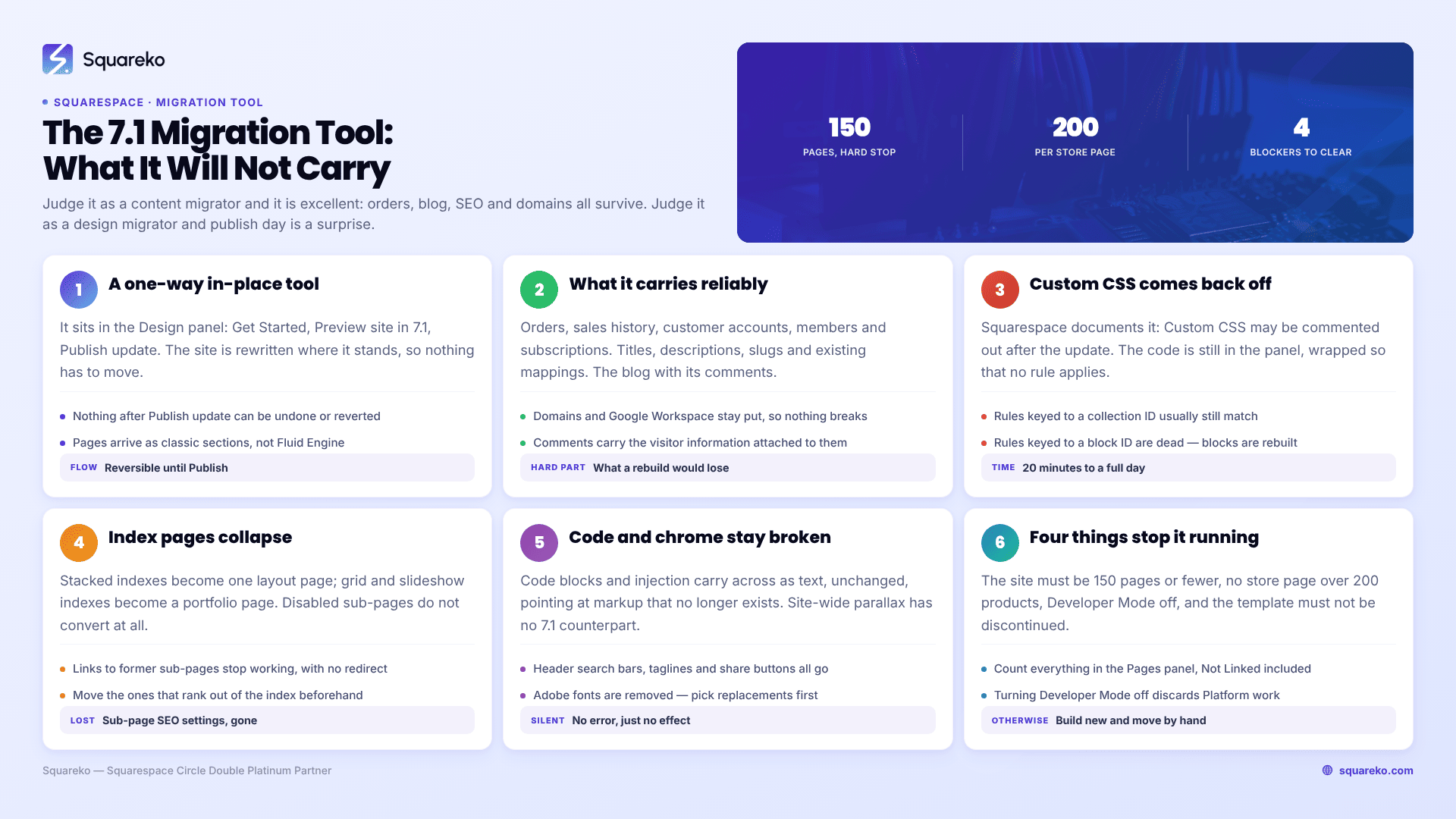
What the Squarespace 7.1 migration tool handles and what it misses
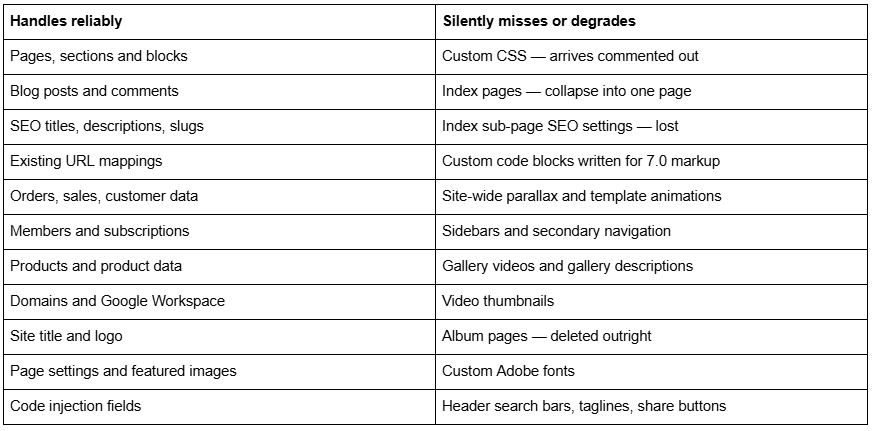
What the Squarespace 7.1 migration tool actually is
It is a one-way, in-place converter, found in the Design panel as Update to Version 7.1. It rewrites your existing site from the 7.0 page model to the 7.1 page model without creating a new site, which is why the domain, the order history and the URL mappings survive — they never move anywhere.
The flow is: Get Started → Preview site in 7.1 → Publish update. Everything before Publish update is reversible; nothing after it is. Squarespace's wording is unambiguous: "After you click Publish update, you can't undo your changes or revert to version 7.0."
The step-by-step procedure, with the pre-flight routine, is in how to upgrade your Squarespace site to 7.1. This page is about whether you should trust it with your site.
What the Squarespace 7.1 migration tool does well
Credit where it is due, because the alternative is worse.
It preserves commerce state. Orders, sales history, customer accounts, members and subscriptions all carry. A manual rebuild loses every one of those — they stay with the original site. On a store with trading history, this alone justifies the tool.
It preserves SEO surface. Page titles, SEO titles, meta descriptions, URL slugs and any URL mappings you had already written come across intact. Because the conversion is in place, your domain never changes and there is no cutover risk.
It moves the blog properly. Every post, with its date, author, categories, tags and comments — including the visitor information attached to those comments. There is no import path between two Squarespace sites, so a manual migration means copying posts one at a time. The tool doing this is the difference between an evening and a fortnight.
It converts page types sensibly where an equivalent exists. Gallery pages become layout pages with a gallery section and the closest matching style tweaks. Cover pages become regular pages with the header and footer hidden. Stacked index pages become a single layout page.
It is free, and the preview is genuinely free. You can run the conversion, walk the whole site, and end the preview with the 7.0 site completely untouched. Most people should do this once purely as a diagnostic, whether or not they intend to publish.
The biggest blind spot: Custom CSS is commented out
This is the finding that almost no page on this SERP mentions, and it is the number-one cause of "my site looks wrong" after an update.
Squarespace's documentation states it plainly: "Custom CSS may be commented out after the update." Your stylesheet is still in Website → Website Tools → Custom CSS. It is simply wrapped in comment markers, so the browser ignores every rule in it.
Why the tool does this is defensible. Squarespace 7.0 CSS is written against row-and-column markup — .sqs-row, .sqs-col-6, .span-6 — plus classes specific to your template family and per-block IDs. Squarespace 7.1 uses section wrappers with data-section-id and .page-section, and Fluid Engine sections use CSS Grid. Leaving 7.0 rules running against 7.1 markup would produce something worse than no styling at all.
Why it is still a blind spot is that the site you publish is your content with none of your styling, and the warning is a line in a help article rather than a prompt in the interface.
What to do:
Do not uncomment the file wholesale and republish. Most of it is dead.
Go rule by rule. Ask of each: does 7.1 now do this natively? A large share of 7.0 custom CSS existed for full-width sections, background overlays, button styling and mobile hiding — all of which are settings in 7.1. Delete those rules.
Rules keyed to a collection ID usually still work, because collection IDs are preserved.
Rules keyed to a block ID are almost certainly dead, because the conversion rebuilds blocks.
Budget the time honestly. Twenty minutes on a lightly styled site; a full day on a Brine site with 800 lines.
It misses index pages, and takes their SEO settings with them
Index pages are 7.0's signature structural feature and 7.1 has no equivalent, so the conversion is lossy by necessity. What matters is how it is lossy.
Stacked index pages become a single layout page holding the content of every enabled sub-page.
Grid and slideshow index pages become a portfolio page.
Disabled sub-pages do not convert at all. Only enabled ones come across.
Links to former sub-pages stop working. /services/roofing was a real URL; after the conversion it is a chunk of /services.
Sub-page settings are lost. Squarespace states that information in the settings of sub-pages, "such as SEO descriptions and titles, won't transfer."
That last point is the one with a price tag. If index sub-pages rank, you lose their titles and descriptions and their URLs in a single action, with no automatic redirect — Squarespace never creates one. The mitigation is to move those sub-pages out of the index before running the tool, so they become ordinary pages with their own settings, and then write mappings for any URL that still shifts.
It misses custom code, animations and template-specific features
The tool converts content structures. It does not translate behaviour.
Custom code blocks and code injection carry across as text, unchanged. Anything inside them that targeted 7.0 markup — a jQuery selector for .sqs-row, a script hooking a Brine index, a style block overriding template classes — arrives intact and broken. The code is there; it just no longer matches anything.
Animations do not translate. Site-wide parallax is not supported in 7.1; only a section's background image can parallax. Template-family animation settings have no 7.1 counterpart. Squarespace 7.1 has its own animation system in Site Styles, but it is a different system and you configure it from scratch.
Template-specific chrome disappears: fixed headers, header search bars, header taglines, share buttons, sidebars, secondary navigation. Each of these was a feature of a 7.0 template family rather than of the platform, and 7.1 has one family that does not include them.
Custom Adobe fonts are removed. Pick 7.1 replacements from the font packs before you publish, not after.
Third-party extensions and plugins written against 7.0 markup need re-checking. Anything that injects into a page by selector is a candidate for silent failure.
The two limits that stop the Squarespace 7.1 migration tool outright
Before any of the above matters, the tool has to run at all.
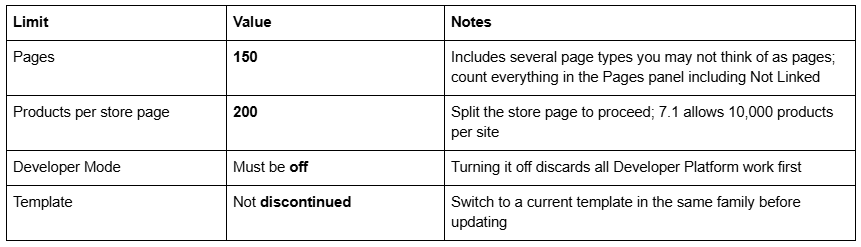
If you cannot clear these, the tool is not your route — see how to migrate from Squarespace 7.0 to 7.1 manually.
The tool does not give you Fluid Engine
Worth stating on its own, because it is the most common misunderstanding about what the migration tool delivers.
Converted pages arrive as Squarespace 7.1 classic editor sections. You get the 7.1 style system, the 7.1 page types and the 7.1 commerce limits, but the editing experience on your existing pages is still row-and-column. Fluid Engine is opt-in, section by section: click Edit, then Upgrade in the top-left corner of a classic section.
Two cautions. That upgrade is one-way once you save the page — Undo works before saving, not after. And the conversion is approximate, because classic spacing built from spacer blocks has to be translated into coordinates on a 24-column desktop grid and a separate 8-column mobile grid, pivoting at 768px. Expect layouts to shift.
Blog posts always use the classic editor on 7.1, so no amount of upgrading changes the blog. Full detail in how Squarespace Fluid Engine works.
The preview mode trap
Preview is the tool's best feature and the source of its most avoidable mistake.
While previewing, "all other site functions are disabled until you publish or end the preview." You can add content and change styles. You cannot edit blog posts, manage orders or change most settings.
The trap is assuming preview is a sandbox in every respect. It is not a content sandbox — it is a design sandbox. Deleting a form block or a newsletter block while previewing can affect the live site, because those objects are site-level. The safe habit is the one that applies to any Squarespace preview: restyle freely, delete nothing.
And use the preview properly, because it is free and it is the last reversible moment. Walk every page, on mobile as well as desktop, with particular attention to anything that was an index page, a gallery page or a cover page.
When not to use the Squarespace 7.1 migration tool
Four cases where the answer is no even though the tool would technically run.
You are redesigning anyway. The tool reproduces your 7.0 layout as faithfully as 7.1 allows. Converting first means restyling something you already decided to replace.
The site is mostly index pages, sidebars and custom code. When most of what makes the site work is on the "does not transfer" list, the output is a rebuild — on a version you can no longer leave.
You cannot afford the styling gap. The site is live and unstyled between Publish update and the moment your CSS is rebuilt. On a busy site, plan that window or go manual.
You have not duplicated the site. Do that first, from Account Dashboard → … → Duplicate Website, every time. It is the only reference copy you will ever get.
Where it is the right tool: a 7.0 site under 150 pages, with trading history, a blog archive worth keeping, and styling you are willing to rebuild. That describes most 7.0 sites.
The post-migration audit
Run this the day you publish. It catches everything the tool misses, in the order the misses hurt.
Custom CSS — open the panel, confirm the comment markers, rebuild rule by rule.
URL check — crawl the site against your pre-migration URL list and write 301s in Settings → Developer Tools → URL Mappings (/old-url -> /new-url 301; 400 KB / ~2,500 line cap) for everything that moved.
Old index sub-pages — every one needs a mapping or an accepted 404.
Code blocks and code injection — open each one and confirm its selectors still match.
Forms — submit every form and confirm where the submission lands.
Video thumbnails — re-add, they are gone.
Heading structure — check h1/h2 on money pages; 7.1 does not always land on the same level.
Navigation — secondary navigation is folded in, so the menu will not match.
Store category navigation — in 7.1 it cannot be hidden and scrolls horizontally on mobile.
Mobile, every page — the conversion is least predictable there.
Most small 7.0 sites go through the tool cleanly and the audit above is an hour's work. Where it stops being an hour is a large Brine-family site with a decade of blog posts, index pages that rank, and a stylesheet nobody documented — because there the irreversible click comes before the repair, not after it. That is the case our premium Squarespace templates and migration builds exist for. For everything smaller, run the preview, read the audit list, and do it yourself.
FAQ
-
For content, yes — it reliably moves pages, blog posts and comments, products, orders, customer accounts, domains and SEO settings. For design, no. Custom CSS arrives commented out, index pages collapse, and template-specific features have no 7.1 equivalent. Treat it as a content migrator, not a design migrator.
-
Load yourdomain.com/sitemap.xml and copy every URL into a spreadsheet. Squarespace generates the sitemap automatically and it cannot be edited, so it is a reliable inventory of what is currently indexable. Diff the new sitemap against it after the switch.
-
Partially. Stacked index pages become one layout page containing every enabled sub-page's content; grid and slideshow indexes become a portfolio page. Disabled sub-pages do not convert, links to former sub-pages break, and sub-page SEO titles and descriptions do not transfer.
-
Keep every URL identical where you can, and write a manual 301 in Settings → Developer Tools → URL Mappings for every URL that changes. Squarespace never creates redirects automatically. Old index sub-page URLs need particular attention, because index pages have no version 7.1 equivalent.
-
Yes. Squarespace still hosts, serves and supports version 7.0 sites, and there is no forced migration. New sites can only be created on 7.1, so 7.0 is a shrinking population, but nothing on an existing 7.0 site stops working because you stayed.
-
The site must be 150 pages or fewer, no store page may hold more than 200 products, Developer Mode must be switched off, and the template must not be discontinued. Over either limit, build a new 7.1 site and migrate manually instead.

Author Bio
I'm Walid Hasan, a Certified Squarespace Expert and Squarespace Circle Platinum Partner with over 12 years of hands-on experience designing and optimizing high-performing websites. Over the years, I've had the privilege of building more than 2,000 Squarespace websites for clients around the world, always focusing on clean design, strong user experience, and conversion-driven results.
