
The Brine Template Alternative in Squarespace 7.1
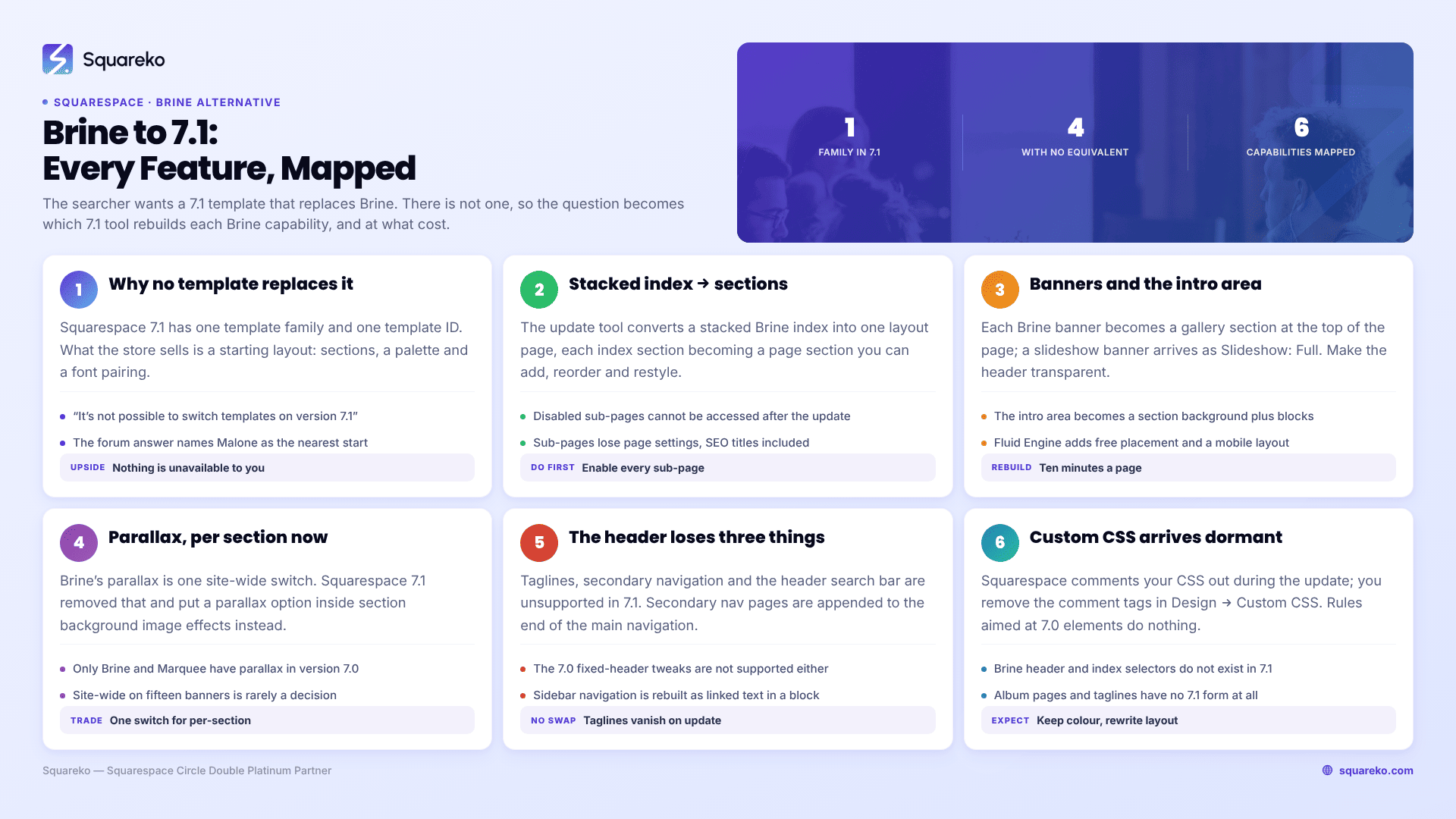
There is no 7.1 equivalent of Brine, because Squarespace 7.1 is a single template family — every 7.1 site has identical features. So the question is not which 7.1 template replaces Brine; it is how you rebuild each Brine capability using 7.1's tools. Most have a direct equivalent. Four do not: album pages, taglines, secondary navigation and site-wide parallax. Everything else is a rebuild rather than a loss.
That is the whole answer. The map below is the detail.
Brine feature to Squarespace 7.1 equivalent
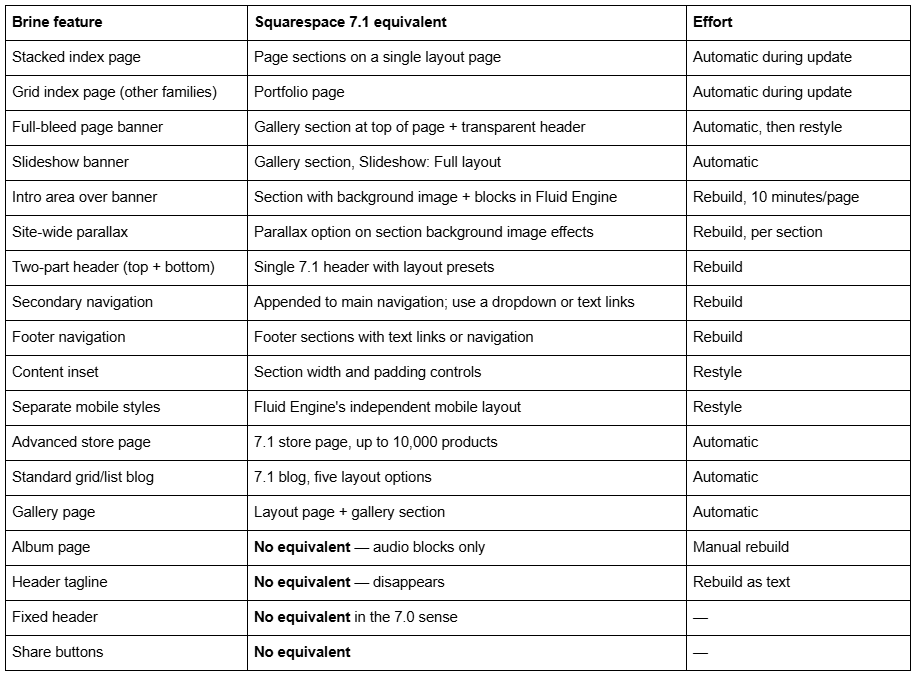
Everything marked "automatic" is handled by Squarespace's Design → Update to Version 7.1 tool. Everything else is work you do afterwards.
Why no single Squarespace 7.1 template replaces Brine
Squarespace 7.1 has one template family and one template ID, 5c5a519771c10ba3470d8101, shared by every 7.1 site. Squarespace's documentation says it directly: "All templates in 7.1 are part of the same template family", and "It's not possible to switch templates on version 7.1."
What the 7.1 template store sells is a starting layout — a set of pre-built sections with a colour palette and a font pairing. Malone, Paloma, Bergen and the other 198 designs in the store all install the same underlying template. The moment you edit one, the name describes nothing about your site.
This is why forum answers to "which 7.1 template is closest to Brine" tend to be unsatisfying. The accepted answer on the Margot thread names Malone as the nearest starting point and then concedes that "any 7.1 template can be made to look like any other." Both statements are correct. Neither helps you plan a migration.
The practical consequence is good. Nothing you saw on another 7.1 site is unavailable to you. There is no "my template can't do that" in 7.1.
Rebuilding Brine's stacked index page in Squarespace 7.1
Brine's stacked index is the feature most Brine sites are built around, and it has the cleanest 7.1 replacement.
Squarespace's update tool converts it automatically: "All content from enabled sub-pages in stacked index pages will display on a layout page when you update your site." Each index section becomes a page section, and page sections are the native 7.1 structure — you add, delete, reorder and restyle them freely, which is more than Brine's index allowed.
Two things to do before you run the update:
Enable every sub-page. Disabled pages "won't appear and can't be accessed in the version 7.1 site". Enable them or move them out of the index first.
Move sub-pages out if you need their page settings. Sub-pages inside an index lose their page settings on update — SEO titles and descriptions included. If any index sub-page has SEO metadata worth keeping, pull it out of the index, let it convert as an ordinary page, and rebuild the section afterwards.
Grid and slideshow indexes, which Brine does not have but Avenue, Montauk, Forte and York do, become portfolio pages instead. Those keep their URLs via automatic redirects.
Reproducing Brine banners and the intro area in Squarespace 7.1
Squarespace 7.1 has no page banners. This sounds worse than it is.
The update tool converts each Brine banner into a gallery section at the top of the page, using the banner image. A slideshow banner becomes a gallery section on the Slideshow: Full layout. To restore the overlaid look, make the 7.1 header transparent so it sits over the image.
Brine's intro area — the block-editable region over the banner — has no direct import. Rebuild it as a normal 7.1 section with a background image, then place your heading, text and buttons in Fluid Engine on top of it. This is functionally better than the Brine intro area: Fluid Engine gives you free positioning and an independent mobile layout, where the intro area gave you a stacked block column.
If banner images do not appear during the 7.1 preview, Squarespace's documented fix is to cancel the preview, delete the banner image and re-add it to the page, then start the preview again.
Getting parallax scrolling back in Squarespace 7.1
Brine and the discontinued Marquee family are the only 7.0 families with parallax, and it is a single site-wide switch in Brine at Site styles → Main: overlay → Enable parallax.
Squarespace 7.1 removed site-wide parallax and replaced it with a per-section option on section background images. That is the trade: you lose the one-switch simplicity, you gain the ability to have parallax on the three sections where it helps and nowhere else.
Practically, this is usually an improvement. Site-wide parallax on a Brine site with fifteen banners is rarely a deliberate design decision; it is a switch someone flipped in 2018. Rebuilding it per section forces the question of where it actually earns its place.
Rebuilding the Brine header in Squarespace 7.1
Brine splits the header into a top header and a bottom header, and lets you place branding, navigation, secondary navigation, cart, search and social icons into either. It is the most configurable header in Squarespace 7.0.
Squarespace 7.1 has one header with a set of layout presets. You get fewer arrangements, but you get them without CSS.
What does not carry over:
Taglines. Not supported in 7.1; they disappear on update. Rebuild as text in a section if you need one.
Secondary navigation. Not supported. Pages in it are appended to the end of the main navigation after the update. Turn them into a dropdown, or move them to the footer.
Header search bar. Not supported. Add a search block elsewhere on the site.
Header CTA button. May need rebuilding as a button in the 7.1 header.
Fixed headers. The 7.0 fixed-header tweaks are not supported.
Sidebar navigation — which Brine does not have, but Aviator, Five, Supply and Wells do — does not transfer either, and has to be rebuilt manually with linked text in a text block.
What happens to Brine Custom CSS in Squarespace 7.1
Two things, and both catch people out.
Your CSS is commented out during the update. Squarespace states: "Custom CSS may be commented out after the update. To add it back in, remove the comment tags in the CSS editor." Open Design → Custom CSS, remove the comment tags, save. Until you do, the site looks unstyled in ways that feel like the update broke something.
Most of it will not work once you uncomment it. Squarespace is blunt about this: "if the custom CSS applies to elements that only exist in version 7.0, they won't affect your version 7.1 site." Brine class names — the header, index and intro-area selectors — do not exist in 7.1. Assume a rewrite rather than a port.
The honest planning number: on a Brine site with a few hundred lines of Custom CSS, expect to keep the colour and typography rules and rewrite everything structural.
What to do before you run the update
The update tool is permanent. Squarespace's own wording: "By clicking Publish update, you acknowledge and understand that Squarespace will update your site from version 7.0 to 7.1 and that you'll no longer have access to the version of your site on 7.0."
Before you start:
Check you are not on a discontinued template. Lincoln and Custom Template are the two discontinued Brine members. The update option will not appear until you switch to a supported template — any of the other 45 Brine templates will do.
Check the 150-page limit. The update tool refuses sites over 150 pages.
Check the 200-product limit on any single store page. Split the page if you are over.
Duplicate the 7.0 site as a visual reference. Squarespace documents that this creates a new 7.0 site with identical content and design. It is a new trial site with no orders, analytics or domain — delete it once the update is done.
Disable developer mode, and save your Developer Platform files locally first, because they disappear.
Save album page audio locally. Album pages do not exist in 7.1 and vanish on update.
There is no downtime and no billing change. Your 7.0 site stays live and keeps taking orders throughout the preview.
The full sequence, including what transfers and what does not, is in the 7.0 to 7.1 upgrade guide. If you have not yet decided whether to move at all, whether old Squarespace templates are still supported is the honest version of that decision — Squarespace has announced no end-of-life date for 7.0, and updating is officially optional.
Convert the Brine site, or rebuild it in Squarespace 7.1?
Squarespace offers both routes and is even-handed about it: the update tool for sites with "a lot of content, orders, settings, or domains", and starting over "for sites without a lot of content or inactive sites".
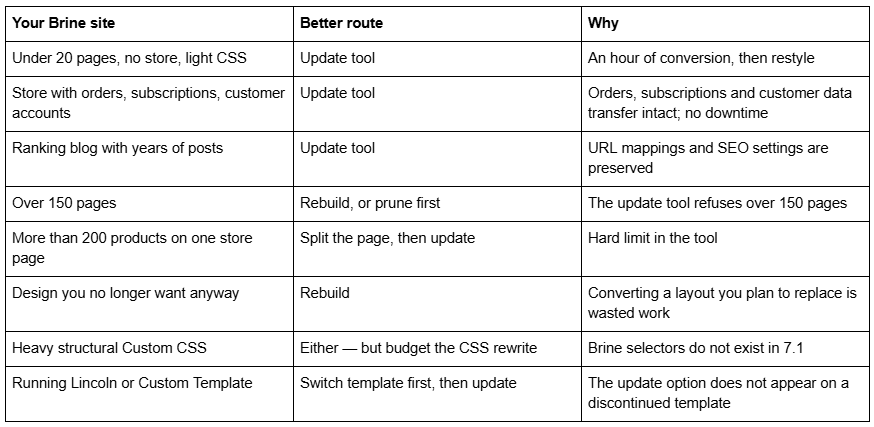
The one thing that argues strongly for the update tool regardless: it preserves URL mappings, SEO settings, orders, subscriptions, customer accounts, members and domains. Manually rebuilding means re-creating every URL mapping by hand, and that is where migrations lose rankings.
For most Brine sites, the update tool plus a day of restyling is the whole job, and the map above is all you need. Where it stops being a day's work is a Brine site with heavy Custom CSS, a large stacked index carrying real SEO equity, or a store that has outgrown the 200-product page. In those cases a rebuild on a premium Squarespace 7.1 template usually costs less than converting and then fighting the result — but that is a judgement about your specific site, not a general rule.
FAQ
-
None specifically, because 7.1 is one template family and every 7.1 site shares the same features and template ID. What the 7.1 store sells is starting layouts, not templates. Any starting layout can be styled to look like any Brine site; the differences are presets, not capabilities.
-
Page sections. The update tool converts a stacked Brine index into a single layout page with each index section becoming a page section. Enable every sub-page before updating — disabled sub-pages do not transfer and cannot be accessed afterwards.
-
Not site-wide. Squarespace 7.1 removed the site-wide parallax that Brine has and replaced it with a parallax option inside section background image effects, applied per section. You gain per-section control and lose the single Brine switch.
-
Each banner image becomes a gallery section at the top of the page. Slideshow banners become a gallery section using the Slideshow: Full layout. Make the 7.1 header transparent to restore the overlaid look. Brine's intro area has to be rebuilt as a section with a background image.
-
No. Secondary navigation is not supported in 7.1. Pages in your Brine secondary navigation are appended to the end of the main navigation after the update. You can convert them into a dropdown or move them into the footer.
-
Partly. Squarespace comments out Custom CSS during the update, so you have to remove the comment tags in Design → Custom CSS first. After that, any rule targeting Brine-specific classes will do nothing, because those elements do not exist in 7.1. Colour and typography rules usually survive.

Author Bio
I'm Walid Hasan, a Certified Squarespace Expert and Squarespace Circle Platinum Partner with over 12 years of hands-on experience designing and optimizing high-performing websites. Over the years, I've had the privilege of building more than 2,000 Squarespace websites for clients around the world, always focusing on clean design, strong user experience, and conversion-driven results.
