Squarespace Template for a Boutique: Building for Curation, Not Catalogue
The short answer: a boutique does not need a template with better filtering — it needs one with more room per product. With twenty pieces rather than two thousand, category navigation stops being useful and the product page becomes the whole shop. Look for a template shipping a Gallery or Portfolio for the edit, a Blog or Journal for the story, and a Services or enquiry page for personal shopping. Filtering, size charts and bulk category structure are the wrong problem at this scale.
Twenty products versus two thousand: what actually changes
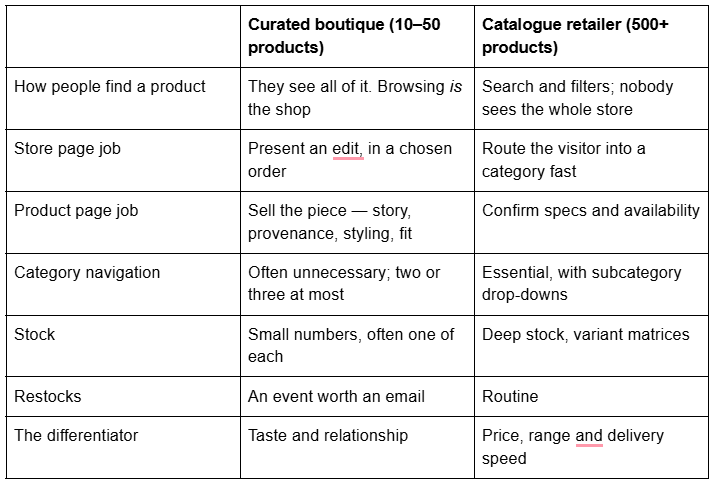
Squarespace 7.1 supports up to 10,000 products with up to 100 variants each and an unlimited number of filtered category pages. A boutique will use almost none of that, and the templates optimised to show it off — dense grids, heavy filter bars, compact cards — actively work against a curated range. A twelve-item grid in a layout built for 200 items looks like a shop that has sold out.
If your range is genuinely large — hundreds of SKUs, deep size and colour matrices, seasonal turnover — you are running catalogue operations rather than a curated boutique, and the structure that needs is a different one: categories, size guides, variant management and filtering are worked through in Squarespace template for clothing store. This post assumes the opposite problem, where the shop is small enough that every product is a decision.
Two 7.1 behaviours matter more at small scale than large. Product visibility is Public, Hidden or Scheduled — there is no draft state, so a piece you are still photographing must be set Hidden rather than left half-finished in public, and Scheduled is genuinely useful for a drop. And you cannot disable checkout in 7.1: to pause selling, Squarespace's documented route is enabling product waitlists with quantities set to zero, or moving the store page out of navigation behind a password.
The in-store and online split, and where stock accuracy breaks
Most boutiques have a physical shop, and the honest failure mode of a boutique website is not design — it is a customer buying online at 9pm something that sold on the shop floor at 4pm.
Squarespace can run both channels, with real limits worth knowing before you commit.
Point of sale. The Squarespace app works as a POS in the United States and United Kingdom only. In the US you can take payment with Tap to Pay, a Square Reader, Pay Links, cash or manually entered card details; in the UK, Tap to Pay and Pay Links. The critical distinction is stock:
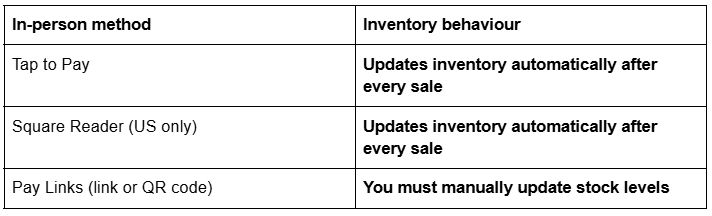
If your shop floor runs on Pay Links, your website's stock numbers are wrong the moment someone buys in person. For a boutique holding one of each piece, that is an oversell and a refund email. Tap to Pay requires connecting Squarespace Payments (UK), or Squarespace Payments, Stripe or Square (US).
Local pickup — click and collect. Add a pickup option in the Pickup panel and it displays at checkout for physical products, free to the customer, with your address and opening hours carried into their confirmation email. You can leave the address off the public option and put it only in the ready-for-pickup email if you would rather not publish it. Four limits to plan around:
Customers can't schedule a pickup time. There is no slot picker. Manage this in your ready-for-pickup email copy.
Afterpay and Clearpay aren't available on local pickup orders.
Subscription products aren't eligible for local pickup.
Pickup orders aren't sent to third-party extensions like ShipStation or Shippo, because they have no shipping address.
Add a taxation address to the pickup option so sales tax is calculated from the shop's location rather than the customer's billing postal code — the correct treatment for a collect-in-store sale, and easy to miss.
The practical stock discipline for a one-of-each boutique: set real quantities rather than leaving the Unlimited quantity toggle on, sell in person with Tap to Pay rather than Pay Links wherever you can, and reconcile the two channels at the same time every day rather than when you remember.
Merchandising a small edit: the store page
With twenty products, the store page is a curated arrangement, not a database view.
Use categories sparingly. Squarespace 7.1 generates category navigation automatically from the categories you assign, with drop-down subcategories. Three categories across twenty products is helpful. Nine is a menu longer than the range it describes.
Order the grid deliberately. Products display in the order you arrange them in the Products panel — that is a merchandising decision, and it should change when the window display changes.
Use the store page's native features. 7.1 store pages include Quick View, image zoom, product waitlists and an alternate-image hover effect. Alternate-image hover is the single most useful one for fashion and homeware: a flat-lay that becomes an on-body or in-room shot as the cursor crosses it. Note that hover does not exist on a touchscreen, so the mobile grid must work on the first image alone — Squarespace 7.1's mobile breakpoint is 767px, and most of your boutique's traffic is below it.
The 7.1 store page has no share buttons. If social sharing matters, that is a block you add to the product page.
Waitlists earn their keep at this scale. For a one-of-each shop, a sold-out piece with a waitlist is a mailing-list signup with intent attached. Waitlists sit on the Core plan and above.
The story-led product page
This is where a boutique wins, and where most Squarespace boutique sites are thinnest.
In Squarespace 7.1 you can add ordinary page sections to the bottom of a product detail page — the same sections you use anywhere else on the site, styled from the Design tab. That means a product page can carry: an image section showing the piece in use, a text section on the maker and the material, a quote from a customer, a map block for the shop, and a small "styles with" edit. Squarespace's own guidance for this space names accessibility information, testimonials, lead times, care instructions, ingredients and dimensions.
Three other native tools belong here:
Add-on products, up to four per product, appearing under the Add to Cart button. A care kit with a leather bag, a gift box with jewellery. Note that a product with more than one variant option cannot be used as an add-on.
The Add to cart form, which Squarespace describes as collecting "personalised information for a product, like custom engraving or lettering instructions" — monogramming, sizing notes, gift messages at the item level.
The custom checkout form for order-level requests such as gift wrapping or delivery instructions.
Write the description as though the customer is standing in front of you. Twenty products means twenty pieces of writing you can actually do well, which is a luxury a 2,000-product retailer does not have and should be used as the advantage it is.
Personal shopping, appointments and the enquiry route
High touch is the boutique's product. The site needs a route to a conversation that isn't the contact form buried in the footer.
Three routes, in ascending order of complexity:
A Services page plus a form. The simplest and, for most boutiques, the right answer: a page describing private appointments, styling sessions or personal shopping, with a form that asks the two or three useful questions. No extra subscription.
A service product. Squarespace's service product type covers "in-person classes and events (without physical tickets), or other services you offer" and requires no shipping address at checkout. Correct for a paid styling session or a deposit against an appointment.
Acuity Scheduling for genuine calendar booking. Squarespace's Help Center states that Squarespace Scheduling is now officially Acuity Scheduling, and it is billed separately from the website plan. Worth it only if appointments are frequent enough that email scheduling has become a job.
Whichever you choose, the template's contribution is having a page for it. A boutique template with no Services page means building that page from a blank editor in week one.
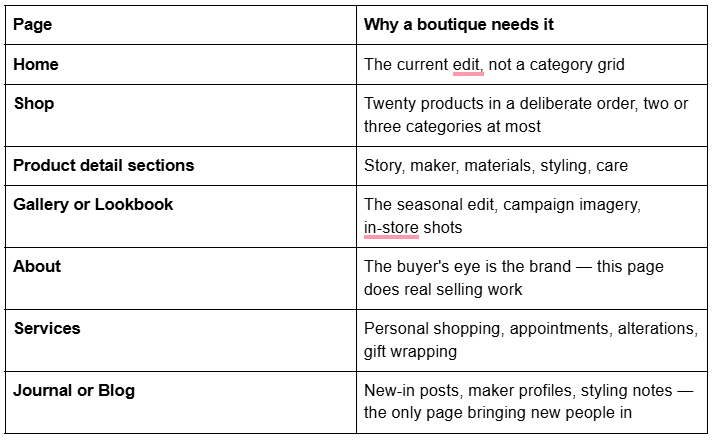
The page architecture a boutique needs
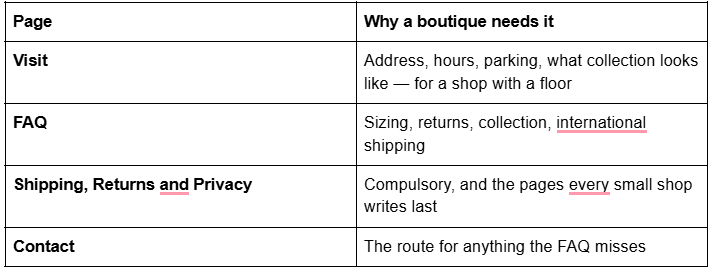
Eleven pages, and only one of them is the shop.
Squareko templates that fit a boutique
Described by verified page lists read off the live demos, not by product-page overview copy. All are $249 and Squarespace 7.1 with Fluid Engine.

Skyline — 12 pages: two homepage variants, About, Services, Shop, Portfolio, Gallery, Blog, Freebie, Contact, a Style Guide and a 404. Tagged Shop, Beauty and Fashion. This is the closest structural match to the architecture above in the whole range: a store and a lookbook and a services page and somewhere to write. It also ships a Figma file. Note its demo is on the bare skyline.squarespace.com subdomain, not the -by-squareko pattern. Gallery sections cap at 250 images — Squarespace itself recommends 50 — and cannot hold video, so a lookbook is stills only.

Styleza — 12 pages: two homepage variants, About, Products, Blog, FAQ, License Agreement, Refund Policy, Terms of Service, Privacy Policy, Contact, Style Guide and 404. Tagged E-Commerce, Fashion and Shop, and it also includes a Figma file. Choose Styleza when the policy layer matters more than the lookbook — it is the only template in the range with four policy pages already named and routed. It ships no Portfolio and no Gallery, so the seasonal edit is built from sections.

Scholar — 11 pages: two homepage variants, About, Services, Shop, Portfolio, Gallery, Freebie, Contact, Style Guide and 404. Its demo is on scholar-of-squareko — the -of- pattern, not -by-. Good for a boutique built around commissions or made-to-order pieces, where Services carries the process. Scholar ships no blog, which for a shop marketing itself through new-in posts and maker profiles is a real gap.

Harmony — 11 pages with a Store, Portfolio, Gallery, Blog, Services and a Freebies page. Tagged Interior & Home Design, and the right pick for a homewares or lifestyle boutique. Its navigation does not surface a conventional About page the way the rest of the range does, so plan on building one.
Every Squareko template includes a Style Guide page, a 404, 150+ sections and a launch guide, and arrives as a Squarespace contributor invitation rather than a file to download. The Squarespace subscription is separate; Squareko recommends the Business plan, states its templates work on Basic, and passes on 20% off the first year. All sales are final, and demo images are not licensed for live use — walk the demo on your phone, every page, before buying.
Competing shops are worth a look before you commit. The full segmented comparison, including where competitors genuinely beat Squareko, is in Squarespace templates for ecommerce.
Photography is the whole build
For a curated shop the photographs are the merchandising, which makes weight the thing to control. Across 54 Squareko-built client sites measured in August 2026 — Playwright and Chromium, cloud datacentre, unthrottled, single run per site, load-only CLS, so lab data rather than field data — median mobile LCP was 2.01s and median page weight 3.0 MB across 93 requests.
Upload at 1500–2500px on the long edge; 2500px is the maximum Squarespace serves, and anything larger is bandwidth you paid for and nobody sees. Set filenames before upload — they cannot be changed afterwards, and product filenames are one of the few image SEO signals you get. The Squarespace CDN serves WebP unconditionally, so no conversion step is needed.
Buy for room, not for filtering. Skyline if you want a shop, a lookbook and a journal in one template. Styleza if the policy pages matter more than the lookbook. Scholar for commissions. Harmony for homewares. Then spend the time you saved on twenty product descriptions and one honest About page, because at this scale those two things outsell any design decision on the site.
Where a second opinion earns its cost is the boutique running a shop floor and a website against one stock pool, because getting local pickup, taxation addresses and in-person payment methods wrong shows up as oversold orders rather than as a broken page — and Squarespace creates no automatic 301 when a URL changes, ever, so restructuring later is expensive. That is why the premium Squarespace templates in our shop are listed with their full page structure rather than a homepage screenshot. Most boutiques will build this themselves from the architecture above in a fortnight.
FAQ
-
Skyline, in most cases — 12 pages including a Shop, a Portfolio, a Gallery, a Services page and a Blog, which matches what a curated shop actually needs. Styleza is the better pick if the policy pages matter more than the lookbook, and Scholar if your boutique sells commissions or made-to-order pieces.
-
There is no platform limit that will bite you — Squarespace 7.1 allows 10,000 products. The design question is different: below roughly 50 products, category filtering stops helping and the store page should be a deliberately ordered edit. Depth of product page beats breadth of catalogue at this scale.
-
Yes, in the United States and United Kingdom only, through the Squarespace app. Tap to Pay and the Square Reader (US only) update your inventory automatically after every sale. Pay Links do not — you must update stock levels manually, which is how online oversells happen.
-
Add a local pickup option in the Pickup panel. It appears at checkout for physical products and is free to the customer. Customers can't schedule a pickup time, Afterpay and Clearpay aren't available, and subscription products aren't eligible. Add a taxation address so tax is calculated from the shop's location.
-
Yes. In Squarespace 7.1 you can add ordinary page sections to the bottom of a product detail page — image, text, quote, map, video — styled from the Design tab. That is where a boutique puts the story, the maker, the materials and the care instructions rather than cramming them into the description field.
-
Not usually. A Services page plus a form handles most boutique appointment requests, and a Squarespace service product handles a paid styling session with no shipping address at checkout. Acuity Scheduling — billed separately from your website plan — is worth it only once email scheduling has become a job.

Author Bio
I'm Walid Hasan, a Certified Squarespace Expert and Squarespace Circle Platinum Partner with over 12 years of hands-on experience designing and optimizing high-performing websites. Over the years, I've had the privilege of building more than 2,000 Squarespace websites for clients around the world, always focusing on clean design, strong user experience, and conversion-driven results.