Squarespace Template for Digital Products: The Build That Actually Delivers the File
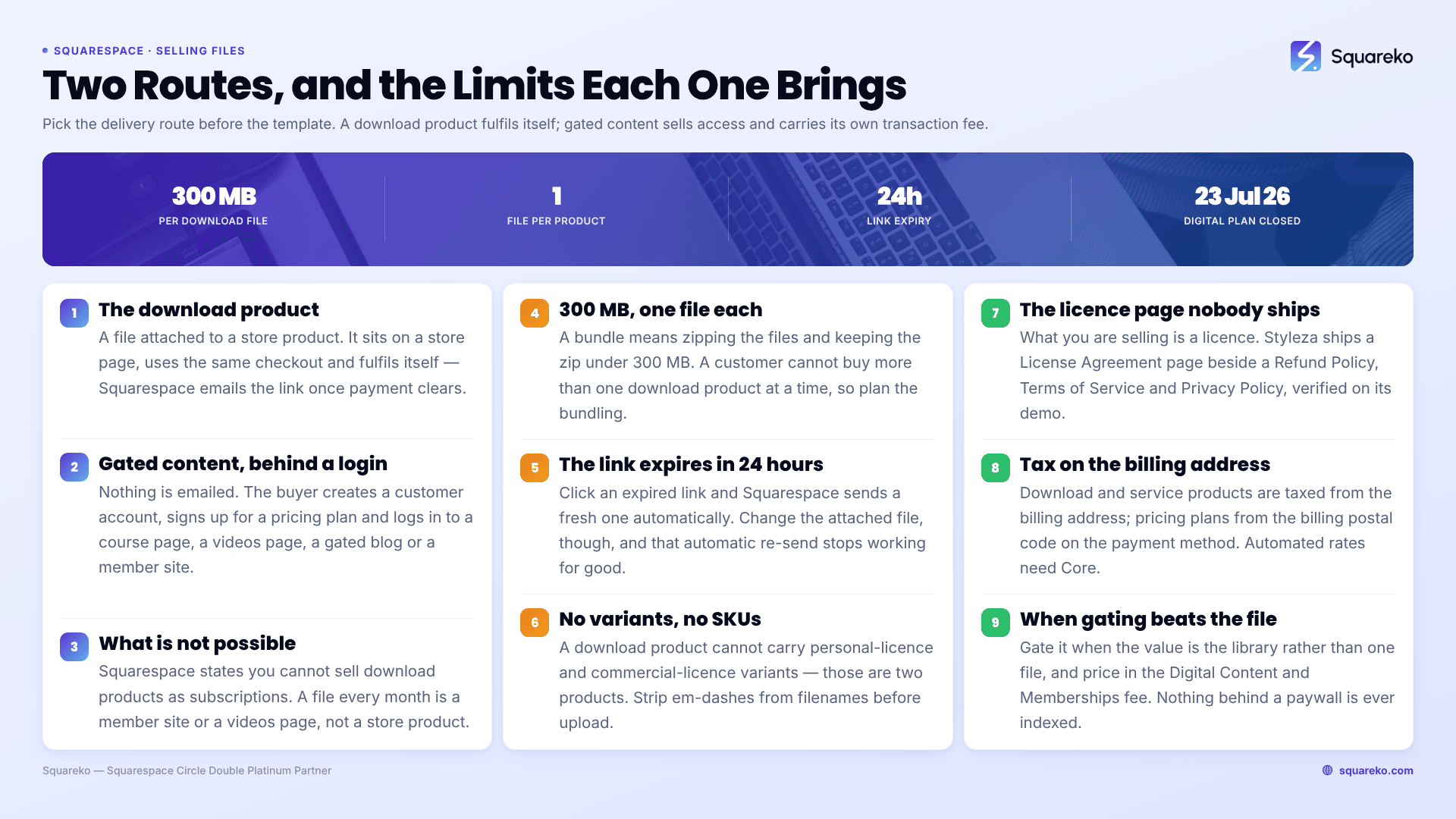
The short answer: pick the delivery route before you pick the template. Squarespace 7.1 sells a file two ways — as a download product in your store, or as gated content behind a pricing plan under Content & Memberships. Download products are one file, 300 MB, with a link that expires in 24 hours. Gated content carries a transaction fee of 7% / 5% / 1% / 0% by plan. The template only decides how many of the surrounding pages you have to build yourself.
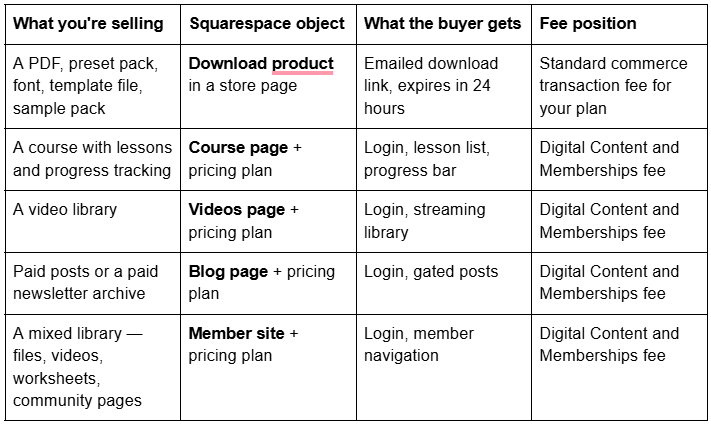
Which route your product needs

That last row matters more than it looks. Squarespace's documentation is explicit: "It's not possible to sell download products as subscriptions." If your business model is a file every month, you are building a member site or a videos page, not a store.
The two delivery routes, compared
A download product is a store product with a file attached. It sits on a store page next to your physical products, uses the same cart and checkout, and fulfils itself — Squarespace emails the buyer a link the moment payment clears, with no action from you.
Gated content works nothing like that. Nothing is emailed. The buyer creates a customer account, signs up for a pricing plan, and logs in to reach a course page, a videos page, a gated blog or a member site. You are selling access, not a file.
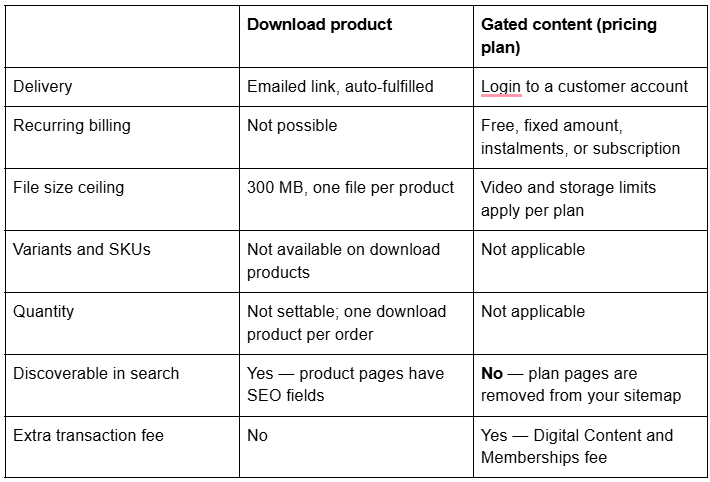
The SEO line is the one people discover too late. Squarespace states plainly that "All pages added to a pricing plan, including pages in a member site, are hidden from search engines." A download product page is a normal, indexable URL that can rank. A gated lesson is not, and never will be.
What changed in 2026: the Digital Products plan closed
If you read a guide written before mid-2026, it will tell you to buy a Digital Products plan. You can't. Squarespace's wording is "As of July 23, 2026, you can't sign up for a Digital Products plan." Existing subscribers keep theirs; new sellers do not get the option.
Digital content now lives under Content & Memberships on the standard website plans, and instead of a plan fee you pay a Digital Content and Memberships transaction fee on every pricing plan sale:
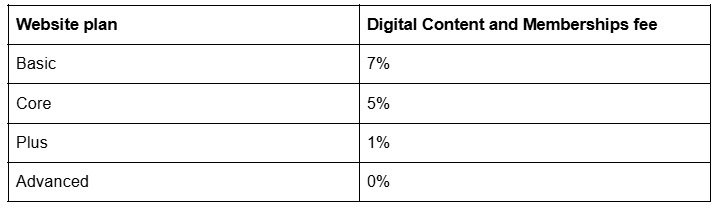
Legacy Personal, Business and Commerce plans still run the old ladder — 9% with no Digital Products plan, 7% on Starter, 3% on Core, 0% on Pro. Fees and tiers move. Confirm both figures against Squarespace's live pricing page before you model your margins, because the gap between 7% and 0% is a plan upgrade decision, not a rounding error.
This fee applies to pricing plans. It does not apply to a straight download product sold through your store, which is one of the strongest arguments for selling the file rather than gating it.
The download product limits you have to design around
These are hard platform limits in Squarespace 7.1, not template limitations, and each one has a design consequence.
300 MB per file. Above that, host elsewhere and sell access, or split the product.
One file per download product. A bundle means zipping the files together and uploading the zip — still under 300 MB.
The download link expires 24 hours after purchase. If a buyer clicks an expired link, Squarespace automatically sends a fresh link to the email address used at checkout. The link stays live for the full 24 hours even if you cancel the order.
No quantity, no variants, no SKUs. A download product cannot have a "personal licence / commercial licence" variant. Those are two separate products.
A customer can't buy more than one download product at a time. Plan your bundling around that, because it directly shapes your product page.
Strip special characters from filenames before upload. Squarespace specifically calls out em-dashes as a cause of failed downloads. Filenames also cannot be changed after upload.
You cannot download your own file back, or export download products. To check what a buyer receives, place a test-mode order and use the link on the checkout page.
Set your site to Secure in the SSL panel, or customers hit download problems.
Product visibility is Public, Hidden or Scheduled — there is no draft state on any Squarespace product, so an unfinished digital product must be set Hidden rather than left half-built in public.
Licensing: the page most digital-product sites forget to ship
If you sell a font, a preset, a Lightroom pack, a Notion template or a stock photo, the thing you are actually selling is a licence, and the buyer will ask what they are allowed to do with it. Personal use only? Client work? Resale? One seat or a team?
Squarespace gives you nowhere to put this automatically. A download product has a description field and, in 7.1, page sections you can add to the bottom of the product detail page — that is where a short licence summary belongs, in front of the Add to Cart button, not buried in a footer link. The full terms need their own URL so you can link to them from the product, the checkout confirmation and the delivery email.
This is the single most useful structural thing to look for in a template for digital products. Styleza ships a dedicated License Agreement page alongside a Refund Policy, a Privacy Policy and Terms of Service — four legal pages already in the site map with the right names, verified on its live demo. Most templates ship none of them, which means writing four pages from a blank editor in the week you are trying to launch.
Pair it with the Add to cart form, which Squarespace describes as a way to "collect personalised information for a product, like custom engraving or lettering instructions." On a digital product it is the right place to capture the licensee's business name for a commercial licence.
Instant fulfilment, and what the buyer actually receives
A download product fulfils itself. After payment the buyer sees the file on the Order Confirmation page, receives the standard order confirmation email, then receives a second email containing two links to the file in different formats.
When something goes wrong — an expired link, a bounced email, a buyer who changed address — you re-send manually: open the Products & Services panel, click Orders, open the order, click the … in the top-right, then Re-send email notifications and Resend and Refresh digital goods.
One trap worth knowing before you edit a live product: if you change or delete the file attached to a download product, Squarespace can no longer auto-send a new link when a customer clicks an expired one. Updating a product file means manually re-sending links to anyone who needs them. Version your files as new products rather than swapping them under existing buyers.
You can also attach add-on products to a digital product — Squarespace supports add-ons on download, physical and service products, up to four per product, with the caveat that a product with more than one variant option cannot be used as an add-on. A worksheet pack attached to an ebook is the obvious use.
Tax on digital goods: billing address, not shipping address
Digital products have no shipping address, so Squarespace taxes them differently, and this is where sellers get caught.
For download products and service products, tax is calculated from the customer's billing address.
For Digital Products pricing plans, tax is calculated from the billing postal code tied to the member's payment method.
For physical products, tax follows the shipping address.
Automated tax rates — US sales tax, EU and UK VAT including EU One-Stop Shop, and GST — are available on Core, Plus, Advanced and the legacy Business, Commerce Basic and Commerce Advanced plans. On Basic you are on manual rates, which is workable if you sell into one jurisdiction and painful the moment you don't.
Two practical notes. Product tax codes can be assigned per product and override your default code, including for Content and Memberships, Downloads, Digital products, Physical products and Service products. And tax-inclusive pricing is a site-wide switch in the Taxes panel — for cross-border digital sales, showing one price that already includes tax usually beats a total that changes at checkout.
Squarespace is explicit that none of this is tax advice, and neither is this post. Digital goods VAT rules are decided by where your buyer is, not where you are. Get an accountant to confirm your registrations before your first launch, not after.
The page architecture a digital-product site actually needs
Nine pages, and only three of them are the shop.
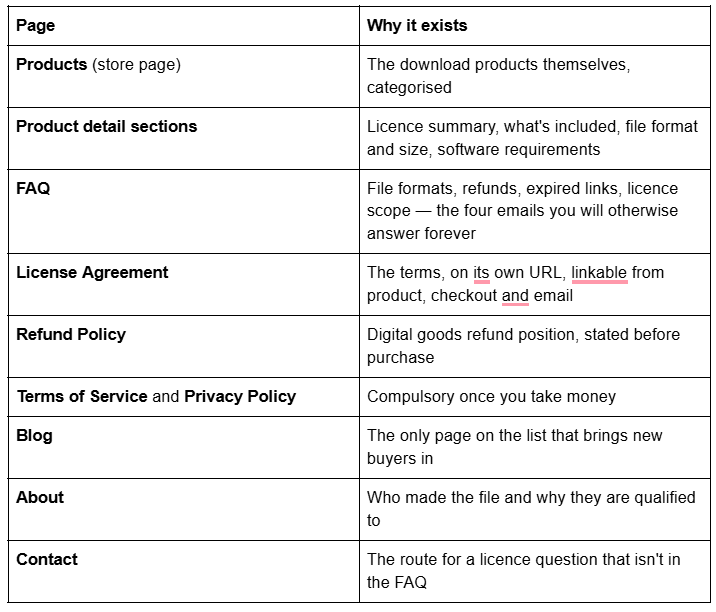
Three Squareko templates map onto this without invention, described by their verified page lists rather than marketing copy:
Styleza — 12 pages: two homepage variants, About, Products, Blog, FAQ, License Agreement, Refund Policy, Terms of Service, Privacy Policy, Contact, plus a Style Guide and 404. It is the closest thing in the range to a purpose-built digital-product site, and it includes a Figma file. It ships no Portfolio or Gallery.
Scholar — 11 pages: two homepage variants, About, Services, Shop, Portfolio, Gallery, Freebie, Contact, Style Guide and 404. Better if your files are visual and need showing before they sell. Scholar ships no blog.
Luminary — 11 pages including Courses, Shop, Portfolio, Gallery and a Freebie page. The right shape if you are heading toward gated content rather than files. Luminary ships no Contact page — you build that on day one.
Every Squareko template is $249, includes a Style Guide page, a 404 and 150+ sections, and arrives as a Squarespace contributor invitation rather than a file to download and install. The Squarespace subscription is separate. Squareko does not publish whether any template's pages are pre-wired to Content & Memberships — treat a Courses page as a layout, not a configured paywall.
When gating the file beats selling it
Sell the file as a download product when: it is under 300 MB, it is bought once, and you want the product page to rank in Google. Most preset packs, ebooks, fonts and templates sit here, and they avoid the Digital Content and Memberships fee entirely.
Gate it behind a member site or a course page when: the value is in the library rather than any one file, you want recurring revenue, you need to add material over time, or the file is too big to email. Accept two costs — the transaction fee, and the fact that nothing behind the paywall can ever be found in search.
The hybrid most digital-product businesses land on is a free pricing plan as the list-builder — Squarespace lets a visitor sign up with just an email address, which is exactly what the Freebie page in Scholar, Luminary and Skyline is for — with paid files sold as ordinary download products alongside it. That keeps your indexable pages indexable and your fees where you want them.
If you are weighing the paywall seriously, the mechanics, the pricing-plan limits and what Squarespace cannot do for a community are worked through in Squarespace membership site template.
Pick the route first, then the template. Files under 300 MB bought once: download products, and buy a template that already ships the licence and policy pages. A growing library or recurring revenue: pricing plans, and price the transaction fee into what you charge.
Where a second opinion earns its cost is the business doing both at once — files in the store, a library behind a paywall, one checkout, one tax setup — because that is where structure gets locked in early and Squarespace creates no automatic 301 when a URL changes, ever. That is why the premium Squarespace templates in our shop are listed with their full page structure rather than a homepage screenshot. Most people selling one PDF will set it up from the tables above in an afternoon.
FAQ
-
Yes. Add a product to a store page and choose the Download product type. The file limit is 300 MB and only one file can be attached per product, so a bundle must be zipped. After purchase Squarespace emails the buyer a download link automatically, with no action needed from you.
-
300 MB per download product, and only one file per product. You can zip multiple files together as long as the zip stays under 300 MB. For anything larger, host the file elsewhere and sell access through a pricing plan instead of a download product.
-
Download links expire 24 hours after purchase by design. If a customer clicks an expired link, Squarespace automatically sends a new one to the email address used at checkout. You can also re-send manually from the Orders panel using Re-send email notifications then Resend and Refresh digital goods.
-
Straight download products sold through your store carry only your plan's standard commerce transaction fee. Gated content sold through a pricing plan carries an additional Digital Content and Memberships fee — 7% on Basic, 5% on Core, 1% on Plus, 0% on Advanced. Confirm current rates on Squarespace's pricing page.
-
No. Squarespace's documentation states that as of 23 July 2026 you can't sign up for a Digital Products plan. Existing subscribers keep theirs. New sellers use Content & Memberships on a standard website plan and pay the transaction fee for their tier instead.
-
By billing address, not shipping address, because download products have no shipping. Pricing plans use the billing postal code attached to the member's payment method. Automated VAT, GST and US sales tax — including EU One-Stop Shop — require Core or above; Basic is manual rates only.

Author Bio
I'm Walid Hasan, a Certified Squarespace Expert and Squarespace Circle Platinum Partner with over 12 years of hands-on experience designing and optimizing high-performing websites. Over the years, I've had the privilege of building more than 2,000 Squarespace websites for clients around the world, always focusing on clean design, strong user experience, and conversion-driven results.