Squarespace Templates for Ecommerce: 14 Compared by What You Actually Sell
The short answer: stop comparing ecommerce templates on looks. Every Squarespace 7.1 store runs the same engine — same 10,000-product ceiling, same 100 variants per product, same checkout — so the template only decides which supporting pages already exist. What should decide your shortlist is the fulfilment model: stocked inventory, made-to-order, digital files, subscription, or a single high-consideration product. Below, 14 templates are grouped by those five models and scored against one published rubric.
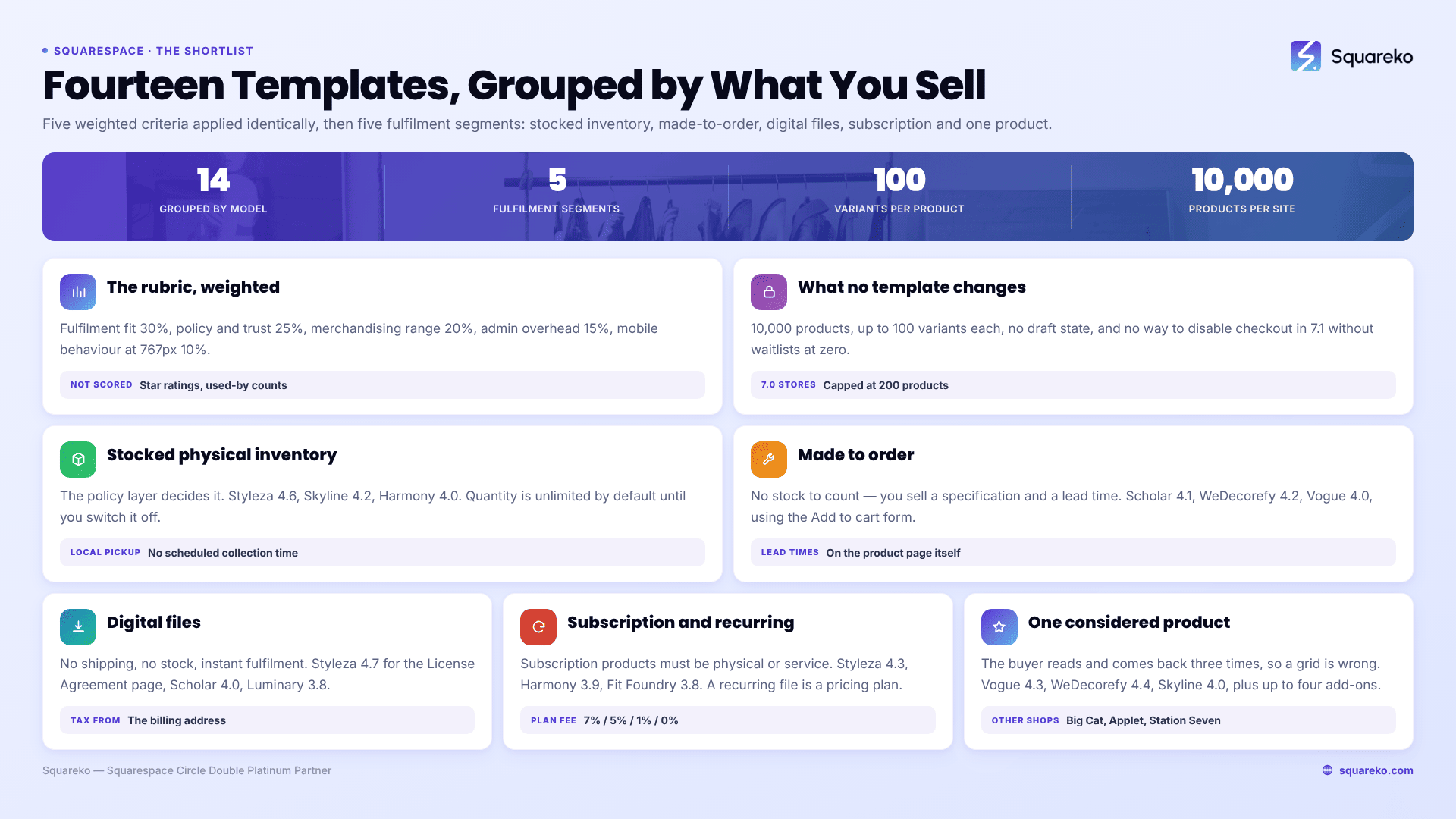
How these Squarespace ecommerce templates were scored
Five weighted criteria, out of 5, applied identically to every template regardless of who sells it.
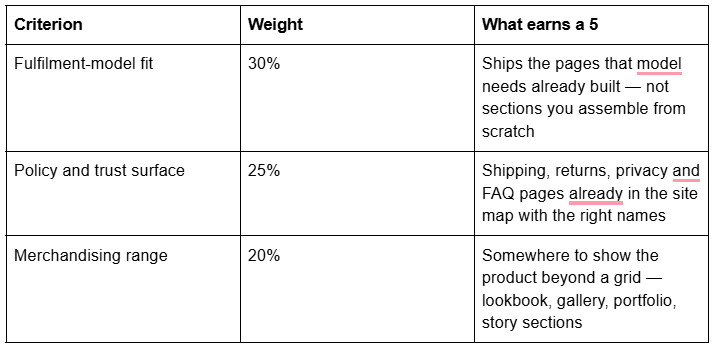
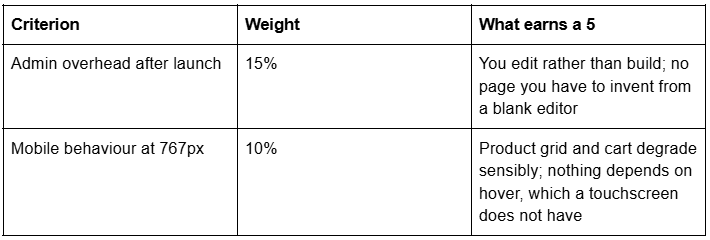
What this rubric is and is not. It is a structural assessment made from each template's published page list, from walking its live demo, and from 12 years of building Squarespace stores. It is not a lab benchmark, and it scores nothing verifiable only by the shop selling it. Star ratings and "used by X businesses" counts appear nowhere here.
This post is the shortlist, not the framework. If you have not yet worked out what kind of store you are building, start with Squarespace ecommerce template — that is the decision framework. This page assumes the decision is made and gives you the candidates.
Disclosure: Squareko sells the five templates in positions 1–5, because this is Squareko's site. The rubric, the verified page counts and every weakness are stated so you can check the reasoning yourself. Competitor shops follow, and in two of the five segments the honest answer is not a Squareko template.
The Squarespace 7.1 commerce facts that apply to every template here
These are the platform ceilings you are buying into. None of them change with the template.
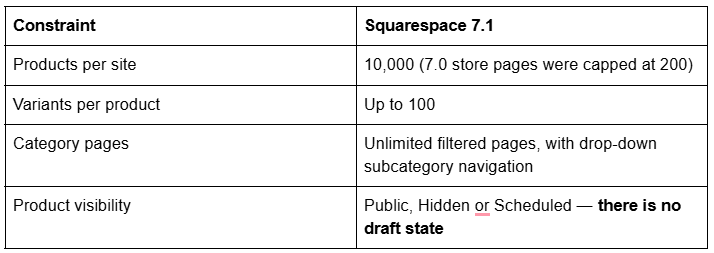
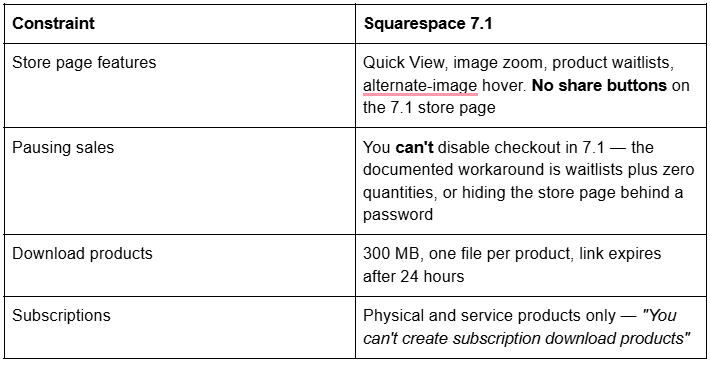
The variant ceiling of 100 sounds generous until you multiply: five colours × four sizes × three finishes is 60, and restructuring variants after orders exist is genuinely painful. Decide the full matrix before the product exists.
Segment 1 — Stocked physical inventory
Retail, makers with stock on shelves, importers. The template's job here is the policy layer, because inventory businesses lose orders at the point a buyer asks what happens if it doesn't fit.
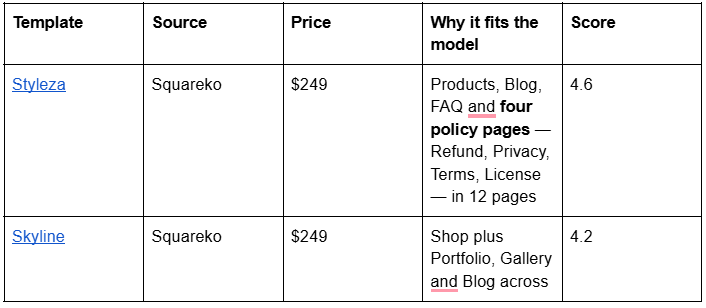
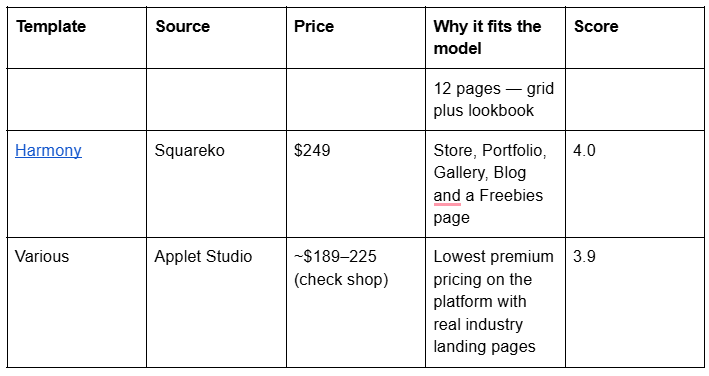
Two operational notes for stocked inventory. Product quantity is unlimited by default — you switch the Unlimited quantity toggle off before a stock number exists, and plenty of new stores oversell because nobody did. And local pickup, free to the customer at checkout on physical products, has a real limitation: customers can't schedule a pickup time, and local pickup orders are not passed to extensions like ShipStation or Shippo, because they have no shipping address.
Segment 2 — Made-to-order
Custom furniture, engraved jewellery, bespoke tailoring, commissioned art. There is no stock to count. What you sell is a specification plus a lead time, and the site's job is to collect the specification and set the expectation.
The feature that carries this segment is the Add to cart form — Squarespace describes it as collecting "personalised information for a product, like custom engraving or lettering instructions" — plus a custom checkout form for order-level details like gift messages. Neither needs a plugin.
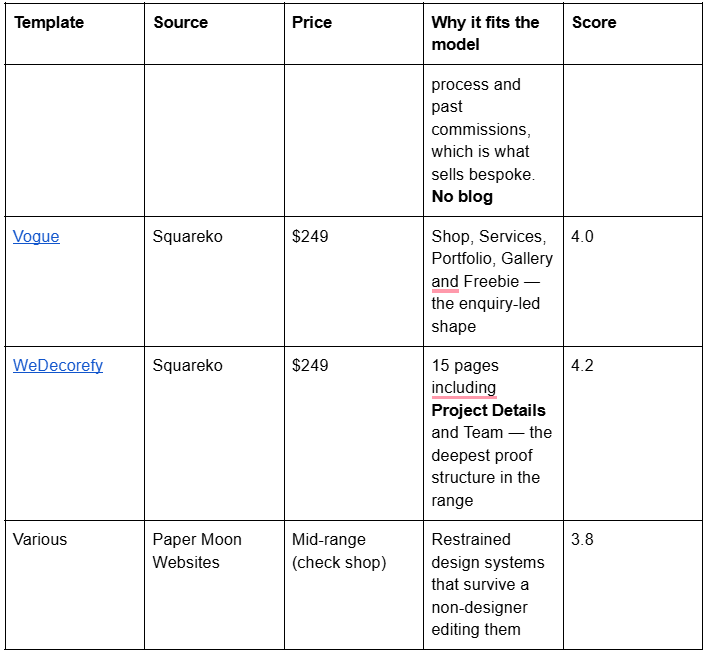
Publish lead times on the product page itself. Squarespace 7.1 lets you add ordinary page sections to the bottom of a product detail page, which is the correct home for care instructions, dimensions, materials and "ships in 4–6 weeks" — not a policy page nobody opens.
Segment 3 — Digital files
Presets, fonts, ebooks, templates, sample packs. No shipping, no stock, instant fulfilment — and a different set of limits.
Download products are capped at 300 MB and one file each (zip a bundle), the emailed link expires 24 hours after purchase, and they support no quantity, no variants and no SKUs. Tax is calculated from the billing address, not a shipping address.
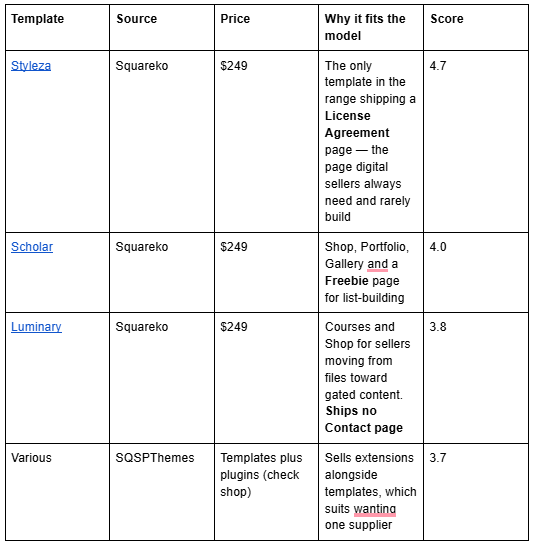
The full mechanics — licensing, expiry, re-sending links, and when gating beats selling the file — are in Squarespace template for digital products.
Segment 4 — Subscription and recurring
Coffee clubs, supplement refills, flower subscriptions. One rule decides this segment: Squarespace subscription products must be physical or service products. Squarespace's own wording is "You must sell physical or service products. You can't create subscription download products."
So a recurring digital offer is not a subscription product at all — it is a pricing plan under Content & Memberships, carrying a separate Digital Content and Memberships transaction fee of 7% on Basic, 5% on Core, 1% on Plus and 0% on Advanced. Confirm the live percentages before modelling margins.
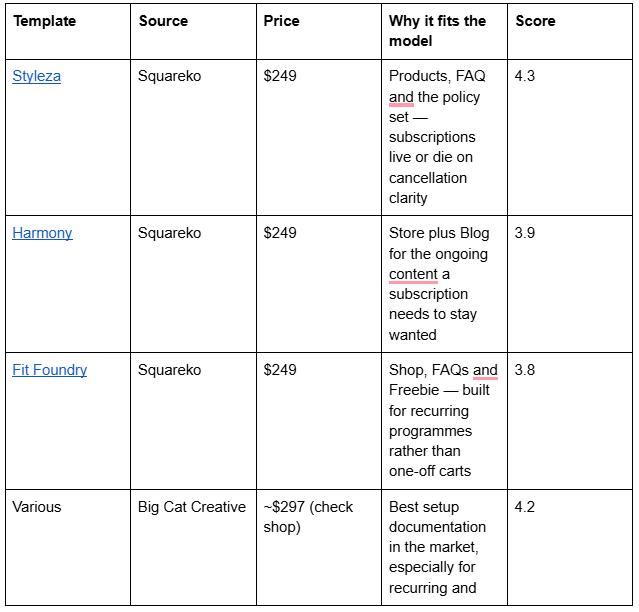

Three subscription details worth knowing before launch. Billing cycles are defined by number of payments including the initial purchase — a three-month subscription renewing monthly is "repeats every 1 month, expires after 3 payments". Subscription products aren't eligible for local pickup. And subscriptions renew at the tax rate from the original order.
Segment 5 — One high-consideration product
A single piece of furniture, a piece of equipment, a limited-edition run. The buyer does not browse a grid — they read, compare, hesitate, and come back three times. A category-navigation store page is actively wrong here.
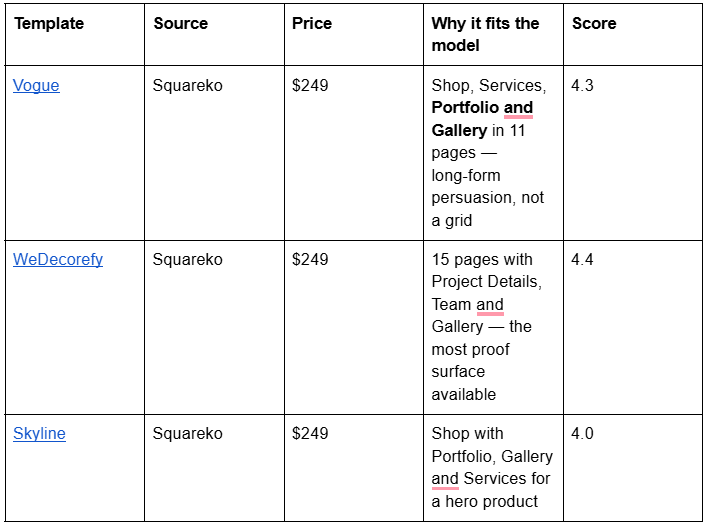
For a single product the useful native features are add-on products — up to four per product, supported on download, physical and service products, though a product with more than one variant option can't be used as one — and page sections on the product detail page for specification and warranty content.
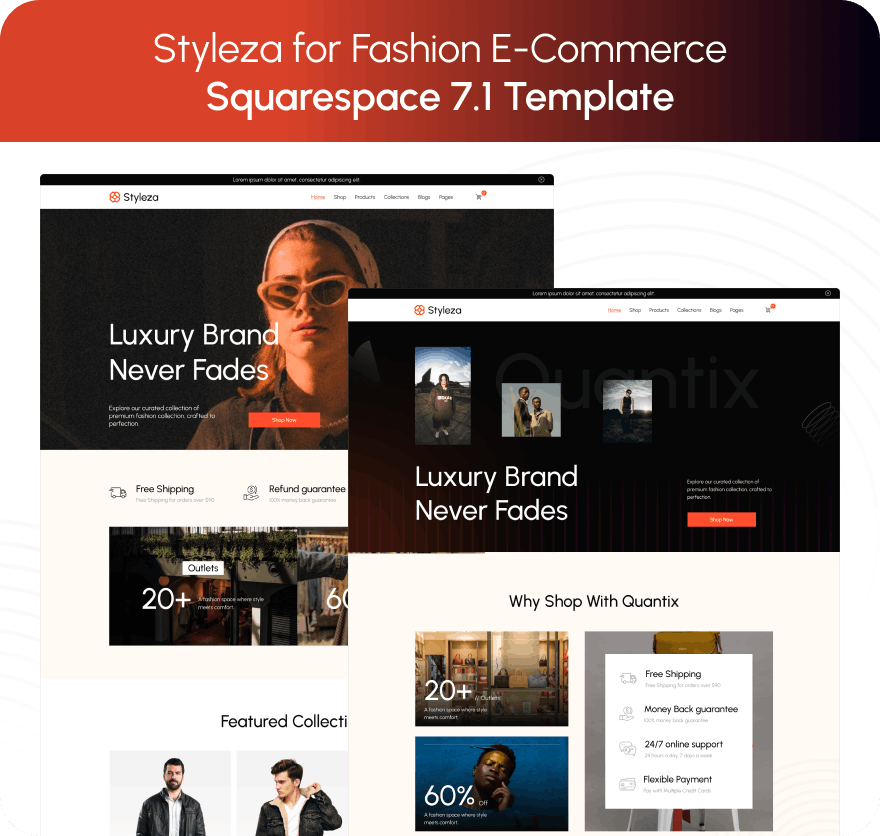
1. Styleza — the ecommerce template that ships its policy pages
Squareko · $249 · 12 pages · Score 4.6
Styleza is tagged E-Commerce, Fashion and Shop, and it is the strongest all-round ecommerce template in the Squareko range because of what is already in the site map. Verified on the live demo, its pages are: two homepage variants, About, Products, Blog, FAQ, License Agreement, Refund Policy, Terms of Service, Privacy Policy, Contact, plus a Style Guide and a 404.
Four policy pages is the differentiator, and it is not a glamorous one. Refunds, shipping terms, privacy and licensing are the pages every store writes last, writes badly, and needs before the first order — and having them already named and routed is the difference between writing content and inventing structure at 11pm on launch week.
The FAQ page compounds it. Squarespace 7.1's native Accordion block renders server-side, so question and answer text is crawlable. An FAQ page built with accordions is a ranking surface as well as a returns-reducer.
Styleza is one of only two Squareko templates including a Figma file — the other is Skyline.
The honest weakness: Styleza ships no Portfolio and no Gallery. A maker showing process, or a retailer wanting seasonal lookbooks, builds that from sections. If merchandising matters as much as selling, Skyline and Harmony cost the same and ship both.

2. Skyline — the store that also has a lookbook
Squareko · $249 · 12 pages · Score 4.2
Skyline is tagged Shop, Beauty and Fashion, and its verified page set is two homepage variants, About, Services, Shop, Portfolio, Gallery, Blog, Freebie, Contact, Style Guide and 404.
That combination — a working store and a portfolio and a gallery — is what a visually-led retailer needs. The product grid handles the transaction; the Gallery handles the seasonal edit; the Portfolio handles collaborations, press or bespoke work. Skyline also includes a Figma file.
The Services page is the underrated one for beauty and fashion retail: it gives an in-store or made-to-measure service somewhere to live that isn't a product listing.
The honest caution: gallery sections cap at 250 images, with Squarespace's own recommendation being 50, and cannot hold video. A lookbook built as a gallery section is stills only. Skyline's demo also lives on the bare skyline.squarespace.com subdomain rather than the -by-squareko pattern the rest of the range uses.

3. Scholar — the bespoke and digital seller's template
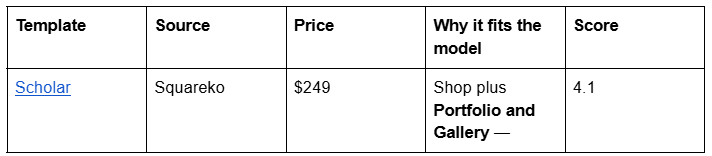
Squareko · $249 · 11 pages · Score 4.1
Scholar is tagged Fashion, Course and Shop. Verified on its live demo at scholar-of-squareko — note the -of- pattern, scholar-by-squareko is not the address — its 11 pages are two homepage variants, About, Services, Shop, Portfolio, Gallery, Freebie, Contact, Style Guide and 404.
The Services-plus-Shop pairing is why it sits here rather than in stocked inventory. A made-to-order business sells a process first and a product second: Services explains how commissioning works, Portfolio and Gallery prove it has been done well before, and the Shop takes deposits or fixed-price items. The Freebie page gives a lead magnet somewhere to live — for a considered purchase, often worth more than the shop page.
The honest weakness: Scholar ships no blog. For a store whose marketing runs on search — care guides, material explainers — that is a real gap, and adding a blog page later means building the layout yourself. Styleza and Skyline both ship one at the same price. Scholar is right when you sell through images and referral rather than writing.

4. Harmony — the store-plus-content template
Squareko · $249 · 11 pages · Score 4.0
Harmony is tagged Interior & Home Design and ships a Store rather than a Shop page, alongside Portfolio, Gallery, Blog, Services, Freebies, Contact, a Style Guide and a 404, verified on its live demo.
It earns its place because of the blog-plus-store pairing. Homewares, ceramics, furniture and lifestyle goods sell through context — how a thing is used, what it goes with, how it was made — and a store with no editorial surface has nowhere to put that. Harmony's Gallery and Portfolio give room-set and project imagery a home that isn't the product grid.
The honest weakness: Harmony's navigation does not surface a conventional About page the way most of the range does, so plan on building one. Its register is firmly homewares — correct for interiors and ceramics, wrong for apparel without real style work.

5. Vogue — the enquiry-led store for expensive things
Squareko · $249 · 11 pages · Score 4.0
Vogue is tagged Real Estate and Interior, but the live demo is an interior design studio, and that is the shape it actually is: two homepage variants, About, Services, Shop, Portfolio, Gallery, Freebie, Contact, Style Guide and 404. Its demo lives on vogue-squareko — vogue-by-squareko does not resolve.
It belongs here for the high-consideration segment. When the product costs four figures, the sale happens across a Services page, a Portfolio of completed work and a conversation — the Shop holds a deposit or a small ready-made range, not the persuasion. Vogue is the only Squareko template that puts a store behind an enquiry-led structure rather than in front of it.
The honest weakness: Vogue ships no blog, so a store planning to rank on content adds one. Its register is strongly interiors; a jewellery or equipment brand needs real style work to make it theirs. For a grid-first store, this is the wrong template in the range.
Competitor shops, and what each genuinely does better
Squareko is not the only good answer, and pretending otherwise would be worth nothing to you.
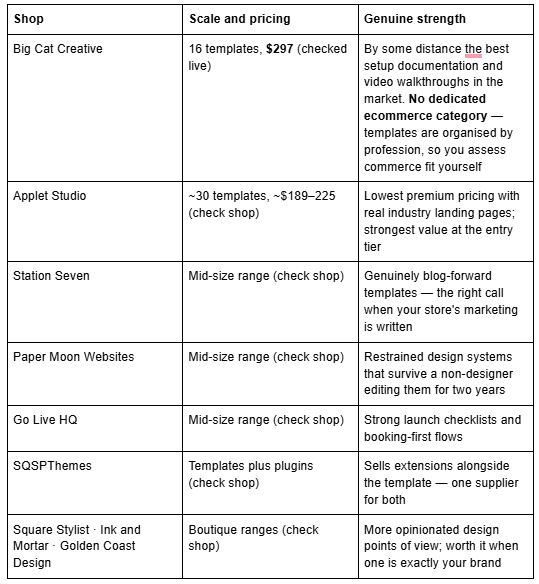
Where Squareko wins is delivery and support, not exclusivity. Squareko templates arrive as a Squarespace contributor invitation — no file to download, no zip to upload, no FTP. Two routes exist: a new 12-month trial site Squareko builds and then transfers ownership of, leaving your existing store live throughout; or installation onto an existing site, a paid add-on taking around 48 hours. Sixty days of email support is included; customisation is not.
Where competitors win is choice and documentation. If budget decides it, Applet Studio is cheaper. Prices move — check each shop rather than trusting a figure in any roundup, this one included.
Squarespace's own included templates, honestly assessed
Squarespace publishes an online-store template gallery included with any subscription. What that means, bluntly:
Every Squarespace 7.1 template is a configuration of the same engine. The 10,000-product limit, the 100 variants, Quick View, waitlists, category navigation and the checkout are identical whether you paid $249 or nothing. The commerce ceiling is exactly the same — the most under-stated fact on this SERP, including on pages selling templates.
What a premium template buys is the page set, the style guide page, and someone to ask: eight to twelve other pages already in the site map with the right names — policies, FAQ, lookbook, story — plus support while you fill them. With no revenue yet, start on an included template and upgrade once the store earns.
Be careful with older roundups. Several pages still ranking for ecommerce template keywords recommend Brine, Supply, Galapagos, Bedford, Tremont, Avenue and Pacific — all Squarespace 7.0-era templates a new site cannot be started on in 2026, several of them capped at 200 products rather than 10,000.
Buying mechanics and the running cost
Four facts that apply to Squareko and, with variation, to every premium shop.
The Squarespace subscription is separate. The $249 covers the design and use of the template only. Squareko recommends the Business plan, states its templates work on Basic, and passes on 20% off the first year.
Your plan is decided by what you sell, not your size. Custom CSS is available on every plan, including Basic — what needs Core or above is JavaScript or iframes inside Code Blocks, and site-wide Code Injection. Discounts, limited-availability labels and product waitlists sit on Core and above, as do automated tax rates for US sales tax, EU and UK VAT including One-Stop Shop, and GST; on Basic you set rates manually. If you sell gated content, the Digital Content and Memberships fee runs 7% / 5% / 1% / 0% from Basic to Advanced. Confirm all of it on the live pricing page.
Demo images are not licensed for live use, and real page counts run 9 to 15, read off the templates themselves.
All sales are final. Squareko's policy is that digital products cannot be returned, exchanged or refunded under any circumstances — the industry norm for digital goods, and a good reason to walk the live demo, every page, on your phone, before buying. Every demo linked here was tested with a live request before publication.
Performance on an ecommerce site is an image problem
Product photography is the heaviest thing on a store, and the thing you control. Across 54 Squareko-built client sites measured in August 2026 — Playwright and Chromium, cloud datacentre, unthrottled, single run per site, load-only CLS, so lab data rather than field data — median mobile LCP was 2.01s and median page weight 3.0 MB across 93 requests. What moves those numbers is discipline, not template choice: upload at 1500–2500px on the long edge, since 2500px is the maximum Squarespace serves, and set filenames before upload because they cannot be changed afterwards. The Squarespace CDN serves WebP unconditionally.
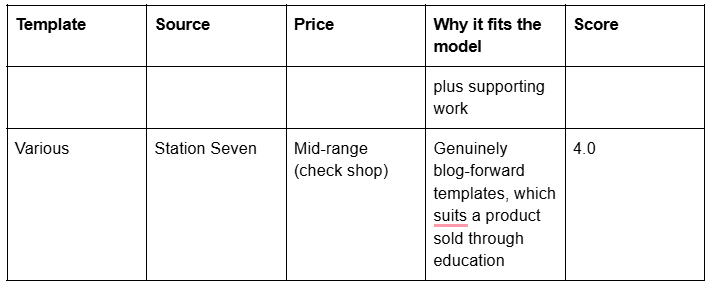
Pick the fulfilment model first. Stocked inventory: Styleza, for the policy pages. Made-to-order: Scholar, and use the Add to cart form. Digital files: Styleza again, for the License Agreement page. Subscription: Styleza or Fit Foundry, and price the transaction fee in. One expensive product: Vogue or WeDecorefy. For more designs in your exact category, Big Cat Creative genuinely has them.
Where a second opinion earns its cost is the store selling across two models at once — stocked goods plus a made-to-order line plus a digital add-on — because that is where category structure and URLs get locked in early, and Squarespace creates no automatic 301 when a URL changes, ever. That is why the premium Squarespace templates in our shop are listed with their full page structure rather than a homepage screenshot. Most stores will decide from the segment tables above without asking anyone.
FAQ
-
It depends on what you sell. For stocked inventory, Styleza — 12 pages with Products, Blog, FAQ and four policy pages. For made-to-order, Scholar, for its Services, Portfolio and Gallery. For digital files, Styleza again, for the License Agreement page. For one expensive product, Vogue or WeDecorefy.
-
Squarespace 7.1 allows up to 10,000 products site-wide, with up to 100 variants per product and an unlimited number of filtered category pages. Version 7.0 store pages were capped at 200 products, which is one reason older template roundups are misleading for a 2026 store.
-
Yes, but only physical and service products. Squarespace states you can't create subscription download products. A recurring digital offer is sold as a pricing plan under Content & Memberships instead, which carries a transaction fee of 7% on Basic, 5% on Core, 1% on Plus and 0% on Advanced.
-
Commerce features are available on Basic, Core, Plus, Advanced and some legacy plans. Basic can run a store. What Core and above adds is discounts, product waitlists, limited-availability labels, automated tax rates, and JavaScript or iframes in Code Blocks. Confirm current plan features on Squarespace's pricing page.
-
Use the Add to cart form on the product, which Squarespace provides for collecting personalised information like engraving or lettering instructions, and a custom checkout form for order-level details. Publish lead times in a page section on the product detail page rather than in a policy page.
-
The commerce ceiling is identical — same product limits, variants, checkout and features. What you pay for is the page set already built with the right names, a style guide page, and support while you fill it. With no revenue yet, start on an included template and upgrade when the store earns.

Author Bio
I'm Walid Hasan, a Certified Squarespace Expert and Squarespace Circle Platinum Partner with over 12 years of hands-on experience designing and optimizing high-performing websites. Over the years, I've had the privilege of building more than 2,000 Squarespace websites for clients around the world, always focusing on clean design, strong user experience, and conversion-driven results.