Squarespace Ecommerce Templates: The Complete Decision Map
The short answer: pick the template by what your catalogue does, not by how the demo looks. A fashion label that publishes seasonal drops needs a blog collection and a gallery-driven homepage; a homeware maker with 30 SKUs needs product-detail depth and tags that drive filters; a course seller needs Member Sites and never touches shipping. Squarespace Commerce handles all three well up to a genuine ceiling — 250 variant combinations, one currency, no product draft state — and the ceiling is what should decide you, not the design.
Here is the map.
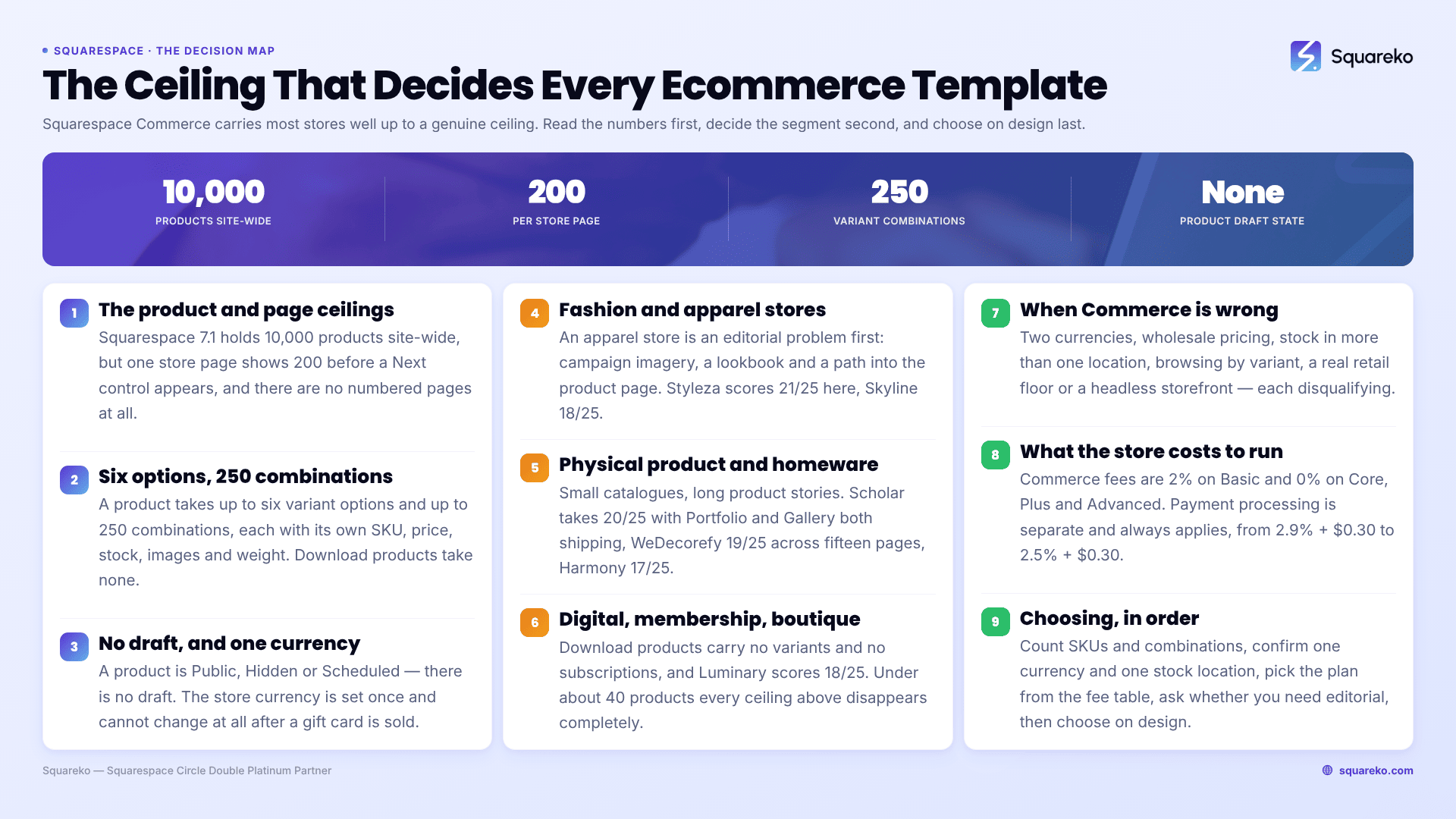
Which Squarespace ecommerce template matches your store
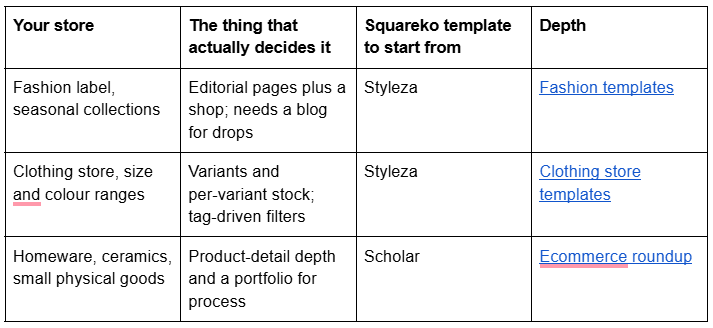
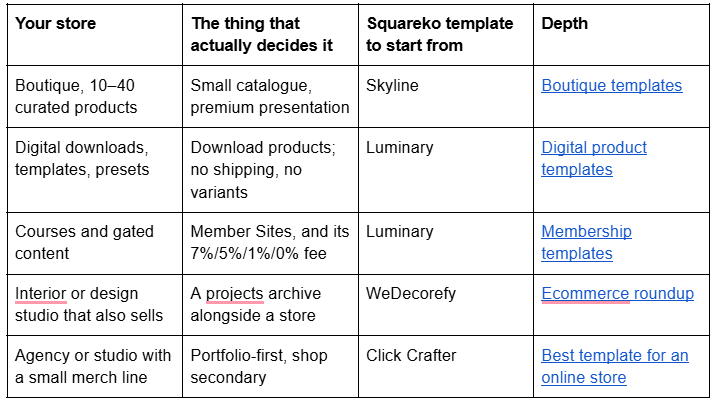
If your row is not on this table, the honest answer is usually that Squarespace Commerce is not the right host. That case is covered in full further down.
How these templates were scored
Every template below was scored out of 25 against five criteria, five points each. The scores come from the template's verified page list and from the live demo, not from product-page marketing copy.
Catalogue fit — does the template ship a store page, and does its structure suit the number of products you actually have?
Product-page depth — how much room the design leaves for the description, care or fit information, size guides and policy content that reduces returns.
Editorial capacity — whether the template ships a blog or journal collection, which is what makes drops, campaigns and product storytelling possible.
Trust architecture — legal pages, refund and shipping policy pages, FAQs. Stores that ship these convert better and dispute less.
Demo verifiability — whether the live demo resolves publicly, so you can inspect the build before buying.
Two things are deliberately excluded. Aggregate star ratings are excluded because no template shop on the market publishes a dated, per-template, platform-attributed review set, and an unsourced rating is worth nothing. Load speed of the demo is excluded because demo images are placeholder assets you must replace anyway — your own photography will decide your Largest Contentful Paint, not the template's.
The Squarespace Commerce ceiling, in numbers
Read this before you read another template review. These are the limits that decide whether any Squarespace ecommerce template will work for you. Fees and plan gates change; confirm against the Squarespace pricing page before you commit.
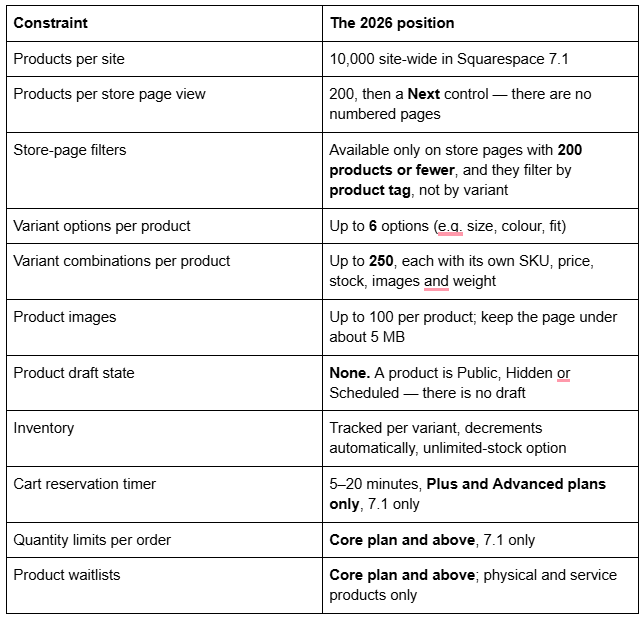
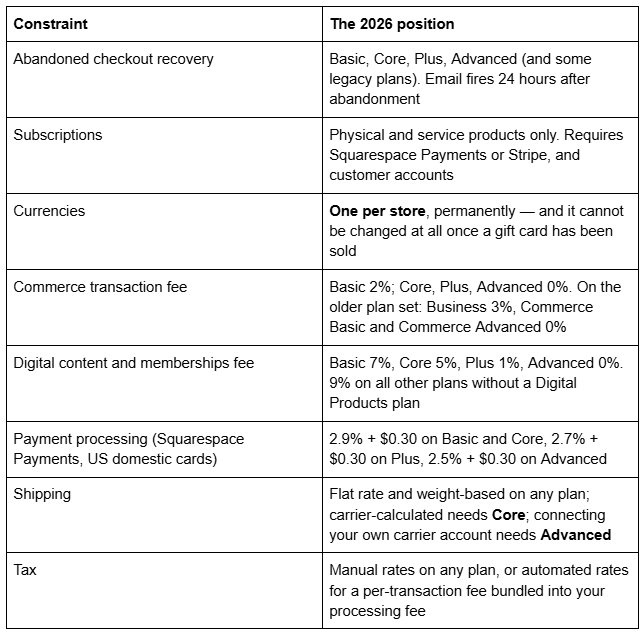
Four of those deserve unpacking, because they are the ones that surprise people after launch.
Products have no draft state. In Squarespace 7.1 a product's visibility is Public, Hidden or Scheduled. There is no half-finished-and-invisible state the way there is for blog posts. In practice this means you build a new product with the visibility set to Hidden and switch it to Public when it is ready, or you set a Scheduled date if you are running a timed drop. It works, but it is a manual discipline rather than a workflow the platform enforces, and on a large catalogue it is the single easiest way to publish something half-built.
Store-page filters are tag-based and capped. Filters appear only on store pages holding 200 products or fewer, they are driven by product tags, and their position on the page cannot be moved. That means "filter by size" is not automatic — the size lives in the variant, and the filter reads the tag. Somebody has to tag every product. The clothing store post works through how to do that without creating a tagging job that nobody maintains.
Abandoned checkout recovery has real conditions. The email is disabled by default, fires 24 hours after abandonment, and only sends when the customer is either signed into a customer account or has typed an email into the first checkout field, and at least one product in the cart is in stock. It never sends for subscription products, and it never sends for paywall products. It is genuinely useful — Squarespace states it roughly doubles the chance of completion — but it is not a rescue system for a store with no email list.
The transaction fee is a plan decision, not a fixed cost. Squarespace Commerce charges 2% on Basic and 0% on Core and above under the current plan set, and 3% on Business with 0% on Commerce Basic and Commerce Advanced under the older one. Payment processing is separate and always applies. At any meaningful volume the maths pushes you off the entry-level plan quickly, which is worth knowing before you compare a $249 template against a cheaper one.
Fashion and apparel stores
An apparel store is an editorial problem before it is a catalogue problem. People buy a label, then a garment. The template has to carry campaign imagery, a lookbook, and a path from that imagery into a product page.

Styleza — 21/25. Twelve pages tagged E-Commerce, Fashion and Shop. The verified build ships two homepage variants, an About page, a Blog, a Products store page, a Contact page, an FAQs page, a Style Guide, a 404 page, a sections library, and three separate legal pages — Privacy Policy, Terms of Service and Refund Policy. Styleza is also one of only two Squareko templates that includes a Figma file. The live demo is a menswear outerwear brand, with product URLs in the standard 7.1 /products/p/ form.
The reason Styleza scores highest for apparel is the combination nobody else ships: a blog collection and a full legal set and an FAQ page. Fashion returns are driven by fit uncertainty and by policy uncertainty, and Styleza gives both a home without you having to build the pages from scratch. The gap is the absence of a portfolio or gallery page, so a lookbook has to be built as gallery sections inside a regular page — which is what the fashion post covers in detail, including the fact that Squarespace gallery sections cannot hold video.

Skyline — 18/25. Twelve pages tagged Shop, Beauty and Fashion, and the second template that includes a Figma file. The verified demo carries two homepages, About, Services, Shop, Portfolio, Gallery, Blog, Freebie, Contact, Style Guide and a 404 page. Skyline's advantage over Styleza is that it ships both a Portfolio and a Gallery page out of the box, so the lookbook has somewhere to live without you constructing it. Its disadvantage is that it ships no dedicated legal or refund pages, which for a store selling physical goods is work you will have to do anyway.
Physical product and homeware stores
Makers, ceramicists, furniture and homeware sellers have small catalogues and long product stories. The product page is doing most of the selling, and a process or studio page is doing the rest.

Scholar — 20/25. Eleven pages tagged Fashion, Course and Shop. The verified build ships two homepages, About, Services, a Shop store page, Portfolio, Gallery, Freebie, a "More" navigation group, Contact, Style Guide and a 404 page. The live demo is a ceramics and homeware brand — cups, bowls, planters — with products under /shop/p/.
Scholar is the strongest structure on this list for a maker: Portfolio and Gallery both ship, so process photography and finished-piece photography get separate homes, and the Services page gives commissions or wholesale enquiries somewhere to go. Scholar ships no blog collection, which is the honest limitation. If you want to publish, you are adding a blog page yourself — trivial to do, but it means Scholar is a weaker starting point than Styleza for a brand that plans to run editorial.

WeDecorefy — 19/25. Fifteen pages, the largest template in the range, tagged Interior and Home Design. Its demo confirms Projects and a Project Details page, Gallery, Portfolio, Team, Blog, Shop, Services, Offering, Freebie, Donate, About and Contact. For a design studio that sells a product line alongside its project work, that Projects-plus-Shop pairing is the reason to pick it. For a pure store it is more architecture than you need.

Harmony — 17/25. Eleven pages tagged Interior and Home Design, with a Store page, Portfolio, Gallery, Blog, Services, Freebies and Contact. A clean small-catalogue structure. Note that the verified demo does not carry a standalone About page.
Digital product and download stores
Download products behave differently from everything else in Squarespace Commerce, and the differences are not cosmetic. You cannot add variants to a download product. You cannot make a download product a subscription. Tax is calculated on the billing address rather than a shipping address. And there is no shipping to configure at all.
Luminary — 18/25. Eleven pages tagged Service-Based, Course and Speaker. The verified demo ships two homepages, About, Services, a Courses page, a Shop, Portfolio, Gallery, Freebie, a "More" group and a Style Guide. Luminary ships no Contact page — a real gap, and one you should plan to build.
Luminary is the right starting point when the store is a side of the business rather than the whole of it: a coach or educator selling a small set of downloads and one course. What it does not solve is the fee structure. Anything sold through Member Sites or a course carries the Digital Content and Memberships fee — 7% on Basic, 5% on Core, 1% on Plus, 0% on Advanced, and 9% on the older plans without a Digital Products plan attached. The standalone Digital Products plan closed to new signups on 23 July 2026, so for a new site that ladder is now the only route to a lower rate. The digital products post works the arithmetic through properly.
Membership and recurring-revenue stores
Member Areas is now Member Sites, part of Content & Memberships. It is included on paid plans rather than sold as a flat add-on, and it is priced through the transaction fee above. Three constraints matter more than any template choice:
Member-site pages have no SEO options and do not appear in your sitemap. Gated content is invisible to search by design.
Subscription products do not work with Member Areas. If you need recurring billing for gated content, it runs through the membership pricing plan, not through a subscription product.
Subscription products require Squarespace Payments or Stripe, plus enabled customer accounts, and are limited to physical and service products.
Luminary's Courses page is the closest structural match in the range. The membership template post covers what has to sit outside the paywall for the site to be findable at all.
Boutiques and very small catalogues
Under about 40 products, every constraint above disappears and the whole decision becomes presentation. Filters work, pagination never triggers, tagging is a ten-minute job, and inventory fits on one screen.
Skyline and Scholar are both strong here. Vogue — eleven pages tagged Real Estate and Interior, with a Shop, Portfolio, Gallery, Services and Freebie — is worth a look for a homeware boutique despite its tags; the demo is an interior design studio with a small furniture and ceramics shop. Vogue ships no blog. The boutique post covers the small-catalogue presentation problem in full.
When Squarespace Commerce is the wrong choice
This is the section that should decide the largest number of readers, and almost no template shop writes it.
Move to Shopify, or somewhere else, if any of these are true:
You need more than one currency. A Squarespace store has exactly one store currency. There is no market-specific pricing, no geo-routed catalogue, and the currency cannot be changed once a gift card has been sold. If you sell meaningfully into two currency zones, this alone is disqualifying.
You need wholesale or trade pricing. There is no customer-group pricing, no price list per account, no net-terms invoicing tied to the storefront. A trade channel on Squarespace ends up as a password-protected page and a manual invoice.
You hold stock in more than one location. Squarespace tracks a single stock number per variant. There is no multi-location inventory, no warehouse routing, no per-location availability.
Your customers browse by variant. Store-page filters read tags and only exist below 200 products. A shopper who wants "size 12, in stock, under £80" is asking for something the platform does not do natively at any catalogue size.
You need a real retail floor. Squarespace supports in-person selling through Tap to Pay on iPhone and Android and a Square Reader, which covers a market stall or a pop-up. It is not a store-estate POS with tills, staff accounts and cash management.
You need the app ecosystem. Bundles, loyalty programmes, advanced review platforms, dunning management for failed subscription payments, ERP and 3PL integrations — these exist as third-party extensions on Squarespace but the range is a fraction of Shopify's, and extensions fall outside Squarespace's own support scope.
Your catalogue is genuinely large. Ten thousand products is the ceiling, but the practical ceiling is lower. The Squarespace mobile app lists only the first 500 products. Bulk work happens through CSV import and export rather than a real bulk editor. Past a couple of thousand SKUs, catalogue maintenance stops being pleasant.
You need a headless storefront. There is no Storefront API equivalent, and no blog write API either.
Stay on Squarespace if: your catalogue is under a few hundred products, you sell in one currency, your brand and content are doing as much work as your catalogue, and you would rather spend your time on photography than on app subscriptions. That describes most independent labels, makers, boutiques and studios — which is precisely why Squarespace ecommerce templates sell as well as they do.
What the store actually costs to run
The template is a one-off. The recurring cost is the plan plus the fees, and the fees are where the decision sits. Work it in this order.
Take your expected monthly revenue. Multiply by the commerce transaction fee for the plan you are considering — 2% on Basic, 0% on Core and above. Add the payment processing rate, which applies regardless of plan: 2.9% + $0.30 per order on Basic and Core with Squarespace Payments in the US, 2.7% + $0.30 on Plus, 2.5% + $0.30 on Advanced. Premium cards run 3.2% + $0.30 and international cards carry a further 1.5% surcharge. Then add the plan price itself.
The crossover arrives earlier than most people expect. At £3,000 a month in sales, the 2% Basic transaction fee is £60 — usually more than the gap between Basic and Core, and Core also unlocks carrier-calculated shipping, shipping labels, product waitlists, automatic discounts and custom code. For a store selling anything physical, Core is effectively the floor.
Two costs are easy to miss. Automated tax rates carry a per-transaction fee, bundled into your processing fee rather than itemised separately — manual rates are free if you only have one rate to apply. And anything sold as gated content or a course carries the Digital Content and Memberships fee instead of the commerce fee, at 7%, 5%, 1% or 0% by plan. A membership at 7% on Basic is a materially different business from the same membership at 1% on Plus.
What a Squareko template actually includes
All 24 Squareko templates are $249, with no variants or sale pricing. A Squarespace subscription is separate and required; the template price covers the design and its use only. Squareko recommends the Business plan and states templates work on Basic, and buyers get 20% off their first year.
Delivery is a Squarespace contributor invitation, not a file download — there is nothing to unzip or upload, unlike a WordPress theme. Two installation routes exist: a new 12-month trial site that Squareko builds and then transfers to you, leaving your existing site live throughout, or a paid installation onto an existing site, which is a fully manual process taking around 48 hours.
Every template ships 150+ pre-designed sections, a Style Guide page, a 404 page and a launch guide, on Squarespace 7.1 with Fluid Engine. Page counts run from 9 to 15 depending on the template. Sixty days of email support is included; customisation is not.
Two things to be clear-eyed about. All sales are final — digital products cannot be returned, exchanged or refunded, which is a reason to work through the live demo properly before buying. And demo images are not licensed for live use: every image in the demo has to be replaced with your own before launch. For an ecommerce site that is not a burden, since you were always going to shoot your own products.
Choosing, in order
Count your SKUs and your variant combinations. If any single product needs more than 250 combinations or more than 6 options, stop here.
Confirm you sell in one currency and hold stock in one place.
Pick your plan from the fee table, not from the feature list — the transaction fee and processing rate usually dominate.
Decide whether your store needs editorial. If yes, the template must ship a blog collection.
Then, and only then, choose on design.
If you want the single-answer version of that sequence rather than the full map, the best Squarespace template for an online store gives a verdict in its first paragraph. If you are still upstream of the niche question, how to choose a Squarespace template covers the general case.
Most people who work through the ceiling table above can pick a template and build the store themselves in a fortnight. Where it stops being a solo job is a migration — moving an existing catalogue off Shopify or Etsy with URLs, variants and stock intact, or rebuilding a store whose tagging was never designed and whose filters therefore do nothing. That is the situation our premium Squarespace templates and installation service is built for: the template installed onto your live site in about 48 hours, with the catalogue structure set up correctly the first time. If your catalogue is small and your variants are simple, you genuinely do not need us.
FAQ
-
Up to 10,000 products site-wide in Squarespace 7.1. A single store page displays 200 products at a time before showing a Next control, and store-page filters only work on store pages holding 200 products or fewer. In practice, catalogues above a couple of thousand SKUs become difficult to maintain.
-
Up to six options — such as size, colour and fit — and up to 250 variant combinations per product. Each combination gets its own SKU, price, stock level, image and weight. Variant names are capped at 100 characters. Download products cannot have variants at all.
-
No. Products have three visibility states in Squarespace 7.1: Public, Hidden and Scheduled. There is no draft. The working method is to build the product with visibility set to Hidden and switch it to Public when it is finished, or to set a Scheduled date for a timed release.
-
Yes, on the entry-level plan. Commerce transaction fees are 2% on Basic and 0% on Core, Plus and Advanced. On the older plan set they are 3% on Business and 0% on Commerce Basic and Commerce Advanced. Payment processing is charged separately and always applies.
-
Yes, on the Basic, Core, Plus and Advanced plans and some legacy plans. The email sends 24 hours after abandonment, is disabled by default, and requires either a signed-in customer account or an email typed into the first checkout field. It never sends for subscription or paywall products.
-
No. A store has exactly one currency, set by the bank account behind your payment processor. It cannot be changed at all once a gift card has been sold. If multi-currency pricing matters to your business, Squarespace Commerce is the wrong platform.

Author Bio
I'm Walid Hasan, a Certified Squarespace Expert and Squarespace Circle Platinum Partner with over 12 years of hands-on experience designing and optimizing high-performing websites. Over the years, I've had the privilege of building more than 2,000 Squarespace websites for clients around the world, always focusing on clean design, strong user experience, and conversion-driven results.