The Best Squarespace Template for an Online Store
The verdict: Styleza. For a store selling physical products in 2026, Styleza is the strongest starting point in the Squareko range, and it wins on structure rather than looks. It ships twelve pages including a Products store page, a Blog collection for drops and campaigns, an FAQs page, and — uniquely in the range — three separate legal pages: Privacy Policy, Terms of Service and Refund Policy. Every store needs those. Almost no template ships them.
If you sell downloads or courses rather than physical goods, the answer changes to Luminary. If your catalogue is under 40 items and presentation matters more than process, it changes to Skyline. Both cases are covered below.
The scoring
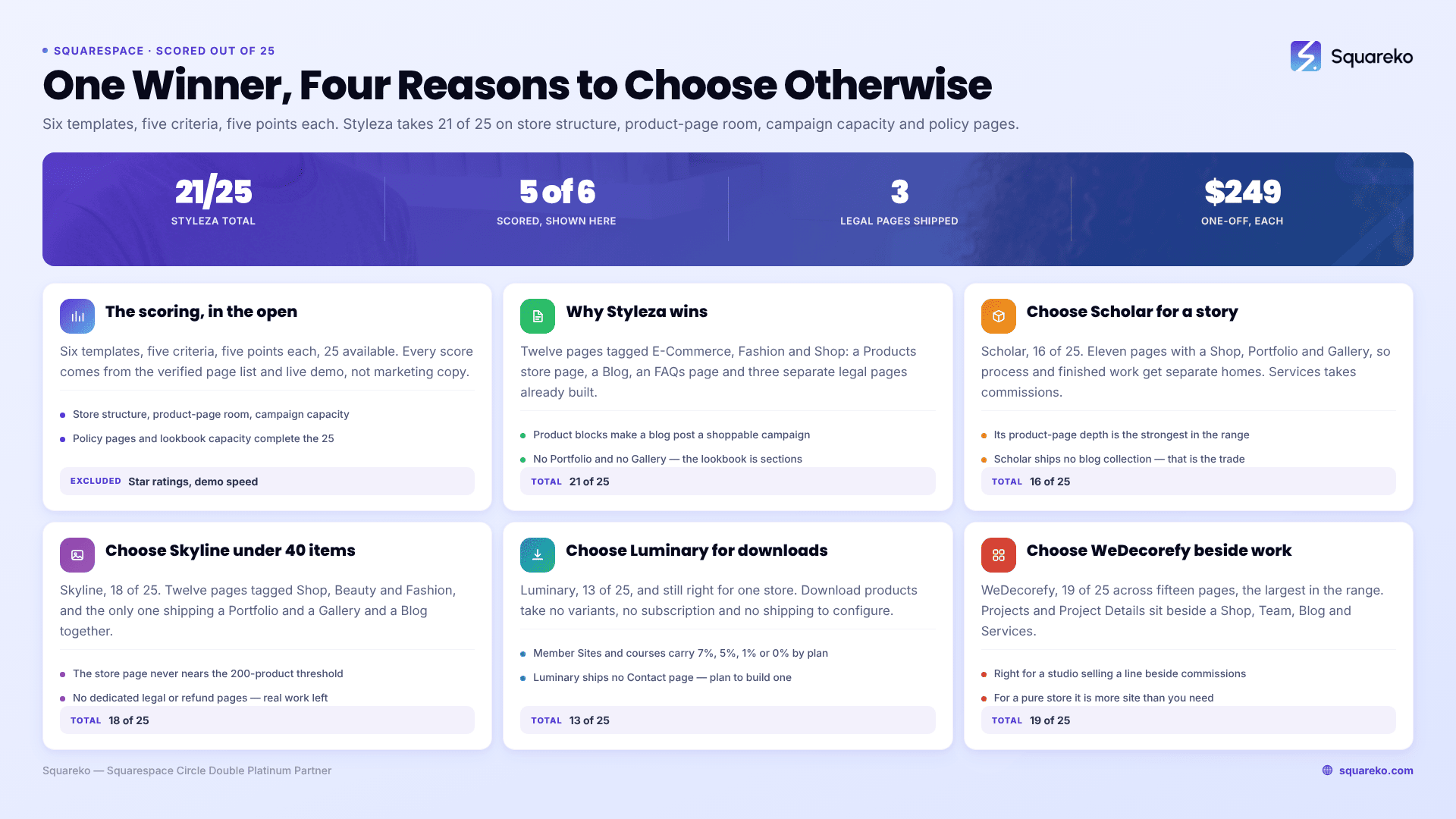
Six templates, five criteria, five points each, 25 available. Every score comes from the template's verified page list and its live demo, not from product-page marketing copy. Only templates whose live demo resolves publicly were scored at all — a template you cannot inspect before buying is not a candidate.
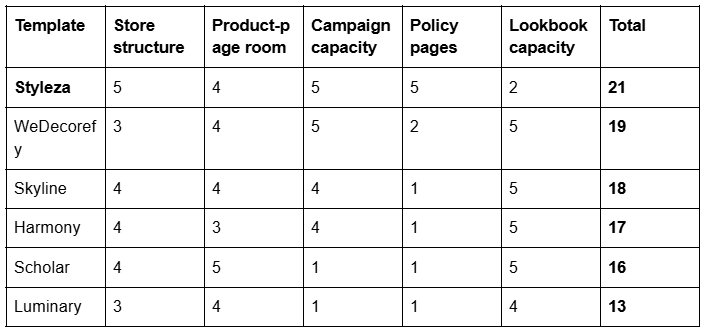
What each criterion measures. Store structure — whether a store page ships and whether the supporting commerce pages are already built. Product-page room — how much space the design leaves for descriptions, care and fit information, size guides and policy content. Campaign capacity — whether a blog or journal collection ships, because that is what makes drops and shoppable posts possible. Policy pages — refund, terms, privacy and FAQ pages, which reduce disputes and lift conversion. Lookbook capacity — whether Portfolio and Gallery pages ship, so campaign imagery has a designed home.
This is a narrower rubric than the pillar's, and deliberately so. The ecommerce template pillar scores the same templates across every kind of store — downloads, memberships, boutiques, studios — and segments the results. This table weights everything towards a store shipping physical goods, which is why Scholar sits lower here than it does in the pillar's homeware segment, and why Styleza's missing lookbook pages cost it real points despite winning.
What is deliberately excluded. Star ratings, because no template shop publishes a dated, per-template, platform-attributed review set. Demo page speed, because you replace every demo image before launch and your own photography decides your Largest Contentful Paint.
Why Styleza wins
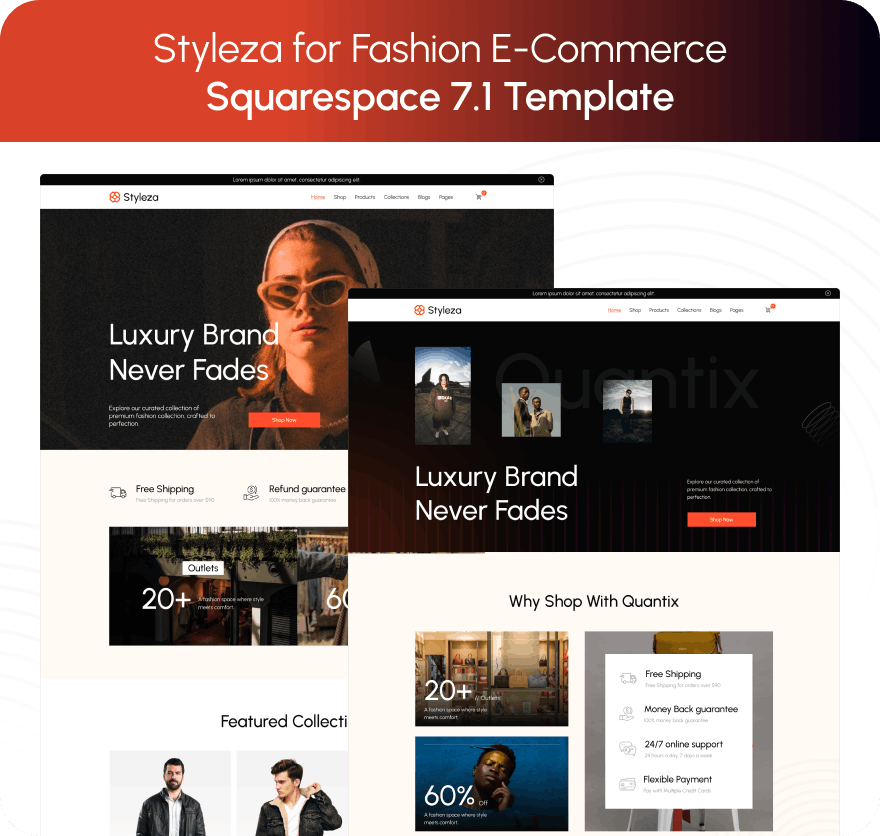
Styleza is tagged E-Commerce, Fashion and Shop, and it is the only template in the range built as a store first. The verified build ships two homepage variants, an About page, a Blog, a Products store page, Contact, FAQs, a Style Guide, a 404 page, a sections library, and Privacy Policy, Terms of Service and Refund Policy as three distinct pages. It is also one of only two Squareko templates that includes a Figma file. The live demo is a menswear outerwear brand.
Three things earn the score.
The legal set is already built. A store selling physical goods needs a refund policy, terms, and a privacy notice before it takes a single order — and in most jurisdictions a returns policy has to be visible before checkout, not after. Every other template on this list makes you build those three pages yourself. Styleza does not.
The blog is a store feature, not a bonus. Squarespace product blocks pull live product data — image, title, price, add-to-cart — into anywhere on the site that accepts blocks, including blog posts and email campaigns. Edit the product and every block updates. That turns a Styleza blog post into a shoppable campaign page without any custom code. Templates that ship no blog collection cannot do this at all, which is why Scholar and Luminary score 1 on editorial.
FAQs sit where returns are decided. Sizing, shipping times, exchange windows: the questions that stop an order are answered on the FAQ page or not at all. Styleza ships one.
The gap, stated plainly: Styleza ships no Portfolio and no Gallery page. A lookbook has to be built as gallery sections inside a regular page. That is straightforward — and it is also where you meet the constraint that Squarespace gallery sections hold up to 250 images but cannot hold video. The fashion template post covers how to build the lookbook properly and where video actually goes.
Choose Scholar if your product needs a long story

Scholar, 16/25. Eleven pages: two homepages, About, Services, a Shop store page, Portfolio, Gallery, Freebie, a "More" navigation group, Contact and a Style Guide. The live demo is a ceramics and homeware brand.
Scholar is the better choice when the making is part of the sell. Portfolio and Gallery both ship, so process photography and finished-piece photography get separate homes, and the Services page gives commissions or wholesale enquiries somewhere to land. Its product-page depth is the strongest in the range.
Scholar ships no blog collection. That is the trade. You can add a blog page in about a minute, but you are then styling it yourself rather than inheriting a designed one — so if editorial is central to the brand, Styleza is the better buy.
Choose Skyline if your catalogue is under 40 items

Skyline, 18/25. Twelve pages tagged Shop, Beauty and Fashion. The verified demo carries two homepages, About, Services, Shop, Portfolio, Gallery, Blog, Freebie, Contact, a Style Guide and a 404 page. Skyline is the second template that includes a Figma file.
Skyline is the only template here that ships a Portfolio and a Gallery and a Blog. For a boutique or a beauty brand with a small, tightly curated range, that is exactly the right shape: the lookbook is prebuilt, the editorial is prebuilt, and the store page never gets near the 200-product threshold where Squarespace's pagination and filter limits start to bite.
Skyline ships no dedicated legal or refund pages. For a physical-goods store that is real work you will have to do regardless. The boutique template post goes deeper on small-catalogue presentation.
Choose Luminary if you sell downloads or courses
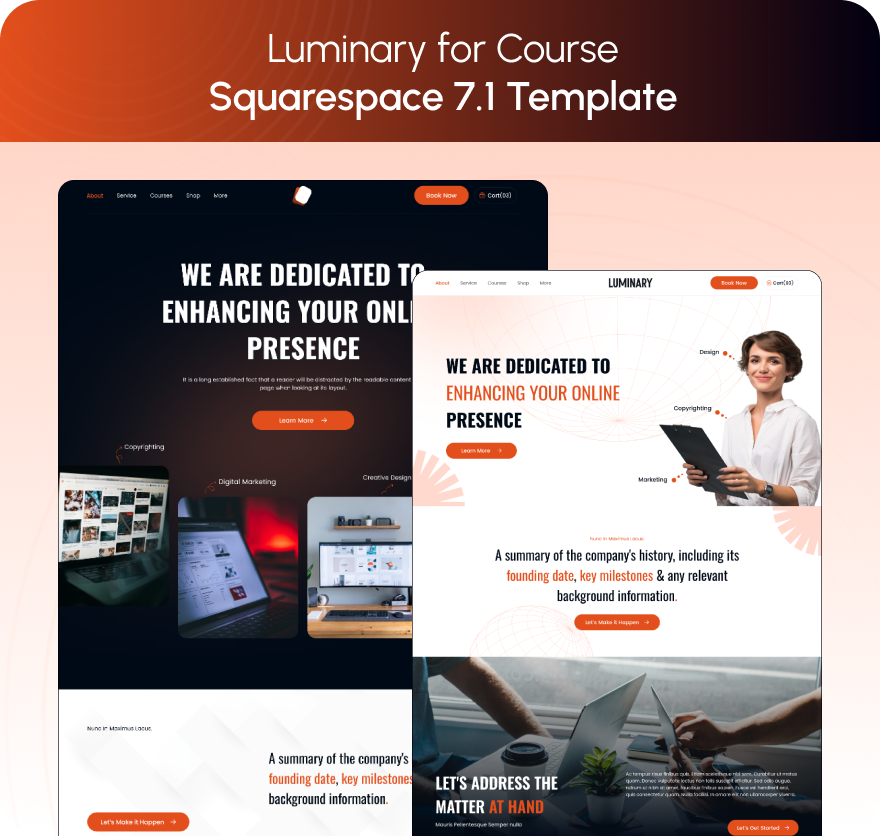
Luminary, 13/25. Eleven pages: two homepages, About, Services, a Courses page, a Shop, Portfolio, Gallery, Freebie, a "More" group and a Style Guide.
Luminary scores lowest on this table and is still the right answer for one specific store, because download products behave differently from everything else in Squarespace Commerce. You cannot add variants to a download product. You cannot make a download product a subscription. There is no shipping to configure, and tax is calculated on the billing address rather than a shipping address. None of the criteria that made Styleza win apply.
What matters instead is the fee. Anything sold through Member Sites or a course carries the Digital Content and Memberships transaction fee — 7% on Basic, 5% on Core, 1% on Plus, 0% on Advanced, and 9% on the older plans without a Digital Products plan attached. The standalone Digital Products plan closed to new signups on 23 July 2026, so the plan ladder is now the only route to a lower rate.
Luminary ships no Contact page. Plan to build one. The digital products post covers the full picture.
Choose WeDecorefy if the store sits beside project work

WeDecorefy, 19/25. Fifteen pages — the largest template in the range. The demo confirms Projects and a Project Details page, Gallery, Portfolio, Team, Blog, Shop, Services, Offering, Freebie, Donate, About and Contact.
It scores well and still is not the general answer, because most of those fifteen pages are project architecture rather than store architecture. For an interior studio, a furniture maker or a design practice selling a product line alongside commissioned work, the Projects-plus-Shop pairing is the reason to buy it. For a pure store it is more site than you need, and every page you do not use is a page you have to hide.
What about Squarespace's free store templates and the other shops?
Two fair questions, and the honest answers do not both favour buying from us.
Squarespace's own free store templates are a legitimate starting point. They are built by Squarespace, they are current, they cost nothing, and on Squarespace 7.1 every template shares the same underlying page and section system — so a free template is not functionally weaker than a paid one. What you get for $249 is the pages you would otherwise build yourself: a designed store page, a designed product detail arrangement, an FAQ page, legal pages, a style guide, and 150+ pre-designed sections to build the rest from. If you are comfortable in Fluid Engine and have time, a free template plus a fortnight of work reaches the same place.
The other premium shops are genuinely good, and some do things we do not. Big Cat Creative has the largest catalogue and the deepest industry taxonomy, so if your niche is unusual it is the first place to look. Applet Studio runs about 30 templates at a slightly lower price with dedicated industry landing pages. Station Seven, Paper Moon Websites, Go Live HQ, Ink and Mortar, SQSPThemes, Square Stylist and Golden Coast Design all ship credible ecommerce designs.
Where Squareko differs is delivery rather than design. Templates arrive as a Squarespace contributor invitation — there is no file to download and no theme to upload, unlike a WordPress theme — and installation onto an existing live site is available as a paid, fully manual add-on. If you are choosing purely on how the homepage looks, shop widely. If the thing you are dreading is the install, that is the difference worth paying for.
What every one of these templates cannot change
The template controls layout. It does not control Squarespace Commerce, and these limits apply identically to all six:
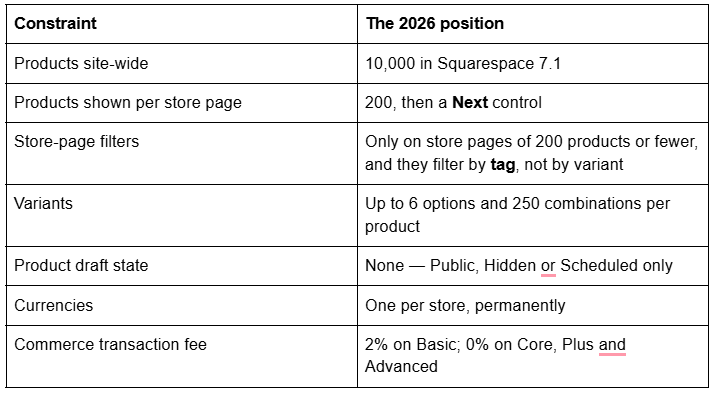
Two of these decide template choice more often than design does. Products have no draft state, so a half-built product is either live or hidden, and on a growing catalogue you need a working habit rather than a workflow the platform gives you. And filters are tag-driven, so browsing by size or colour is a tagging job somebody has to keep up with — the clothing store post sets out how to structure that.
What you are buying, and what you are not
All 24 Squareko templates are $249, with no variants and no sale pricing. A Squarespace subscription is separate and required — the template price covers the design and its use only. Squareko recommends the Business plan, states the templates work on Basic, and buyers get 20% off their first year.
Delivery is a Squarespace contributor invitation, not a file download. Nothing to unzip, nothing to upload. Either Squareko builds a new 12-month trial site and transfers ownership to you — your existing site stays live throughout — or installs onto your existing site as a paid add-on, a fully manual process taking around 48 hours.
Every template ships 150+ pre-designed sections, a Style Guide page, a 404 page and a launch guide, on Squarespace 7.1 with Fluid Engine. Page counts run from 9 to 15. Sixty days of email support is included; customisation is not.
Two things to be clear about before you buy. All sales are final — digital products cannot be returned, exchanged or refunded, so work through the live demo properly first. And demo images are not licensed for live use; every image has to be replaced with your own. For a store that is no burden, because you were always shooting your own products.
The verdict, restated
Styleza, unless you sell downloads, in which case Luminary, or your catalogue is under 40 curated items and the lookbook matters more than the blog, in which case Skyline. There is no fourth answer worth hedging over.
If you want the reasoning rather than the answer — the full map of store types, plan fees, Commerce limits and the cases where Squarespace is genuinely the wrong host — the Squarespace ecommerce template guide covers all of it.
Most store owners can install one of these themselves and be selling inside a fortnight. Where it stops being a solo job is a migration with an existing catalogue: moving off Shopify or Etsy with product URLs, variants and stock levels intact, and a tag structure designed before the products land rather than after. That is what our premium Squarespace template installation exists for — the template on your live site in about 48 hours with the catalogue set up correctly the first time. If you are starting from twenty products and a clean slate, you do not need us.
FAQ
-
Styleza, for a store selling physical products. It ships twelve pages including a Products store page, a Blog collection, an FAQs page and three separate legal pages — Privacy Policy, Terms of Service and Refund Policy. No other template in the range ships that legal set, and every physical-goods store needs it.
-
Every Squarespace 7.1 site can add a store page on any paid plan, so ecommerce is a platform feature rather than a template feature. What differs between templates is whether a store page and its supporting pages — product detail structure, FAQs, refund policy — are already designed for you.
-
Scholar, for products that need a long story: it ships both a Portfolio and a Gallery page alongside the Shop, so process and finished work get separate homes. The product details page layout itself — Simple, Wrap, Half or Full — is a Squarespace setting, and it applies to every product on the same store page.
-
Yes. Products, orders, customers and inventory live in Squarespace Commerce rather than in the template, so they survive a redesign. What does not survive is layout-specific custom CSS and any section arrangement you built by hand. Product URLs keep the /store-page/p/slug form.
-
Squareko templates are $249 each, one-off. A Squarespace subscription is separate and required. The wider premium market runs roughly $199 to $417. Installation onto an existing live site is a paid add-on and takes around 48 hours; a new build delivered as a trial site is included.
-
Rarely. Styleza is the exception in the Squareko range, shipping Privacy Policy, Terms of Service and Refund Policy as three separate designed pages. Skyline, Harmony and Luminary ship none, so budget time to write and build them before you take your first order.

Author Bio
I'm Walid Hasan, a Certified Squarespace Expert and Squarespace Circle Platinum Partner with over 12 years of hands-on experience designing and optimizing high-performing websites. Over the years, I've had the privilege of building more than 2,000 Squarespace websites for clients around the world, always focusing on clean design, strong user experience, and conversion-driven results.