Interior Design Squarespace Templates: 12 Picks, Segmented by the Work You Do
The short answer: choose an interior design Squarespace template on how it builds a project case study, not on how the homepage looks. Every Squarespace 7.1 template runs the same engine, so any aesthetic is reachable from any starting point in an afternoon of Site Styles work. What genuinely differs is whether the template ships a repeatable project structure — index, detail page, before and after — or expects one gallery to carry everything.
Below are 12 templates sorted into five kinds of interior business, scored against one rubric, plus the structural decision that matters more than the template does.
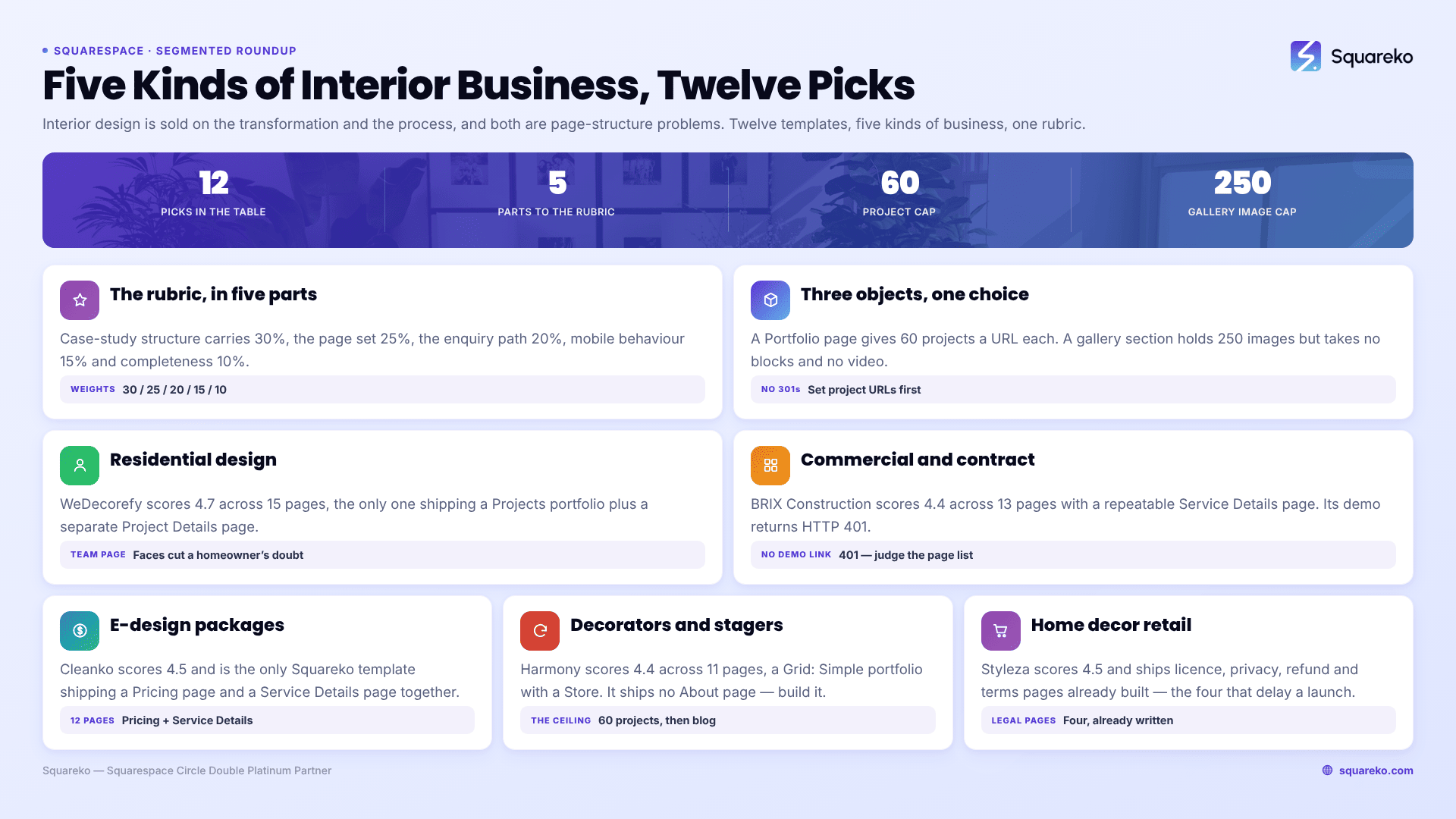
How these interior design Squarespace templates were scored
Every template here was judged against five weighted criteria, scored out of 5.
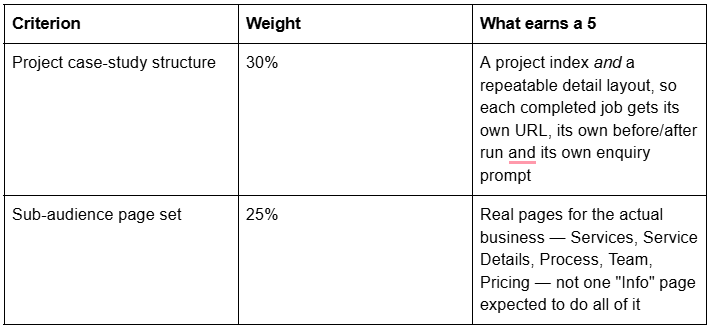
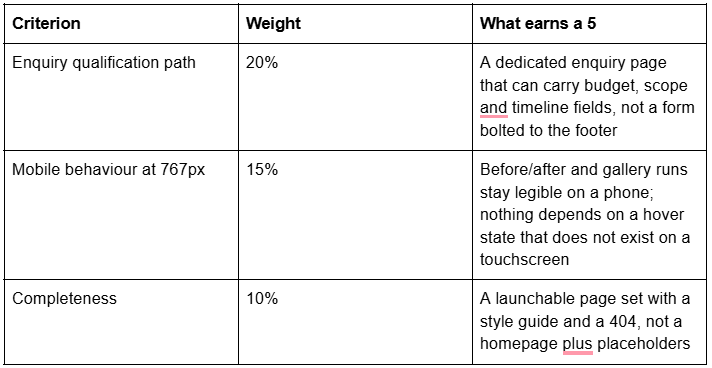
What this scoring is and is not. It is a structural assessment built from each template's live demo navigation and the page objects each demo actually uses, read from page source in August 2026, plus 12 years of building interior design sites on Squarespace. It is not a lab benchmark of the demo sites — demos ship placeholder photography that bears no relationship to the 60 full-bleed interiors you are about to upload, so a Lighthouse score run against a demo tells an interior designer nothing useful. Performance figures later in this post are either Squarespace's own published guidance or Squareko's own client-site measurements, labelled as lab data.
Disclosure: Squareko sells ten of the 12 templates below, marked Squareko, $249. Squarespace's own templates are included with a subscription and are a legitimate answer for at least one segment here — I have said so where it is true. Big Cat Creative and Applet Studio are included because both do specific things the Squareko range does not.
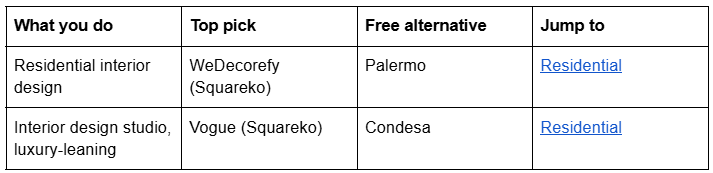
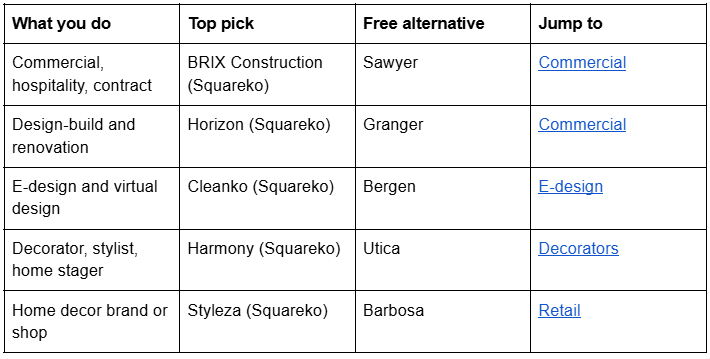
Quick pick by kind of interior business
The decision that comes before the template: how a project case study is built
Read this before you look at a single design. Interior design is sold on two things — the transformation and the process — and both are page-structure problems, not styling problems.
On Squarespace 7.1 there are three objects that can carry project imagery, and they are not interchangeable.
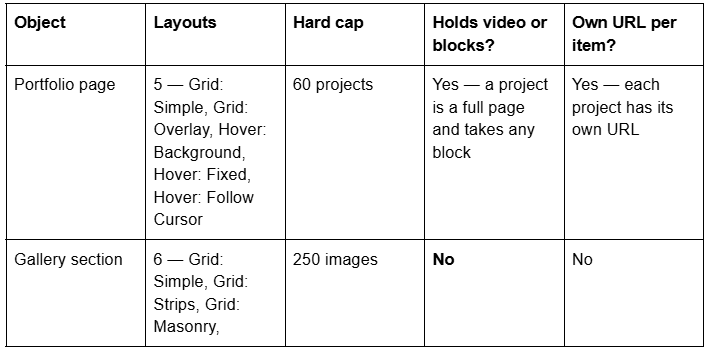
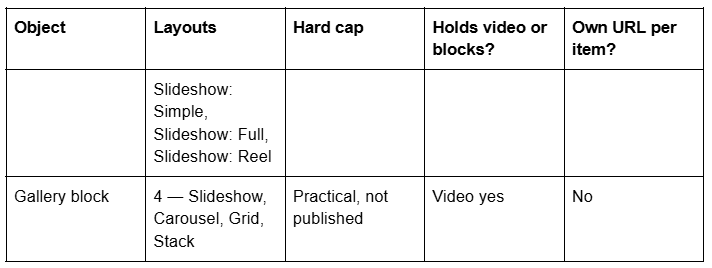
Four consequences follow, and together they decide the shape of an interior design site.
A Portfolio page is a collection, not a folder of pages. Squarespace's documentation is explicit: "It's not possible to turn projects into standalone pages outside the portfolio. Projects are collection items, dependent on the main portfolio collection page, similar to blog posts in a blog page." That is exactly what you want — each project lives at /projects/kensington-townhouse and can rank for "kensington townhouse renovation" on its own. What it means in practice is that a project cannot be lifted into the top-level navigation, and that at 60 projects you have hit the ceiling. Sixty is generous for a studio that completes eight jobs a year; it is not generous for a stager who does eight a month.
A gallery section cannot hold the thing that converts. Squarespace states plainly that "It's not possible to upload videos or add blocks to the section, but you can add block sections above and below a gallery." No caption block, no spec list, no "enquire about this project" button inside the run of images. For an interior designer this is the single most consequential limitation on the platform, because the caption is where the value is — the joinery decision, the lighting spec, the reason the wall moved. Put the images in a gallery section and the words in block sections above and below it, or use a Portfolio project where images and blocks can sit together.
Room-by-room and whole-project are two different sequences, and they suit different businesses. A whole-project sequence — arrival, living, kitchen, principal bedroom, detail — reads like a walkthrough and sells a full-service commission. A room-by-room structure, where the kitchens from twelve projects sit on one page, sells a specialism and ranks for "kitchen designer in town". You can have both, but only one can be the Portfolio collection; the other becomes a set of ordinary pages with gallery sections, or blog posts. Decide which one is the collection before you build, because moving it later means changing every project URL, and changing a slug on Squarespace creates no automatic 301, ever.
Before/after is a mobile problem, not a design problem. Side-by-side before and after works on a laptop and fails on a phone, where each image ends up around 170px wide inside a 767px viewport. Three approaches survive the 767px breakpoint: stacked pairs with a clear "before" and "after" label on each image; a two-image slideshow gallery section where the visitor swipes between the same framing; or a single composite image exported at 2500px wide with the label baked in. Avoid JavaScript before/after sliders that need a Code Block — those need a Core plan or above for scripts, they add weight to an already heavy page, and they are the first thing to break when Squarespace updates its section markup. Whatever you choose, shoot the "before" from the same position and lens as the "after". The comparison is the product.
Squarespace templates for residential interior designers
Residential interior design is a high-consideration purchase made by a homeowner who is nervous about cost, timeline and living in a building site. The site's job is to make a stranger feel like the process is known and the outcome is repeatable.
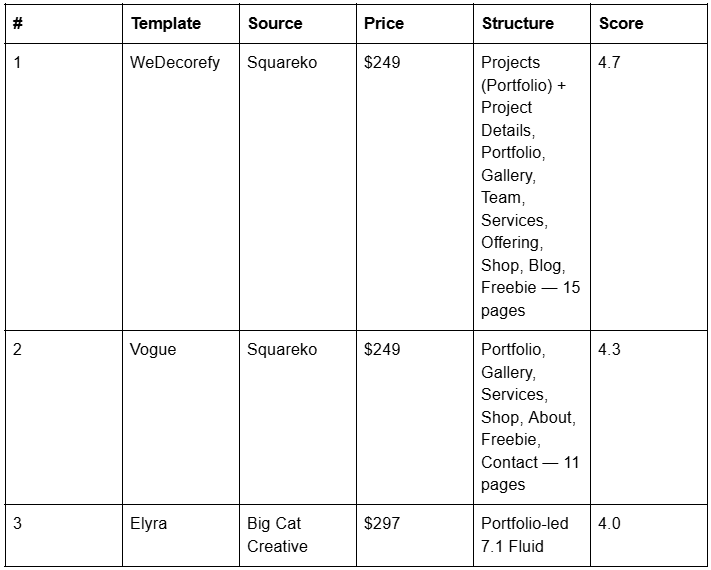

WeDecorefy (demo) is the largest template in the Squareko range at 15 pages and the only one that ships the full case-study pattern. Verified from the live demo rather than the product page: its Projects page is a genuine Squarespace Portfolio collection running the Grid: Overlay layout, with six demo projects at /projects/{slug}, and there is a second Portfolio page at /portfolio alongside it. The separate Project Details page is an ordinary page — a designed detail layout you duplicate per commission rather than a collection item — which is exactly the right tool if you want a long-form case study with specification tables, supplier credits and a before/after run that a gallery section could not carry.
The rest of the page set is unusually complete for residential work: Team, Services with a separate Offering page, About and About Me, a Gallery, a Blog, a Shop, a Freebie page for a downloadable style questionnaire, plus Contact, a Style Guide, a 404 and a Sections page. The Team page matters more than it sounds. A homeowner is deciding whether to let strangers into the house for four months, and faces reduce that friction faster than any amount of copy.

Vogue (demo) is the studio-facing alternative and its demo actually runs as an interior design practice, "Vogue Interiors". Eleven pages: two homepages, About, Services, a Portfolio collection on Grid: Overlay, a Gallery, a Shop built on a Products collection, a Freebie page, Contact, a Style Guide and a 404. Vogue ships no Blog — verified live, /blog and /journal both 404 — so if content marketing is part of the plan, add a blog page after install or start from WeDecorefy instead.
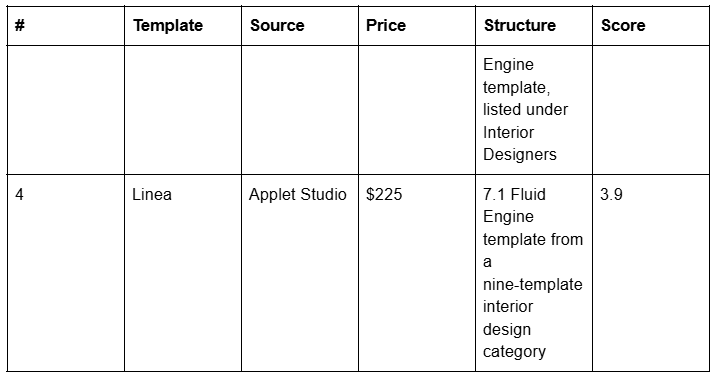
Elyra from Big Cat Creative ($297) and Linea from Applet Studio ($225) are genuine competitors. Big Cat Creative maintains a dedicated Interior Designers category — Elyra, Shelley, Noire and Gigi Rose — and Applet Studio's interior design category holds Arch&Gold, Chloe and Linea. Both sell polished, portfolio-led designs. What neither includes is installation: Squareko delivers by Squarespace contributor invitation, so there is no file to download and upload, and installation onto an existing site is a paid add-on taking around 48 hours. That is the difference worth paying for, not the pixels.
Full build detail — enquiry qualification, budget signalling, service tiers — is in the Squarespace template for interior designers guide, and the head-to-head verdict is in best Squarespace template for interior designers.
Squarespace templates for commercial, hospitality and contract interiors
Commercial interior design is bought by a procurement process, not a person. The site is read as evidence: sector experience, project scale, delivery method, insurance and accreditation. Photography still matters, but a specification table matters more.
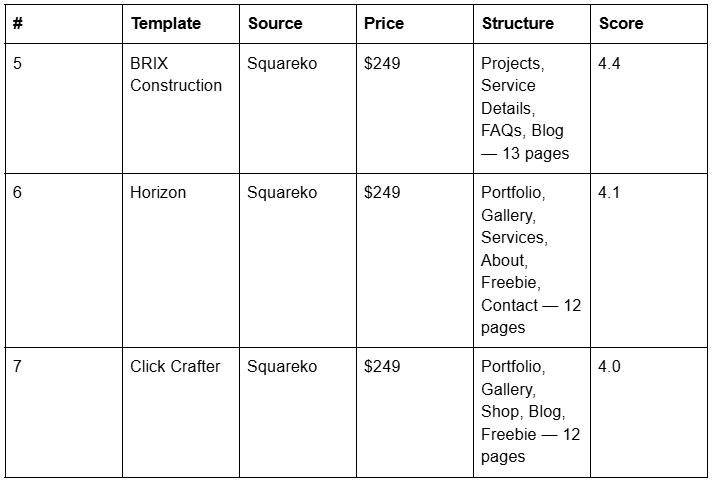
BRIX Construction is the strongest structure in the range for contract and fit-out work: 13 pages including a Projects page, a repeatable Service Details page and an FAQs page, plus a Blog. The Service Details page is the object that carries a delivery method — survey, design, tender, fit-out, handover — as its own indexable page per service line. BRIX Construction's live demo returns HTTP 401, so no demo link is published here. Judge it on the page list, or ask for a walkthrough before buying.

Horizon (demo) is worth naming precisely because it is widely mislabelled. Its live demo is a custom home builder — the H1s read "Construction by horizon" — and its verified pages are home, home-2, services, about, portfolio, gallery, freebie, contact, style-guide, 404, sections and cart. There is no blog and no journal. That makes Horizon the right pick for a design-build practice or a renovation contractor with an in-house design arm, where the site has to convince on build capability as much as on taste, and where a blog is not part of the plan. It is the wrong pick for a designer who intends to publish.
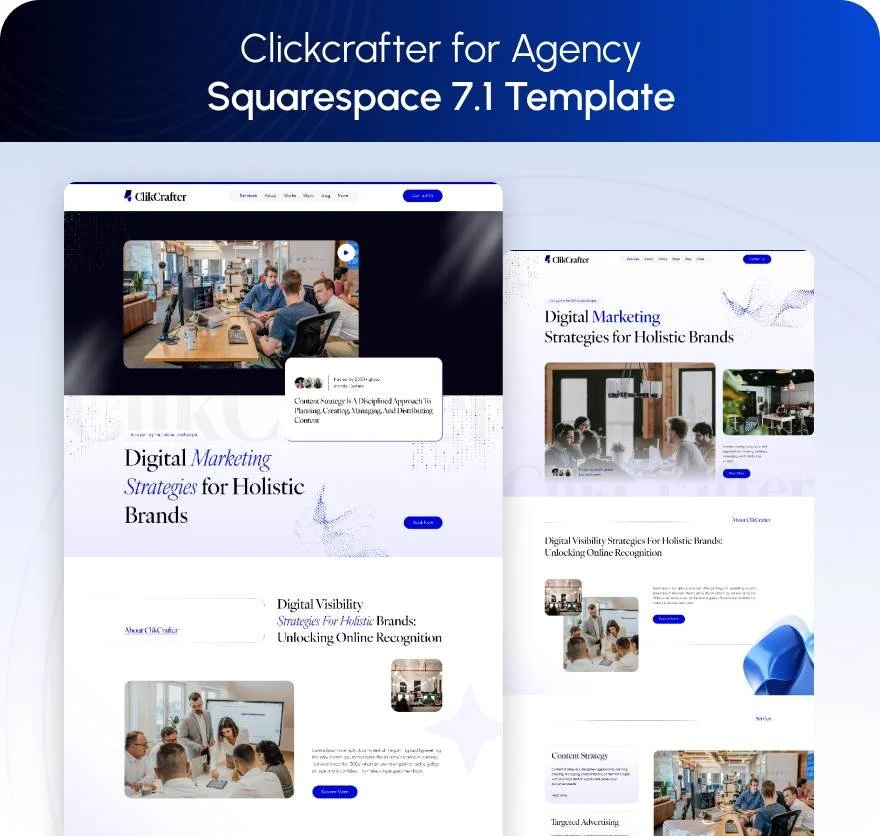
Click Crafter (demo) is an agency template, and a commercial interior design consultancy is structurally an agency: Portfolio, Gallery, Blog, Shop and a Freebie page that works well as a gated capability statement or sector case-study pack.
Squarespace templates for e-design and virtual interior design
E-design is a productised service, and it fails on websites built like portfolio sites. The buyer is comparing three packages at three prices and wants to know exactly what arrives, in how many days, and what happens if they do not like it. That is a pricing-and-process problem.
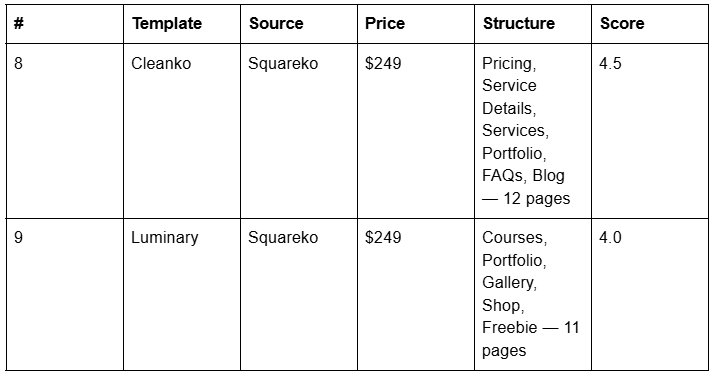
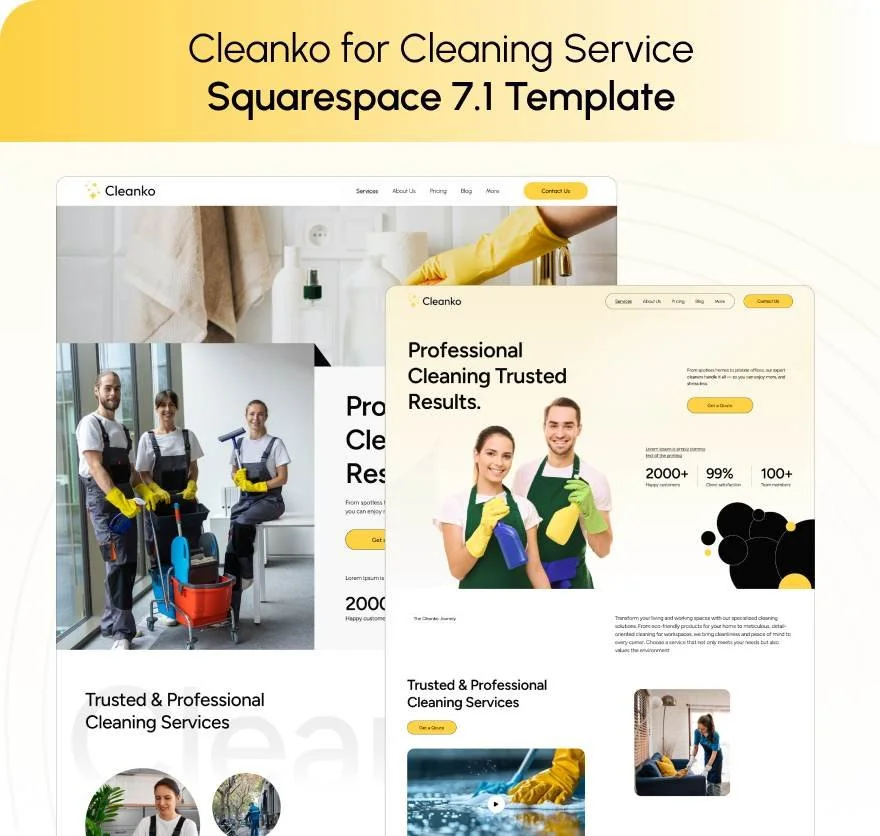
Cleanko (demo) is sold as a cleaning-service template and is the best e-design structure in the range anyway, for one reason: it is the only Squareko template that ships a Pricing page and a Service Details page together. Verified pages: home, home-2, about, services, service-details, pricing, portfolio, faqs, blog, contact-us, style-guide, 404, sections. Published tiers plus a per-tier detail page plus an FAQs page is precisely the shape of an e-design offer. Ignore the demo's subject matter; the architecture is what you are buying.
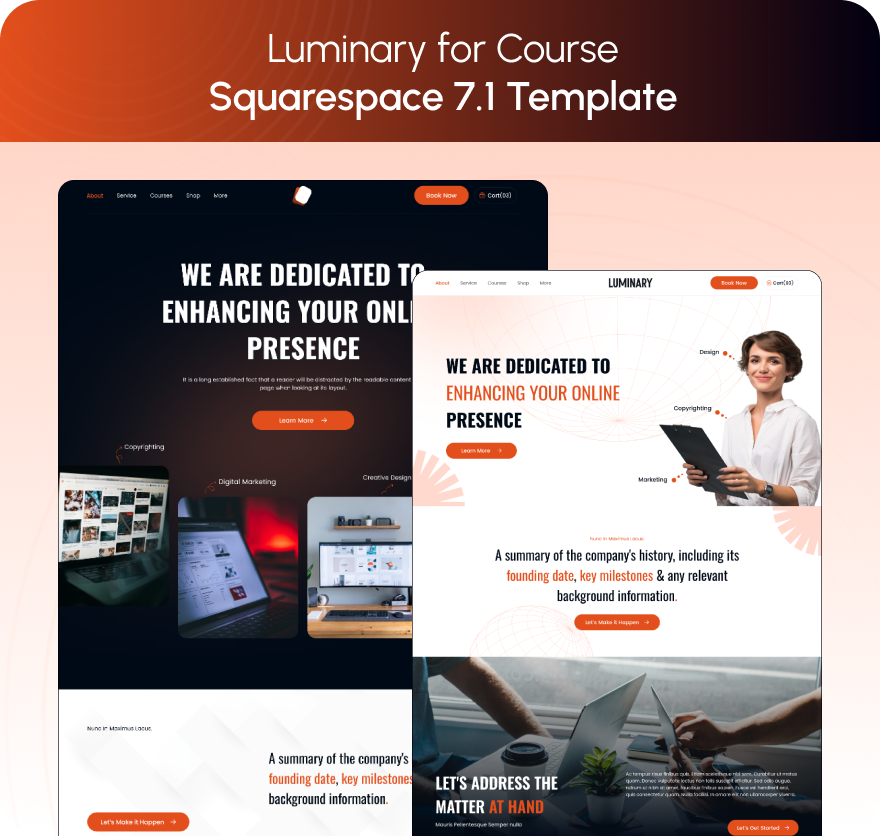
Luminary (demo) suits the e-designer whose second income is teaching — a room-styling course, a sourcing masterclass, a paid template pack. It ships Courses, Portfolio, Gallery, Shop and a Freebie page across 11 pages, but Luminary ships no Contact page — verified live — so budget an hour to build one before launch.
Two platform notes for anyone selling e-design packages. The standalone Digital Products plan closed to new signups on 23 July 2026. And Content & Memberships (formerly Member Areas) is not a flat add-on: it carries a Digital Content and Memberships transaction fee of 7% / 5% / 1% / 0% from Basic to Commerce Advanced, member-site pages have no SEO options and are not in the sitemap, and subscription products do not work with it. Confirm current fees against Squarespace's live pricing page before you build a business model on them.
Squarespace templates for decorators, stylists and home stagers
A decorator or stylist sells taste and speed, often with a product margin attached. The work is high-volume and lower-ticket than full-service design, which changes the structure: more projects, shorter case studies, and usually something to buy.
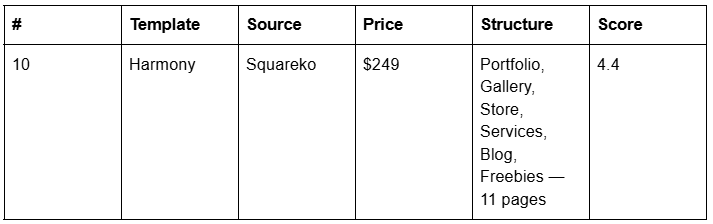

Harmony (demo) pairs a Portfolio collection running the Grid: Simple layout with a Gallery, a Store built on a Products collection, a Blog, a Services page and a Freebies page. Grid: Simple is the right default here: it is the least hover-dependent of the five Portfolio layouts, which matters when most of your traffic is a phone.
One honest caveat, verified on the live demo rather than taken from the product page: Harmony ships no About page. /about returns 404. For a decorator whose personal taste is the product, that is the single most important page missing, and building it is a 30-minute job you should do on day one.
The 60-project Portfolio cap is worth planning around in this segment specifically. A stager working eight properties a month reaches 60 inside a year. The workable pattern is to keep the Portfolio for a curated 20 to 30 signature projects and run the rest as blog posts, which have no cap. See the home staging guide for the full structure.
Squarespace templates for home decor brands and shops
Home decor retail is a different business from interior design services, and it needs a different site. The unit of content is a product, not a project; the goal is a transaction, not an enquiry; and the imagery has to do two incompatible jobs — sell the room and sell the object in it.
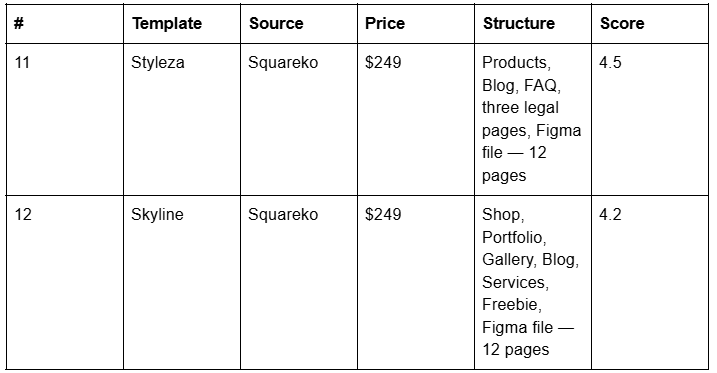

Styleza (demo) is the most retail-ready template in the range and the only one that ships licence, privacy policy, refund policy and terms of service pages already built — verified live. For anyone shipping physical goods those are not filler; returns terms and delivery policy have to exist somewhere, and writing four legal pages from nothing is the thing that delays launches. Styleza also includes a Figma file, which only it and Skyline do.

Skyline (demo) is the lifestyle-brand option, with a Shop alongside a Portfolio, a Gallery and a Services page — the right shape for a decor brand that also takes styling commissions. Note the demo subdomain is the bare skyline, not a -squareko variant. Scholar (demo) is a third option with Shop, Portfolio and Gallery, though it ships no blog.
The commerce mechanics — shoppable room imagery, product photography standards, affiliate versus own inventory — are the whole subject of the home decor template guide, which is the retail counterpart to this post's services focus.
Free Squarespace templates for interior design, honestly assessed
Squarespace's own designs are included with a subscription and several are perfectly capable interior design starting points. Verified present in Squarespace's 7.1 Fluid Engine template list in August 2026, and recommended for interiors or architecture work by the two roundups that currently rank for this keyword: Palermo, Selene, Bergen, Sawyer, Condesa, Ventura, Barbosa, Granger and Utica.
What a free Squarespace template gives you is a homepage, a portfolio-ish page and a contact page. What it does not give you is the other ten pages — Services and Service Details, Process, Team, Pricing, FAQs, a project detail layout, a style guide page — and those pages are where an interior design site actually converts. Every Squareko template ships 9 to 15 real pages plus 150+ pre-designed sections and a Style Guide page, which is the thing that keeps a site consistent after handover.
The honest rule: if you have three completed projects and no budget, start free. WeDecorefy is a large template and it looks empty when it is empty. If you have twelve projects, a service ladder and something to sell, the page set is what you are paying for.
Two purchase facts to weigh before buying anything premium, from any shop. Demo images are not licensed for live use — every one has to be replaced with your own. And Squareko's digital products are final sale, which is a good reason to spend twenty minutes in the demo before committing rather than twenty seconds.
Page weight is the constraint interior design sites actually hit
Interiors photography is the heaviest imagery in any niche. A wide-angle room shot has detail in every square inch — textiles, timber grain, plaster, glass — so it compresses badly, and interior design sites want a lot of them: a hero, a project index of 20 thumbnails, and 15 to 30 images inside every case study.
Squarespace's own guidance is to keep each page to 5 MB or less, notes that 1 MB is the safest size for cellular connections, and recommends no more than 60 blocks on a page. For image preparation, Squarespace states that a width of 2500 pixels is ideal, that images under 1500px wide may look blurry, that the upload limit is 20 MB, and that 500 KB or less is the target for fast loading. The Squarespace CDN serves WebP unconditionally, regardless of source format or Accept header, and generates seven resized versions of every upload — but it cannot reduce the number of requests a 40-image gallery makes.
For calibration: across 54 Squareko-built client sites measured in August 2026 — Playwright and Chromium, cloud datacentre, unthrottled network and CPU, single run per site, load-only CLS, so lab data rather than field data — median page weight was 3.0 MB across 93 requests, median mobile LCP was 2.01s with 74% under Google's 2.5s "good" threshold, and 86% of images were served as WebP. Only 48% of those sites came in under 3 MB, which is the honest counterpoint: a properly built Squarespace site is not automatically light, and an interiors site is at the heavy end of the distribution by construction.
Three practical rules follow. Keep the homepage to one hero plus eight to ten images, because the Largest Contentful Paint element is almost always that hero. Put the long image runs inside project pages, where the visitor has already chosen to look. And set the filename before upload — Squarespace filenames cannot be changed afterwards, and on a site with 400 room photographs that is 400 chances to lose an SEO signal.
What Squarespace will not do for an interior design site
Name these before you buy, not after.
60 projects is a hard cap on a Portfolio page, and projects cannot become standalone pages outside the portfolio.
Gallery sections cannot hold video or blocks. Captions, spec lists and buttons go in block sections above and below.
There is no native mood board, FF&E schedule or before/after slider. A specification list is a table, an accordion or a set of product blocks; anything interactive needs JavaScript in a Code Block, which requires a Core plan or above.
Blog posts use the classic editor, not Fluid Engine, so a project written as a blog post cannot use Fluid Engine layouts.
Changing a page or project slug creates no automatic 301. Set URLs before you publish.
Blog featured images have no alt-text field — the post title is used as alt text instead.
Custom CSS is available on every plan, including Basic, at Website → Website Tools → Custom CSS. It is JavaScript and iframes inside Code Blocks, and site-wide Code Injection, that need Core or above.
Where to go next in this interior design cluster
The working designer's site — enquiry qualification, budget signalling, e-design tiers: Squarespace template for interior designers
One verdict, scored: best Squarespace template for interior designers
Minimalism as a functional choice, and what it costs you: minimalist interior design Squarespace template
Home decor as retail — shoppable rooms, product photography, commerce: Squarespace website template for home decor
Furniture catalogues — variants, lead times, freight: Squarespace template for a furniture store
Studios with a team — capability, credentials, sector pages: Squarespace template for an interior design studio
Luxury positioning — restraint, discretion, NDA'd work: luxury interior design website template
Home staging — volume, turnaround, estate agent referrals: Squarespace template for home staging
Home design businesses more broadly: Squarespace templates for home design businesses
If you are still between two templates, the deciding question is never the homepage. It is whether a completed project can become a page — with a before, an after, a caption explaining the decision, and an enquiry button underneath — without you rebuilding the layout every time.
That is worth checking before you commit, which is why the premium Squarespace templates in our shop are listed with their full page structure rather than a homepage screenshot, and why installation onto an existing site is included as a service rather than left to you. Most designers will pick correctly from the tables above without any help; if you have 200 project images and a live site you cannot take down, that is the point at which a hand is genuinely useful.
FAQ
-
Yes. Squarespace's own 7.1 Fluid Engine range includes designs regularly used for interiors work, including Palermo, Selene, Bergen, Sawyer, Condesa and Utica. Premium shops add purpose-built page sets: Squareko's WeDecorefy, Vogue and Harmony, Big Cat Creative's Interior Designers category, and Applet Studio's interior design range.
-
For residential interior design, WeDecorefy is the strongest structure available: 15 pages including a Projects portfolio collection, a repeatable Project Details layout, a Team page and a Shop. For e-design, Cleanko wins on its Pricing and Service Details pairing. For home decor retail, Styleza wins on its pre-built commerce and legal pages.
-
Sixty. A Squarespace 7.1 Portfolio page caps at 60 projects, offers five layouts, and each project gets its own URL. Projects are collection items and cannot become standalone pages outside the portfolio. High-volume businesses such as home staging usually curate 20 to 30 projects and run the rest as blog posts, which have no cap.
-
No. Squarespace states it is not possible to upload videos or add blocks to a gallery section, though you can add block sections above and below it. Gallery sections cap at 250 images across six layouts. If a project needs video, captions or an enquiry button alongside the images, use a Portfolio project or a gallery block instead.
-
Three approaches survive the 767px mobile breakpoint: stacked pairs with each image labelled, a two-image slideshow gallery section the visitor swipes through, or a single composite image exported at 2500px with the labels baked in. Interactive sliders need JavaScript in a Code Block, which requires a Core plan or above.
-
They can be, because interiors photography compresses badly. Squarespace recommends keeping pages to 5 MB or less and uploading images at 2500px wide and 500 KB or less. Across 54 Squareko-built client sites measured in August 2026 — lab data, unthrottled, single run — median page weight was 3.0 MB and median mobile LCP was 2.01s.

Author Bio
I'm Walid Hasan, a Certified Squarespace Expert and Squarespace Circle Platinum Partner with over 12 years of hands-on experience designing and optimizing high-performing websites. Over the years, I've had the privilege of building more than 2,000 Squarespace websites for clients around the world, always focusing on clean design, strong user experience, and conversion-driven results.