
Squarespace Pacific Template: Family, Limits and the 7.1 Path
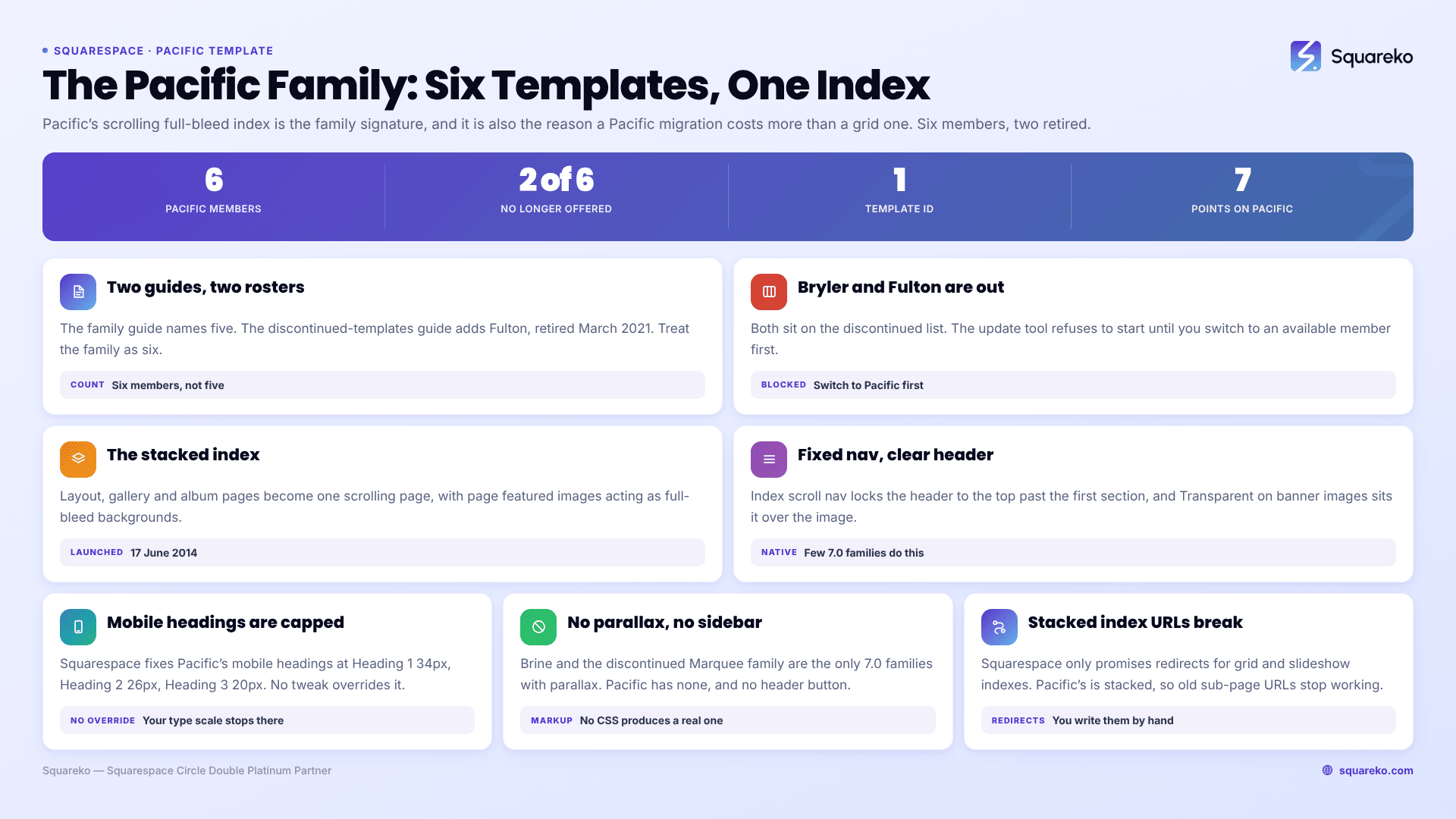
Pacific is a Squarespace version 7.0 template and it heads a family of six — two of which are discontinued. Charlotte, Horizon, Naomi and Pacific are still installable; Bryler and Fulton are not. All of them share one codebase and one template ID, and all are built around a stacked, full-bleed index page. Pacific itself is not discontinued, and version 7.0 has no announced end-of-life.
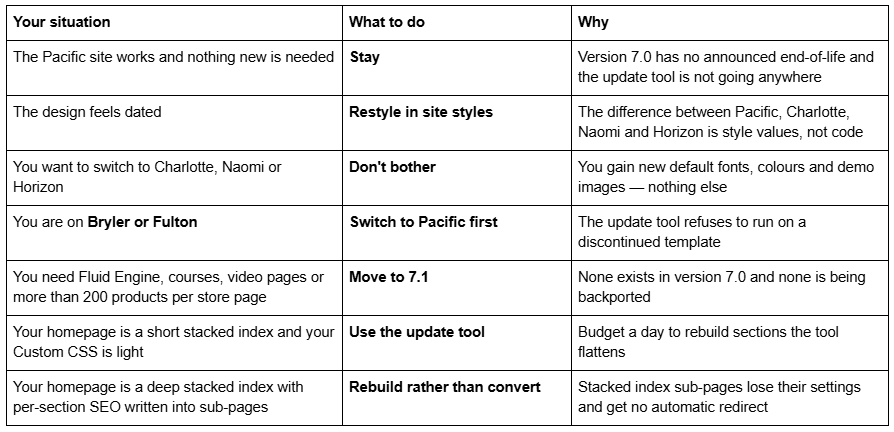
Should you stay on Pacific, restyle it, or move to 7.1?
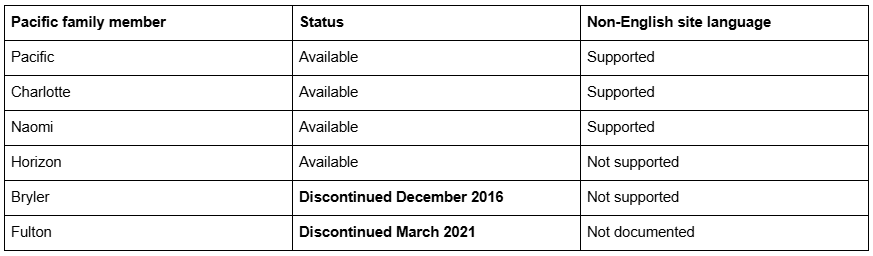
Who is actually in the Squarespace Pacific family
Squarespace's own two guides do not agree, so here is both, and what we verified.
The Pacific template family guide names five: "The Pacific template family (Bryler, Charlotte, Horizon, Naomi, Pacific) use text overlays and a scrolling full-bleed index page to tie all of your content together into a single voice."
The discontinued version 7.0 templates guide names a sixth. It lists Fulton — March 2021 — Pacific family, and also lists Bryler — December 2016 — Pacific family. Fulton appears nowhere in the family guide.
Treat the family as six. The likeliest explanation is simply that Squarespace stopped maintaining the family guide's roster after Fulton was retired in 2021, and the discontinued guide is the more recently accurate of the two. We could not confirm Fulton's template ID directly: fulton-demo.squarespace.com returns HTTP 401 in August 2026, so its demo is no longer publicly served. We are not going to assert an ID we have not read.
Everything else we did read. In August 2026, pacific-demo, charlotte-demo, naomi-demo, horizon-demo and bryler-demo on squarespace.com all report "templateVersion":"7" and the identical template ID 52e96934e4b0ea14d0f64568.
Three practical consequences: search for "Pacific" rather than your member name, because the class names and tweaks are family-level; a detector tool will report your site as "Pacific" and it is not wrong, because templateId identifies the family rather than the member; and switching between the four available members changes nothing but defaults. The list of Squarespace 7.0 templates covers all 121 templates across the 22 families.
What the Squarespace Pacific template does well
Squarespace launched Pacific on 17 June 2014, describing it as a way to "create an engaging single page site by using stacked content containers." That is still the honest summary.
The stacked index. A Pacific index turns several pages into one scrolling page. Content sections come from layout pages, gallery index sections from gallery pages, and album sections from album pages, with page featured images acting as full-bleed backgrounds. Section height comes from Page padding under Index overlay (sections with images) or under Index (sections without).
Gallery index sections in two modes. Set Design under Index gallery to grid or slideshow. Slideshow gets Autoplay, Slideshow transition (Fade or Scroll), Gallery controls and a caption toggle; grid gets Grid max columns and Grid aspect ratio.
Fixed navigation on an index homepage. Choose Index scroll nav: show on scroll under Site navigation and the header locks to the top of the window past the first section. Check Expand homepage index links and each content and album section gets its own anchor link in the navigation. Very few version 7.0 families do this natively.
A transparent header over banners. Transparent on banner images under Site header puts the branding and navigation over the image rather than above it, which is the look most Pacific sites were bought for.
A pre-footer. A second content area above the main footer, switched on with Content: custom under Pre-footer. Alongside site info pulled from Business information, it gives Pacific a genuinely useful two-tier footer.
Category navigation. Filter links at the top of blog and store pages, styled in the Category navigation section of site styles.
What breaks or feels dated on a Pacific site in 2026
No Fluid Engine. Version 7.0 editing is the classic block editor — a 12-column grid, no overlapping elements without CSS, no drag-anywhere canvas. Fluid Engine is 7.1-only and is not coming to Pacific.
No parallax. Brine and the discontinued Marquee family are the only two version 7.0 families with site-wide parallax. Pacific has none, so the depth effect people associate with 2014-era Squarespace sites has to be faked with CSS.
Mobile headings are capped. Squarespace fixes maximum mobile heading sizes on Pacific: "Heading 1 – 34 pixels, Heading 2 – 26 pixels, Heading 3 – 20 pixels." Your desktop type scale simply stops applying below that point, and no site styles tweak overrides it. Squarespace 7.1 with Fluid Engine keeps a separately editable mobile layout per section at a 767px breakpoint.
Grid galleries leave a gap. Squarespace documents it: grid galleries display two images per row on mobile, and "if you have an odd number of images, there will be a blank space next to the final image."
Text blocks in blog posts are indented and you cannot change it. Single-column text blocks are inset on either side, and Squarespace states "there are no options to change the indent's width."
The logo is capped at 50 pixels tall on mobile, and the navigation always collapses into a ☰ in the top-left corner.
No sidebar, and no header call-to-action button. Neither exists in Pacific's markup, so no CSS produces a real one.
Pacific bugs Squarespace documents and is not going to fix
Squarespace maintains a Troubleshooting Pacific section, prefaced with its actual position on version 7.0: "Although we still support Squarespace version 7.0, fixing bugs or issues is a lower priority for us while we focus on our current platform, version 7.1."
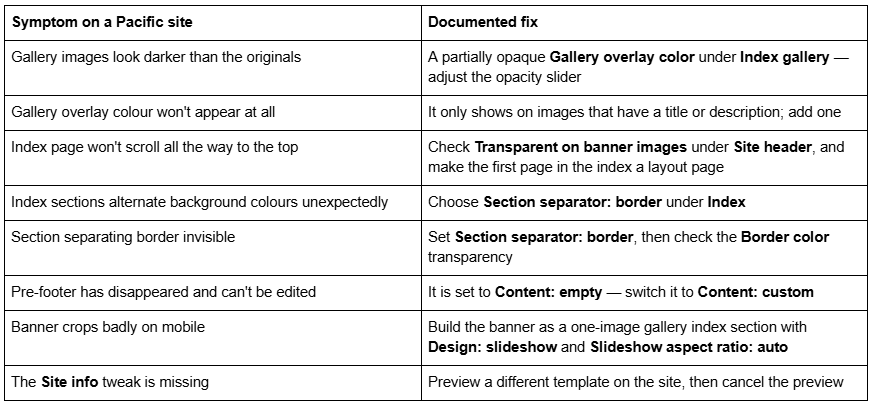
None of these is a fault in your setup. All are Pacific behaving as documented.
Is the Squarespace Pacific template still available?
Pacific, Charlotte, Naomi and Horizon are, on an existing version 7.0 site, via Design → Template → Install new template. Bryler and Fulton are not — both are on Squarespace's discontinued list.
Discontinued does not mean dead. Squarespace's wording: "Your site will stay online, and you can continue to use and edit the template as you've always been able to," and "you can switch to a different template, and switch back to the discontinued template as long as you don't uninstall it." Uninstalling is the irreversible act. Bryler in particular cannot be switched to at all — you can switch away from it, but not back through the template picker.
You cannot start a new site on any Pacific template. The live gallery at squarespace.com/templates returned 198 templates in August 2026, every one of them version 7.1 — we counted them. The old squarespace.com/templates/pacific-demo URL now serves that generic gallery, which is why older "Pacific demo" links land somewhere unrecognisable. Squarespace's demo, pacific-demo.squarespace.com, is still up.
Version 7.0 has no announced end-of-life. Squarespace's migration guide says so plainly: "Updating your site from version 7.0 to 7.1 is optional." Whether old Squarespace templates are still supported covers the support position in full.
Moving a Squarespace Pacific site to version 7.1
The tool is at Design → Update to Version 7.1. Before you touch it:
If you are on Bryler or Fulton, you cannot start. Squarespace's first preparation step is explicit: "Ensure your site isn't using a discontinued 7.0 template. If your template is discontinued, switch to another template before starting the update." Switch to Pacific, rebuild whatever the switch disturbs, then run the tool.
It is permanent. "After you click Publish update, your site will update to version 7.1 permanently."
It caps at 150 pages and errors above 200 products on a store page.
Developer mode must be off, and Developer Platform code disappears when you disable it.
Custom CSS survives commented out. Remove the comment tags in the CSS editor and save. Selectors written against Pacific class names will mostly not match 7.1 markup.
What happens to the parts a Pacific site is built from:
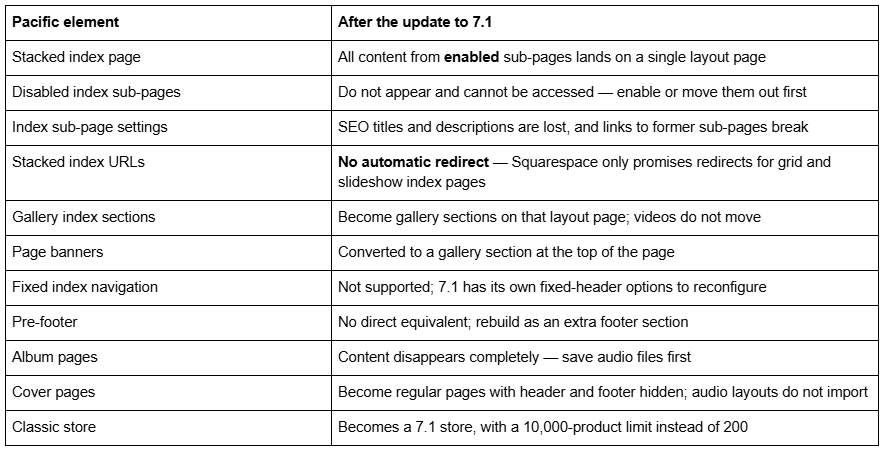
The stacked index is the part to think hardest about. Squarespace's redirect promise covers grid and slideshow index pages; Pacific's index is stacked, so the old sub-page URLs simply stop working. On a Pacific site where each index section was a real page with its own SEO title, that is your entire on-page SEO for the homepage disappearing at once.
Audit before you press the button. Export every index sub-page's URL, SEO title and description to a spreadsheet. Enable every disabled sub-page or move it out. Count pages and products. Export the Custom CSS. Screenshot the Index, Index overlay, Index gallery and Site header tweaks.
And the expensive one: changing a page slug on Squarespace creates no automatic 301 redirect, ever. On a Pacific migration you will be writing redirects by hand; plan for it rather than discovering it.
The screen-by-screen version is in the Squarespace 7.0 to 7.1 guide, and the Squarespace 7.0 template comparison chart shows how Pacific's feature set compares with the other 21 families. The Squarespace Brine template guide works through the same decision for the largest 7.0 family.
So: stay on Pacific, or move?
Stay if the Pacific site does its job and nothing on your list requires 7.1. It is not a liability, and a scrolling full-bleed index still looks current.
Restyle if the objection is aesthetic. Fonts, colours, overlay opacities, section padding and gallery layouts are all site styles values. Switching to Charlotte, Naomi or Horizon will not change a single feature.
Move if you need Fluid Engine, courses, video pages, a store past 200 products per page, or a mobile layout you can edit independently — the capped mobile heading sizes alone push a lot of Pacific sites over the line. Move deliberately, not just by pressing the button, if your index is deep and each section carries its own SEO metadata.
For scale: across 54 Squareko-built client sites measured in August 2026 (Playwright/Chromium lab test, cloud datacenter, unthrottled, single run per site), 53 of 54 run Squarespace 7.1. Version 7.0 is the minority case now, but a working Pacific site is not an emergency.
Most Pacific sites we are sent survive the tool and then need their homepage rebuilt properly, because a flattened stacked index is rarely the page anyone wanted. Where the index is deep, the Custom CSS is years old, or you are starting from Bryler or Fulton and would have to switch templates first anyway, beginning again from a premium Squarespace template built for 7.1 and Fluid Engine is usually the shorter path. The table at the top of this page settles it for most people without spending anything.
FAQ
-
Squarespace's family guide names five — Bryler, Charlotte, Horizon, Naomi and Pacific. Its discontinued-templates guide adds a sixth, Fulton, listed as Pacific family and retired in March 2021. Treat the family as six, with Bryler and Fulton discontinued and the other four still installable.
-
Squarespace's discontinued-templates guide says yes and dates its retirement to March 2021, but the Pacific family guide does not list it. The two guides disagree. We could not verify Fulton's template ID independently because fulton-demo.squarespace.com returns HTTP 401 and is no longer publicly served.
-
Functionally, yes. Horizon is a Pacific family member reporting the same template ID, 52e96934e4b0ea14d0f64568, and running identical code. Only default fonts, colours and demo content differ. One real distinction: Charlotte, Naomi and Pacific support non-English site languages and Horizon does not.
-
A partially opaque overlay. Open site styles, go to Index gallery, and adjust the Gallery overlay color tweak with its opacity slider. The overlay only shows on images that have a title or description, which is why it can look like it affects some images and not others.
-
Not directly. Squarespace requires you to switch off a discontinued template before starting: switch to Pacific, Charlotte, Naomi or Horizon first, then run Design → Update to Version 7.1. Do not uninstall the discontinued template — uninstalling is permanent, and Bryler cannot be switched back to.
-
All content from enabled sub-pages lands on a single layout page. Disabled sub-pages disappear entirely. Sub-page SEO titles and descriptions are lost, and Squarespace's automatic redirect only covers grid and slideshow index pages, not stacked ones — so those URLs stop working.

Author Bio
I'm Walid Hasan, a Certified Squarespace Expert and Squarespace Circle Platinum Partner with over 12 years of hands-on experience designing and optimizing high-performing websites. Over the years, I've had the privilege of building more than 2,000 Squarespace websites for clients around the world, always focusing on clean design, strong user experience, and conversion-driven results.
