
Squarespace Avenue Template: Index, Limits and the 7.1 Path
Avenue is a Squarespace version 7.0 portfolio template, it is the only member of its own family, and it can be moved to 7.1 with Squarespace's update tool. That last point contradicts the most widely read review of Avenue online, so it is worth stating first: Avenue is not discontinued, not excluded from the tool, and Squarespace links the tool from Avenue's own help page. What it lacks is Fluid Engine, and that is the real argument for moving.
Should you stay on Avenue, restyle it, or move to 7.1?
The Squarespace Avenue template is a family of one
Version 7.0 organises its 121 templates into 22 families that share code, features and a template ID. Avenue is one of those 22, and Avenue is its only member.
We confirmed it directly in August 2026: avenue-demo.squarespace.com reports "templateVersion":"7" and template ID 4fd11f32c4aad9b01c9e624c, an ID no other template returns.
Two practical consequences:
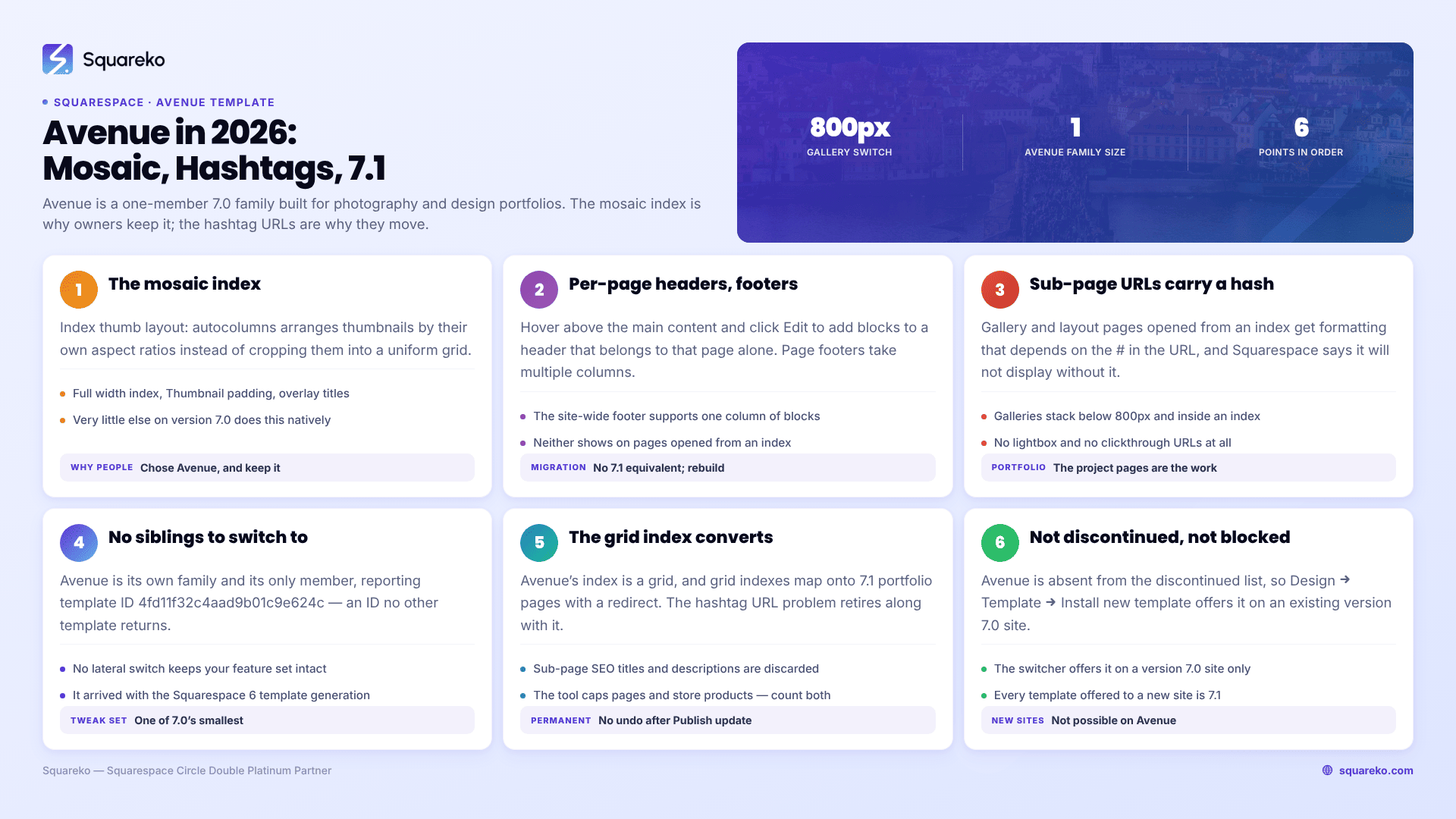
There is no lateral move. On Brine you can install any of 46 siblings and keep every feature; on York, any of eight. On Avenue, every switch is a switch to a different feature set — different index behaviour, different gallery type, different sidebar rules, and your Custom CSS blank in the new template's editor. The list of Squarespace 7.0 templates shows what the alternatives actually are.
Search results are thin because the family is small. Family-level searching is what makes Brine tutorials easy to find; with Avenue you are searching for one template.
Avenue also sits outside Squarespace's non-English template list — only the Montauk, Pacific, Bedford, Brine and York families support other site languages — so a non-English site cannot switch to Avenue without setting its site language to English first.
Avenue is also one of the oldest templates still installable. It arrived with the Squarespace 6 template generation, well before version 7.0 existed, and it shows in the size of its tweak set.
What the Squarespace Avenue template does well
Squarespace's description is a fair summary of the intent: "Avenue's adaptive grid-based index is a great way to organize multiple galleries or projects, and is particularly well-suited for photography and design portfolios. Use its customizable headers and footers to add page-specific content to every page."
The mosaic index. This is the reason people chose Avenue and still the reason to keep it. Set Index thumb layout: autocolumns under Index styles and thumbnails arrange themselves by their original aspect ratios into a mosaic, rather than being cropped into a uniform grid. Very little else on version 7.0 does that natively.
Index controls that are genuinely useful. Full width index takes the grid to the site width; Thumbnail padding at 0% makes thumbnails touch; Index thumb title position: overlay puts the navigation title over the thumbnail on hover instead of beneath it; Index item layout places gallery titles and descriptions to the right, left, centred or auto.
Per-page headers and footers. Hover above the main content and click Edit to add blocks to a page header that belongs to that page only. Page footers do the same at the bottom and support multiple columns of blocks — the site-wide footer supports one.
Slideshow galleries with deeplinks. Avenue gallery pages are slideshows, styled with Gallery page controls and Gallery play speed under Gallery styles. Squarespace notes you can "customize deeplink URLs to send visitors directly to any image in a gallery" — uncommon in version 7.0.
A blog sidebar. Position it with Blog sidebar under Blog styles and size it with Sidebar width; Blog sidebar: hidden removes it.
Light pages. Avenue's markup is old and small. That is its one accidental modern virtue.
What breaks or feels dated on an Avenue site in 2026
No Fluid Engine. Version 7.0 editing is the classic block editor — a 12-column grid, no overlapping elements without CSS, no drag-anywhere canvas. Fluid Engine is 7.1-only and is not coming to Avenue.
Index sub-pages have hashtag URLs. Gallery and layout pages opened from an Avenue index get special formatting, and Squarespace is explicit that "the URL includes a hashtag (#)" and "the special formatting doesn't display if the URL doesn't include the #." Share the clean URL and a visitor sees an unstyled page; share the hash URL and you are asking a search engine to treat a fragment as a page. On a portfolio site, where the project pages are the content, that is a real cost.
Galleries change shape without warning. Squarespace documents both directions: an Avenue gallery displays stacked "when opened from an index page" and "on browsers narrower than 800 pixels, such as mobile devices", and image titles and descriptions only display on galleries opened from an index. Two visitors on two devices can see two genuinely different layouts of the same gallery.
No lightbox and no clickthrough URLs. Squarespace states Avenue galleries "don't support clickthrough URLs or a lightbox." A grid whose images cannot be clicked through to a case study is a limitation people notice quickly.
One of the smallest tweak sets in version 7.0. There is no header call-to-action button, no fixed navigation, no transparent header option, and the header's mobile padding is "built in, which isn't affected by the Header padding tweak."
Mobile is one inherited layout. Navigation collapses to a Menu link, index pages drop to two thumbnails per row, and that is the extent of your control. Squarespace 7.1 with Fluid Engine keeps a separately editable mobile layout per section at a 767px breakpoint.
Avenue behaviour Squarespace documents and is not going to change
Squarespace maintains a Troubleshooting Avenue section, prefaced with its actual position on version 7.0: "Although we still support Squarespace version 7.0, fixing bugs or issues is a lower priority for us while we focus on our current platform, version 7.1."
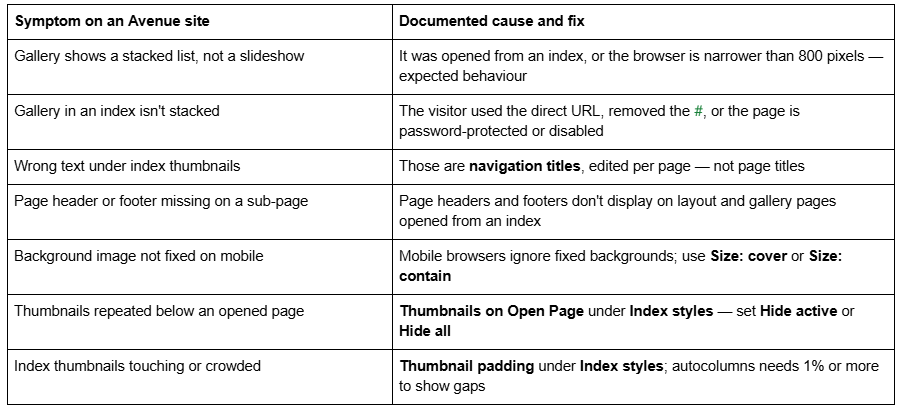
None of these is a fault in your setup. All are Avenue behaving as documented.
Is the Squarespace Avenue template still available?
Yes, on an existing version 7.0 site, via Design → Template → Install new template. Avenue does not appear on Squarespace's discontinued list.
You cannot start a new site on Avenue. The live gallery at squarespace.com/templates returned 198 templates in August 2026, every one of them version 7.1 — we counted them. The old squarespace.com/templates/avenue-demo URL now serves that generic gallery, which is why older "Avenue demo" links land somewhere unrecognisable. Squarespace's demo, avenue-demo.squarespace.com, is still up.
And yes, an Avenue site can use the version update tool. This is worth being blunt about, because the most-linked Avenue review on the web says otherwise. The update tool refuses to run on a discontinued template, and Avenue is not discontinued. Squarespace's own Avenue guide carries the standard line and the link: "You can move your version 7.0 site to version 7.1 using our update tool."
Version 7.0 has no announced end-of-life, and Squarespace states the move is optional: "Updating your site from version 7.0 to 7.1 is optional." One rule worth knowing even though Avenue is not affected: uninstalling a discontinued template is permanent. Encore, Lincoln, Bryler and Taylor cannot be switched to at all, though you can switch away from them. Whether old Squarespace templates are still supported covers the support position in full.
Moving a Squarespace Avenue site to version 7.1
The tool is at Design → Update to Version 7.1. Before you touch it:
It is permanent. Squarespace: "After you click Publish update, your site will update to version 7.1 permanently."
It caps at 150 pages and errors above 200 products on a store page.
Developer mode must be off, and Developer Platform code disappears when you disable it.
Custom CSS survives commented out. Remove the comment tags in the CSS editor and save. Selectors written against Avenue class names will mostly not match 7.1 markup.
What happens to the parts an Avenue site is built from:
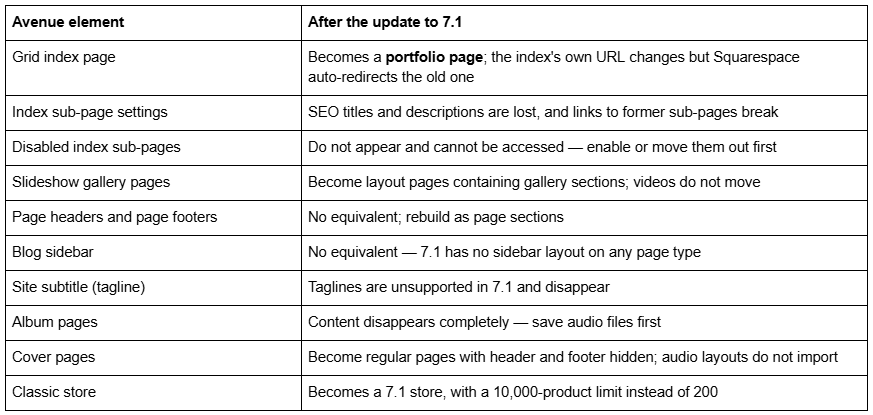
Avenue converts better than most. Its index is a grid, and grid indexes are the type Squarespace maps onto 7.1 portfolio pages and carries a redirect for — which also retires the hashtag URL problem permanently. What it does not carry is the settings on every sub-page inside that index.
Audit before you press the button. Export every index sub-page's navigation title, SEO title and description to a spreadsheet — that is the data the tool discards. Enable every disabled sub-page or move it out. Note which pages carry per-page headers and footers, because those become rebuild work. Count pages and products, export the Custom CSS, and screenshot the Index styles, Gallery styles and Options tweaks.
And the expensive one: changing a page slug on Squarespace creates no automatic 301 redirect, ever. The index page itself is redirected for you; nothing else is.
The screen-by-screen version is in the Squarespace 7.0 to 7.1 guide, and the Squarespace 7.0 template comparison chart shows how Avenue's feature set compares with the other 21 families. The Squarespace Brine template guide works through the same decision for the largest 7.0 family.
So: stay on Avenue, or move?
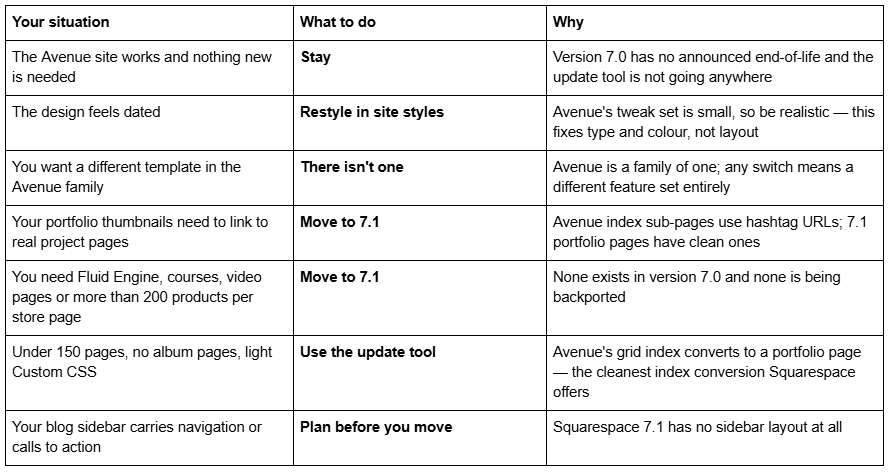
Stay if the Avenue site does its job and nothing on your list requires 7.1. It is not a liability, and a mosaic index still reads as a deliberate design choice rather than an old one.
Restyle only with realistic expectations. Avenue has one of the smallest tweak sets in version 7.0, so site styles will fix your type and colours and will not fix your layout. If the layout is the complaint, restyling is not the answer.
Move if you need Fluid Engine, clean project-page URLs instead of hashtags, clickable portfolio thumbnails, courses or video pages, a store past 200 products per page, or an independently editable mobile layout. Avenue is one of the more forgiving templates to migrate, and the hashtag URL problem disappears with it.
For scale: across 54 Squareko-built client sites measured in August 2026 (Playwright/Chromium lab test, cloud datacenter, unthrottled, single run per site), 53 of 54 run Squarespace 7.1. Version 7.0 is the minority case now, but a working Avenue site is not an emergency.
Most Avenue sites we are sent come through the update tool intact and then need a fortnight of tidying — re-entering sub-page SEO data, rebuilding per-page headers as sections, replacing the blog sidebar. The exception is the Avenue portfolio whose whole structure is one deep index with years of Custom CSS on top: there, rebuilding from a premium Squarespace template built for 7.1 and Fluid Engine is usually the shorter path. The table at the top of this page settles it for most people without spending anything.
FAQ
-
Its own. Avenue is one of version 7.0's 22 template families and its only member, reporting template ID 4fd11f32c4aad9b01c9e624c. There are no sibling templates, so unlike Brine or York there is no lateral switch that keeps your features and changes only the styling.
-
Yes. Avenue is not discontinued, so Design → Update to Version 7.1 works on an Avenue site. Some reviews claim Avenue has no upgrade path; that is incorrect. The tool refuses only on discontinued templates, and Squarespace links it from Avenue's own help guide.
-
Two documented causes. Avenue galleries display stacked when opened from an index page, and on browsers narrower than 800 pixels, including most phones. Both are expected behaviour rather than faults. Image titles and descriptions only display on galleries opened from an index.
-
Those are navigation titles, not page titles. Edit the navigation title for each page in the Pages panel, and the text below its index thumbnail changes. The page title shown at the top of the page itself is a separate field, so the two can differ deliberately.
-
Avenue gives gallery and layout pages opened from an index special formatting, and that formatting depends on the # in the URL. Squarespace states the special formatting doesn't display if the URL doesn't include it. Moving to 7.1 converts the index to a portfolio page with clean URLs.
-
Yes, on blog landing pages and posts only. Position it with Blog sidebar under Blog styles, size it with Sidebar width, and hide it with Blog sidebar: hidden. Squarespace 7.1 has no sidebar layout on any page type, so it does not survive migration.

Author Bio
I'm Walid Hasan, a Certified Squarespace Expert and Squarespace Circle Platinum Partner with over 12 years of hands-on experience designing and optimizing high-performing websites. Over the years, I've had the privilege of building more than 2,000 Squarespace websites for clients around the world, always focusing on clean design, strong user experience, and conversion-driven results.
