
The Squarespace Flatiron Template: Grid Index, No Banners, Still Installable
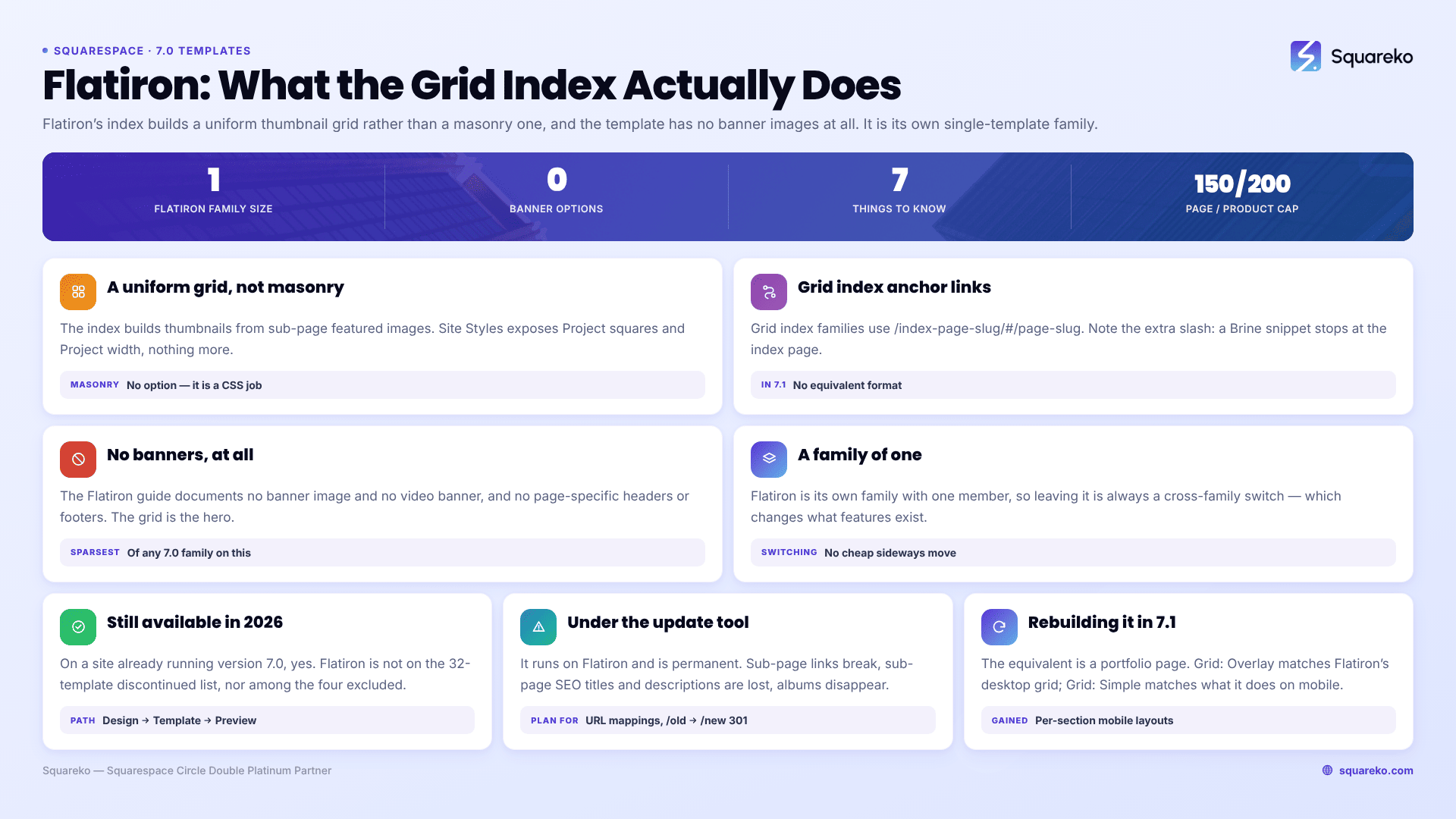
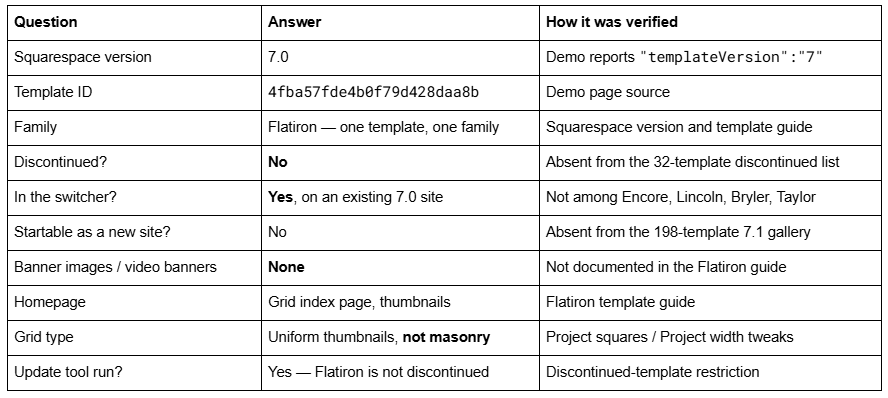
Flatiron is a Squarespace version 7.0 template, it is its own single-template family, and it is still available to install on a site that is already on version 7.0 — verified. Its demo reports "templateVersion":"7" and template ID 4fba57fde4b0f79d428daa8b. Flatiron is absent from Squarespace's list of 32 discontinued version 7.0 templates and is not one of the four templates excluded from the switcher, so it appears in Design → Template → Install new template today.
Two things about Flatiron are routinely described wrongly, and both change how you plan work on it.
Flatiron at a glance
Is the Squarespace Flatiron template still available in 2026?
Yes, on an existing version 7.0 site. This is worth answering carefully because "still available" means three different things and only one of them applies.
Available to install on a 7.0 site: yes. Squarespace publishes a list of discontinued version 7.0 templates — 32 of them, including Bryler, Encore, Fulton, Jones, Lincoln, Marquee and Taylor. Flatiron is not on it. Squarespace also names exactly four templates that cannot be switched to: Encore (Aviator family), Lincoln (Brine), Bryler (Pacific) and Taylor (York). Flatiron is not among those either. So the switcher offers it: Design → Template, hover the template, click Preview, then Set as live template and Confirm.
Available to start a new site on: no. The gallery at squarespace.com/templates now returns 198 templates and every one is version 7.1. Flatiron is not there, and it cannot be. The old per-template demo URL under squarespace.com/templates/ serves that generic gallery rather than a Flatiron page — several competitor pages still link the dead form. The working demo is the subdomain, flatiron-demo.squarespace.com.
Supported: yes, with a caveat you should read plainly. There is no announced end-of-life for Squarespace 7.0. Squarespace 5, released in 2008, is still online and supported. What Squarespace does say is that "fixing bugs or issues is a lower priority for us while we focus on our current platform, version 7.1." That is a real signal, not a shutdown notice. The longer answer is in are old Squarespace templates still supported?
One consequence worth stating: because Flatiron is not discontinued, the version update tool will run on it. Owners of the 32 discontinued templates have to switch to a supported sibling first. Flatiron owners do not.
Which family the Squarespace Flatiron template belongs to — verified
Flatiron is its own family with one member. Fetching flatiron-demo.squarespace.com returns:
"templateVersion":"7"
"templateId":"4fba57fde4b0f79d428daa8b"
A version 7.0 site reports "templateVersion":"7" — a bare 7, never "7.0". And in 7.0, the template ID identifies the family, not the template; for a family of one those are the same thing, which is why this ID is unique to Flatiron.
The practical effect of being in a family of one is that there is no cheap switch. Within the Brine family you can move between 45 templates and keep every feature, because siblings share a codebase. Leaving Flatiron is always a cross-family switch, and cross-family switches change which structural features exist at all. Squarespace is explicit that you cannot mix and match features from more than one template. What that costs, feature by feature, is laid out in how to change a Squarespace template.
Flatiron has no banner images and no video banners
This is the first of the two commonly-stated errors, and it is the one that wastes the most time.
Squarespace's Flatiron guide documents the index thumbnail grid, the header, the footer, the gallery styles and the mobile behaviour. It documents no banner image feature and no video banner feature. Flatiron's site-layout profile is the sparsest of any 7.0 family on this axis: no page banner images, no video banners, no page-specific headers and no page-specific footers.
So if you are looking for the setting that puts a full-width hero image behind the title on an interior page, it is not hidden — it does not exist in Flatiron. What Flatiron gives you instead is the grid index as the hero: a wall of thumbnails is the first thing a visitor sees, and interior pages open clean.
Two related behaviours people mistake for banner controls:
The header position tweak. Under Site header, the Header position tweak decides whether the header is fixed at the top or scrolls with the page. Fixed is Flatiron's default and is what most descriptions mean by "fixed header". Squarespace notes a specific conflict: with an announcement bar enabled and a tall logo, the header overlaps project thumbnails.
The autohide footer. With autohide enabled, "the footer appears when visitors hover over the bottom of the browser." With it disabled, the footer is fixed and page content appears to scroll up from underneath it. That is the "pop-up footer" other pages describe, and it is a genuine Flatiron characteristic.
The Flatiron grid is a uniform thumbnail grid, not masonry
This is the second common error. Flatiron's index page "creates thumbnail grids that visitors can use to explore your content", built from the featured images of its sub-pages. It is a regular grid — tiles of a consistent shape — controlled by Site Styles tweaks under Gallery styles:
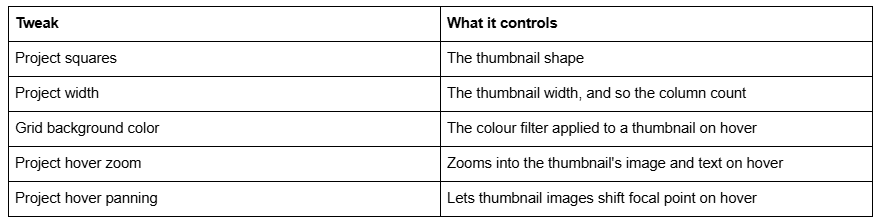
There is no masonry option and no per-thumbnail size control. That is exactly why the Squarespace Forum has recurring Flatiron threads asking for alternate or random thumbnail sizes, for column control, for smaller index thumbnails and for extra padding between grid items — all of which are CSS jobs, because the template exposes a width and a shape and nothing else. If you want an aspect-ratio-driven staggered mosaic in version 7.0, that is Wexley's gallery page behaviour, not Flatiron's index.
On mobile, Flatiron's navigation collapses to a Menu link in the top centre, dropdowns expand when tapped, footers centre, and index page titles move to the bottom of each thumbnail rather than appearing on hover.
Anchor links on a Flatiron grid index
Flatiron's index page is required — the template is built around it — and it accepts album, blog, gallery, events, product and layout sub-pages.
Because it is a grid index rather than a stacked one, its anchor link format differs from the Brine and Bedford style most tutorials show. Squarespace documents grid index families — Avenue, Flatiron and Montauk — as using:
/index-page-slug/#/page-slug
Note the extra slash after the hash. Stacked index families use /index-slug/#section-slug instead, and Pacific needs a -section suffix on top of that. Copying a Brine anchor snippet onto Flatiron gets you a link that resolves to the index page and stops there.
None of these formats exist in Squarespace 7.1, where anchors are a per-section field. That difference, and how to rebuild a one-page scroll on the new engine, is covered in Squarespace 7.0 to 7.1.
What happens to Flatiron under the 7.0 → 7.1 update tool
The tool is at Design → Update to Version 7.1 → Get Started, and it lets you preview before committing. It is permanent, capped at 150 pages and 200 products, and it will run on Flatiron because Flatiron is not discontinued. Note that album, cover, gallery, index and info pages all count toward that 150-page limit — on a grid-heavy Flatiron portfolio, the count adds up faster than you expect.
The Flatiron-specific outcomes:
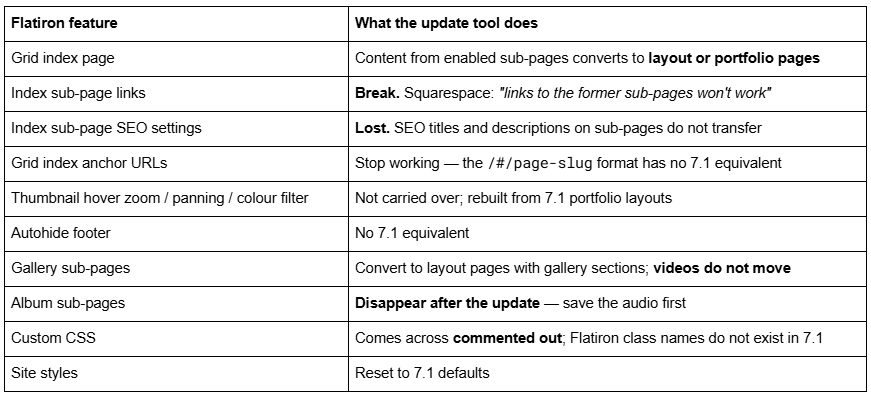
Everything else survives: pages, blocks, blog posts, gallery images, products, events, ordinary page settings, code injection, domains, URL mappings, orders and customer data.
The item to plan for is the sub-page SEO loss. On a Flatiron portfolio with thirty projects, that is thirty SEO titles and descriptions to re-enter, and thirty URLs that stop resolving. Slug changes create no automatic 301, ever — record the old paths first, then add URL Mappings in the form /old -> /new 301 immediately after the update. Export the list before you press the button, not after.
Rebuilding the Flatiron grid in Squarespace 7.1
The 7.1 equivalent of a Flatiron index is a portfolio page. Add one at Pages panel → + → Portfolio, then choose a layout. Projects inside it behave like blog posts inside a blog page: individual collection items with their own pages.
Squarespace 7.1 offers five portfolio layouts:
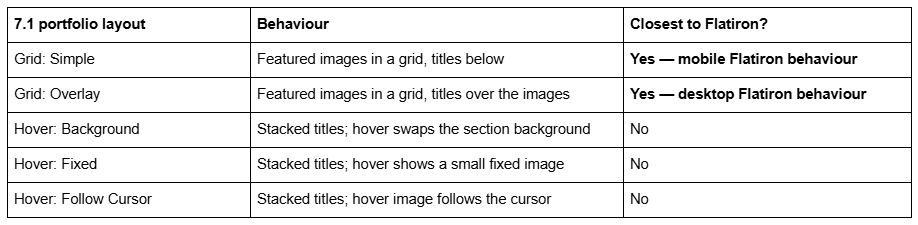
Grid: Overlay is the closest match to Flatiron's desktop grid, where titles sit over the thumbnails. Grid: Simple matches what Flatiron does on mobile, with titles beneath.
What you gain is significant: portfolio pages can sit alongside other sections on the same page, Fluid Engine gives every section a separate mobile layout, and project pages are proper collection items with their own SEO fields — which is exactly what index sub-pages stopped being when they were converted. What you lose is Flatiron's hover panning and its autohide footer, both of which need custom CSS if you want them back.
For context on how much of a legacy layout usually survives a rebuild like this, rebuilding a legacy layout in 7.1 works through the same reasoning on a much larger family.
Where this leaves you
Flatiron is available, supported and installable on any site already running version 7.0. Nothing is forcing you off it, and if your grid works and your traffic is steady, staying is a defensible decision rather than a delayed one.
The reasons to move are the ones Flatiron cannot fix: no banners, a grid you can only shape with CSS, no per-section mobile layout, and interior pages with nowhere to put a hero. Squarespace 7.1 answers all four.
The part that is genuinely hard is the sub-page SEO and URL loss on a large grid index — thirty projects means thirty redirects to write and thirty sets of metadata to re-enter, and Squarespace will not do any of it for you. That is the situation our premium Squarespace templates and migration work are built for. A ten-project Flatiron site is a weekend on your own, and The Squarespace Brine template guide covers the wider legacy picture if you want the context before you decide.
FAQ
-
Yes, on a site already running version 7.0. Flatiron is absent from Squarespace's 32-template discontinued list and is not one of the four templates excluded from the switcher — Encore, Lincoln, Bryler and Taylor. Install it at Design → Template → Install new template. You cannot start a new site on Flatiron.
-
Flatiron is its own family with one member. Its demo reports template ID 4fba57fde4b0f79d428daa8b and "templateVersion":"7". Because it has no siblings, every switch away from Flatiron is a cross-family switch, which changes which structural features your site has.
-
No. Squarespace's Flatiron guide documents no page banner images and no video banners, and Flatiron also has no page-specific headers or footers. The grid index page acts as the visual hero instead. The "fixed header" people describe is the Header position tweak under Site header.
-
No. Flatiron's index is a uniform thumbnail grid, shaped by the Project squares and Project width tweaks under Gallery styles, with hover zoom, hover panning and a hover colour filter. There is no masonry option and no per-thumbnail sizing. Aspect-ratio-driven mosaics in 7.0 are a Wexley gallery behaviour.
-
Flatiron is a grid index family, so its anchor format is /index-page-slug/#/page-slug — with a slash after the hash. Stacked index families such as Brine and Bedford use /index-slug/#section-slug instead. Neither format exists in Squarespace 7.1, which uses per-section anchor slugs.
-
Sub-page content converts to layout or portfolio pages. Links to former sub-pages stop working and sub-page SEO titles and descriptions do not transfer. Record the old URLs first and add URL Mappings after the update, because a slug change never creates an automatic 301.

Author Bio
I'm Walid Hasan, a Certified Squarespace Expert and Squarespace Circle Platinum Partner with over 12 years of hands-on experience designing and optimizing high-performing websites. Over the years, I've had the privilege of building more than 2,000 Squarespace websites for clients around the world, always focusing on clean design, strong user experience, and conversion-driven results.
