
Classic Editor or Fluid Engine: Which Is Better for Your Site?
The short answer: For most sites, Fluid Engine — but not for every section, and not because it is objectively better. Fluid Engine wins where layout is doing real work and someone will maintain it. The Squarespace 7.1 classic editor wins where the content is long-form, the person editing it isn't a designer, or the section needs to be predictable more than it needs to be interesting.
This post is about the decision, not the differences. If you want the feature-by-feature comparison — grid behaviour, which blocks exist where, what each editor can and can't do — that's set out in Fluid Engine vs the classic editor. What follows assumes you already know what they do and want to know which to pick.
The decision matrix
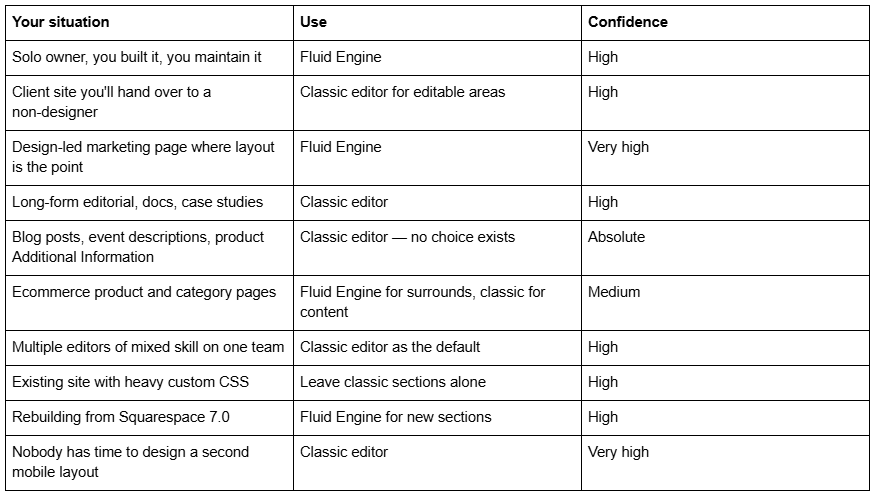
The last row is the one that decides more real projects than any feature. Read on for why.
The three questions that settle it
Before the scenarios, the shortcut. Three questions resolve maybe 80% of cases in under a minute.
1. Will anyone author the mobile layout? Fluid Engine keeps a separate mobile layout per section, and it will not derive one from your desktop work — the default stack follows the order blocks were added, not their visual arrangement. If nobody is going to open mobile view and lay it out deliberately, Fluid Engine will produce a worse phone experience than the classic editor's automatic stack. The classic editor's collapse is dull, but it is never wrong.
2. Who edits this after launch? Fluid Engine gives an editor the power to put a block anywhere, including on top of another block, half off the section, or in a position that only works at one window width. The classic editor's rigidity is a guard rail. If the person maintaining the page is a marketing coordinator rather than a designer, that guard rail is a feature.
3. Is the layout carrying meaning? Overlapping a heading onto an image, offsetting a card, breaking a grid deliberately — that is what Fluid Engine exists for and the classic editor genuinely cannot do it. If your section is a headline, some body copy and a button, Fluid Engine adds effort and returns nothing.
If all three answers point the same way, stop reading and go with them. The scenarios below are for the cases where they don't.
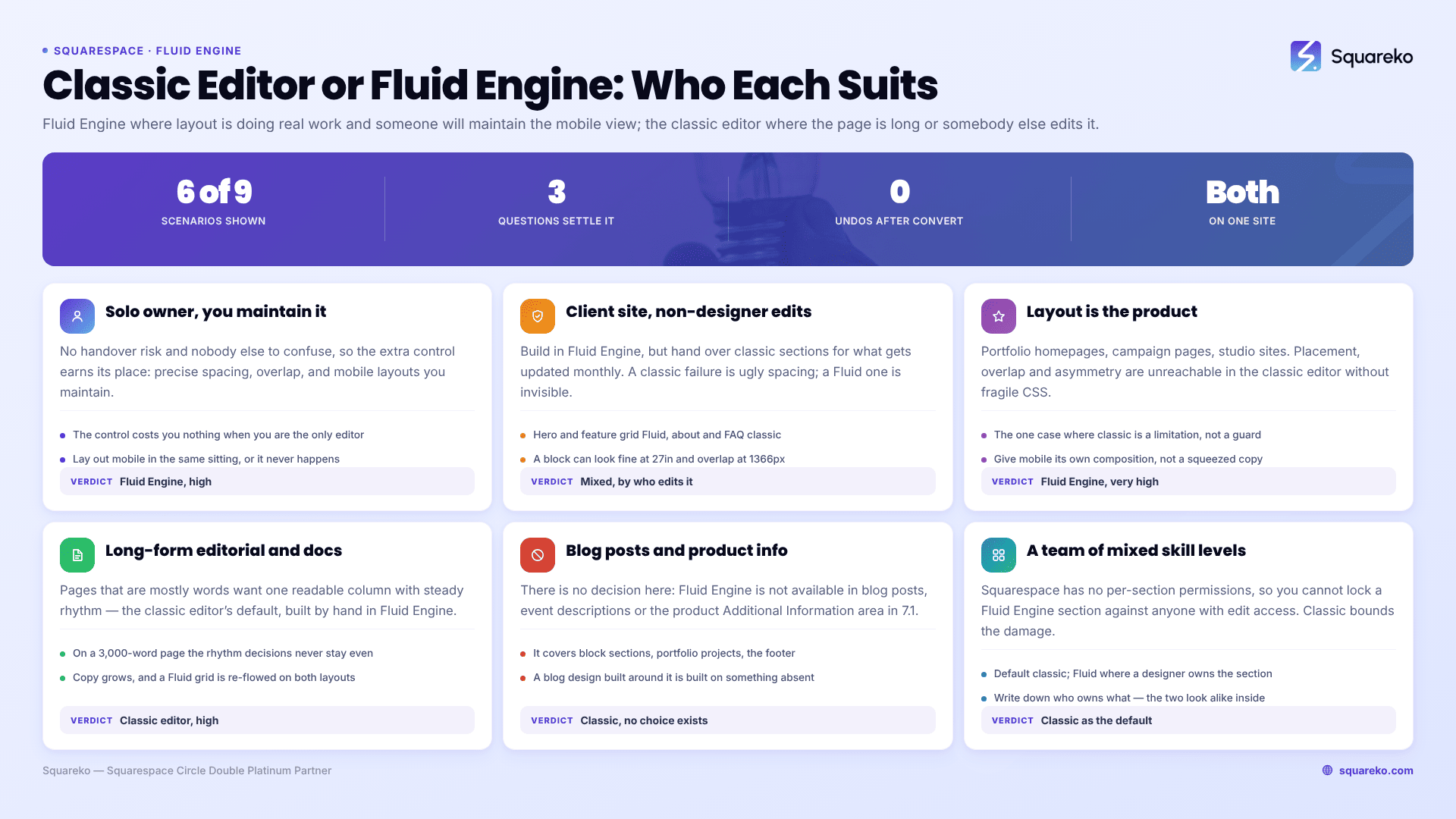
Solo owner who built the site and maintains it
You know where everything is, you are the only person who edits, and you can spare ten minutes per section for mobile.
Verdict: Fluid Engine. The extra control is worth having when there is no handover risk and no one else to confuse. You get precise vertical spacing without spacer-block gymnastics, overlap when you want it, and per-section mobile layouts you will actually maintain because you care about the site.
The realistic caveat is that "I'll do mobile later" becomes "I never did mobile". Build the habit of laying out the mobile view in the same sitting as the desktop one — the switching cost is what kills it, not the work. Our guide to Fluid Engine mobile editing explains why the two layouts stay out of sync unless you do this.
Client site you're handing to a non-designer
This is where the honest recommendation diverges most from the popular one.
Verdict: build in Fluid Engine, but hand over classic editor sections for anything the client will edit regularly. A common and effective pattern on client builds is Fluid Engine for the hero, the feature grid and anything visually load-bearing, and classic sections for the "about us" copy, the FAQ area, the team bios — the parts that get updated monthly.
The reasoning is about failure modes, not capability. When a client breaks a classic section, the worst outcome is ugly spacing. When a client breaks a Fluid Engine section, they can drag a block into a position that looks fine on their 27-inch monitor and overlaps illegibly at 1366px, or they can nudge a block and not realise mobile is now untouched and wrong. Fluid Engine failures are invisible to the person causing them, which is exactly the wrong property in a handover.
If the client insists on Fluid Engine everywhere — and some will, having seen the marketing — the mitigation is a written note in the handover doc: after any change, check mobile view for that section. It is a small ask and it prevents most of the damage.
Design-led marketing page where the layout is the product
Portfolio homepages, campaign landing pages, studio sites, anything where a designer is being judged on the page itself.
Verdict: Fluid Engine, unambiguously. This is the case Fluid Engine was built for and the only case where the classic editor is genuinely a limitation rather than a constraint. Precise placement, deliberate overlap, asymmetry, blocks that break out of a column — none of that is reachable in the classic editor without custom CSS that will be fragile forever.
Give the mobile layout its own design pass rather than treating it as compression of the desktop one. Overlapping compositions almost never survive the drop from a 24-column grid to an 8-column one, and the version that works on a phone is usually a different composition, not a smaller one.
Long-form editorial, documentation and case studies
Pages that are mostly words: methodology write-ups, service explainers, long case studies.
Verdict: classic editor. Long-form content wants a single readable column with consistent rhythm, and that is precisely what the classic editor produces by default and what Fluid Engine makes you construct by hand. On a 3,000-word page, Fluid Engine gives you the power to make a hundred small vertical-rhythm decisions, all of which you will get slightly inconsistent, on both layouts.
There is a maintenance argument too. Editorial content gets edited. Every time the copy grows by two paragraphs in a Fluid Engine section, the grid has to be re-flowed and the mobile layout re-checked. In a classic section, the text just gets longer.
Blog posts, events and product descriptions
Verdict: classic editor — there is no decision to make. Fluid Engine is not available in blog posts, event descriptions or the product Additional Information area in Squarespace 7.1. These remain on the classic editor.
This surprises people who have converted every section on their pages and then can't find the upgrade prompt inside a blog post. It isn't hidden. Fluid Engine applies to block sections on pages, portfolio projects and the site footer, and the editing surfaces above are outside that scope. Planning a blog design that depends on Fluid Engine placement is planning something that does not exist.
Ecommerce sites
Verdict: mixed, and the split is structural. Product detail pages and category pages are largely generated by Squarespace from your product data, so the layout decisions available to you are limited regardless of editor. Product Additional Information is classic-only, as above.
Where Fluid Engine earns its place on a store is everything around the catalogue: the homepage, collection landing pages, lookbook-style sections, promotional pages. Those benefit from precise composition and are usually built once by a designer.
One practical consideration: stores tend to have the most frequently-edited content on a site — seasonal banners, promo sections, changing hero images. Frequently-edited plus Fluid Engine plus nobody checking mobile is the combination that produces broken phone layouts, so if your promo sections change weekly, classic sections there will fail less often.
A team of mixed skill levels editing the same site
Several people with edit access, one of whom is a designer and the rest of whom aren't.
Verdict: classic editor as the default, Fluid Engine as the exception. Squarespace has no per-section permissions, so you cannot lock a Fluid Engine section against the intern. Anything anyone can edit, anyone can drag. The classic editor bounds the damage; Fluid Engine does not.
The pattern that works is to decide the editor per section based on who owns that section, not per site. Sections owned by the designer can be Fluid Engine. Sections that the wider team updates should be classic. Write the ownership down somewhere the team can see, because from inside the editor the two look similar enough that people won't know which they're in until they try to move something.
An existing site with substantial custom CSS
Verdict: leave classic sections classic unless you have a reason. Converting a classic section to Fluid Engine changes the markup around your blocks, and CSS that targeted the old structure — section-level selectors especially — will need rewriting. Fluid Engine also writes its own positioning as inline styles and per-section <style> blocks that beat linked stylesheets, so rules that used to apply cleanly now need !important or don't apply at all. Several of the causes in our guide to custom CSS not working in Squarespace are downstream of exactly this.
The compounding factor is that converting a classic section to Fluid Engine is irreversible. Once the page is saved, there is no revert. On a site with a large stylesheet, "convert everything and fix the CSS after" is a decision you cannot walk back. Convert one section, fix what breaks, decide whether the pattern is worth repeating.
Rebuilding or migrating from Squarespace 7.0
Verdict: Fluid Engine for new sections, classic for anything you're porting as-is. Fluid Engine does not exist on 7.0, so this decision only arises once you are on 7.1. Pages brought across by Squarespace's update tool arrive as classic editor sections, which is the correct starting state — it means nothing is broken, and you can convert selectively.
The temptation after a migration is to convert everything immediately so the site "feels new". Resist it on any page that is working. Convert the pages you were going to redesign anyway; a 7.0 page that already reads well is not improved by moving it onto a grid you then have to lay out twice.
Can you use both on one site?
Yes, and on most real Squarespace 7.1 sites you should. The editor is chosen per section, not per site or per page. A single page can carry a Fluid Engine hero, a classic editor body and a Fluid Engine call-to-action, and there is no penalty for the mix — no performance cost, no styling inconsistency beyond what you introduce yourself.
Treating the choice as a per-section design decision rather than a platform allegiance is the single most useful reframing here. The question is never "should this site use Fluid Engine". It is "does this section need arbitrary placement, and is someone going to maintain its mobile layout". Answer that section by section and you will end up with a sensible mix without ever having to hold an opinion about which editor is better.
What the wrong choice actually costs
Getting this wrong is rarely catastrophic in either direction, but the costs are asymmetric and worth naming. Choosing the classic editor where Fluid Engine belonged costs you a slightly plainer page — recoverable at any time, since converting up is always available. Choosing Fluid Engine where the classic editor belonged costs you an unmaintained mobile layout on a section nobody realises is broken, and the conversion cannot be undone. That asymmetry is the argument for defaulting conservatively and converting deliberately.
If you have inherited a 7.1 site that was converted wholesale to Fluid Engine and now behaves unpredictably on phones — or a stylesheet that stopped working after a batch conversion — untangling which sections should go back to being simple is a specific and fairly common piece of remedial work. That's the sort of job our Squarespace website support plans take on. Most sites don't need it; the section-by-section rule above prevents the situation in the first place.
FAQ
-
Decide per section, not per site. Use Fluid Engine where layout carries meaning and someone will author the separate mobile layout. Use the classic editor for long-form copy, sections edited often by non-designers, and anywhere a predictable automatic mobile stack matters more than precise placement.
-
Not usually. Fluid Engine gives beginners enough freedom to create layouts that break at window widths they never test, and it requires authoring a second mobile layout per section. The classic editor's automatic stacking is less interesting and much harder to get wrong.
-
Yes. The editor is chosen per section, so one page can contain both. There is no performance or styling penalty for mixing them. Most well-built Squarespace 7.1 sites do exactly this rather than committing to one editor everywhere.
-
No. Conversion is irreversible once the page is saved, it can break custom CSS that targeted the old markup, and each converted section needs its mobile layout authored from scratch. Convert sections you were going to redesign anyway, and leave working sections alone.
-
There is no choice. Blog posts, event descriptions and product Additional Information stay on the classic editor in Squarespace 7.1. Fluid Engine is limited to block sections on pages, portfolio projects and the site footer.
-
No. Classic editor sections continue to work on 7.1 and can be created and edited normally. Squarespace has signalled that Fluid Engine is the direction of travel for block sections, but there is no forced migration and no deadline currently in effect.

Author Bio
I'm Walid Hasan, a Certified Squarespace Expert and Squarespace Circle Platinum Partner with over 12 years of hands-on experience designing and optimizing high-performing websites. Over the years, I've had the privilege of building more than 2,000 Squarespace websites for clients around the world, always focusing on clean design, strong user experience, and conversion-driven results.
