
Does Squarespace Back Up Your Site?
Squarespace runs geographically separated data centres and tested disaster recovery plans, so its own infrastructure is resilient. But there is no restore point for your site, no version history, and no support process that rolls your site back to how it looked last week. Squarespace's redundancy protects Squarespace. It does not protect you from your own edits.
That distinction is the whole answer, and it is where most site owners go wrong. "Squarespace is fully managed hosting" is true, and people reasonably extrapolate from it to "so my site is backed up". The two things are unrelated.
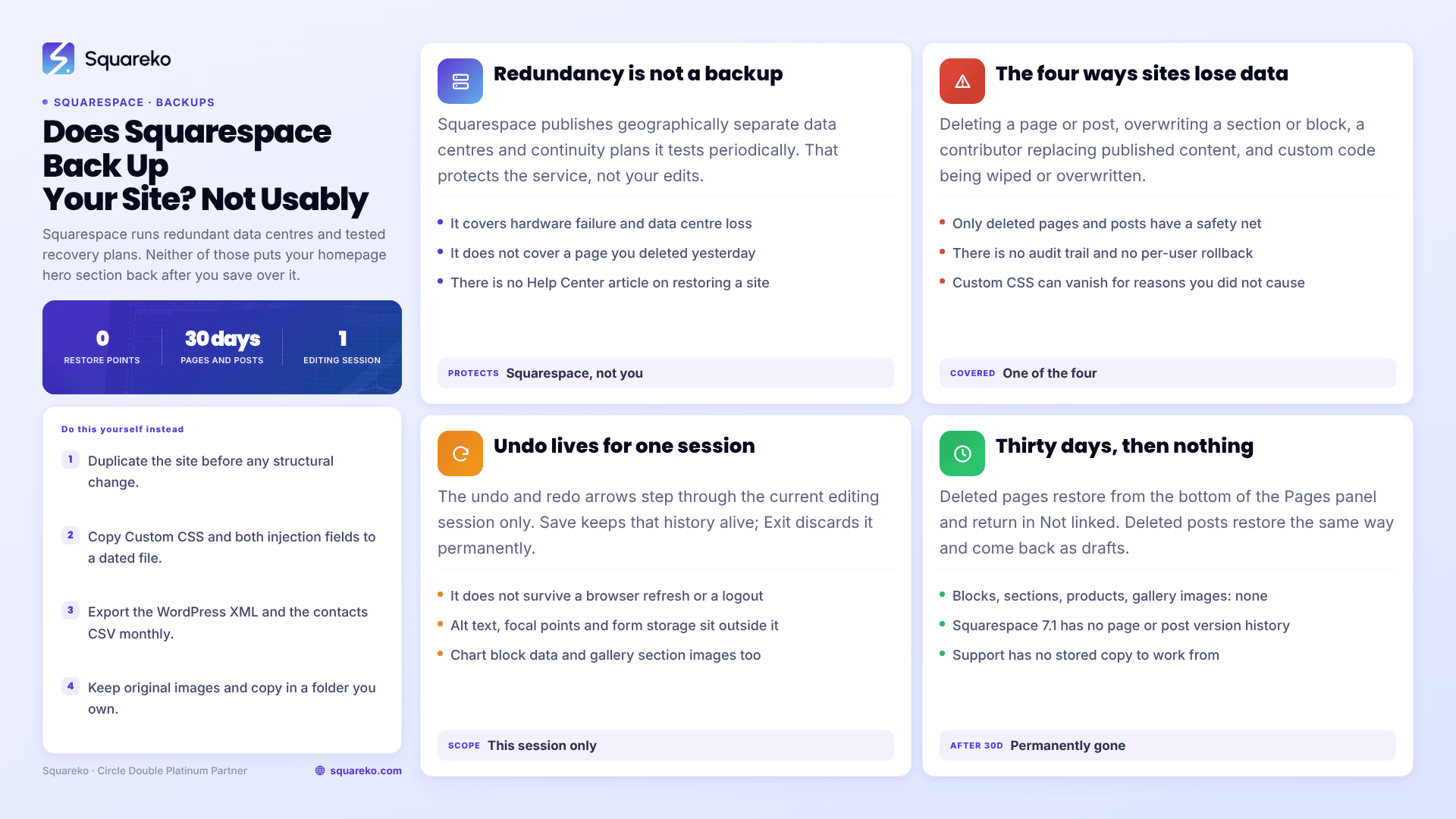
Infrastructure redundancy versus a restore point
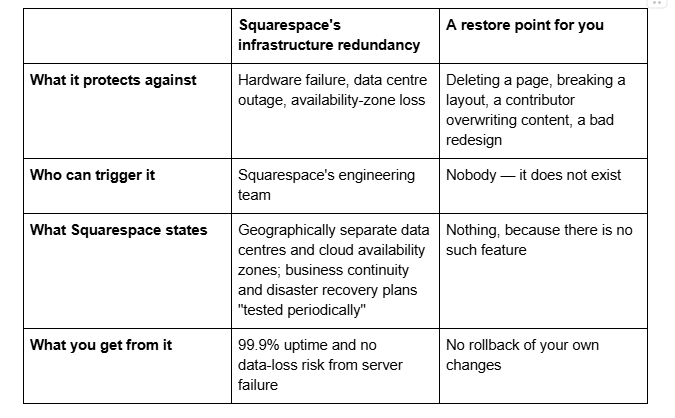
Squarespace's published security measures describe the redundancy in operational terms — availability and continuity of the service — not as a customer-facing recovery product. There is no article in the Squarespace Help Center called "restoring your site", because there is no mechanism to document.
The practical test is simple. If you deleted your homepage's hero section yesterday and saved, there is nothing in your account, and nothing available to Squarespace support, that puts it back.
The failure modes Squarespace redundancy does not cover
Almost every real Squarespace data loss falls into one of four categories, and none of them is a hosting event.
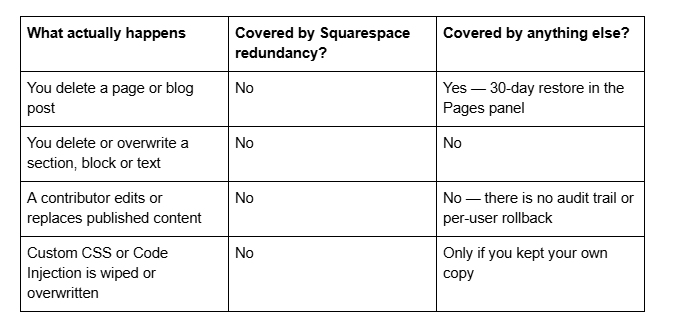
Only the first row has a safety net, and it is a short one. Everything else depends entirely on whether a copy existed before the change.
The custom-code row catches people out most often, because CSS can vanish for reasons that have nothing to do with deleting it — Custom CSS disappearing after a template change is its own failure mode, and the only route back is a copy you kept yourself.
That is also why "is Squarespace hosting reliable?" and "am I protected?" are unrelated questions. The hosting can be flawless — and on this platform it generally is — while your content remains one careless save away from being unrecoverable.
What recovery does exist in Squarespace 7.1
Three things, and they are narrower than most people expect.
1. Undo and redo, within one editing session. The undo and redo arrows in the top-left of the Squarespace 7.1 page editor step backwards and forwards through your changes, and ⌘ + Z / Ctrl + Z does the same. Clicking Save keeps the history alive so you can carry on undoing. Clicking Exit ends the editing session and discards the history permanently. It does not survive a browser refresh or a logout, and several kinds of edit are outside it altogether — chart block data, form block content and storage settings, image alt text and focal points, gallery section images, linked social accounts and newsletter block storage are all unaffected by undo.
2. Deleted pages and blog posts, for 30 days. Squarespace keeps deleted pages and blog posts recoverable for 30 days. In the Pages panel, scroll to the bottom to Deleted Pages, hover the item and click Restore; it returns in the Not linked section. For blog posts, open the blog page in the Pages panel and look for Deleted Posts at the bottom — restored posts come back as drafts and have to be republished. After 30 days they are permanently gone.
3. Nothing else. Blocks and sections cannot be recovered once the editor closes. Neither can text deleted inside an editor, code removed from a code block or the Custom CSS panel, products, events, portfolio items, gallery images, album tracks, or a deleted Member Site. There is no page-level version history in Squarespace 7.1, no "previous versions" list, and no per-change audit trail.
Does Squarespace have version history?
No. Squarespace 7.1 has no version history for pages, posts or style settings. Undo/redo is a session-scoped editing feature, not an archive, and Squarespace's own documentation on undo makes no mention of stored previous versions because none are kept.
This is the single most common misunderstanding we see when someone inherits a site. WordPress keeps post revisions by default, Google Docs keeps every version, and people assume a hosted platform of Squarespace's maturity does the same. It does not. Once an editing session ends, the previous state of a page exists nowhere.
There is also no per-contributor change log. Squarespace records who has access to a site through the Permissions panel, but not who changed what, or when. On a site with three or four contributors, that means an unexplained content change cannot be traced to a person or a date from inside the platform — and cannot be reversed from inside it either. If several people edit your site, tightening who holds which permission level is the closest thing to prevention available.
Can Squarespace support restore my site?
Within the 30-day window for deleted pages and blog posts, you do not need support — the restore is self-service in the Pages panel. Outside that, there is no escalation path that recovers content, because there is no stored copy for anyone to recover from.
Two related cases are worth separating out:
A cancelled or expired site. Site data is not immediately destroyed when a subscription lapses, and reactivating the subscription generally brings the site back. This is a billing state, not a backup — and note that you cannot run the content export from an expired site until it has been reactivated.
A deleted site. Deletion is a different action from cancellation and is treated as permanent.
Neither is a substitute for holding your own copies.
What this means in practice
The risk on Squarespace is not that the servers fail. Across 54 Squareko-built client sites measured in August 2026 (Playwright/Chromium lab test, cloud datacenter, unthrottled, single run per site), median mobile time-to-first-byte was 514ms with 85% under 800ms — the hosting is not the weak point on this platform, and it never has been.
The risk is human. Somebody deletes the wrong section. A contributor overwrites the copy. A redesign goes live and the client wants the old homepage back — which is why "duplicate the current site" sits at the top of our Squarespace website redesign checklist rather than somewhere in the middle. Every one of those is unrecoverable by default on Squarespace, which means the only real protection is copies you made yourself, before the fact.
What Squarespace does and does not secure on your behalf more generally — platform-level protection versus the parts that stay with you — is set out in Squarespace site security and monitoring.
The routes that exist — duplicating the site, the WordPress-format XML export, product and contact CSVs, and copying your Custom CSS and Code Injection into a text file — are covered route by route, with exactly what each one preserves and drops, in how to back up a Squarespace website.
Two habits cover most of the exposure and take five minutes: duplicate the site before any structural change, and copy your custom code to a dated text file before you touch it. Neither depends on remembering to do anything monthly.
If you are managing a site with several contributors and no export routine, the awkward part is usually not the backing up — it is working out what is currently on the site that nobody has a copy of. That audit is part of what our Squarespace website support plans set up at the start. Most site owners can do the same thing themselves in an afternoon with the pillar guide above; the point is that nobody else is doing it for you.
FAQ
-
No. Squarespace runs geographically separated data centres with tested disaster recovery plans, which protects the platform against hardware and data centre failure. It does not create a restore point for your site, and there is no way to roll your own content or design back to an earlier state.
-
No. Squarespace 7.1 keeps no page or post revision history. Undo and redo work only within an active editing session — clicking Exit discards the history permanently — and several edit types, including form storage settings and image alt text, are outside undo altogether.
-
Only in the sense that you can restore it yourself. Deleted pages and blog posts are recoverable for 30 days from the Pages panel. Blocks, sections, products, gallery images, events and custom code are not recoverable at all, and support has no stored copy to work from.
-
30 days. Scroll to Deleted Pages at the bottom of the Pages panel and click Restore; the page returns in the Not linked section. Deleted blog posts restore the same way from the blog page's own panel and come back as drafts. After 30 days they are permanently deleted.
-
Because redundancy protects against server failure, not against you. Deleting a section, overwriting copy, or publishing a redesign you later regret are all normal editing actions that Squarespace has no mechanism to reverse. Your own duplicates and exports are the only rollback that exists.
-
The site goes offline but the data is not immediately destroyed, and reactivating the subscription generally restores it. That is a billing state rather than a backup — and you cannot run the content export from an expired site until it has been reactivated first.

Author Bio
I'm Walid Hasan, a Certified Squarespace Expert and Squarespace Circle Platinum Partner with over 12 years of hands-on experience designing and optimizing high-performing websites. Over the years, I've had the privilege of building more than 2,000 Squarespace websites for clients around the world, always focusing on clean design, strong user experience, and conversion-driven results.
