
Squarespace Security: What's Handled for You and What's on You
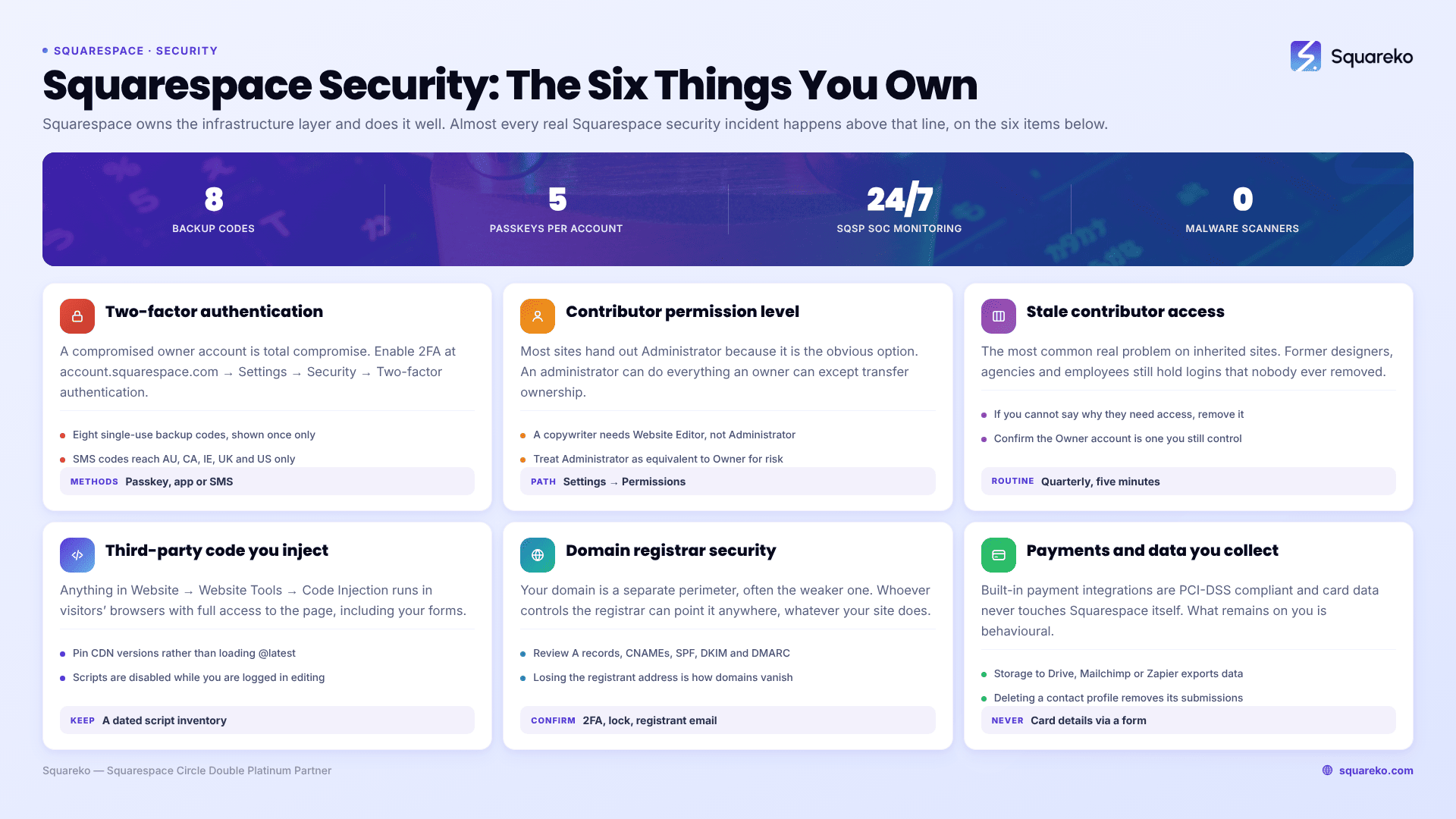
Squarespace owns the infrastructure layer — hosting, TLS certificates, platform patching, DDoS mitigation, 24/7 monitoring by its own Security Operations Centre, and PCI-DSS compliant payment integrations. You own everything above that line: who can log in, whether those accounts use two-factor authentication, what permission level each contributor holds, any third-party code you inject, and the registrar account your domain lives in. Almost every real Squarespace security incident happens on your side of that line.
That is also why most Squarespace security advice is unhelpful. It is written for WordPress, where the site owner is responsible for core updates, plugin vulnerabilities, file permissions and malware scanning. None of those exist here. The genuine list is shorter, more specific, and mostly about access control.
The responsibility split
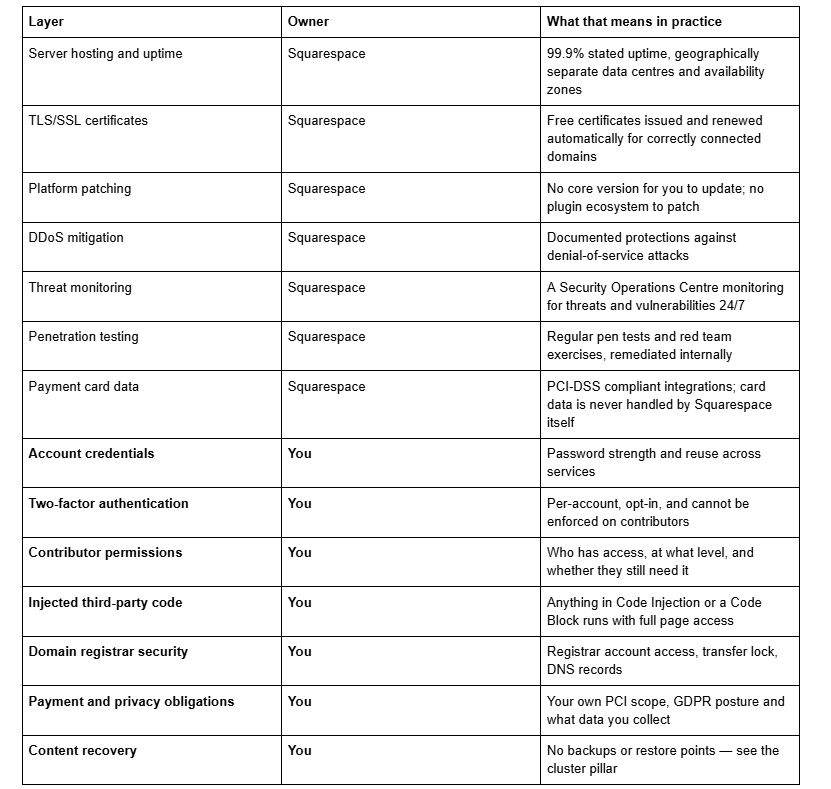
The Squarespace-owned rows are the reason security work on this platform is cheap. The rows marked You are the reason it is not zero.
Why "malware scanning" and "security plugins" do not apply
Worth clearing this out before anything else, because it dominates the search results and wastes money.
Squarespace is a closed, fully managed platform. There is no server you can reach, no file system to write to, no database you can query, no plugin directory, and no core software version under your control. That removes the entire category of risk a WordPress security stack exists to manage — vulnerable plugins, outdated core, unmaintained themes, file permission errors, PHP shells.
It follows that there is nothing for a malware scanner to scan and nothing for a security plugin to harden. If a Squarespace maintenance package offers "security patching, malware scanning and firewall management", it is describing labour that cannot be performed on this platform. The one exception is genuine: code you injected yourself can be malicious or compromised, and that is covered below.
1. Account access and two-factor authentication
This is the highest-risk item on a Squarespace site by a wide margin, because a compromised owner account is total compromise — content, commerce, contacts, domain settings and billing.
Enable two-factor authentication on every account that touches the site. The panel is at account.squarespace.com → Settings → Security → Two-factor authentication. Squarespace supports three methods:
Passkeys — device biometrics such as TouchID or FaceID, or a hardware key like a YubiKey. Up to five passkeys per account. This is the strongest option and the one to choose if the device supports it.
Authentication app — time-based codes from an app such as Google Authenticator.
Text message — six-digit SMS codes, available only in Australia, Canada, Ireland, the UK and the US.
After enabling any method you get eight single-use backup codes, shown once. Save them somewhere that is not the same password manager entry as the password itself, or you will lock yourself out of the recovery route at the same moment you lose the primary one.
The important limitation: 2FA on Squarespace is configured per individual user account, not per site. A site owner cannot require contributors to enable it. There is no administrative enforcement setting. If a designer, VA or marketing agency has administrator access to your site with a reused password and no 2FA, that is your exposure and you cannot fix it from your own account — you can only ask them, or remove the access.
2. Contributor permissions — the level matters
Most Squarespace sites hand out administrator access because it is the obvious option in the dropdown. It is almost never the right one.
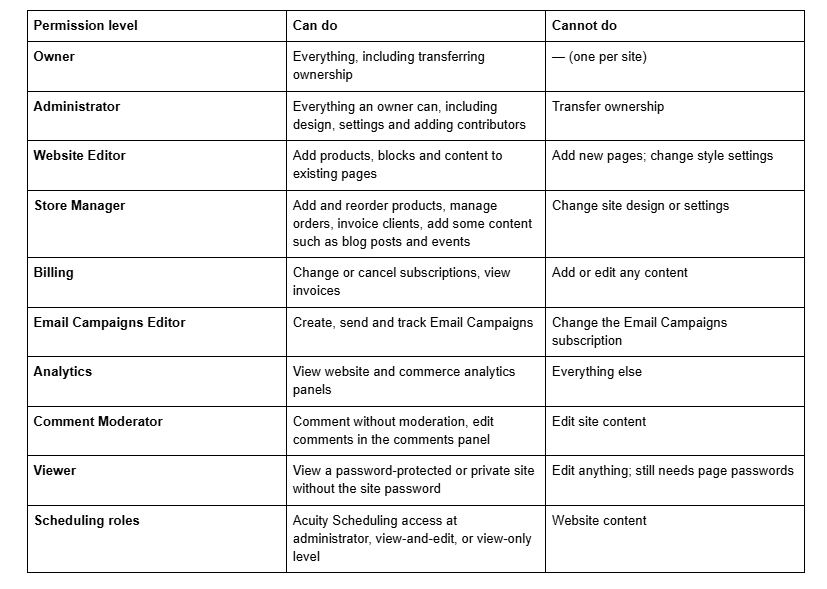
Two rules cover most situations. Give the narrowest level that lets the person do their job — a copywriter needs Website Editor, not Administrator; a bookkeeper needs Billing, not Administrator. And treat Administrator as equivalent to Owner for risk purposes, because an administrator can add further administrators.
One quiet detail worth knowing if you duplicate sites: contributor permissions are not copied to a duplicate. Basic authors carry across, but they are not attached as the author of any collection item.
3. Stale contributor access after a project ends
This is the most common real security problem we find on inherited Squarespace sites, and it is never malicious — it is simply that nobody removed anyone.
A typical five-year-old site accumulates: the original designer, their subcontractor, a developer brought in for one integration, a photographer who uploaded a gallery, a marketing agency that has since been replaced, a former employee, and a virtual assistant. Most hold Administrator. All of them can still log in. None of them has 2FA that you can verify.
Every one of those accounts is a live route into your site that sits outside your control. It is not that any of these people intend harm — it is that their own account security is now your risk surface, and if any of them reuses a password that appears in a credential dump, your site is reachable.
The audit, quarterly, five minutes:
Open Settings → Permissions & Ownership.
Read every name on the list out loud. If you cannot immediately say why that person needs access this quarter, remove them.
For anyone remaining, check the level is the narrowest one that fits their actual job.
Confirm the account listed as Owner is one you control — not a former agency's address. Ownership transfer is the one thing an administrator cannot do for you, so an owner account you have lost access to is a genuine problem.
Do the same on the domain registrar, and on Acuity Scheduling if you use it.
Build removal into your offboarding: when a project ends or a contract is cancelled, revoking Squarespace access belongs on the same checklist as the final invoice.
4. Third-party code you inject
Code Injection is the one genuine attack surface Squarespace hands you, and it is available on Core, Plus, Advanced and some legacy plans via Website → Website Tools → Code Injection, plus per-page fields under Page Settings → Advanced.
Anything you paste there runs on your visitors' browsers with full access to the page — including forms and anything typed into them. A third-party script is a trust decision, not a formatting decision. That applies to chat widgets, analytics tools, pop-up builders, review widgets, animation libraries loaded from a CDN, and code snippets copied from a forum thread.
Practical rules that cost nothing:
Keep an inventory. A dated text file listing every script, what it is for, who added it and when. This doubles as your code backup, which nothing on Squarespace exports for you.
Pin versions where a CDN offers them rather than loading @latest, so a compromised upstream release does not silently become your code.
Remove what is no longer used. Old tracking pixels and abandoned widget scripts are the most common thing we delete on audits.
Review it on handover. Inheriting a site means inheriting whatever the last developer left in these panels.
One 7.1 behaviour that confuses testing: script-bearing code blocks are disabled while you are logged in and editing, with the message "This block contains embedded scripts. Embedded scripts are disabled while you're logged in and editing your site." Always verify logged out before concluding a script is or is not running.
5. Domain registrar security
Your domain is a separate security perimeter from your Squarespace site, and it is frequently the weaker one.
If the domain is registered with Squarespace, its security is your Squarespace account security — the 2FA section above covers it. If it is registered elsewhere, which is common on client sites, that registrar account has its own password, its own 2FA setting and often its own set of forgotten users. Whoever controls it can point the domain anywhere, regardless of what your Squarespace site is doing.
Three things to confirm, whichever registrar you use:
2FA is on at the registrar.
Transfer lock (registrar lock) is enabled, so the domain cannot be moved without deliberately unlocking it.
The registrant email is one you still control — losing that address is how domains quietly get lost at renewal.
Check DNS records at the same time. Stale A records, orphaned CNAMEs from services you no longer use, and missing SPF, DKIM and DMARC records on the sending domain are all ordinary findings, and the email ones affect whether your form notifications and campaigns arrive at all.
6. Payments, PCI and the data you collect
Squarespace's built-in payment integrations are PCI-DSS compliant and Squarespace states that sensitive card data is never handled by Squarespace itself — it goes directly to Stripe, PayPal or Square. That removes most PCI scope from a standard Squarespace shop.
What remains on you is narrower but real: not taking card details over a Squarespace form or by email, not storing card numbers in the Contacts panel or in order notes, and understanding what personal data your forms actually collect and where it ends up. A form storing to Google Drive, Mailchimp or Zapier has exported that data to a third party, and your privacy policy needs to reflect it. Deleting a contact profile in the Contacts panel removes their submission history along with it, which matters for erasure requests.
What "security monitoring" can actually mean on Squarespace
Given there is no server to scan and no code to patch, monitoring on Squarespace is a short and specific list:
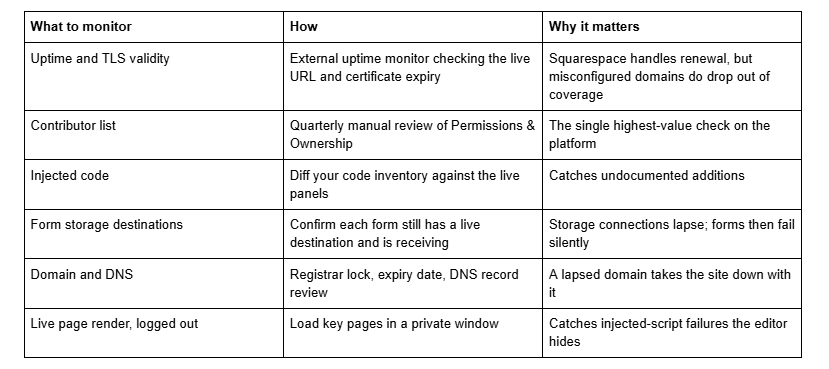
None of that requires a product. It requires someone doing it on a schedule.
The quarterly routine
Review the contributor list and remove anyone who no longer needs access. Confirm 2FA on your own account and ask contractors to confirm theirs. Diff the code injection panels against your inventory and delete what is unused. Check registrar lock, domain expiry and DNS. Test one form end to end, logged out. Then take your backups, because none of the above protects content — that is a separate problem covered in how to back up a Squarespace website.
The awkward case is an inherited site: an unknown contributor list, undocumented injected code, a domain at a registrar nobody has the login for, and no way to tell what changed or when because Squarespace keeps no change log. Untangling that from the inside is genuinely difficult, and it is a common reason people bring us in — our Squarespace website support plans start with exactly that audit. Everything in this article is doable in an afternoon by a site owner with the access to do it; the point is that it does not happen by itself.
FAQ
-
At the platform layer, yes. Squarespace provides free TLS certificates, DDoS mitigation, regular penetration testing, geographically separate data centres and 24/7 monitoring by its own Security Operations Centre. What it cannot secure is your account credentials, your contributor list, code you inject, or your domain registrar account.
-
No. There is no plugin ecosystem, no file system you can write to and no core software version under your control, so there is nothing for a scanner to scan or a firewall plugin to harden. Any maintenance package selling "malware scanning" for Squarespace is describing work that cannot be performed.
-
Go to account.squarespace.com → Settings → Security → Two-factor authentication. Choose passkeys, an authentication app, or SMS where available. Save the eight single-use backup codes separately from your password. 2FA is per user account, and site owners cannot require contributors to enable it.
-
Owner, Administrator, Website Editor, Store Manager, Billing, Email Campaigns Editor, Analytics, Comment Moderator, Viewer, and three Acuity Scheduling roles. Administrator can do everything an owner can except transfer ownership, including adding more administrators, so treat it as equivalent to full access.
-
Open Settings → Permissions & Ownership at account.squarespace.com and remove the contributor from the list. Review this quarterly — stale access from former designers, agencies and employees is the most common security problem on inherited Squarespace sites, and each account carries its own password risk.
-
Squarespace's built-in payment integrations are PCI-DSS compliant and sensitive card data is never handled by Squarespace itself. Your remaining obligation is behavioural: never take card details through a form or email, never store card numbers in Contacts or order notes, and document where form data is sent.

Author Bio
I'm Walid Hasan, a Certified Squarespace Expert and Squarespace Circle Platinum Partner with over 12 years of hands-on experience designing and optimizing high-performing websites. Over the years, I've had the privilege of building more than 2,000 Squarespace websites for clients around the world, always focusing on clean design, strong user experience, and conversion-driven results.
