
How to Stop Spam Form Submissions on Squarespace
Google reCAPTCHA is already enabled by default on Squarespace form blocks, newsletter blocks and product waitlists — so if you are getting spam, the thing most guides tell you to turn on is already on. Reducing it from here is layered rather than binary: confirm reCAPTCHA really is active on the block, restructure the form so it is expensive for bots to fill, report spam so Squarespace's filter learns, and filter what still gets through on the email side.
Before anything else, check which problem you actually have. "Spam form submissions" describes two unrelated things, and the fixes have nothing in common.
Which problem are you actually solving?
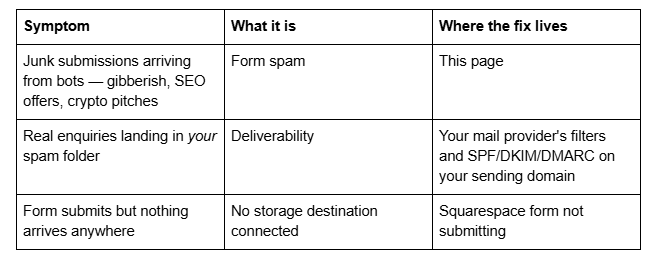
That third row catches more people than it should. A Squarespace form requires at least one storage option — without one there is nowhere to send submissions and visitors cannot submit at all. If your form volume dropped to zero rather than filling with junk, that is the thing to check first.
Tactics ranked by effect per unit of effort
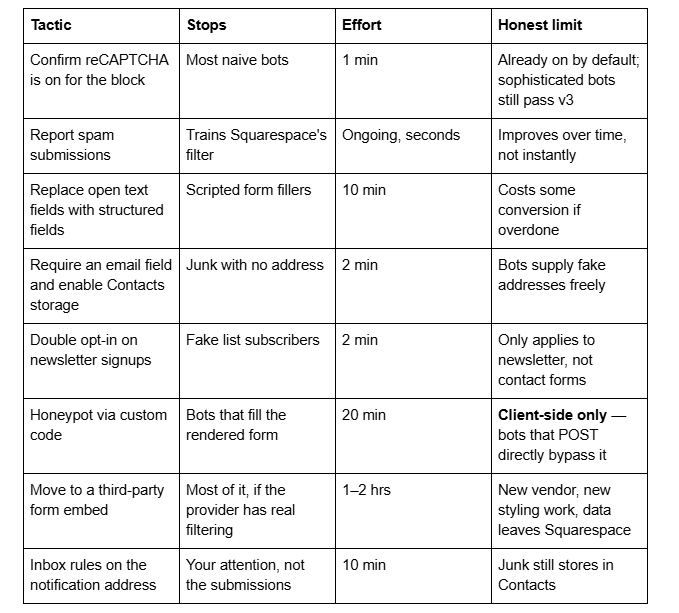
Work down the list. The first four take under fifteen minutes combined and handle the majority of ordinary Squarespace form spam.
1. Confirm Google reCAPTCHA is actually enabled on the block
Squarespace enables Google reCAPTCHA v3 by default on form blocks, newsletter blocks and product waitlists. v3 is invisible — there is no checkbox and no image puzzle — which is exactly why people assume it is off.
Where to check: open the page in the editor, click the form block, open the Storage tab, and look for Google reCAPTCHA. Confirm it is switched on for that specific block. Blocks built a long time ago, or duplicated from an older site, are the ones worth checking.
Two things to know about this layer:
You do not supply your own keys for standard form blocks. The only exception is cover page forms on Squarespace 7.0, which use reCAPTCHA v2 — the checkbox version — and do require API keys from Google's reCAPTCHA admin console, entered in Squarespace's developer settings. Choosing a v3 key type there produces an error, and mismatched domains produce "Invalid domain for site key".
reCAPTCHA v3 scores traffic rather than blocking it. It is a probability model, not a gate. A determined spam operation — or a human paid to fill forms — passes it. That is why this is step one of several rather than the answer.
2. Report spam so the filter learns
Squarespace flags submissions it suspects are spam and gives you a Report spam control on individual submissions. Using it is not busywork: reported submissions feed Squarespace's detection, and on sites where someone actually reports rather than silently deleting, the flagged-and-filtered proportion improves.
Review submissions in the Contacts panel under Form submitters, report the obvious junk, and delete the profiles you do not want retained. Note that Squarespace deletes contact profiles rather than individual submissions, so removing a spam profile removes its submission history with it.
This layer is slow and unglamorous, and it is the only one that improves without you doing anything new next month.
3. Make the form structurally hostile to bots
This is the highest-leverage change most Squarespace sites have not made, and it costs nothing.
Automated form fillers are good at free-text fields and bad at anything that requires a choice. A contact form consisting of Name, Email and Message is the easiest possible target. Adding structure breaks scripted submissions without adding meaningful friction for a real enquirer:
Add a required dropdown or radio group — "What are you enquiring about?" with three or four real options. Squarespace supports dropdown, checkbox, radio and survey fields, and scripted fillers frequently submit them empty or invalid.
Add a required phone or date field where it genuinely fits your enquiry process. Both are typed fields with format expectations.
Use follow-up questions. Squarespace 7.1 supports one level of conditional logic on dropdown, checkbox, radio and survey fields, so a second question can appear only after the first is answered. Conditional fields are meaningfully harder for a generic script to complete.
Set the email field to Required. This is also a prerequisite for storing form submitters in the Contacts panel.
Do not overdo it. Every additional required field costs some real enquiries, and a nine-field contact form loses more business than the spam costs you. Two structured fields is usually the right trade.
4. Turn on confirmation for newsletter signups
If the junk is arriving through a newsletter block or a promotional pop-up rather than a contact form, the fix is different and better.
Squarespace can send a confirmation email to new subscribers on newsletter blocks, promotional pop-ups and cover pages, so an address only joins the list after the recipient clicks. Mailchimp storage uses double opt-in by default and behaves the same way. Bot-submitted addresses never confirm, so they never reach your list.
This is the closest thing to a genuine fix in this entire article, and it applies only to list signups. It does nothing for a contact form, because a contact form's job is to notify you immediately.
5. Honeypot fields — what they can and cannot do here
A honeypot is a form field hidden from humans that bots fill in anyway; anything with that field populated is discarded. It is a standard technique and it works well on platforms where you control the server that receives the POST.
On Squarespace you do not. Form blocks submit to Squarespace's own endpoint, and there is no server-side rule you can write, no plugin layer, and no forms API to intercept the submission. What you can build is a client-side honeypot: add a text field to the form, hide it with Custom CSS, and use JavaScript in Website → Website Tools → Code Injection to block the submit event when that field has a value.
Be clear about what that buys you. It stops bots that render your page and drive the actual form. It does nothing at all against bots that POST directly to the endpoint, which is a large share of modern form spam. And a field hidden with display: none can also be skipped by better-written bots, so the technique is imperfect on both sides.
Two further cautions specific to Squarespace 7.1. Any hidden field is still a real field, so its values will appear in your stored submissions and CSV exports. And script-bearing code is disabled while you are logged in and editing — Squarespace shows "This block contains embedded scripts. Embedded scripts are disabled while you're logged in and editing your site." — so a honeypot must be tested logged out, in a private window, or it will look broken when it is not.
Worth doing if you are comfortable with code and the volume justifies it. Not worth doing as a first move.
6. Move the form to a third-party provider
When spam volume is genuinely disruptive, the honest answer is that Squarespace's native forms do not have the anti-spam depth of a dedicated form product, and the platform gives you no way to add it.
Embedding a third-party form via a Code Block or embed block gets you spam controls Squarespace does not offer — configurable honeypots, server-side rate limiting, keyword and country blocking, submission scoring, and their own CAPTCHA options.
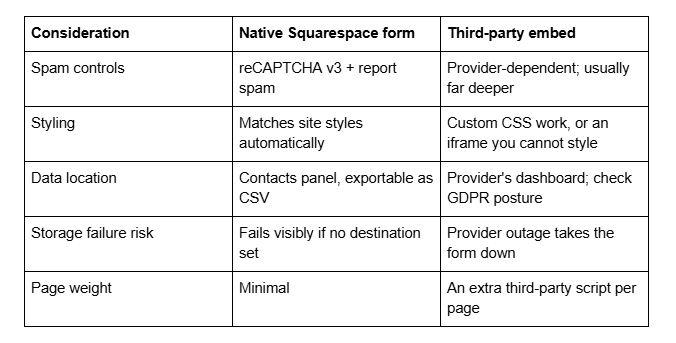
If you go this route, keep one native form somewhere as a fallback, and remember that an embedded form still needs testing logged out — embeds and scripts behave differently in the editor. Moving forms off-platform also moves that data out of your Squarespace export routine, which is worth accounting for alongside how to back up a Squarespace website.
7. Filter on the email side
This is damage control rather than prevention, and it is the fastest relief available.
Send form notifications to a dedicated address rather than your main inbox, then build rules on that address — Gmail filters, Outlook rules — that match the patterns you actually receive: known sender domains, phrases like "SEO audit" or "guest post", non-Latin character blocks, submissions with a URL in the name field. Route matches to a folder rather than deleting them, so you can check the folder weekly and catch false positives.
The junk still lands in your Contacts panel. What changes is that it stops consuming attention, which for most small sites is the actual cost of form spam.
What you cannot do on Squarespace
Worth stating plainly, because a lot of advice written for WordPress gets applied here and wastes an afternoon:
You cannot block an IP address or a country. Squarespace exposes no firewall, no access rules and no request-level blocking.
You cannot add a server-side spam filter. There is no plugin layer and no forms API to hook.
You cannot hide the form from bots with robots.txt. Squarespace's robots.txt cannot be edited, and spam bots ignore it regardless.
You cannot delete an individual stored submission — Squarespace deletes contact profiles, which removes that contact's submission history entirely.
You cannot bulk-reject by keyword on native form blocks.
A CAPTCHA image puzzle is not available on standard 7.1 form blocks. reCAPTCHA v3 is invisible by design; v2's checkbox exists only on 7.0 cover pages.
The order to work in
Confirm reCAPTCHA on the block. Report the spam you get rather than deleting it silently. Add two structured required fields. Turn on confirmation emails for newsletter signups. Then, only if the volume still justifies it, add a client-side honeypot or move to a third-party form. Filter the notification inbox at any point — it costs ten minutes and buys back your attention immediately.
If you are getting hundreds of submissions a day, or spam is arriving through a form that a previous developer built with custom code, the diagnosis is usually about how the form was assembled rather than about Squarespace's defaults, and that is harder to unpick from the outside. That is the kind of thing our Squarespace website support plans handle — though the layered approach above resolves ordinary form spam on most sites without anyone else being involved.
FAQ
-
Yes. Google reCAPTCHA v3 is enabled by default on form blocks, newsletter blocks and product waitlists, and you do not supply your own keys. It is invisible, so there is no checkbox to see. Check it is on for a specific block in that block's Storage tab under Google reCAPTCHA.
-
reCAPTCHA v3 scores traffic rather than blocking it, so determined bots and paid human form-fillers still get through. Reducing spam further means changing the form itself — required dropdowns, radio groups and conditional follow-up questions — and reporting spam submissions so Squarespace's filter improves.
-
No. Squarespace provides no firewall, access rules or request-level blocking, so IP and country blocking are not available at any plan level. The nearest equivalents are structuring the form so scripts fail it, or embedding a third-party form that offers those controls.
-
Only a client-side one. Add a field, hide it with Custom CSS, and block the submit event with JavaScript in Code Injection. It stops bots that drive the rendered form, but not bots that POST directly to Squarespace's endpoint, and the hidden field still appears in your exports.
-
Open the Contacts panel, go to Form submitters, and delete the contact profile. Squarespace deletes profiles rather than individual submissions, so this removes that contact's whole submission history. Use Report spam before deleting, so the detection filter learns from it.
-
Only if native spam controls have failed. Third-party form providers offer server-side honeypots, rate limiting and keyword blocking that Squarespace cannot. The trade-offs are styling work, an extra third-party script on the page, and your submission data living outside the Contacts panel.

Author Bio
I'm Walid Hasan, a Certified Squarespace Expert and Squarespace Circle Platinum Partner with over 12 years of hands-on experience designing and optimizing high-performing websites. Over the years, I've had the privilege of building more than 2,000 Squarespace websites for clients around the world, always focusing on clean design, strong user experience, and conversion-driven results.
