
Connecting Squarespace to Zapier: Automations That Save Hours
The short answer: Squarespace's Zapier integration is narrower than most guides suggest. There are two separate Zapier apps — Squarespace Forms and Squarespace Commerce — and between them they offer four triggers and two useful actions. There is no "create blog post" action, no page editing, and no content API of any kind. Everything worth automating on Squarespace is downstream of a form submission or an order.
That is not a small surface. It is just a specific one, and knowing its shape saves you from building a Zap that can never work.
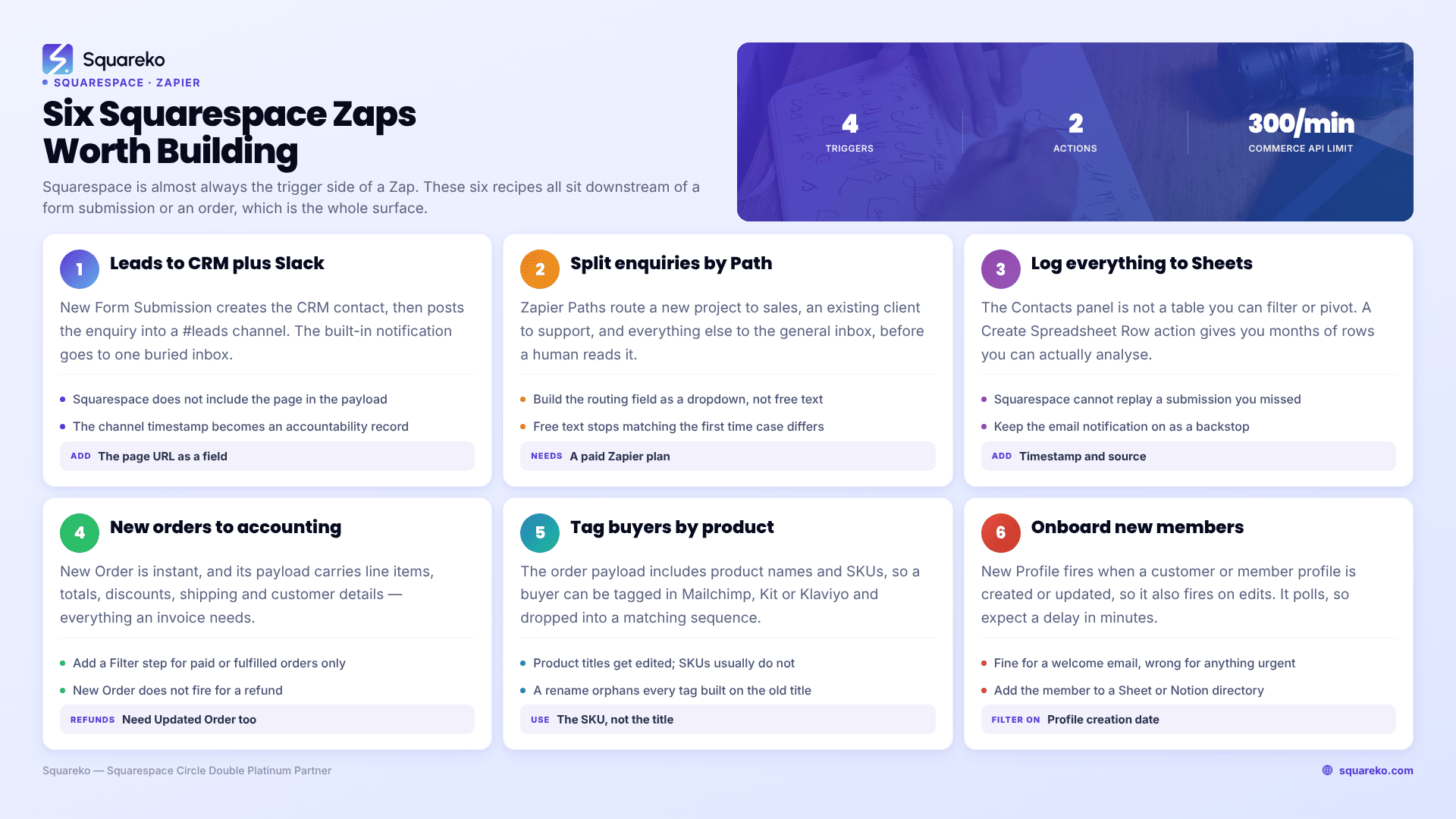
What Squarespace's Zapier apps actually offer in 2026
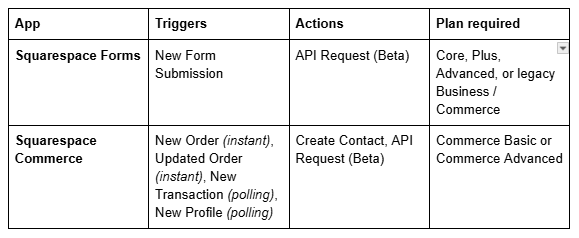
Read that table as the ceiling, not the starting point. Squarespace is almost always the trigger side of a Zap and rarely the action side. Data flows out of Squarespace to your CRM, spreadsheet, accounting tool or inbox; very little flows back in.
Two details in that table do more work than they look like they do:
New Order and Updated Order are instant. They fire on a webhook, not a poll, so there is no 1–15 minute delay depending on your Zapier plan. New Transaction and New Profile are polling triggers and will lag.
API Request (Beta) is a raw authenticated HTTP call against Squarespace's own APIs. It is the escape hatch for anything the packaged actions don't cover — but it only reaches endpoints that exist, which for content means it still cannot write a blog post.
Prerequisites and plan gates
Three things gate a Squarespace–Zapier setup, and it is worth confirming all three before you start building.
Squarespace plan. Form integrations require Core or above (or a legacy Business, Commerce Basic or Commerce Advanced plan). The Commerce triggers require Commerce Basic or Commerce Advanced specifically — a Core plan with a store attached is not enough.
Zapier plan. The free Zapier tier allows single-step Zaps only. Several recipes below use a Filter or a second action step, which needs a paid Zapier plan.
A form that already works. Zapier is a storage destination on a Squarespace form, not a replacement for one. If the form itself is misconfigured, connecting Zapier will not surface the problem — it will just never trigger.
Rate limits are worth knowing for the commerce side: Squarespace's commerce APIs are limited to 300 requests per minute, and a request over the limit returns a 429 with a one-minute cooldown. You will not hit this with ordinary order volume. You can hit it with a badly written API Request loop.
How to connect a Squarespace form to Zapier
The connection is made per form block, from inside the block, not from a site-wide settings panel. This is the part people get wrong.
Edit the page and double-click the form block or newsletter block.
Click the Storage tab.
Find Zapier in the list of storage destinations and click Connect.
Authorise the connection when prompted. If Squarespace shows you a key during this step, copy it immediately — it is not retrievable afterwards, and losing it means generating a new one.
In Zapier, create a new Zap, choose Squarespace Forms as the trigger app, and select the New Form Submission trigger.
Choose the form when Zapier asks.
The testing quirk that confuses everyone. When Zapier asks to test the trigger, it tries to fetch a recent submission. Squarespace does not retain form submissions for this purpose, so Zapier generates a sample submission instead. Your field names will look like placeholders. Map them anyway, publish the Zap, then submit the real form once yourself and check the Zap history — that run will carry your real field names and values, and you can correct the mapping if anything landed in the wrong place.
One Zap per form. Each form block or newsletter block on your Squarespace site needs its own Zap. There is no site-wide "any form submitted" trigger. A five-form site with two actions each is ten Zaps, which matters for your Zapier task budget.
Also worth doing on every form: keep a second storage destination alongside Zapier. Squarespace's own guidance recommends connecting a second option in case one fails, and the built-in email notification is the cheapest possible insurance against a silently broken Zap.
How to connect Squarespace Commerce to Zapier
The commerce connection is site-level rather than block-level.
In Zapier, create a Zap and choose Squarespace Commerce as the trigger app.
Select your trigger — New Order, Updated Order, New Transaction or New Profile.
Click to connect your Squarespace account. You will be sent to Squarespace to log in and grant Zapier access to the site.
Pick the site if you have several under one account.
Test. Unlike the forms trigger, this one can usually pull a real recent order, so your field mapping will be accurate first time.
New Transaction versus New Order. These are not duplicates. New Order fires for store orders. New Transaction fires for orders and donations, and carries a type field so you can tell them apart. If you take donations through Squarespace, New Transaction is the trigger you want; if you only sell products, New Order is instant and therefore better.
Automation 1 — Route form leads to your CRM with a Slack alert
The single highest-value Zap on most Squarespace sites, because it fixes response time rather than admin time.
Trigger: Squarespace Forms → New Form Submission Action 1: Create or update a contact in your CRM (HubSpot, Pipedrive, Close, whatever you use) Action 2: Send a Slack message to a #leads channel with the name, the enquiry text, and a link to the CRM record
The Slack step is the point. A Squarespace form's built-in notification goes to one email address, which gets buried. A channel message with the enquiry body visible means anyone can pick it up, and the timestamp becomes an accountability record.
Add the form's own page URL as a static field in the Zap so you can tell which page the lead came from — Squarespace does not include it in the submission payload.
Automation 2 — Split enquiries by service type before they reach a human
Most agency and service-business Squarespace sites have one contact form and several people who could own the reply. This is what Zapier's Paths are for.
Trigger: Squarespace Forms → New Form Submission Path A (dropdown field = "New project") → create a deal in the CRM, notify the sales channel Path B (dropdown field = "Existing client support") → create a ticket, notify the support channel Path C (everything else) → email the general inbox
Build the routing field as a dropdown in the Squarespace form block, not a free-text field. A dropdown returns a fixed string that a Path condition can match exactly. Free text returns whatever the visitor typed, and your conditions will silently stop matching the first time someone writes "existing client" in lower case.
This one needs a paid Zapier plan. It is usually the automation that justifies the upgrade.
Automation 3 — Log every form submission to Google Sheets as a permanent record
Squarespace stores form submitters in the Contacts panel when the form has a required email field, and that is genuinely useful — but it is not a table you can filter, pivot or hand to a bookkeeper.
Trigger: Squarespace Forms → New Form Submission Action: Google Sheets → Create Spreadsheet Row
Add a timestamp column and a source column. Six months of rows is the dataset that tells you which pages produce enquiries, what the seasonal pattern is, and whether a redesign changed anything — none of which Squarespace Analytics will tell you about form submissions specifically.
Note the direction of travel here: Squarespace does not store the submission itself and cannot replay it. If your Zap is off for a week, that week is gone. Keep the email notification switched on as a backstop.
Automation 4 — Push new orders into accounting on the day they happen
Trigger: Squarespace Commerce → New Order (instant) Action 1: Xero, QuickBooks or FreeAgent → create an invoice or sales receipt Action 2: Google Sheets → append a row for the fulfilment list
This is the recipe that actually saves hours rather than minutes, because it removes a monthly reconciliation job entirely. The New Order payload carries line items, quantities, totals, discounts, shipping and the customer's details, which is everything an invoice needs.
Two things to get right. First, add a Filter step for order status if you only want fulfilled or paid orders reaching accounting. Second, decide up front how refunds are handled — New Order will not fire for a refund, and Updated Order will, so a refund-aware setup needs both triggers.
Automation 5 — Tag buyers in your email tool by what they bought
Trigger: Squarespace Commerce → New Order (instant) Action: Mailchimp, Kit or Klaviyo → add or update subscriber, applying a tag derived from the product name
quarespace's own email tools do not segment by purchase history in any depth. Zapier bridges that gap: the order payload includes product names and SKUs, so you can tag a buyer with the product they bought and trigger a post-purchase sequence specific to it.
Use the SKU rather than the product title for the tag where you can. Product titles get edited; SKUs usually don't, and a renamed product silently orphans every tag built on its old title.
If your email tool is Mailchimp and the connection also drops on your forms, that is a separate and well-known failure mode — see Squarespace Mailchimp integration not working for the reconnection sequence.
Automation 6 — Onboard new members automatically
Trigger: Squarespace Commerce → New Profile (polling) Action 1: Send a welcome email through your email platform with access instructions Action 2: Add the member to a Google Sheet or Notion database used as a member directory
New Profile fires when a customer or member profile is created or updated, which means it will also fire on edits. Add a Filter step comparing the profile's creation date to today if you only want genuinely new members, otherwise the Zap will re-run every time somebody changes their address.
Because this is a polling trigger rather than an instant one, expect a delay measured in minutes. That is fine for onboarding email and wrong for anything time-critical.
What Squarespace and Zapier cannot do
This section is here because half the automations recommended in other guides do not exist. As of 2026:
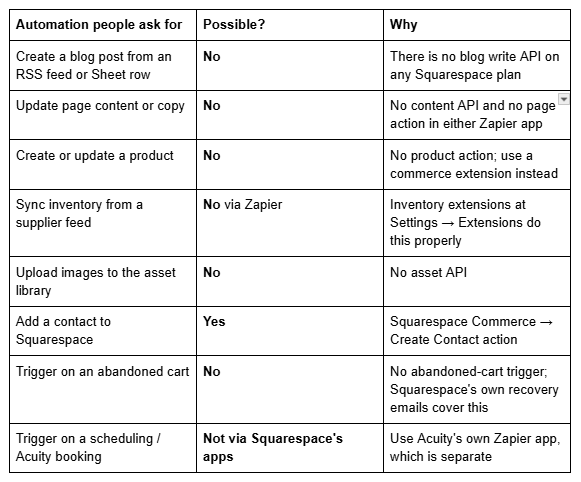
The blog one is worth stating plainly because it comes up constantly. If your workflow depends on programmatically publishing to a Squarespace blog, Squarespace is the wrong platform for that workflow — not the wrong Zap.
When to reach past Zapier
Zapier is the right tool for a Squarespace site right up until one of three things becomes true.
Task volume. Zapier bills per task. A busy store firing three actions per order gets expensive quickly, and Make (formerly Integromat) prices operations more cheaply at volume. Both connect to Squarespace forms and commerce.
Logic complexity. Once a Zap has four Paths, three Filters and a Formatter step, it has become software with no version control. At that point a small serverless function receiving the data directly is easier to maintain than the Zap.
Anything Squarespace-side. No automation platform can write content into Squarespace, because the API does not exist. Automating publishing means either a headless setup or a different CMS — and for most businesses running a Squarespace site, that trade is not worth making for the sake of scheduled posts.
Where this usually goes wrong
Three failure patterns account for nearly every "my Squarespace Zap stopped working" report: the Zap was built against Zapier's sample submission and the real field names never matched; a second form block was added later and nobody built a Zap for it; or the form's storage connection was removed during an unrelated edit. Check Zapier's Zap history first — it shows whether the trigger fired at all, which immediately tells you whether the problem is on the Squarespace side or the Zapier side.
If you're mapping several forms and a store into a CRM and want it built once, properly, with the failure modes covered rather than discovered later, that's the kind of work our Squarespace website support plans handle. The six recipes above are all buildable in an afternoon on your own, though, and most sites only need the first one.
FAQ
-
(7.1, available in the classic blog editor). All question and answer text renders server-side, so it is fully crawlable. Do not use a raw <details> code block.
-
No. There is no blog write API on any Squarespace plan, and neither the Squarespace Forms nor the Squarespace Commerce Zapier app offers a content action. Squarespace is almost always the trigger side of a Zap. If programmatic publishing is a hard requirement, Squarespace is the wrong platform for it.
-
Four. Squarespace Forms provides New Form Submission. Squarespace Commerce provides New Order and Updated Order, both instant, plus New Transaction and New Profile, both polling. Actions are limited to Create Contact and a raw API Request in beta.
-
Form integrations need Core, Plus, Advanced, or a legacy Business, Commerce Basic or Commerce Advanced plan. The commerce triggers need Commerce Basic or Commerce Advanced specifically — a Core plan with a store attached will not expose them.
-
Check Zapier's Zap history first. If no run is recorded, the trigger never fired: the form block's Zapier storage connection was probably removed, or you built the Zap against a different form block. If runs are recorded but fail, the field mapping is usually wrong because it was built against Zapier's sample submission.
-
Edit the page, double-click the form block, open the Storage tab, find Zapier and click Connect. Then build the Zap in Zapier using the New Form Submission trigger. Each form block needs its own Zap — there is no site-wide "any form submitted" trigger.
-
No. Squarespace does not retain submissions for trigger testing, which is why Zapier generates a sample submission during setup. It also means a Zap that was switched off cannot replay missed submissions, so keep the built-in email notification enabled as a backstop.

Author Bio
I'm Walid Hasan, a Certified Squarespace Expert and Squarespace Circle Platinum Partner with over 12 years of hands-on experience designing and optimizing high-performing websites. Over the years, I've had the privilege of building more than 2,000 Squarespace websites for clients around the world, always focusing on clean design, strong user experience, and conversion-driven results.
