
Acuity Scheduling Embed Not Working on Squarespace? Fixes
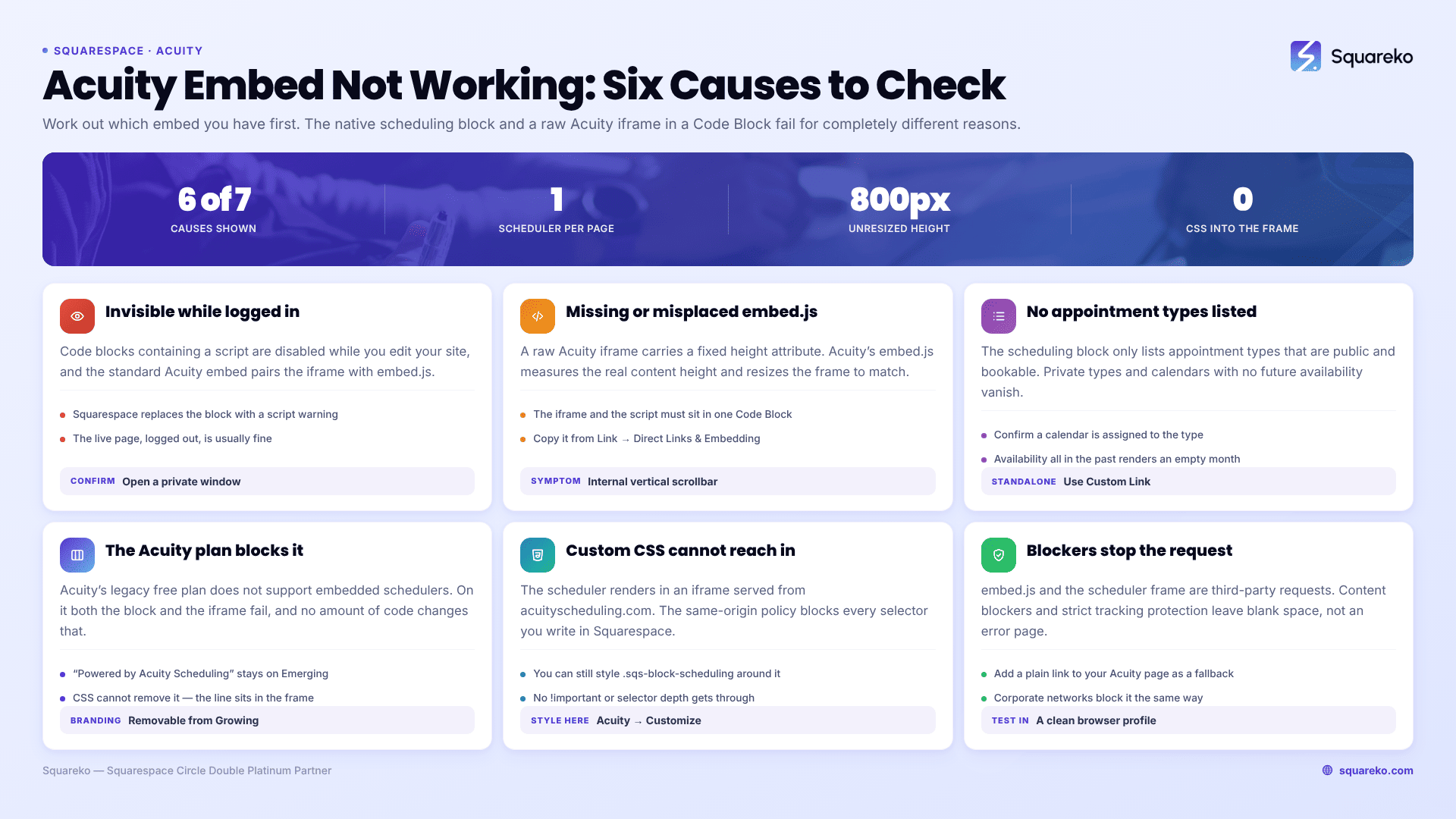
The short answer: work out which of the two embed methods you're using first, because they fail differently. The native scheduling block calculates its own height and almost never scrolls; a raw Acuity iframe pasted into a Code Block relies on Acuity's embed.js resize script, which breaks if there is more than one scheduler on the page or if the script was omitted. Most "Acuity embed not working" reports are one of those two things.
Acuity is Squarespace-owned — Squarespace acquired it in 2019, briefly rebranded it Squarespace Scheduling, and has since reverted the name to Acuity Scheduling. That ownership matters: it is why a native block exists at all, and why the block behaves better than the generic embed.
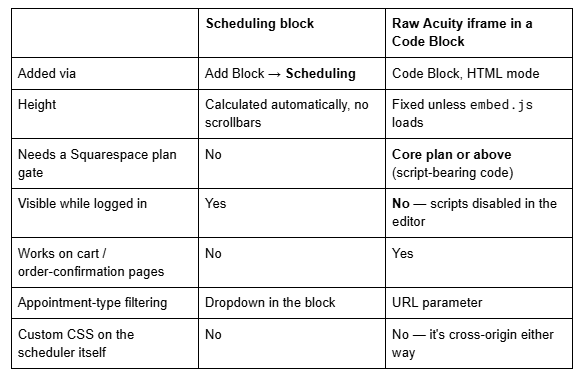
Which embed are you using?
Cause 1 — The Acuity embed is invisible because you're logged in
The single most common false alarm with a raw Acuity iframe on Squarespace. Code blocks that contain a <script> tag are disabled while you are logged in and editing your site, and Squarespace replaces the block with the message "This block contains embedded scripts. Embedded scripts are disabled while you're logged in and editing your site."
Because the standard Acuity embed pairs an <iframe> with the whole block is treated as script-bearing. In the editor it looks broken. On the live site, logged out, it is usually fine.
Confirm in ten seconds: open the page in a private window. If the scheduler renders there, nothing is wrong. Do not debug anything until you have checked logged out — this consumes more hours than any real Acuity bug.
Cause 2 — The Acuity iframe has scrollbars or the wrong height
A raw Acuity iframe embed has a fixed height attribute. Acuity's embed.js script is what measures the scheduler's real content height and resizes the iframe to match. If the script is missing, blocked, or confused, you get the classic symptom: a short frame with an internal vertical scrollbar, and a booking flow that feels broken on mobile.
The complete, correct embed looks like this:
<iframe
  src="https://app.acuityscheduling.com/schedule.php?owner=00000000"
  title="Schedule Appointment"
  width="100%"
  height="800"
  frameborder="0"
  allow="payment"
></iframe>

<script
  src="https://embed.acuityscheduling.com/js/embed.js"
  type="text/javascript"
></script>
Three things break the resize:
The script was left out. People copy only the <iframe> line. Without embed.js the height never changes from 800px.
More than one Acuity embed on the same page. The resize script does not reliably handle multiple schedulers on one page — it targets the wrong frame and both end up with internal scrollbars. One Acuity embed per page.
The script was split into a different block. The <iframe> and the <script> must be in the same Code Block. Splitting them across two blocks, or moving the script to Code Injection, changes the timing and often the resize never fires.
Get the exact snippet from Acuity rather than a tutorial: Scheduling Page → Link → Direct Links & Embedding, select the scheduler type, then Copy. Your owner ID is baked into that snippet.
Cause 3 — The scheduling block shows no appointment types
The Squarespace scheduling block only lists appointment types that are public and available to book. An appointment type marked private, one with no availability configured, or one belonging to a calendar that is switched off will not appear in the block's dropdown and will not appear to visitors.
Check in Acuity under the appointment type's settings that it is not set to private, that a calendar is assigned, and that the calendar has availability in the future. A scheduler with all its availability in the past renders as an empty month with no bookable slots — technically working, functionally broken.
If you have a standalone Acuity subscription rather than one attached to your Squarespace site, the block will not auto-discover your schedulers at all. Choose Custom Link in the block's dropdown and paste your Acuity scheduling page URL into the Custom Scheduling Page Link field.
Cause 4 — Your Acuity plan does not support embedding
Acuity's legacy free plan does not support embedded schedulers. If you are on it, the block and the iframe will both fail, and no amount of code will change that — the fix is a paid Acuity plan.
Branding is a separate plan gate. The "Powered by Acuity Scheduling" line under the scheduler is removable from the Growing tier upward, not on Emerging. Removing it with CSS is not possible, for the reason in Cause 5.
Cause 5 — Custom CSS can't reach inside the Acuity scheduler
This is where most Squarespace styling attempts die, and it is worth understanding rather than fighting.
The Acuity scheduler — whether it arrives via the scheduling block or a raw iframe — renders inside an <iframe> served from acuityscheduling.com. Your Squarespace Custom CSS panel styles your own document. Browsers enforce the same-origin policy, so no selector you write in Squarespace can style anything inside that frame. There is no !important that fixes this, and no selector depth that gets through.
What you can style from Squarespace is the container around it:
/* Squarespace 7.1 — constrain and centre the scheduling block wrapper.
This styles YOUR page, not the Acuity scheduler inside the iframe. */
.sqs-block-scheduling {

  max-width: 900px;

  margin: 0 auto;

}
/* Give a raw Acuity iframe room on mobile — Squarespace 7.1 breakpoint is 767px */
@media screen and (max-width: 767px) {

  .sqs-block-code iframe { min-height: 900px; }

}
To change fonts, colours, or button styling inside the scheduler, use Acuity's own appearance settings — Customize Appearance in the Acuity admin, which includes a custom CSS field on the higher plan tiers. That CSS is served with the scheduler, so it applies inside the frame where yours cannot.
Cause 6 — The page doesn't scroll back to the top during checkout
A reported behaviour of the raw Acuity iframe embed rather than a misconfiguration: when a visitor moves from choosing a time to the checkout step, the iframe's internal content changes but the parent Squarespace page keeps its scroll position. On a long page the visitor is left looking at the middle of a form.
The scheduling block handles this better because it manages its own height and does not leave the parent page scrolled past the frame. If checkout scroll position matters to your booking flow — and on mobile it does — that is a genuine reason to prefer the native block wherever the block is usable.
Where you must use the raw embed (cart pages, order confirmation pages, anywhere the block isn't offered), keep the scheduler high on the page and keep the page short, so there is less scroll to lose.
Cause 7 — Ad blockers and privacy extensions
Acuity's embed.js and the scheduler frame are third-party requests. Aggressive content blockers, strict tracking protection in Firefox and Safari, and some corporate networks will block them. The symptom is a completely blank space where the scheduler should be, with a console error rather than an Acuity error page.
Test in a clean browser profile with extensions disabled before assuming the embed is at fault. If it renders there, the issue is on the visitor's machine, and the practical mitigation is a plain link to your Acuity scheduling page as a fallback next to the embed.
Still broken?
The order that resolves this fastest: check logged out, confirm which embed method you have, confirm embed.js is present and there is only one scheduler on the page, confirm the appointment types are public and have future availability, then confirm the Acuity plan supports embedding.
If the scheduler loads but the booking flow itself misbehaves — payments failing, confirmation emails not sending, calendar sync drifting — that is an Acuity configuration problem rather than a Squarespace embedding problem, and it gets solved in the Acuity admin.
That's the kind of thing our Squarespace website support plans exist for, particularly when a booking page is taking real revenue and you want it checked properly rather than guessed at. Most embed faults, though, are one of the seven above and take minutes to clear.
FAQ
-
Usually because you're logged in. Code blocks containing a script are disabled while you edit your Squarespace site, and the standard Acuity embed includes embed.js. Check the page in a private window before debugging. If it's still blank there, an ad blocker or the browser's tracking protection is the next suspect.
-
Make sure <script src="https://embed.acuityscheduling.com/js/embed.js"> sits in the same Code Block as the iframe — it is what resizes the frame to the content. Then confirm there is only one Acuity scheduler on the page; the resize script does not handle multiple embeds reliably.
-
Yes. Squarespace acquired Acuity in 2019 and rebranded it Squarespace Scheduling, then reverted. Squarespace's own documentation now states that Squarespace Scheduling is officially Acuity Scheduling again. Search the help centre for "Acuity" rather than "Scheduling" to find current articles.
-
Not from Squarespace. The scheduler renders in a cross-origin iframe, so the same-origin policy blocks your Custom CSS from reaching inside it. Style the container from Squarespace, and style the scheduler itself in Acuity's own Customize Appearance settings, which includes a CSS field on higher plans.
-
The Squarespace scheduling block only lists appointment types that are public and bookable. Private types, types with no assigned calendar, and calendars with no future availability won't appear. If your Acuity subscription is standalone rather than attached to Squarespace, use the Custom Link option instead.
-
Use the scheduling block wherever it's available — it self-sizes, needs no plan gate for scripts, and behaves better through checkout. Use the raw iframe only where the block isn't offered, such as cart and order-confirmation pages, and note that it needs a Core plan or above.

Author Bio
I'm Walid Hasan, a Certified Squarespace Expert and Squarespace Circle Platinum Partner with over 12 years of hands-on experience designing and optimizing high-performing websites. Over the years, I've had the privilege of building more than 2,000 Squarespace websites for clients around the world, always focusing on clean design, strong user experience, and conversion-driven results.
