
Squarespace Instagram Feed Not Updating? The Token Fix
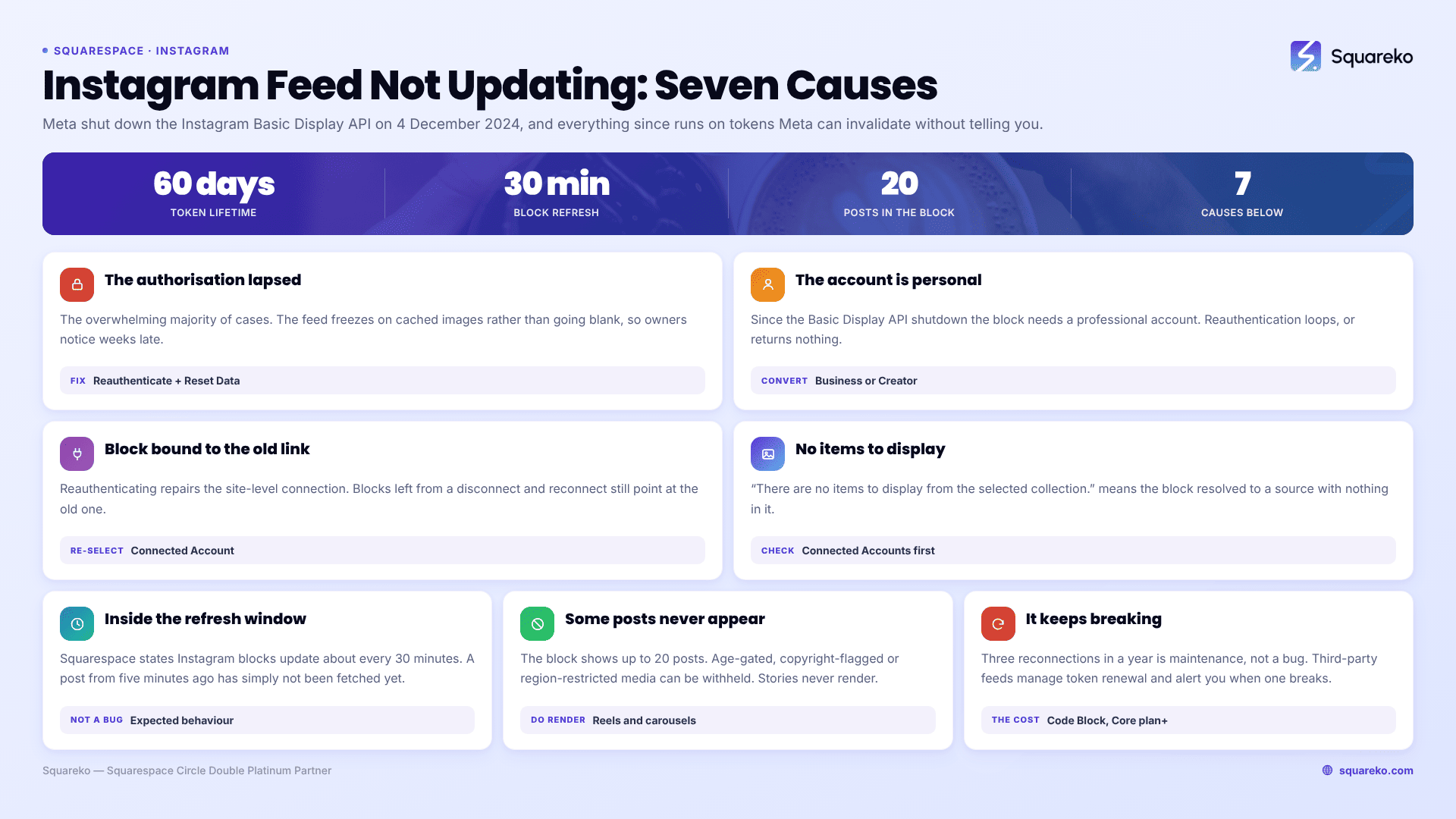
The authorisation between Squarespace and Instagram has lapsed, and the Instagram block is serving the last images it cached rather than fetching new ones. Meta shut down the Instagram Basic Display API on 4 December 2024, and everything since runs on tokens Meta can invalidate. Fix it at Settings → Connected Accounts → Instagram → Reauthenticate, then re-select the account on each Instagram block.
Here are the causes, ordered by how often they turn out to be the problem.
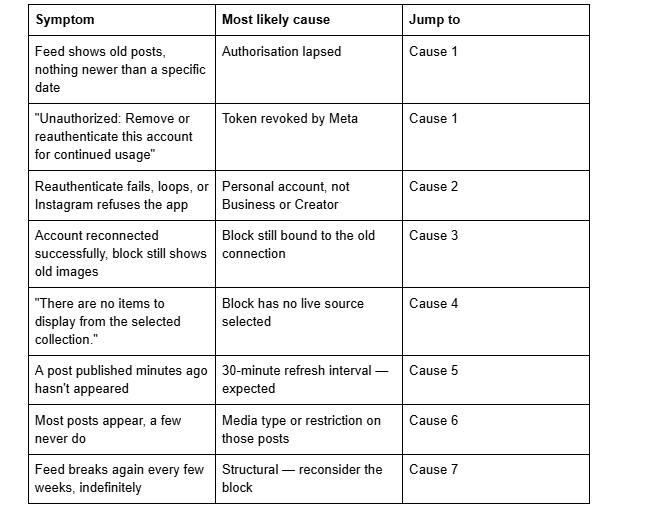
Quick diagnostic table
Cause 1 — The Instagram authorisation has lapsed
This is the overwhelming majority of cases, and the reason the symptom is so distinctive: the feed does not go blank, it freezes. Squarespace keeps the last set of images it successfully retrieved and simply stops adding to it. Owners often notice weeks late, because the block still looks populated.
How to confirm it in 20 seconds: open Settings → Connected Accounts. A lapsed Instagram connection shows the message "Unauthorized: Remove or reauthenticate this account for continued usage". If the connection looks healthy but the feed is still stale, skip to Cause 3.
The fix:
Open Settings → Connected Accounts.
Click the Instagram account, then click Reauthenticate.
Log in to Instagram when prompted and approve the permissions.
Back in Connected Accounts, click the Instagram icon and click Reset Data. This clears Squarespace's cached copy of the feed and forces a fresh pull.
Go to each page with an Instagram block, open the block, and confirm the right account is selected in the Connected Account dropdown.
Step 5 is the one people skip, and it is why "I already reconnected it" is such a common follow-up.
Why it lapses at all. Squarespace holds a long-lived Meta access token on your behalf. Meta's long-lived tokens carry a 60-day lifetime and renew automatically while the connection stays healthy, so a working feed can run for years untouched. What kills a token is an event: an Instagram password change, revoking Squarespace under Instagram's connected-apps settings, switching account type, transferring the account to a different Meta Business portfolio, or Meta invalidating a batch of tokens during an API change. Squarespace does not notify you when this happens — there is no email, no dashboard warning on the block itself.
Cause 2 — The Instagram account is personal, not Business or Creator
Since the Basic Display API shutdown, Meta provides no supported route for a personal Instagram account to feed a third-party website. Squarespace's Instagram block now requires a professional account — Business or Creator. If reauthentication fails, loops back to the login screen, or completes but returns nothing, account type is the first thing to check.
Convert in the Instagram mobile app: Settings and privacy → Account type and tools → Switch to professional account. Choose Creator or Business; either works for the Squarespace Instagram block. The conversion is free and reversible, though reverting will break the feed again.
Do the conversion before reauthenticating, not after. Changing account type on an already-connected profile is itself one of the events that invalidates the token.
Cause 3 — The Instagram block is still bound to the old connection
Reauthenticating in Connected Accounts repairs the site-level connection. It does not always re-point the individual blocks, which store a reference to the connected account. If you disconnected and reconnected rather than using Reauthenticate, Squarespace treats it as a new connection and every existing Instagram block is left pointing at one that no longer exists.
Open each page containing an Instagram block, double-click the block, open the account tab, and re-select your account from the Connected Account dropdown. Save the page. Then check the live site logged out — the editor caches its own preview of the block and is not a reliable test.
This is worth auditing across the whole site, not just the homepage. Instagram blocks tend to accumulate in footers and section templates where nobody looks.
Cause 4 — "There are no items to display from the selected collection."
This exact string means the block resolved to a source with nothing in it. On an Instagram block it almost always means the connected account is gone — disconnected, revoked, or deleted — rather than that the account genuinely has no posts.
Work backwards: Connected Accounts first (is Instagram listed at all?), then the block's account dropdown, then the account itself. A private Instagram account will also return nothing; the block can only read publicly visible media.
Cause 5 — You are inside the 30-minute refresh window
Squarespace states that Instagram blocks update about every 30 minutes. A post published five minutes ago has not failed to sync; it has not been fetched yet. This is normal and there is no way to force it from the block.
If you need to check immediately, Reset Data in Connected Accounts clears the cache and triggers a fresh pull. Use it as a diagnostic, not a routine — it is not a refresh button and repeated use tells you nothing extra.
Cause 6 — Specific posts never appear in the feed
If the Squarespace Instagram block updates normally but individual posts are missing, the connection is fine and the media is the issue. The block shows up to 20 posts, so anything older than your last twenty is out of scope by design. Beyond that, posts hidden by Instagram's own restrictions — age-gated content, media flagged for copyright, content restricted in some regions — may be withheld from the API response even though it displays fine inside the Instagram app.
Reels and carousels generally render; Stories never do, because they are not part of the media set the API exposes to the block.
Cause 7 — Whether the native Instagram block is still the right choice in 2026
If you have reauthenticated three times in a year, the honest answer is that you are maintaining infrastructure rather than fixing a bug. The native Squarespace Instagram block has one job and does it free; what it does not do is manage token renewal robustly across Meta's API changes, or tell you when it has stopped working.
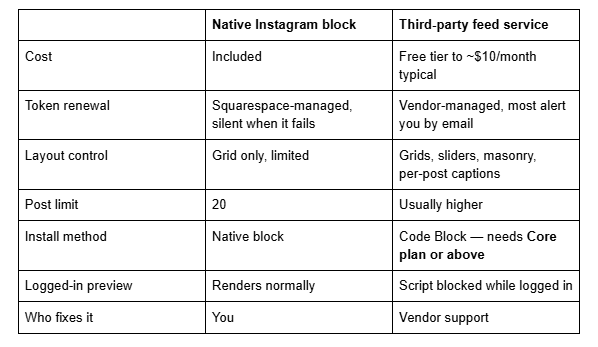
The trade is real: a third-party widget means a <script> in a Code Block, which requires a Core plan or above and is disabled while you're logged in and editing your site, so it will look broken in the editor even when it is working. It is also client-side rendered, so the images and captions it injects are not in your page's HTML source and will not be read by crawlers that do not execute JavaScript — which, as of 2026, is most AI crawlers. If the Instagram feed is decorative, that is irrelevant. If you were relying on it for content, it was never doing that job anyway.
Choose the native block if you post regularly and can tolerate an occasional reconnection. Choose a third-party service if the feed is commercially important, if you want alerting when it breaks, or if you need a layout the native block cannot produce.
Still not updating?
Work the order: Connected Accounts → Reauthenticate → Reset Data → re-select the account on every block → check logged out. That sequence resolves the large majority of stale Instagram feeds on Squarespace 7.1, and it takes about five minutes.
If reauthentication completes cleanly and the feed is still frozen, the problem is usually on the Meta side — an account in a Business portfolio the login can't authorise, or a professional account conversion that didn't fully apply — and it needs unpicking at the Instagram end before Squarespace can do anything with it.
That's the kind of thing our Squarespace website support plans exist for. Most Instagram feed problems we're sent are solved by the five minutes above, though, so try that first — no obligation either way.
FAQ
-
Almost always an expired authorisation between Squarespace and Instagram. The block keeps showing its cached images rather than going blank, so the failure is easy to miss. Go to Settings → Connected Accounts, click your Instagram account, click Reauthenticate, then Reset Data, then re-select the account on each Instagram block.
-
Yes. Since Meta shut down the Instagram Basic Display API on 4 December 2024, personal Instagram accounts have no supported route into a third-party website feed. Convert in the Instagram app under Settings and privacy → Account type and tools → Switch to professional account, then reauthenticate in Squarespace.
-
About every 30 minutes, per Squarespace's own documentation. A post published in the last half hour has not failed to sync — it simply has not been fetched yet. Reset Data in Connected Accounts clears the cache and forces an immediate pull if you need to verify something.
-
It means Meta has invalidated the access token Squarespace held for your Instagram account. Common triggers are an Instagram password change, revoking Squarespace in Instagram's connected-apps settings, switching account type, or a Meta-side API change. Reauthenticate in Settings → Connected Accounts to issue a new token.
-
Because reconnecting repairs the site-level connection but leaves individual Instagram blocks pointing at the previous one. Open each block, re-select your account in the Connected Account dropdown, and save. Then check the live site logged out — the editor renders its own cached preview of the block.
-
If the feed is commercially important, yes — third-party services manage token renewal and alert you when a feed breaks, which Squarespace does not. The cost is a Code Block script, which requires a Core plan or above and is disabled while you're logged in. For a decorative footer grid, the native block is fine.

Author Bio
I'm Walid Hasan, a Certified Squarespace Expert and Squarespace Circle Platinum Partner with over 12 years of hands-on experience designing and optimizing high-performing websites. Over the years, I've had the privilege of building more than 2,000 Squarespace websites for clients around the world, always focusing on clean design, strong user experience, and conversion-driven results.
