
15 Squarespace Website Mistakes That Cost You Enquiries
The short answer: The most expensive Squarespace mistakes are not design mistakes. They are silent plumbing failures — a contact form with no storage destination attached, a product left on Hidden, a search-visibility toggle never switched off after launch. None of them produce an error message. The site looks finished, traffic arrives, and the enquiries either never send or never reach your inbox.
Here are the fifteen that cost the most, with the mechanism for each and what to do about it.
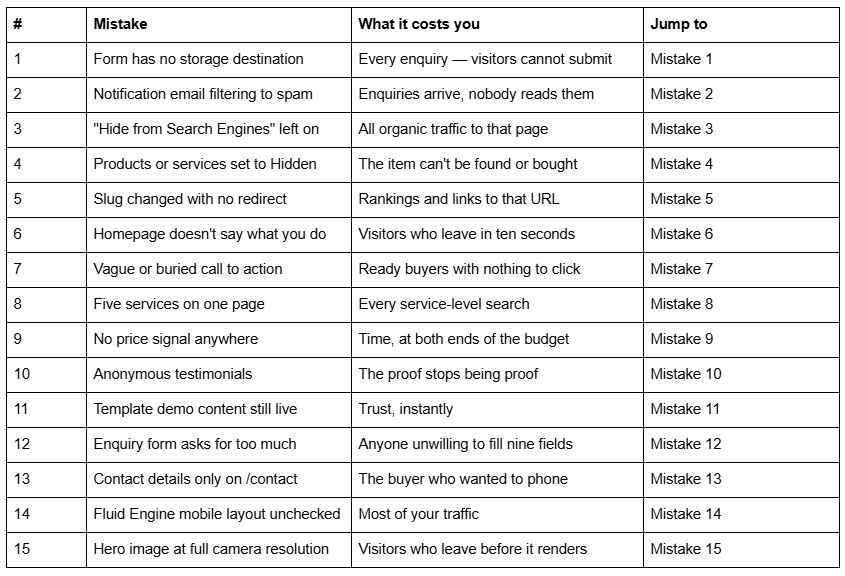
What each mistake actually costs
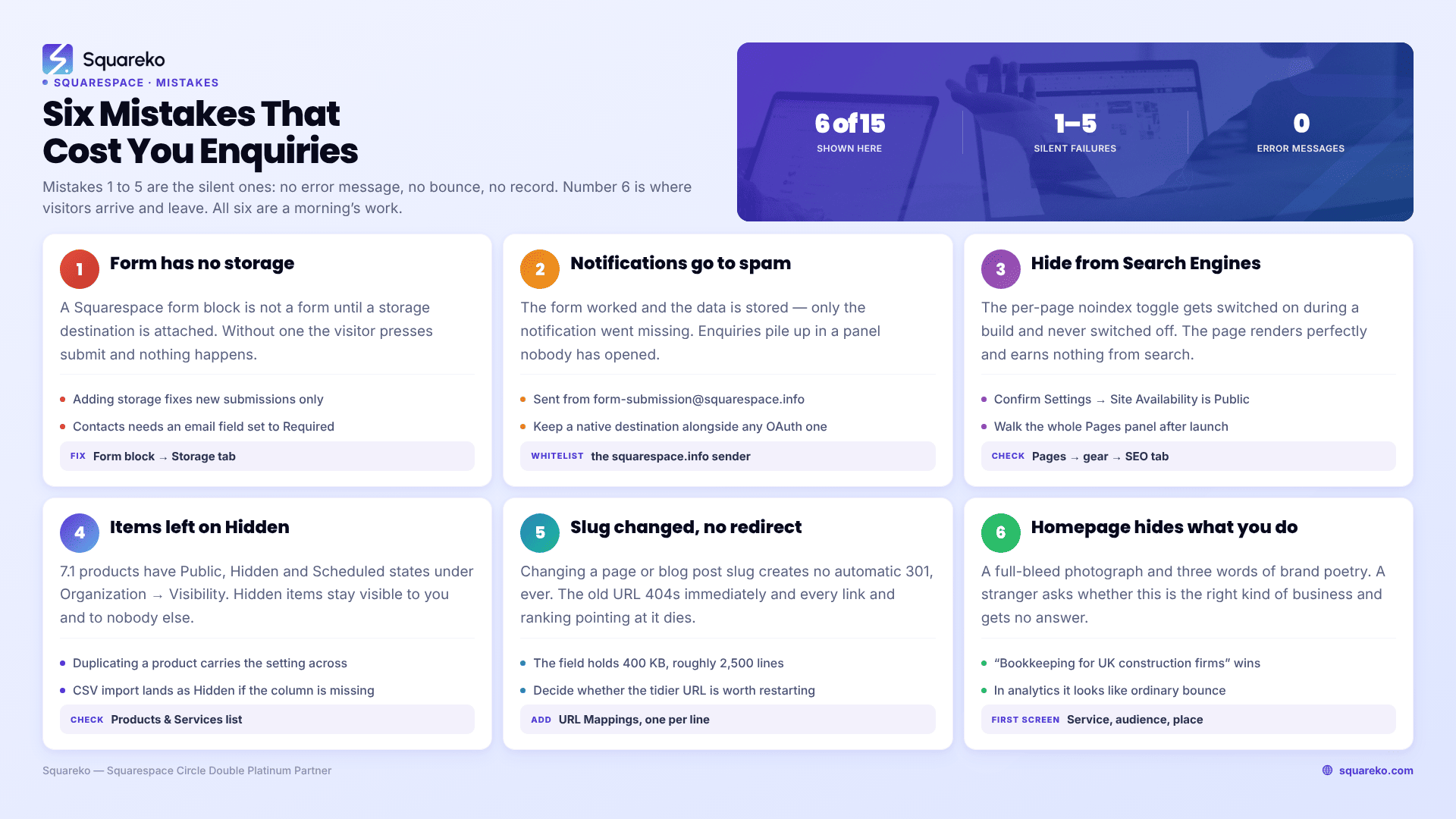
Silent failures — enquiries that never reach you
Mistake 1 — The Squarespace form has no storage destination
This is the most expensive mistake on the platform and it is invisible from the front end.
A Squarespace form block is not a form until it has somewhere to send data. Squarespace's documentation is explicit: at least one storage option is required per form, and without one "the form won't have a place to send submissions, and visitors won't be able to submit the form." In the editor Squarespace flags it as "Add storage to this form." On the live site the visitor fills everything in, presses the button, and nothing happens.
The mechanism. You lose every enquiry from that form and get no signal that anything is wrong — no bounce, no error email, no entry anywhere. Sites run like this for months while the owner concludes the marketing isn't working.
The fix. Click the form block → Storage tab. Confirm at least one destination: an email address, a Squarespace mailing list, the Contacts panel, Google Drive, Mailchimp or Zapier. The Contacts panel only receives submissions if the form has an email field with Required switched on. Note that adding storage fixes new submissions only — anything sent while storage was missing was never captured and cannot be recovered. Then test every form on the site from a logged-out browser.
Mistake 2 — The notification email is filtering to spam
Half the "my Squarespace form isn't working" reports we're sent are not submission failures at all. The form worked, the data is stored, and only the notification email went missing.
The mechanism. Enquiries pile up in a panel nobody has opened, and by the time you find them the prospect has hired someone else. This is worse than Mistake 1, because you also lose the goodwill of people who think you ignored them.
The fix. Squarespace sends notifications from form-submission@squarespace.info. Whitelist that address — on Google Workspace under Admin console → Apps → Google Workspace → Gmail → Spam, phishing and malware, on Microsoft 365 in the Safe Senders list. Then check Contacts → Form submitters against your inbox for the last three months.
Keep a native Squarespace destination connected alongside any third-party one. Google Drive and Mailchimp connections are OAuth grants and they expire; the Contacts panel does not.
Mistake 3 — "Hide from Search Engines" is still switched on
Squarespace has a per-page noindex toggle at Pages panel → gear icon → SEO tab → Hide from Search Engines. It gets switched on during a build so a half-finished page isn't indexed, and then nobody switches it off.
The mechanism. The page renders perfectly for anyone with the link and is invisible in search. You will not notice unless you check, because the page works. A services page in this state earns nothing from organic search for as long as it stays that way.
The fix. Walk the Pages panel after launch and confirm the toggle is off on everything that should rank. While you are there, check Settings → Site Availability is Public rather than Private or Password Protected — a whole site left private fails the same way at a larger scale.
Mistake 4 — Products or service items are set to Hidden
Squarespace 7.1 products have three visibility states in the product editor under Organization → Visibility: Public, Hidden and Scheduled. Hidden products stay visible to you while you are logged in, and are invisible to everyone else.
The mechanism. Two workflows push items into Hidden unnoticed: duplicating a product carries settings across and the visibility field is easy to leave alone, and CSV import lands the whole batch as Hidden if the visibility column is missing or malformed. Because the items still list in your admin, nothing looks wrong until a customer emails asking where something went.
The fix. Open Products & Services and read the Visibility column in list view — you can change several at once there. Then check the store page logged out, not in the editor.
Mistake 5 — A URL slug changed and no redirect was created
Changing a page or blog post slug on Squarespace creates no automatic 301 redirect, ever. The old URL starts returning a 404 immediately, and every link, bookmark and ranking pointing at it is dead.
The mechanism. This usually happens during a tidy-up — someone shortens /services/website-design-services-for-small-business to /services/web-design because it reads better. The page that was earning enquiries loses its accumulated links and its position, and the replacement starts from nothing.
The fix. Before changing a slug, decide whether the gain is worth restarting that URL's history. If you change it anyway, add the redirect in the same sitting at Settings → Developer Tools → URL Mappings:
/services/website-design-services-for-small-business -> /services/web-design 301
One line per redirect. The field holds up to 400 KB, roughly 2,500 lines.
Message failures — visitors who arrive and leave
Mistake 6 — The homepage doesn't say what you do or who it's for
Most Squarespace homepages that lose enquiries open with a mood: a full-bleed photograph and three words of brand poetry. "Considered spaces." "Elevated wellness." Beautiful, and unreadable to a stranger.
The mechanism. A first-time visitor arrives with one question — is this the right kind of business for me? If the first screen doesn't answer it they open the next tab, and in analytics that looks like ordinary bounce rather than a fixable problem.
The fix. The first screen needs the service, the audience and the location in plain words, in the H1 or immediately beneath it. "Bookkeeping for UK construction firms" outperforms "Numbers, handled." You can be elegant; you cannot be ambiguous. The full breakdown is in the 7-section homepage layout post.
Mistake 7 — The primary call to action is vague, or below the fold
"Learn more", "Get in touch" and "Say hello" are the three most common buttons on Squarespace service sites and the three weakest. So is having six equally weighted buttons on one page.
The mechanism. A vague button asks the visitor to imagine what happens next, and imagining is friction. Competing buttons split attention: offer a newsletter signup, a portfolio link, a shop link and an enquiry form at equal visual weight and the enquiry gets a quarter of the attention.
The fix. Choose one primary action per page and name the outcome — "Book a 20-minute call", "Request a quote", "Check availability for June". Give it the strongest button style in Site Styles and make every other action secondary. Repeat that same action at the end of the page rather than inventing a second one.
Mistake 8 — Five services share one page
A single /services page listing everything you do is the most common structural mistake on service business sites built quickly.
The mechanism. It costs you twice. In search, one page cannot rank for five distinct service queries — there is no title, no H1 and no depth for any of them. On the page, a visitor who came for one service reads about four they don't want, which reads as unfocused rather than versatile.
The fix. One page per service you actually want to sell, each with its own URL, H1, proof and enquiry route. Keep /services as an index that links to them. If you have eleven services and three earn the money, build pages for three.
Mistake 9 — There is no price signal anywhere
Service businesses on Squarespace routinely publish no pricing at all, on the theory that it starts a conversation.
The mechanism. It does start conversations, just not useful ones. Without a signal you attract enquiries at a tenth of your minimum, and lose buyers at three times it who assumed you were cheap.
The fix. You don't need a price list. A starting figure or a typical range does the filtering. Put it on the service page, not buried in an FAQ. If pricing genuinely varies, publish the two or three variables that move it.
Mistake 10 — The proof is anonymous
"Amazing to work with! — J.S." is not proof. It is a sentence you could have written yourself, and readers treat it that way.
The mechanism. Testimonials work by being verifiable and specific. Strip the name, the business and the outcome and you remove every reason to believe it, while still occupying the space real proof could have used.
The fix. Full name, business name, and a result with a number or a timeframe in it. Place each testimonial beside the claim it supports rather than in a carousel at the bottom.
Mistake 11 — Template demo content is still live
Lorem ipsum in a footer. A stock team of four people who don't work there. An events page listing a 2023 workshop. A Squarespace template's placeholder Instagram handle.
The mechanism. Leftover demo content tells the visitor the site is unattended, and that transfers straight to the business — if the website hasn't been touched in two years, is the company still trading?
The fix. Before launch, view every page logged out and read the footer, the 404 page, the search results page and any page not in the main navigation. Those four are where demo content survives longest. The full sweep is in our pre-launch checklist.
Friction failures — visitors who wanted to enquire and gave up
Mistake 12 — The enquiry form asks for too much
Nine required fields, a budget dropdown, a "how did you hear about us" and a phone number marked Required.
The mechanism. Every required field is a decision point where somebody stops. Phone number and budget range are the highest-friction fields on a first contact, because both feel like committing before you know who you're talking to.
The fix. Name, email and one open message field is enough for a first enquiry. Everything else can be asked in your reply.
While you are in the form block, set a confirmation. Squarespace lets you show a post-submit message or redirect to a thank-you page. The redirect is better — the visitor gets an unambiguous confirmation, and you get a URL you can count as a conversion in analytics.
Mistake 13 — Contact details live only on the contact page
The phone number and email exist once, on /contact, behind a form.
The mechanism. Different buyers convert through different channels, and someone comparing three suppliers on a Tuesday afternoon wants to phone. Making them navigate to find the number adds a step at the moment they were ready to act, and a proportion of them ring whoever's number was easier to find.
The fix. Put the phone number and email in the footer of every page, and in the header if phone enquiries matter. Mark them up as real tel: and mailto: links. If you serve a defined area, put the city or region in the footer too — the cheapest local relevance signal on the site.
Mistake 14 — The Fluid Engine mobile layout was never checked
Fluid Engine maintains separate desktop and mobile layouts for the same section. Moving a block on desktop does not move it on mobile, and vice versa. Squarespace 7.1's mobile breakpoint is 767px.
The mechanism. Text lands on top of a face. A button pushes off the right edge. The hero headline stacks into eleven lines and the call to action ends up three screens down. Most service business traffic is mobile, so this is the majority experience — and the one nobody checks, because sites get built on a 27-inch screen.
The fix. Switch to the mobile view in the editor, walk every section, then load the live site on a real phone. Fix mobile positioning in the mobile editor rather than with CSS — Fluid Engine writes inline styles for layout, and inline styles beat stylesheet rules regardless of specificity.
Mistake 15 — The hero image is a 6 MB file straight off the camera
The Squarespace CDN will compress and convert it, but it cannot undo an 8,000-pixel-wide upload.
The mechanism. The hero image is almost always the Largest Contentful Paint element — what Google measures to decide whether your page felt fast. A slow LCP loses mobile visitors before they read anything, and it is a ranking input.
The fix. Upload images between 1500 and 2500 pixels wide; 2500px is the maximum Squarespace serves, so anything larger is wasted bytes. Set the filename before upload — Squarespace filenames cannot be changed afterwards. The platform serves WebP unconditionally from its CDN, so there is no need to convert formats yourself.
For context: across 54 Squareko-built Squarespace sites measured in August 2026 — Playwright/Chromium lab test, unthrottled, one run per site — median mobile LCP was 2.01 seconds, with 74% under Google's 2.5-second threshold, at a median page weight of 3.0 MB. That is lab data rather than field data, but it shows a media-heavy Squarespace site can sit inside the threshold when images are sized sensibly.
Where to start
Work the silent failures first — mistakes 1 to 5. They take under an hour between them, and they are the only five here that can be costing you enquiries right now with no visible symptom. Then fix the homepage message and the call to action.
Most of this is a morning's work on the site you already have. Where it stops being maintenance and becomes a rebuild is when the structure itself is the problem — one page carrying five services, nowhere to put proof, a homepage that can't be made to say what you do without redesigning the section. That is the point at which a custom Squarespace design is the cheaper option, because otherwise you pay twice: once to patch, once to rebuild. If the structure is sound, ignore that and go and check the form.
FAQ
-
Most often the form has no storage destination. Squarespace requires at least one per form — an email address, mailing list, the Contacts panel, Google Drive, Mailchimp or Zapier — and without one visitors physically cannot submit. Click the form block, open the Storage tab, and confirm something is connected.
-
Yes. Changing a page or blog post slug creates no automatic 301 redirect, ever. The old URL returns a 404 immediately and loses its rankings and inbound links. Add a redirect at Settings → Developer Tools → URL Mappings using the syntax /old-url -> /new-url 301 in the same sitting.
-
Its Visibility is probably set to Hidden. Squarespace 7.1 products have three states under Organization → Visibility: Public, Hidden and Scheduled. Duplicated products and CSV imports frequently land as Hidden, and Hidden items stay visible to you while logged in, which is why it goes unnoticed.
-
Fluid Engine keeps separate desktop and mobile layouts for every section, so moving a block on desktop does not move it on mobile. The 7.1 breakpoint is 767px. Fix mobile positioning in the mobile editor rather than with CSS, because Fluid Engine writes inline styles that beat stylesheet rules.
-
Between 1500 and 2500 pixels wide. 2500px is the maximum Squarespace serves, so larger uploads are wasted weight on your hero image, which is usually the Largest Contentful Paint element. Set the filename before uploading — Squarespace filenames cannot be changed after upload.
-
A signal, yes — a starting figure or a typical range. Without one you attract enquiries far below your minimum and lose buyers who assumed you were cheap. It does not have to be a full price list; publishing the two or three variables that move the price works nearly as well.

Author Bio
I'm Walid Hasan, a Certified Squarespace Expert and Squarespace Circle Platinum Partner with over 12 years of hands-on experience designing and optimizing high-performing websites. Over the years, I've had the privilege of building more than 2,000 Squarespace websites for clients around the world, always focusing on clean design, strong user experience, and conversion-driven results.
