
"My Squarespace SEO Isn't Working" — 12 Reasons Why
The short answer: Most of the time nothing is broken. The most common cause of a Squarespace site not ranking is that too little time has passed and too few pages exist — Squarespace's own guidance puts meaningful traction at 4 to 12 months. Before accepting that, rule out the fault that makes everything else irrelevant: check in Google Search Console whether the page is indexed at all.
Here are the twelve causes, ordered by how often they turn out to be the problem.
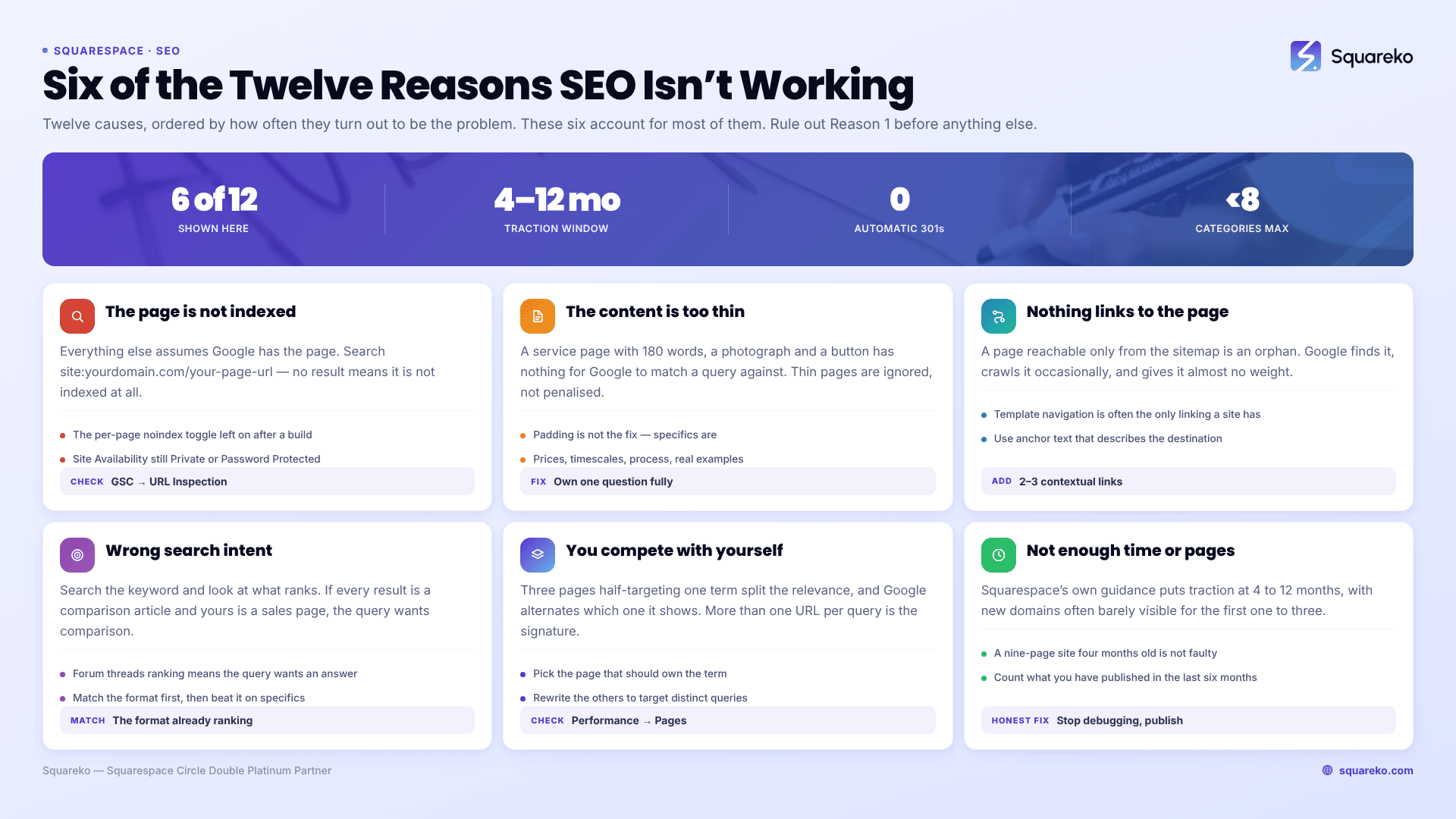
Quick diagnostic table
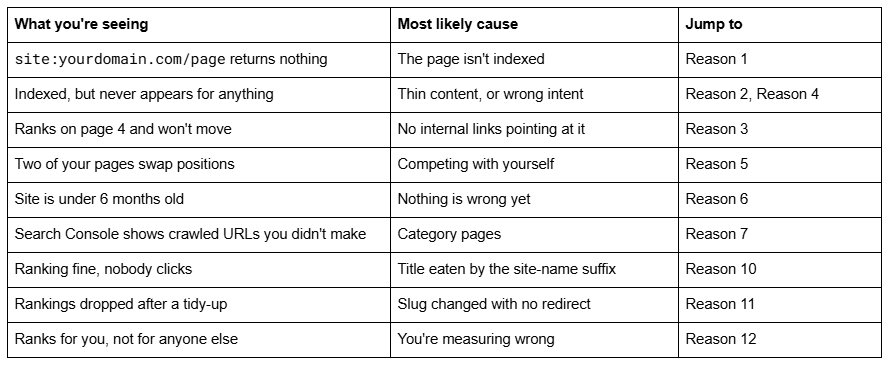
Reason 1 — The page isn't indexed at all
Everything else on this list assumes Google has the page.
How to confirm it in 20 seconds: search site:yourdomain.com/your-page-url in Google. No result means it is not indexed. Then open Google Search Console → URL Inspection and paste the full URL for the reason.
Three Squarespace-specific causes account for most of it. The per-page noindex toggle at Pages panel → gear icon → SEO tab → Hide from Search Engines gets switched on during a build and never switched off. Settings → Site Availability left on Private or Password Protected hides the whole site. And a new page may simply not have been crawled yet — Squarespace generates /sitemap.xml automatically, but discovery lag runs to days or weeks.
Reason 2 — The content is too thin to rank for anything
A Squarespace service page with 180 words, a photograph and a button has nothing for Google to match a query against.
How to confirm it: read the page and ask what question it answers completely. If the answer is "none — it introduces a topic", that is the problem. Thin pages are ignored rather than penalised.
The fix is not padding. Pick one question the page should own and answer it fully, with the specifics only you have — prices, timescales, process, real examples.
Reason 3 — Nothing on your site links to the page
A page reachable only from the sitemap is an orphan. Google finds it, crawls it occasionally, and gives it almost no weight.
How to confirm it: search your own site for the page's topic and see whether anything else links to it. If the only route in is the navigation, or nothing at all, it's orphaned.
Add two or three contextual links from related pages, with anchor text describing the destination. This matters more on Squarespace than elsewhere, because a template's navigation is often the only internal linking a site has.
Reason 4 — The page targets the wrong search intent
A page can be excellent, indexed and well-linked and still never rank, because it answers a different question from the one people are typing.
How to confirm it in 30 seconds: search the keyword and look at what ranks. If the results are all comparison articles and yours is a sales page, Google has decided that query wants comparison, and you will not win it with a sales page regardless of quality.
Match the format that is already ranking, then beat it on specifics. If the SERP is dominated by forum threads, the query wants a direct answer, not a brochure.
Reason 5 — You're competing with your own pages
Three service pages that all half-target "web design" split the relevance, and Google alternates which one it shows.
How to confirm it: in Search Console, open Performance, filter by the query, and add the Pages dimension. More than one URL appearing for the same query is the signature.
Pick the page that should own the term, make it the best answer, rewrite the others to target their own distinct queries, and link them to the chosen one.
Reason 6 — Not enough time has passed, and not enough pages exist
This is the honest answer for most sites that arrive at this article, and the one nobody wants.
Squarespace's own guidance says most businesses start to see traction in 4 to 12 months, with new domains often spending the first one to three months barely visible. A nine-page site launched four months ago that has published nothing since is not suffering a technical fault. It has not given search engines enough to work with.
How to confirm it: check the domain's age and count the pages you have published in the last six months. If the answer is "under a year old" and "none", stop debugging and start publishing.
Reason 7 — Blog category pages are absorbing the crawl
Squarespace 7.1 handles blog tags and categories differently, and the difference matters. Tag URLs use the ?tag= parameter, and Squarespace's robots.txt — which cannot be edited — disallows /*?tag=* along with ?author=, ?month= and ?view=. Category pages get clean paths like /blog/category/Website+Help, are crawlable, and appear in the generated sitemap.
How to confirm it: open yourdomain.com/sitemap.xml and look for /category/ URLs. A site with 20 posts and 15 categories is publishing 15 near-empty listing pages into its own sitemap.
Keep categories few and genuinely distinct — under eight for most sites — and use tags for the long tail, since tag URLs are excluded from crawling anyway.
Reason 8 — There is no extractable answer on the page
Squarespace auto-emits one Article JSON-LD block per post, and that is all you get by default. No FAQ schema, no organisation schema, and — more importantly — often no plainly-worded answer for anything to extract.
How to confirm it: run the page through Google's Rich Results Test. Schema is added through a Code Block in the post body, HTML mode; there is no per-post header injection on any plan. Add FAQPage, Person or Organization as complementary types, never a second Article. The bigger win is structural: a direct 40–60 word answer near the top, and real tables for anything comparative. Both get quoted; a wall of prose does not.
Reason 9 — The page is slow or unstable on mobile
Google measures mobile. A hero image uploaded at full camera resolution is usually the Largest Contentful Paint element, and a slow LCP costs visitors before it costs rankings.
How to confirm it: run the URL through PageSpeed Insights and read the mobile tab only. Upload images at 1500–2500px wide — 2500px is the maximum Squarespace serves. As a benchmark: across 54 Squareko-built Squarespace sites measured in August 2026 (Playwright/Chromium lab test, unthrottled, one run per site), median mobile LCP was 2.01 seconds, 74% under Google's 2.5-second threshold, and median mobile CLS was 0.000. Desktop CLS was weaker at 0.029, so check stability on both. That is lab data, not field data from real visitors.
Reason 10 — Your titles are being eaten by the site-name suffix
This one doesn't affect rankings; it affects whether anyone clicks. By default Squarespace appends your site title to every page and item title, using the format field at Settings → Marketing → SEO → Search Appearance. On a site called "Meridian Interior Architecture Studio" that spends roughly 35 of the ~60 characters Google displays on your own name.
How to confirm it: search your brand and read the titles in the results. If every one ends in the same suffix, remove the — %s from the Items and Pages format fields.
Reason 11 — You changed a slug and lost what you had
Changing a page or blog post slug on Squarespace creates no automatic 301 redirect, ever. The old URL 404s immediately and takes its rankings and inbound links with it.
How to confirm it: in Search Console, look for a rise in Not found (404) dated to the week rankings dropped.
Add the redirect at Settings → Developer Tools → URL Mappings, one line per rule:
/old-page-url -> /new-page-url 301
Reason 12 — You're measuring the wrong thing
Checking rankings by searching in your own logged-in browser tells you almost nothing. Results are personalised, localised, and biased by how often you visit your own site.
How to confirm it: use Search Console's Performance report — average position, impressions and clicks by query. Impressions rising while position stays flat is progress, not failure: Google has started showing the page and is deciding where it belongs.
Where to start
Rule out Reason 1 first, because an unindexed page makes the other eleven moot. Then work Reasons 2 to 5 — content decisions, and the same ones behind what makes a good service business website. If they are fine and the site is under a year old, Reason 6 is the answer, and the fix is publishing.
Our Squarespace SEO checklist covers the setup side in order, and if the site itself is misbehaving rather than the search results, start with the Squarespace diagnostic guide.
Outside help earns its keep in one case: the technical side is clean, the content is good, and the site still isn't moving after a year. That usually means the target queries were chosen wrong, and no amount of on-page work fixes a keyword strategy problem — which is what our Squarespace SEO service exists to sort out. If you are three months in with nine pages, save your money and publish instead.
FAQ
-
Squarespace's own guidance puts meaningful traction at 4 to 12 months, with new domains often barely visible for the first one to three. A site under a year old with fewer than a dozen pages usually has no technical fault at all — it simply has not given search engines enough to rank yet.
-
Search site:yourdomain.com/your-page-url in Google. If nothing comes back the page is not indexed. Then use URL Inspection in Google Search Console for the reason. The two common Squarespace causes are the Hide from Search Engines toggle and Site Availability set to Private.
-
Tag URLs use ?tag= and are already disallowed in Squarespace's robots.txt, which cannot be edited. Category pages are different — they get clean /blog/category/Name paths, are crawlable, and appear in your sitemap. Keeping categories few and distinct avoids publishing near-empty duplicate listing pages.
-
Squarespace auto-emits one Article JSON-LD block per blog post, with the author as a bare string. Nothing else is added. Extra schema goes in a Code Block in the post body, HTML mode, because Squarespace 7.1 has no per-post header injection. Add complementary types only, never a second Article.
-
Squarespace appends your site title to page titles using the format at Settings → Marketing → SEO → Search Appearance. With a long site name that consumes most of the roughly 60 characters Google displays. Remove the — %s suffix from the Pages and Items format fields.
-
Yes, unless you redirect. Changing a page or blog post slug creates no automatic 301 on Squarespace, ever. The old URL 404s straight away and loses its rankings and inbound links. Add /old-url -> /new-url 301 at Settings → Developer Tools → URL Mappings in the same sitting.

Author Bio
I'm Walid Hasan, a Certified Squarespace Expert and Squarespace Circle Platinum Partner with over 12 years of hands-on experience designing and optimizing high-performing websites. Over the years, I've had the privilege of building more than 2,000 Squarespace websites for clients around the world, always focusing on clean design, strong user experience, and conversion-driven results.
