
What to Prepare Before Hiring a Web Designer (Client Checklist)
The short answer: The two things that decide whether your project runs to schedule are content and decisions — who is writing the words, and who is allowed to approve them. Design work almost never stalls on design. It stalls waiting for copy that nobody was assigned to write, or on a fourth round of feedback from a person who wasn't in the kick-off. Prepare those two properly and everything else is administration.
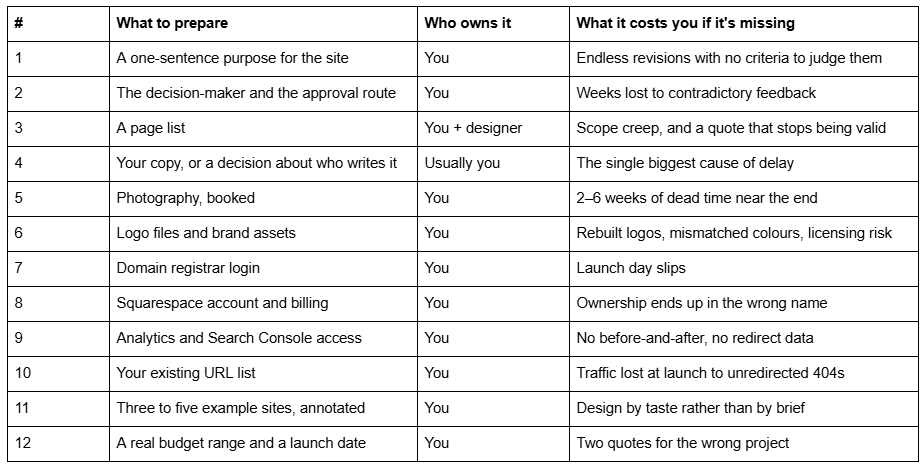
Here are the twelve items worth assembling first, in the order a project consumes them.
Readiness table
1. A one-sentence purpose for the site
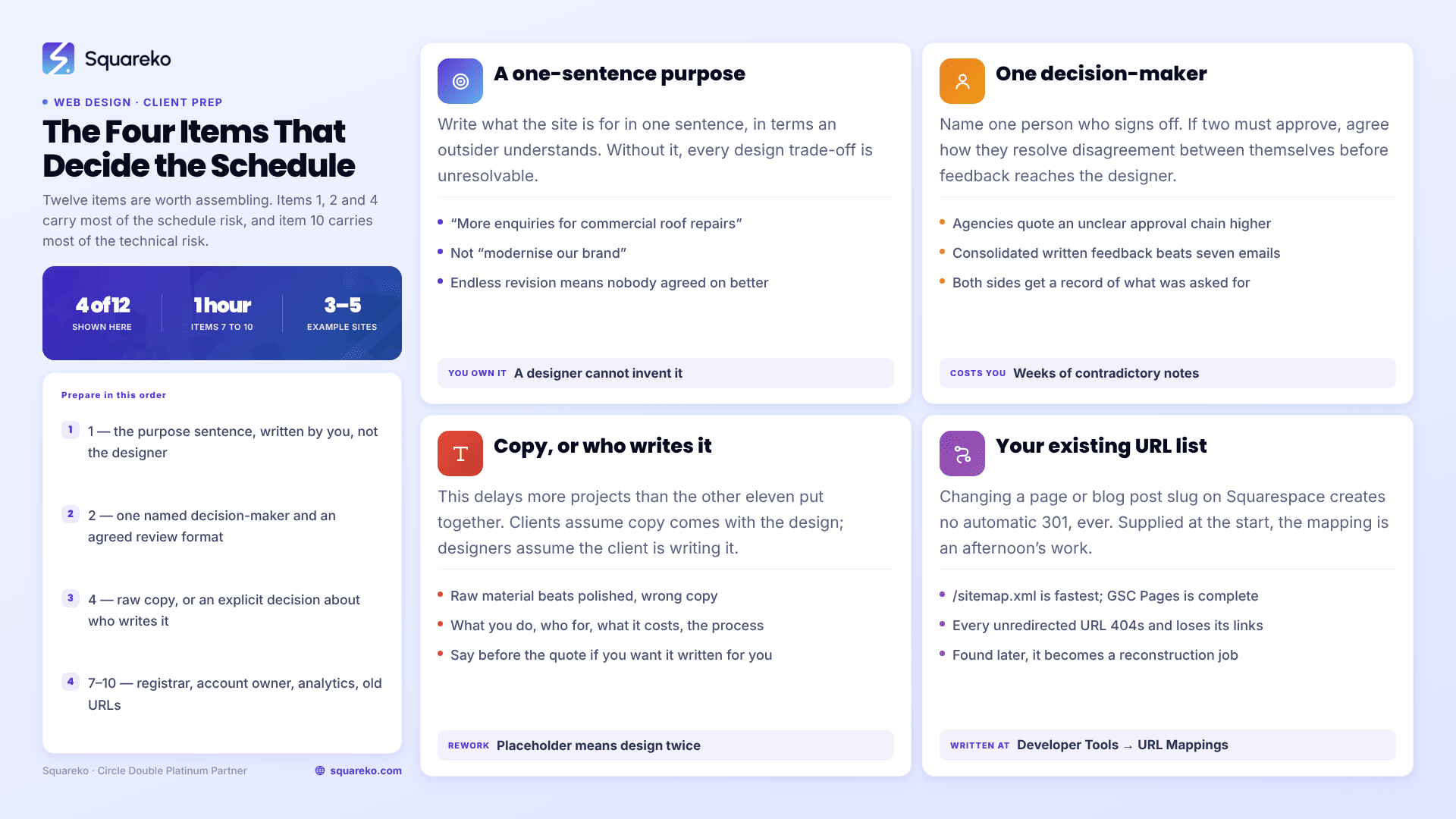
Before anything else, write down what the website is for, in one sentence, in terms someone outside your business would understand. "Get more enquiries for commercial roof repairs from facilities managers in the North West." Not "modernise our brand".
Why it shortens the project. Every design decision is a trade-off, and without a stated purpose you have no basis for choosing. Should the hero carry a booking button or the portfolio? Should pricing be visible? Those arguments are unresolvable without a purpose sentence and instantly resolvable with one. Projects that revise endlessly are almost always projects where nobody agreed what "better" meant.
Write the sentence yourself. A designer can help you sharpen it, but they cannot invent it.
2. Who decides, and how approvals happen
Name one decision-maker. If two people must sign off, say so up front and agree how they resolve disagreement between themselves before feedback reaches the designer.
Why it shortens the project. Contradictory feedback is the most expensive thing a client can send. When one stakeholder wants the hero simplified and another wants three more links in it, the designer has to build both and then wait. Agencies price this risk in — a project with an unclear approval chain gets quoted higher, or gets a tighter revisions clause, because it has historically run long.
Agree the review format too. Consolidated written feedback in one document beats seven separate emails and a phone call, and it gives both sides a record of what was asked for.
3. A page list
List the pages the site needs, with a one-line note on what each one is for. Home, About, three service pages, Contact, Blog. That is a sitemap, and it is the single most useful thing you can bring to a first call.
Why it shortens the project. Web design is quoted per page or per template, so the page list is the scope. Without it you get a quote based on assumptions, and the moment you say "and obviously each service needs its own page" three weeks in, the quote is void and the timeline moves.
Two rules worth applying while you write it. One page per service you actually want to sell — a single page covering five services cannot rank for any of them, and it reads as unfocused. And if a page has no purpose you can state in a line, it probably shouldn't exist.
4. Your copy, or an explicit decision about who writes it
This is the item that delays more projects than the other eleven put together.
Most clients assume copy comes with the design. Most designers assume the client is writing it. Nobody checks, and the project reaches build stage with lorem ipsum in every section and no author.
Why it shortens the project. A designer laying out real text designs once. A designer laying out placeholder text designs twice — once for the placeholder, once when your actual 90-word paragraph doesn't fit the 40-word slot. That is rework you pay for either in fees or in weeks.
What to prepare. Not polished copy. Raw material: what you do, who for, what it costs, what the process is, the questions clients always ask, three real projects with outcomes, and your own answers to "why us". Rough bullet points from you are more useful than a beautifully written page that describes the wrong business.
If you want the designer or a copywriter to write it, say so before the quote, because it changes the price substantially and it changes who is waiting on whom.
5. Photography, booked before the project starts
If the site needs original photography — team, premises, product, work in progress — book the shoot before design begins, not after.
Why it shortens the project. Photography is the most common source of dead time at the end of a project, and it is entirely predictable: photographers book weeks ahead, shoots get rained off, and editing takes a further week or two. A site that is otherwise finished can sit unlaunched for a month waiting on images.
If you can't get original photography in time, decide that early and budget for good stock instead. A designer can build around known stock; they cannot build around images that might arrive.
One technical note for Squarespace: supply images at 1500–2500 pixels wide. 2500px is the maximum Squarespace serves, so bigger files are wasted weight, and filenames cannot be changed after upload — so name them descriptively before you hand them over.
6. Logo files and brand assets
Gather the original vector logo (.svg, .ai or .eps), a transparent PNG, your exact colour values as hex codes, and the names of your fonts along with any licence you hold for web use.
Why it shortens the project. Without a vector file, a designer either rebuilds your logo — billable, and rarely exact — or uses a low-resolution version that looks soft on a retina screen. Colours picked by eye from a JPEG drift, so your website ends up a slightly different blue from your van livery. And a font you bought for print may not be licensed for web embedding, which is the kind of thing that surfaces two days before launch.
If you have a brand guidelines document, send it. If you don't, hex codes and font names in an email are enough.
7. Domain registrar login
Find out where your domain is actually registered and confirm you can log in. Not where the site is hosted — where the domain name is bought and renewed.
Why it shortens the project. Launch day requires DNS changes, and DNS changes require registrar access. It is remarkably common to discover on launch day that the domain sits in an account belonging to a developer who left in 2019 and doesn't reply. Recovering a domain from an unresponsive third party takes days at best.
Check this in week one, not week eight. If you can't get in, start the recovery process immediately — it is the only item on this list with an unbounded delay.
8. The Squarespace account, in your name
The subscription should be in your business's name, with your billing details, and you should be the account owner. Grant your designer access as a contributor rather than handing over your login.
Why it matters more than it seems. Ownership is not the same as access, and it does not transfer automatically. If a designer builds the site under their own account, you are dependent on them to move it later — and site transfers, billing and domain ownership are three separate things that all have to be sorted out individually.
On Squarespace you invite people at Settings → Permissions & Ownership → Invite Contributor. Administrator is the level most designers need, because Website Editor cannot create pages, change Site Styles or edit custom code. Administrator can do nearly everything except transfer ownership — which stays with you, which is the point.
9. Analytics and Search Console access
If the site already exists, get into Google Analytics and Google Search Console, or set them up now.
Why it shortens the project. Two reasons. First, you cannot tell whether a redesign worked without a baseline, and the baseline has to be captured before anything changes. Second, Search Console tells the designer which of your existing pages actually earn traffic — which is the difference between a redesign that keeps your rankings and one that quietly discards them.
Grant access rather than sharing passwords. Both platforms have proper user-level permissions.
10. Your existing URL list
If you are replacing an existing site, export a list of every current URL. Your sitemap at /sitemap.xml is the fastest source; Search Console's Pages report is the more complete one.
Why it shortens the project — and saves real money. Every URL that changes without a redirect becomes a 404, and takes its rankings and inbound links with it. On Squarespace this is not a soft risk: changing a page or blog post slug creates no automatic 301 redirect, ever. Redirects have to be written by hand at Settings → Developer Tools → URL Mappings, one line per rule:
/old-page-url -> /new-page-url 301
Supplying the old URL list at the start turns this into an afternoon's mapping. Discovering it three weeks after launch, when traffic has already dropped, turns it into a reconstruction job from Search Console's 404 report.
11. Three to five example sites, with a sentence each
Collect a handful of sites you admire — competitors, or not — and write one line on each saying what specifically you like. "The way the services are laid out." "How much white space there is." "It's obvious what to click."
Why it shortens the project. A link on its own is ambiguous. A designer shown five sites without commentary has to guess whether you liked the typography, the structure or the colour, and they will guess wrong at least once. The sentence is what converts a mood board into a brief.
Include one or two you actively dislike, with a reason. Negative examples narrow the field faster than positive ones.
12. A real budget range and a launch date
Give a range, not a secret. And if the launch date is tied to something real — a trade show, a season, a funding round — say what it's tied to.
Why it shortens the project. Withholding budget doesn't get you a better price; it gets you a proposal aimed at the wrong project. A designer with a range builds a scope that fits it, and tells you honestly if the scope you want doesn't fit. Without one, you get two rounds of quoting before anyone finds out.
The same applies to dates. "As soon as possible" is not a deadline and gets scheduled accordingly. "Live before the trade show on 14 March" is a constraint everyone can plan around, and it tells the designer immediately whether the scope is achievable.
What not to bother preparing
Three things clients often prepare that get thrown away:
Finished, formatted copy in a Word document. Formatting doesn't survive the move, and text written without knowing the layout rarely fits it. Send the raw material instead.
A full design mock-up you made yourself. It anchors the designer to your layout and you end up paying for your own idea to be rebuilt. Send the intent, not the execution.
Stock photos bought in advance. Buy them after the design direction is set, or you will buy the wrong aspect ratios and the wrong style.
What this adds up to
Items 1, 2 and 4 — purpose, decision-maker, copy — account for most of the schedule risk in a web design project. Items 7 to 10 — registrar, account ownership, analytics, existing URLs — account for most of the technical risk, and they take about an hour between them.
If you assemble all twelve, expect a tighter quote, because you have removed the unknowns that agencies price defensively. You will also get a straighter answer about timelines, since the honest constraint is usually your content rather than the designer's capacity. Our post on what makes a good service business website is worth reading alongside this if you are still deciding what the site needs to do.
Most of this list is yours to do regardless of who you hire, and it is worth doing even if you end up building the site yourself. Where it makes sense to bring someone in is when the structure needs to change rather than the styling — new service pages, a rebuilt enquiry path, a migration with redirects to plan. That is what our custom Squarespace design work is for. Either way, prepare items 1 to 4 first; they are the ones that decide how the project goes.
FAQ
-
A one-sentence purpose for the site, a page list, your copy or a decision about who writes it, logo files in vector format, brand colours as hex codes, photography, and access to your domain registrar and analytics. Content and approval clarity matter most — both are the usual causes of delay.
-
Whoever you agree in writing before the quote. Most delays come from the client assuming copy is included and the designer assuming the client is writing it. If you want copywriting included, say so up front, because it changes the price and the timeline substantially.
-
Administrator, in most cases — Website Editor cannot create pages, change Site Styles or edit custom code. Invite them at Settings → Permissions & Ownership → Invite Contributor rather than sharing your login. Keep ownership, billing and the domain in your own name.
-
Book the shoot before design starts if you need original photography. It is the most common source of dead time at the end of a project, because photographers book weeks ahead and editing adds more. If original photography can't happen in time, decide early and budget for stock instead.
-
So that every URL that changes gets a redirect. On Squarespace, changing a page or blog post slug creates no automatic 301 redirect, ever — the old URL 404s and loses its rankings and links. Redirects are written manually at Settings → Developer Tools → URL Mappings.
-
Yes, as a range. Withholding it produces a proposal aimed at the wrong project and usually two rounds of re-quoting. A designer given a range scopes to fit it and will tell you plainly if what you want doesn't fit inside it.

Author Bio
I'm Walid Hasan, a Certified Squarespace Expert and Squarespace Circle Platinum Partner with over 12 years of hands-on experience designing and optimizing high-performing websites. Over the years, I've had the privilege of building more than 2,000 Squarespace websites for clients around the world, always focusing on clean design, strong user experience, and conversion-driven results.
