
The Pre-Launch Squarespace Checklist (52 Points)
The short answer: The items that cause real damage after a Squarespace launch are not the obvious ones. Changing a page slug creates no automatic 301 redirect, ever — so every URL you alter after indexing becomes a 404 unless you write the redirect yourself. Work the list below in order; the four Squarespace-specific traps in the Technical group are the ones that cost money to fix later.
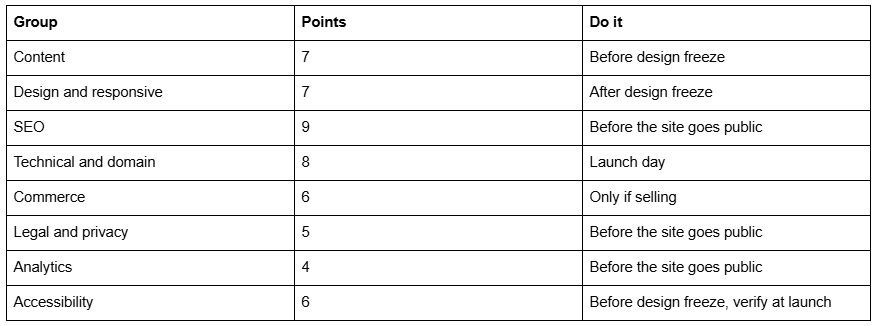
Fifty-two points, grouped by area. Nothing here is gated and nothing requires a plugin.
How to use this checklist
Do the whole thing logged out, in a private window, on a real phone. Logged in, Squarespace shows you editor chrome, disables embedded scripts, and skims past everything you have already seen a hundred times.
Content — 7 points
1. Every page has final copy. No lorem ipsum, no "coming soon", no section left with Squarespace demo text in it. Check the pages nobody visits during a build: 404, search results, the post-form thank-you page.
2. Contact details are correct and identical everywhere — header, footer, contact page, and any schema. Phone numbers are click-to-call links on mobile.
3. Business hours, address and service area are current, including anywhere they appear inside body copy rather than a location block.
4. Every form has a final confirmation message and, where relevant, a dedicated thank-you page rather than the default inline message.
5. The 404 page has real copy and at least one route back into the site. Squarespace ships a functional but generic one; edit it in Pages → Not Linked → 404.
6. Spelling and grammar checked by someone who did not write the copy. Read it aloud on a phone — errors that hide on a wide screen are obvious at 390px.
7. Every stated claim, price, credential and date is true today, not true when the copy was drafted six weeks ago.
Design and responsive — 7 points
8. Every page checked at 390px, 768px, 1024px and 1440px. Squarespace 7.1's mobile breakpoint is 767px, so 768px is the narrowest desktop layout and the width where spacing problems most often appear.
9. Every Fluid Engine section's mobile layout has been reviewed, not just inherited. Fluid Engine maintains separate desktop and mobile layouts, and the generated mobile stack follows block order.
10. No horizontal scroll on mobile on any page. A single over-wide block or a table is the usual cause.
11. Favicon uploaded in Design → Browser Icon, and the browser tab shows the site name rather than "Site Title".
12. Social sharing image set in Marketing → Social Sharing Image, and tested with a real share to confirm the crop.
13. Header and mobile menu behave correctly on a real device — the hamburger opens, closes, and does not trap scroll.
14. Consistent image treatment across the site: one aspect-ratio family, one colour treatment. Mixed crops are the fastest way to look unfinished.
SEO — 9 points
15. Every page has a unique SEO Title under 60 visible characters, set in the page's SEO tab rather than left to inherit the page title.
16. Every page has a unique meta description of 150–160 characters.
17. The site-name suffix has been removed at Settings → Marketing → SEO → Search Appearance → Items if you don't want — Site Name consuming ~20 characters of every title.
18. Exactly one H1 per page, and it is the page's real subject rather than a decorative line.
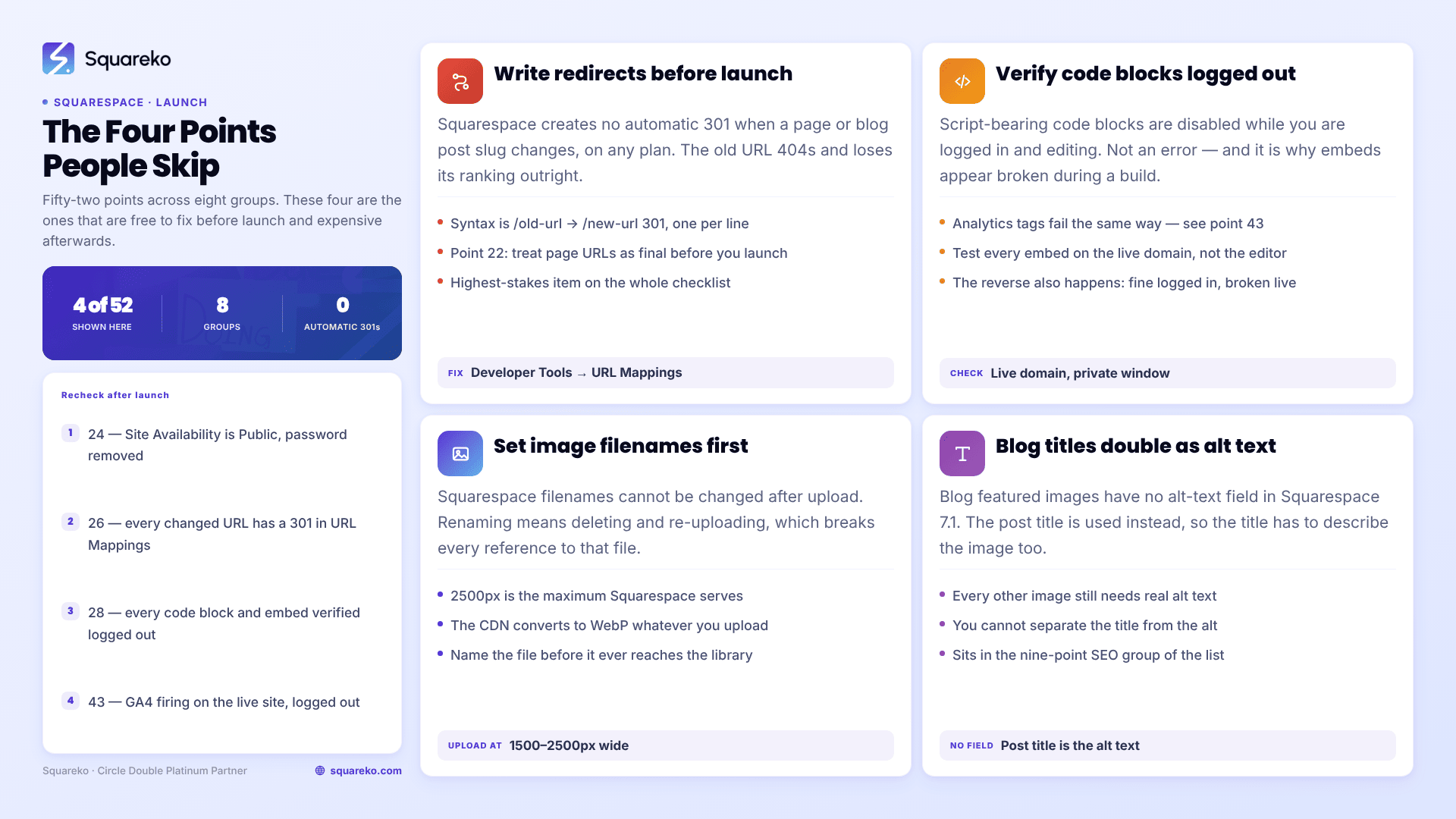
19. Every image has alt text — with one exception you cannot fix: blog featured images have no alt-text field in Squarespace 7.1, and the post title is used instead. Write titles that work as alt text.
20. Image filenames set before upload. Squarespace filenames cannot be changed after upload; renaming means deleting and re-uploading, which breaks every reference to that file.
21. Images uploaded at 1500–2500px wide. 2500px is the maximum Squarespace serves, and its CDN converts to WebP unconditionally regardless of your source format.
22. Page URLs are final. This is the highest-stakes item on the list — see point 26.
23. Sitemap reachable at /sitemap.xml. Note that robots.txt cannot be edited on Squarespace, and ?author=, ?tag=, ?month= and ?view= are disallowed by default.
Technical and domain — 8 points
24. Site visibility switched from Private to Public at Settings → Site Availability, and any password protection removed.
25. Domain connected and pointing correctly, with www and non-www both resolving to the same canonical version.
26. Redirects written for every changed URL. Squarespace creates no automatic 301 when you change a page or blog post slug — not on any plan, not ever. Build the mapping in Settings → Developer Tools → URL Mappings using the /old-url -> /new-url 301 syntax, one rule per line, before the old URLs start returning 404s.
27. SSL set to Secure (Preferred) in Settings → Developer Tools → SSL, so HTTP requests redirect to HTTPS rather than being served on both.
28. Every code block and embed verified logged out. Script-bearing code blocks are disabled while you're logged in and editing, showing: "This block contains embedded scripts. Embedded scripts are disabled while you're logged in and editing your site." That message is not an error, and it is why embeds appear broken during a build and fine on launch — or the reverse.
29. Custom CSS validated with no syntax errors. CSS parses sequentially, so one unclosed brace silently discards every rule below it. If styling looks half-applied, this is why — see why Squarespace custom CSS stops working.
30. All internal links tested. Root-relative paths (/services) rather than absolute URLs, which cost a redirect hop.
31. Page speed checked on the live domain, logged out. Across 54 Squareko-built Squarespace sites measured in August 2026 (Playwright/Chromium lab test, cloud datacenter, unthrottled, single run per site), median mobile LCP was 2.01s with 74% under Google's 2.5s threshold, median TTFB was 514ms, and median page weight was 3.0 MB across 93 requests. Use those as a sanity range rather than a target.
Commerce — 6 points
32. A real test order placed end to end, then refunded — not a test-mode order. Test mode does not exercise the live payment processor.
33. Shipping rules tested for every zone you actually ship to, including the ones with a flat rate you set months ago.
34. Tax rules configured for every region you are obliged to charge in.
35. Every automated commerce email reviewed and rebranded at Selling → Customer Notifications — order confirmation, shipping confirmation, abandoned cart. The defaults carry Squarespace's wording.
36. Product images consistent in crop, background and lighting, and every product has a description longer than one line.
37. Inventory counts accurate, and out-of-stock behaviour decided — hidden, or shown with a waitlist.
Legal and privacy — 5 points
38. Privacy policy published, reachable from the footer of every page, and accurate about what you actually collect.
39. Terms of service published if you sell anything, and linked at checkout.
40. Cookie banner configured at Settings → Cookies & Visitor Data if you have EU or UK visitors, with analytics cookies gated behind consent rather than firing on load.
41. Any newsletter signup states what the subscriber is agreeing to receive, and the list has a working unsubscribe.
42. Copyright line in the footer shows the current year and the correct legal entity name.
Analytics — 4 points
43. Google Analytics 4 installed via Settings → Developer Tools → Code Injection → Header, and verified firing on the live site logged out — see point 28.
44. Google Search Console verified and the sitemap submitted. Squarespace's sitemap can lag by days to weeks; submitting it manually is the only lever you have.
45. Squarespace's built-in Analytics reviewed once so you know what it reports natively and what needs GA4.
46. Conversion tracking configured for the actions that matter — form submissions, bookings, purchases — and each one triggered manually to confirm it registers.
Accessibility — 6 points
47. Text-to-background contrast meets WCAG AA — 4.5:1 for body text, 3:1 for large text. Squarespace colour themes will happily produce light grey on white.
48. Every page navigable by keyboard alone, with a visible focus state on links, buttons and form fields. The default focus ring is often styled away by custom CSS without a replacement.
49. Heading levels in logical order — H1, then H2, then H3 — with no levels skipped for visual reasons. Use the type scale for size, not the heading level.
50. Link text is descriptive. "Read more" repeated fourteen times is unusable in a screen reader's link list.
51. Form fields have visible labels, not placeholder text doing the labelling. Placeholders vanish on focus and are not reliably announced.
52. In Fluid Engine, block order matches reading order. Screen readers and keyboard tab order follow block order, not visual position — a heading placed visually above a paragraph but ordered after it is announced in the wrong sequence.
The four points people skip
If you do nothing else on this list, do these:
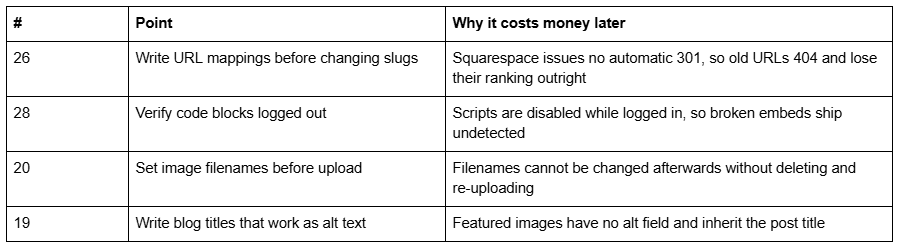
Each one is free before launch and expensive afterwards.
After launch
Recheck points 24, 26, 28 and 43 an hour after the site goes public, from a device that has never visited it. Almost every "the site broke when we launched" report resolves to one of those four: still private, redirects not written, scripts that were only ever tested logged in, or analytics that never fired.
Then leave it a week and check Search Console's Pages report. Two things show up there that nothing on this list can predict: URLs you forgot were indexed on the old site, and pages Squarespace is serving that you did not intend to publish — an unused blog collection, a duplicate landing page in Not Linked, a product page from a store you switched off. Both are quick to resolve in the first fortnight and awkward once they have accumulated links.
A note on sequencing. Work the Content and Accessibility groups before the design is frozen, because both change layout — a form that needs visible labels and a heading order that needs correcting are structural, not cosmetic. Everything in the SEO, Legal and Analytics groups can be done on a finished site without touching design. The Technical group belongs on launch day itself, and only points 24 and 25 should be left until the moment you go public.
The point at which this stops being a checklist problem is a rebuild — when the site you are launching inherited hundreds of URLs from an older site, or when a redesign has changed the structure enough that the mapping itself is the project. That is the situation a custom Squarespace design engagement is scoped for, and it is worth costing before launch rather than after the 404s appear in Search Console. For a straightforward first launch, the fifty-two points above are the whole job.
FAQ
-
No. Squarespace creates no automatic 301 when a page or blog post slug changes, on any plan. The old URL returns a 404 and loses its ranking. Write the rule yourself in Settings → Developer Tools → URL Mappings using /old-url -> /new-url 301, one rule per line.
-
Squarespace disables script-bearing code blocks while you are logged in and editing, showing a message about embedded scripts being disabled. That is expected behaviour, not an error. Verify every code block, embed and analytics tag logged out, in a private window, on the live domain.
-
Not in 7.1 — featured images have no alt-text field, and Squarespace uses the post title as the alt text instead. The practical workaround is to write post titles that describe the image adequately, since you cannot separate the two.
-
Contrast at 4.5:1 for body text, keyboard navigation with a visible focus state, headings in logical order with no skipped levels, descriptive link text, visible form labels rather than placeholders, and — in Fluid Engine — block order matching reading order, since screen readers follow block order.
-
If you have EU or UK visitors and run analytics or marketing cookies, yes. Configure it at Settings → Cookies & Visitor Data and gate analytics cookies behind consent rather than letting them fire on page load. A privacy policy reachable from every page footer is a separate requirement.
-
No. Squarespace's robots.txt cannot be edited on any plan. It already disallows the query-string variants ?author=, ?tag=, ?month= and ?view= by default, so the crawl-control problems those parameters would otherwise cause are handled without intervention.

Author Bio
I'm Walid Hasan, a Certified Squarespace Expert and Squarespace Circle Platinum Partner with over 12 years of hands-on experience designing and optimizing high-performing websites. Over the years, I've had the privilege of building more than 2,000 Squarespace websites for clients around the world, always focusing on clean design, strong user experience, and conversion-driven results.
