
Squarespace Templates With Plugins Included: What's Worth Paying For
The short answer: Squarespace has no first-party plugin marketplace, so a "plugin" here is third-party code you paste into your own site. When a template advertises "plugins included", it almost always means custom code blocks bundled into the design — which become yours to own, update, and debug. That is not automatically bad, but it is not what "included" implies.
Here is what the word actually covers, what genuinely earns its price, and what to check before installing anything.
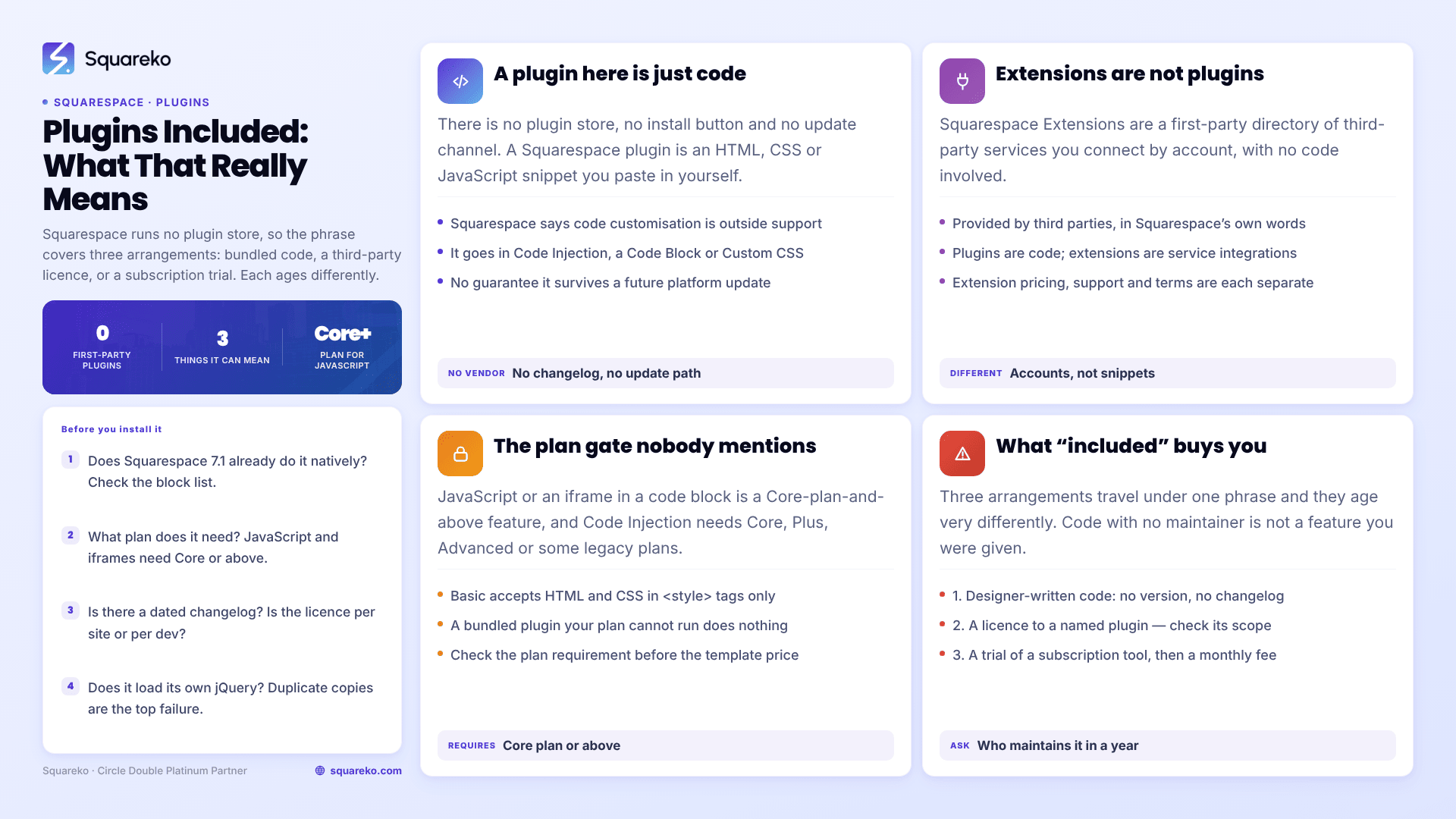
What "plugins included" can mean
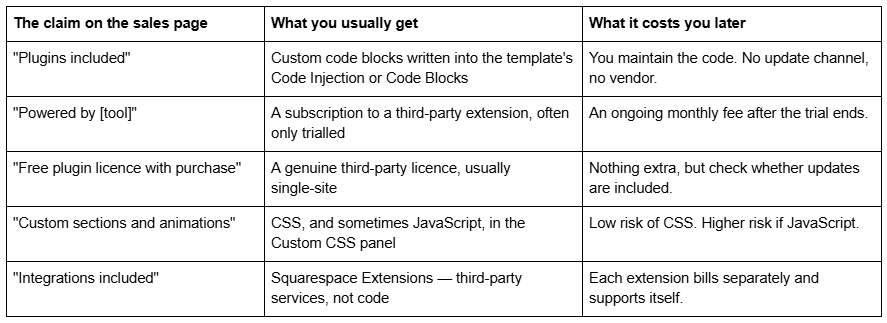
What a "plugin" actually is on Squarespace 7.1
Squarespace does not run a plugin store. There is no equivalent of the WordPress plugin directory, no install button, no update notifications, no dependency manager. This is a deliberate platform decision, not an oversight.
What the industry calls a Squarespace plugin is a snippet of HTML, CSS or JavaScript, written by a third-party developer, that you paste into your own site. The developer sells you the snippet and some instructions. Squarespace is not involved in the transaction and does not support the result — its own documentation is explicit that "code-based customization falls outside the scope of our support", and that it cannot guarantee compatibility with future platform updates.
There are three places the code goes, and all three sit behind the same plan gate:
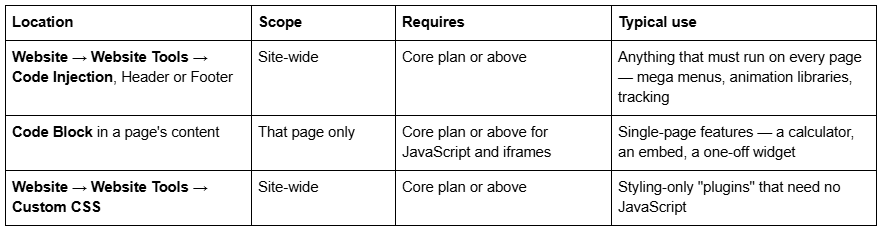
That is the entire installation mechanism. A plugin is a paste operation, which is why a template shop can honestly describe pasted code as "included".
Squarespace Extensions are not plugins
This distinction matters because template shops blur it, and because the two behave nothing alike.
Squarespace Extensions are a first-party directory of third-party services — Mailchimp, Printful, ShipStation, TaxJar, Weglot. You connect an account; no code is involved. Squarespace's own wording is that "the extensions listed in Squarespace Extensions are provided by third parties and not Squarespace", and each one carries its own pricing, support team and terms.
Third-party plugins are code. Nobody curates them, nobody reviews them, and nothing tells you when one stops working.
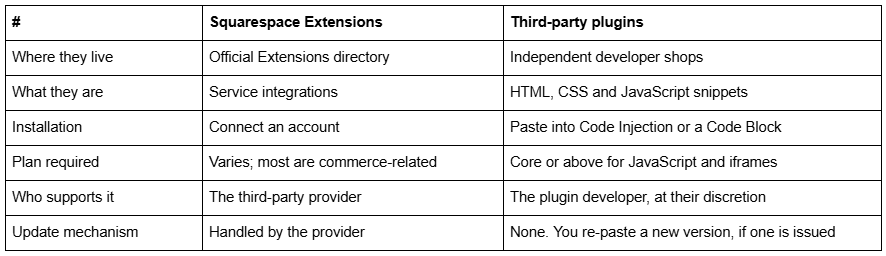
A template that "includes integrations" is telling you about Extensions, which you could have connected yourself in five minutes. A template that "includes plugins" is telling you about code.
The plan-tier gate nobody mentions on the sales page
This is the single most common reason a bought plugin does nothing.
Squarespace's own documentation states that "adding JavaScript or iframes to a code block is a premium feature available in the current Website Core plan and higher." Code Injection is likewise "available in the Core, Plus, Advanced, and some legacy billing plans." On the current entry-level Basic plan, a Code Block will accept HTML and CSS wrapped in <style> tags, but JavaScript and iframe embeds are refused.
The practical consequences:
A template advertising bundled plugins may be advertising something your plan cannot run. Check the plan requirement before the template price.
Squareko recommends the Business plan for its templates and passes on 20% off your first Squarespace year, which is worth asking about before you subscribe rather than after — the discount cannot be applied retroactively.
If you downgrade later, Code Injection is switched off and any plugin installed through it stops working. The code stays in the field; it simply no longer runs.
One more thing that looks like a plan problem and is not: script-bearing Code Blocks are disabled while you are logged in and editing. Squarespace shows the message "This block contains embedded scripts. Embedded scripts are disabled while you're logged in and editing your site." That is expected behaviour. Log out, or use Preview in Safe Mode, before concluding a plugin is broken.
What "included" means when a template shop says it
Three genuinely different arrangements travel under the same phrase.
1. Code written by the template designer. The commonest case. The designer built a testimonial slider or a sticky header for the demo and left it in the Custom CSS panel or Code Injection. It is included in the sense that it arrives with the template. It comes with no version number, no changelog and no developer to email in eighteen months. You own it, and owning code you did not write is a real cost.
2. A licence to a named third-party plugin. Better, because the plugin has a maintainer. Check three things: whether the licence covers one site or several, whether future versions are included, and whether the licence is registered to you or to the template shop.
3. A trial of a subscription tool. SquareKicker, which sells both templates and a no-code design extension, is the clearest published example of this model — its templates are a one-off purchase and ship with a 30-day extension subscription, and its FAQ states plainly that "you do not need a SquareKicker Extension subscription to use a Template." That is honest disclosure and worth using as your benchmark. Read it as a trial, not an inclusion, and note the useful detail in its terms: designs already applied remain in place after you cancel — you lose the ability to edit them, not the design itself. Not every subscription tool behaves that way. Ask.
Where Squareko stands, stated plainly: none of Squareko's 24 templates publishes a bundled plugin. No plugin is listed on any product page and none is claimed here. What each template does include is 9 to 15 designed pages, 150+ pre-designed sections, a Style Guide page, a 404 page, a launch guide and 60 days of email support. If a feature can be built from native Squarespace 7.1 sections, it is, and that is a maintenance decision rather than a limitation to apologise for.
Plugin functionality that genuinely earns its price
Judged on one criterion: does it do something Squarespace 7.1 cannot do natively, that your business actually needs?
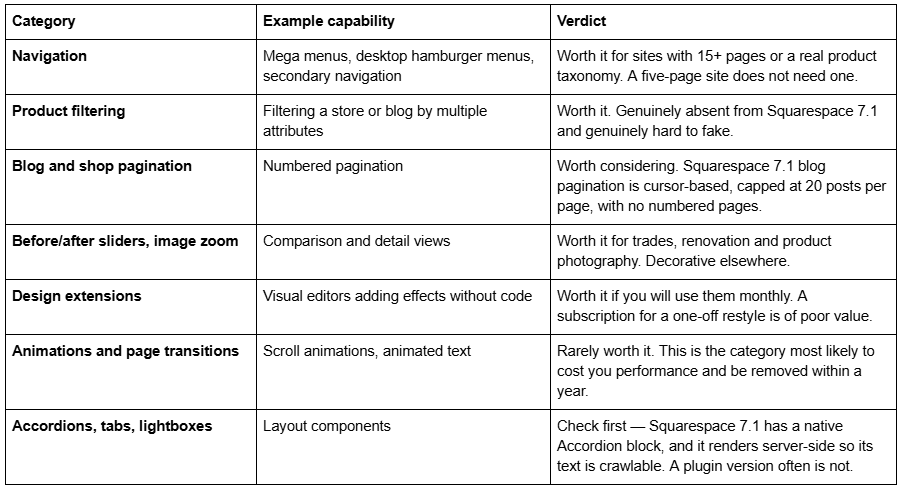
That last row is the general rule. Before paying for any plugin, confirm Squarespace has not shipped the feature natively since the plugin was written. Several popular paid plugins now duplicate native 7.1 blocks.
What breaks, and why
Plugins do not fail randomly. Four causes account for nearly all of it.
Duplicate JavaScript libraries. The most common failure by a distance. Several plugins each inject their own copy of jQuery, the copies conflict, and plugins that worked in isolation stop working together. If two plugins each work alone but not on the same site, look here first: check your Code Injection header for more than one jQuery <script> tag and remove the duplicates.
Class names changing. Plugins target Squarespace's DOM using class selectors. Squarespace renames and restructures classes between releases without notice, and a plugin written against last year's markup silently matches nothing. There is no deprecation warning and no version pinning.
Fluid Engine inline styles. Fluid Engine writes layout values directly onto elements as inline styles, and inline styles beat every stylesheet rule regardless of specificity. A plugin that repositions elements will lose to Fluid Engine unless it uses !important — and if it does, it will fight anything else you add later.
Plan downgrades and trial expiry. Code Injection switches off below the Core plan, and JavaScript in Code Blocks goes with it. A site that worked through a trial and broke on a cheaper plan has not broken; it has been downgraded.
Add one structural risk on top of those four: no plugin on Squarespace has an update channel. Nothing notifies you that a fix has shipped. You find out because a page stopped working, usually from a customer.
How to evaluate a Squarespace plugin before installing it
Seven checks. Ten minutes. They apply equally to a plugin you buy and one that arrives "included" with a template.
Does Squarespace 7.1 already do it? Check the native block list first. This eliminates a surprising share of paid plugins.
What plan does it need? If it uses JavaScript or an iframe, you need Core or above. Confirm before you buy either the plugin or the template that bundles it.
Is there a dated changelog? A plugin updated in the last six months has a maintainer. One with no dates has an author who has moved on.
Is the licence per site or per developer? Single-site licences are the norm. If you run multiple sites, the cost multiplies.
One-off or subscription? And if it is a subscription, what happens to the work when you stop paying — does the design persist, or does the feature disappear?
Does it load its own copy of jQuery? If you already run one plugin that does, expect a conflict. Ask the developer which version it expects.
Test it on a trial site first. Never paste unfamiliar JavaScript into a live site. Squarespace trial sites are free, and a broken trial site costs nothing.
If a template shop cannot answer questions 2 through 5 about the plugins it says are included, treat "included" as decoration.
What to do with this
Decide what the plugin is for before you decide which template to buy. If the requirement is layout and design, a template covers it, and a plugin adds maintenance you do not need. If the requirement is genuine missing functionality — filtering, real navigation depth, comparison views — buy the plugin from a maintained source and treat it as a separate purchase with its own lifespan, rather than a bullet point on a template's sales page.
And be sceptical of "included" as a selling point. Code that arrives with a template and has no maintainer behind it is not a feature you were given. It is a liability you were handed. The wider question of what a template does and does not cover is worked through in our complete guide to Squarespace website templates.
Squareko's templates are $249 each, 9 to 15 pages, built entirely on native Squarespace 7.1 sections, with no bundled plugins claimed or implied — you can see the full range on the premium Squarespace templates page. If your requirement genuinely is functional rather than visual, no template on any shop solves it, and the honest advice is to price the plugin and the template separately.
FAQ
-
No. Squarespace runs no first-party plugin store or directory the way WordPress does. What the industry calls Squarespace plugins are code snippets sold by independent developers and pasted into your own site via Code Injection or a Code Block. Squarespace is not party to the transaction and does not support the result.
-
Squarespace Extensions are an official directory of third-party services — Mailchimp, Printful, ShipStation, TaxJar — connected by account, with no code. Plugins are third-party code you paste in yourself. Extensions are curated and provider-supported; plugins are neither, and have no update mechanism.
-
For most, yes. Squarespace states that adding JavaScript or iframes to a code block is a premium feature available on the Website Core plan and higher, and Code Injection is available on Core, Plus, Advanced and some legacy plans. CSS-only customisations are less restricted, but anything scripted needs Core or above.
-
Usually that the designer wrote custom code into the template's Custom CSS panel or Code Injection. It arrives with the template, but it has no version number, no changelog and no maintainer. Occasionally it means a genuine third-party licence or a trial subscription — ask which, and ask whether updates are covered.
-
Four common causes: two plugins loading conflicting copies of jQuery, Squarespace renaming the CSS classes a plugin targets, Fluid Engine inline styles overriding plugin layout, and a plan downgrade switching off Code Injection. Scripts are also disabled while you are logged in and editing, which looks like a fault and is not.
-
No. None of Squareko's 24 templates publishes a bundled plugin, and none is claimed. Each includes 9 to 15 designed pages, 150+ pre-designed sections, a Style Guide page, a 404 page, a launch guide and 60 days of email support, built on native Squarespace 7.1 sections.

Author Bio
I'm Walid Hasan, a Certified Squarespace Expert and Squarespace Circle Platinum Partner with over 12 years of hands-on experience designing and optimizing high-performing websites. Over the years, I've had the privilege of building more than 2,000 Squarespace websites for clients around the world, always focusing on clean design, strong user experience, and conversion-driven results.
