
Are Premium Squarespace Templates Worth It?
The short answer: Yes, if your business already earns money and your time is worth more than about $15 an hour. A $249 premium Squarespace template buys 20 to 40 hours of finished layout work — not extra features. If you are pre-revenue, need fewer than six pages, or enjoy design work, it isn't for you.
I sell premium Squarespace templates at $249, so read the rest with that in mind. What follows is the version I would want to read before spending the money, including the parts that argue against spending it.
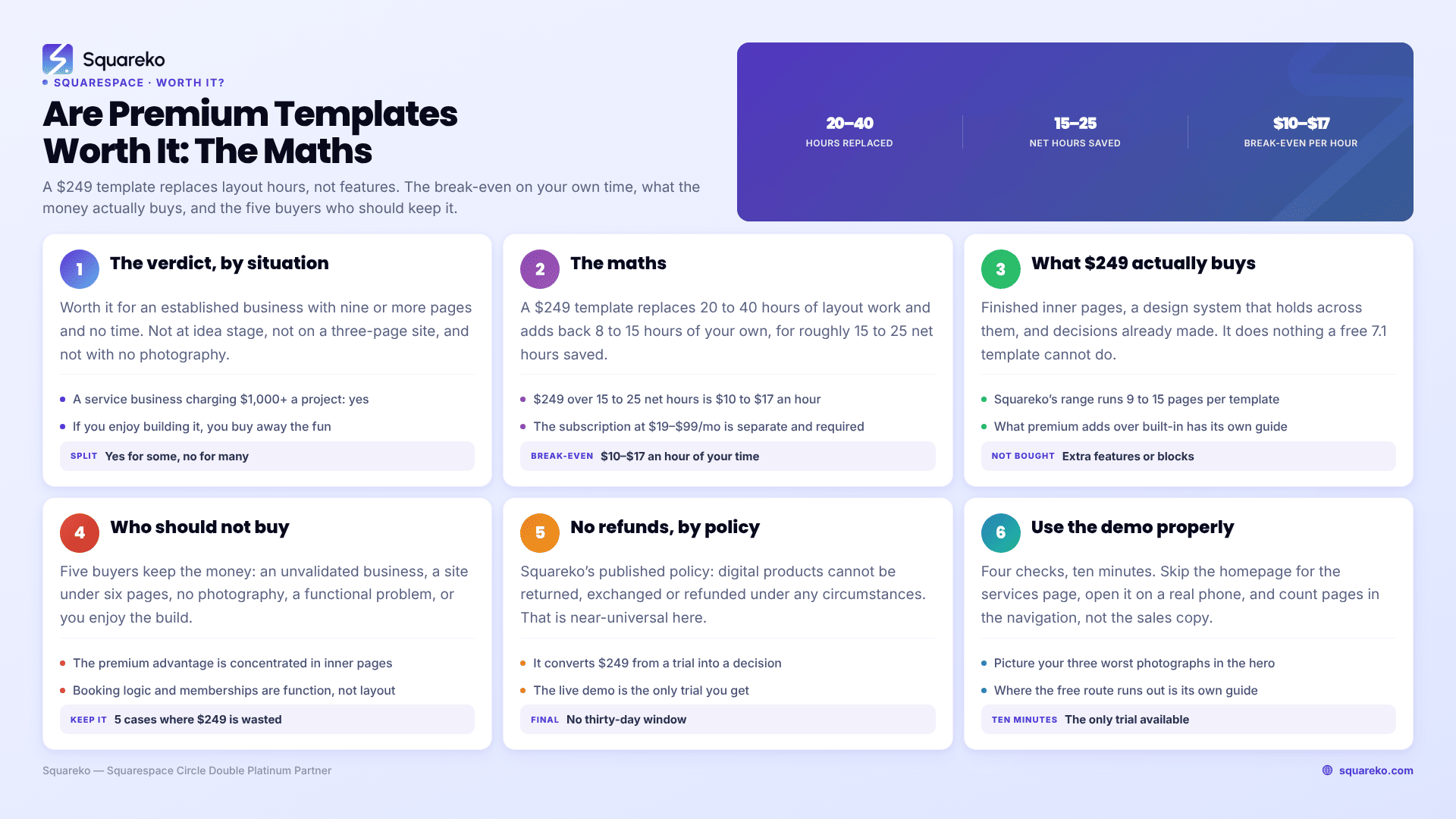
The verdict, by situation
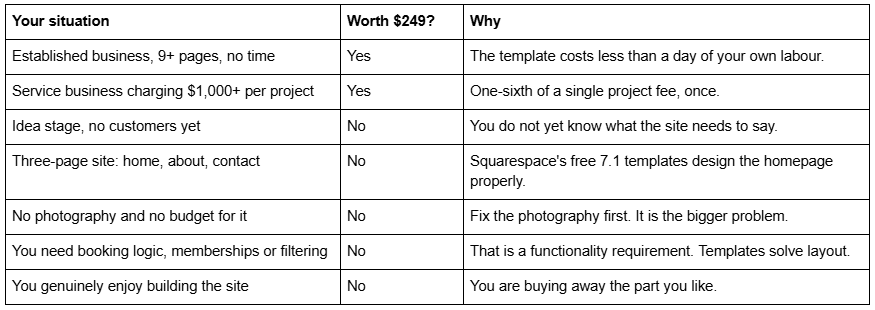
The maths on a premium Squarespace template
Every figure below is either published or checkable. Nothing here is modelled.
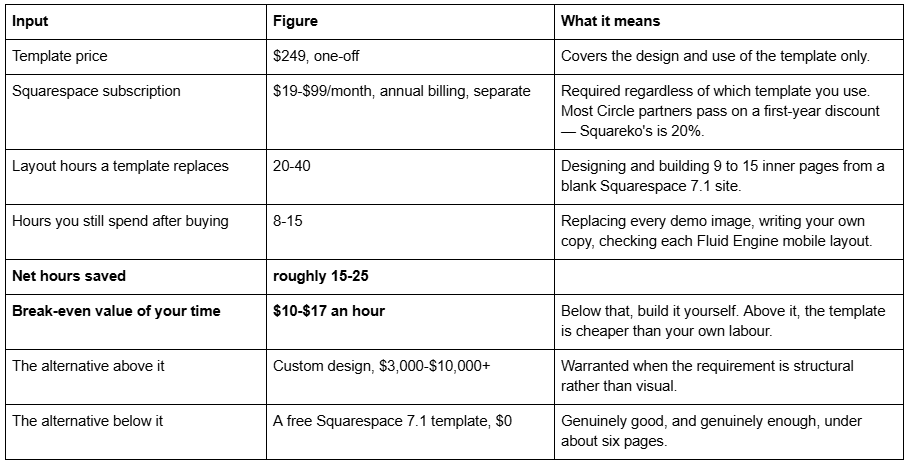
A break-even of roughly $10-$17 an hour is a low bar, and that is the honest finding: for anyone already trading, the arithmetic on a premium Squarespace template is not close. The question worth asking is not whether $249 beats your hourly rate. It is whether a template is the right kind of purchase for the problem you have.
What $249 actually buys on Squarespace 7.1
This is where most "worth it" articles overclaim. A premium Squarespace template cannot do anything a free one cannot. Every Squarespace 7.1 site runs the same feature set, and features are determined by your plan, not your template. Nobody gets extra blocks, extra sections or extra capability by paying $249.
What you buy is four things:
Finished inner pages. Free Squarespace templates design the homepage carefully and leave the rest generic. Premium templates ship service detail pages, project detail pages, pricing pages, legal pages, FAQ pages — the pages that actually earn search traffic and answer buying questions. Squareko's own range runs 9 to 15 pages depending on the template.
A design system that holds together. Type scale, spacing rhythm and colour applied consistently across every page, plus a Style Guide page so it stays consistent after you take over.
Someone else's judgement. Whether the pricing page comes before or after the testimonials. Where the enquiry button sits on mobile. Decisions you would otherwise make badly, twice.
Installation. At the better shops the template arrives as a Squarespace contributor invitation rather than files to download and upload. Installing onto an existing live site is a manual rebuild — a paid add-on at most shops, around 48 hours at Squareko.
Who should not buy a premium Squarespace template
Five buyers who are better off keeping the $249. I would rather say this here than refund it later, because — see the next section — I cannot refund it later.
You have not validated the business. If you do not yet know who your customer is or what you charge, you do not know what the site should say. Launch something free, get five customers, then buy the template with what you have learned.
Your site is under six pages. The premium advantage is concentrated in inner pages. If you need home, about and contact, you are paying for pages you will delete.
You have no photography. Every template on every shop is carrying demo imagery you are not licensed to keep, so it all has to go. A premium template holding placeholder stock looks worse than a free template holding three good photographs of your actual work.
Your problem is functional, not visual. Tiered membership content, real booking logic, a filtered catalogue. No template at any price ships those, and buying one postpones the conversation you need to have.
You are migrating a site that already ranks. A premium template usually arrives as a new site, which means new URLs, and Squarespace never creates an automatic 301 redirect when a URL slug changes. The redirect mapping is the project; the template is a detail.
The no-refund policy is part of the decision
Squareko's published policy is that digital products "cannot be returned, exchanged, or refunded under any circumstances." That is not an outlier — it is close to universal across premium Squarespace template shops, and Squarespace itself applies the same rule to the Getty Images licences you buy inside the editor.
It belongs in a worth-it calculation for one reason: it converts $249 from a trial into a decision. There is no thirty-day window in which to discover the services page is thinner than the homepage suggested. Any article that tells you premium templates are worth it without telling you the purchase is final has left out the part that matters when it goes wrong.
The practical response is not to complain about the policy. It is to treat the live demo as the trial, because it is the only one you get.
How to use a template demo properly before you buy
Four checks, ten minutes, no refund required.
Skip the homepage. Open the services, menu or products page instead. The homepage sells the template; the inner pages will be your working life.
Open it on your actual phone, not a resized desktop browser. Squarespace 7.1 keeps a separate mobile layout per section in Fluid Engine, and a neglected mobile layout is a template you will rebuild.
Count the pages in the demo navigation, not in the sales copy. Then subtract anything that is a variant of another page.
Picture your three worst photographs in the hero. If the design still reads as a business you would trust, the design is doing the work. If it collapses, the stock photography was.
If a shop makes any of those four difficult — no working demo, no page list, no support terms before the buy button — that is itself the answer.
So, are they worth it?
For an established business with more than six pages to build and no appetite for building them: comfortably, and the break-even is not close. For everyone else on the list above: no, and I would rather you kept the money.
The fuller side-by-side against Squarespace's free 7.1 templates is in our free vs premium Squarespace templates comparison, and the scored roundup across every major shop is in the premium Squarespace templates guide.
If you have worked through the demo checks and the arithmetic and a template is the right purchase, Squareko's are $249 each, 9 to 15 pages, installed by contributor invitation with 60 days of email support, in the premium Squarespace templates shop. If a competing shop fits your niche better, buy from them — this page is not much use if it only ever reaches one conclusion.
FAQ
-
Between roughly $188 and $299 across the established shops, as a one-off payment. Squareko's are $249. The price covers the design only — your Squarespace subscription is separate, at $19 to $99 per month on annual billing, and is required whichever template you use.
-
No. Every Squarespace 7.1 site shares one feature set, and features are unlocked by your plan, not your template. A premium template adds finished inner pages, a consistent design system and installation support. It cannot add blocks, sections or capability that a free template lacks.
-
Usually not. Squareko's policy is that digital products cannot be returned, exchanged or refunded under any circumstances, and that is close to the industry norm. Treat the live demo as your trial: open the inner pages on your own phone before buying, not the homepage on a desktop.
-
Roughly 15 to 25 net. A 9 to 15 page template represents 20 to 40 hours of layout work, but you will still spend 8 to 15 hours replacing demo images, writing your own copy and checking Fluid Engine mobile layouts. At $249, that puts break-even at about $10 to $17 an hour.
-
When your site is under about six pages, when you have not validated the business yet, or when you have no photography budget. Squarespace's free 7.1 templates design the homepage well, and the homepage is most of a three-page site.
-
They come with demo images licensed for the demo only, at every shop. Every one must be replaced with your own photography or properly licensed stock before launch. Squarespace's own guidance is the same: you have no licence to use sample images on a live site.

Author Bio
I'm Walid Hasan, a Certified Squarespace Expert and Squarespace Circle Platinum Partner with over 12 years of hands-on experience designing and optimizing high-performing websites. Over the years, I've had the privilege of building more than 2,000 Squarespace websites for clients around the world, always focusing on clean design, strong user experience, and conversion-driven results.
