
Do Squarespace Templates Come With Demo Content?
The short answer: Yes, but you cannot keep it. Squarespace templates and third-party premium templates arrive filled with demo images and placeholder copy for context only. Squarespace states you have no licence to use sample images on a live site. The layout, sections and structure are yours. The images and words are not.
That single distinction — structure transfers, content does not — is the thing most template buyers miss, and it is the thing that turns a launch into a scramble.
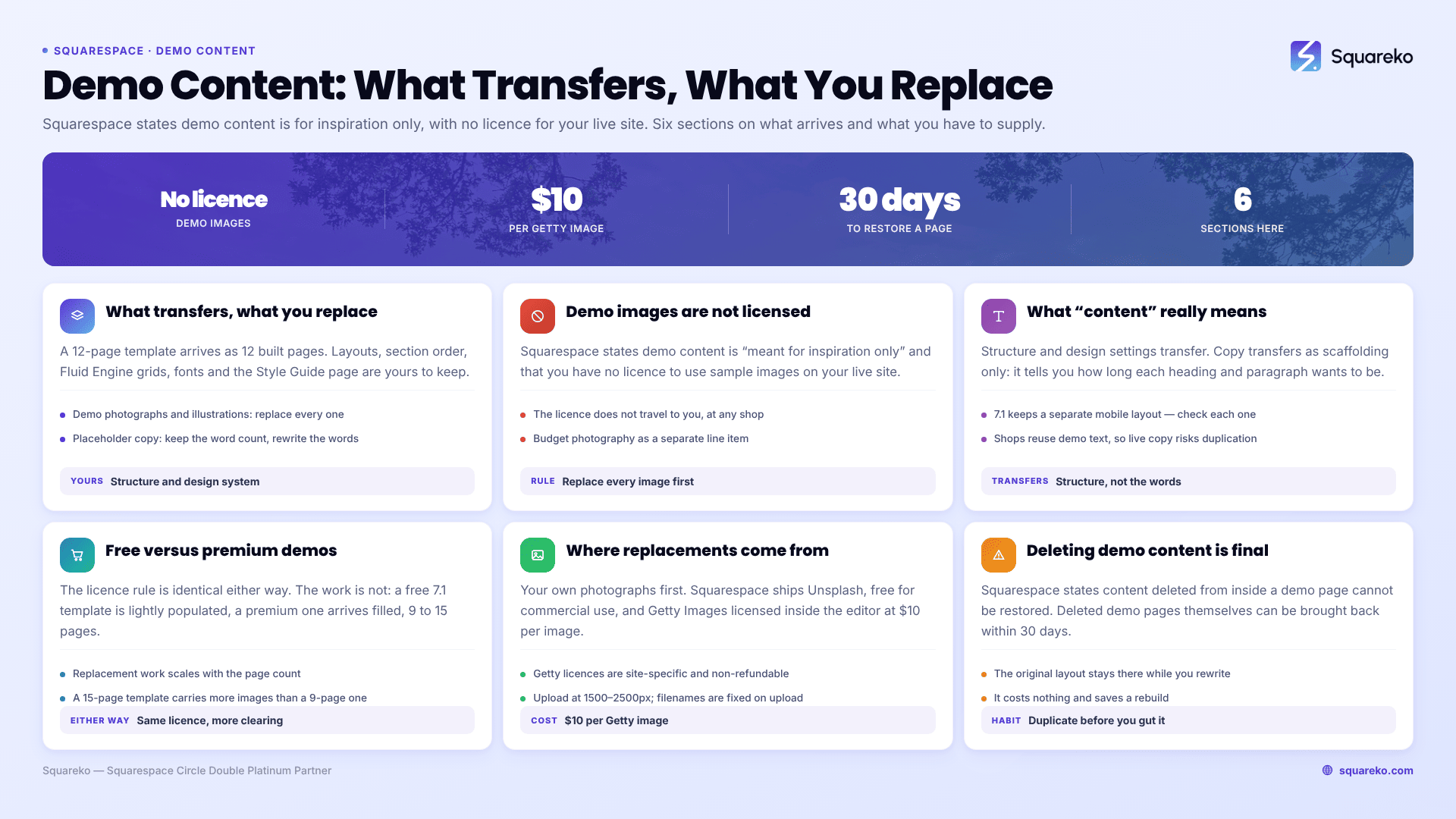
What transfers, and what you have to replace
Demo images are copyright-protected and not licensed to you
This is the single most consequential fact in a template purchase, and Squarespace states it without ambiguity in its own documentation: demo content "is meant for inspiration only, and you don't have a license to use any sample images or content on your live site."
The images in a demo are owned by photographers or stock libraries. The template shop licensed them to build and display a demo. That licence does not travel to you when you buy the template — it never has, at any shop.
Squareko's own policy is the same: buyers must replace every demo image with their own licensed or original images before the site goes live. So is the wider category's. Candor's published template policy is unusually plain about it and worth quoting because it is the industry position stated properly: "Demo images may be owned by third-party photographers, stock libraries or other rights holders. You must not use demo images on your live website unless you have the appropriate licence or permission."
If you take one thing from this page: budget for photography as a separate line item, not as something the template covers. A premium template still carrying its demo stock at launch looks worse than a free template carrying three good photographs of your actual work.
What "content" actually means in a Squarespace template
The word does a lot of work on sales pages, so here is the split as it applies to Squarespace 7.1.
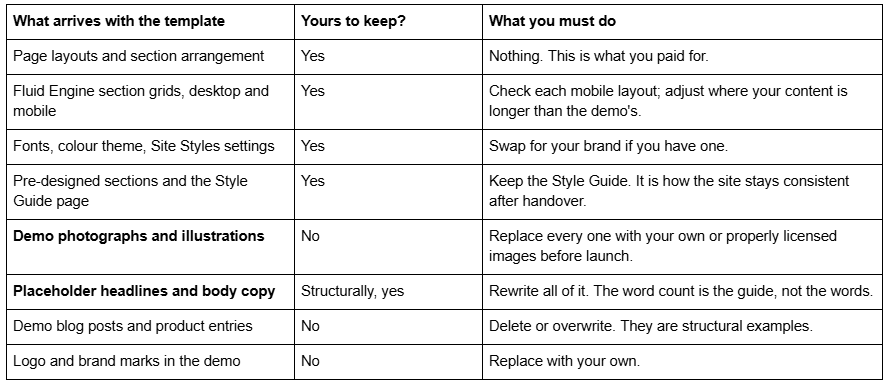
Structure transfers. Every section, in order, on every page. A 12-page template arrives as 12 built pages — a services page with a services layout, a project detail page with a project detail layout, legal pages with legal page layouts. That is the purchase.
Design settings transfer. Fonts, colour themes, button styles and spacing, applied consistently, plus the Style Guide page that documents them.
Fluid Engine layouts transfer, in both orientations. Squarespace 7.1 keeps a separate mobile layout per section. Well-built templates set both. Check the mobile version of each page after you fill it, because your headline will rarely be the same length as the demo's.
Copy transfers as scaffolding only. The demo text tells you how many words the space wants: whether a heading is three words or nine, whether a paragraph is two lines or six. That information is genuinely useful. The words themselves are placeholder and must be rewritten — leaving demo copy live is both a credibility problem and, since several shops reuse the same demo text across templates, a duplicate content problem.
Free Squarespace templates vs premium templates: the demo content differs
The licensing rule is identical either way. The volume of work is not.
A free Squarespace 7.1 template starts you on a lightly populated site — a designed homepage and a handful of generic inner pages. There is less demo content to remove, because there was less there to begin with.
A premium template from a third-party shop arrives as a finished 9 to 15 page site with every section filled. That is the point of it, and it is also more to clear out. Expect the replacement work to scale with the page count: a 15-page interior design template carries considerably more images than a 9-page law firm template.
Either way, the rule holds. Squarespace's demo images and a premium shop's demo images are both licensed to the party that placed them, not to you.
Where to get properly licensed replacement images
Four routes, cheapest effort first.
Your own photographs. Always the best option for a service business. Images of your actual work, premises and team outperform stock on every measure that matters, and the licence question disappears.
Unsplash, built into Squarespace. Squarespace ships an Unsplash integration you can reach almost anywhere you add an image. The licence permits free commercial use, and attribution is appreciated rather than required. Squarespace is explicit that you remain "responsible for verifying that the image's license is legitimate" — a reasonable caveat, and the reason not to use Unsplash for anything involving recognisable people or trademarks.
Getty Images, also built in. Licensable inside the Squarespace editor at $10 per image (€9 / £8 / A$14). The licence is site-specific — "to use a licensed image on different sites, you need to purchase a new license for each Squarespace site" — and purchases are non-refundable. For a hero image on a template you intend to keep for years, $10 is a reasonable price for certainty.
A paid stock subscription. Worth it above roughly fifteen images. Below that, per-image Getty licences inside the editor are usually cheaper and involve no account to cancel.
Whichever route you take, upload at 1500-2500px wide — 2500px is the maximum Squarespace serves — and set the filename before uploading, because filenames cannot be changed afterwards. Squarespace's CDN converts to WebP automatically, so you do not need to.
Deleting demo content is permanent
Worth knowing before you start clearing a template out. Squarespace's Help Center states that "it's not possible to restore content deleted from demo pages. If you delete or change some of the content on a demo page, that content is deleted permanently."
Deleted demo pages can be restored within 30 days. Deleted content inside a page cannot. The practical habit: duplicate a demo page before you gut it, so you have the original layout to refer back to while you are filling in the copy. It costs nothing and saves a rebuild.
What to do before you buy
Open the demo and read the inner pages as though the photography were already gone. If the design still reads as a business you would trust with your own worst photograph in the hero, the layout is doing the work and the template is a good purchase. If it collapses without the stock imagery, you were buying the photographs — and the photographs are the one thing that does not come with it.
Then plan the replacement work honestly: images, copy, and a mobile pass on every page. On a 12-page template that is typically eight to fifteen hours, and it is the part that decides whether the site looks like yours or like a demo someone forgot to finish. The rest of what a template does and does not cover is set out in our complete guide to Squarespace website templates.
Squareko's templates are $249 each, 9 to 15 pages, delivered by Squarespace contributor invitation with a Style Guide page and 60 days of email support — and, like every shop in this category, with demo images you will need to replace before launch. The full range is on the premium Squarespace templates page. If you would rather see the pages you would actually be filling before deciding, the Savore demo is a fair example of the inner-page depth to look for at any shop.
FAQ
-
No. Squarespace states that demo content is meant for inspiration only and that "you don't have a license to use any sample images or content on your live site." The same applies to third-party premium templates: the shop licensed those images for its demo, and that licence does not transfer to you.
-
They come with demo images, licensed for the demo only. Every one must be replaced with your own photography or properly licensed stock before launch. This applies at every premium Squarespace template shop, not just some of them, and it is the most commonly missed obligation in a template purchase.
-
They come with placeholder copy, which is useful as scaffolding — it tells you how long each heading and paragraph should be — but it must all be rewritten. Several shops reuse the same demo text across multiple templates, so leaving it live risks duplicate content as well as looking unfinished.
-
Page layouts, section arrangement, Fluid Engine desktop and mobile grids, fonts, colour themes, button and spacing styles, the pre-designed sections and the Style Guide page. In short: the structure and the design system. The images and the words do not transfer.
-
Your own photography first. Otherwise Squarespace has built-in Unsplash and Getty Images integrations — Unsplash is free for commercial use, and Getty images licence inside the editor at $10 each, site-specific and non-refundable. Upload replacements at 1500-2500px, with the filename set before upload.
-
Not content deleted from inside a demo page — Squarespace states that is permanent. Deleted demo pages can be restored within 30 days. Duplicate a demo page before you clear it out, so the original layout stays available while you write the replacement copy.

Author Bio
I'm Walid Hasan, a Certified Squarespace Expert and Squarespace Circle Platinum Partner with over 12 years of hands-on experience designing and optimizing high-performing websites. Over the years, I've had the privilege of building more than 2,000 Squarespace websites for clients around the world, always focusing on clean design, strong user experience, and conversion-driven results.
