
Squarespace Template for Architects: A Portfolio Problem, Not a Listings Problem
The short answer: an architecture practice's website has two jobs, and neither is showing property. It has to make the work legible to someone who is not an architect, and it has to explain what the engagement actually is — the stages, the deliverables, the fee structure and the timescale. Choose a Squarespace template on the strength of its project pages and whether it gives you room for a process explainer. In Squarespace 7.1 the right object is a Portfolio page, and it has limits worth knowing before you design around it.
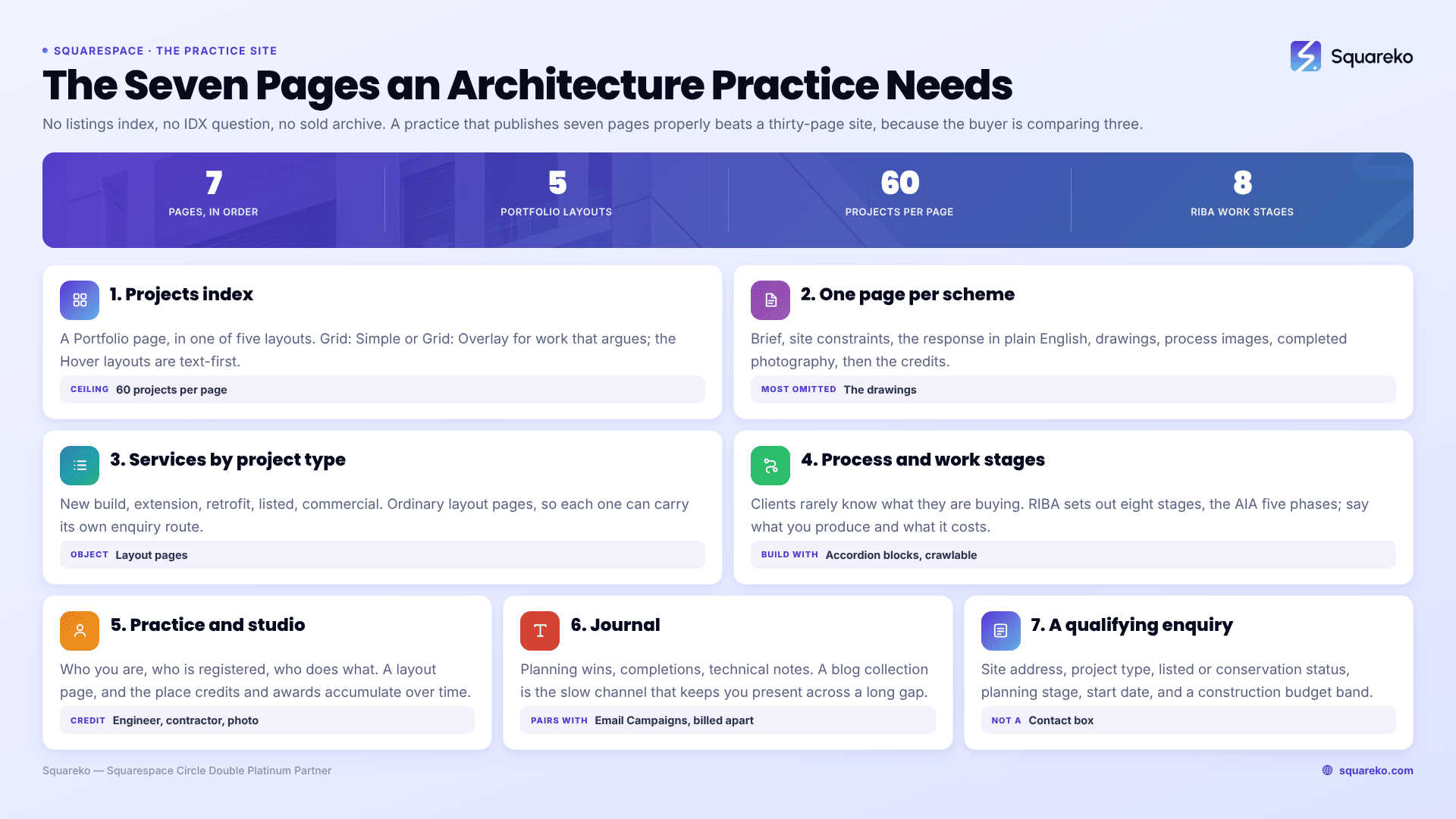
The page set an architecture practice actually needs
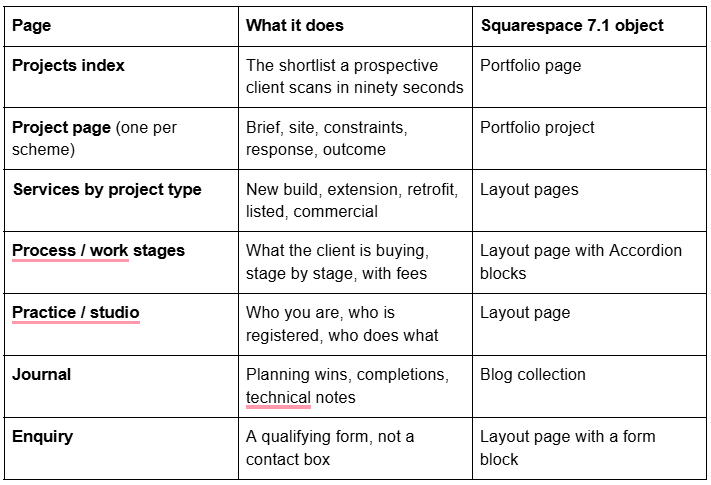
Seven pages. An architecture practice that publishes those seven well beats a thirty-page site every time, because the buyer is comparing three shortlisted practices, not browsing.
Note what is absent: there is no listings index, no IDX question and no sold archive. Architects get grouped with estate agents in template shops because both sell buildings, but the two site types share almost nothing. If you are selling property rather than designing it, the decision map in Squarespace templates for real estate is the right starting point instead.
Squarespace Portfolio pages, documented properly
The Portfolio page is the correct Squarespace 7.1 object for architecture projects, and most template guides never explain how it works.
Five layouts, and only two of them suit architecture.
Grid: Simple — featured images in a grid, project titles below. The default, and the right answer for most practices.
Grid: Overlay — same grid, titles overlaid on the images. Good when your project names are places rather than descriptions.
Hover: Background — titles listed in a stack or inline; hovering swaps the section background to the project image.
Hover: Fixed — hovering shows the project image smaller, in a fixed position.
Hover: Follow Cursor — the project image follows the cursor.
The three Hover layouts are typographic index pages, and they photograph beautifully in a portfolio review, but they are text-first and they behave differently on touch devices where there is no hover state. For a practice whose work is the argument, Grid: Simple or Grid: Overlay.
The caps and the settings.
A portfolio page holds up to 60 projects. That is a career for most small practices; if you exceed it, split by decade or by sector across two portfolio pages.
Each project has a featured image, a title, an editable URL slug, its own SEO title and SEO description, and an optional alternate social image.
Each project has a status: Draft, Needs Review, Scheduled or Published. Only Published projects are visible. Needs Review is genuinely useful in a practice — it is where a project sits while the client approves the photography and the copy.
You cannot add blocks inside the portfolio section itself, but you can add ordinary block sections above and below it. That is where the intro paragraph, the sector filters written as links, and the enquiry prompt go.
Portfolio pages cannot be added or edited in the Squarespace mobile app.
What belongs on an architecture project page
The most common failure is a project page that is a photo gallery with a two-line caption. A prospective client cannot evaluate that, and neither can a planning officer, a journal editor or an awards juror.
A project page that works carries, in this order:
The one-line identification — project name, location, type, completion year.
The brief in the client's words. What they came with, including the constraint that made it difficult.
The site and its constraints. Orientation, conservation area or listing status, access, party wall, levels, budget ceiling. This is where practices demonstrate judgement rather than taste.
The response. Two or three moves, explained in plain English. Not "a dialogue between mass and void".
Drawings. Site plan, plans, a section. This is the single most persuasive content on an architecture website and the most commonly omitted, because it is the only content that proves you designed the building rather than photographed one.
Process images. Model shots, sketches, the site during construction. These make the practice feel real and they are the images that get shared.
Completed photography. Fewer, larger, better.
The credits. Structural engineer, contractor, photographer, planning consultant. Practices that credit properly get recommended by the people they credit.
Drawings, plans and image handling
Drawings break on the web for predictable reasons, and the fixes are specific to Squarespace.
Upload at 1500–2500px wide; 2500px is the maximum width Squarespace serves. A 6000px drawing export gains you nothing and costs load time.
Set the filename before you upload — Squarespace filenames cannot be changed after upload, and a page full of Export_final_v7.jpg is a wasted signal.
The Squarespace CDN serves WebP unconditionally, regardless of your source format or the browser's Accept header. Export as PNG for line drawings if you like; the visitor gets WebP either way.
Gallery sections have six layouts and a 250-image cap, but they cannot hold video. Squarespace's own recommendation is around 50 images per gallery, not 250. For a single project that is far more than enough — and a 40-image gallery is a decision, not a freebie.
Line drawings at small sizes are where readability dies. Crop to the part that carries the argument, and provide the full sheet as a click-through rather than shrinking it into illegibility.
For context on the cost: across 54 Squareko-built client sites measured in August 2026 (Playwright and Chromium, cloud datacentre, unthrottled, single run per site, load-only CLS — lab data, not field data), median mobile LCP was 2.01s and median page weight was 3.0 MB across 93 requests, with a median 86% of images served as WebP. Architecture project pages are among the heaviest pages anyone builds on this platform, so the image budget is worth setting deliberately.
The process page is the highest-converting page on an architect's site
Domestic and small-commercial clients almost never know what they are buying. They know they want an extension. They do not know that there are distinct stages, that planning is one of them, that most practices charge by stage, or that the drawing package they imagine is three separate deliverables.
Publish the stages. In the UK the RIBA Plan of Work organises a project into eight stages — Strategic Definition, Preparation and Briefing, Concept Design, Spatial Coordination, Technical Design, Manufacturing and Construction, Handover, and Use. In the US, the AIA's five phases — Schematic Design, Design Development, Construction Documents, Bidding and Negotiation, and Construction Administration — do the same work. Either way, the page should say for each stage: what you produce, what the client decides, roughly how long it takes, and how the fee is structured.
Build it with Accordion blocks. In Squarespace 7.1 accordions render server-side, so the question and answer text is fully crawlable, and a stage-by-stage accordion answers a long tail of searches — what is RIBA stage 3, how much does an architect charge for planning drawings — that no template ships and almost no practice publishes.
Two additions that convert: a fee structure section, even as percentage bands or a minimum engagement size; and an honest timescale, because the gap between a client's imagined six weeks and a real eighteen months is where projects die.
The sales cycle is measured in seasons, so build for it
An architecture enquiry commonly sits between first contact and appointment for six to eighteen months, through a house purchase, a planning pre-app, a mortgage, or a budget being assembled. A website designed for immediate conversion is designed for the wrong event.
Three things follow from that:
Qualify at the form, not on the call. A contact box wastes both parties' time. An architecture enquiry form should ask for the site address or postcode, the project type, whether the building is listed or in a conservation area, the planning status, the target start date and — this is the one practices flinch at — a construction budget band. Publishing the bands rather than an open field makes it answerable, and a form that filters out the £40k loft conversion enquiries is doing its job. Squarespace form blocks require at least one storage option: a Squarespace mailing list, the form submitters list in the Contacts panel, an email address, Google Drive, Mailchimp or Zapier, with Mailchimp and Zapier needing the Core plan or above.
Keep a slow channel open. A Journal and a mailing list are how a practice stays present through a twelve-month gap. Squarespace Email Campaigns can send an automated campaign when someone joins a mailing list, and it is billed separately from the site subscription.
Use the proposal tooling that is already in your plan. Squarespace's Projects panel can send branded proposals, estimates and contracts to clients, available on the Basic, Core, Plus, Advanced, Business, Commerce Basic and Commerce Advanced plans. For a small practice that currently emails a Word document, that is a meaningful upgrade in how the first fee conversation looks — and it happens on the same platform as the website.
Which templates suit an architecture practice
No template ships an architecture site. What it can ship is a projects index, a repeatable detail layout and somewhere for process to live.
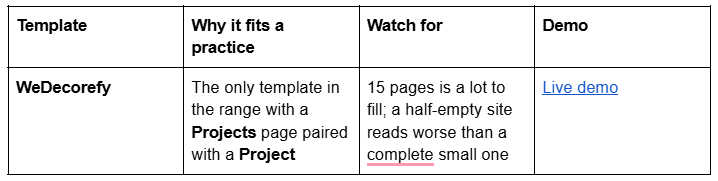
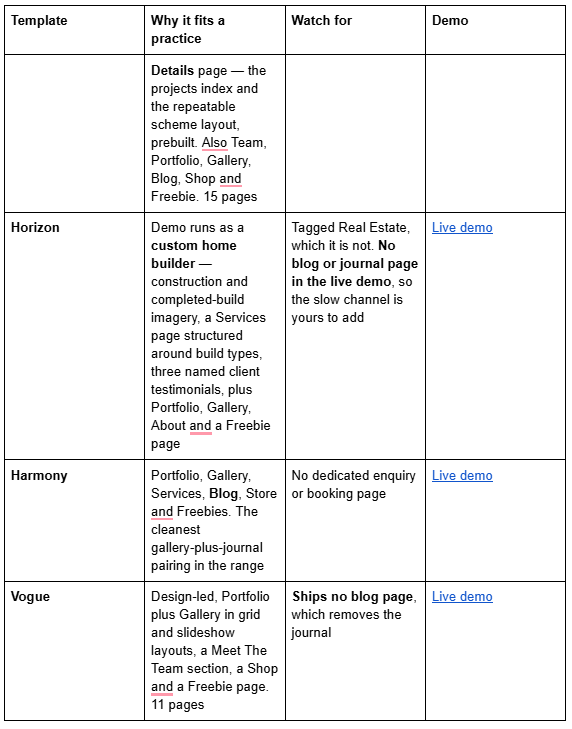
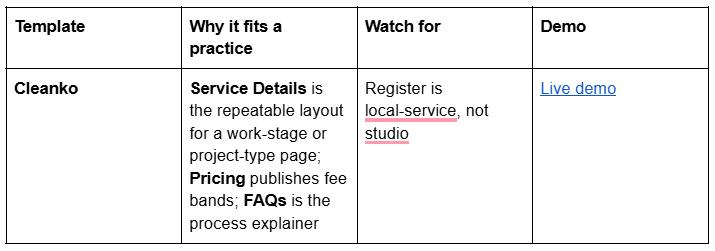
BRIX Construction is a 13-page template with a Projects page, a Service Details page, FAQs and a Blog, which on paper is the best structural fit of all for a practice that builds as well as designs — but its published live demo returns HTTP 401, so no link is given here. Ask for a walkthrough before buying rather than judging from thumbnails. If your business is contracting rather than designing, Squarespace templates for construction companies covers that segment properly.
Use horizon-squareko.squarespace.com for Horizon; the bare horizon.squarespace.com is an unrelated third-party site.
All Squareko templates are $249, the Squarespace subscription is separate and required, and every demo image is licensed to the shop rather than to you — for a practice that means your own photography, and it means clearing the photographer's licence for web use before you upload. Digital-product sales are final, so work through the demo first.
Building it
Start with three project pages done to full depth — brief, constraints, drawings, process, credits — rather than twelve done thinly. Write the process page next, because it converts. Then the enquiry form with the budget band. Journal, awards and press come after. A practice site with six pages of real substance wins shortlists against thirty pages of renders, because the client on the other end is trying to work out whether you will be good to work with for the next eighteen months.
If the practice would rather spend that time on drawings, the premium Squarespace templates in our range arrive as a Squarespace contributor invitation and can be installed onto an existing live site without taking it down. Most practices will build this themselves over a fortnight of evenings; the structure above is the same either way.
FAQ
-
Seven: a projects index, one page per project, services by project type, a process page explaining the work stages and fees, a practice page, a journal and a qualifying enquiry page. Depth beats breadth — three project pages done fully outperform twelve done thinly.
-
Sixty. A Squarespace 7.1 Portfolio page caps at 60 projects. Each project has its own featured image, editable URL slug, SEO title and SEO description, and a status of Draft, Needs Review, Scheduled or Published. Beyond 60, split the work across a second portfolio page by decade or sector.
-
Grid: Simple or Grid: Overlay. Squarespace offers five layouts — those two plus Hover: Background, Hover: Fixed and Hover: Follow Cursor. The three Hover layouts are typographic index pages that depend on a hover state, so they behave differently on touch devices where the work should lead.
-
Upload at 1500–2500px wide, set the filename before upload because it cannot be changed afterwards, and crop to the part of the sheet that carries the argument rather than shrinking a full sheet into illegibility. Squarespace serves WebP unconditionally, so export format matters less than dimensions.
-
Build a process page with Accordion blocks, one per stage. The RIBA Plan of Work has eight stages from Strategic Definition to Use; the AIA uses five phases. For each, state what you produce, what the client decides, how long it takes and how the fee is structured. Accordion text renders server-side and is crawlable.
-
Yes. The Projects panel can send branded proposals, estimates and contracts, available on the Basic, Core, Plus, Advanced, Business, Commerce Basic and Commerce Advanced plans. You need a project created and a valid reply-to email address in your business information settings.

Author Bio
I'm Walid Hasan, a Certified Squarespace Expert and Squarespace Circle Platinum Partner with over 12 years of hands-on experience designing and optimizing high-performing websites. Over the years, I've had the privilege of building more than 2,000 Squarespace websites for clients around the world, always focusing on clean design, strong user experience, and conversion-driven results.
