
Real Estate Squarespace Template: The Page Architecture That Actually Works
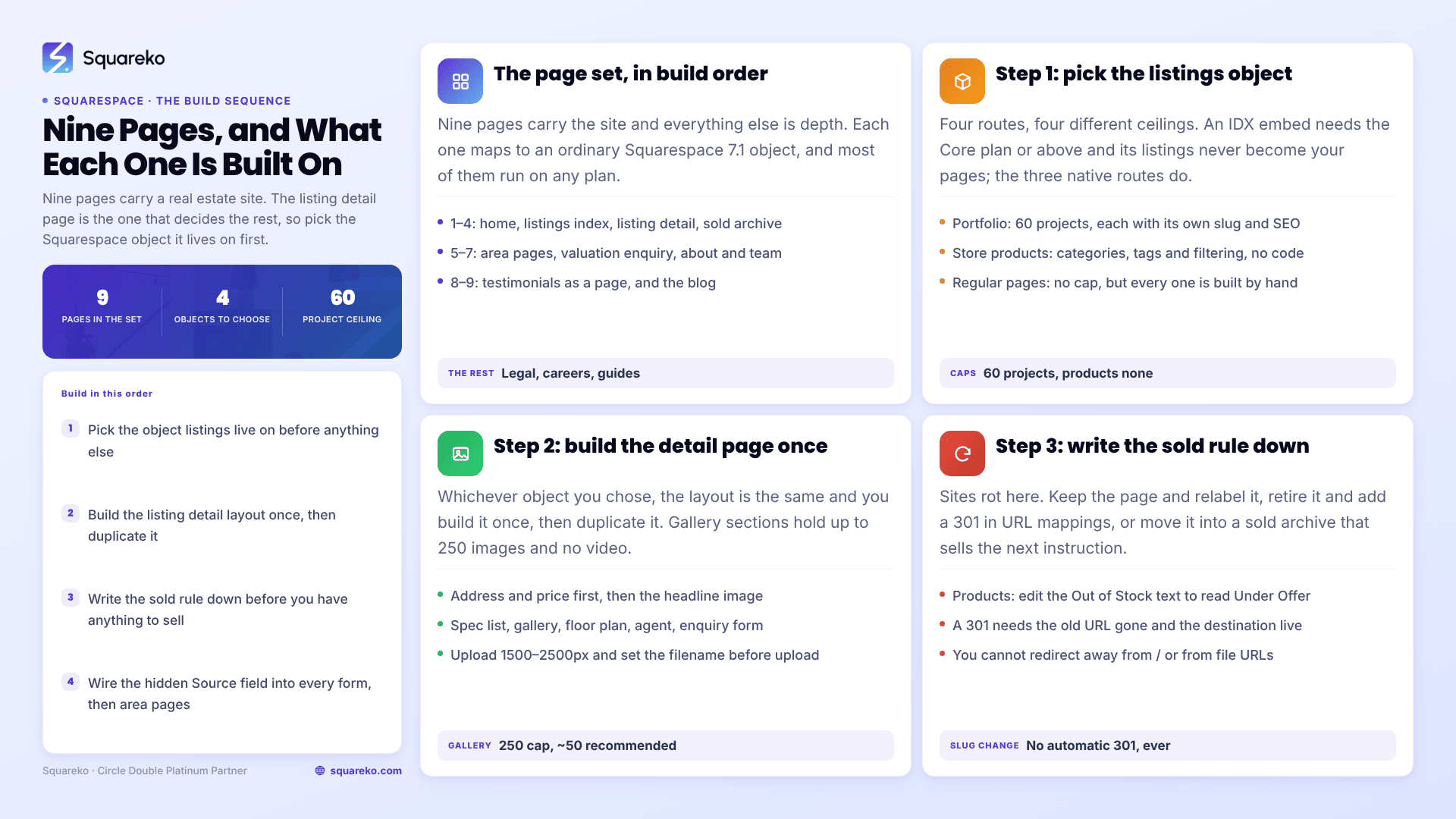
The short answer: a real estate Squarespace template is judged on nine pages, not on its homepage. The one that decides everything is the listing detail page, because Squarespace 7.1 has no native IDX or MLS integration — no listings content type, no feed importer, no property object. You build listings on one of four Squarespace objects, each with different caps and different maintenance. Choose that object first; the rest of the site follows from it.
Here is the whole architecture, in build order.
The page set, and what each page is built on
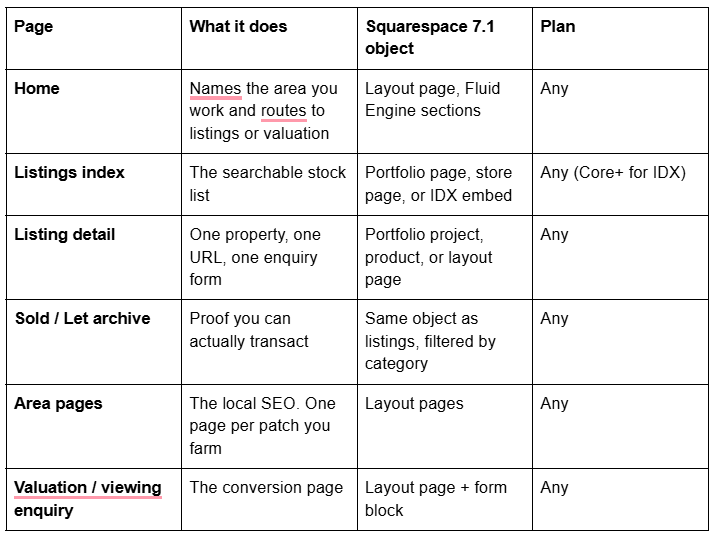
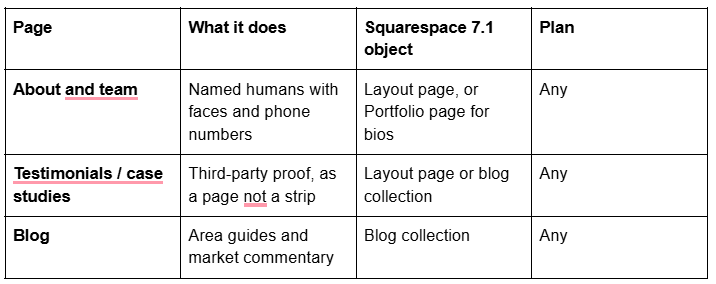
Everything else — legal pages, careers, a landlord guide — is depth. These nine carry the site. If you are not yet sure which real estate business you are building for — solo agent, team, brokerage, architect, property manager — start with the decision map in Squarespace templates for real estate and come back here.
Step 1 — decide which object your listings live on
Squarespace's own Help Center article Adding an MLS search is unambiguous: to show MLS listings you "should be a member of an IDX service", and it names Diverse Solutions, IDXBroker and Displet. There is nothing native. So pick one of four.
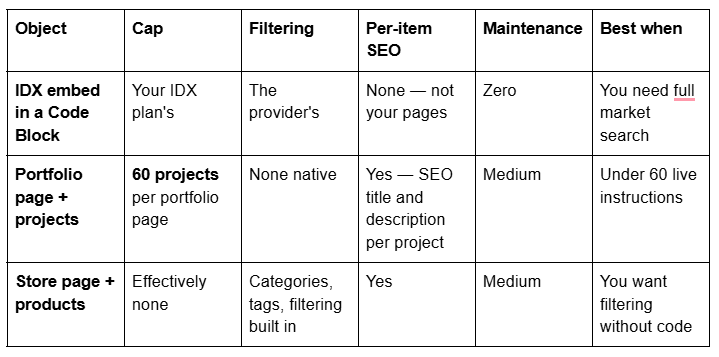
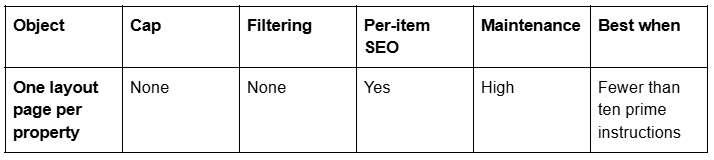
The IDX route. The embed goes in a Code Block, and advanced code in Code Blocks requires the Core plan or above. Some IDX providers need a second script in site-wide Code Injection, which is Core or above as well. Two things to expect: the embed will not render while you are logged in and editing, so verify logged out every time; and Squarespace states plainly that this customisation "falls outside the scope of our support" and that it cannot guarantee "full compatibility with Squarespace… including how it functions with our responsive design, particularly its appearance on mobile devices". Budget roughly $60–$149 a month for a single-agent IDX plan plus a one-off setup fee, and confirm against the provider's live pricing page. Note also that several strong IDX products are WordPress plugins — Showcase IDX advertises WordPress and does not list Squarespace — so check platform support before you sign.
The Portfolio route. A Squarespace Portfolio page holds up to 60 projects, and each project is a real page: featured image, title, editable URL slug, its own SEO title and SEO description, and a status of Draft, Needs Review, Scheduled or Published. Scheduled is the useful one — you can set a listing to go live at launch time. There are five portfolio layouts (Grid: Simple, Grid: Overlay, Hover: Background, Hover: Fixed, Hover: Follow Cursor); Grid: Overlay is the one that reads as a property index because the address sits on the image. You cannot add blocks inside the portfolio section itself, but you can add ordinary block sections above and below it, which is where the intro copy and the enquiry form go.
The Products route. A store page gives you the thing the Portfolio route lacks: filtering. Categories and tags are native, so "3 bedrooms", "£400–500k" and "Chorlton" become filters without a line of code. Product URLs in 7.1 always include p/ before the slug, so a listing lives at /listings/p/42-oak-road. Products have Visible, Scheduled and Hidden statuses — there is no draft state — and the price field is the asking price. This is the most capable native route and the least obvious one.
Step 2 — build the listing detail page once, properly
Whichever object you chose, the detail layout is the same and you build it exactly once, then duplicate it. A listing detail page that works has, in this order: address and price in the H1 region, the headline image, a short honest description, a specification list (bedrooms, bathrooms, tenure, EPC or energy rating, council tax band or property tax, square footage), the gallery, the floor plan, the location context, the named agent handling it, and the enquiry form.
Two Squarespace-specific notes. Gallery sections have six layouts and a 250-image cap, but they cannot hold video — Squarespace's own recommendation is around 50 images, not 250, and for a property tour that is far more than enough. And image handling matters here more than anywhere else on the site: upload at 1500–2500px wide (2500px is the maximum Squarespace serves), set the filename before upload because it cannot be changed afterwards, and let the CDN do the rest — Squarespace serves WebP unconditionally regardless of your source format.
For context on what that costs you in speed: across 54 Squareko-built client sites measured in August 2026 (Playwright and Chromium, cloud datacentre, unthrottled, single run per site, load-only CLS — lab data, not field data), median mobile LCP was 2.01s and median page weight 3.0 MB across 93 requests. Image-heavy pages like property listings are exactly where that budget gets spent, so a 40-image gallery on a listing page is a decision, not a freebie.
Step 3 — decide the sold rule before you have anything to sell
Sites rot at this step. Three defensible options in Squarespace 7.1:
Keep the page and relabel it. Best for SEO and best as proof. If listings are Products, open the Product Status panel, click Out of Stock, and edit the text field — "Sold Out" becomes "Sold", "Under Offer" or "Let Agreed". If listings are Portfolio projects or pages, add a banner section and move the item into a Sold category.
Retire the page and redirect it. Delete or disable the page, then add a 301 in the URL mappings panel. Squarespace's rules are strict: the original URL must no longer exist and the destination must exist. You cannot redirect away from /, and you cannot redirect image or file URLs because static assets live on the CDN.
Move it to a Sold archive. A separate portfolio page or store category holding everything transacted, linked from the listings index. This is the option that turns dead stock into a sales pitch.
Whatever you pick, note that changing a page or post slug in Squarespace creates no automatic 301, ever. If you rename a listing URL you must add the redirect yourself.
Step 4 — the enquiry form, and the setting that makes it measurable
Every Squarespace 7.1 form block needs at least one storage option. The options are a Squarespace mailing list, the form submitters list in the Contacts panel, an email address, Google Drive, Mailchimp or Zapier — Mailchimp and Zapier require Core plan or above. Select two: an email address for speed and Google Drive as the audit trail.
Then add a Hidden field. Label it Source and Squarespace generates the variable SQF_SOURCE. Append ?SQF_SOURCE=42-oak-road or ?SQF_SOURCE=chorlton to the links that point at the form, and every submission arrives tagged with the page that produced it. That is how you find out, after one quarter, which listings and which area pages actually generate instructions.
For the post-submission step, a Squarespace form either shows a confirmation message — which accepts HTML — or redirects to a URL or a page. Redirect valuation requests to a short "what happens next" page; it converts better than a green tick and gives you a thank-you URL to fire conversion tracking from.
Step 5 — area pages, because that is where the searches are
Property search is geographic, and the durable structure is one real page per area you work. Not a tag, not a filter parameter. Squarespace's robots.txt cannot be edited and disallows ?tag=, ?author=, ?month= and ?view= by default, so anything that exists only as a query string is not a page you can rank.
A working area page has the area name in the H1 and the SEO title, genuine local content, your own sold examples in that area, the named agent who covers it, and an enquiry form with the hidden source field set to that area. Ten written properly beat fifty thin ones.
One trap: if any part of the site sits behind Squarespace Member Sites, remember that member-site pages have no SEO options and are not in the sitemap. Public area pages must never live there.
Which templates ship the most of this already
No template in any shop ships a listings system, because Squarespace has no listings object to ship. What a template can save you is the repeatable detail-page layout.

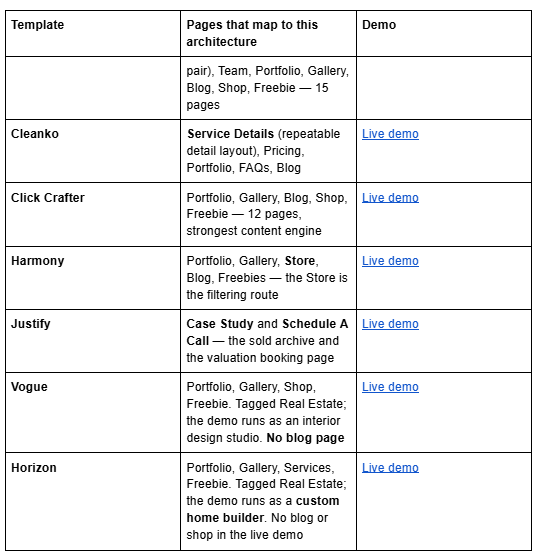
Two honest notes. BRIX Construction has a Projects and Service Details pair that suits new-build sites, but its published live demo returns HTTP 401, so no link is given — ask for a walkthrough. And Horizon must be linked as horizon-squareko.squarespace.com; the bare horizon.squarespace.com is an unrelated third-party site.
All Squareko templates are $249, the Squarespace subscription is separate and required, and demo images are licensed to the shop rather than to you — every one gets replaced before launch. Digital-product sales are final, so use the demo properly first.
Building it
Decide the listings object, build the detail page once, write the sold rule down, wire the hidden source field into every form, then write the area pages. That order matters: every later decision inherits from the first one, and retrofitting a listings structure onto a live site is the single most expensive thing you can do to a real estate website.
If the site is already producing enquiries and you would rather not rebuild it live, the premium Squarespace templates in our range are delivered as a Squarespace contributor invitation and can be installed onto an existing site without taking it down. Most agents will do this themselves over a weekend; the architecture above is the same either way.
FAQ
-
Yes, but not natively as listings. Squarespace 7.1 has no property content type. You either embed a third-party IDX feed in a Code Block, or build listings on Portfolio projects, store products or ordinary pages. The three native routes produce real indexable pages; the IDX embed does not.
-
Yes, and it is the cleanest native route under 60 properties. A portfolio page caps at 60 projects. Each project has its own featured image, editable slug, SEO title and description, and a Draft, Needs Review, Scheduled or Published status. You cannot add blocks inside the portfolio section, only above and below it.
-
Only if listings are built as store products. Product categories and tags give native filtering on a store page, so bedroom count, price band and area become filters with no code. Portfolio pages have no native filtering, and ordinary layout pages have none either.
-
Relabel it or redirect it. For products, edit the Out of Stock text in the Product Status panel to read "Sold" or "Under Offer". To retire a page, delete or disable it and add a 301 in the URL mappings panel — the old URL must no longer exist and the destination must exist for the redirect to work.
-
Add a form block, then give it at least one storage option — email address plus Google Drive is a sensible pair. Add a Hidden field labelled Source to generate the SQF_SOURCE variable, then append that parameter to the links pointing at the form so each submission records which page produced it.
-
Only for IDX. Custom CSS is on every plan, but JavaScript and iframes in Code Blocks and site-wide Code Injection need the Core plan or above, which is what most IDX embeds require. A native build on Portfolio pages or products runs on any plan.

Author Bio
I'm Walid Hasan, a Certified Squarespace Expert and Squarespace Circle Platinum Partner with over 12 years of hands-on experience designing and optimizing high-performing websites. Over the years, I've had the privilege of building more than 2,000 Squarespace websites for clients around the world, always focusing on clean design, strong user experience, and conversion-driven results.
