
Squarespace Templates for Real Estate: The Full Decision Map
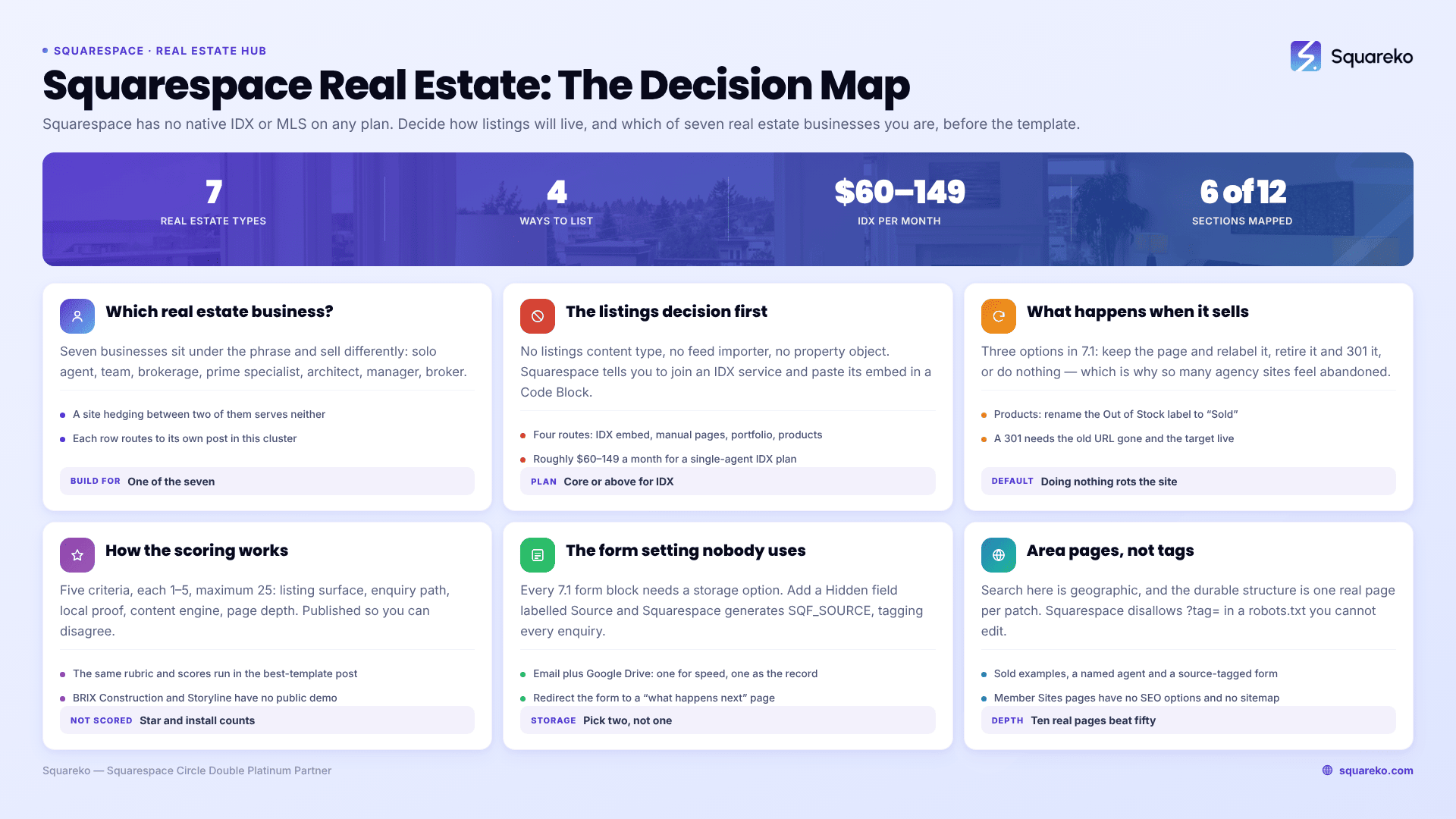
The short answer: the template is not your problem. Listings are. Squarespace has no native IDX or MLS integration on any plan — Squarespace's own Help Center tells you to join a third-party IDX service and paste its embed code into a Code Block — so before you choose a Squarespace template for real estate, decide how property listings will live on the site. That decision determines your plan tier, your monthly cost and your maintenance load. Colour palette determines none of them.
"Real estate" also covers at least seven businesses that sell completely differently. Work out which one you are first.
Which real estate business are you?
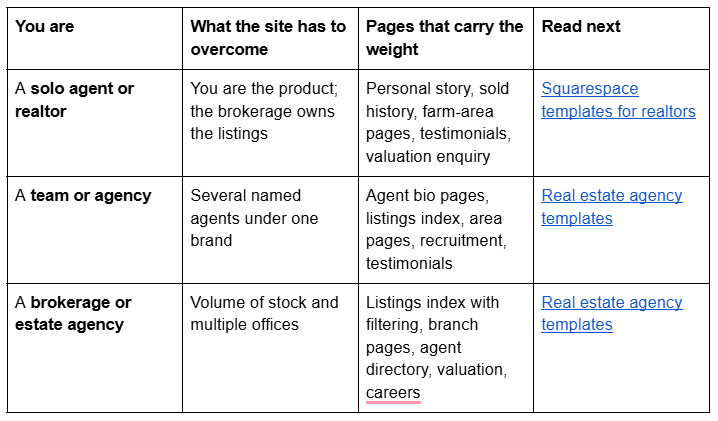
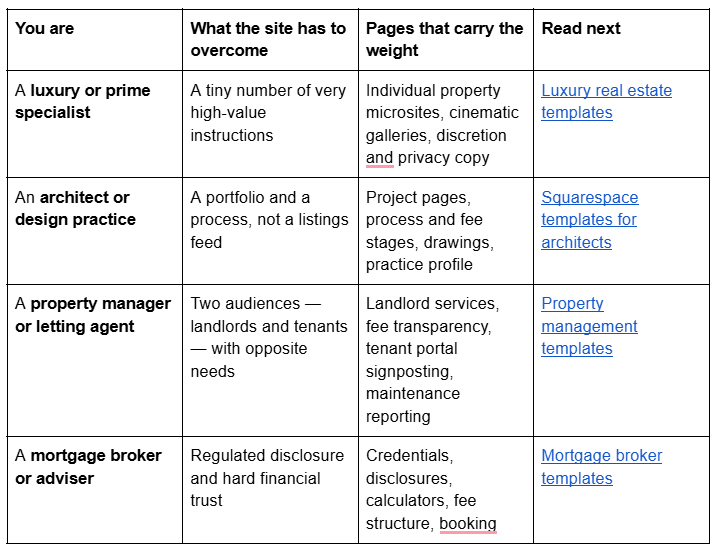
If you sit in two of these, build the site for the one that produces the revenue you want more of. A site that hedges between a personal agent brand and a multi-office brokerage converts neither.
The listings decision comes before the template
This is the single most important fact in this whole subject, and almost nothing that ranks for real-estate template keywords states it: Squarespace has no native IDX or MLS integration. There is no listings content type, no feed importer, no property object. Squarespace's Help Center article Adding an MLS search says it directly — to put MLS search on your site "you should be a member of an IDX service", and it names Diverse Solutions, IDXBroker and Displet as examples.
That leaves you four honest routes. Pick one before you buy anything.
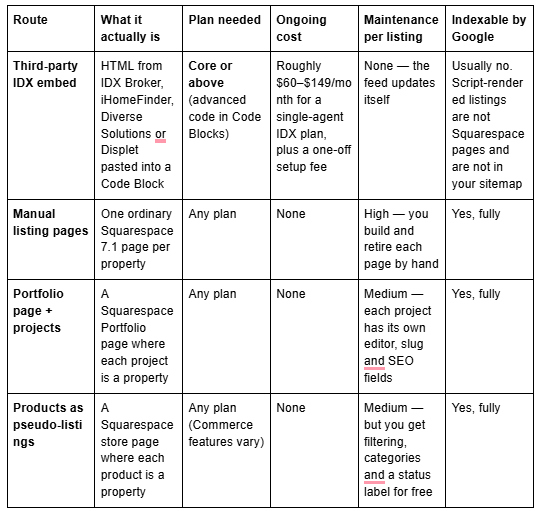
What the IDX route really buys you. It buys accuracy and it buys zero maintenance. It does not buy SEO. Squarespace's own article carries an unusually blunt disclaimer: this code-based customisation "falls outside the scope of our support", they cannot "guarantee its functionality or full compatibility with Squarespace", and that explicitly includes "how it functions with our responsive design, particularly its appearance on mobile devices, and if it functions on all templates". Some IDX providers also need a second script in site-wide Code Injection, which is Core plan or above as well. Add to that: the embed will not render while you are logged in and editing, so you must check it logged out every single time.
Also worth knowing before you commit: several of the best-regarded IDX products are WordPress plugins and cannot be used on Squarespace at all. Showcase IDX, for example, advertises WordPress and does not list Squarespace support. Diverse Solutions is one of the few that publishes an "IDX for any platform" product naming Squarespace explicitly.
What the native routes really buy you. Every listing becomes a real Squarespace page with its own URL, its own SEO title and description, and a place in your sitemap. A well-written listing page for 3-bed Victorian terrace, Chorlton can rank. An IDX iframe cannot. The cost is that you type it in, and you retire it when the property goes.
Most working agents end up running both: IDX for search, native pages for the twelve instructions they actually want to rank for. The build detail for each native route — caps, statuses, filtering and the listing detail layout itself — is worked through page by page in real estate Squarespace templates.
What happens when a property sells
This is the part nobody plans for, and it is where real-estate sites rot. Squarespace 7.1 gives you three defensible options.
Keep the page and mark it sold. This is usually right. A sold archive is the single strongest piece of proof a listing agent has, and the page has already accrued whatever links and rankings it was going to get. If your listings are Products, you can rename the status label: open the Product Status panel, click Out of Stock, and edit the text field to read "Sold", "Under Offer" or "Let Agreed". If your listings are Portfolio projects or pages, add a banner section and move the item to a Sold category.
Retire the page and redirect it. Delete or disable the page, then add a 301 in the URL mappings panel pointing at the area page or the sold archive. Squarespace's rules here are strict: for a 301 to work the original URL must no longer exist and the destination must exist. You also cannot redirect away from /, and you cannot redirect image or file URLs, because static assets sit on the CDN.
Do nothing. Leaves live "for sale" pages for property that sold in 2024. This is the default outcome, and it is why so many agency sites feel abandoned.
Decide the rule now and write it down, because in eighteen months the person doing it will not be you.
How these Squarespace real estate templates were scored
This is an editorial rubric, not a lab measurement. It is applied identically to every template so the scores compare to each other, and it is published so you can disagree with the weighting rather than guess at it. The same rubric and the same scores are used in the best-template comparison, so the two posts do not contradict each other.
Five criteria, each scored 1–5, maximum 25:
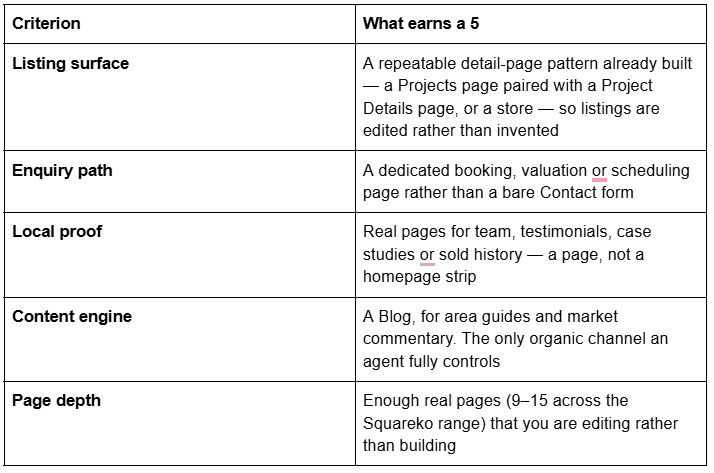
What is not scored: aggregate star ratings, "trusted by" counts and install figures. Those are unverifiable from outside the shop selling them, and this post does not cite them for its own templates either.
A note on demo access and on tags. Two templates below — BRIX Construction and Storyline — have no publicly viewable demo; their published live-demo links return HTTP 401, so no demo link is given for them here. Ask for a walkthrough instead of judging from thumbnails. Separately: template niche tags are not a description of the demo. Vogue and Horizon both carry a Real Estate tag, and neither demo is an estate agency. Both are described below by the pages they actually ship.
Squarespace templates for solo agents and small teams
A single agent or a two-person team needs proof, personality and a route to a valuation appointment. Listing volume is low, so a native listing structure is realistic.
WeDecorefy — best overall for a real estate site with listing pages
Score: 23/25. WeDecorefy is the largest template in the Squareko range at 15 pages, and it is the only one that ships a Projects page paired with a separate Project Details page. That pair is exactly the listings pattern: an index of properties and a repeatable detail layout you duplicate per instruction, rather than designing a property page from scratch and then designing it again slightly differently next month.
The rest of the page set is unusually complete for this use: Team, a Portfolio folder, a Gallery, a Blog, a Shop, a Freebie page, an About Me page, a Services folder with an Offering page, plus Contact, a Style Guide, a 404 and a Sections page. The demo runs as an interior-design studio, so every image and every line of copy is yours to replace — but the architecture underneath is the closest thing in the range to an agency site.
Listing surface 5, enquiry path 3, local proof 5, content engine 5, page depth 5.
Worst for: anyone who wants a small site. Fifteen pages is a lot to fill, and a half-empty 15-page site looks worse than a complete 9-page one.
Cleanko — best for a solo agent who works from service pages
Score: 19/25. Cleanko is built for a cleaning company, and the structure transfers to a solo agent almost exactly. Its verified pages are Home, Home 2, About, Services, Service Details, Pricing, Portfolio, FAQs, Blog, Contact Us, a Style Guide, a 404 and a Sections page.
The Service Details page is the one to notice. It is a repeatable detail layout, which is what an area page or a listing page is. Pricing gives you somewhere to publish a fee structure, which in sales and lettings is the fastest way to filter enquiries. FAQs built with Accordion blocks in Squarespace 7.1 render server-side, so the question and answer text is crawlable — that is where "how much is your commission" and "how long will it take to sell" belong.
Listing surface 3, enquiry path 4, local proof 4, content engine 4, page depth 4.
Worst for: luxury and prime. The register is local-service practical, not discreet and expensive.
Justify — best when your entire pitch is sold history
Score: 18/25. Justify is built for law firms and is the smallest template in the range at nine pages, but it ships two structures real estate needs and rarely gets: a Case Study page and a dedicated Schedule A Call page. Its other verified pages are Home, Home 2, About, Services, Our Practice Area, Blog, Contact, a Style Guide, a 404 and a Sections page.
For an agent, Case Study is the sold-history page: what the property was, what the challenge was, what it achieved, over what period. Schedule A Call is the valuation booking page most agency sites replace with a contact form and then wonder why nobody fills it in.
Listing surface 2, enquiry path 5, local proof 5, content engine 4, page depth 2.
Worst for: anyone carrying stock. Nine pages and no gallery or projects structure means listings are entirely yours to build.
Squarespace templates for agencies and brokerages
Multiple agents, multiple areas and a marketing function. Depth and a working blog matter more than they do for a solo agent.
Click Crafter — best for an agency that markets itself
Score: 20/25. Click Crafter is a 12-page agency and service-business template with Home, Home 2, About, Services, Portfolio, Gallery, Blog, Shop, Freebie, Contact, a Style Guide, a 404 and a Sections page. Its demo runs as a digital marketing studio.
For an estate agency the Portfolio page is the listings or sold-property index, the Blog is where area guides and quarterly market commentary live, and the Freebie page is where a seller's guide or a landlord compliance checklist goes. That last one is underrated: in lettings, a downloadable landlord guide is consistently the best-converting asset on the site, and most agencies email it on request, which loses every enquiry that never asks.
Listing surface 4, enquiry path 3, local proof 4, content engine 5, page depth 4.
Worst for: a practice that needs a bookable appointment. There is no scheduling or booking page in the build.
Harmony — best for a lettings and property-management brand
Score: 17/25. Harmony ships Home 1, Home 2, Services, Portfolio, Gallery, a Store, a Blog, a Freebies page, Contact, a Style Guide, a 404 and a Sections page. The Store is the interesting part for property management: a store page gives you categories, tags, filtering and a status label out of the box, which is most of a lettings availability list without writing any code.
Listing surface 4, enquiry path 2, local proof 3, content engine 4, page depth 4.
Worst for: sales agents who need a valuation funnel. There is no booking, pricing or enquiry-specific page.
BRIX Construction — best for new-build and developer sites
Score: 21/25. BRIX Construction is a 13-page template with a Projects page, a Service Details page, an FAQs page and a Blog. For a developer selling a scheme, or an agency whose stock is new-build, Projects is the development index and Service Details is the plot or phase page.
BRIX Construction's published live demo returns HTTP 401, so no demo link is given here. Ask for a walkthrough before buying. If your business is building rather than selling, Squarespace templates for construction companies covers that segment properly.
Listing surface 5, enquiry path 3, local proof 4, content engine 4, page depth 5.
Worst for: resale estate agency. The whole register is contractor, not agent.
The two templates tagged Real Estate, described honestly
Both templates in the Squareko range carrying a Real Estate tag are worth looking at, and neither demo is an estate agency. Judge them on pages, not on tags.
Vogue — a design-led site for prime property and interiors
Score: 16/25. Vogue is an 11-page template tagged Real Estate and Interior. Its live demo runs as an interior design studio — the headline is Vogue Interiors and the services are room schemes. The verified pages are Home, Home 2, Services, About with a Meet The Team section, Portfolio, Gallery (grid and slideshow layouts), a Shop, a Freebie page, Contact, a Style Guide, a 404 and a Sections page.
For prime and luxury property that combination works: Portfolio as the instruction index, Gallery for the property tour, Shop for a lookbook or a paid staging service. What Vogue does not ship is a blog page, and for an agent whose local SEO strategy is area guides, that is a significant hole you will have to add and style yourself.
Listing surface 4, enquiry path 3, local proof 4, content engine 1, page depth 4.
Worst for: volume agency. No blog, no booking page, no repeatable detail-page pattern.
Horizon — a custom home-builder demo with a strong portfolio
Score: 15/25. Horizon carries Real Estate, Home and Interior tags, and the demo is none of those in the estate-agency sense: it runs as a custom home builder, with headlines about building homes that last a lifetime, a Custom Home Builds services page and three named client testimonials. Verified live pages are Home, Home 2, Services, About, Portfolio, Gallery, a Freebie page, Contact, a Style Guide, a 404 and a Sections page. There is no blog or journal page and no shop in the live demo.
That makes Horizon a good fit for a developer, a builder or an architecture practice, and a weak one for an agent with stock to list. It is included here because it is tagged Real Estate and buyers will find it that way — not because it is the right answer for most of them.
Listing surface 4, enquiry path 3, local proof 4, content engine 1, page depth 3.
Worst for: lettings and resale agency. Nothing in the build is oriented to a listings archive.
Always use horizon-squareko.squarespace.com. The bare horizon.squarespace.com subdomain resolves to an unrelated third-party site and has nothing to do with this template.
Lead capture: the one form setting that changes everything
Every Squarespace 7.1 form block requires at least one storage option, and the options are a Squarespace mailing list, the form submitters list in the Contacts panel, an email address, Google Drive, Mailchimp or Zapier. Mailchimp and Zapier need Core plan or above. Pick two — an email address for speed and Google Drive as the audit trail — because a lost valuation enquiry is a lost fee.
The setting almost nobody uses is the Hidden field. Add a hidden field to your enquiry form, label it Source, and Squarespace generates the variable SQF_SOURCE. Append ?SQF_SOURCE=chorlton-area-page or ?SQF_SOURCE=listing-42-oak-road to the links pointing at your enquiry page, and every submission arrives tagged with the page that produced it. After a quarter you know which area pages and which listings actually generate instructions, rather than guessing.
Post-submission, a Squarespace form either shows a confirmation message — which accepts HTML — or redirects to a URL or a page on your site. For a valuation form, redirect to a short "what happens next" page. It converts better than a green tick and it gives you a thank-you page to fire conversion tracking from.
Area pages are the local SEO, not the blog
Real estate search is overwhelmingly geographic, and the durable structure is one real page per area you actually work — not a tag, not a blog category, not a filter parameter. Squarespace disallows ?tag=, ?author=, ?month= and ?view= in its robots.txt by default and you cannot edit that file, so anything that only exists as a query parameter is not a page you can rank.
An area page that earns its place has: the area name in the H1 and the SEO title, genuine local content (transport, schools, housing stock, price direction), your own sold examples in that area, a named agent who covers it, and an enquiry form with the hidden source field set to that area. Ten of those, written properly, will outperform fifty thin ones.
One trap to avoid: if you are on Squarespace Member Sites, remember that member-site pages have no SEO options and are not included in the sitemap. Never build public-facing area pages inside a member site.
Agent bio pages, and why they are not an About page
A brokerage's highest-intent branded searches are people typing an agent's name. That traffic has nowhere to land if all seven agents share one Team page.
Give each agent a real page: name in the H1, area of coverage, direct contact, recent sold examples, testimonials naming them, and their own enquiry form with the hidden source field set to their name. If you would rather not build seven pages by hand, a Portfolio page works well here — each agent becomes a project, with a featured image, an editable URL slug and its own SEO title and description. The cap is 60 projects per portfolio page, which is more agents than almost any independent brokerage has.
What the rest of the market offers
Being fair about this earns more trust than pretending there is one option, and there isn't.
Applet Studio runs about 30 templates at roughly $225 and holds the strongest dedicated real estate landing page on the SERP, with genuine IDX Broker and iHomeFinder guidance. Big Cat Creative is the largest premium Squarespace shop and its self-service customisation education is better than most agencies' onboarding. Station Seven, Paper Moon Websites, Go Live HQ, Ink and Mortar, SQSPThemes and Square Stylist all sell into this niche.
Squarespace's own free templates are the honest baseline. They are included with every subscription, and if your site is a personal agent brand of six pages, a free template plus a weekend is a completely reasonable outcome. The free versus premium comparison sets out where that stops being true. Note that Squarespace maintains an architecture template category but no real-estate category, which tells you something about how the platform sees this market.
Where the Squareko range differs is delivery, not design. Templates arrive as a Squarespace contributor invitation rather than a file download — there is nothing to upload — and installation onto an existing live site is a manual add-on taking around 48 hours, which matters when the current site is producing valuations.
What it costs over the life of the site
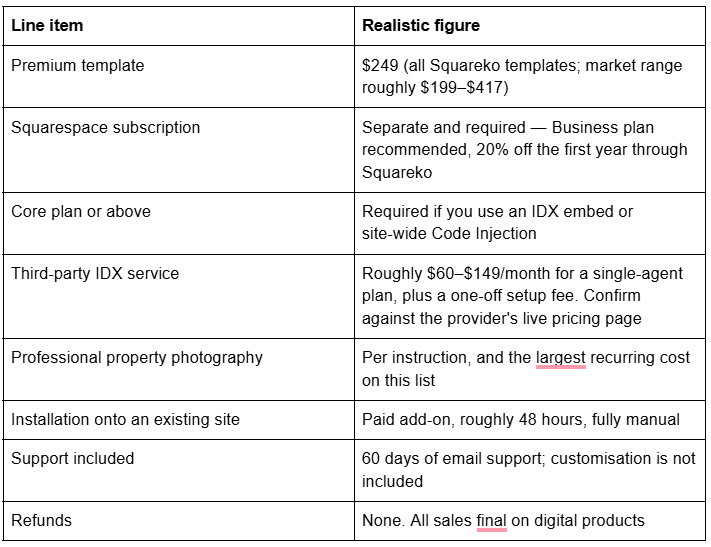
Two things get missed. Demo images are licensed to the template shop, not to you — every one must be replaced before launch, which for an agency means a real photograph of your team and your stock. And all sales are final: digital products cannot be returned, exchanged or refunded, which is standard across the template market. Use the demo properly first, and where a demo is not publicly viewable, ask for a walkthrough.
Choosing one
Work it in this order. Decide how listings will live — IDX embed, manual pages, Portfolio projects, or Products — because that sets your plan tier and your monthly cost. Identify which of the seven real estate businesses you are and build for that one. Then check the template ships a repeatable detail-page pattern and a real enquiry path, not just a contact form. Aesthetics come last, because in Squarespace 7.1 aesthetics are the easiest thing to change and page architecture is the hardest.
If you would rather not run the install yourself, the premium Squarespace templates in our range are delivered as a contributor invitation and can be installed onto an existing live site without taking it down. Most agents reading this will do it themselves over a weekend, and the eight templates above are the shortlist worth starting from.
FAQ
-
No. Squarespace has no native IDX or MLS feature on any plan. Its own Help Center instructs you to join a third-party IDX service such as IDX Broker, Diverse Solutions or Displet and paste that service's embed code into a Code Block. Advanced code in Code Blocks requires the Core plan or above.
-
Four ways: a third-party IDX embed in a Code Block, one manually built page per property, a Portfolio page where each project is a property, or a store page where each product is a property. Only the last three produce real, indexable Squarespace pages with their own URLs and SEO fields.
-
Sixty. Squarespace caps a portfolio page at 60 projects. Each project has its own featured image, editable URL slug, SEO title and SEO description, and a status of Draft, Needs Review, Scheduled or Published. Only published projects are visible to visitors.
-
Keep it and relabel it, or retire it and redirect. If listings are Products you can rename the Sold Out label to "Sold" in the Product Status panel. If you delete the page, add a 301 in the URL mappings panel — the old URL must no longer exist and the destination must exist for the redirect to work.
-
Only if you use IDX. Custom CSS is available on every plan, but JavaScript and iframes inside Code Blocks and site-wide Code Injection require the Core plan or above, and that is what most IDX embeds need. A native listings build using Portfolio pages or Products runs on any plan.
-
Six that carry weight: a homepage naming the area you work, a listings index, a repeatable listing detail page, an area page per patch you farm, a sold or case-study archive, and a valuation or viewing enquiry page. Agent bios, testimonials and a blog are the depth you add once those six convert.

Author Bio
I'm Walid Hasan, a Certified Squarespace Expert and Squarespace Circle Platinum Partner with over 12 years of hands-on experience designing and optimizing high-performing websites. Over the years, I've had the privilege of building more than 2,000 Squarespace websites for clients around the world, always focusing on clean design, strong user experience, and conversion-driven results.
