
Best Squarespace Template for Consultants (2026, Scored)
The verdict: for most independent consultants, Advisory is the best Squarespace template available — 11 pages built on the consultative shape, including the Pricing page and two legal pages that consultants otherwise always have to add. If you sell productised services or need a project portfolio, Click Crafter is the better pick. If you want the widest design choice rather than the closest structural fit, Big Cat Creative has the largest premium library on the platform and is a genuinely strong alternative.
Below is how each was scored and who should choose which.
How these were scored
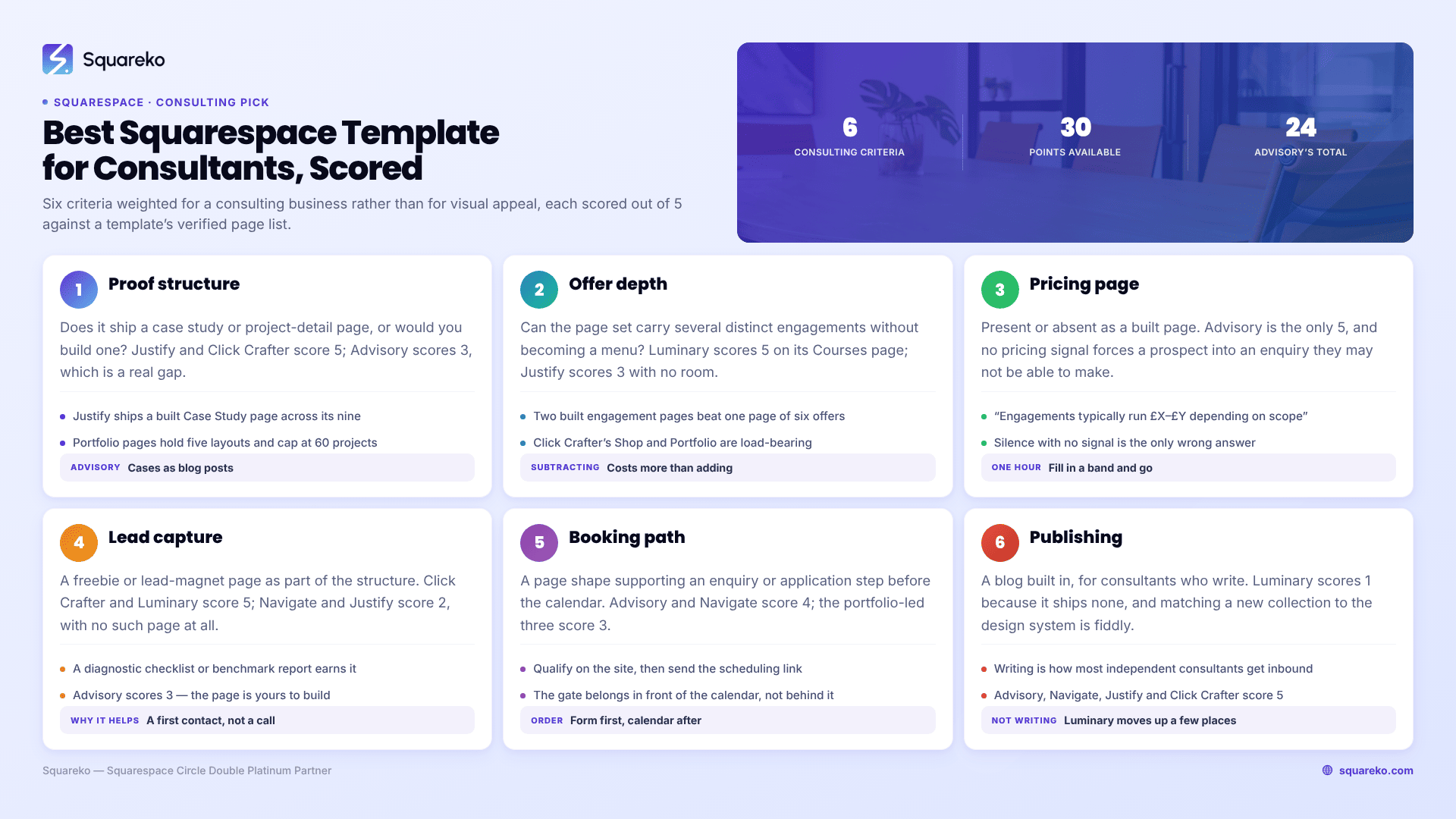
Six criteria, weighted for a consulting business rather than for visual appeal. Each is scored out of 5 against the template's verified page list and built structure — not its demo photography, which every buyer replaces anyway.
Proof structure — does it ship a case study or project-detail page, or would you build one?
Offer depth — can it carry several distinct engagements without turning into a menu?
Pricing page — present or absent as a built page.
Lead capture — a lead-magnet or freebie page as part of the structure.
Booking path — a page shape that supports an enquiry or application step before the calendar.
Publishing — a blog built in, for consultants who write.
Design quality is deliberately excluded. Every premium template on this list is competently designed, all of them are Squarespace 7.1 with Fluid Engine, and colour and type are the two things you will change first regardless.
The scoring table
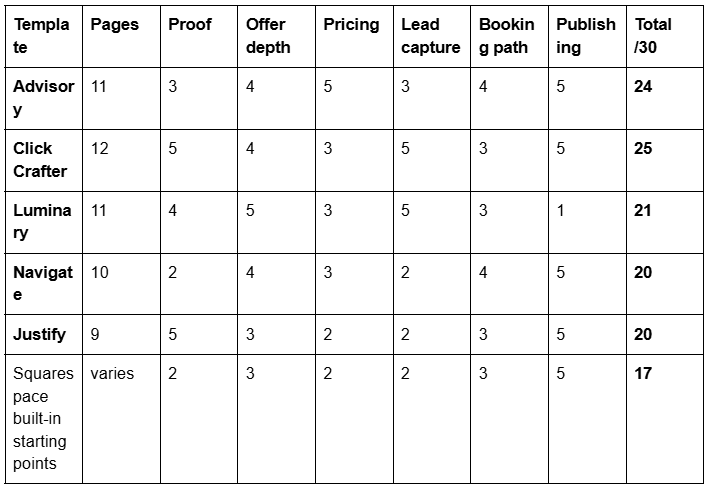
Click Crafter scores highest on raw structure. Advisory is still the right default for most independent consultants, for a reason the table does not capture: Click Crafter's portfolio and shop pages are load-bearing, and a consultant with no visual work and no products spends the first week deleting them. A template you subtract from is more work than a template you add to.
Advisory — the default for an independent consultant
Eleven pages, structured around consultation rather than around visuals: home, services, blog, a Pricing page and two legal pages, with the supporting pages a professional practice expects.
The Pricing page is why it wins. Consultants agonise over whether to publish rates, and the most common outcome is a site with no pricing signal at all — which forces every prospect into an enquiry they may not have authority to make. A template that ships the page makes you decide, and "engagements typically run £X–£Y depending on scope" is a page you fill in an hour.
The two legal pages matter more than they look. A consultant working with corporate clients will be asked for terms, a privacy policy and often a data-processing position, and templates that omit these leave you building the least interesting pages on the site from scratch, usually at the point when you are already late.
What it does not give you is a built case-study page. You build proof as either blog posts or a repeatable services-detail page. That is a real gap, and it is the reason Advisory scores 3 rather than 5 on proof.
Advisory is tagged for consultation and speaking, so it also suits the consultant whose talks feed the practice.
Click Crafter — for productised services and project work
Twelve pages with Blog, Portfolio, Gallery, Shop and a Freebie page. Demo.
This is the strongest structure on the list if your consulting has an output someone can look at, or an offer someone can buy without a call. The Portfolio page carries project work properly — Squarespace Portfolio pages have five layouts and cap at 60 projects, which no consultancy will reach. The Shop page is the piece most consultants overlook: a productised audit, a paid diagnostic, a fixed-scope workshop or a template pack sells perfectly well through Squarespace commerce, and having the page already built removes the excuse not to try it.
The Freebie page is a built lead-capture page, which is more useful than it sounds. Consultants who publish a diagnostic checklist or a benchmark report have a reason for a first contact that is not "book a call".
The cost is what you delete. If you have no products and no visual project work, the Shop, Portfolio and Gallery pages are three pages of scaffolding to remove, and removing pages cleanly takes longer than filling them.
Luminary — when consulting is one revenue line among several
Eleven pages with a Courses page, a Shop, Portfolio, Gallery and a Freebie page. Demo.
Luminary is built for the expert with several income streams — advisory work, a course, a product, speaking. If that describes you, it is the strongest fit on the list, and the Courses page saves a build that is otherwise fiddly.
The reason it scores 21 rather than higher is that it has no blog. For a consultant, that is a significant omission: writing is the main way independent consultants generate inbound enquiries, and adding a blog collection to a Squarespace 7.1 site is easy but adding one that matches the template's design system is not. If you do not intend to write, this is not a problem at all and Luminary moves up several places.
Navigate — for the consultant who teaches
Ten pages, built around Speaking, Podcast, Course and Blog.
Navigate is not really a consulting template; it is an authority template. It suits the consultant whose pipeline comes from a podcast, a stage or a course rather than from a services page, and it assumes a publish-and-speak rhythm rather than a proposal-and-deliver one.
It scores lowest on proof because there is no case-study or project page in its ten, and lowest on lead capture because there is no freebie page. If your enquiries come from people who already know your work, neither omission costs you much. If you are cold to most of your market, they cost you a lot.
Justify — the smallest, and sometimes the right answer
Nine pages with a Blog and a Case Study page. Demo. Tagged for attorneys, and structurally it suits any professional-services practice that sells expertise rather than output.
The Case Study page is the reason it appears on a consultants list at all — it is the only template here that ships proper proof structure as a built page rather than as something you improvise.
Nine pages is the smallest template in the Squareko shop, and for some consultants that is the feature. A solo consultant with two service lines does not need fifteen pages; they need six good ones and no maintenance burden. The trade-off is no pricing page, no lead-capture page and no room to grow into a multi-offer structure without building.
Squarespace's own templates, and the other shops
An honest comparison has to include the alternatives, because for some readers they are the better answer.
Squarespace's built-in starting points are free, professionally designed, and on 7.1 they are all the same underlying system — the visual differences are section arrangements and style settings you could reproduce yourself. If your budget is zero and you have time, you can build a good consulting site on one. What you do not get is a page structure designed for a consultancy; you get a homepage and a blank canvas, and the eight days you spend deciding what pages to build is the thing a premium template sells you out of.
Big Cat Creative has the largest premium Squarespace template library and a full industry taxonomy. If design choice is what you want — genuinely wanting to browse twenty options and pick a look — they are the strongest shop on the platform and it is not close. They also publish a large volume of free Squarespace education, which is a fair indicator of how well a shop understands the platform.
Applet Studio runs around 30 templates at roughly $225 with dedicated industry landing pages, and is a serious alternative at a slightly lower price point. Station Seven, Paper Moon Websites, Go Live HQ, Ink and Mortar, SQSPThemes, Square Stylist and Golden Coast Design all sell competent premium Squarespace templates, and several have deeper design ranges than Squareko does.
Where Squareko wins is not the size of the library. It is delivery and support: templates arrive as a Squarespace contributor invitation, not a file download — there is nothing to unzip, upload or install — and installation onto an existing site is available as a paid add-on that typically takes around 48 hours, with your current site staying live throughout. Sixty days of email support is included. If you are comparing on breadth of design choice, buy elsewhere. If you are comparing on getting the thing live without becoming a Squarespace technician, that is the argument.
Choose this if
Choose Advisory if you are an independent consultant selling engagements, you want a pricing page you will actually fill in, you need terms and a privacy policy from day one, and you write.
Choose Click Crafter if you have project work worth showing, you sell or intend to sell a productised service, or you want a lead magnet as a first-contact route rather than a call.
Choose Luminary if consulting is one of three or four things you do, you run a course, and you are not going to blog.
Choose Navigate if your pipeline comes from a stage, a podcast or a course, and prospects arrive already knowing who you are.
Choose Justify if you want the smallest possible site with real case studies, two service lines, and nothing to maintain.
Choose a free Squarespace starting point if budget is the binding constraint and you have several days to spend on structure.
Choose Big Cat Creative or Applet Studio if what you actually want is to browse a large design range and pick the look you like most. That is a legitimate way to buy, and neither shop will let you down on quality.
The practicalities, before you buy anything
All 24 Squareko templates are $249, with no variants and no sale price. That covers the design and use of the template only — a Squarespace subscription is separate and required, and Squareko recommends the Business plan while confirming the templates work on Basic. Buyers get 20% off their first Squarespace year.
Three things worth knowing before you commit, because they are the ones people discover afterwards:
All sales are final. Digital products cannot be returned, exchanged or refunded. That makes the demo the most important step in the purchase, not an optional one — click every page, resize to the 767px mobile breakpoint, and check that the pages you need actually exist.
Demo images are not licensed for live use. Every image gets replaced with yours. For a consultancy this is fine — you were never going to launch with stock anyway — but budget for photography or a decent image licence.
Customisation is not included. Sixty days of email support, a five-day course, video tutorials and a private community are. Layout changes beyond the template are a separate engagement.
Actual page counts across the shop run from 9 to 15 depending on the template, and the page list is the specification. Read it before the homepage image. For how $249 sits against the rest of the market, see how much Squarespace templates cost.
What matters more than which template you pick
Two consultants can buy the same template and end up with sites that perform completely differently, and the difference is never the template.
Proof. Three specific, anonymised case studies with the mechanism described — the problem, the intervention, the timeframe, the change — beat any design decision on this page. Most consulting sites have none, or have three sentences of testimonial with a first name attached.
One clear offer. A services page listing six things converts worse than a page describing one engagement well. The template gives you room for either; the discipline is yours — and what belongs on each page of a consulting site is worked through in Squarespace website for consultants.
A pricing signal. A number, a band, or an explicit statement of why there isn't one. Silence with no signal is the only wrong answer.
Speed, and it is mostly your images. Across 54 Squareko-built client sites measured in August 2026 — Playwright and Chromium, cloud datacentre, unthrottled, single run per site, load-only CLS, so lab data rather than field data — the median mobile LCP was 2.01s with 74% under Google's 2.5s "good" threshold, and median page weight was 3.0 MB across 93 requests. Templates do not usually make sites slow. Uncompressed hero images do. Upload at 1500–2500px and let the Squarespace CDN serve WebP.
The short version
Advisory for most independent consultants. Click Crafter if you have project work or products. Luminary if consulting is one line among several and you will not blog. Justify if you want the smallest real site available. Big Cat Creative if you would rather choose from a wide design range than from a page structure.
Then spend the time you saved on the three case studies, because that is what the site is actually selling.
If the install is the part you would rather not do, our premium Squarespace templates come as a contributor invitation with installation onto an existing site available as an add-on, typically inside about 48 hours, with your current site live the whole time. Plenty of consultants install a template themselves in an afternoon — if that is you, the scoring table above is the only part of this post you need.
FAQ
-
Advisory, for most independent consultants — 11 pages built on a consultative structure including a Pricing page and two legal pages. Click Crafter is better if you have project work to show or sell a productised service, and Justify is better if you want the smallest possible site with a built case-study page.
-
Only if your work produces something visual. Most consulting is better evidenced by written case studies — problem, intervention, timeframe, measurable change — than by images. Squarespace Portfolio pages offer five layouts and cap at 60 projects, which suits design and construction work far more than advisory work.
-
Squareko's are $249 each with no variants, covering the design and use of the template only; a Squarespace subscription is separate and required. Applet Studio sits around $225. Prices across the premium market generally run from roughly $150 to $400, and Squarespace's own built-in starting points are free.
-
If you value the page structure, yes. Squarespace's free starting points are well designed but give you a canvas rather than a specification, and the days you spend deciding what pages a consultancy needs are what a premium template removes. If you already know your structure, free is a reasonable choice.
-
Justify ships a built Case Study page across its nine, and Click Crafter carries Portfolio and Gallery pages that serve the same purpose for project work. Advisory does not include one — case studies there are built as blog posts or as a repeatable services-detail page.
-
Yes, with Squareko it is a paid add-on and a fully manual process that typically takes around 48 hours, with your existing site staying live throughout. The alternative route is a new 12-month trial site that is built and then transferred to you. Templates arrive as a contributor invitation, not a file download.

Author Bio
I'm Walid Hasan, a Certified Squarespace Expert and Squarespace Circle Platinum Partner with over 12 years of hands-on experience designing and optimizing high-performing websites. Over the years, I've had the privilege of building more than 2,000 Squarespace websites for clients around the world, always focusing on clean design, strong user experience, and conversion-driven results.
