
Squarespace SSL Certificate Not Active? How to Force It
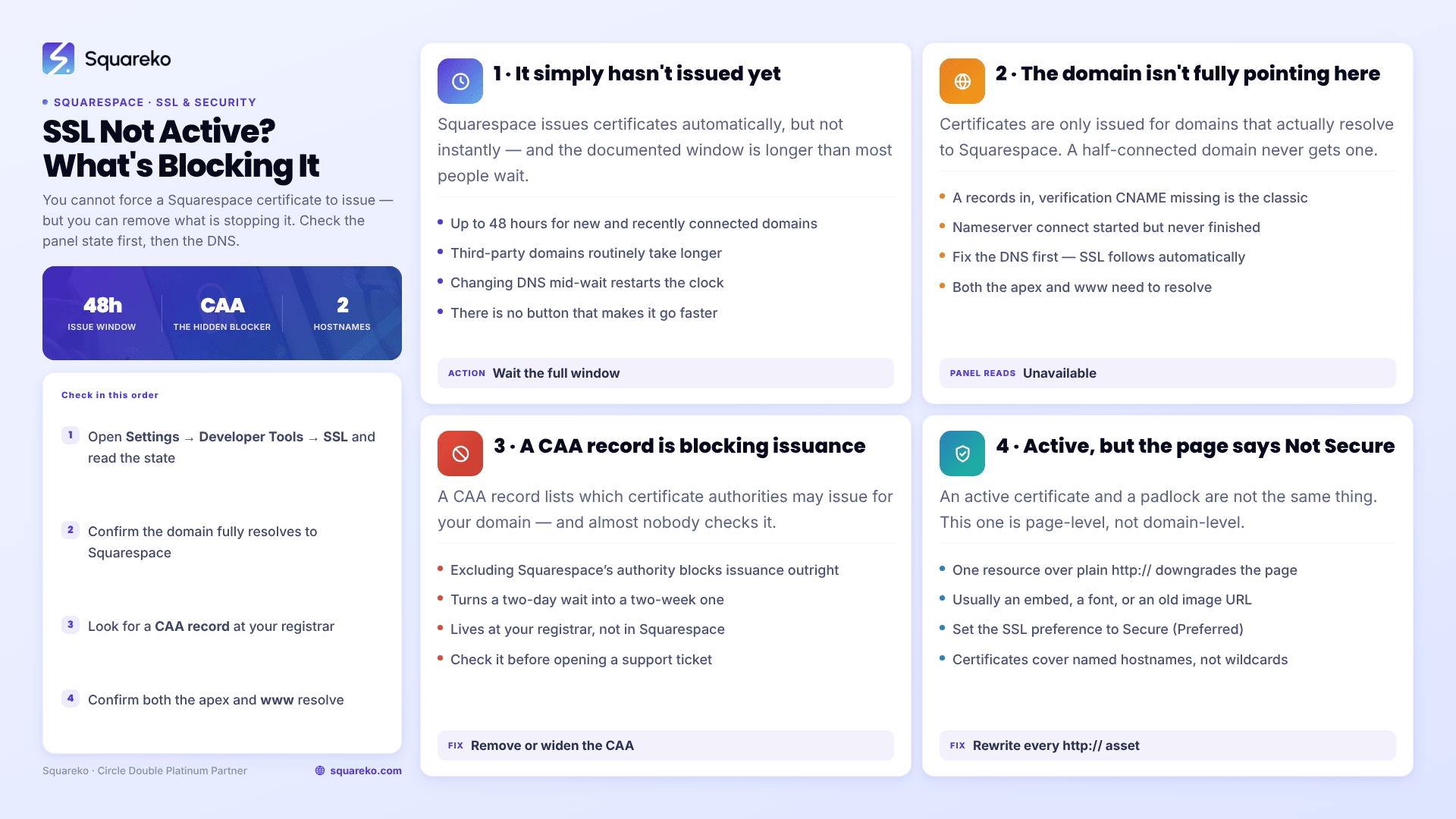
You cannot manually force a Squarespace certificate to issue — but you can remove what's blocking it. In almost every stuck case the domain isn't fully pointing at Squarespace yet, or a CAA record at the registrar is refusing the certificate authority permission to issue. Squarespace allows up to 48 hours for a new domain, and third-party domains take longer. Check the SSL panel state first, then the DNS.
The SSL setting lives at Settings → Developer Tools → SSL. Everything below assumes Squarespace 7.1.
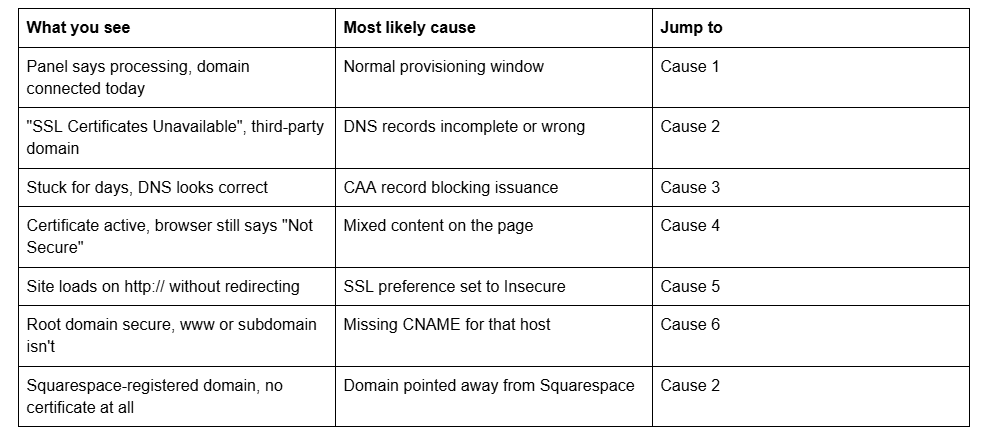
Quick diagnostic table
Cause 1 — The certificate simply hasn't been issued yet
Squarespace issues certificates automatically for custom domains pointing at Squarespace sites. It is not instant.
The documented window is "up to 48 hours to finish connecting and generate the certificate" for new and recently connected domains, and Squarespace notes that third-party domains not yet connected "may take a bit longer". Forum threads regularly report several days for third-party domains where DNS propagation was slow.
How to confirm: the domains dashboard shows the certificate as Issued; the SSL panel shows it as Active. Two different labels for two different stages — a domain can be Issued and not yet Active.
What to do: nothing, for 48 hours. During provisioning the panel intermittently shows error text, and that is expected behaviour rather than a fault. Reconnecting the domain, toggling the SSL preference, or deleting and re-adding DNS records all restart the clock and are the most common reason a stuck certificate stays stuck.
Cause 2 — The domain isn't fully pointing at Squarespace
Squarespace only issues SSL for domains that resolve to Squarespace. A partially connected third-party domain — A records in, verification CNAME missing — will never get a certificate, and the panel reports it as unavailable.
The records a third-party domain needs:
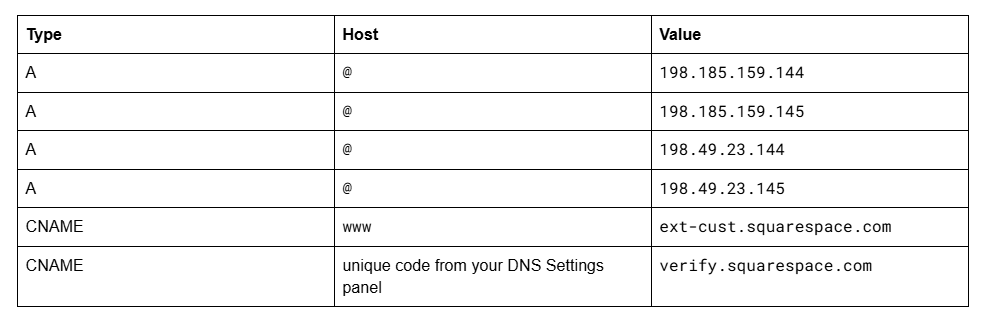
The verification CNAME is the one people skip, because its host is a random string rather than a readable word. Without it Squarespace cannot confirm you control the domain, and no certificate is issued.
Also check for leftovers. Old A records from a previous host, or an AAAA record pointing at an IPv6 address that isn't Squarespace's, will make the domain resolve inconsistently. Delete anything at @ and www that isn't in the table above.
A Squarespace-registered domain that points somewhere other than a Squarespace site gets no certificate either — SSL is only included where the domain points at Squarespace.
Cause 3 — A CAA record is blocking issuance
This is the cause that turns a two-day wait into a two-week one, and almost nobody checks it.
A CAA (Certification Authority Authorization) record lists which certificate authorities are allowed to issue for your domain. If your registrar sets one automatically — several do, particularly when you have bought an SSL product from them — and it doesn't include Squarespace's provider, issuance fails silently and forever. Squarespace's own guidance is to ask your provider whether their system uses CAA restrictions, because "our SSL provider can't issue a certificate if there's a restriction."
How to confirm in 20 seconds: run a CAA lookup on your root domain using any public DNS checker, or from a terminal:
dig CAA yourdomain.com +short
An empty response is good — no CAA record means every authority is permitted. Any issue value that doesn't cover Squarespace's provider is your blocker.
The fix: delete the CAA record at your registrar, or add an entry permitting Squarespace's certificate authority. Then wait a further 48 hours; issuance is retried automatically, not on demand.
Cause 4 — The certificate is active but the browser says "Not Secure"
An active certificate and a padlock are not the same thing. If a page served over HTTPS loads any resource over plain http://, the browser downgrades the indicator — this is mixed content, and it is a page-level problem rather than a certificate problem.
On Squarespace 7.1 it nearly always comes from one of four places:
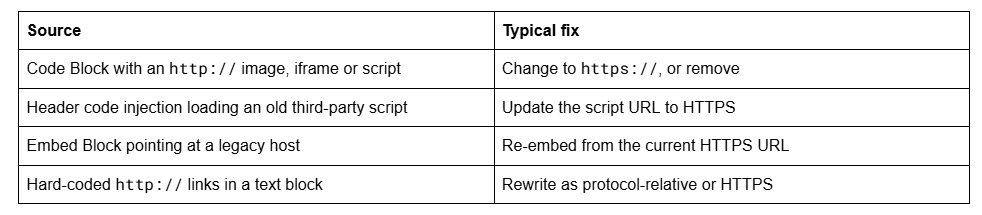
How to find it: open the page, open your browser's developer console, and look for the mixed content warning. It names the offending URL directly. Fix the source rather than suppressing the symptom — an upgrade-insecure-requests policy hides the warning but does nothing about a resource that genuinely has no HTTPS version.
Cause 5 — The SSL preference is set to Insecure
The Squarespace SSL panel offers three states, and only one of them is right for a normal site:
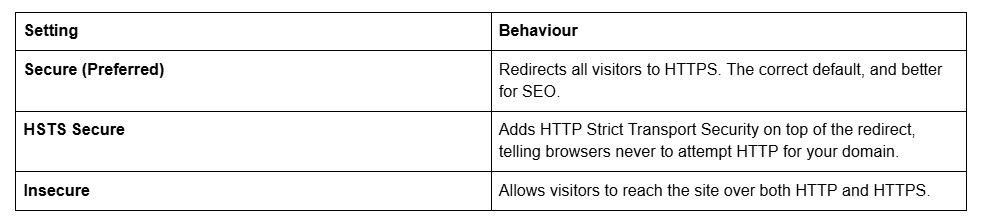
If the panel is set to Insecure, your certificate can be perfectly valid while half your visitors sit on an unencrypted connection and see no padlock.
Set it to Secure. Switching takes up to 48 hours to complete.
On HSTS: enable it once the site has been stable on HTTPS for a while, and understand that it is a commitment. HSTS instructs browsers to refuse HTTP for your domain for the lifetime of the policy, and visitors who have already cached it cannot be told to forget it on your schedule. If there is any chance of moving the domain off Squarespace soon, leave HSTS off until after the move.
Cause 6 — Only one hostname is covered
Certificates cover specific hostnames. If yourdomain.com is secure and www.yourdomain.com throws a warning, the www CNAME to ext-cust.squarespace.com is missing or wrong, so that hostname never got included.
The same applies to subdomains. A subdomain connected to a Squarespace site needs its own CNAME and gets its own certificate; one connected to a different host is that host's problem, not Squarespace's. Set your primary domain in the Domains panel so the other version redirects to it rather than resolving independently.
Still not active?
Order of work: check the panel state, wait out 48 hours, verify all six DNS records, check for a CAA record, check the SSL preference, then look for mixed content. Causes 2 and 3 account for nearly every certificate that never issues.
If you have been through all six and the panel still reports the certificate as unavailable after a week with clean DNS, that is one of the genuine cases for Squarespace Customer Care — it usually means something at the registrar is intercepting requests in a way that isn't visible from the DNS records alone.
That's also the kind of thing our Squarespace website support plans handle, usually as part of a domain migration rather than on its own. Most SSL problems don't need anyone; the six causes above resolve them. If the certificate is fine but something else on the site is broken, work from the complete Squarespace diagnostic guide instead.
FAQ
-
Up to 48 hours for a newly connected domain, and Squarespace notes third-party domains may take longer. During that window the SSL panel can intermittently display errors, which is normal. Reconnecting the domain or editing DNS records restarts provisioning, so leave it alone.
-
Settings → Developer Tools → SSL. It offers Secure (Preferred), HSTS Secure, and Insecure. Secure is correct for almost every site — it redirects all traffic to HTTPS. Changes to the setting take up to 48 hours to take effect across the site.
-
That's mixed content, not a certificate fault. A page served over HTTPS is loading at least one resource over plain http://, usually from a Code Block, an old embed, or a script in header code injection. Your browser console names the offending URL directly.
-
Yes, and it's the most common cause of a certificate that never resolves. A CAA record at your registrar lists which certificate authorities may issue for the domain. If it excludes Squarespace's provider, issuance fails permanently. Run dig CAA yourdomain.com — an empty result is fine.
-
Only once the site has been stable on HTTPS and you're confident the domain is staying on Squarespace. HSTS tells browsers never to attempt HTTP for your domain, and visitors who cached the policy can't be told to forget it early. It's a genuine security improvement, but not a reversible one.
-
Certificates cover specific hostnames. If one version works and the other doesn't, a DNS record for the failing hostname is missing — the four A records at @ for the root, or the www CNAME to ext-cust.squarespace.com. Set a primary domain so the other version redirects.

Author Bio
I'm Walid Hasan, a Certified Squarespace Expert and Squarespace Circle Platinum Partner with over 12 years of hands-on experience designing and optimizing high-performing websites. Over the years, I've had the privilege of building more than 2,000 Squarespace websites for clients around the world, always focusing on clean design, strong user experience, and conversion-driven results.
