
Squarespace Site Down? How to Check and What to Do Next
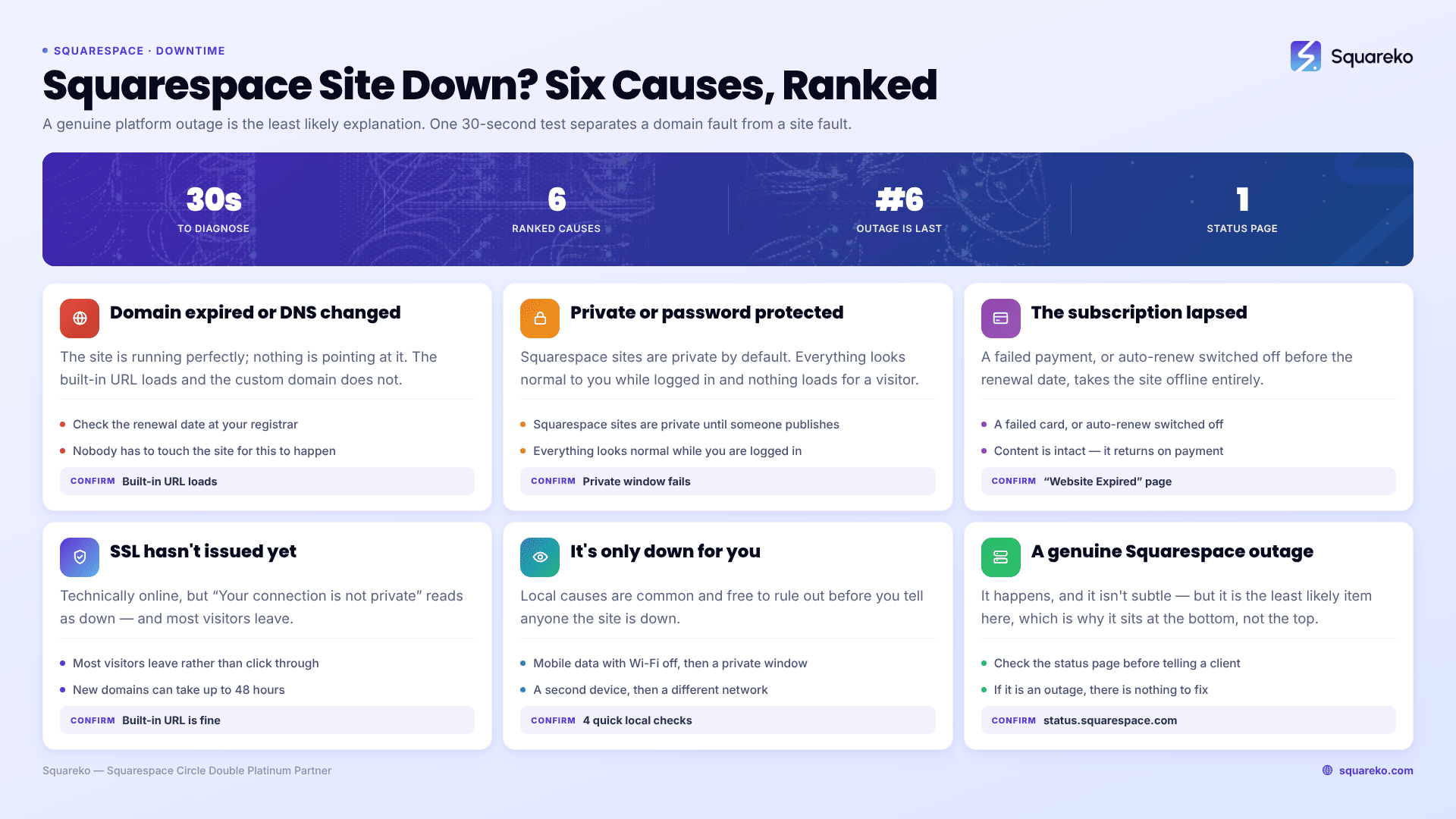
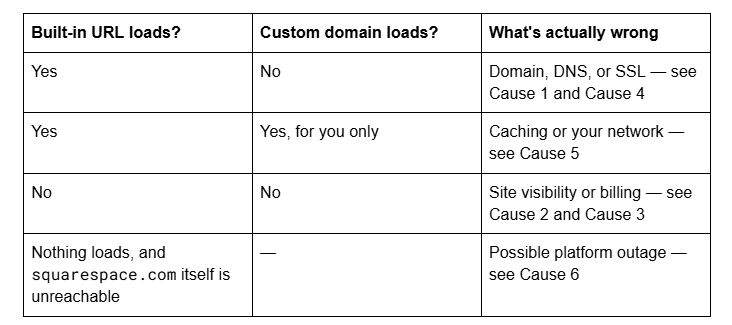
A genuine Squarespace platform outage is the least likely explanation, despite being the first thing everyone checks. Open your built-in yoursite.squarespace.com URL. If your site loads there, Squarespace is fine and the problem is your domain, DNS or SSL. If it doesn't load there either, the problem is the site itself — visibility settings or a lapsed subscription.
That one test splits every "site down" case into two halves, and it takes thirty seconds.
The 30-second test, first
Every Squarespace site keeps a built-in URL in the form your-site-name.squarespace.com, regardless of what custom domain you've connected. Find it at Settings → Domains under the built-in domain.
Now work the causes in order. They're ranked by how often each turns out to be the real answer, not by how dramatic they sound.
Cause 1 — The domain expired or its DNS changed
The most common reason a Squarespace site "goes down" without anyone touching it. The site is running perfectly; nothing is pointing at it.
How to confirm it in seconds: the built-in .squarespace.com URL loads and the custom domain doesn't. That combination is conclusive.
Three variants, in order of frequency:
The domain registration lapsed. A card expired, auto-renew was off, or the renewal notice went to an address nobody reads. For Squarespace-registered domains the grace period depends on the registrar of record — 30 days for Squarespace Domains LLC and Squarespace Domains II LLC, 40 days for Tucows. After that a redemption fee applies on top of the renewal, and eventually the domain can be bought by someone else.
DNS records were changed or removed. Common after someone sets up email, migrates a tool, or "tidies up" the DNS panel. For a third-party domain, Squarespace needs four A records on the apex and a www CNAME pointing to ext-cust.squarespace.com.
The domain is attached to a different Squarespace site. A domain can only be connected to one Squarespace site at a time, and trial sites count.
The fix: open Settings → Domains, check the domain's status label and expiry date, and renew or reconnect. Allow up to 48 hours after any DNS or renewal change before deciding it hasn't worked.
Cause 2 — The site is set to Private or Password Protected
If neither the custom domain nor the built-in URL loads for a visitor, but everything looks normal to you while logged in, this is almost always why. Squarespace sites are private by default and stay that way until someone changes it.
How to confirm it in seconds: open the site in a private browsing window. A private Squarespace site shows a grey holding message saying the site is private and the owner can log in; a password-protected site shows a password prompt.
The fix:Settings → Site Availability, then set the site to Public. Two things to know:
Public requires a paid subscription. A trial site cannot be public, though it can be password protected.
Private sites are not indexed. If a site was live in Google and then vanished from search entirely rather than just going offline, check this setting before anything else.
This is the single most common cause of a "down" site that was never actually down. It usually happens after a rebuild, when someone switches the site back to private to work on it and forgets.
Cause 3 — The Squarespace subscription lapsed
When a website subscription payment fails or auto-renew is switched off past the renewal date, Squarespace takes the site offline and serves a page reading "Website Expired".
How to confirm it in seconds: the built-in URL and the custom domain both show that message, and the site is flagged in your account dashboard.
The fix: update the payment method and reactivate the subscription in the billing panel. Content isn't deleted when a site expires, so reactivating restores the site as it was.
Worth separating clearly, because people conflate them: a website subscription and a domain registration are two different products with two different renewal dates and often two different cards on file. A site can be paid up while its domain has expired, or the reverse. Check both.
Cause 4 — The SSL certificate hasn't issued, so browsers block the site
A site that is technically online but shows "Your connection is not private" reads as down to every visitor, and most will leave rather than click through the warning.
How to confirm it in seconds: the site loads on the built-in URL over HTTPS but the custom domain throws a certificate warning.
Squarespace provisions SSL automatically, but certificates for new and recently connected domains can take up to 48 hours. Beyond that window, two things block issuance:
A CAA record at your registrar restricting which certificate authorities may issue for the domain. Squarespace cannot issue through a restriction it isn't listed in. Ask your registrar whether one is set.
The domain not correctly pointing at Squarespace, which produces "SSL Certificates Unavailable" in the Domains panel. That's Cause 1 wearing a different mask.
The fix: confirm SSL is set to Secure in the Squarespace SSL panel, verify the DNS records, then wait out the 48 hours before escalating.
Cause 5 — It's only down for you
Before telling clients the site is down, confirm it's down for anyone other than you. Local causes are common and cost nothing to rule out.
Run these four checks, in order:
Load the site on mobile data, with Wi-Fi off. This bypasses your router, your ISP's DNS resolver and any office network filtering in one step.
Open a private browsing window. This bypasses cached assets, cached DNS and browser extensions.
Try a second device or network.
Use an external checker such as IsItDownRightNow or a similar "down for everyone or just me" service to get a verdict from outside your network.
If the site loads on mobile data but not on your home or office connection, the site is fine — your DNS cache or network is stale. On macOS, flush it with sudo dscacheutil -flushcache; sudo killall -HUP mDNSResponder; on Windows, ipconfig /flushdns in an elevated Command Prompt.
Slow is not down. A page that takes eight seconds on a weak mobile connection gets reported as "the site is down" constantly. For reference, across 54 Squareko-built Squarespace sites measured in August 2026 — Playwright/Chromium lab test, cloud datacenter, unthrottled, single run per site — median time to first byte was 514ms, with 85% under 800ms. If a Squarespace site is responding at all but feels sluggish, that is a performance problem with a different set of fixes, not an outage.
Cause 6 — Squarespace is genuinely having an outage
It happens, and when it does it's not subtle — but it is the least likely item on this list, which is why it's here rather than at the top.
How to confirm it in seconds: open status.squarespace.com. That's Squarespace's official status page, showing current incidents and component-level status for the CMS, Commerce, Domains, Email Campaigns and Scheduling. If your site is down and that page is all green, the outage is not the explanation, whatever a third-party aggregator says.
Third-party monitors report user-submitted problems and frequently show a spike that reflects one region's ISP rather than a Squarespace incident. Treat the official status page as authoritative and everything else as a hint.
The fix: there isn't one — you wait. What you can do is subscribe to updates on the status page so you find out before your client does, and post a holding note on the channels you control.
One nuance worth understanding: because Squarespace is a hosted platform, an incident affecting one component rarely takes whole sites offline. A Commerce or Scheduling incident can break checkout or booking while every page still loads normally. So if the status page shows an active incident, read which component it names before assuming it explains your symptom. A red banner on Email Campaigns has nothing to do with a domain that won't resolve.
Still down?
Work it in this order: run the built-in URL test, then check the domain and its expiry, then site availability, then billing, then SSL, then your own network, and only then the status page. In practice, the first three account for most of it.
The cases worth handing over are the ones where the site is down and the domain is entangled with live business email — that's where a hurried fix takes the mail down with it, and nobody notices for a day. If you're staring at a DNS panel you didn't build, with a business waiting on the other end, that's the situation our Squarespace website support plans are designed for. Most outages, though, resolve on the list above without help.
FAQ
-
Open status.squarespace.com, Squarespace's official status page. It shows current incidents and component-level status for the CMS, Commerce, Domains and other services. Third-party monitors report user-submitted complaints and often spike for regional ISP problems, so treat the official page as authoritative.
-
The site itself is running and the problem is between your domain and Squarespace — an expired domain registration, changed or missing DNS records, or an SSL certificate that hasn't issued. Check the domain's status and expiry date in Settings → Domains first.
-
The website subscription payment failed, or auto-renew was switched off past the renewal date, and Squarespace has taken the site offline. Update the payment method and reactivate in the billing panel. Content is not deleted when a site expires, so reactivating restores the site as it was.
-
The site is most likely set to Private, which is the default for every new Squarespace site, or Password Protected. Check Settings → Site Availability and set it to Public. Note that Public requires a paid subscription — trial sites cannot be made public.
-
The grace period depends on the registrar of record: 30 days for Squarespace Domains LLC and Squarespace Domains II LLC, 40 days for Tucows, and varying periods for country-code TLDs. After the grace period a redemption fee applies on top of the renewal cost, and the domain can eventually be registered by someone else.
-
Functionally, yes — most visitors will leave at the warning. Squarespace issues SSL automatically, but new domains can take up to 48 hours. Past that, check for a CAA record at your registrar blocking certificate issuance, and confirm the domain's DNS records point correctly at Squarespace.

Author Bio
I'm Walid Hasan, a Certified Squarespace Expert and Squarespace Circle Platinum Partner with over 12 years of hands-on experience designing and optimizing high-performing websites. Over the years, I've had the privilege of building more than 2,000 Squarespace websites for clients around the world, always focusing on clean design, strong user experience, and conversion-driven results.
