
Squarespace Products Not Displaying in Your Store? Fixes
The product's Visibility is almost certainly set to Hidden or Scheduled rather than Public. In Squarespace 7.1 that control lives in the product editor under Organization → Visibility, and it is the one field people skip when duplicating an existing product to save time. Check it first. Then check whether a category is filtering the store page, and whether the store page itself is still enabled.
Here are the nine causes, ordered by how often they turn out to be the problem.
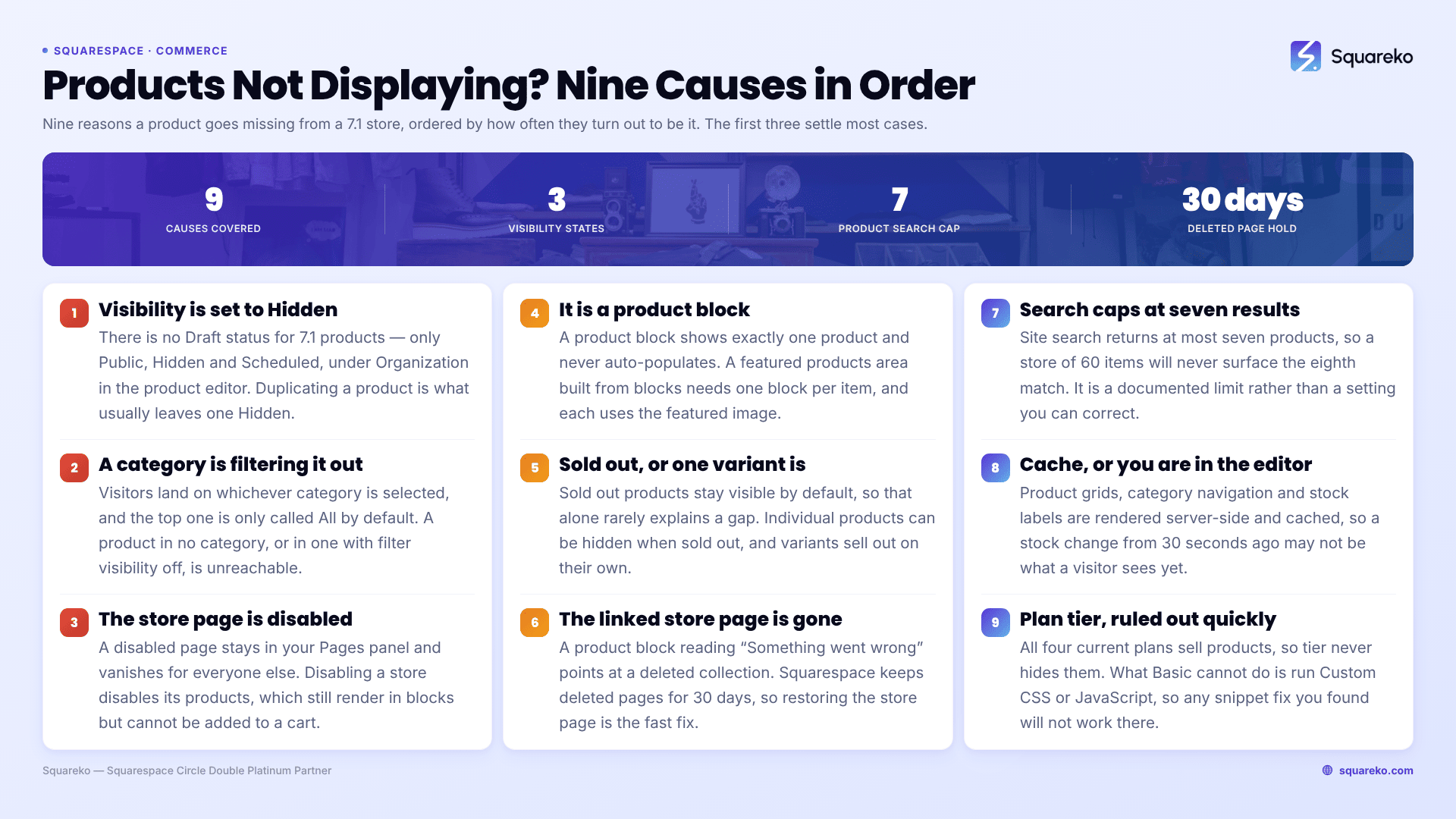
Quick diagnostic table
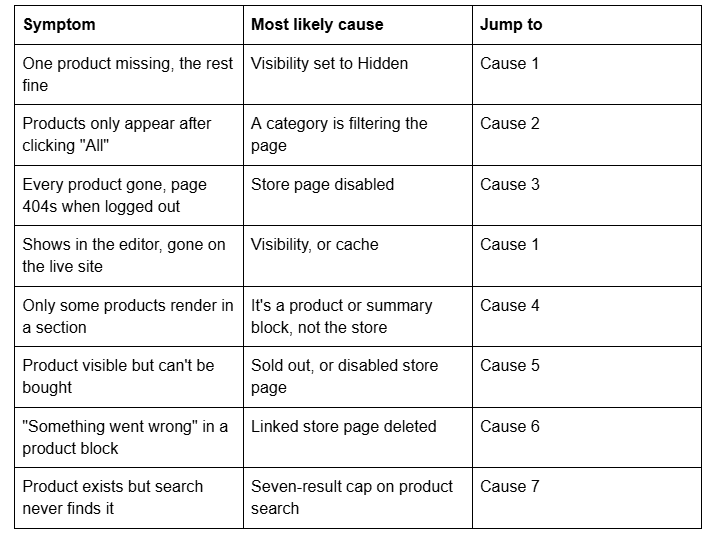
Cause 1 — The product's Visibility is set to Hidden or Scheduled
This is the single most common cause, and it is worth clearing up a myth first: Squarespace 7.1 products have no "Draft" status. There are exactly three states in the Visibility dropdown, found in the product editor under Organization:

Two things push products into Hidden without you noticing. Duplicating a product is the big one — it is the fastest way to add a variation and the visibility field is easy to leave alone. CSV import is the other; a missing or malformed visibility column lands products as Hidden.
How to confirm it in 10 seconds: open Products & Services, look at the Visibility column in the list view. Hidden products are marked there without opening each one. You can change several at once directly in that list rather than editing products individually.
Cause 2 — A category is filtering the store page
If your Squarespace 7.1 store page shows a category navigation, visitors are landing on whichever category is selected — not necessarily on everything. The top category is called All by default and can be renamed under Top category name in page settings, which is how it quietly stops looking like an "everything" link.
A product assigned to no category, or to a category whose Filter visibility is toggled off, can be genuinely unreachable through the navigation even though it exists and is Public.
How to confirm it: load the store page logged out and click All. If the missing products appear, this is your cause. On mobile the category navigation always sits beneath a Filter button, so it is easier still to miss.
Categories and tags do different jobs in 7.1. Categories build the navigation, up to three nested levels. Tags drive store page filters — up to 10 filters per store page, up to 50 tags per filter, and each tag can belong to only one filter. If you edit or delete a tag after building a filter, the filter keeps the old tag and silently stops matching.
Cause 3 — The store page is disabled
A disabled page in Squarespace 7.1 stays visible in your Pages panel while you are logged in and is invisible to everyone else. That asymmetry is exactly why it survives so long undiagnosed.
How to confirm it: Pages panel → hover the store page → gear icon → look at the Enable Page toggle.
Disabling a store page also disables the products inside it. There is one important edge case: products from a disabled store page still render inside product blocks elsewhere on the site, but cannot be added to a cart. If you have a product block that looks fine and a buy button that does nothing, this is almost always why. Re-enable the store page.
Cause 4 — You're looking at a product block, not the store page
Squarespace 7.1 has three different ways to put products on a page and they behave differently:
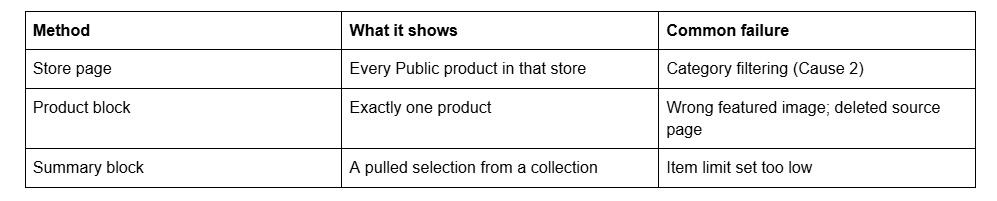
A product block displays one item. To show several you add several blocks, or use a summary block. If you built a "featured products" area expecting it to auto-populate as you add stock, it will not — product blocks are manual, one per product, and new products never appear in them by themselves.
Product blocks also use the product's featured image, which is not necessarily the first image in the product's gallery. A block showing the wrong photo is a featured-image problem, not a bug.
Cause 5 — The product is sold out, or one variant is
Sold out products in Squarespace 7.1 stay visible by default — the platform's position is that displaying them advertises what you sell. So "sold out" on its own does not explain a missing product. What does explain it is that individual sold out products can be hidden, and that this is often done once and forgotten.
Variants sell out independently of the parent product. When a variant hits zero stock, button variants render dimmed and dropdown variants gain a (Sold out) label beside the option. The product itself still displays. If a customer reports "the size I want isn't there", the fix is stock on that variant, not visibility on the product.
How to confirm it: in the Products panel, the Stock column shows quantity per product. A product at zero across every variant is sold out; set a real quantity or remove the stock limit to bring it back.
Cause 6 — The product block points at a deleted store page
If a product block renders the message "Something went wrong", the store page it was pulling from has usually been deleted. The block keeps its reference; the collection no longer exists.
Squarespace retains deleted pages for 30 days, so restoring the store page is normally the fastest fix and preserves every product inside it. Past 30 days you are rebuilding the store page and re-pointing each block.
Cause 7 — Product search only ever returns seven results
Squarespace 7.1 caps product results in site search at seven products. A store with 60 items will never surface the eighth match, no matter how precise the query. This is a documented limit, not a misconfiguration, and it is the answer to most "my product isn't in search" reports.
For a large catalogue, category navigation and tag filters on the store page are the discovery mechanism. Search is not.
Cause 8 — Cache, or you're viewing the editor
Squarespace serves through a CDN with long cache lifetimes, and the editor renders differently from the live site. Verify in a private window, logged out, before treating anything as broken. Hard refresh is Cmd + Shift + R on Mac, Ctrl + Shift + R on Windows.
This matters more on commerce pages than elsewhere: product grids, category navigation and stock labels are all rendered server-side and cached, so a stock change you made 30 seconds ago may not be what a visitor sees yet.
Cause 9 — Plan tier (rule it out quickly)
All four current Squarespace plans — Basic, Core, Plus and Advanced — can sell products. Plan tier does not hide products. What differs is transaction fees, and whether you can write code: Custom CSS and JavaScript require Core or above. If the fix you found online is a CSS snippet to restyle sold-out labels or hide a category, that snippet will not run on Basic.
Legacy plans are different. A site still on an old Personal plan cannot run a store at all, which is worth checking on an inherited account.
Still not working?
Work the list in order — visibility, category filter, page enabled, block type, stock, deleted collection, search cap, cache, plan. Eight times out of ten the answer is in the first three, and the first one alone accounts for most of them.
If products are still missing after all nine, the usual remaining cause is a store page whose collection was rebuilt at some point, leaving blocks and navigation links pointing at an ID that no longer exists. That is a mapping problem rather than a settings problem, and it needs someone to read the page structure rather than guess at it.
That's the kind of thing our Squarespace website support plans exist for — most commerce visibility issues we're sent are diagnosed inside a single support block. No obligation either way; the nine causes above resolve the overwhelming majority of cases on their own.
FAQ
-
Most often the product's Visibility is set to Hidden rather than Public. Open the product editor, find the Organization section, and check the Visibility dropdown. Duplicated products and CSV imports are the two workflows that most often leave products Hidden without any warning.
-
No. Squarespace 7.1 products have exactly three visibility states: Public, Hidden and Scheduled. There is no Draft. Advice that tells you to "publish the draft" is describing pages or blog posts, not products, which is why following it never finds anything.
-
Either the product's Visibility is Hidden — which still lists it for you while logged in — or the store page itself is disabled, which behaves the same way. Check Visibility first, then Pages panel → gear icon → Enable Page. Verify logged out in a private window.
-
No, sold out products stay visible by default and show a Sold Out label. They only vanish if someone has hidden them individually. Variants sell out separately: dimmed for button variants, a "(Sold out)" label for dropdown variants, while the product itself still displays.
-
Squarespace 7.1 caps product results in site search at seven. A larger catalogue will never surface the eighth match regardless of the query. Use category navigation and tag filters on the store page for discovery instead of relying on search.
-
The store page the block pulls from has been deleted. Squarespace keeps deleted pages for 30 days, so restoring it is normally the fastest fix and preserves the products. After 30 days you have to rebuild the store page and re-point every product block.

Author Bio
I'm Walid Hasan, a Certified Squarespace Expert and Squarespace Circle Platinum Partner with over 12 years of hands-on experience designing and optimizing high-performing websites. Over the years, I've had the privilege of building more than 2,000 Squarespace websites for clients around the world, always focusing on clean design, strong user experience, and conversion-driven results.
