
Squarespace Embeds Not Loading? Third-Party Script Fixes
If the embed is blank while you're logged in, nothing is broken. Squarespace disables embedded scripts in the editor as a security measure and shows the message "This block contains embedded scripts. Embedded scripts are disabled while you're logged in and editing your site." Log out or use Preview in Safe Mode and check again. If it's still blank logged out, the next two suspects are your plan tier and the third party refusing to be framed.
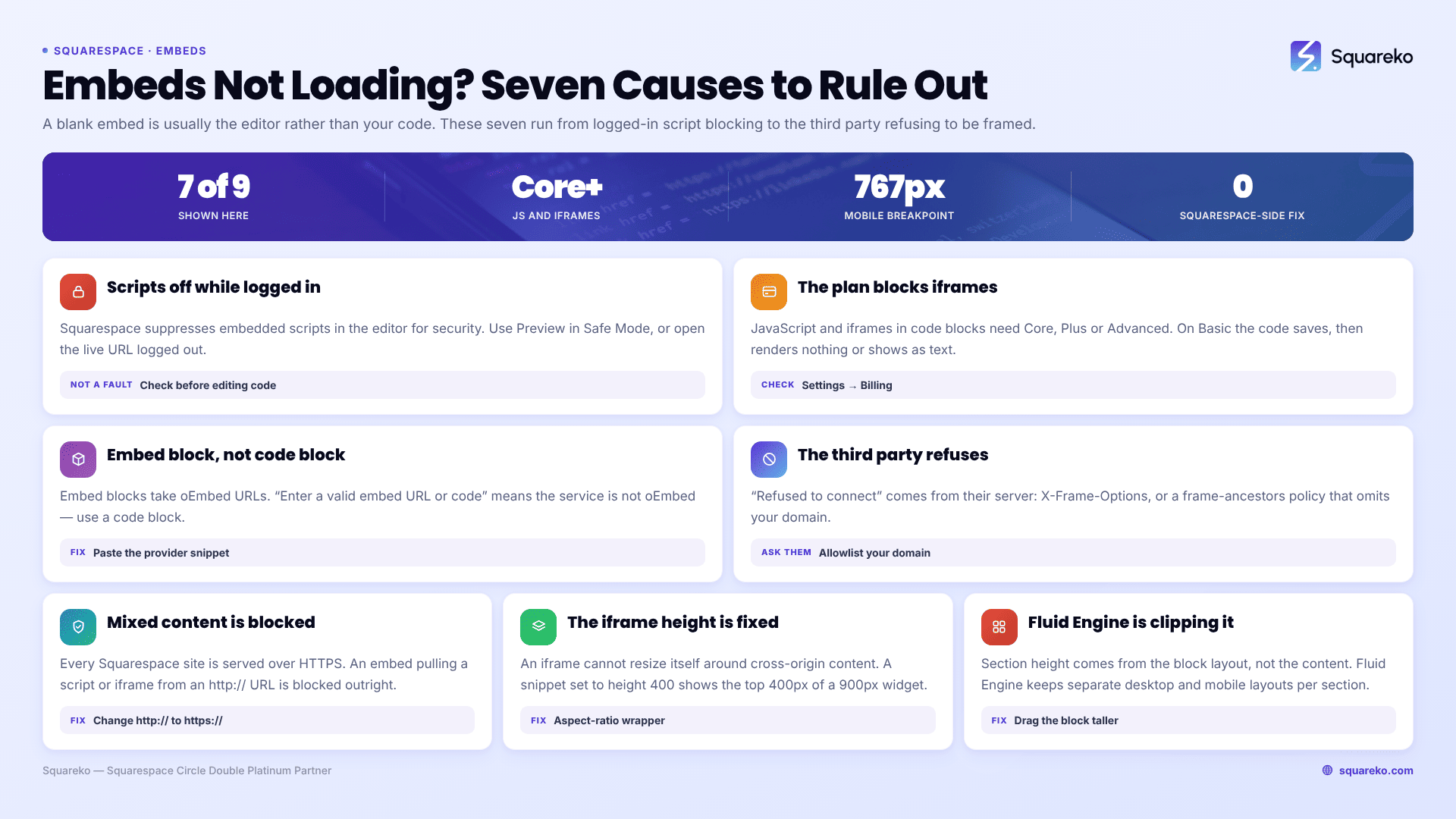
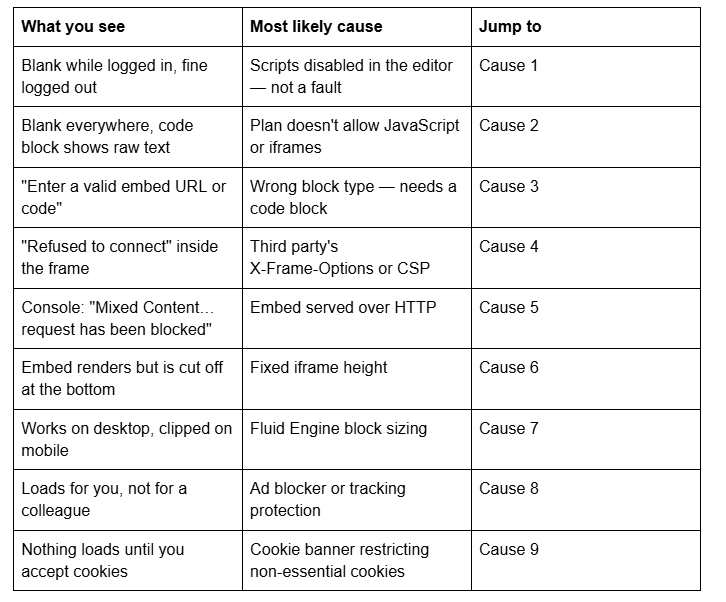
Here are the nine causes, ordered by how often they turn out to be the problem.
Quick diagnostic table
Cause 1 — Squarespace disables embedded scripts while you're logged in
This is the most common cause by a wide margin, and it is not a fault. Squarespace treats logged-in editing as a security-sensitive context and suppresses embedded scripts in code blocks. The block renders as an empty grey area or shows the message "This block contains embedded scripts. Embedded scripts are disabled while you're logged in and editing your site."
Squarespace's own documentation puts it plainly: code in a code block may not appear for you when you're logged in, even if visitors can see it.
How to confirm it in 15 seconds: click Preview in Safe Mode, or open the live URL in a private browsing window. If the embed appears, you are done — there was never a problem. Do this before you change a single character of the embed code.
Cause 2 — Your Squarespace plan doesn't allow iframes or JavaScript
Code blocks exist on every Squarespace plan, but JavaScript and iframes inside code blocks require Core, Plus or Advanced (or a legacy Business, Commerce Basic or Commerce Advanced plan). On the entry-level Basic plan, a code block will accept plain HTML and Markdown but will not execute a <script> or render an <iframe>.
The symptom is distinctive: the code appears to save, and then either nothing renders or the code shows up as visible text on the page.
How to confirm it: Settings → Billing → check the current plan name. Every embed that depends on a third-party widget — booking tools, calculators, maps, chat, form builders — needs Core or above. The same threshold applies to Custom CSS and Code Injection, so a Basic-plan site cannot use the CSS workarounds later in this article either.
Cause 3 — You used an embed block where you needed a code block
Squarespace 7.1 has two different blocks and they are not interchangeable.
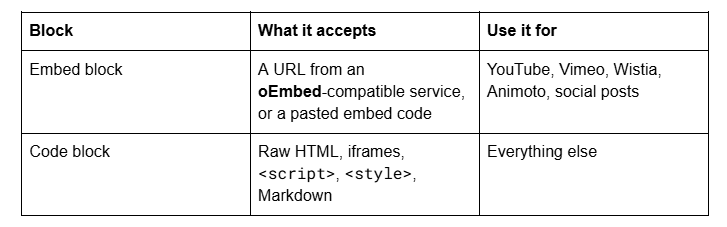
If you paste a URL into an embed block and get "Enter a valid embed URL or code", the service almost certainly does not support the oEmbed standard. That is not a formatting mistake — Squarespace's recommendation in that situation is to get the provider's full embed code and paste it into a code block instead.
The reverse also causes trouble: a bare link dropped into a code block renders as a link, not as the widget. Where a provider gives you both a share URL and an <iframe src=...> snippet, use the snippet.
Cause 4 — The third party refuses to be framed
If the embed area loads but shows "refused to connect" or "[site] refused to connect", the block is coming from the other end. The site you are embedding is sending an X-Frame-Options: DENY / SAMEORIGIN header, or a Content Security Policy with a frame-ancestors directive that does not include your domain.
How to confirm it: open the browser console on the live page. You will see "Refused to display '…' in a frame because it set 'X-Frame-Options' to 'sameorigin'" or "Refused to frame '…' because it violates the following Content Security Policy directive: frame-ancestors…".
There is no Squarespace-side fix. These headers are set by the third party's server, and Squarespace gives you no server-side proxy. Ask the provider to allow your domain in their frame-ancestors list, use their official JavaScript embed instead of a raw iframe, or link out rather than embed.
Worth knowing in the other direction: Squarespace 7.1 itself sends X-Frame-Options: sameorigin, so your own Squarespace pages cannot be framed inside someone else's site either. That is the cause behind most "I can't iframe my Squarespace page into X" threads.
Cause 5 — Mixed content blocked over HTTPS
Every Squarespace site is served over HTTPS. If an embed loads a script, iframe or stylesheet from an http:// URL, the browser blocks it outright and logs "Mixed Content: The page at '…' was loaded over HTTPS, but requested an insecure resource '…'. This request has been blocked; the content must be served over HTTPS."
The fix: change http:// to https:// in the embed code. Old embed snippets copied from documentation written years ago are the usual source. If the provider's asset genuinely has no HTTPS version, it cannot be embedded on Squarespace at all. Protocol-relative URLs (//example.com/widget.js) are safe — they inherit HTTPS from the page.
Cause 6 — The iframe has a fixed height and the content is taller
An iframe cannot resize itself to fit cross-origin content. If the provider's snippet sets height="400" and the widget renders 900px tall, you get the top 400px — with a scrollbar, or with nothing to indicate the rest exists.
Set an explicit height that fits, or wrap the iframe in a responsive aspect-ratio container:
<div style="position:relative;width:100%;padding-top:56.25%;">

  <iframe src="https://example.com/widget"
          style="position:absolute;top:0;left:0;width:100%;height:100%;border:0;"
          loading="lazy" allowfullscreen></iframe>

</div>
Change 56.25% to set the ratio — 56.25% is 16:9, 75% is 4:3, 133% is a tall form. Providers that offer a JavaScript embed alongside the iframe usually include an auto-resize script; use that version where it exists, because it is the only reliable way to get true auto-height.
Cause 7 — Fluid Engine is clipping the block
In Squarespace 7.1's Fluid Engine sections, blocks sit on a grid and the section height is set by the block layout, not by the content inside a block. An embed whose content is taller than the block's grid cell gets clipped, and Fluid Engine keeps separate desktop and mobile layouts for the same section — so a block you sized correctly on desktop can be far too short on mobile.
How to confirm it: switch to the mobile view in the editor and check the block's actual size rather than assuming it inherited the desktop sizing. The fix is usually in the editor, not in CSS: drag the block taller in the mobile layout. Where CSS is genuinely needed, Squarespace 7.1's mobile breakpoint is 767px:
@media screen and (max-width: 767px) {
  .sqs-block-code iframe { height: 700px; }
}
Cause 8 — An ad blocker or tracking protection is blocking it
Widgets from chat tools, analytics-adjacent services and social feeds are routinely blocked by uBlock Origin, Brave Shields, Safari's Intelligent Tracking Prevention and Firefox's Enhanced Tracking Protection.
How to confirm it: load the page in a clean browser profile with no extensions. If it works there and not in your normal browser, the embed is fine. The console usually shows net::ERR_BLOCKED_BY_CLIENT.
You cannot fix this from Squarespace. What you can do is make the page degrade sensibly — a heading and a plain link to the provider beside the embed means a blocked widget does not leave a dead section.
Cause 9 — Your cookie banner is holding the embed back
If Squarespace's cookie banner is configured to restrict non-essential cookies until visitors acknowledge it, third-party integrations that set non-essential cookies are held until consent. The embed stays blank until someone clicks accept.
There is a documented trap here. If you turn the cookie banner off while leaving the restrict-cookies setting selected, visitors get no way to accept anything — and, in Squarespace's own words, "some content that drops non-essential cookies won't function." The embed then never loads for anyone, with no banner on screen to explain why.
How to confirm it: open the live page in a private window, accept the banner, and see whether the embed appears. Settings live in the Cookies & Data Privacy panel. If you run a third-party consent tool instead, the same logic applies — the tool's category assignment decides whether your embed fires before consent.
Still not working?
Work the list in order — logged-in state, plan tier, block type, framing headers, mixed content, height, Fluid Engine, blockers, consent. The first three account for most cases, and all three take under a minute to rule out.
If you've been through all nine and the console is clean, the remaining cause is usually a script running before the element it targets exists — Squarespace loads content asynchronously. That needs the embed rewritten to wait for its container rather than assume it.
That's the kind of thing our Squarespace website support plans exist for — most third-party embed conflicts we're sent get diagnosed and fixed inside a single support block. No obligation either way; the nine causes above resolve the overwhelming majority of cases on their own.
FAQ
-
Squarespace disables embedded scripts while you're logged in and editing, showing the message "This block contains embedded scripts. Embedded scripts are disabled while you're logged in and editing your site." That is expected behaviour, not a fault. Use Preview in Safe Mode or a private window to check.
-
No. JavaScript and iframes in code blocks require Core, Plus or Advanced, or a legacy Business, Commerce Basic or Commerce Advanced plan. On Basic, a code block accepts plain HTML and Markdown only, and Custom CSS and Code Injection are unavailable too.
-
An embed block takes a URL from an oEmbed-compatible service such as YouTube, Vimeo or Wistia, or a pasted embed code. A code block takes raw HTML, iframes, script and style tags. If you see "Enter a valid embed URL or code", the service isn't oEmbed-compatible — use a code block.
-
The third-party site is sending an X-Frame-Options header or a Content Security Policy frame-ancestors directive that blocks framing from your domain. Squarespace gives you no access to change that. Ask the provider to allow your domain, use their JavaScript embed instead, or link out.
-
Wrap the iframe in a container with position:relative and a percentage padding-top that sets the aspect ratio, then absolutely position the iframe to fill it at 100% width and height. Use 56.25% for 16:9. Cross-origin iframes cannot auto-resize to their content.
-
Your cookie banner is set to restrict non-essential cookies until visitors acknowledge it, which holds third-party embeds that set those cookies. Check the Cookies & Data Privacy panel. If the banner is switched off while restriction stays on, the embed never loads for anyone.

Author Bio
I'm Walid Hasan, a Certified Squarespace Expert and Squarespace Circle Platinum Partner with over 12 years of hands-on experience designing and optimizing high-performing websites. Over the years, I've had the privilege of building more than 2,000 Squarespace websites for clients around the world, always focusing on clean design, strong user experience, and conversion-driven result
