
Squarespace Hayden Template: It's Bedford, and What That Means
Hayden is a Squarespace version 7.0 template in the Bedford family, alongside Anya, Bedford and Bryant. All four report the same template ID, 52a74dafe4b073a80cd253c5, and run the same code — we compared the compiled stylesheets and found one differing selector out of 3,823. So every Bedford tutorial, every Bedford CSS snippet and every Bedford limitation applies to your Hayden site, including the two that hurt most in 2026: the blog sidebar and the sidebar navigation, neither of which exists in Squarespace 7.1.
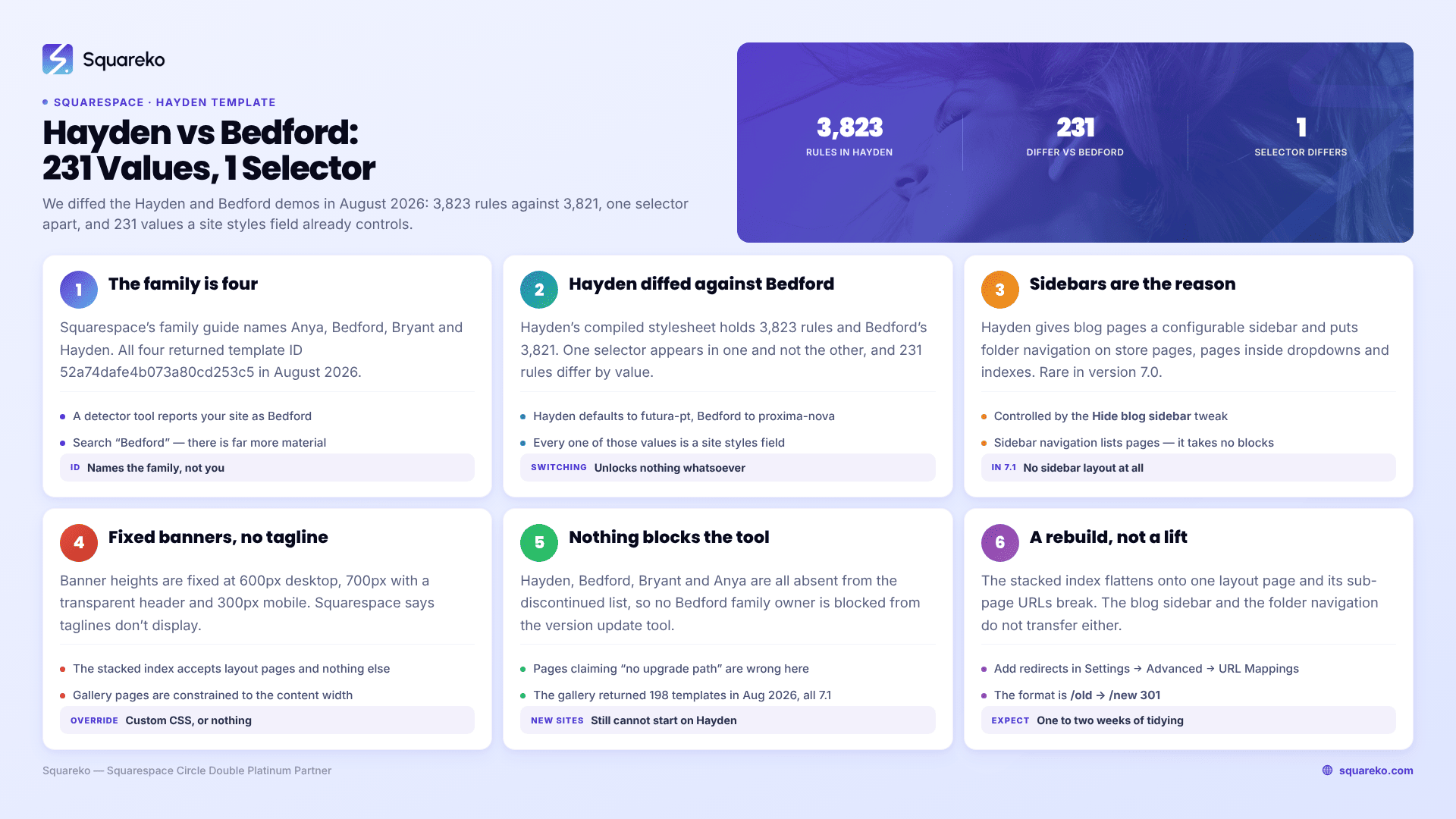
Should you stay on Hayden, restyle it, or move to 7.1?
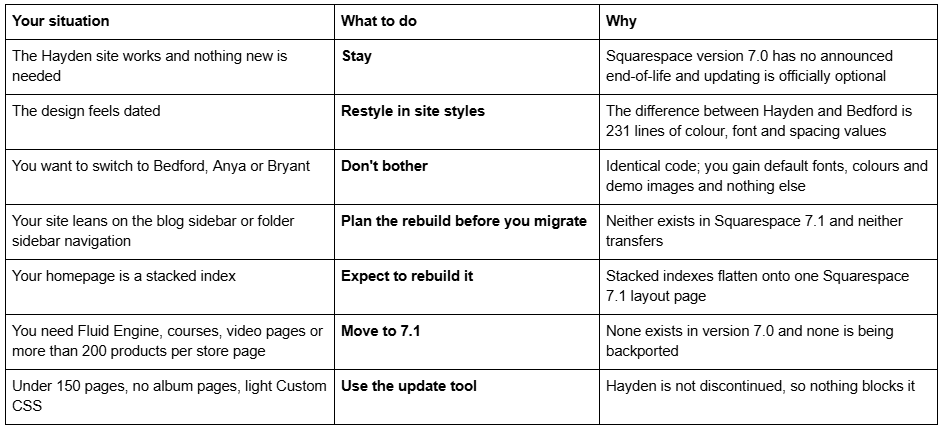
Hayden is Bedford: the proof
Squarespace's family guide is unambiguous: "The versatile Bedford template family (Anya, Bedford, Bryant, Hayden) works for all types of sites, from nonprofits to real estate listings."
We went further than the documentation in August 2026. All four demos — hayden-demo, bedford-demo, bryant-demo and anya-demo — returned HTTP 200 and report "templateVersion":"7" and the identical template ID 52a74dafe4b073a80cd253c5. Then we downloaded the compiled site stylesheet from hayden-demo.squarespace.com and bedford-demo.squarespace.com and diffed them:
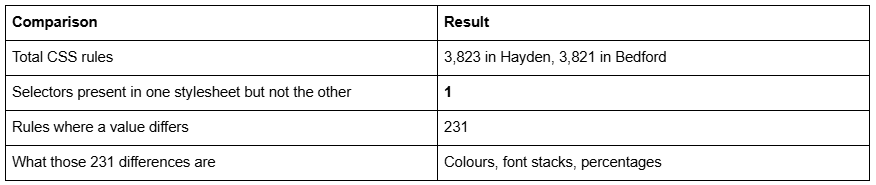
Hayden's default body font stack is futura-pt; Bedford's is proxima-nova. Hayden's default medium button is near-black #111; Bedford's is teal #36b3a8. Hayden's card image layout uses 10% padding; Bedford's uses 9%. That is the entire difference between the two templates, and every one of those values is a site styles field you already control.
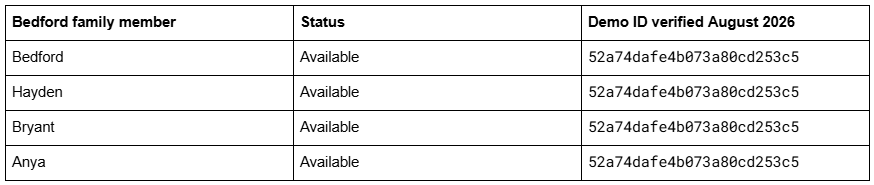
Two practical consequences. Search "Bedford", not "Hayden" — you will find roughly ten times as much material and all of it works. And a template detector will report your site as "Bedford" and will not be wrong: templateId identifies the family, never the individual template. The list of Squarespace 7.0 templates covers all 121 templates across the 22 families.
Hayden's own Read Me page describes it as "ideal for Businesses and Portfolios" — the demo-content framing, not a feature difference.
What the Squarespace Hayden template does well
A blog sidebar, and folder sidebar navigation. This is the reason people picked Bedford family templates and it is genuinely rare in version 7.0. Hayden creates sidebars on store pages, on pages inside dropdowns, on member sites and inside indexes, and gives blog pages their own configurable sidebar controlled by the Hide blog sidebar tweak. Only Five and Wells have a true site-wide content sidebar in version 7.0; everywhere else, a sidebar means a blog sidebar — and most families do not have one at all. One caveat straight from Squarespace: "Sidebar navigation doesn't support blocks." It lists pages, not content.
A navigation button. The last item in the main navigation can be rendered as a call-to-action button rather than a link. Brine famously has no header button and needs a secondary-navigation workaround; Hayden just has one.
Real page banners. Full-bleed images and video banners on layout, album, blog, event and store pages, with formatted text overlays supporting headings, body copy and button-style links, plus a Banner overlay color filter. Banner heights are fixed: 600px on desktop, 700px with a transparent header, 300px on mobile.
Slideshow banners. Add a slideshow gallery block as the first element on a page and Hayden renders it as a banner slideshow. That is a version 7.0 idiom that no longer exists in 7.1.
A stacked index with a fixed header. Squarespace: "The header is fixed on index pages." Sub-pages stack into one scrolling page with the navigation pinned.
Footer navigation, a featured-post slideshow on blog pages, and Classic store pages with sidebar category filtering.
What breaks or feels dated on a Hayden site in 2026
No Fluid Engine. Version 7.0 editing is the classic block editor — a 12-column grid, no overlapping elements without CSS, no drag-anywhere canvas. Fluid Engine is 7.1-only and is not coming to Hayden.
The index accepts layout pages only. Bedford family stacked indexes take layout pages and nothing else — no gallery pages, no blog pages, no store pages. It is the tightest index restriction in Squarespace version 7.0, and it is why Hayden homepages tend to be simpler than Brine homepages.
No taglines. Squarespace states it plainly for the family: "Taglines don't display." If you have a tagline set in site settings, Hayden ignores it.
No parallax. Parallax scrolling exists in exactly two version 7.0 families, Brine and the discontinued Marquee. Hayden has none.
A Classic store, not an Advanced one. Brine, Farro, Skye, Tremont and York got the Advanced store page. The Bedford family did not, and all version 7.0 store pages cap at 200 products per page regardless.
Fixed banner heights. 600px desktop, 300px mobile, no per-page override without Custom CSS. Version 7.1 lets you set section height per section in the editor.
Full-width galleries need code. The forum thread that ranks for this template is someone asking exactly this — "I am trying to make my gallery full width" — and it is a recurring Bedford-family request because the template constrains gallery pages to the content width. It is solvable with CSS and is native behaviour in 7.1.
Mobile is one inherited layout. Navigation "collapses to a ☰ in the top right", blog sidebars drop beneath the main content, a Back to top link appears at the foot of the page, and slideshow banners compress to 300px. Squarespace 7.1 with Fluid Engine keeps a genuinely separate mobile layout per section at a 767px breakpoint.
Hayden bugs Squarespace documents and is not going to fix
Squarespace maintains a Troubleshooting section for the Bedford family, prefaced with its actual position on version 7.0: "Although we still support Squarespace version 7.0, fixing bugs or issues is a lower priority for us while we focus on our current platform, version 7.1."
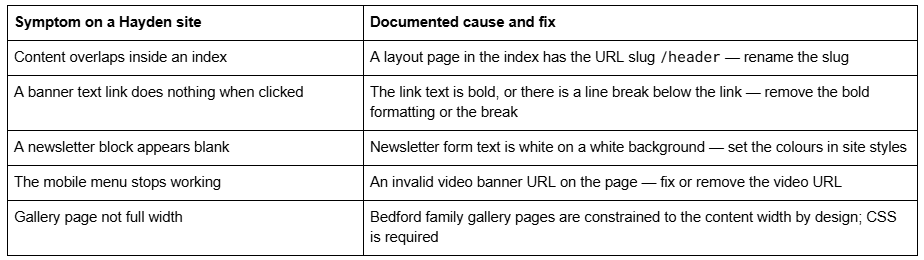
None of these is a fault in your setup. All are Bedford family behaviour, and all of them affect Hayden, Bedford, Bryant and Anya identically.
Is the Squarespace Hayden template still available?
Yes — on an existing version 7.0 site, via Design → Template → Install new template. Hayden is not on Squarespace's discontinued list, and neither are Bedford, Bryant or Anya. The whole family is intact, which means no Hayden owner is blocked from the version update tool the way Marquee, Pacific and Aviator owners are.
You cannot start a new site on Hayden. The live gallery at squarespace.com/templates returned 198 templates in August 2026, every one of them version 7.1 — we counted them. The old squarespace.com/templates/hayden-demo URL, which still ranks first for this keyword, now serves that generic gallery. Squarespace's actual demo, hayden-demo.squarespace.com, is still up and still Hayden.
Version 7.0 has no announced end-of-life, and Squarespace states the move is optional: "Updating your site from version 7.0 to 7.1 is optional." Several competing pages claim specific 7.0 templates have "no upgrade path". That is false for every Bedford family template. Whether old Squarespace templates are still supported covers the support position in full.
Moving a Squarespace Hayden site to version 7.1
The tool is at Design → Update to Version 7.1. Before you touch it:
It is permanent. "After you click Publish update, your site will update to version 7.1 permanently."
It caps at 150 pages and errors above 200 products on a store page.
Developer mode must be off, and Developer Platform code disappears when you disable it.
Custom CSS survives commented out. Remove the comment tags in the CSS editor and save. Selectors written against Bedford class names will mostly not match 7.1 markup.
Move index sub-pages out first if you want to keep their SEO titles and descriptions.
What happens to the parts a Hayden site is built from:
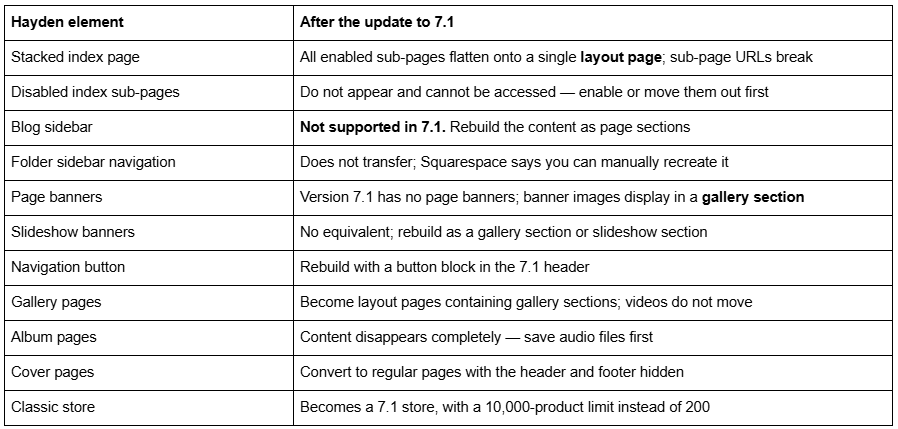
Be realistic about the two hard ones. The blog sidebar and the sidebar navigation are the whole reason many Hayden sites exist, and 7.1 has neither. What 7.1 gives you instead is a blog list section with category filtering and full editorial control of the post layout — usually better, but not a like-for-like swap, and not something the update tool does for you.
Audit before you press the button. Export every index sub-page's navigation title, SEO title and description to a spreadsheet — that is the data the tool discards. Enable every disabled sub-page. Screenshot the sidebar content on every page that has one. Confirm no layout page inside an index uses the /header slug. Count pages and products, and export the Custom CSS.
And the expensive one: changing a page slug on Squarespace creates no automatic 301 redirect, ever. Index sub-pages that flatten into a layout page lose their URLs, and nothing redirects them. Add those by hand in Settings → Advanced → URL Mappings using the /old -> /new 301 format.
The screen-by-screen version is in the Squarespace 7.0 to 7.1 guide, and the Squarespace 7.0 template comparison chart shows how Bedford's feature set compares with the other 21 families. The Squarespace Brine template guide works through the same decision for the largest 7.0 family.
So: stay on Hayden, or move?
Stay if the Hayden site does its job, the blog sidebar is doing real work, and nothing on your list requires 7.1. Hayden is not discontinued and version 7.0 has no announced end-of-life.
Restyle if the objection is aesthetic. Fonts, colours, banner overlay, button styles and blog layout are all site styles values, and switching to Bedford, Bryant or Anya changes 231 lines in a roughly 3,820-rule stylesheet and unlocks nothing whatsoever.
Move if you need Fluid Engine, courses, video pages, a store past 200 products per page, or an independently editable mobile layout — and accept that a Hayden migration is a rebuild of the sidebar and the index, not a lift-and-shift.
For scale: across 54 Squareko-built client sites measured in August 2026 (Playwright/Chromium lab test, cloud datacenter, unthrottled, single run per site), 53 of 54 run Squarespace 7.1. Version 7.0 is the minority case now, but a working Hayden site is not an emergency.
Most Hayden sites we are sent come through the update tool and then need one to two weeks of tidying — rebuilding sidebars as sections, re-entering sub-page SEO data, adding URL Mappings for every broken index sub-page URL. The exception is the content-heavy Hayden site where folder sidebar navigation is the primary way visitors move around: there you are redesigning the information architecture, and starting from a premium Squarespace template built for 7.1 and Fluid Engine is usually the shorter path. The table at the top of this page settles it for most people without spending anything.
FAQ
-
The Bedford family, alongside Anya, Bedford and Bryant. All four report the template ID 52a74dafe4b073a80cd253c5 and "templateVersion":"7" in their page source. Because templateId identifies the family rather than the individual template, a detector tool will report a Hayden site as Bedford, and it is not wrong.
-
In code, effectively yes. Comparing both demos' compiled stylesheets in August 2026, Hayden's has 3,823 rules and Bedford's 3,821, exactly one selector appears in one and not the other, and 231 rules differ by value — colours, font stacks and percentages. Hayden defaults to futura-pt, Bedford to proxima-nova. Every difference is a site styles setting.
-
Yes, and it is one of Hayden's genuine strengths. The Bedford family supports blog sidebars, controlled by the Hide blog sidebar tweak, plus folder and category sidebar navigation on store pages, pages inside dropdowns and indexes. Squarespace notes that sidebar navigation doesn't support blocks — it lists pages, not content.
-
Yes, on an existing version 7.0 site via Design → Template → Install new template. Hayden is not on Squarespace's discontinued list. You cannot start a new site on it — the live template gallery returned 198 templates in August 2026, all version 7.1 — and squarespace.com/templates/hayden-demo now serves that generic gallery.
-
Fixed: 600px on desktop, 700px when the header is transparent, and 300px on mobile. Slideshow banners also compress to 300px on smartphones. There is no per-page height control without Custom CSS, which is one of the clearer contrasts with Squarespace 7.1, where section height is set per section in the editor.
-
No. Squarespace states that sidebar navigation won't transfer to version 7.1 and that blog sidebar navigation is not supported there at all. You can recreate the effect manually with page sections, a summary block or a blog list section with category filtering, but the update tool will not do it for you.

Author Bio
I'm Walid Hasan, a Certified Squarespace Expert and Squarespace Circle Platinum Partner with over 12 years of hands-on experience designing and optimizing high-performing websites. Over the years, I've had the privilege of building more than 2,000 Squarespace websites for clients around the world, always focusing on clean design, strong user experience, and conversion-driven results.
