Why Isn't My Squarespace Site on Google? How Indexing Really Works
If your Squarespace site has been live for less than a month, nothing is wrong. Google discovers, crawls and indexes on its own schedule, and its own guidance is that this takes anywhere from a few days to a few weeks — longer on a new domain with no links pointing at it. Two to six weeks to full indexing is ordinary. There is no button that shortens it.
This post is the explanation. If something on your site is actively blocking Google — a trial plan, a password, a crawler block — the procedure for finding and fixing it is Squarespace site not showing on Google. Read this one first to work out which situation you are in.
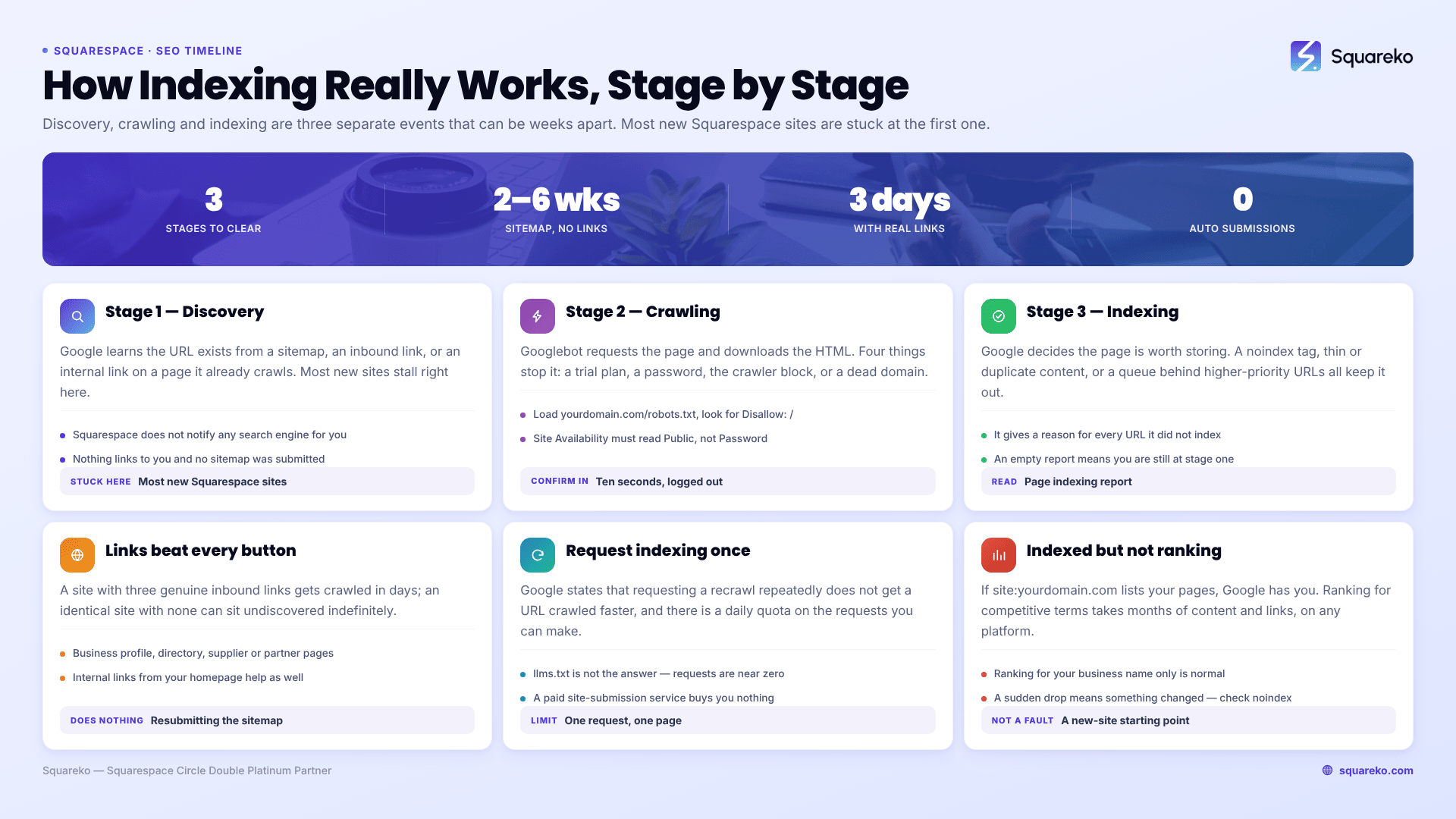
The three stages between publishing and appearing
"Being on Google" is not one event. It is three, and they can be separated by weeks.
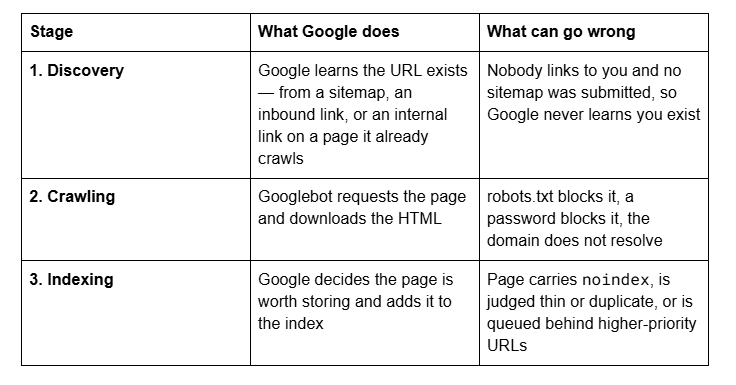
Most people who ask this question assume they are stuck at stage 2 or 3. On a new Squarespace site they are almost always stuck at stage 1 — Google has simply never been told the site exists.
Squarespace does not submit your site to Google. It generates a sitemap automatically and it emits clean, crawlable HTML, but nothing about publishing a Squarespace site notifies a search engine. That first notification is yours to make.
The realistic timeline
Based on Google's published guidance and on what we see across client launches, these are the windows to plan around.
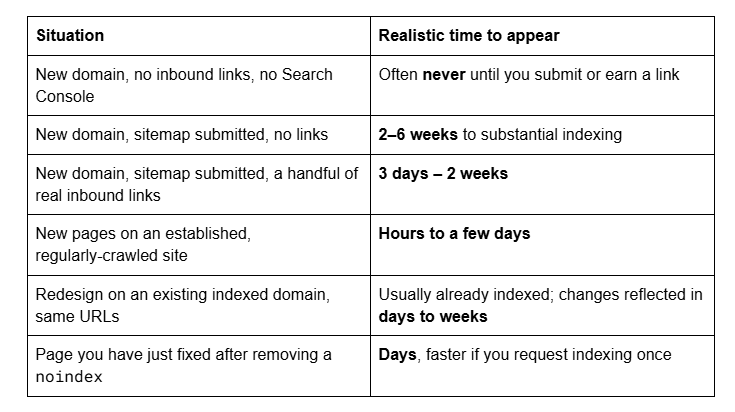
The single largest variable is not your settings. It is whether anything already in Google's index points at your site. A site with three genuine inbound links gets crawled in days; an identical site with none can sit undiscovered indefinitely.
Check one: has Google indexed anything at all?
Open a private browsing window and search:
site:yourdomain.com
Results appear — you are indexed. Skip to the ranking section below; this is not an indexing problem.
No results — Google has nothing yet. Continue.
Then open Google Search Console and look at the Page indexing report. If the property is verified and the report shows URLs under "Not indexed" with a reason attached, Google has at least discovered you and the reason tells you which stage you are stuck at. If the report is empty, you are at stage 1.
Check two: is anything actively blocking Google?
Four things make a Squarespace site uncrawlable, and all four are settings rather than SEO problems:
The site is on a trial or unpublished — trial sites are hidden from search engines.
Site Availability is set to Private or Password.
Settings → Crawlers → Block search engine crawlers is ticked, which adds Disallow: / to robots.txt.
The domain is not resolving, so there is nothing at the address Google would crawl.
Confirm the third in ten seconds by loading yourdomain.com/robots.txt in a private window and looking for Disallow: / under User-agent: *.
If any of these is true, your wait is not normal and the timeline above does not apply. Go to the full whole-site diagnostic and fix it, then start the clock from that day.
Check three: has Google been told the site exists?
If nothing is blocking you and the site is genuinely new, this is where the time goes.
Two actions matter, in this order:
Verify in Search Console and submit the sitemap once. On Squarespace the quickest route is Analytics → Search Keywords → Connect, then submit sitemap.xml in Search Console. Full walkthrough: how to submit your Squarespace sitemap to Google. On a site with no inbound links this is Google's only route in.
Earn two or three real inbound links. A Google Business Profile, a trade association listing, a supplier's stockist page, a professional directory, a partner's site. These are not link building in the SEO sense — they are discovery paths from pages Google already crawls daily. In our experience this moves the needle harder than anything you can do inside Squarespace.
What does not help: submitting the sitemap repeatedly, requesting indexing for every URL, buying a "site submission" service, or adding llms.txt. Requesting indexing multiple times for the same URL does not get it crawled faster, and Google says so directly.
Check four: are you indexed but not ranking?
This is a different problem wearing the same clothes, and it accounts for a large share of the people asking this question.
If site:yourdomain.com lists your pages, Google has you. Search your exact business name — if you come up first, you are visible and functioning. What you do not have yet is a ranking for competitive commercial terms, and that is normal for months on a new site, on any platform.
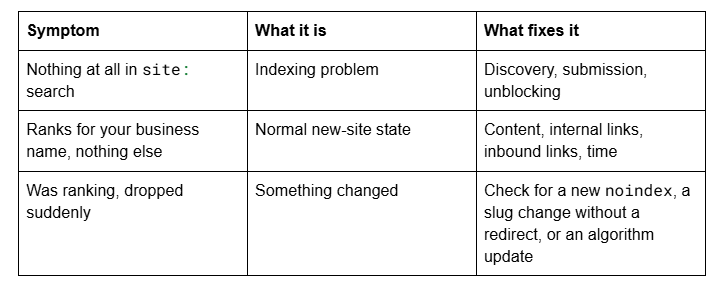
The middle row is not a fault to fix. It is a starting position, and the work from there is in the Squarespace SEO guide rather than in a settings panel.
Why Squarespace specifically is rarely the reason
It is worth saying plainly, because the SERP is full of the opposite claim: Squarespace 7.1 sites are crawled and indexed perfectly well. The platform auto-generates a sitemap, serves static URLs, emits structured data, applies canonical tags to filtered and duplicate URLs, and renders content server-side so headings and body text are in the initial HTML.
The other version of the claim is that Squarespace sites are too slow to get crawled properly. That does not survive measurement. Across 54 Squareko-built Squarespace sites measured in August 2026 — a Playwright/Chromium lab test from a cloud datacenter, unthrottled, single run per site — median mobile LCP was 2.01 seconds and median time to first byte was 514 milliseconds, with 85% of sites under Google's 800ms TTFB guideline. Those are lab figures rather than field data, and desktop layout stability was weaker than mobile, but nothing in that range constitutes a crawl obstacle. Googlebot is not being kept out by page speed.
What Squarespace does not do is compensate for a site nobody links to, or one that publishes three hundred words of text across five pages. Those are the actual reasons most new sites take a long time — and they would be the reasons on any platform.
If it has been under a month, the site is public, robots.txt is clean and the sitemap is submitted, the answer is that you are inside the normal window and the correct action is to wait. That is an unsatisfying answer and it is the true one.
If it has been three months under those same conditions, something is wrong that a checklist will not surface, and that is the point at which our Squarespace website support plans are worth a conversation. Most sites that ask this question are four weeks old and fine.
FAQ
-
Google states that crawling a new URL takes anywhere from a few days to a few weeks. In practice a new domain with a submitted sitemap and no inbound links takes two to six weeks to be substantially indexed. With two or three real inbound links it is usually days rather than weeks.
-
No. Squarespace generates and maintains your sitemap automatically, but it does not notify any search engine that your site exists. You verify the site in Google Search Console yourself — the quickest route is Analytics → Search Keywords → Connect — and submit sitemap.xml once.
-
Search site:yourdomain.com in a private browsing window. Results mean Google has indexed you. No results mean it has not. For detail, check the Page indexing report in Google Search Console, which gives a reason for every URL it has chosen not to index.
-
Yes, for the first few weeks. Discovery is the slow stage: Google has to learn the URL exists before it can crawl or index it. A brand-new domain that nothing links to and that has never been submitted can stay undiscovered indefinitely, which is why submission and a couple of real inbound links matter more than any setting.
-
Once, for one important page, marginally. Repeatedly, no — Google states that requesting a recrawl multiple times for the same URL will not get it crawled any faster, and there is a daily quota. For a whole new site, the sitemap plus inbound links outperforms manual requests.
-
Because indexing and ranking are separate. Being in the index means Google stored the page; ranking means it competes with established pages for a query. A new site typically ranks for its own business name first and for competitive terms only after months of content and links.

Author Bio
I'm Walid Hasan, a Certified Squarespace Expert and Squarespace Circle Platinum Partner with over 12 years of hands-on experience designing and optimizing high-performing websites. Over the years, I've had the privilege of building more than 2,000 Squarespace websites for clients around the world, always focusing on clean design, strong user experience, and conversion-driven results.