Squarespace Site Not Showing on Google? 8 Causes, Ranked by Frequency
If your entire Squarespace site is missing from Google, it is almost never an SEO problem. In order of how often it turns out to be the cause: the site is still on a trial or unpublished, a site-wide password is switched on, Settings → Crawlers → Block search engine crawlers is ticked, or the site is simply too new to have been crawled yet. Run the two-minute test below before changing anything.
This post is about the whole site being absent. If the site appears but specific pages do not, that is a different diagnosis — see Squarespace pages not indexing.
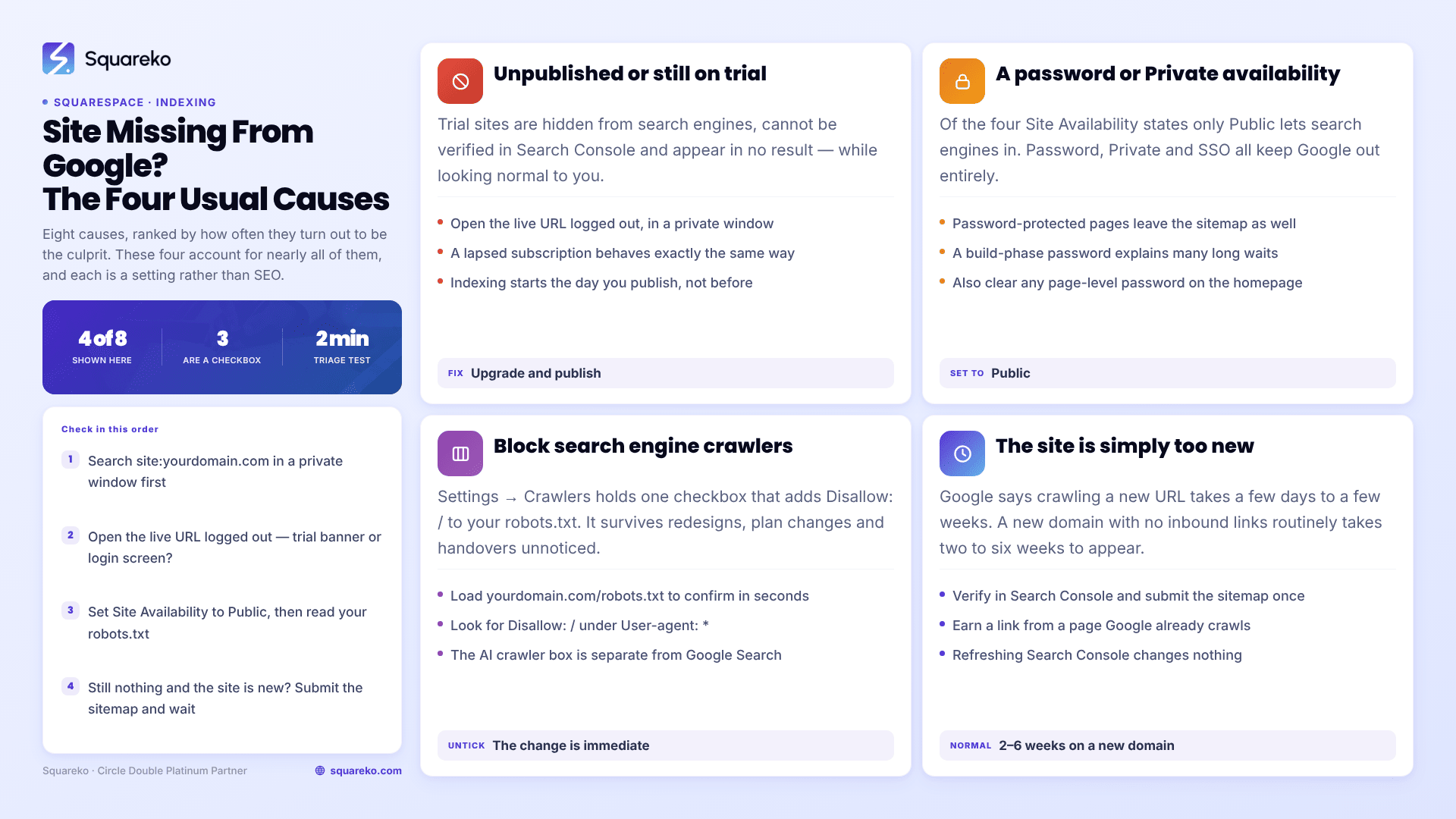
The two-minute test that tells you which half of the list you are in
Open a private browsing window and search Google for:
site:yourdomain.com
That is the operator, no space after the colon, using your live domain without https://.
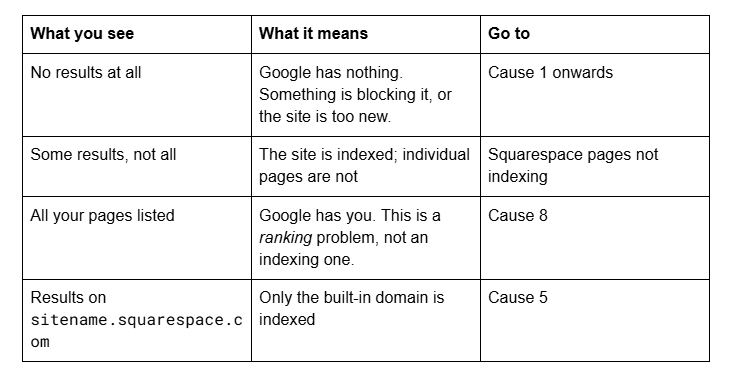
Do the same search in the same private window for your exact business name and town. Most people who think they are invisible are ranking for their brand and nothing else — which is a completely different problem with a completely different fix.
Cause 1 — The site is unpublished or still on a trial
This is the single most common cause and the easiest to miss, because the site looks perfectly normal to you while you are logged in.
Squarespace trial sites are hidden from search engines. They are not crawled, cannot be verified in Google Search Console, and will not appear in any result. The same applies to a site whose subscription has lapsed.
How to confirm in 20 seconds: open your live URL in a private window while logged out. If you see a Squarespace trial banner, a login screen or an error, the site is not publicly available and nothing else on this list matters.
Fix: upgrade to a paid plan and publish. Indexing then starts from zero on the day you publish, not from the day you built the site.
Cause 2 — A site-wide password or Private availability
Open the Site Availability panel. There are four states, and three of them keep you out of Google entirely.
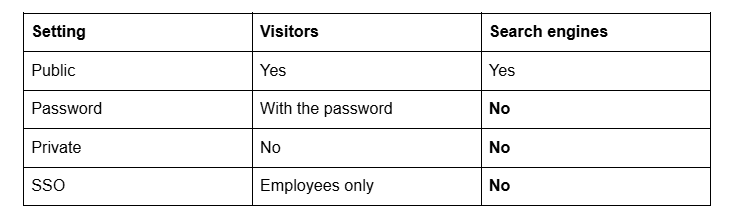
A password left on from the build phase is behind a large share of "my site launched three months ago and Google has never seen it". Squarespace also removes password-protected pages from the sitemap, so Google has no route in at all.
Fix: set Site Availability to Public and remove any page-level password on the homepage. Then check Cause 3 before you assume you are done.
Cause 3 — Search engine crawlers are blocked at site level
Open the Settings panel and click Crawlers. There is a checkbox labelled Block search engine crawlers.
Ticking it adds Disallow: / to your site's robots.txt, which tells every compliant crawler to stay off the entire site. It is a one-click way to make a Squarespace site invisible, and it survives redesigns, plan changes and ownership handovers without anyone noticing.
How to confirm in 20 seconds: load yourdomain.com/robots.txt in a private window. If you see Disallow: / under User-agent: *, that is your answer.
Fix: untick the box. Then re-check robots.txt — the change is immediate. Google will re-crawl on its own schedule, typically within days, and you can nudge it by submitting the sitemap.
The same panel has a separate Block known artificial intelligence crawlers checkbox. That one does not affect Google Search — it affects whether your content can be used by AI answer engines. Do not confuse the two.
Cause 4 — The site is new and has not been crawled yet
If the site is published, public, crawlable, and less than a month old, the most likely explanation is that nothing is wrong.
Google's own guidance is that crawling a new URL can take anywhere from a few days to a few weeks. A brand-new domain with no inbound links routinely takes two to six weeks to appear at all. There is no setting that shortcuts this.
Fix, in order of actual effect:
Verify the site in Google Search Console and submit the sitemap — see how to submit your Squarespace sitemap. On a new site this is genuinely Google's only discovery route.
Get one or two real inbound links from pages Google already crawls — a Google Business Profile, a directory listing, a supplier or association page.
Wait. Refreshing Search Console does not change the timeline.
If this is your situation, the fuller explanation of why it takes this long is in why isn't my Squarespace site on Google.
Cause 5 — The domain is not resolving, or the wrong domain is indexed
Two distinct failures wear the same symptom.
The domain is not connected properly. If DNS is wrong, your custom domain never serves the site, and Google has been crawling nothing. Load the domain in a private window; if you get a registrar parking page, a certificate warning or a timeout, this is a domain problem rather than an SEO problem.
The built-in domain is what got indexed. If sitename.squarespace.com appears in site: results and your real domain does not, the site was crawled before the custom domain was set as primary. Squarespace updates the sitemap to the primary domain, and search engines follow — but it takes a crawl cycle or several.
Fix: confirm the custom domain is connected and set as primary, wait for SSL to show as secured, then request re-indexing of the homepage in Search Console. Squarespace's built-in URL cannot be removed from your account, but once the primary domain is right it stops being the indexed one.
Cause 6 — A site-level noindex from code injection
Less common, but it happens on sites that have been through a developer or a migration. A <meta name="robots" content="noindex"> tag pasted into Settings → Developer Tools → Code Injection → Header applies to every page on the site.
How to confirm: load the live homepage in a private window, view source, and search for noindex. If it is there, open the Code Injection panel and look in the Header field.
Fix: delete the tag, save, and confirm it is gone from the rendered source. Then request indexing for the homepage in Search Console to shorten the wait.
Cause 7 — The site is indexed but the homepage looks empty to Google
A homepage built entirely from background images, video banners and text baked into image files gives Google almost nothing to read. The URL gets indexed; the listing is bare; nothing ranks.
How to confirm: in Search Console's URL Inspection tool, run the homepage and click View crawled page. If the HTML contains almost no words, that is the problem.
Fix: put your actual proposition in real text blocks, with a proper H1. Text inside images is invisible to search engines and to AI answer engines alike.
Cause 8 — You are searching for the wrong thing
If site:yourdomain.com returns all your pages, Google has indexed you completely and the site is not missing. What you have is a ranking problem, and it is a normal one: a new site does not rank for competitive terms for months.
Search your business name first. If you rank first for that and nowhere for "wedding photographer manchester", the site is fine and the work ahead is content and links, not settings. Start with the Squarespace SEO guide.
Almost every genuinely invisible Squarespace site is one of the first three causes, and all three are a checkbox. Work the list top to bottom and you will find yours in ten minutes.
Where it stops being self-service is the inherited site — several previous owners, a developer who left, a header injection nobody can account for, and a domain that has been moved twice. Pulling that apart is what our Squarespace website support plans are for. If your site: search came back empty and Settings → Crawlers was the reason, you have just fixed it yourself.
FAQ
-
Search site:yourdomain.com in a private browsing window. No results means Google has nothing indexed. Some results means the site is indexed but individual pages are missing. All your pages means indexing is complete and any problem you have is about ranking, not visibility.
-
Most likely because it is new. Google states that crawling a new URL takes anywhere from a few days to a few weeks, and a new domain with no inbound links commonly takes two to six weeks. Verify in Search Console, submit your sitemap once, and get one or two real inbound links.
-
No. Trial sites are hidden from search engines, cannot be verified in Google Search Console, and will not appear in any result. Indexing begins when you upgrade to a paid plan and publish, not when you built the site.
-
Only if someone ticked it. Open Settings → Crawlers and check the Block search engine crawlers box. When ticked it adds Disallow: / to your robots.txt and hides the whole site. Confirm by loading yourdomain.com/robots.txt in a private window.
-
The site was crawled before your custom domain was set as primary. Confirm the custom domain is connected and set as primary in the Domains panel, wait for SSL to secure, then request re-indexing of the homepage in Search Console. The built-in URL cannot be deleted but stops being the indexed one.
-
No. If site:yourdomain.com returns your pages, indexing has worked and the site is visible. Not ranking for competitive terms on a new site is normal and takes months of content and links to change. It is not a settings problem.

Author Bio
I'm Walid Hasan, a Certified Squarespace Expert and Squarespace Circle Platinum Partner with over 12 years of hands-on experience designing and optimizing high-performing websites. Over the years, I've had the privilege of building more than 2,000 Squarespace websites for clients around the world, always focusing on clean design, strong user experience, and conversion-driven results.