Squarespace Meta Description Not Showing in Google: Why, and When It Is Actually a Problem
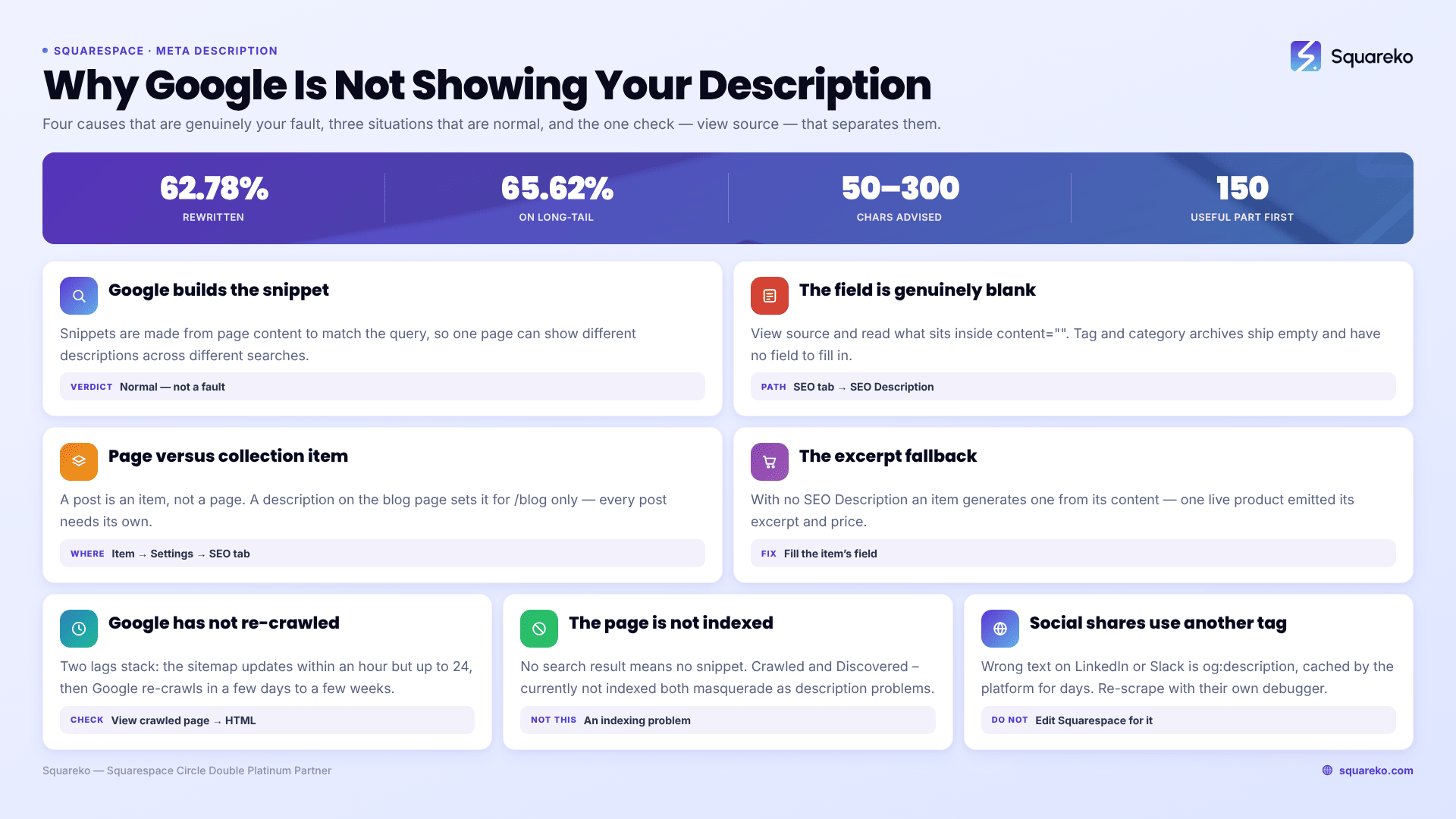
The short answer: Google usually ignores your meta description on purpose. Ahrefs measured Google rewriting 62.78% of hardcoded meta descriptions across 20,000 desktop keywords, because snippets are generated to match the specific query, not the page. If Google is showing a sentence lifted from your page body, nothing on your Squarespace site is broken. The cases that genuinely are your fault are narrower — and all four of them show up in the page source, not in the search result.
Normal, or actually broken?
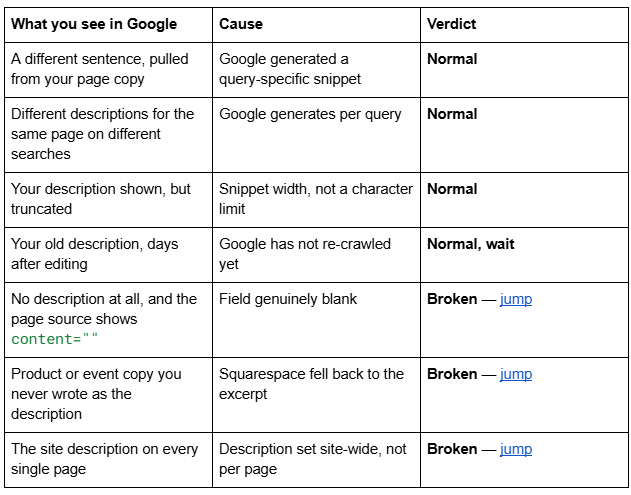

Why Google rewrites descriptions, and why that is not a fault
Google's documentation is explicit: "Snippets are primarily created from the page content itself. However, Google sometimes uses the meta description HTML element if it might give users a more accurate description." It also states that snippets "are designed to emphasize and preview the page content that best relates to a user's specific search", so "Google Search might show different snippets for different searches."
That is the whole mechanism. One page, ten queries, potentially ten snippets. Your meta description is one candidate among them.
The rewrite rate is not marginal. In Ahrefs' study of 20,000 keywords, Google rewrote the description 59.65% of the time for fat-head terms and 65.62% for long-tail terms. Long-tail queries are more specific, so Google has more reason to build a snippet from the matching passage instead.
What this means practically. Write the description for the click, not for the crawler. It has no direct ranking effect — Google has said so repeatedly — and there is a better than even chance it will not be used verbatim. Spend the effort on the page title, which Google rewrites far less often.
Cause 1 — The field is genuinely blank
The most common real cause. Confirm it in ten seconds: view source on the live page (Cmd + Option + U on Mac, Ctrl + U on Windows), search for name="description", and look at what is inside content="".
On a live Squarespace 7.1 site I audited, several URL types returned a literally empty description:
/blog/tag/SEO → <meta name="description" content="" />
/blog/category/Website+SEO → <meta name="description" content="" />
Tag and category archive pages ship with an empty description and there is no field to fill in on the archive itself. If those URLs are appearing in search with no snippet, the fix is not to write a description — it is to decide whether the archive should be indexed at all. See Squarespace duplicate content.
For a page you can edit, the field is at Pages → hover the page → gear icon → SEO tab → SEO Description. Squarespace's own SEO report, in the SEO/AI Visibility panel, will list every page and item missing one.
Cause 2 — You filled in the wrong field
Squarespace has three separate description fields and they are easy to confuse.
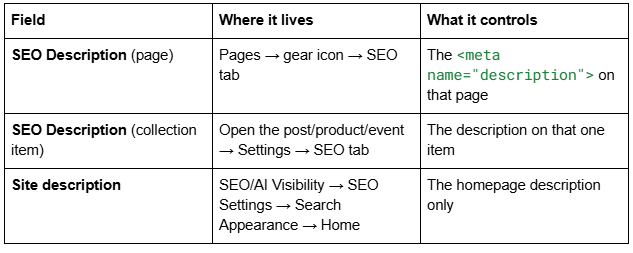
Two failure modes follow from this.
The page-versus-item confusion. A blog post is a collection item, not a page. Setting an SEO description on the blog page sets it for /blog — the archive — and does nothing for any individual post. Every post needs its own, set inside the post's own Settings panel.
The excerpt fallback. Where a collection item has no SEO description, Squarespace does not leave the tag empty — it generates one from the item's own content. On the site I audited, a product page emitted <meta name="description" content=" Kids | Education | Kids Care $249 " />, assembled from the product excerpt and price. That is a description nobody wrote, and it looks exactly like a bug. It is a fallback. Fill in the item's SEO Description and it goes away.
Cause 3 — Google has not re-crawled the page yet
You edited the description this morning and Google still shows the old one. That is expected.
Two lags stack up. Squarespace's auto-generated sitemap updates when content changes, typically within an hour but documented as taking up to 24 hours. Google then has to re-crawl, which its own documentation puts at "a few days to a few weeks".
Check what Google actually has rather than guessing: Search Console → URL Inspection → paste the URL → View crawled page → HTML. That is the exact source Google holds. If your new description is in that HTML and the SERP still shows the old one, the index simply has not caught up. If your new description is not in that HTML, Google has not re-crawled at all, and you can request indexing once — but only once. Google states that "requesting a recrawl multiple times for the same URL won't get it crawled any faster."
Cause 4 — The page is not indexed, so there is no snippet to show
If a page has no description in search results because it has no search result, this is not a description problem. Check the status in Search Console → Indexing → Pages, or with URL Inspection.
Crawled – currently not indexed and Discovered – currently not indexed are the two statuses that most often masquerade as description problems on Squarespace. They have separate posts because they have separate fixes: Crawled – currently not indexed and Discovered – currently not indexed.
How long should a Squarespace meta description be?
Squarespace's field accepts up to 400 characters and recommends 50–300. Google's guidance is that "there's no limit on how long a meta description can be, but the snippet is truncated in Google Search results as needed, typically to fit the device width."
There is no magic number, because the truncation point depends on the device and the pixel width of your characters. The practical rule: put the useful part in the first 150 characters, then let the rest run to whatever length reads naturally. A description written to hit exactly 155 characters and then cut off mid-sentence is worse than one that says the important thing in 90.
Social share descriptions are a different tag
If the wrong text appears when a page is shared on LinkedIn, Slack or Facebook, that is og:description, not <meta name="description">. Squarespace generates the Open Graph tags from the same fields, but social platforms cache aggressively and hold their own copy for days. Re-scrape with the platform's own debugger rather than editing anything on Squarespace.
When to hand this over
Almost every "meta description not showing" report on a Squarespace site resolves to one of two things: Google rewrote it, which is normal, or the description was set on the blog page instead of on the individual posts, which takes an afternoon to correct across a large blog.
The version worth handing over is a site where hundreds of collection items are emitting excerpt-derived fallbacks and nobody knows which. That is a bulk audit rather than a fix, and it is the sort of pass our Squarespace website support plans run as one job. For a single page with a single wrong snippet, the source-view check above answers it in under a minute.
FAQ
-
Because Google generates snippets to match the query rather than always using your tag. Ahrefs measured Google rewriting 62.78% of meta descriptions across 20,000 desktop keywords. A different snippet is normal behaviour, not a Squarespace fault, and there is no setting that prevents it.
-
For a page: Pages → hover the page → gear icon → SEO tab → SEO Description. For a blog post, product or event: open the item, then Settings → SEO tab. The homepage description is separate, in SEO/AI Visibility → SEO Settings → Search Appearance → Home.
-
Because the item has no SEO Description, so Squarespace falls back to generating one from the item's own content — often the excerpt and price, which reads as junk. Filling in the item's SEO Description field replaces it.
-
Two lags stack. Squarespace's sitemap updates within an hour but is documented as taking up to 24 hours, then Google re-crawls in anywhere from a few days to a few weeks. Use URL Inspection → View crawled page to see what Google currently holds.
-
No. On a live 7.1 site, /blog/tag/Name and /blog/category/Name both emit an empty content="" description, and there is no field to edit on the archive itself. If that matters, the decision is whether those archives should be indexed at all.
-
Squarespace allows up to 400 characters and recommends 50–300. Google says there is no limit and truncates to fit the device. Put the useful information in the first 150 characters and let the sentence finish naturally rather than padding to a target.

Author Bio
I'm Walid Hasan, a Certified Squarespace Expert and Squarespace Circle Platinum Partner with over 12 years of hands-on experience designing and optimizing high-performing websites. Over the years, I've had the privilege of building more than 2,000 Squarespace websites for clients around the world, always focusing on clean design, strong user experience, and conversion-driven results.