Squarespace Pages "Not Indexed" in Google Search Console: How to Read the Report
The short answer: most of what sits in the Not indexed table of a Squarespace site is supposed to be there. Squarespace auto-generates tag and category archive URLs, redirect targets and canonicalised duplicates, and Google reports every one of them. Before you fix anything, sort the statuses into "normal", "act now" and "decide", because only about a third of them mean something is wrong.
Open Search Console → Indexing → Pages. The chart at the top splits into Indexed and Not indexed. Ignore the chart. The table underneath it, headed Why pages aren't indexed, is the entire diagnostic.
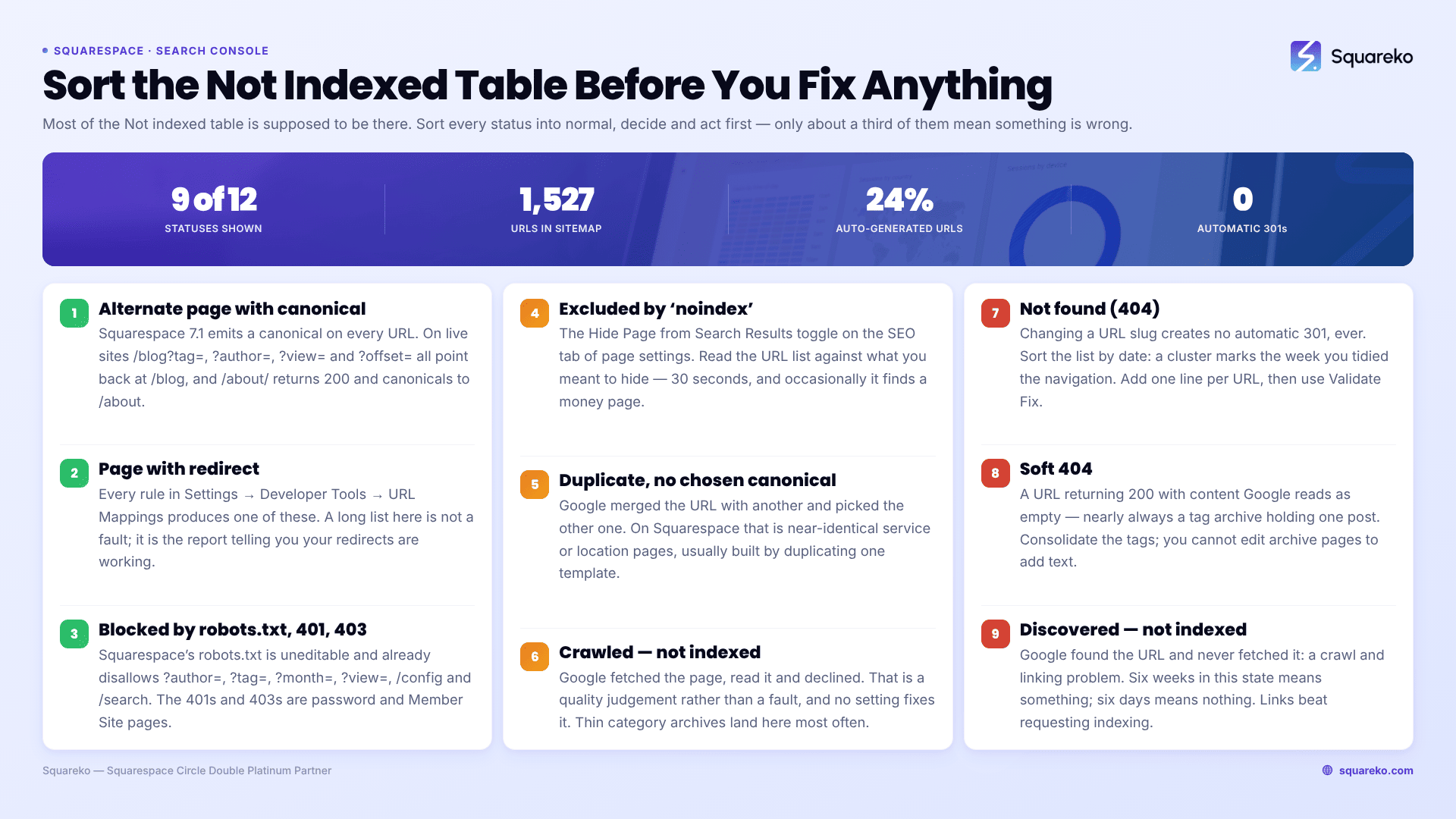
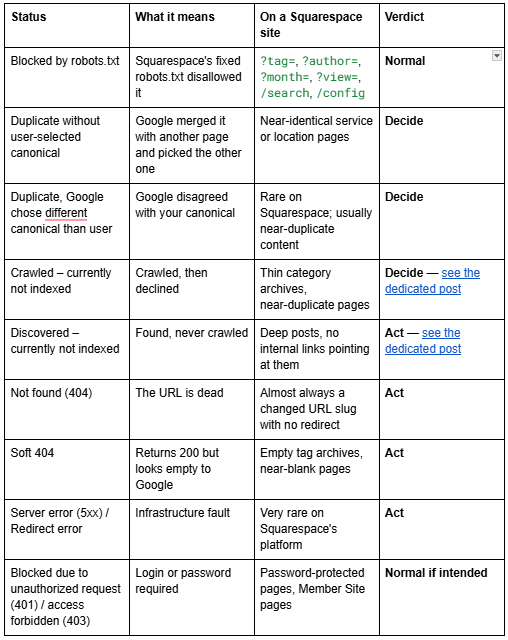
Every Search Console status, and what it means on Squarespace 7.1
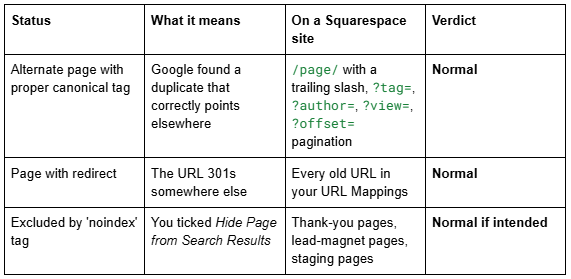
The six statuses that are normal on every Squarespace site
Squarespace generates URLs you never asked for, and it handles most of them correctly on its own. These statuses are the report telling you the system worked.
Alternate page with proper canonical tag. Squarespace 7.1 emits a <link rel="canonical"> on every URL. On filtered blog views it points back at the clean URL. I checked this directly on live 7.1 sites: /blog?tag=SEO, /blog?author=…, /blog?view=grid and the paginated /blog?offset=… all emit <link rel="canonical" href="https://…/blog"/>. A trailing-slash URL such as /about/ returns 200 rather than redirecting, and canonicals to /about. All of that is correct behaviour and none of it needs action.
Page with redirect. Every rule in Settings → Developer Tools → URL Mappings produces one of these. A long list here means your redirects are working.
Blocked by robots.txt. Squarespace's robots.txt cannot be edited, and it already disallows /*?author=*, /*?tag=*, /*?month=*, /*?view=*, /*?format=json*, /*?reversePaginate=*, /config, /search and /static/. Those entries in the report are the platform doing its job.
Excluded by 'noindex' tag. This is the Hide Page from Search Results toggle in page settings → SEO tab. Check the URL list against what you meant to hide. A page you did not mean to hide appearing here is the single fastest SEO fix on the platform.
401 and 403. Password-protected pages and Member Site pages. Member-site pages have no SEO options and are not in the sitemap at all, by design.
The Indexed count will never match your page count
Site owners open the Page Indexing report, see 40 indexed against 300 submitted, and assume something is broken. Usually nothing is.
On one live Squarespace 7.1 site I audited, the auto-generated sitemap.xml contained 1,527 URLs — of which 351 were tag archives and 18 were category archives. That is 24% of the sitemap made of pages nobody wrote, several of them near-duplicates created by typos in tag names (Squarepsace Update alongside Squarespace Update, Marketing Stategy alongside Marketing Strategy). Squarespace generates the sitemap automatically and you cannot edit it, so those URLs are submitted to Google whether you want them there or not.
The number to care about is not the ratio. It is whether the specific pages that earn you money are in the Indexed table.
Not found (404): almost always a changed URL slug
On Squarespace this status has one dominant cause. Changing a URL slug creates no automatic 301, ever. Squarespace states it plainly: "If you change a page's URL slug, traffic won't automatically redirect to the new URL."
Sort the 404 list by date. If a cluster of them appeared the week you tidied up your navigation, you renamed pages. Fix it by adding a rule per URL in Settings → Developer Tools → URL Mappings, following the redirect setup guide, then use Validate Fix on the status.
Soft 404 and thin archives
A soft 404 is a URL returning HTTP 200 with content Google reads as empty. On Squarespace it is nearly always an archive page with one post in it, or a tag applied to a single draft. The fix is to consolidate tags, not to add content to the archive — you cannot edit archive pages.
One Squarespace quirk worth knowing: the built-in 404 page lives at a real URL, /404-error, and it returns HTTP 200 when requested directly. Requesting a genuinely missing URL correctly returns a 404 status while serving that page's content, so this does not cause a problem on its own — but do not link to /404-error from anywhere.
How long a new Squarespace site takes to appear
There is no fixed number, and anyone quoting one is guessing. Google's own documented range for crawling a submitted URL is "a few days to a few weeks", and indexing is a separate decision after that. Squarespace adds its own lag: the auto-generated sitemap updates when content changes, typically within an hour but documented as up to 24 hours.
For a brand-new site the realistic sequence is: connect Search Console via Analytics → Search keywords → Connect, submit sitemap.xml once, then expect the homepage and top navigation pages within one to two weeks and deeper pages over the following month. A page that is still Discovered – currently not indexed after six weeks is telling you something; a page in that state after six days is telling you nothing.
Two things genuinely accelerate it, and neither is a Search Console button: links from pages Google already crawls often, and a site structure where every page is reachable in three clicks from the homepage.
Triage order: what to do in the first ten minutes
Filter to the pages that matter. Use the sitemap filter, then search for your service and money page slugs. Nothing else is urgent.
Check Excluded by 'noindex' first. It takes 30 seconds and occasionally reveals a money page hidden by a previous contractor.
Clear the 404s. Every one is lost link equity and a real visitor hitting a dead end.
Split the two "not indexed" statuses.Discovered is a crawl problem, Crawled is a quality judgement, and the fixes have nothing in common. Read Discovered – currently not indexed and Crawled – currently not indexed before acting on either.
Stop requesting indexing. Google is explicit: "requesting a recrawl multiple times for the same URL won't get it crawled any faster." Crawling "can take anywhere from a few days to a few weeks."
Work that list, then leave the report alone for two weeks. Indexing decisions are not instantaneous and re-checking daily tells you nothing.
When the report still doesn't make sense
Nine times out of ten the Page Indexing report on a Squarespace site is describing normal platform behaviour and one genuine problem, and the job is telling them apart. If you have worked through the triage list and your commercial pages are still sitting in Crawled – currently not indexed months later, the issue is usually structural — a site where a dozen pages say roughly the same thing, or a blog where nothing links to anything.
That is the kind of diagnosis our Squarespace website support plans cover, and it typically needs one audit rather than an ongoing engagement. Most readers will not need it; the triage order above resolves the overwhelming majority of these reports on its own.
FAQ
-
Most entries in the Not indexed table are normal. Squarespace auto-generates tag archives, category archives, redirect targets and canonicalised duplicates, and Google reports each one. Check the status string first — six of the fifteen statuses describe correct behaviour and need no action at all.
-
Alternate page with proper canonical tag, Page with redirect, Blocked by robots.txt, and 401 or 403 on password-protected pages are all normal. Excluded by 'noindex' is normal only if you deliberately ticked Hide Page from Search Results on that page.
-
Squarespace adds every tag and category archive to the auto-generated sitemap and you cannot edit that sitemap. On one 7.1 site I audited, 369 of 1,527 sitemap URLs were tag or category archives. Google reports on all of them.
-
Once, for a genuinely new URL. Google states that requesting a recrawl multiple times for the same URL will not get it crawled any faster, and that crawling can take a few days to a few weeks. Repeat requests do nothing.
-
There is no correct ratio, because the sitemap contains URLs you never created. Judge it by whether your service pages, location pages and commercial blog posts are indexed, not by the total count.
-
Discovered means Google knows the URL exists but has not fetched it — a crawl and internal-linking problem. Crawled means Google fetched it and chose not to index it — a quality and duplication judgement. The fixes are completely different.

Author Bio
I'm Walid Hasan, a Certified Squarespace Expert and Squarespace Circle Platinum Partner with over 12 years of hands-on experience designing and optimizing high-performing websites. Over the years, I've had the privilege of building more than 2,000 Squarespace websites for clients around the world, always focusing on clean design, strong user experience, and conversion-driven results.