
SEO for Author and Coach Websites: How to Rank on Google and AI Search with Squarespace
Introduction
If you're an author or coach building a website on Squarespace, you're probably hoping people will actually find it. But getting discovered online has changed. You're no longer just competing for Google rankings—you're competing for visibility in ChatGPT, Claude, Gemini, and Perplexity answers too. The good news? Squarespace gives you the tools to succeed at both. The better news? SEO for authors and coaches isn't as complicated as you think.
The challenge is specific to your niche. Authors need to rank for genre-specific searches, book recommendations, and topic deep-dives. Coaches need to show up for local searches, specific problem-solving queries, and AI-powered answer engines. Traditional SEO advice—write about keywords—isn't enough anymore. You need to be the kind of resource that AI systems actually cite, while also capturing the search traffic that still comes from Google.
This guide walks you through exactly how to optimize your Squarespace website for both traditional search and AI-powered engines. Whether you're launching your first coaching practice or promoting your debut novel, you'll learn the specific keywords, strategies, and technical setup that work for your industry.
Key Takeaways SEO for Author and Coach Websites: How to Rank on Google and AI Search with Squarespace
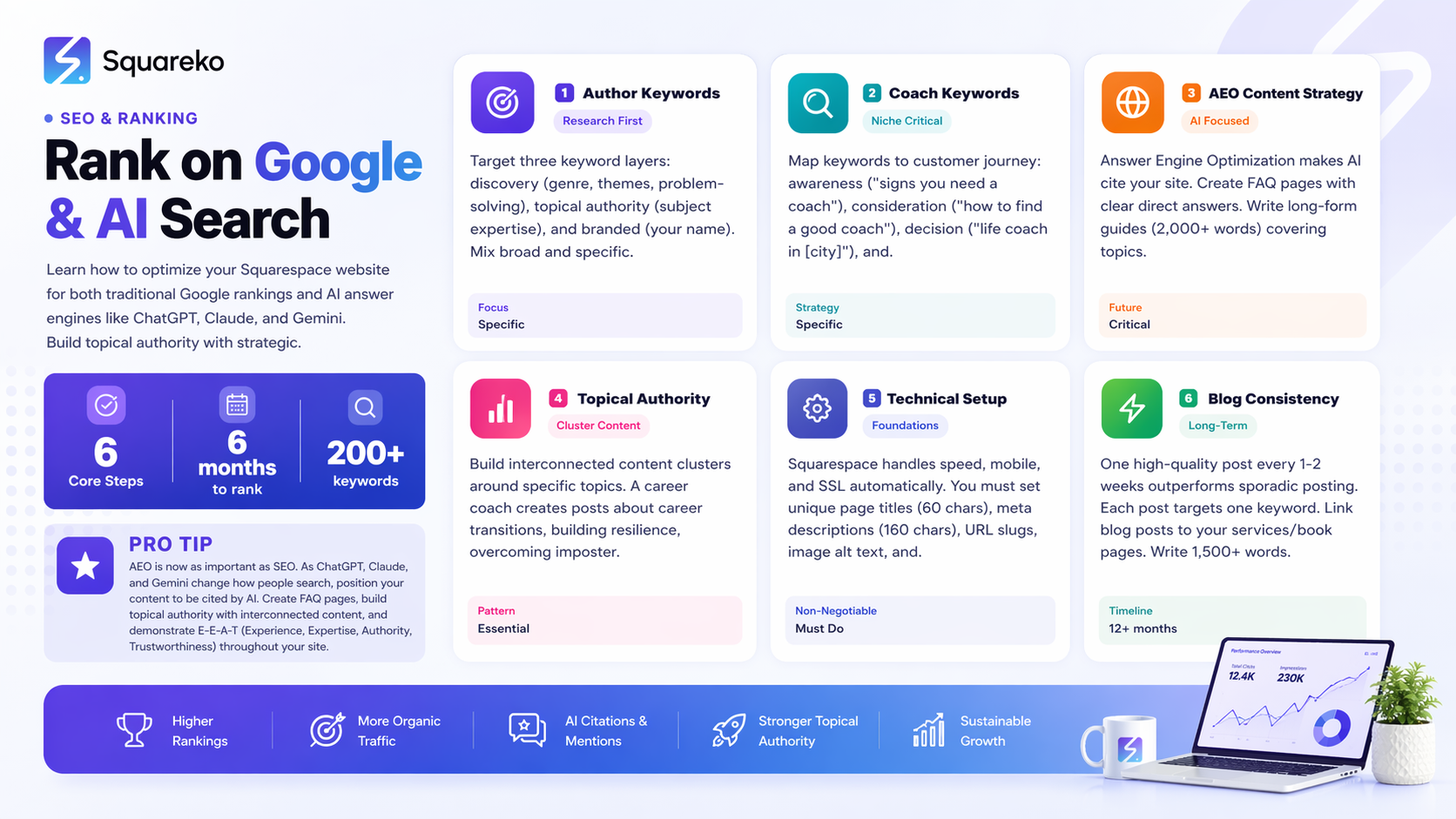
Authors and coaches have unique SEO needs: genre authority, local targeting, and problem-solving content are more important than general traffic.
Squarespace handles most technical SEO automatically, but you need to manually optimize titles, descriptions, and schema markup.
Your keyword strategy should blend three types: branded searches (your name), informational searches (how-to questions), and service/product searches (coaching packages, book recommendations).
AI Search Engine Optimization (AEO) is now critical: structured content, FAQ pages, and schema markup make your site citable by ChatGPT, Claude, and Gemini.
A strategic blog is your SEO engine: it ranks for long-tail keywords, builds topical authority, and gives AI systems multiple pages to cite from your site.
1. Why SEO Is Different for Authors and Coaches
SEO isn't one-size-fits-all, and that's especially true for authors and coaches. Your audience isn't searching the way SaaS companies or e-commerce sites are. Understanding the differences will change how you approach keyword research, content strategy, and even how you measure success.
The Author's SEO Challenge
Authors face a unique search problem. Your potential readers aren't always searching for your book by title—at least not yet. Instead, they're searching for the problems your book solves or the genres you write in.
Someone looking for a book about grief recovery isn't typing Sarah's memoir about loss. They're typing books about grief recovery, best memoirs about loss, or even how to cope with losing a parent. A fantasy reader looking for your epic series might search best fantasy books with strong female leads or series similar to Game of Thrones.
This means your SEO strategy needs to target discovery keywords first, and branded keywords second. Your book's tagline, your genre authority, and your subject matter expertise matter more than keyword density or backlink profiles. You're also competing with Goodreads, Amazon, and major publisher websites—so you need to own the topic, not just chase random book-related terms.
Local SEO doesn't apply much to authors unless you do in-person book events or workshops. But you do need to consider that your readers might be searching authors who write about [topic] or author recommendations for [specific interest]. Building topical authority around your subject matter is how you win those searches.
The Coach's SEO Challenge
Coaches face the opposite problem: hyper-local intent mixed with global reach. A potential client searching life coach near me has completely different intent than someone searching how to become a life coach or is life coaching worth it.
Your keyword strategy needs to serve multiple customer journey stages. Someone early in the decision-making process might search signs you need a coach or how to find the right coach. Someone ready to buy searches life coach prices or book a life coaching session. Someone in your service area searches business coach in [city] or executive coach near [neighborhood].
Coaches also benefit from Google Business Profile optimization, review generation, and local service ads. But you can also serve clients globally if you offer virtual coaching. This means your site needs to target both coach in X city and online coach for [specific niche].
Niche specificity matters heavily for coaches. A general life coach is invisible in search. A life coach for women in tech or executive coach for first-time founders has a fighting chance. The more specific your niche, the easier it is to rank and the more qualified your leads become.
Why Your Industry Needs Topical Authority
Search engines reward sites that demonstrate deep expertise in a specific area. For authors, that means building authority around your subject matter, your genre, and your writing style. For coaches, it means owning your specific coaching niche.
This isn't about writing one perfect article. It's about creating a cluster of related content that all connects together logically. A coach specializing in startup founders might write about:
Founder challenges and common obstacles
Building resilience as a new entrepreneur
How executive coaching helps early-stage companies
Specific problems your ideal clients face
Search engines see these interconnected articles and recognize you as the authority on that topic. This topical authority is what makes you rankable.
2. Squarespace SEO Foundations You Need to Master
Before you jump into keyword research or content strategy, you need to understand what Squarespace handles automatically and what you need to optimize manually. The good news is that Squarespace has matured significantly for SEO. The bad news is that just having a Squarespace site doesn't mean you'll rank—you still need to do the work.
What Squarespace Does Automatically
Squarespace automatically handles several important technical SEO factors:
Site Speed: Squarespace's hosting infrastructure is optimized for performance. Your site gets fast loading times without you having to do anything. This is a significant advantage—page speed is a ranking factor, and Squarespace takes care of it.
SSL Certificates: Every Squarespace site comes with an SSL certificate (https). This was once a major ranking advantage; now it's table stakes. You have it, so move on.
Mobile Responsiveness: Squarespace sites are mobile-first by design. Your site automatically adapts to phones, tablets, and desktops. Google prioritizes mobile-responsive sites, and Squarespace handles this completely.
Sitemap Generation: Squarespace automatically generates your sitemap.xml file and submits it to Google. You don't need to manually create or submit this.
Responsive Images: Squarespace serves appropriately sized images to different devices. Large images don't slow down mobile users.
Basic Structured Data: Squarespace adds basic structured data for your organization, contact information, and content types. This isn't comprehensive, but it's a foundation.
What You Must Optimize Manually
Here's where most authors and coaches drop the ball. Squarespace gives you the tools, but you have to actually use them.
Page Titles: These are not optional. Every page needs a unique, descriptive title that includes your target keyword. Your homepage title might be Divorce Coach for Women in Boston | Empowered After Separation. A blog post about coaching your teenage daughter might be How to Coach Your Teenage Daughter Through Challenges: Expert Tips. These titles appear in browser tabs and search results. They matter.
In Squarespace, you set page titles in the SEO settings for each page. The default is usually just your page name. Change it. Always.
Meta Descriptions: These 160-character snippets appear below your title in search results. Squarespace lets you write a custom meta description for every page. Fill them in. A good meta description summarizes what someone will find on that page and includes your keyword naturally.
For a coaching services page, your meta description might be: Work with a certified life coach specializing in career transitions. Transform your next chapter with personalized coaching for professionals 40+. Learn more and schedule a free consultation.
URL Structure: Squarespace creates clean URLs by default, which is good. But you need to be intentional about slug naming. A blog post about grief recovery should be /blog/books-about-grief-recovery, not /blog/post-47 or /blog/grief-recovery-guide-v2. URLs should be readable, include keywords when possible, and stay consistent. Once a page is live, don't change the URL—it damages your SEO.
Image Alt Text: Every image on your site should have alt text. This serves two purposes: it helps visually impaired visitors understand your images, and it helps search engines understand what the image contains. For an author, an image of your book cover should have alt text like The cover of Sarah Chen's memoir, Finding Light After Loss. For a coach, a photo of yourself should be Sarah Chen, certified life coach and therapist based in Boston.
Squarespace makes it simple to add alt text. When you upload or manage images, there's an alt text field. Use it.
Canonical URLs: By default, Squarespace handles canonical tags correctly. You don't usually need to mess with this unless you're syndicating content or have other weird situations. Just be aware that canonical tags exist and tell search engines which version of a page is the main one if duplicates exist.
Internal Linking: Squarespace doesn't automatically link pages together. You need to manually add internal links in your content. Link from blog posts to your services pages. Link between blog posts on related topics. These links tell search engines how your content relates and help distribute authority throughout your site. For authors, link from blog posts about your book's themes to the book sales page. For coaches, link from FAQ or blog content to your consultation booking page.
3. Keyword Strategy That Works for Authors
Author keyword research is fundamentally different from coaching keyword research because your customer journey is different. Readers discover you through genre, theme, and subject matter—not through a buying decision.
Three Layers of Author Keywords
Layer 1: Discovery Keywords (No brand awareness) These are searches from people who haven't heard of you yet. They're searching for the type of book they want to read or the topic they want to explore.
Examples:
Best books about starting a business
Memoir about recovery from addiction
Science fiction books with diverse characters
Fiction books about grief and loss
Self-help books for busy entrepreneurs
These searches have high volume but mixed intent. Some people are looking for recommendations, some are looking for reviews, some are actually ready to buy. Your goal is to show up in results with a strong book recommendation or topical article that positions you as an authority.
Layer 2: Topical Authority Keywords These target the themes, topics, and problems your book addresses. They often have informational intent—people are learning about a subject, not yet ready to buy.
Examples:
How to recover from burnout as an entrepreneur
Understanding grief in early recovery
Building resilience after failure
Women in tech leadership challenges
How to write a memoir
You might rank for these keywords with your blog content, not necessarily your sales page. But if you write a blog post about Overcoming Perfectionism: Why High-Achievers Get Stuck, you're building topical authority and warming up readers for your book.
Layer 3: Branded Keywords Once someone has heard of you, they search for you directly.
Examples:
Sarah Chen author
[Your Name] books
[Book Title]
[Your Name] website
These are lower volume but higher intent. Someone searching your name is likely already interested. Your job is to make sure your site appears when they search for you, and that it has the information they're looking for (which book, where to buy, how to contact you).
How to Find Author Keywords
Use Google Search Console if you have at least a few months of site history. Check which keywords you're already getting impressions for. These are golden—you're already ranking for them; you just need to optimize those pages to get better click-through rates.
Use Google Trends to understand seasonal patterns. Memoir searches spike after New Year (people reflecting on life) and around grief holidays. Business books spike during New Year resolutions and career transition seasons.
Use Google's autocomplete feature. Start typing books about [your topic] and see what autocompletes. These are real searches people are doing.
Search books about [your topic] and see what appears. Amazon has great search suggestions. Goodreads has great category structures. These show you how readers think about your genre.
Look at author websites you respect. If an author writes in your genre or niche, use SEMrush, Ahrefs, or even just Google Search Console data to see what keywords they rank for.
Building Topical Authority as an Author
The real SEO win for authors comes from building topical authority around what your books address. This means creating an interconnected set of blog posts and pages that cover your subject matter comprehensively.
If you wrote a memoir about recovery from divorce, your topical authority cluster might include:
Blog posts about divorce recovery challenges
A guide to finding the right therapist or coach
Stories from your book (as blog content)
Articles about rebuilding self-esteem after divorce
Posts about co-parenting challenges
Resources for kids going through divorce
Each of these articles internally links to the others. They all relate to recovery from divorce. Search engines recognize this pattern and rank you higher for divorce-related keywords.
The key is variety. Don't write ten articles about divorce recovery. Write articles about grief, resilience, co-parenting, self-esteem, therapy, family dynamics, and other related topics. This breadth shows true expertise.
4. Keyword Strategy That Works for Coaches
Coach keyword research must account for the customer journey: awareness, consideration, and decision.
The Coaching Keyword Framework
Awareness Keywords (Do I need a coach?)
Signs you need a life coach
Benefits of executive coaching
How to know if therapy or coaching is right for me
What does a business coach actually do
How much does coaching cost
These searches show someone early in their journey. They're not sold on coaching yet. Your job is to answer their question honestly and position yourself as a resource.
Consideration Keywords (How do I find the right coach?)
How to find a good life coach
What to look for in a coach
Questions to ask a potential coach
Best coaching certifications
Types of coaching specialties
These searches show someone who knows they want a coach, but is doing research. They want to understand what makes a good coach and how to evaluate one. Content answering these questions positions you as an expert guide, not just a salesperson.
Decision Keywords (I'm ready to book)
Life coach in [city]
Online business coach for freelancers
[Your Name] coach reviews
Book a coaching session online
Coaching packages and prices
These keywords are shorter, more specific, and higher intent. Someone searching life coach in Boston is probably ready to schedule a consultation. Someone searching coaching packages and prices is definitely evaluating whether they can afford you.
Niche-Specific Keywords (You must own your niche)
Business coach for women founders
Executive coach for tech leaders
Career coach for career changers
Confidence coach for introverts
These are the most important. A general life coach is invisible. Specific niches are rankable. If you coach women entrepreneurs, you're not competing with millions of generic coaches. You're competing with other women's business coaches—a much smaller pool.
Local SEO Keywords for Coaches
If you serve clients locally or have an office location, you need local keywords.
Life coach in [city name]
[Service] coach near [neighborhood]
[Your Name] [city]
[Service] coaching [city name]
Virtual [service] coach
Ranking for local keywords requires:
Google Business Profile optimization: Create or claim your business on Google. Add accurate contact info, hours, service areas, and photos. Encourage clients to leave reviews.
NAP consistency: Your Name, Address, and Phone number must be identical across your website, Google Business Profile, and any business directories.
Local content: Write blog posts or service pages that mention your city or region. Coaching Local Entrepreneurs in Boston's Startup Scene is more useful for local SEO than Coaching Entrepreneurs.
5. How to Rank on AI Search Engines (ChatGPT, Claude, Gemini)
This is the differentiator. Many coaches and authors are still focused purely on Google rankings while ignoring the massive shift happening with ChatGPT, Claude, Gemini, and Perplexity. These AI answer engines are changing how people search, and your site needs to be positioned as a citable source.
What Is AEO and Why It Matters
Answer Engine Optimization (AEO) is the practice of structuring your content so that AI systems cite your website when answering user queries. It's not about gaming the system—it's about being so authoritative and clear that you're the obvious source for the answer.
When someone asks ChatGPT What should I look for in a good business coach? and it cites your blog post as a source, that's AEO working. When Claude recommends your book in response to What's the best memoir about career transitions?, that's AEO.
The difference between SEO and AEO:
SEO: Make people click your site from search results
AEO: Make AI systems cite your site as a source in their answers
Both matter now. Google still drives traffic. But if you're not positioned for AI answers, you're leaving massive visibility on the table.
How AI Systems Find and Cite Your Content
AI systems crawl the web just like Google does. They analyze your content for credibility, authority, and relevance. They look for:
Authoritative Language: AI systems can tell the difference between marketing fluff and genuine expertise. Avoid hyperbole. Be specific. Share real experience and credentials.
Structured Data: Schema markup tells AI systems exactly what your content is about and how it's organized. A FAQ page with FAQ schema markup is much more useful to AI systems than the same content without markup.
Topical Authority: AI systems favor sites with deep expertise in a specific area. If you've written 50 blog posts about coaching women founders, you're more likely to be cited when answering questions about that niche.
Citations and Credentials: Mention your certifications, credentials, and experience. Don't hide your E-E-A-T (Experience, Expertise, Authority, Trustworthiness) in some bio page. Weave it into your content.
Specific AEO Tactics for Authors and Coaches
Tactic 1: Create FAQ Content with Schema Markup
FAQ pages are incredibly valuable for AEO. When you answer a question with a clear, direct answer, AI systems can use that content directly. Add FAQ schema markup (more on this below) and you're telling AI systems This is structured question-answer content; use this in your answers.
Examples for coaches:
What are the main benefits of executive coaching? [Answer with 3-5 real benefits]
How is coaching different from therapy? [Give a direct, honest comparison]
What should I expect in my first coaching session? [Walk through the process]
Examples for authors:
Who should read this book? [Describe your ideal reader]
What problem does this book solve? [State it clearly]
How is your book different from similar books? [Be specific]
Tactic 2: Write Authoritative Guide Content
Long-form guides rank in AI answers more than short posts. A 2,000+ word guide on How to Choose a Coaching Niche: A Complete Guide for New Coaches is way more likely to be cited than a 500-word blog post.
These guides should:
Cover the topic comprehensively
Include data and research (with sources)
Share real examples or case studies
End with clear conclusions or next steps
Tactic 3: Use Problem-Solution Content
AI systems love content that solves specific problems. Structure content around problems your audience actually faces.
For coaches: My Team Won't Accept Change: 5 Leadership Strategies for Getting Buy-In solves a real problem. AI systems will cite this when someone asks about change management or team resistance.
For authors: Writing a Memoir About Trauma: How to Tell Your Story Safely solves a real problem and positions you as an expert guide.
Tactic 4: Add Schema Markup Everywhere
Schema markup is structured data that tells AI systems (and Google) exactly what your content is about. Add:
FAQ Schema: For FAQ pages and Q&A content
Person Schema: For author bios and coach profiles (this is especially important)
Book Schema: For authors—add this to your book sales pages and book-related content
LocalBusiness Schema: For coaches serving specific locations
Organization Schema: For your homepage and about pages
[More on implementing this in the schema section below]
Tactic 5: Build Content Clusters Around Specific Problems
Rather than writing random blog posts, create content clusters that all address one specific problem from different angles.
For a coach specializing in career transitions, a cluster might be:
Career Transition Anxiety: What's Normal and What Needs Help
How Long Does a Career Transition Usually Take?
5 Mistakes People Make During Career Transitions
The Role of Coaching in Successful Career Transitions
What to Tell Your Current Employer During a Career Transition
All these articles link to each other. They all address variations of I'm changing careers and feeling overwhelmed. AI systems see this comprehensive coverage and cite your site as THE authority.
Tactic 6: Include Real Data and Case Studies
AI systems favor content backed by data. Real transformation data, research citations, and case studies make your content more citable.
For coaches: In my 5 years of working with career transitioners, I've noticed 87% struggle with imposter syndrome in the first 3 months. Here's what I do about it... This specific experience is valuable to AI systems.
For authors: Reference studies, research, or expert interviews related to your book's themes. This signals authoritative content.
Tactic 7: Make Your Site a Source, Not Just a Seller
The most important AEO tactic is this: provide so much value that AI systems want to cite you.
Don't just sell coaching packages or books. Provide:
Detailed guides about your subject matter
Honest answers to hard questions
Resources and references
Frameworks and tools people can use
When you're generous with information, AI systems recognize you as a resource worth citing. This has the added benefit of building trust with human visitors too.
6. Blogging Strategy for SEO Authority and Traffic
A blog isn't optional for SEO success. It's your primary tool for building authority, capturing long-tail keywords, and generating recurring traffic. But you need a strategy—random blog posts won't help.
Why Blogs Matter More Than Ever
Your homepage and service pages are static. They get updated occasionally. But a blog is constantly growing content that ranks for new keywords, answers new questions, and gives both Google and AI systems more pages to evaluate.
A website with just a homepage and services page might rank for 20-30 keywords. The same website with a strategic blog ranks for 200-300 keywords. This broader keyword coverage drives more traffic and positions you as a more comprehensive authority.
For authors specifically, a blog is where you build relationship with potential readers. They discover you through a blog post about your book's theme, and then they check out your book. For coaches, a blog shows your coaching style and philosophy before someone books a consultation.
Content Ideas for Author Blogs
About Your Books
Behind-the-scenes insights about your book
Deleted scenes or expanded chapters
The research process and inspiration
Why you wrote this particular book
Q&A about your book
About Your Genre
Trends in your genre
Recommendations for other authors in your space
Analysis of how your book fits in the genre
Discussions of common themes in your genre
About Your Subject Matter
Deep dives into topics your book covers
Current events related to your book's themes
How-to content for topics in your book
Resources for readers interested in your topic
Writing and Author Life
Writing process and tips
Overcoming writer's block
Publishing journey (memoir-style)
Lessons learned as an author
Reader Resources
Book club discussion guides
Reading lists on specific themes
Resources for topics your book addresses
Q&A from readers
Content Ideas for Coach Blogs
Solving Client Problems
Common obstacles your clients face
Step-by-step guides for challenges you coach on
Real (anonymized) case studies showing transformations
Tools and exercises from your coaching practice
Answering Decision Questions
Do I need a coach?
How is coaching different from [therapy/mentoring/advice]?
What makes a good coach?
How much should coaching cost?
Establishing Your Philosophy
Your coaching approach and why
What you believe about change and growth
Your values and how they show up in coaching
Stories that illustrate your philosophy
Niche-Specific Content
Trends affecting your specific niche
Unique challenges in your niche
Resources for your niche
Stories about transformation in your niche
Building Authority
Research and insights from your work
Patterns you've noticed across clients
Data you've gathered from your practice
Frameworks you've developed
Blog Posting Frequency and Consistency
Consistency matters more than frequency. Publishing one high-quality post every two weeks is better than publishing five mediocre posts once a month.
Recommended frequency: One blog post every 1-2 weeks (26-52 posts per year)
This is enough to build authority without requiring unsustainable effort. Each post can target 1-2 keywords and contribute to your topical authority.
Internal Linking Strategy in Your Blog
Don't just write blog posts and publish them. Link them strategically.
Link from blog posts to your core pages:
Link from relevant blog posts to your services pages
Link from blog posts to your book sales page
Link to your consultation booking page when relevant
Link between blog posts:
Link from newer posts to older posts on similar topics
Create a related posts section at the bottom of each post
In the text, mention and link to other posts that provide more detail
Link from core pages to blog posts:
Your coaching services page should link to blog posts that dive deeper into what you offer
Your book sales page should link to blog posts exploring themes from the book
These internal links accomplish two things: they help readers discover more of your content, and they tell search engines how your content relates. This interconnection builds topical authority.
7. Technical SEO Checklist for Your Squarespace Site
You don't need to be a technical person to handle Squarespace SEO. But you do need to complete this checklist.
SEO Settings in Squarespace
In your Squarespace admin, go to Settings > SEO & Metadata. Here you'll see:
Site Title and Description (Homepage meta data)
Set a unique site title: [Your Name] | [Your Profession] or [Your Name] | [Your Book/Niche]
Write a compelling meta description (max 160 characters) that would make someone click
Favicon
Add a custom favicon (the small image that appears in browser tabs)
This doesn't directly impact SEO but improves user experience
Page-by-Page SEO Setup
For every page on your site (home, services, about, blog posts):
Set a Unique Page Title
Maximum 60 characters (leaves room in search results)
Include your target keyword
Make it descriptive, not clickbait
Example: Divorce Recovery Coaching for Women | Sarah's Practice
Write a Custom Meta Description
Maximum 160 characters
Summarize what the page offers
Include your keyword if it fits naturally
Include a call-to-action if appropriate
Example: Expert coaching for women navigating divorce. Learn strategies to rebuild confidence, co-parent effectively, and create your new life. Schedule a free consultation.
Set URL Slug
Keep it short and descriptive
Use hyphens to separate words
Include keyword if relevant: /divorce-recovery-coaching not /services-3
Don't use dates or version numbers in URLs
Add Image Alt Text
Every image on the page needs alt text
Describe what the image shows
Include keyword if relevant, but don't force it
Example: Sarah Johnson, divorce recovery coach, sitting in a coaching office (not coach, divorce, best coaching, expert coach, coaching practice)
Remove Old Pages
If you delete a page that ranked well, set up a 301 redirect to a relevant page
This preserves any ranking authority
In Squarespace, use the Redirect feature when deleting pages
Submission and Monitoring
Submit Your Sitemap to Google Search Console
Create a free Google Search Console account (if you haven't already)
Verify your site ownership
Go to Sitemaps and add: yoursite.com/sitemap.xml
Squarespace creates this automatically, so you just need to submit it
Monitor Search Console Monthly
Check which keywords you're getting impressions for
See which pages have the most clicks
Fix any crawl errors or warnings
Identify opportunities to improve click-through rate on your top pages
Submit Your Sitemap to Bing Webmaster Tools
Create a free Bing Webmaster Tools account
Add your site
Submit your sitemap
Bing provides different insights than Google
Set Up Google Analytics 4 (GA4)
Create a Google Analytics account
Add your Squarespace site to GA4
Track where traffic comes from
Understand which content drives conversions (consultations booked, books sold)
Speed Optimization
Squarespace handles most of this automatically, but you can optimize further:
Use Squarespace's native image feature (don't embed large files)
Limit large video files (use YouTube or Vimeo embeds instead)
Minimize plugins and integrations (each one adds load time)
Keep homepage reasonably lightweight (lots of images = slower loads)
Check your page speed with Google PageSpeed Insights. Squarespace sites typically score 75+ on mobile if you're not going crazy with images or third-party code.
8. Local SEO for Coaches
If you work with clients locally or in a specific region, local SEO is essential.
Google Business Profile (GBP)
This is non-negotiable. Google Business Profile is the single most important local SEO factor.
Set up your profile:
Go to google.com/business
Create or claim your business
Add accurate information:
Business name (exactly as it appears legally)
Address (if you have a physical location; omit if virtual-only)
Phone number
Website (your Squarespace site)
Business categories (pick the most specific ones)
Hours (if applicable)
Service areas (if you serve multiple locations)
Optimize for local search:
Add high-quality photos (of your office, you coaching, client testimonials)
Write a compelling business description (120 characters, include your niche)
Add your services as specific offerings
Keep information updated
Post regular updates (business posts, offers, events)
Reviews and Reputation
Reviews are a local SEO ranking factor and a trust factor for humans.
Encourage reviews:
Ask satisfied clients to leave reviews on your GBP
Link to your review page from your website
Email clients asking for reviews (after their transformation is evident)
Never offer incentives for reviews (this violates Google's policies)
Always respond to reviews, both positive and negative
Respond to reviews:
Thank people for positive reviews
Address concerns in negative reviews professionally
Show that you care about client experience
NAP Consistency
NAP = Name, Address, Phone. This must be identical everywhere:
Your website
Google Business Profile
Business directories (Yelp, psychology directories, coaching directories)
Email signature
Social media bios
If you're at 123 Main Street, Boston, MA 02101 on your website but 123 Main St, Boston, Massachusetts on Yelp, search engines get confused. Consistency signals legitimacy.
Local Content
Write content that mentions your location or region:
Blog posts about local issues (Coaching Leaders Through Boston Tech Layoffs)
Service pages for specific neighborhoods (Executive Coaching in Downtown Boston's Financial District)
Local events or trends you comment on
Partnerships with other local professionals you mention
This local content tells Google that you're actually serving your geographic area.
Ready to Get Your Author or Coach Website Found on Google and AI?
SEO doesn't have to be complicated. It's not about gaming algorithms or chasing trends. It's about creating a website that truly serves your audience, answers their questions directly, and proves you're an authority in your niche. That's exactly what this guide walks you through.
Here's what we've covered: the specific keyword strategies that work for authors and coaches, how to optimize every page of your Squarespace site, how to build a blog that drives real traffic, and—most importantly—how to make sure you're positioned to be cited by AI search engines alongside Google.
But knowing the strategy and implementing it are two different things.
This is where Squareko comes in. We specialize in helping authors and coaches rank on both Google and AI search engines. We've built dozens of Squarespace sites for coaches, authors, and service professionals who wanted better visibility and more qualified leads. We understand your niche. We know what keywords your ideal clients search. We know how to structure your Squarespace site not just for looks, but for discoverability.
Here's what you get when working with Squareko:
Complete SEO Audit of your current site, identifying quick wins and major opportunities. We show you exactly where you're leaving visibility on the table.
Strategic Keyword Research specific to your niche. Not generic keywords—the exact search terms your ideal readers or clients are using.
Content Strategy and Creation that builds topical authority and addresses both Google and AI search. We write or guide you through creating blog content that ranks.
Technical Squarespace Setup that maximizes every SEO feature the platform offers. We handle schema markup, metadata, internal linking, and all the behind-the-scenes optimization you might miss.
Ongoing SEO Monitoring so you know what's working and where to double down. We track your rankings, monitor AI citations, and adjust strategy as the landscape changes.
Whether you're launching a new coaching practice, publishing your first book, or rebranding an existing site, the foundation matters. Get it right from the start, and you'll spend the next two years reaping the benefits of better visibility and more qualified leads.
Ready to start? Schedule a consultation with the Squareko team. We'll audit your site, identify your biggest opportunities, and show you a concrete roadmap to get found on Google and AI.
Frequently Asked Questions
-
Yes, Squarespace is excellent for SEO. It handles technical fundamentals automatically (speed, mobile responsiveness, SSL, sitemaps). However, Squarespace doesn't do your keyword research, write your content, or set up your metadata—you have to do that. The platform is good enough that your SEO success depends on strategy and effort, not platform limitations.
-
Expect 3-6 months to start seeing meaningful ranking improvements. New sites get a "sandbox period" where Google is cautious about giving them prominent rankings. With consistent, quality content and proper optimization, you'll typically see movement in months 3-6. Major ranking gains often take 12+ months.
-
Start with Google Search Console if you have some site history. Look at what you're already getting impressions for. Use Google's autocomplete feature (type "books about..." or "[your niche] coach" and see suggestions). Look at what competitors rank for using tools like SEMrush or Ahrefs (free versions available). Use Reddit and Facebook groups in your niche to see what questions people actually ask. The best keywords are the ones real people in your target audience are already searching for.
-
Build comprehensive content on your topics with clear answers, use FAQ schema markup, establish topical authority with interconnected content, and include your E-E-A-T (Experience, Expertise, Authority, Trustworthiness) throughout your site. Create an FAQ page with FAQ schema markup. Write long-form guides on problems your niche faces. Make sure your site is accessible and crawlable by AI systems (which it is on Squarespace by default). The more authoritative you become on a specific topic, the more likely you are to be cited.
-
Not strictly required, but highly recommended. A blog gives you multiple pages to rank for different keywords, helps you build topical authority, and demonstrates ongoing expertise. Without a blog, you're limited to ranking for maybe 20-30 keywords (your main pages). With a strategic blog, you can rank for hundreds of keywords.
-
Squarespace added native schema markup features that make this easier. In the page editor, you can add specific metadata for People (for author/coach bios), FAQs, and Book information. For more complex schema, you can add code in the code injection panel (Settings > Code Injection) at the page level or site level. If you're not comfortable with code, you can use a JSON-LD generator and paste the code into your site settings.
-
Mix three types: discovery keywords (genre, theme, similar books), topical authority keywords (problems your book solves), and branded keywords (your name, book title). Don't chase generic terms like "books" or "fiction." Target specific intent like "memoirs about grief," "fantasy books with strong female protagonists," or "self-help books for burnout recovery." The more specific, the better.
-
AEO (Answer Engine Optimization) is making sure AI systems like ChatGPT, Claude, and Gemini cite your website when answering relevant questions. As people increasingly use AI to search for answers, appearing in those AI responses is as important as appearing in Google results. AEO requires clear, structured content, FAQ pages, schema markup, and comprehensive topical authority.

From custom website design to SEO strategy, we help businesses launch a site that looks professional and performs better.

About the Author
I'm Walid Hasan, a Certified Squarespace Expert and Squarespace Circle Platinum Partner with over 12 years of hands-on experience designing and optimizing high-performing websites. Over the years, I've had the privilege of building more than 2,000 Squarespace websites for clients around the world, always focusing on clean design, strong user experience, and conversion-driven results.
