
5 Must-Have Features for Author and Coach Websites on Squarespace
Introduction
Your author or coach website isn't just a digital business card—it's your most powerful sales tool. Whether you're selling books, booking speaking engagements, or filling your coaching roster with ideal clients, the features you choose on Squarespace directly impact your revenue and reach. The problem is that most author and coach websites are missing the critical tools that turn visitors into paying customers.
After working with dozens of authors and coaches, we've identified the exact author coach website features Squarespace creators need to win. These aren't vanity metrics or nice-to-haves. They're the features that separate successful author and coach websites from those that look pretty but don't convert. In this post, we'll walk through five non-negotiable features—and show you exactly how to set up each one on Squarespace.
You don't need a complicated tech stack or expensive software subscriptions. Squarespace was designed with service-based professionals in mind, and when configured correctly, it can do everything you need to grow your author or coaching business.
Key Takeaways 5 Must-Have Features for Author and Coach Websites on Squarespace.
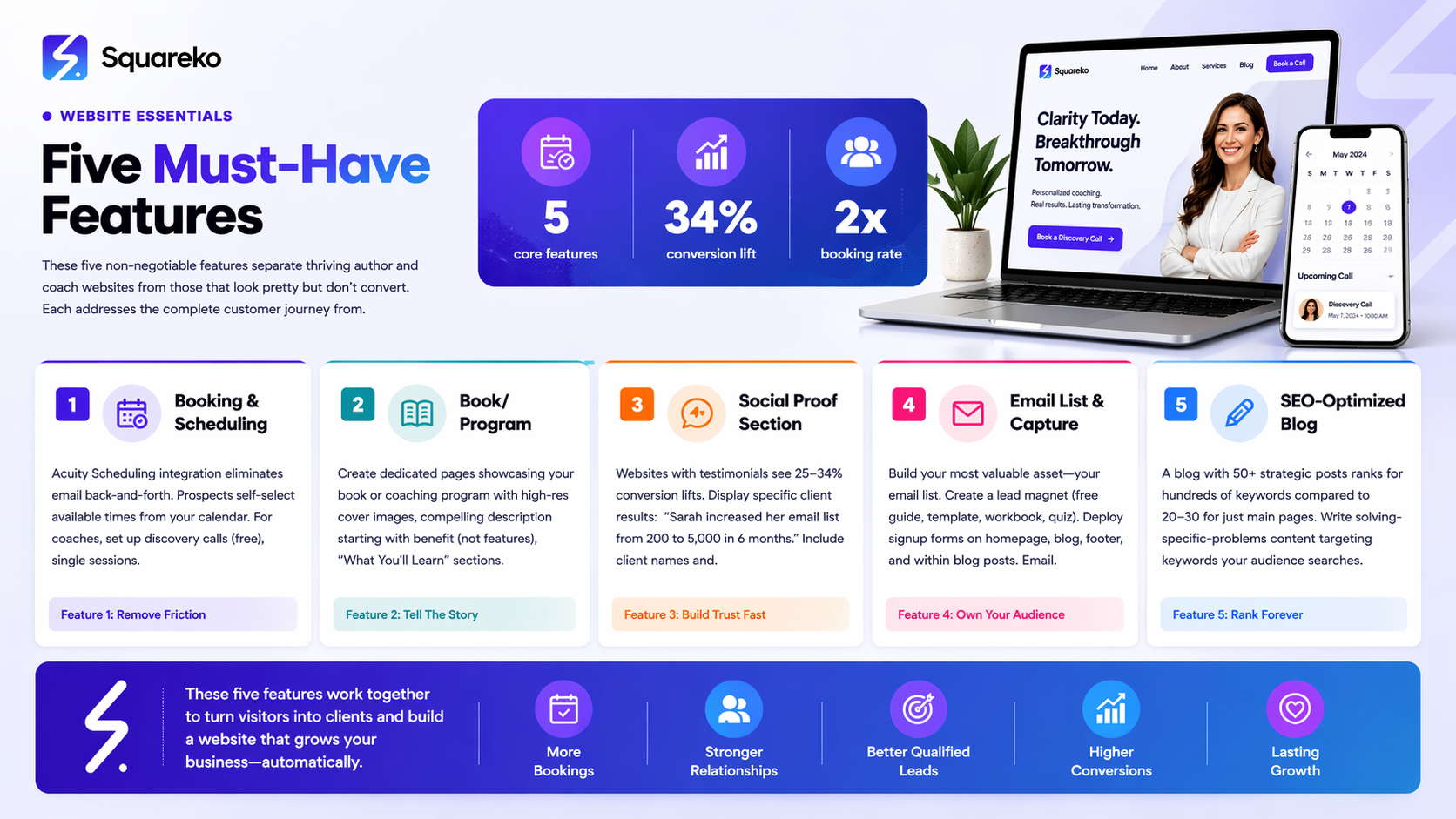
A professional booking system (Acuity Scheduling integration) is non-negotiable for coaches and essential for authors seeking speaking gigs or consultations
Dedicated showcase pages for books, programs, or packages convert better than generic product listings because they tell a story
Social proof sections (testimonials, case studies, media logos) increase trust and boost conversion rates by up to 34% for service-based businesses
Email list building outperforms social media for authors and coaches because you own your audience and aren't subject to algorithm changes
An SEO-optimized blog positions you as an authority in your niche and drives long-term organic traffic without paid advertising
Why Your Author or Coach Website Needs the Right Features
Your website is always selling. Every page, every section, every word either moves visitors closer to becoming clients or pushes them away. For authors, this means converting readers into book buyers, newsletter subscribers, and speaking engagement clients. For coaches, it means filling your calendar with qualified leads who are ready to invest in your services.
The difference between a website that generates consistent business and one that sits idle often comes down to five critical features. These aren't trendy add-ons or creative flourishes—they're foundational elements that handle the mechanics of converting interest into action.
When you combine a Squarespace website with the right features, you create a system that works 24/7. A prospect can discover you through Google search, land on your blog post, read about your coaching program, book a discovery call, and receive an automated confirmation email all without you lifting a finger. That's the power of a purpose-built author or coach website.
The five features we'll cover in this post address the complete customer journey: they help visitors discover you, learn about what you offer, see proof of your expertise, take the next step, and stay connected over time.
Feature #1: Booking & Scheduling System
If you're running a coaching practice or you speak professionally, a booking system isn't optional—it's your front desk, your calendar manager, and your payment processor all in one.
A booking system eliminates the back-and-forth email dance that wastes everyone's time. Instead of Is next Tuesday at 2 PM good? What about 3 PM? Let me check my calendar and get back to you, your clients self-select an available time from your calendar. For coaches especially, this means more booked sessions and less administrative overhead. For authors, a booking system streamlines speaking inquiries, consultation requests, and media appearances.
How to Set Up Acuity Scheduling on Squarespace:
Start by creating an Acuity Scheduling account (it integrates seamlessly with Squarespace). Once you've set up your account and created your appointment types—whether that's a 30-minute coaching discovery call, a 90-minute intensive session, or a speaking inquiry form—you'll add it to Squarespace.
In your Squarespace dashboard, go to Pages > Add Page. Choose Scheduling from the template library, or navigate to an existing page where you want to add the booking feature. Click the + icon and search for Acuity Scheduling. Select the embedded Acuity widget and link it to your Acuity account. You can customize the colors and branding to match your site, and set it to display only your available appointment types.
For coaches, create multiple appointment types: a free 20-minute discovery call (which most serious prospects will book), a paid initial consultation, and ongoing session packages. For authors, create forms for Speaking Inquiry, Media Appearance Request, and One-on-One Consultation.
Squarespace Pro Tip: Under Acuity's settings, enable intake forms for coaching discovery calls. This means when a prospect books, they automatically fill out questions like What's your biggest challenge? or What are you hoping to achieve? You'll get their answers before the call even starts, making the conversation far more productive. You can customize these forms for each appointment type, so your discovery call intake looks different from your paid session intake.
Feature #2: Book or Program Showcase Page
A generic My Books or My Programs page doesn't convert. A dedicated showcase page that tells the story of your book or program, shows what results it delivers, and makes it easy to buy or book does.
For authors, your book is often the gateway to everything else—speaking gigs, coaching clients, podcast appearances. A professional book showcase page with high-quality cover images, a compelling description of what readers will learn, and direct purchase links (Amazon, your own shop, indie bookstores, signed copy options) dramatically increases conversions. For coaches, your program page does the same thing: it showcases outcomes, explains what's included, demonstrates value, and has a clear call-to-action.
The key difference between a mediocre product page and a converting one is specificity and storytelling. Don't just say This book is about productivity. Say This book walks you through a 30-day system to organize your home office, regain focus, and finish your creative projects months earlier than you thought possible.
How to Set Up on Squarespace:
Create a new page for your book or coaching program. Use a design that emphasizes the book cover or program hero image on one side, with supporting text on the other. Squarespace's Showcase or Gallery layouts work well for this.
For authors:
Add a high-res book cover image (minimum 400x600 pixels)
Write a compelling book description (75-150 words) that starts with a benefit, not features
Include a What You'll Learn section with 5-7 bullet points
Add purchase buttons or links to multiple buying options (Amazon, Smashwords, your own store, signed copies)
Include a What Readers Are Saying section with 3-5 reviews or testimonials
For coaches:
Use a hero image or program graphic at the top
Include a clear What's Included section with 6-10 components
Highlight the specific outcomes or results clients can expect
Show pricing (or investment if you prefer) and what that includes
Add a prominent Book a Discovery Call button
Include client testimonials or case study snippets
Squarespace Pro Tip: Use Squarespace's Summary Block to create a structured Program Details section. You can add icons for different components (a calendar icon for 12 Weeks of Coaching, a video icon for Video Lessons, a checkbox icon for Done-with-You Implementation). This visual breakdown helps prospects quickly scan what they're getting, and the visual elements make the section more engaging than text alone.
Feature #3: Social Proof Section
Trust is the currency of author and coach websites. A stranger lands on your site with no prior knowledge of you. Within 15 seconds, they make a gut-level decision: Do I trust this person? Am I going to read more? The difference between yes and no is often social proof.
Social proof comes in many forms: testimonials from clients or readers, case studies with specific results, media logos showing you've been featured in credible publications, book review snippets, podcast appearance logos, and speaking engagement lists. Each of these signals to a new visitor: Other people have trusted this person. You can too.
Research shows that websites with customer testimonials and social proof see conversion rate increases of 25-34%. For authors, this might mean more book sales. For coaches, it means more qualified leads filling your discovery call calendar.
How to Add Social Proof on Squarespace:
Testimonials Block: Create a dedicated section on your homepage or services page. Add a Testimonials or Reviews block from the Squarespace library. Include client or reader names, their results, and a photo if possible. Make sure testimonials are specific and quantifiable: Sarah increased her email list from 200 to 5,000 subscribers in 6 months beats Sarah loved the coaching.
Case Studies Page: Create a full case study page that walks through one client's transformation. Structure it as: Challenge → Solution → Results. Include before/after metrics, the timeframe, and what they appreciated most about working with you. This is especially powerful for coaches.
Media Logos Section: If you've been featured in Forbes, The New York Times, Medium, podcasts, or other publications, create a section with logos or links to those appearances. Add a simple text line above: As featured in or Seen in. You can link each logo to the publication to build authority.
Book Reviews or Amazon Reviews: For authors, embed a few star ratings and review snippets. Squarespace doesn't have a native Amazon reviews pull, but you can screenshot and embed reviews, or use a service like to automatically pull them.
Speaking or Podcast Appearances: Create a simple list of podcasts you've appeared on, speaking engagements you've delivered, or high-profile interviews. Include the date and a link if possible.
Squarespace Pro Tip: In Squarespace, use the Quote block for individual testimonials to make them visually distinct. Add a small client photo next to their testimonial to increase perceived authenticity. If you don't have photos, at least include their name, title, and company (if relevant). This additional detail makes the testimonial feel more real and trustworthy than an anonymous This was great!
Feature #4: Email List & Newsletter Capture
If you're building your author or coach business, your email list is your most valuable asset. Unlike social media followers, your email subscribers are people who have explicitly agreed to hear from you. They don't disappear because of an algorithm change. They can't be taken away by a platform update. They're yours.
For authors, email subscribers become repeat book buyers, early reviewers, and word-of-mouth promoters. For coaches, email subscribers who stay engaged eventually become paying clients. The conversion rate from email subscriber to client is typically 2-5%, while the conversion rate from social media follower to client is often under 0.5%.
A lead magnet is the bait that gets visitors to sign up. For authors, this might be a free chapter, a character guide for a fiction series, or a downloadable writing guide. For coaches, it might be a free resource guide, a downloadable assessment tool, a mini-course, or a worksheet that solves a specific problem in your niche. The best lead magnets solve a small, immediate problem for your visitor.
How to Set Up Email Capture on Squarespace:
Squarespace has built-in email signup forms. You have three primary deployment options:
Inline Forms: Add an email signup form directly on your page (usually between sections). Go to the page where you want the form, click +, search for Form, and choose Email Signup Form. Customize the headline (make it benefit-focused, not generic), the Sub-headline, the button text, and the confirmation message. This works well on your homepage or blog.
Popup Forms: Create a popup that appears when a visitor lands on your site or tries to leave. In Squarespace, go to Pages > Website Tools > Pop-ups, click Create Pop-up, and select Email Signup. Set the trigger (immediate, on exit, after X seconds) and customize the design to match your brand. Popups have a higher conversion rate than inline forms (8-15% vs. 3-5%), but they're also more intrusive, so use them strategically.
Dedicated Landing Page: Create a full page dedicated to your lead magnet, with a form on that page. This works well for authors and coaches who want to direct traffic from ads, social media, or podcast interviews to a single clear offer. The page should have a compelling headline, 2-3 benefits of your lead magnet, a preview image, and the signup form.
For all three options, connect your Squarespace email signup to your email service provider. If you're using Squarespace's built-in email, subscribers automatically go to a default list. If you use Mailchimp, ConvertKit, or another service, go to Pages > Website Tools > Email Settings and authenticate your email provider.
Squarespace Pro Tip: Create a separate email signup form for each lead magnet. Instead of Sign Up for My Newsletter, your button should say Get My Free Chapter or Download the Coaching Assessment. Specific CTAs convert 30-50% better than generic ones. Also, keep your form to just email address (and maybe first name)—every additional field drops your conversion rate by 5-10%.
Feature #5: SEO-Optimized Blog
A blog isn't a nice-to-have for authors and coaches. It's your long-term traffic engine. A single well-written blog post can bring in qualified traffic for years, while social media posts disappear from view within hours. More importantly, a blog full of keyword-optimized content positions you as an authority in your niche and helps Google understand what you're an expert in.
For authors, a blog about your writing process, behind-the-scenes book creation, or your niche topic (if you write non-fiction) builds anticipation for your books and keeps readers engaged between releases. For coaches, a blog addressing common client questions and challenges establishes trust, helps prospects decide if you're the right coach, and brings in clients actively searching for solutions.
Search engines want to rank websites that answer questions. A coached with articles titled How to Overcome Imposter Syndrome as a First-Time Coach or 5 Questions to Ask Yourself Before Hiring a Business Coach will get found by people actively searching these topics. That's traffic that turns into clients.
How to Structure Your Blog on Squarespace:
Squarespace's blog platform is straightforward. Create a new blog collection, then start adding posts. Each post should target one specific keyword or keyword phrase related to your niche.
When writing posts for author and coach audiences:
Write posts that answer real questions your ideal clients or readers are asking. Use Google's autocomplete feature to see what people search for. Type How to [your topic] into Google and see what appears.
Aim for 1,500-2,500 words per post for maximum ranking potential and value delivery.
Use your focus keyword in the first 100 words and naturally throughout the post.
Structure posts with an H2 subheading every 2-3 paragraphs to make them easy to scan.
Include internal links to relevant pages on your site (your coaching program page, your book page, another blog post).
Add a author bio and social links at the end of each post to keep readers engaged with you.
Use featured images with text overlays so they're visually distinct in social media shares.
Post ideas for authors:
How to Write a Book in [timeframe]
The [Number] Elements Every [Genre] Novel Needs
Behind the Scenes: How I Wrote [Your Book Title]
Where to Find Beta Readers for Your Manuscript
[Your Niche] Trends I'm Watching in [Year]
Post ideas for coaches:
The [Number] Signs You Need a [Type] Coach
How to Choose the Right Coach: A Complete Guide
The [Number] Mistakes I See [Your Client Type] Make
[Result] in [Timeframe]: Here's How We Did It
[Your Niche] Success Story: How [Client Name] Achieved [Result]
Squarespace Pro Tip: Use Squarespace's built-in SEO settings on each blog post. Click Settings > SEO and fill in your target keyword, write a custom meta description (the snippet that appears in search results), and enable the slug to be keyword-rich. Also enable Show excerpt on blog list page so your blog homepage shows snippets of each post—this increases click-through rates from the blog index to individual posts.
Bonus: The Features Most Authors and Coaches Miss
Beyond the core five features, three additional elements separate thriving author and coach websites from average ones:
Press or Media Kit Page: Many coaches and authors overlook this, but journalists, podcast hosts, and event organizers often search for media kits before reaching out. A simple one-page media kit showing your photo, a 50-word bio, key statistics (books sold, clients coached, followers, expertise areas), press quotes, and media appearance history makes it dead simple for people to pitch you for opportunities. Squarespace template: Use a simple page layout with sections for each element.
Video Integration: A 60-second video of you introducing your coaching program, or a speaking reel from past engagements, dramatically increases engagement and trust. Embed videos from YouTube or Vimeo directly on your homepage, program pages, or About page. Video visitors spend 88% more time on your site than text-only visitors.
Mobile-First Experience: Over 60% of traffic now comes from mobile devices. Squarespace templates are mobile-responsive by default, but don't assume your site looks good on phones without checking. Test your site on multiple devices. Pay special attention to your booking forms, email signup forms, and purchase buttons—make sure they work smoothly on small screens. A friction-free mobile experience directly impacts conversions.
Frequently Asked Questions
-
A: If you want to maximize conversions and create a complete customer journey, yes. However, prioritize based on your business model. Coaches absolutely need a booking system. Authors need a book showcase page and email capture. All creators benefit from social proof and a blog.
-
A: Squarespace's email tool is solid for getting started, but if you plan to send regular newsletters (which you should), a service like Mailchimp, ConvertKit, or ActiveCampaign gives you more customization, automation, and segmentation options. The good news: they all integrate seamlessly with Squarespace.
-
A: Consistency beats frequency. One high-quality post per month beats four rushed posts per month. Most successful authors and coaches publish 2-4 posts per month, but if that's not realistic for you, one quality post every other week is solid. The key is maintaining a regular schedule Google can rely on.
-
A: Acuity Scheduling is the most tightly integrated, but Calendly, HubSpot, and others also work. Test them out. Acuity is particularly strong for coaches because it offers intake forms, package pricing, and payment processing.
-
A: Use real names, photos, and specific results. "Best coach ever!" means nothing. "After 90 days of working with Sarah, I landed three new $10K clients and structured my business so I work 20 hours per week instead of 60" is credible and compelling. Also, don't be afraid to ask clients for permission to use feedback. Most are happy to endorse you.
-
A: Typically 3-6 months before you see meaningful traffic, longer if you're in a competitive niche. This is why starting now matters—the posts you publish in March will be bringing in traffic by September and beyond. Don't expect immediate results, but do expect compounding results over time.
-
A: Start collecting them immediately. Ask your first 5-10 clients or readers for feedback and permission to use it on your site. Offer something small in return (a free session, a signed book copy). Once you have 3-5 solid testimonials, you can launch. As you work with more people, keep adding new testimonials to stay current.
-
A: Yes, but make sure people are directed to your booking system or email capture form first. Put a contact form (name, email, message) on a contact page, but funnel most inquiries through your booking system or lead magnet. This ensures you capture their email and control the conversation flow.
Want All 5 Features Set Up Professionally?
Knowing what your website needs and actually building it are two different things. Setting up a booking system, creating a compelling product showcase, building social proof sections, configuring email capture, and launching a keyword-optimized blog takes time, technical know-how, and strategy.
If you'd rather focus on writing your books or coaching your clients instead of wrestling with website features, Squareko specializes in exactly this. We build Squarespace websites for authors and coaches with all five of these features pre-configured, designed, and optimized. We handle the setup so you can focus on the work only you can do.
We've helped authors launch book websites that sell, and coaches build coaching websites that fill their calendar with qualified leads. We know Squarespace inside and out, and we know what converts for authors and coaches specifically.
If you're ready to stop wondering whether your website is doing its job and start knowing it's working 24/7 to drive book sales, coaching clients, and speaking opportunities, let's talk. Schedule a free consultation with our team to discuss your author or coach website and how these five features can transform your business.

From custom website design to SEO strategy, we help businesses launch a site that looks professional and performs better.

About the Author
I'm Walid Hasan, a Certified Squarespace Expert and Squarespace Circle Platinum Partner with over 12 years of hands-on experience designing and optimizing high-performing websites. Over the years, I've had the privilege of building more than 2,000 Squarespace websites for clients around the world, always focusing on clean design, strong user experience, and conversion-driven results.
