
How to Build a Life Coaching Website on Squarespace That Fills Your Calendar
Key Takeaways How to Build a Life Coaching Website on Squarespace That Fills Your Calendar.
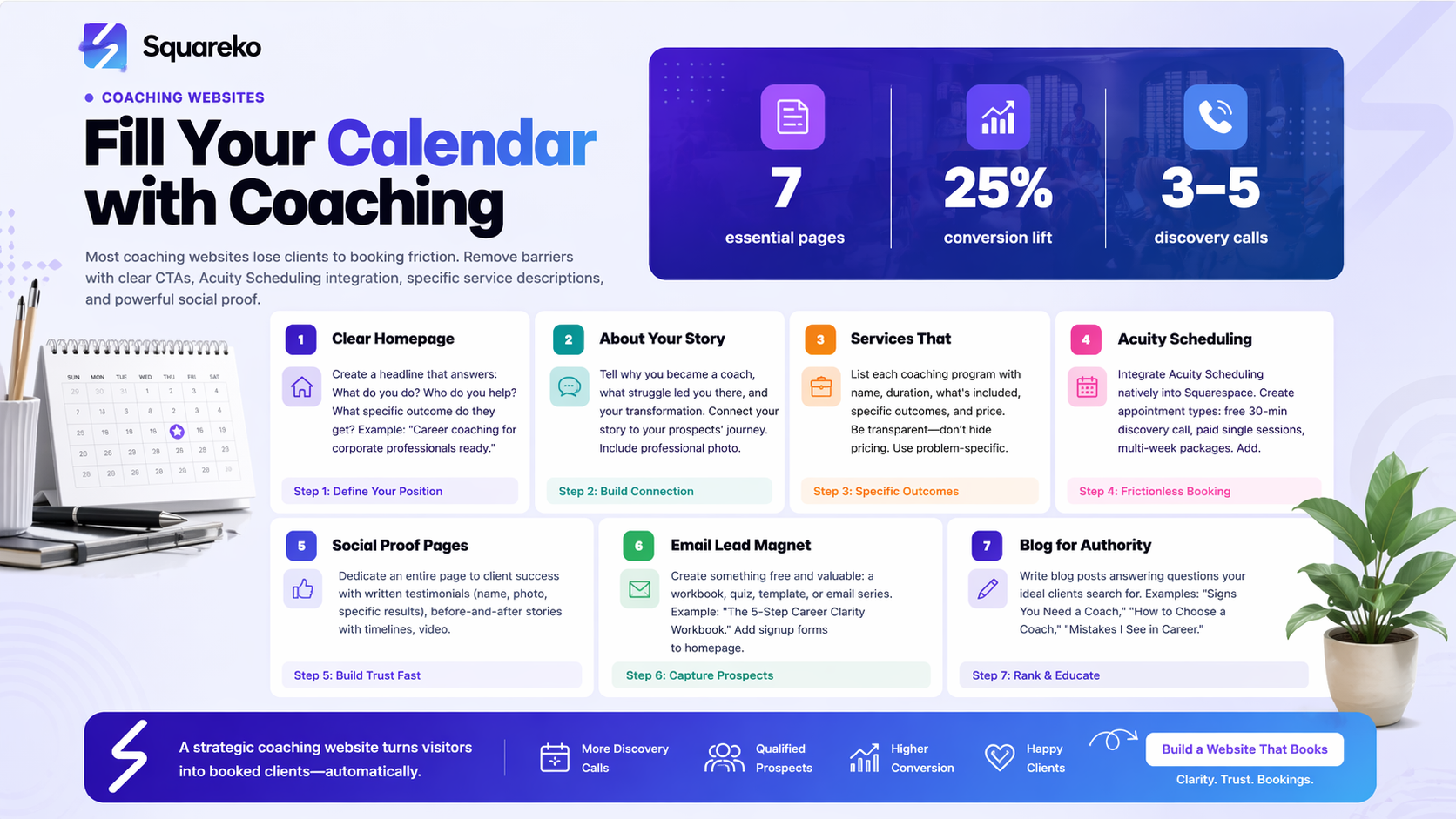
Most coaching websites lose clients to booking friction hidden CTA buttons, confusing navigation, and unclear next steps cost you discovery calls
Squarespace integrates natively with Acuity Scheduling, allowing you to offer discovery calls, paid packages, and intake questionnaires directly on your site
Your services page must clearly articulate specific outcomes (not generic promises) and demonstrate social proof through testimonials and case studies
Email list building through lead magnets is essential—coaches who capture emails get second chances at prospects who weren't ready to book immediately
The best Squarespace coaching templates balance professionalism with approachability, using clear hierarchy to guide visitors toward booking
Your website should be your best salesperson. Yet most life coaches build sites that look polished but don't generate a single discovery call. They write vague taglines, bury their booking button three clicks deep, and wonder why their calendar stays empty despite having solid coaching skills.
The coaching industry is worth over $6 billion annually, and the demand for guidance has never been higher. But most prospects don't hire based on how nice your website looks. They hire based on whether your site answers their specific questions, removes friction from booking, and proves you can deliver the transformation they're seeking. A well-designed life coaching website on Squarespace can do all three, if you know what to build.
In this guide, we'll walk you through exactly how to build a Squarespace coaching website that attracts ideal clients and converts them into paying customers. We'll cover the technical setup (including Acuity Scheduling integration), the psychological elements that drive conversions, and the specific pages every coach needs. By the end, you'll understand why many coaches struggle with calendar bookings and exactly how to fix it.
Why Life Coaches Lose Clients to Bad Websites
Let me describe a common scenario. A prospect finds your website through Google or a referral. They've been thinking about hiring a coach for months. They read your about page, feel a connection to your story, and think, Yeah, this person understands me.
Then they look for how to book. The call-to-action button is small, positioned in the footer, and clicking it takes them to a different website entirely. They have to create a new account. They see no information about your discovery call process, pricing, or what to expect. They're confused, slightly frustrated, and they leave to check out another coach's site instead.
This is booking friction, and it's the #1 reason coaching websites fail to generate clients.
Good websites remove friction. They make booking obvious, quick, and logical. When a prospect is ready to move forward, they shouldn't have to search for the button or figure out your process. The website should guide them toward booking as smoothly as possible.
The second issue is unclear value proposition. Many coaches write copy like I help people reach their potential or Transform your life through coaching. These phrases are generic. They don't help prospects understand what specific problem you solve or what transformation they'll experience.
A prospect who's struggling with career transitions needs to see that you specialize in career transition coaching. They need to understand that your clients go from corporate burnout to purpose-driven work, with specific timelines and outcomes. Generic messaging doesn't do this.
The third problem is missing trust signals. Coaching is about investing money in yourself, which requires trust. When a website lacks testimonials, credentials, or case studies, prospects have no proof that you actually deliver results. They see a stranger asking them to pay for something intangible. Without social proof, conversion rates plummet.
Squarespace, when configured correctly, solves all three problems. It provides native booking integration, templates designed to highlight your unique value, and simple ways to showcase client success stories. The key is building intentionally.
Choosing the Right Squarespace Template for Your Coaching Brand
Not all Squarespace templates work equally well for coaching websites. Some prioritize visual beauty at the expense of clarity. Others have navigation patterns that bury your booking button. You need a template that balances aesthetics with conversion-focused design.
The Best Templates for Coaches:
Look for templates that include a prominent hero section at the top where you can place a clear headline and CTA button. Your prospects should see your key offer within the first two seconds on your site, without scrolling.
Examples of strong coaching templates include those with the following features:
Bold hero sections: The first section should feature a headline, subheadline, and a clear CTA button (like Book Your Discovery Call)
Built-in service showcase areas: These templates have clean sections specifically designed to list your coaching programs or service tiers
Client testimonial layouts: Look for templates with designated testimonial sections that display multiple reviews with photos
Integrated booking widgets: Some templates have native spacing for booking calendars or forms without requiring a separate tool
Squarespace templates like Story, York, and Align are popular for coaching sites because they emphasize clarity over clutter. They use significant white space, readable typography, and intuitive navigation. When you log into your Squarespace account, you can preview each template to see which feels right for your coaching brand.
Template Customization for Coaches:
Don't just use the template as-is. Customize it by:
Changing colors to match your personal brand (most coaches choose calming blues, warm oranges, or professional grays)
Replacing placeholder images with professional photos of yourself—coaching is personal, and your photo should be prominent
Reorganizing sections so that your booking CTA appears in the hero, not buried below fold
Adding a custom navigation menu that makes it impossible for visitors to miss the Book Now or Get Started option
Setting Up Acuity Scheduling on Squarespace
Acuity Scheduling is a booking and appointment management tool specifically designed for service providers like coaches. The best part: it integrates natively with Squarespace, meaning you don't need custom code or third-party plugins.
Why Acuity Scheduling for Coaches?
Acuity allows you to:
Set up multiple appointment types (discovery calls, coaching sessions, follow-ups)
Create different pricing tiers and package bundles
Collect intake questionnaires before appointments
Set time buffers between appointments
Manage your calendar across multiple platforms
Send automated reminders and follow-ups
Accept payments directly through your booking calendar
For life coaches specifically, Acuity is excellent because it accommodates coaching-specific workflows. You can set a 30-minute discovery call as free (a lead magnet), a 6-week coaching package as $1,200, and a one-off session as $150. All from one calendar system.
Step-by-Step Acuity Integration:
Create an Acuity account at acuityscheduling.com and select Life Coach or Personal Coach as your business type
Set up appointment types in Acuity:
Discovery Call (free, 30 minutes)
Single Coaching Session ($150, 50 minutes)
6-Week Coaching Program ($1,200, multiple sessions)
Follow-up Session ($100, 30 minutes)
Configure intake questionnaires for each appointment type. For example, before a discovery call, ask:
What's your biggest challenge right now?
Have you worked with a coach before?
What would success look like in three months?
Set your availability in Acuity, blocking off times you're unavailable and setting buffer times between appointments
Connect Acuity to Squarespace:
Go to your Squarespace account settings
Select Integrations
Choose Acuity Scheduling
Authorize the connection
Select which Acuity calendar to embed
Embed the booking calendar on your Squarespace site:
Create a new page called Book a Session or Schedule a Call
Add an Acuity block (Squarespace provides this natively)
Select your Acuity calendar
Publish the page
That's it. Your booking calendar is now live and synced with Acuity. When a prospect books on your Squarespace site, the appointment automatically appears in Acuity. Reminders send automatically. No manual work required.
Pro Setup Tips:
Set your discovery call as free to lower the barrier to a first conversation
In your Acuity settings, enable the require payment option for paid packages so clients pay immediately upon booking
Use Acuity's email templates to send welcome emails after booking, setting expectations for the call
Enable the cancellation policy feature so clients can reschedule or cancel within 24 hours
Building the Essential Pages Every Coach Needs
Your Squarespace site should have a clear information architecture. Don't overwhelm visitors with 15 pages. Focus on these seven essential pages that every coaching website needs:
1. Home Page
Your homepage is your 10-second pitch. The visitor lands here from Google or a referral. Within 10 seconds, they should understand:
What you do (your specialty)
Who you help (your ideal client)
What they'll get (specific outcome)
What's next (your CTA)
Example headline structure: Career coaching for corporate professionals ready to leave burnout behind. Subheadline: Get clarity on your next move in 3 weeks. CTA button: Book Your Discovery Call.
The homepage should also feature a brief welcome message (100-150 words), a few key benefits or client results, and a prominent booking button.
2. About / My Story Page
Coaches succeed when prospects feel a genuine connection. Your About page is where you build that. Don't just list credentials. Tell your story.
Why did you become a coach? What was the struggle that led you to this work? What transformation did you experience? How do you help others go through a similar journey?
Include a professional photo, your credentials and certifications, and a clear statement of your coaching philosophy. End with a line that connects your story to your prospect's journey: Now I help [your client type] achieve [your outcome].
3. Services / Programs Page
This is where you detail what you actually offer. List each coaching package or program with:
Name of the program
Duration 6 weeks, 12 weeks
What's included (number of sessions, written materials, worksheets)
Specific outcomes clients typically achieve clarity within 3 weeks
Price
CTA button
1. Learn More
Don't hide pricing. Transparency builds trust. If coaching is customized and you offer discovery calls to discuss pricing, that's fine—but make that clear.
4. Booking / Schedule Page
This page contains your embedded Acuity calendar. Keep it simple. Add a headline like Let's Get Started and a brief explanation of your booking process:
Book a free 30-minute discovery call to see if we're a good fit. No pressure, no sales pitch—just an honest conversation about your goals.
Then embed your Acuity calendar below.
5. Testimonials / Case Studies Page
Social proof is critical. Dedicate an entire page to client success. Include:
Written testimonials with client names and photos (when possible)
Before-and-after stories (specific outcomes with timelines)
Short video testimonials (if you have them)
Results metrics (e.g., 87% of coaching clients report increased clarity within 3 weeks)
If you're new to coaching and don't have testimonials yet, start collecting them immediately. Ask early clients if they'd be willing to provide a quote or testimonial video.
6. Blog Page
A coaching blog serves two purposes: it provides value to potential clients, and it helps your site rank in Google for coaching-related keywords. Write blog posts about:
Common coaching challenges Why Your Goals Keep Failing
Coaching-specific topics How to Choose a Life Coach
Transformation stories From Stuck to Clarity: My Coaching Journey
Aim for one blog post every two weeks. This also gives you content to share on social media and in your email list.
7. Contact Page
Keep it simple. Offer an email contact form, your email address, and links to your social media accounts. Some coaches include a phone number. It's optional, but email is the safest bet for capturing inquiries.
Writing a Services Page That Actually Converts
Your services page is the most critical page on your coaching website. Many coaches write services pages that are vague and don't convert. Here's how to write one that actually closes deals.
Start With Specific Outcomes, Not Generic Promises
Bad: I help clients achieve their goals and live fulfilling lives.
Good: For busy executives struggling with work-life balance, I provide a structured 8-week coaching program that helps you redesign your schedule, set healthy boundaries, and reclaim your evenings and weekends.
The second example is specific. It identifies the problem (busy executives, work-life balance), the timeline (8 weeks), and the specific outcomes (redesign schedule, boundaries, reclaim time). A prospect in this situation reads this and thinks, That's exactly me.
Structure Your Services Offering
Coaching programs typically fall into a few structures:
The Discovery Call (free, 30 minutes)
Purpose: Let prospects experience your coaching style and see if you're a fit
Outcome: Clarity on whether to move forward
The Package Program (6-week, 12-week, ongoing)
Example: 6-Week Career Clarity Program - $1,200
Includes: 6 one-on-one sessions, worksheets, email support
Outcome: Clients define their next career move with confidence
The Single Session (e.g., $150 per session)
For clients who want flexibility or are testing coaching first
Less commitment, higher per-session cost
The Done-With-You Group Program (optional)
If you offer group coaching, list it here with cohort size and group outcome
Include These Elements on Your Services Page:
Headline: Coaching Programs Designed for [Your Ideal Client]
Brief intro: Explain your coaching approach in 2-3 sentences
Service tiers: Use a visual layout (cards or columns) showing each option
For each service: Name, duration, investment, what's included, specific outcome, CTA button
FAQ mini-section: Answer How does coaching work? and What should I expect in my first session?
Risk reversal: Consider adding something like Not sure if coaching is right for you? Book a free discovery call first—no obligation.
Pricing Transparency:
Always show pricing on your services page. Here's why: prospects who can't see pricing are more likely to bounce. They assume it's either too expensive or you're hiding something. Transparency builds trust and filters out prospects who can't afford your services—saving everyone time.
If your coaching is highly customized and requires discussion before pricing, that's fine. But state it clearly: Custom programs available—book a discovery call to discuss pricing for your specific needs.
Social Proof on This Page:
Include 2-3 testimonials from clients who benefited from the specific program you're describing. If possible, use client results that align with outcomes on this page.
For example, if you're describing a career coaching program, include a testimonial from a client who successfully transitioned careers through your coaching.
Building Trust With Testimonials and Case Studies
Testimonials are one of the highest-converting elements on any coaching website. They shift the conversation from Is this coach good? to Look at what this coach has done for people like me.
How to Collect Testimonials:
Ask every client for feedback. After your first session, send a simple email:
Hi [Client], I wanted to check in—how did our first session feel? I'd love to know what was most valuable for you. If you're open to it, I'd be thrilled to feature your feedback on my website.
Make it easy. Offer options:
A written testimonial (1-3 sentences)
A quick video testimonial (30 seconds)
A short survey (3 questions)
Most clients will say yes if you ask genuinely.
What Makes a Strong Testimonial:
Strong testimonials include:
The client's name and a photo (if possible)
A specific result or transformation
The emotional impact (I felt more confident...)
How the coaching changed their situation
Weak: Great coach. Highly recommend.
Strong: After three weeks working with [Coach Name], I finally decided to leave my job and pursue my passion. I went from paralyzed by fear to excited about my future. This coaching was the push I needed.
Building a Case Study:
Go deeper with a few clients by creating full case studies. A case study includes:
The Challenge: What was the client struggling with before coaching?
The Goal: What specific outcome did they want?
The Process: What did your coaching work look like together?
The Result: What changed? Use specific metrics or timelines if possible.
The Testimonial: A direct quote from the client.
Example structure:
From Corporate Stress to Creative Freedom: Sarah's Coaching Journey
Challenge: Sarah was burning out in her corporate job, but didn't know how to make a change. She felt trapped between financial responsibility and creative passion.
Goal: Find a path to work that felt meaningful while maintaining financial stability.
Process: Over 8 weeks, we explored her values, identified hidden strengths, and built an action plan for a career shift. We worked through self-doubt and limiting beliefs.
Result: Sarah landed a creative role at a smaller company with lower pay but drastically higher satisfaction. Within 6 months, she promoted to a senior role with better compensation.
Quote: 'This coaching saved my career and my mental health. I went from dreading Mondays to looking forward to my work.' —Sarah M.
Video Testimonials:
If you can get clients to record 30-second video testimonials, these are incredibly powerful. People respond to seeing real humans sharing real experiences. Even with a smartphone camera, video testimonials convert better than written ones.
Capturing Leads Through Email Marketing
Not every visitor is ready to book immediately. Many will need time to think, research other coaches, or wait until they've decided to invest in coaching. Email list building ensures you stay top-of-mind for these prospects.
The Lead Magnet:
Create something free and valuable that prospective clients want. Examples:
The 5-Step Career Clarity Workbook: A PDF guide walking through the process you use with clients to define their ideal career
Coaching Myths Debunked: An email series (3-5 emails) addressing common misconceptions about coaching
The Life Coach Intake Quiz: An interactive tool that helps prospects assess which area of their life needs coaching most
Goal-Setting Template: A simple one-page or multi-page template your clients use during coaching
The lead magnet should be valuable but not so comprehensive that prospects feel they've already solved their problem. It should create curiosity and demonstrate your expertise while showing that working with you would accelerate their progress.
Where to Promote Your Lead Magnet:
On your homepage: Get my free Career Clarity Workbook with an email opt-in form
On your blog posts: Want more like this? Download my free guide.
At the end of your About page: Ready to start your transformation? Sign up for my guide.
In your email signature and social media
Email Sequence After Sign-Up:
Once someone signs up, send an automated email sequence:
Email 1 (immediate): Thank you message + link to download the lead magnet Email 2 (2 days later): A valuable article or insight related to the lead magnet topic Email 3 (4 days later): A story about transformation—how a past client overcame a challenge Email 4 (7 days later): Soft introduction to your discovery call option (If you're curious about working together...)
Keep emails short, personal, and focused on value. The goal isn't to hard-sell coaching—it's to build trust and stay in touch with people who aren't quite ready yet.
Tools for Email on Squarespace:
Squarespace integrates with several email marketing platforms:
Mailchimp (free up to 500 contacts)
ConvertKit (popular with coaches)
ActiveCampaign (more advanced automation)
Choose one and set up your lead magnet form on your Squarespace site.
Optimizing Your Coaching Website for Conversions
Building your site is the first step. Optimizing it for conversions is the ongoing work. Here are the key areas to test and improve.
CTA Placement and Design:
Your Book a Discovery Call or Get Started button should appear:
In your hero section (top of homepage)
At the end of your services page
In your navigation menu (optional but strong)
At the end of your About page
Multiple places on your Blog page
Make buttons visually distinct with contrasting colors. Use action-oriented copy: Book Your Discovery Call, Start Your Transformation, Schedule a Free Consultation.
Page Load Speed:
Slow websites have higher bounce rates. Optimize by:
Using high-quality but compressed images
Limiting the number of embedded videos
Removing unnecessary extensions or widgets
Test your site speed at Google PageSpeed Insights.
Mobile Responsiveness:
Over 50% of web traffic is mobile. Your Squarespace site should look great on phones. Test by:
Using your phone to browse your own site
Using Google's Mobile-Friendly Test
Ensuring buttons are large enough to tap easily
Copy and Messaging:
Review your copy regularly. Ask yourself:
Does my headline clearly state my specialty?
Would my ideal client understand how I help within 10 seconds?
Is it obvious how to take the next step (book a call)?
Testimonial Placement:
Don't hide testimonials on a separate page. Include 2-3 testimonials on your homepage and services page where prospects will see them naturally.
Contact Form Optimization:
Keep your contact form short—3 to 5 fields maximum. The more fields you ask for, the lower your conversion rate. Minimum fields:
Name
Email
Message
Optional:
Phone number
Coaching focus area (dropdown)
Analytics and Tracking:
Install Google Analytics on your Squarespace site to track:
Where your traffic comes from
Which pages get the most visits
Where people drop off without converting
Which CTA buttons get the most clicks
Use this data to continually improve. If your homepage gets lots of traffic but low conversion, rewrite your headline. If your services page bounces people immediately, simplify the page.
Ready to Build Your Life Coaching Website?
You now have the complete roadmap for building a Squarespace website that fills your coaching calendar. You understand the friction points that stop most coaches from converting prospects, you know exactly which pages to build and what to put on them, and you have the technical steps to integrate Acuity Scheduling for seamless booking.
But here's the thing: knowing what to do and actually executing it are two different things. Building a website while running a coaching business is time-consuming. You have to choose templates, write copy, gather testimonials, configure Acuity, set up email marketing, and optimize for conversions. For many coaches, this is outside their wheelhouse—and it's expensive to pay someone to do it wrong.
That's where Squareko comes in. We specialize in building Squarespace websites specifically for coaches. We've built dozens of coaching websites that generate consistent discovery call bookings. We know exactly which templates work, which copy converts, how to integrate Acuity flawlessly, and what optimizations turn browsers into booked clients.
If you're tired of having a website that looks nice but doesn't book clients, or if you don't have the time to build one yourself, I'd recommend booking a free consultation with our team at Squareko.com. We'll audit your current site (if you have one), discuss your coaching focus and ideal client, and share specific recommendations for improving your conversion rate.
No pressure, no sales pitch—just an honest conversation about how to fill your coaching calendar through your website. You can book a call directly on our site, or reach out to hello@squareko.com.
Your coaching deserves better than a website that sits quietly in the background. Build one that works for you.
Frequently Asked Questions
-
Connect Acuity Scheduling to Squarespace (it's a native integration), then embed your Acuity calendar on a dedicated "Book a Session" page. Once connected, everything syncs automatically. When a client books, their appointment appears in Acuity, and they receive a confirmation email. [INTERNAL LINK: Acuity Scheduling setup guide] walks through the exact steps.
-
Yes. Transparency builds trust and filters out prospects who can't afford your services. It also prevents time-wasting inquiries from people looking for cheaper options. If your coaching is highly customized, you can write "Custom packages available—book a discovery call to discuss pricing." But avoid hiding all pricing behind a form.
-
Templates like Story, York, and Align work well for coaches because they emphasize clarity, use generous white space, and have clear sections for testimonials and service offerings. Look for templates with a bold hero section where you can place your main CTA button front-and-center. Preview multiple templates before deciding—the right one should feel aligned with your coaching brand.
-
Go to Squarespace Settings > Integrations > Acuity Scheduling. Authorize the connection with your Acuity account, then select which calendar to embed. Create a page on Squarespace (like "Book a Session"), add an Acuity block, and select your calendar. Publish the page. Your booking calendar is now live and synced with Acuity—no coding required.
-
Build these seven essential pages: Home (your main value proposition), About (your story and credentials), Services (your programs and pricing), Booking (embedded calendar), Testimonials/Case Studies (social proof), Blog (valuable content), and Contact (simple form). This covers everything prospects need to understand your coaching and book a call.
-
Remove friction: make your booking button obvious and easy to click. Be specific in your messaging so your ideal client immediately recognizes themselves. Build trust through testimonials and case studies. Offer a free discovery call to lower the barrier to a first conversation. Capture email addresses through a lead magnet so you can nurture prospects who aren't ready to book yet.
-
Yes, through the integrated Acuity Scheduling connection. Acuity handles the booking, payment collection, and appointment management. Set up different appointment types in Acuity (free discovery calls, single sessions, multi-week packages), set your pricing and duration, and prospects can book and pay directly through your Squarespace site. No separate checkout page needed.
-
A blog isn't required, but it's valuable for two reasons: it provides free content that builds trust with prospects, and it helps your site rank in Google for coaching-related keywords. One blog post every two weeks is a good target. If you don't enjoy writing, focus on the core pages (Home, About, Services, Booking, Testimonials) first.

From custom website design to SEO strategy, we help businesses launch a site that looks professional and performs better.

About the Author
I'm Walid Hasan, a Certified Squarespace Expert and Squarespace Circle Platinum Partner with over 12 years of hands-on experience designing and optimizing high-performing websites. Over the years, I've had the privilege of building more than 2,000 Squarespace websites for clients around the world, always focusing on clean design, strong user experience, and conversion-driven results.
