
How to Build an Author Website on Squarespace That Sells Books
Key Takeaways How to Build an Author Website on Squarespace That Sells Books
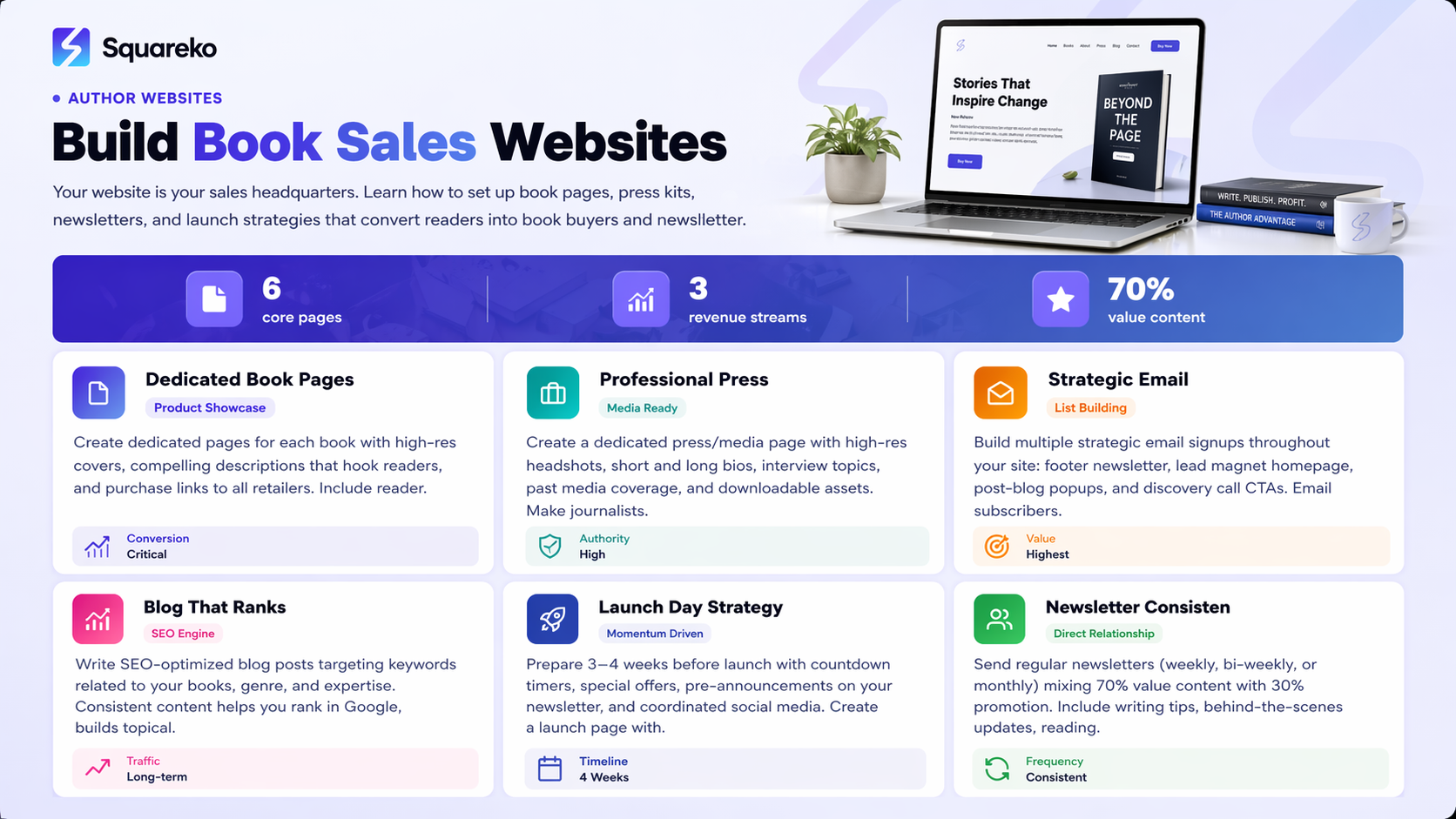
An author website on Squarespace centralizes your book sales, reader engagement, and professional presence in one place
Squarespace's native tools let you sell physical and digital products, host your blog, and manage email newsletters without juggling multiple platforms
Your book page should highlight cover art, include detailed descriptions, and link to all major retailers plus direct purchase options
A professional press kit (media page) includes high-resolution headshots, bios, interview topics, and past media coverage—all downloadable
A strategic blog and newsletter build SEO authority, keep readers engaged, and drive consistent traffic back to your sales pages
You've written a book. Maybe you've published it. But is it actually selling the way you hoped? Many authors make the mistake of relying solely on Amazon, Goodreads, and social media to sell their work. While those platforms matter, they miss a critical piece of the puzzle: your own author website.
An author website on Squarespace isn't just a digital business card. It's your sales headquarters, your press kit distribution center, and your direct connection to readers. When someone discovers your book and wants to learn more about you, they shouldn't have to hunt across five different platforms. They should land on your site—professional, compelling, and optimized to turn visitors into readers and customers.
In this guide, I'll walk you through building an author website on Squarespace that actually drives book sales. We'll cover everything from choosing the right template to setting up your book shop, creating a professional press kit, launching an email newsletter, and strategically promoting your work. Whether you're self-published or traditionally published, whether you're launching your first book or your tenth, this approach works.
Why Every Author Needs a Dedicated Website
Amazon is not your website. Goodreads is not your website. Your author Facebook page is not your website. They're all rental properties on someone else's platform.
Here's what happens when you depend entirely on third-party platforms. Your visibility lives and dies by their algorithms. A change in Amazon's recommendation engine? Your sales tank. A Goodreads policy shift? Your reader engagement withers. You have no control over your storefront appearance, and you can't access your customer email addresses for direct communication.
Your own author website fixes all of this. You own it. You control it. You can update it whenever you want without asking anyone's permission. More importantly, an author website on Squarespace becomes your sales funnel hub.
When a reader discovers your book through a podcast interview, a book blogger, or a social media post, where should they land? Ideally, on your author website. Why? Because from there, you can tell them your full story, show them all your books, introduce your upcoming releases, and collect their email address for your newsletter. That's the beginning of a customer relationship you actually own.
The second reason is SEO and discoverability. A blog on your author website helps you rank for keywords related to your books, your genre, your expertise, and your author brand. Someone googling best books on [your topic] or how to [something your book teaches] might find your website. That person is already interested in exactly what you're selling.
The third reason is professionalism. When a journalist, podcast host, or literary magazine editor wants to feature you, they're going to look you up. A professional author website with a press kit gives them everything they need: your headshot, your bio, interview topics, and past media appearances. You make their job easier, and they're more likely to say yes to featuring you.
Finally, Squarespace specifically solves the too many tools problem. You can sell books, manage your email list, host your blog, and sell merchandise all from one platform. No integrations nightmares. No juggling five subscriptions.
Choosing the Right Squarespace Template for Authors
Not all Squarespace templates work equally well for authors. You need something that showcases your books beautifully, establishes trust immediately, and guides visitors toward your call-to-action without being pushy.
When evaluating templates for your author website, look for these features:
Clean, readable typography. Your website will have a lot of text—book descriptions, author bio, blog posts. Pick a template that makes reading a pleasure, not a chore. Sans-serif fonts typically work better for web than serif fonts, but Squarespace does serif well too. The key is ample line spacing and generous margins.
A hero section that works for book covers. You want a prominent space above the fold to showcase your latest book or featured title. Some templates have beautiful image gallery sections that work perfectly. Others have video sections you can repurpose as book showcase areas.
Built-in product pages. Since you're selling on Squarespace, you want a template that makes product pages look professional and easy to navigate. You should be able to display your book cover as a large image, add product options (hardcover, paperback, ebook), show pricing, and make the Buy Now button obvious.
A blog section that feels natural. Your blog posts should have featured images, clear dates, and an author byline. The template should support categories and tags so readers can browse by topic.
A flexible footer and navigation. You'll want to link to your press kit, book pages, newsletter signup, and external retailers. Choose a template that makes this navigation intuitive.
The best Squarespace templates for authors right now include the Business-focused designs like Pacific (which has excellent product layouts), Brine (a minimal design that puts focus on your content), and Sixth (which has a lovely blog layout and gallery features). However, Squarespace regularly updates these. Visit Squarespace directly, filter by Product and Blog, and test templates using the preview feature. Look at how your book cover would appear on the homepage and product pages.
Setting Up Your Book Pages
Your book pages are the core of your author website. This is where casual visitors become customers. Each book deserves its own dedicated page, and Squarespace makes this surprisingly straightforward.
Create a dedicated Books or Shop section. In Squarespace, you can use their Commerce feature to create a Products collection. Each book becomes a product. You can organize them with tags (by series, by genre, by publication date), which helps visitors browse.
Add your book cover as the primary image. This seems obvious, but don't skip it. Upload a high-quality, high-resolution version of your cover. Squarespace will automatically optimize it for web. Readers want to see the cover clearly—they're deciding whether the book appeals to them visually too.
Write a compelling book description. Don't just copy your Amazon description (though you can adapt it). Your website visitors have already made it to your site, so they're slightly more interested than a random browser. Use this space to speak directly to them.
Start with a hook: What if everything you believed about productivity was backwards? Then provide a brief summary of what the book covers. Then explain who should read it: Perfect for exhausted entrepreneurs looking to work fewer hours but achieve bigger goals. Finally, include any impressive credentials, awards, or endorsements: Named a Top 5 Self-Help Book by XYZ Magazine.
Set up all purchase options. Squarespace lets you sell directly, but you should also link to Amazon, Apple Books, Goodreads, and wherever else your book is available. Create product options for different formats—hardcover, paperback, ebook. If you're selling signed copies, make that an option too. You might charge a premium for signed copies; readers often happily pay extra for that personal touch.
Add a book details section. Below the description, include practical information: publication date, word count, ISBN (if relevant), genre tags, and any content warnings. This information appeals to readers who want specifics before they buy.
Include reader testimonials or reviews. If you have good reviews from Goodreads, Amazon, or from beta readers, pull a few quotes here. Social proof is powerful. A quote like This book changed how I approach my business does more to convince someone to buy than any marketing copy you write yourself.
Link to related books. If you have multiple books, especially if some are in a series, link them together. On your first book's page, add a section like Readers of this book also loved... and link to your other titles. This increases the average customer value.
Building a Professional Press Kit
Journalists, podcast hosts, book bloggers, and event organizers want to feature your work. But they need information to do it. A press kit page on your author website gives them everything immediately, which means they're more likely to feature you.
Create a dedicated Press Kit or Media page. In Squarespace, you can create this as a regular page or a gallery page, depending on what content you want to feature. Give it a simple URL like yoursite.com/press or yoursite.com/media.
Start with a brief introduction. Something like: Thank you for your interest in featuring [Your Name] and [Your Books]. All materials below are available for download and use in your article, podcast, interview, or event.
Provide high-resolution headshots. Include at least two: one professional headshot and one more casual/personable photo. These should be high-resolution (at least 300 DPI for print), because editors might use them in magazines or on websites. Offer them in multiple formats (JPG and PNG) and multiple sizes. Create a simple download link or use a service like Dropbox to host them. Squarespace doesn't have native bulk download capability, but you can create a Dropbox folder and link to it, or use a third-party service like Dropbox or Google Drive for the downloads.
Include short and long bios. Provide a 50-word version and a 150-word version. Journalists often have tight space constraints, so short is crucial. But some blogs and podcasts want more detail. Write both versions, and writers will choose what fits their format.
The short bio might look like: Sarah Mitchell is the author of The Ambitious Mom's Guide to Sanity, a book about balancing career ambitions with parenthood. She's been featured in Forbes, The Atlantic, and Mom.com. She lives in Portland with her family and two cats.
The long bio gives more detail: credentials, previous books, speaking experience, unique perspective.
List interview topics and speaking expertise. If you're willing to do interviews or speak at events, tell people what you can discuss. Examples: Work-life balance, Overcoming perfectionism, Building a writing habit, Publishing myths, Why traditional parenting advice fails modern families.
Include past media coverage. Link to articles, podcast episodes, or video interviews you've done. This is social proof that others have featured you. If you have a lot of past coverage, you can display the logos of major publications: Featured in..."with linked logos of Forbes, CNN, New York Times, etc.
Add a speaking/booking section. If you do speaking engagements, workshops, or consulting, include information about booking you. You might provide an email address, a contact form, or a link to your booking availability. squarespace web design services for authors
Provide a downloads section. Authors can provide additional downloadable assets: an excerpt from their book, a free guide related to their book's topic, a worksheet, or a reading guide for book clubs. These serve double duty—they give press coverage easier distribution, and they get your work in front of more people.
Email Newsletter Strategy on Squarespace
Your email list is the single most valuable asset you can build. These are readers who've opted in to hear from you directly. Unlike social media followers, they can't disappear overnight due to an algorithm change.
Squarespace has two email tools: Squarespace Email (their native newsletter tool) and integrations with third-party services like Mailchimp.
Squarespace Email is best if you want simplicity. You write a newsletter in Squarespace, choose a template, and send it. Subscribers opt in on your website, and you have basic analytics about who opened and clicked. For many authors, this is plenty. You can set up your newsletter signup as a form or a button anywhere on your site.
Mailchimp is better if you need advanced features. With Mailchimp, you can segment your audience (book club readers vs. casual fans, for example), set up automation (like a welcome series when someone joins your list), and create sophisticated workflows. The free tier of Mailchimp handles up to 500 subscribers, which is more than enough for most authors starting out.
Your newsletter strategy should accomplish several things:
First, it builds a direct relationship with readers. Every email reinforces your authority and keeps readers thinking about your work.
Second, it drives book sales. Your newsletter is the perfect place to announce new releases, book bundle deals, or when you're running a promotion. Because subscribers have already indicated interest in you, they're far more likely to buy.
Third, it builds your email list in the first place. You need a compelling opt-in offer. This might be a free chapter from your book, an exclusive short story, a reading guide, a checklist related to your book's topic, or early access to a new release.
On your homepage, add a prominent newsletter signup form. Don't bury it. Use a pop-up or a fixed section on your page. Write compelling copy: Join 5,000+ readers who get writing tips and book updates every month or Be the first to know about new releases, exclusive stories, and giveaways.
Integrate your newsletter with your book pages. After someone reads about one of your books, encourage them to subscribe. Something like: Love this book? Subscribe to my newsletter for behind-the-scenes writing updates and exclusive short stories.
Set a publishing schedule and stick to it. This might be monthly, bi-weekly, or weekly, depending on your availability. Whatever you choose, be consistent. Readers expect to hear from you on schedule.
Your newsletter content should provide value. Don't just use it to sell. Share writing tips, behind-the-scenes stories, reading recommendations, snippets from your upcoming books, or answers to reader questions. Mix value content with promotional content. A good ratio is 70% value, 30% promotion.
Creating a Blog That Drives Sales
A blog seems like it's about content for content's sake, but done right, it's a sales driver. Here's why: a blog gives you permission to write about topics your readers care about, which is the exact thing Google rewards with higher rankings.
When someone searches how to balance a full-time job with a creative career or signs you need therapy, if you've written about those topics on your blog, your website might show up in the search results. That's a reader who found you organically, who's already interested in your book's topic, and who's ready to explore your work.
Choose 5-10 core topics related to your books. If you write paranormal romance, your topics might be paranormal romance recommendations, how to write paranormal, favorite paranormal movies, etc. If you write parenting books, your topics might be modern parenting challenges, new parent struggles, work-life balance, anxiety in kids, etc.
Write longer-form blog posts. Aim for 1,500-2,000+ words per post. Search engines reward depth. A 500-word post rarely ranks highly. A 2,000-word post that thoroughly explores a topic has much better odds.
Use real examples and storytelling. Don't write like a textbook. Share anecdotes from your life, your research, your book writing process, or your readers' experiences. People connect with stories.
Optimize for search but write for humans first. Include your focus keyword naturally in your post. Include it in the title, the first paragraph, and a few times throughout. But don't force it. The post should read naturally; the keyword optimization should be nearly invisible.
Include internal links. Link to your book pages from your blog posts. If you write a blog post about overcoming perfectionism and one of your books is about perfectionism, link to that book. These internal links help Google understand the structure of your site and give readers a path from blog to purchase.
Create a posting schedule. Write one substantial post per month, or two per month if you can manage it. Don't publish sporadically. Consistency helps both your readers and Google.
Repurpose your blog content. The blog post you wrote becomes a LinkedIn article, becomes a thread on social media, becomes a newsletter issue. You multiply the value of each piece of content.
Launching a Book on Squarespace
A book launch on Squarespace isn't just about adding it to your shop. It's about creating momentum, coordinating multiple channels, and giving readers reasons to buy in the launch window.
Prepare 3-4 weeks before launch. Update your book's page with the cover, description, and all purchase links. Create a launch countdown on your homepage. Consider creating a special launch page that's different from your regular shop—something that conveys excitement and urgency.
Set a launch day discount or special offer. You might offer 25% off signed copies for the first 100 orders, or a bundle deal if they buy your new book plus a previous book. This creates urgency and incentivizes people to buy during the launch window rather than waiting.
Pre-announce the launch on your newsletter. Email your list several times in the weeks leading up to launch. Let them know the publication date, the launch day special offer, and where they can pre-order. Make sure to include the link.
Create a launch page (optional but powerful). Some authors create a special landing page that goes live on launch day. This page has countdown timers, special launch day bonuses (a free guide, an exclusive short story, a live Q&A session), and prominent purchase buttons. Squarespace lets you create a standard page designed exactly for this.
Coordinate social media. Post about the launch on Twitter, Instagram, TikTok, LinkedIn, wherever your readers are. Create multiple posts over the launch week, not just one. Share the book cover, a teaser quote, behind-the-scenes writing photos, and testimonials from beta readers.
Reach out to your press list. Email book bloggers, podcasters, and journalists on your media list. Tell them your book is launching and ask if they'd be interested in featuring it or interviewing you.
Offer launch-week bonuses. People who buy during launch week get something extra: a free ebook of short stories, a digital reading guide for book clubs, or a recorded author Q&A session. This bonus is something you deliver via email, so it also gives you access to collect email addresses if they buy through Amazon or another retailer.
Maintain launch momentum for 2-3 weeks. The first week is the most important, but keep pushing the launch message for a few more weeks. Not every reader sees your first announcement.
Ready to Build Your Author Website on Squarespace?
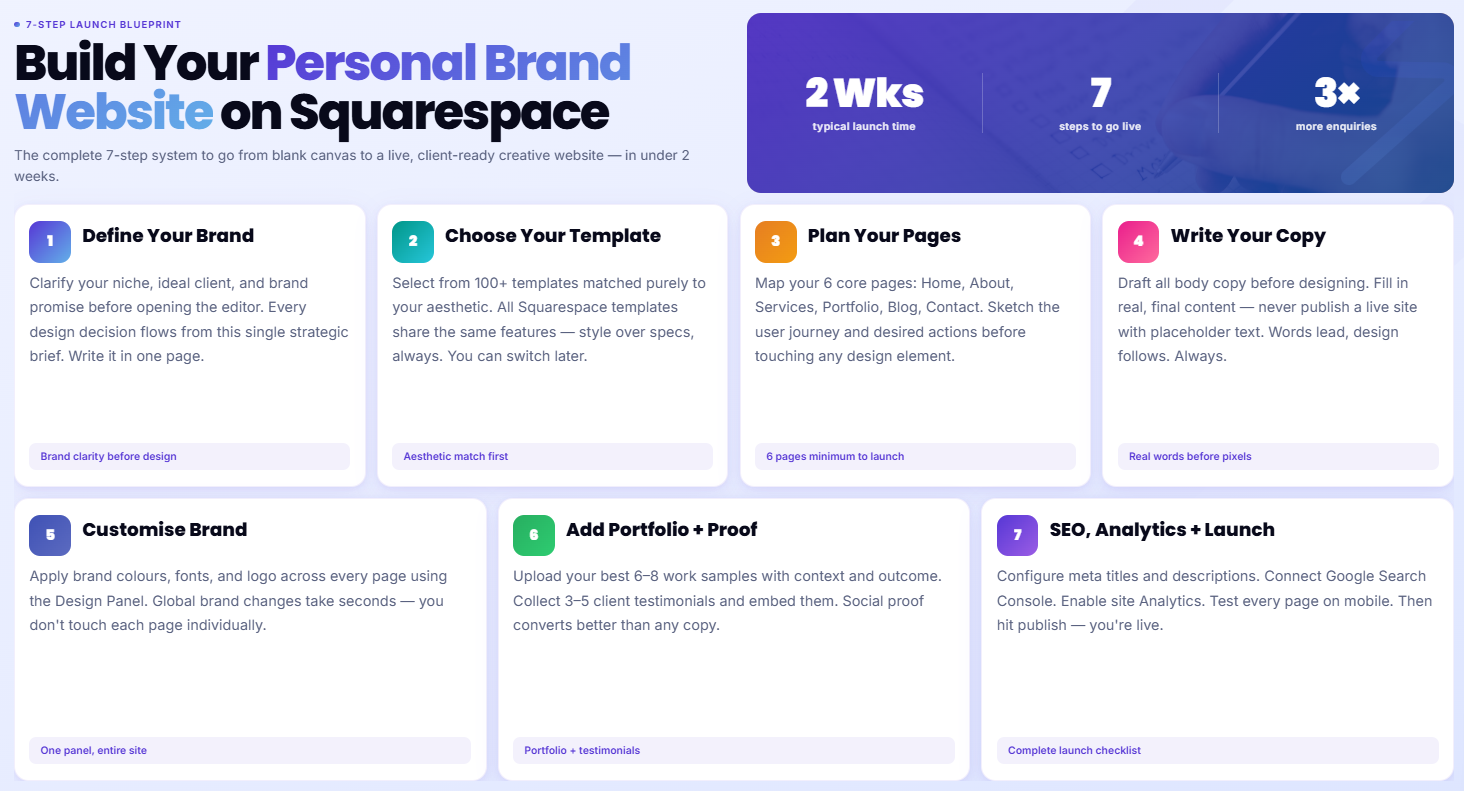
You now have everything you need to build a professional, sales-focused author website on Squarespace. But knowing what to do and actually building it are two different things. Many authors get stuck in the setup phase—choosing templates, tweaking designs, second-guessing their navigation structure. Months pass, and the website still isn't live.
This is where professional guidance makes all the difference. If you're ready to launch your author website and want expert help, I'm here. As a Squarespace specialist designer for authors and creatives, I've built author websites for novelists, business authors, self-published authors, and traditionally published authors. I know exactly which templates work for book sales, how to structure product pages to maximize conversions, how to set up email integrations that actually get readers to subscribe, and how to design press kit pages that journalists and podcasters actually use.
Here's what I typically do: during a free 20-minute call, we talk about your books, your readership, and your sales goals. I'll ask about your audience, your launch timeline, and what success looks like for you. Then I'll walk you through a strategy specific to your situation—whether you need a complete website from scratch, a website redesign, or just help getting your newsletter and product pages set up properly.
The best part? When your website is built right, it doesn't require constant tweaking. You update your blog, promote your newsletter, and focus on writing. Your website works in the background, converting browsers into readers and casual fans into loyal customers.
Ready to stop leaving money on the table? Book a free 20-minute call with me. We'll discuss your author brand, your books, and what a professional Squarespace website could do for your sales.
-
Squarespace doesn't have a specialized "book page" template, but it's not necessary. You can create book pages using Squarespace's product feature within Commerce, which is designed for selling items. Each book becomes a product, complete with descriptions, pricing, images, and purchase options. This setup works beautifully and gives you all the functionality you need.
-
Absolutely. Use product options within Squarespace Commerce to offer different formats: "Standard Edition," "Signed Copy," "Deluxe Edition," etc. You can set different prices for each option. Many authors charge $5-$10 more for signed copies, and readers often happily pay it for that personal touch.
-
Create a Press Kit page in Squarespace and host your downloadable files (headshots, logos, bios) on an external service like Dropbox, Google Drive, or a specialized press kit tool like OnePressKit. Link to those downloads from your Squarespace page. Alternatively, you can create a folder structure in Squarespace and link to individual files, though Squarespace doesn't have bulk download capability, so using an external service usually works better.
-
The best template depends on your aesthetic preferences, but look for templates that handle product pages and blog layouts well. Popular choices for authors include Pacific (for product showcase), Brine (minimal and text-focused), and Sixth (gallery and blog layouts). Test templates using Squarespace's preview feature to see how your book cover and content look before committing.
-
Both work. Squarespace Email is simpler and requires no extra integrations—you send emails directly from Squarespace. Mailchimp is more powerful, offering segmentation, automation, and advanced analytics. For most authors just starting out, Squarespace Email is sufficient. As your list grows and you want more sophisticated campaigns, consider migrating to Mailchimp.
-
Traffic comes from four main sources: search engines (via blog posts optimized for keywords related to your books), social media (sharing blog posts and announcements), your email newsletter (sending subscribers back to your site), and direct outreach (pitching yourself to podcasts, blogs, and media). The key is consistency in all four channels. Your website is the hub where all this traffic converts to email subscribers and book sales.
-
Yes. You can add your book as a product with the publication date clearly stated. Squarespace can handle inventory management, so you can set pre-orders to open and close on specific dates. However, some authors prefer using dedicated pre-order services like BookBaby or Preorder Now for more specialized features. But Squarespace definitely supports pre-orders if you want to keep everything in one place.
-
Keep your navigation simple: Home, Books (or Shop), Blog, About, Press (or Media), Contact, and Newsletter. Don't overwhelm visitors with too many menu items. You want a clear path from any page to your book pages or newsletter signup. Avoid nested menus if possible; keep it flat and scannable.

From custom website design to SEO strategy, we help businesses launch a site that looks professional and performs better.

About the Author
I'm Walid Hasan, a Certified Squarespace Expert and Squarespace Circle Platinum Partner with over 12 years of hands-on experience designing and optimizing high-performing websites. Over the years, I've had the privilege of building more than 2,000 Squarespace websites for clients around the world, always focusing on clean design, strong user experience, and conversion-driven results.
