
Best Squarespace Templates for Cosmetics and Skincare Brands in 2026
Introduction
Building a website for your cosmetics or skincare brand is no longer optional—it's essential. Your site is often the first impression potential customers have of your business, and it needs to look absolutely flawless. But here's the challenge: creating a stunning, professional cosmetics website from scratch requires design skills, technical knowledge, and time you might not have.
That's where Squarespace templates for cosmetics and skincare brands come in. Squarespace has made website creation accessible by offering pre-designed, beautiful templates that are ready to customise in minutes. Whether you're launching a luxury skincare line, a vibrant makeup brand, or an indie beauty label, there's a template designed to showcase your products and connect with your customers. In 2026, Squarespace's template library has evolved significantly, offering templates that are optimised for mobile shopping, feature rich galleries, and integrate seamlessly with e-commerce tools your brand needs.
This guide walks you through the best templates available, what makes them perfect for beauty brands, and how to choose the right one for your vision.
Key Takeaways
Squarespace templates for beauty brands combine stunning visuals with robust e-commerce functionality
Paloma and Flatiron are top-tier templates specifically suited to cosmetics and skincare businesses
The best template for your brand depends on whether you prioritise product galleries, blog storytelling, or sales
Mobile responsiveness and fast loading speeds are non-negotiable in 2026's mobile-first shopping environment
Customisation is straightforward—no coding required—allowing you to match your brand colours, fonts, and messaging
Integration with email marketing, inventory management, and shipping tools ensures your backend runs smoothly
Your template choice should reflect your brand's positioning: luxury, eco-conscious, inclusive, or experimental
Why Squarespace Is Ideal for Cosmetics Brands
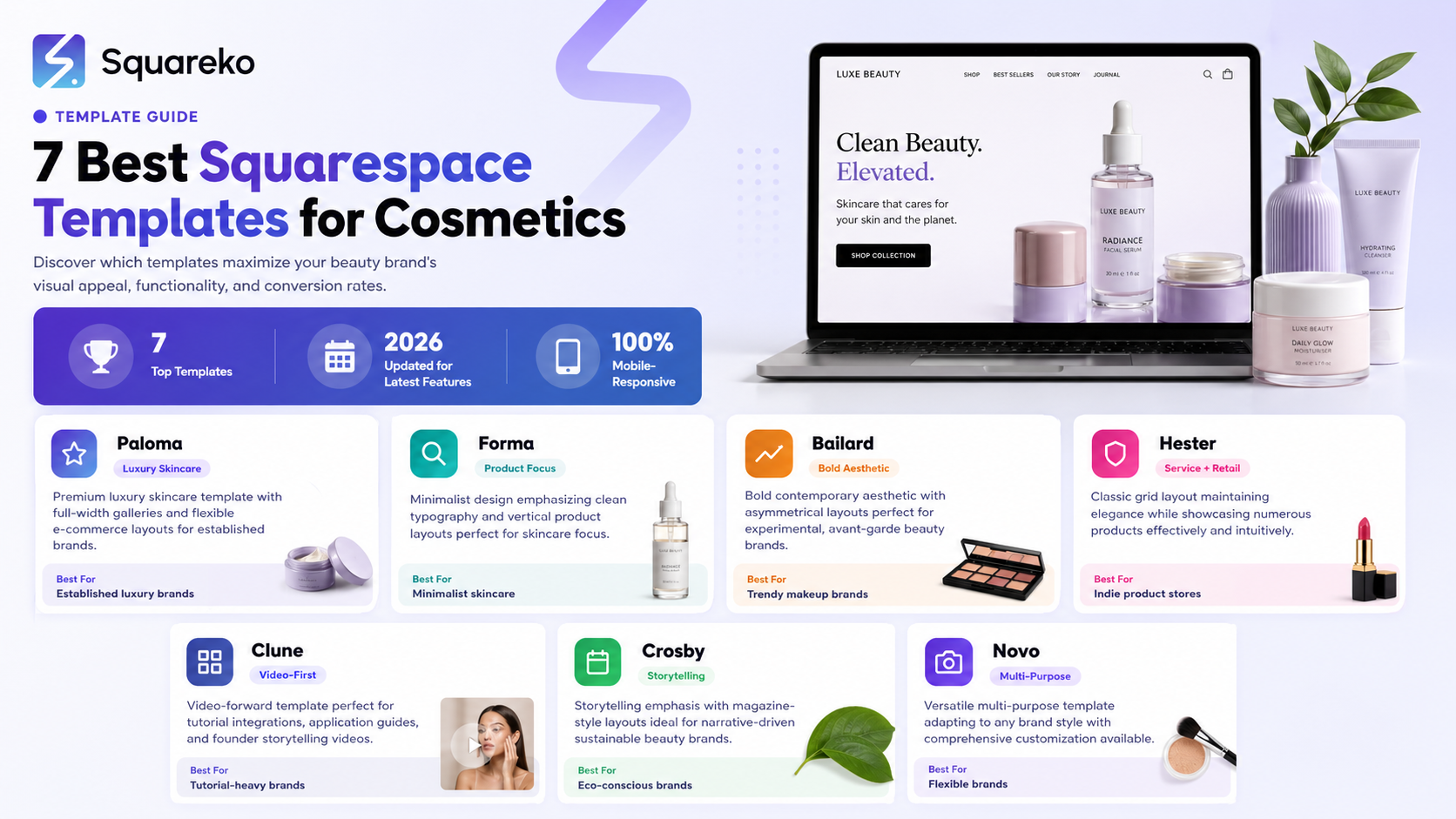
Cosmetics and skincare businesses thrive on visual appeal. Your customers want to see your products clearly, read ingredient lists easily, watch application tutorials, and trust that they're buying from a legitimate, professional brand. Squarespace excels in these areas.
First, Squarespace templates are mobile-optimised out of the box. With over 65% of beauty purchases now starting on mobile devices, this matters more than ever. Every template automatically adjusts to phones, tablets, and desktops without losing functionality or aesthetic appeal.
Second, Squarespace's built-in e-commerce tools handle inventory, payment processing, shipping integration, and customer analytics without requiring third-party plugins. For a beauty brand, this means you can list 50, 500, or 5,000 products and manage them all from one dashboard.
Third, the visual editing interface means no coding knowledge is required. You can drag elements around, change colours, upload product photos, and publish changes instantly. If you need to add a seasonal promotion, update pricing, or feature a new product launch, you do it in minutes.
Finally, Squarespace includes professional email integration, SEO tools, and analytics so you can track which products are popular, where your visitors come from, and how to improve your conversion rates.
Top Squarespace Templates for 2026
Best Overall: Paloma
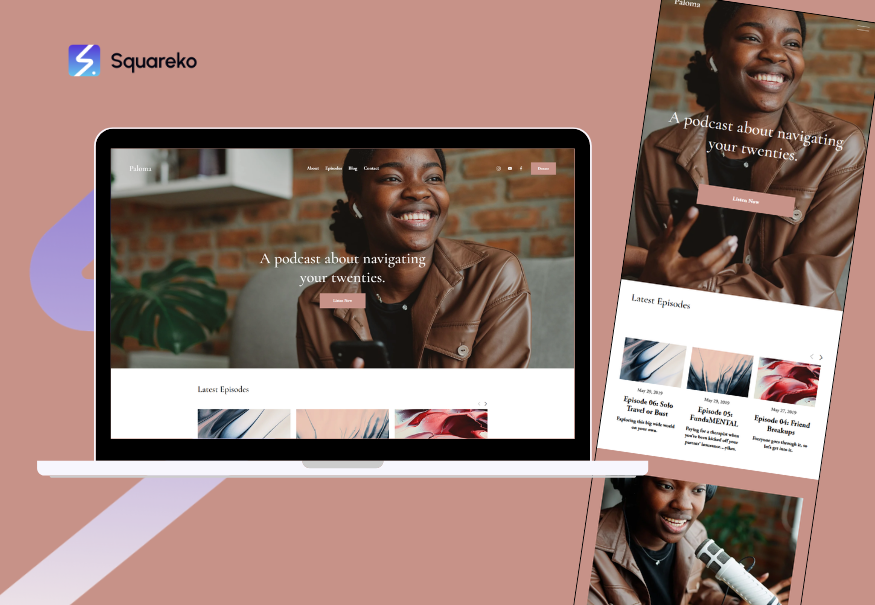
Paloma is the gold standard for beauty and cosmetics brands. This template was built with high-end visual storytelling in mind. It features large, immersive hero images that immediately grab attention—exactly what a luxury skincare or premium makeup brand needs.
What makes Paloma exceptional:
Full-width image galleries: Your product photos and lifestyle imagery are the stars. Paloma gives them generous space to shine.
Flexible layouts: Mix text, images, and product grids in any configuration without feeling constrained.
Powerful e-commerce section: Product pages are clean and conversion-focused, with room for detailed descriptions, ingredients, application instructions, and customer reviews.
Blog integration: Tell your brand story. Share skincare routines, ingredient spotlights, or brand origin stories alongside your shop.
Multiple page templates: Landing pages, about pages, contact pages, and custom collections all have purpose-built layouts.
Paloma works brilliantly for established brands or founders who have a clear aesthetic vision and high-quality product photography. It's slightly more expensive than basic templates, but the investment pays off in perceived brand value.
Best for Minimalism: Flatiron

Flatiron is the minimalist's dream. If your brand philosophy emphasizes clean beauty, simple ingredients, and straightforward messaging, Flatiron delivers.
Why Flatiron excels for skincare-focused brands:
Calm, spacious design: White space and generous padding between sections create a sense of quality and trustworthiness.
Typography-forward: Flatiron makes your copy matter. For brands that educate (like clinically-proven skincare lines), this is perfect.
Vertical product showcases: Products are displayed in a simple, scrollable format that emphasises one item at a time—ideal for encouraging focused attention.
Subtle animations: Hover effects and gentle transitions add polish without distraction.
Mobile-first approach: Flatiron was designed for mobile users first, then scaled up. Everything is effortless on phones.
Flatiron is an excellent choice if your brand is newer, budget-conscious, or focuses on transparency and ingredient education rather than lifestyle imagery.
Other Strong Contenders
Beyond Paloma and Flatiron, Squarespace's 2026 template library includes several other templates worth considering:
Bailard offers a bold, contemporary aesthetic with strong typography and asymmetrical layouts. It suits experimental or avant-garde beauty brands that want to stand out visually. The template excels at featuring single products or collections prominently.
Burdick combines a classic grid layout with modern refinement. It's versatile enough for product-heavy stores whilst maintaining elegance. Smaller indie brands often favour Burdick for its approachable feel.
Cascade emphasises video and dynamic content. If your brand strategy includes tutorial videos, application guides, or founder interviews, Cascade integrates these beautifully alongside your shop.
Arbor is the choice for storytellers. With its emphasis on long-form content and magazine-style layouts, Arbor works if your brand narrative is as important as your products. Eco-conscious beauty brands often select Arbor to explain their sustainability journey.
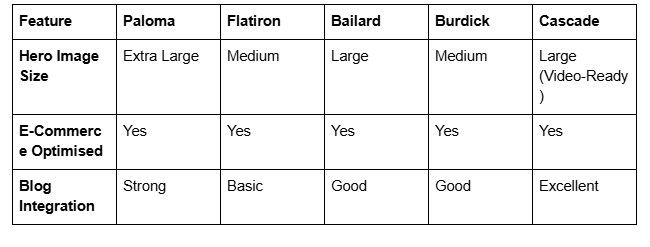
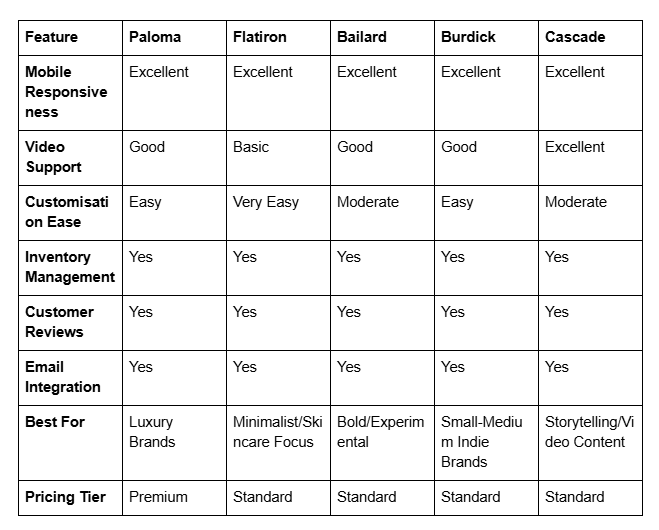
Comparison: Template Features at a Glance
Design Best Practices for Cosmetics Websites
Choosing the right template is the foundation, but how you customise it matters equally. Here are proven design practices that drive conversions for beauty brands:
Invest in Product Photography
Your images are your salespeople. High-quality, professional photos of your products—showing packaging, texture, application, and results—increase customer confidence. Before launching, budget for a professional photographer or invest in a light box and learn smartphone photography techniques.
Use Consistent Colour Psychology
Beauty brands aren't one-size-fits-all. Luxury skincare often uses muted, sophisticated palettes (creams, golds, blacks). Vibrant makeup brands use bold colours. Natural beauty brands favour earth tones and greens. Your template's colour scheme should align with your positioning. Squarespace's colour editor makes this simple.
Prioritise White Space
Resist the urge to fill every pixel. Premium brands use generous white space. It signals confidence and allows customers to focus on what matters: your products and their benefits.
Feature Customer Testimonials and Before-and-After Images
Social proof is powerful. Include real customer reviews, before-and-after photos (with permission), and testimonials. Many Squarespace templates include built-in testimonial sections.
Create Scannable Product Pages
Customers don't read word-by-word on product pages—they scan. Use bullet points for key benefits, highlight ingredients, include ingredient explanations (especially for buzzwords like "hyaluronic acid" or "bakuchiol"), and make the "Add to Cart" button obvious.
Optimise for Different Product Types
If you sell makeup, skincare, and tools, each category might need a different page layout approach. Squarespace's collection templates allow category-specific customisation.
Mobile-First Design Thinking
Over half your traffic will be mobile. Ensure hero images look good on small screens, buttons are thumb-friendly (minimum 44px height), and checkout doesn't require excessive scrolling. All Squarespace templates handle this, but test on your phone before launch.
E-Commerce Features to Check
Your template choice should support these essential e-commerce capabilities:
Product Variants: Can customers choose sizes, shades, or quantities? Most Squarespace templates allow unlimited variants, but confirm this matches your needs.
Inventory Tracking: Automatically manage stock levels and prevent overselling. Squarespace's inventory system sends alerts when stock runs low.
Discount Codes and Sales: Apply percentage discounts, dollar amounts, or buy-one-get-one offers. Schedule sales to run automatically.
Shipping and Tax Calculation: Automatic tax calculation based on customer location (essential for multi-state or international sellers). Shipping integrates with USPS, UPS, and FedEx.
Abandoned Cart Recovery: Automatically email customers who added items but didn't purchase. This alone recovers 10–15% of potential lost sales.
Customer Accounts: Allow repeat customers to save addresses, payment methods, and order history. This reduces friction and encourages repurchasing.
Email Marketing Integration: Connect Mailchimp, Klaviyo, or Squarespace's native email tool to build your mailing list and send targeted campaigns.
Analytics and Reporting: Track sales, traffic sources, top products, and customer behaviour. This data informs your marketing and product decisions.
All Squarespace templates include these features. The difference is often in how elegantly the template presents them.
Customising Your Template: A Step-by-Step Overview
Once you've selected your template, customisation typically follows this workflow:
Step 1: Install the Template Select your template from Squarespace's library and install it to your website. You'll inherit all its pages and layouts.
Step 2: Update Core Brand Elements
Replace logo
Update site title and tagline
Change colour scheme to match brand guidelines
Update fonts (Squarespace offers hundreds of combinations)
Step 3: Customise Homepage
Update hero image with your brand imagery
Edit headlines and subheadlines
Add a compelling brand story or tagline
Step 4: Build Your Shop
Upload product photos (aim for 1000+ pixels wide for quality)
Write compelling product titles and descriptions
Add pricing, variants, and inventory counts
Enable customer reviews
Step 5: Create Essential Pages
About: Share your story. Customers buy from people, not faceless corporations.
Contact: Make it easy to reach you. Include email, contact form, social media links.
FAQ: Answer common questions about ingredients, shipping, returns, and usage.
Blog (optional): Share skincare tips, ingredient guides, or brand updates.
Step 6: Set Up Shipping and Payments
Configure tax settings based on your location and customer base
Connect payment processors (Stripe, PayPal, Square)
Set up shipping zones and rates
Enable SSL certificate for security
Step 7: Test and Launch
Test checkout on desktop and mobile
Verify all links work
Check that product images load quickly
Send a test order to yourself
The entire process typically takes 2–4 weeks if you're doing it yourself (including product photography). Many founders hire a Squarespace expert to accelerate this—usually a 1–2 week project.
Common Mistakes to Avoid
Choosing a Template for the Wrong Reasons
Don't select a template just because you like how it looks on the template showcase site. Imagine your actual products, text, and photos in that template. Does it still work? Some templates that look stunning with placeholder images become cluttered with real product photography.
Overcomplicating Navigation
Beauty brands sometimes create too many menu items and collections. Customers should find products in 2–3 clicks. Keep navigation simple: Shop, About, Blog (if applicable), Contact.
Poor Product Photography
A stunning template can't save weak product photos. If your photos are grainy, poorly lit, or inconsistent in style, invest in improving them before launching.
Ignoring Mobile Experience
Test your site on an iPhone before going live. Squarespace handles responsive design automatically, but you need to verify that touch targets are large enough and images load quickly.
Neglecting SEO
Your Squarespace template includes SEO tools, but you need to use them. Write compelling meta descriptions, use headers logically (one H1 per page), and include keywords naturally in product descriptions.
Missing Trust Signals
Include a privacy policy, clearly state your return policy, display security badges, and encourage customer reviews. These build trust—especially important for first-time buyers purchasing skincare or makeup online.
Launching Too Early
Don't go live before every product is uploaded, every page is written, and you've tested checkout. A polished launch beats a half-finished one with regular updates.
Frequently Asked Questions
-
No. Squarespace is designed for non-technical users. All customization happens through a visual editor—drag, drop, upload images, and change text. If you're comfortable using Word or Google Docs, you can use Squarespace. For advanced customization (custom CSS or scripts), Squarespace allows code injection, but this is optional.
-
You'll need at least the Business plan (or higher) to access full e-commerce features including inventory management, payment processing, and shipping integrations. Basic plans don't include a shop. As of 2026, Squarespace offers tiered pricing with e-commerce starting at around £23/month, though you should verify current pricing on Squarespace.com
-
Yes, but with caveats. You can switch templates, but custom content (product images, descriptions, etc.) may not transfer perfectly. Homepage layouts often need reworking. It's possible, but time-consuming. Choose carefully the first time, but don't stress—you're not locked in permanently.
-
For a solo founder with basic product photography, expect 3–6 weeks part-time. This includes: uploading 50+ products with photos and descriptions (2–3 weeks), writing copy for About, Contact, and FAQ pages (1 week), customizing the template (3–5 days), and testing (3–5 days). If you're hiring help, a professional can deliver a launch-ready site in 1–2 weeks.
-
Yes, every Squarespace template automatically adapts to mobile, tablet, and desktop screens. However, you should still test your specific site on multiple devices before launch. Mobile performance is non-negotiable in 2026—slow mobile sites lose customers.
-
Yes. Squarespace supports multi-currency pricing, international shipping integration, and can calculate VAT/GST for different regions. If you're selling cosmetics internationally, check regulations for each country (some countries have restrictions on certain ingredients), but Squarespace's tools support global business.
-
In Squarespace's language, "templates" and "themes" are sometimes used interchangeably, but typically a template refers to a complete pre-designed site layout you can install and customize. All modern Squarespace templates are responsive and include the features you need. The terminology has evolved in 2026, but the end result is the same: a beautiful, functional starting point for your site.
-
Yes. Squarespace has native integrations with popular email marketing platforms. You can capture emails on your site, segment customers, and send automated campaigns. This is especially useful for beauty brands who want to announce new product launches, seasonal sales, or skincare tips to their audience.
Ready to Build Your Cosmetics Brand Website on Squarespace?
Launching a cosmetics or skincare brand online is one of the most exciting decisions you'll make as an entrepreneur. Your website isn't just a digital storefront—it's the home of your brand, the place where curious customers learn your story, discover your products, and decide whether to trust you with their skin.
Choosing the right Squarespace template is the crucial first step. Whether you select Paloma's luxurious, gallery-rich approach, Flatiron's clean minimalism, or another template that resonates with your vision, you're choosing a foundation that's professionally designed, mobile-optimised, and ready to sell.
But here's what many founders discover: a beautiful template and a solid strategy are different things. You might feel confident about design, but uncertain about product photography, copywriting, pricing strategy, or building an email list. You might wonder whether your chosen template will truly reflect your brand's personality, or whether you're missing features that could boost sales.
That's where we come in. At Squareko, we specialise in helping cosmetics and skincare brands build beautiful, high-converting websites on Squarespace. We don't just set up templates—we partner with you to understand your brand, your customers, and your goals. We handle the technical setup, customization, product uploads, and optimization so you can focus on creating amazing products and building community.
Whether you're launching your first skincare line, scaling an established brand to a new platform, or refreshing your current website, we're here to guide you. We work with luxury skincare brands, indie makeup lines, sustainable beauty companies, and everything in between. We've seen what works, what doesn't, and how to make Squarespace work brilliantly for your specific niche.

About the Author
I'm Walid Hasan, a Certified Squarespace Expert and Squarespace Circle Platinum Partner with over 12 years of hands-on experience designing and optimizing high-performing websites. Over the years, I've had the privilege of building more than 2,000 Squarespace websites for clients around the world, always focusing on clean design, strong user experience, and conversion-driven results.
