
Cleaning Company Squarespace Templates That Book Jobs
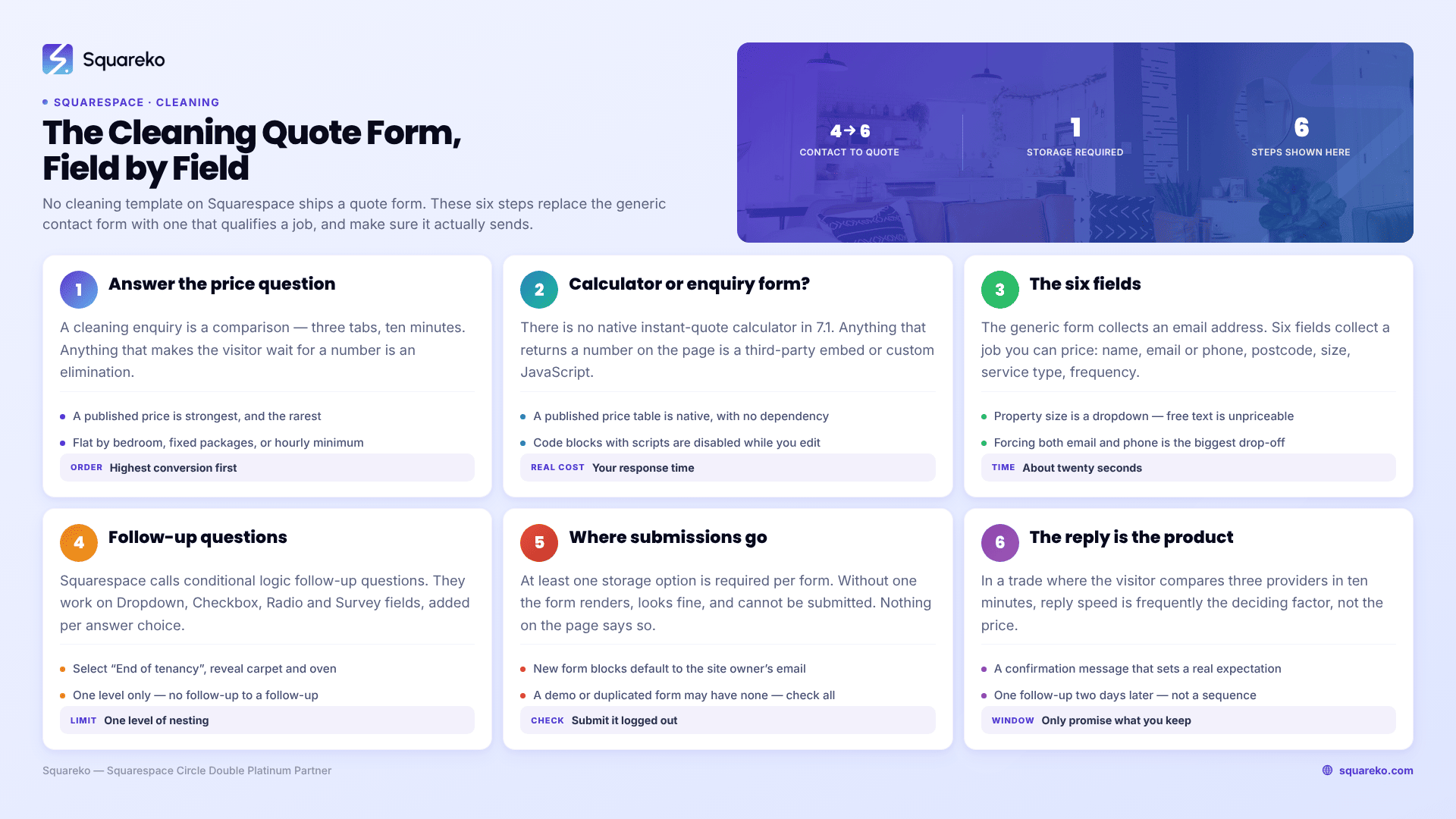
The short answer: The template is not what converts. The quote form is, and no cleaning template on Squarespace ships one — they all ship a generic Name / Email / Subject / Message contact form, including the good ones. Replace it with six fields that qualify a job, connect a storage destination, and reply within the hour. That sequence moves more work than any redesign.
This post is the mechanics half of the cleaning template cluster hub. The hub covers which template to buy. This one covers what to build the day after you install it.
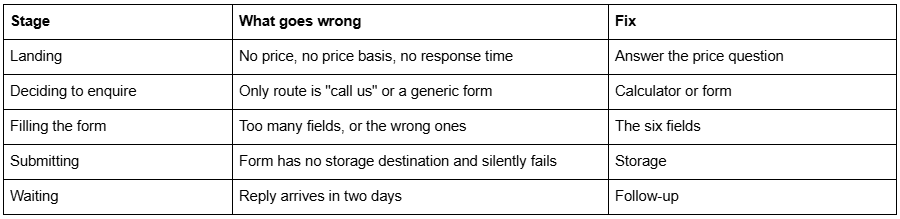
Where cleaning enquiries actually die
The price question, answered before the form
A cleaning enquiry is almost always a comparison. Three tabs, three cleaners, ten minutes. The visitor is not choosing your brand; they are eliminating two of three options as quickly as they can.
Anything that forces them to wait for information is an elimination. "Call for a quote" eliminates you against a competitor who published a number. So does a quote form with no indication of what the answer will roughly be.
You have three honest options, in descending order of conversion:
A published price. Flat rate by bedroom count, fixed-price packages, or hourly with the minimum stated. This is the strongest and the rarest. Cleanko is the one template in our range that ships a three-tier Pricing page with a "what's included" list per tier and a quote CTA on each, which is why it appears throughout this cluster — you can see the layout on the Cleanko demo.
A price basis plus a range. "Standard cleans from £18/hour, two-hour minimum. Most three-bedroom homes are £54–£72 per visit." Precise enough to compare, honest enough not to be walked back.
A stated response time. "Quotes within one working hour, 8am–6pm." If you genuinely cannot publish a number — bespoke post-construction work, large commercial contracts — then speed is your published figure instead.
What does not work is a page that gives none of the three. That is most cleaning websites.
Instant quote calculator or enquiry form?
There is no native instant-quote calculator in Squarespace 7.1. Anything that returns a number on the page is either a third-party embed or custom JavaScript in a Code Block, and both add weight, a dependency and a maintenance burden.
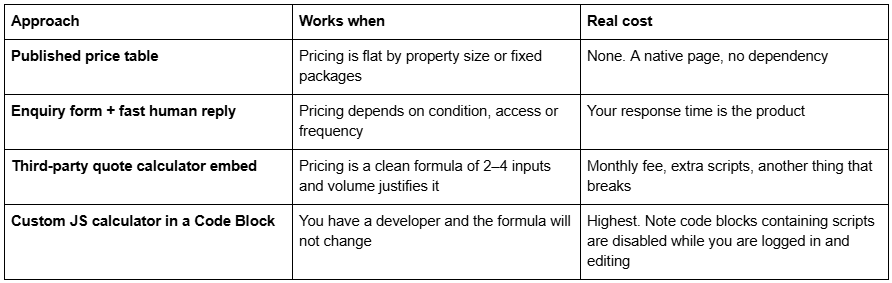
That last row catches people out. Squarespace disables script-bearing code blocks in the editor, showing "This block contains embedded scripts. Embedded scripts are disabled while you're logged in and editing your site." That message is not an error and the calculator is not broken — log out and check on the live site before debugging anything.
For most cleaning companies the honest answer is the first or second row. A calculator that produces an unreliable number is worse than a form, because you spend the first phone call correcting your own website.
The six fields a cleaning quote form needs
The generic form every template ships collects an email address. This one collects a job you can price.
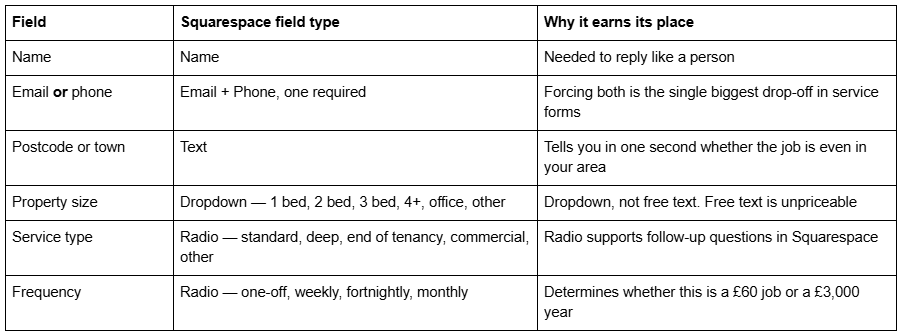
Six fields, all answerable in about twenty seconds, and between them they let you send a real number instead of booking a discovery call.
Two fields to add carefully. Access ("How will we get in?" as a dropdown) is genuinely useful for residential work and can be a follow-up question rather than always visible. Preferred start date, as a Date field, is worth it only if you actually schedule from it.
Two fields to leave out. Budget is answered by your published prices, and asking for it after publishing them reads as a haggle. Free-text "tell us about your property" produces paragraphs you then have to interpret; the dropdowns above already capture what you need.
On field count, the evidence is genuinely mixed rather than one-directional — Venture Harbour's review of five form-length studies includes cases where removing fields cut conversions, because the removed fields were ones users wanted to answer. The reliable principle is not "fewer fields" but "no field the visitor cannot answer instantly, and no field you will not use". Squarespace itself recommends staying under 30 fields per form, which is far more headroom than a cleaning quote needs.
Follow-up questions, natively
Squarespace forms support conditional logic, called follow-up questions in the interface. They are available on Dropdown, Checkbox, Radio and Survey fields, and you add them from the option menu next to an individual answer choice.
This is exactly the right tool for a cleaning quote form. Select "End of tenancy" and reveal a carpet-and-oven follow-up. Select "Commercial" and reveal approximate floor area and number of visits per week. Select "One-off" and skip the frequency branch entirely.
One documented limit: you cannot create a follow-up to a follow-up. One level of nesting only, so plan the branch structure before you build it rather than discovering the ceiling halfway through.
Squarespace form fields also include Date, Time, Number, Currency, Address and a File Upload field, available in form blocks only, accepting files up to 10 MB each. File Upload is worth knowing about for post-construction and end-of-tenancy work, where a photo of the property does more for an accurate quote than any dropdown.
Where form submissions go, and how they silently fail
This is the failure that costs cleaning companies real money, because nothing on the page indicates anything is wrong.
Squarespace's documentation is unambiguous: "At least one storage option is required per form. If you don't select a storage option, the form won't have a place to send submissions, and visitors won't be able to submit the form." The form renders, it looks fine, and it does not work.
New form blocks default to the site owner's email address, so a form you build from scratch is usually fine. A form that arrived with a template demo, or was duplicated from another page, may not be. Check every form on the site after installation, not just the ones you edited.
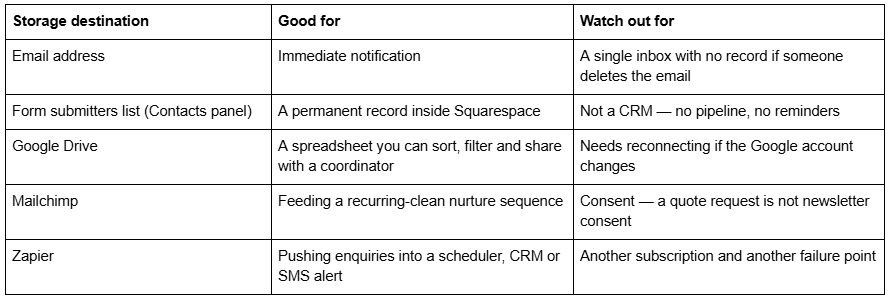
For a small cleaning company the practical pairing is email plus Google Drive: instant notification, plus a spreadsheet nobody can accidentally delete.
One more trap specific to template installs. If you are building on a Squarespace trial site — which is how Squareko delivers a template on a fresh site — form submission emails are not sent unless the site owner is a Circle member. Connect the form to Google Drive during the build, or you will spend an afternoon convinced the form is broken when it is behaving exactly as documented.
The reply is part of the product
The quote form is not the end of the flow. In a trade where the visitor is comparing three providers in ten minutes, the reply speed is frequently the deciding factor, not the price.
Three things worth building on the day you launch:
A confirmation message that sets expectation. Squarespace lets you set post-submission text on the form. "Thanks — you'll have a quote by 5pm today" is a commitment that stops them calling the next cleaner on the list. Only write it if it is true.
An automatic acknowledgement email. Squarespace's form connections can drive this, and it does one useful job: it puts your name and phone number in their inbox so the reply thread already exists.
A single follow-up, two days later, to anyone who did not respond to the quote. Not a sequence, not a drip — one message asking whether the price or the timing was the problem. It also tells you which of the two it usually is.
If you are already running a scheduler, Squarespace's own Cleaning Services solutions page markets booking with custom intake forms, automated reminders and recurring invoicing, and Acuity Scheduling handles intake forms attached to appointment types. The recurring side of that — weekly and fortnightly plans, client accounts, billing — is covered in the maid and domestic services guide in this cluster.
Launch-day QA on a cleaning template
Template demos are demonstration copy, not your copy, and the parts that get missed are always the same ones.
Every form has a storage destination and you have submitted a live test from a logged-out browser
The demo phone number, email and address are gone from the entire site, including the footer and any hard-typed page text. Cleanko's demo carries a fictional address and a misspelled example email in the footer
Placeholder trust statistics are removed. Cleanko's second homepage layout ships counters reading "2000+ Happy Customer", "100+ Team Members" and "99% Client Satisfaction". Publishing unverified figures on a site that also carries your name is not a risk worth taking
Button copy proofread. The Cleanko demo ships buttons reading "Get a Qoute" — a typo on the single most important button on the site
Lorem ipsum searched for and removed across every page, including the Home 2 layout
Demo images all replaced. Demo images are not licensed for live use, on any template from any shop
Pricing page filled or deleted. A three-tier pricing layout still carrying placeholder tier descriptions is worse than no pricing page
What to build first
Order of return, highest first: get a price or a price basis onto the site, replace the four-field contact form with the six-field quote form, connect storage and test it logged out, then set a response-time promise you can keep. That is most of a day, and it will outperform a redesign.
If you want the pricing and service-detail pages already built rather than assembled from sections, Cleanko is in our premium Squarespace templates range at $249 and is installed for you rather than delivered as files — including onto an existing live site, which takes around 48 hours as a manual process. The quote form is still yours to build; nobody ships that, and anyone claiming otherwise is describing a contact form.
If you already have a site that looks fine and produces nothing, the form is where to look before the template.
FAQ
-
Most often no storage destination is connected. Squarespace states that at least one storage option is required per form, and without one visitors cannot submit at all. New form blocks default to the owner's email, but forms that arrived with a template demo may not. Check every form and test logged out.
-
Six: name, email or phone, postcode, property size as a dropdown, service type as a radio, and frequency as a radio. That is enough to price most domestic jobs without a call. Add access details and photo upload as follow-up questions for end-of-tenancy or post-construction work.
-
Not natively. Squarespace 7.1 has no quote calculator, so it means a third-party embed or custom JavaScript in a Code Block. Note that script-bearing code blocks are disabled while you are logged in and editing, so always verify on the live site logged out before assuming it is broken.
-
Yes. Squarespace calls it follow-up questions, available on Dropdown, Checkbox, Radio and Survey fields, added from the option menu next to an answer choice. One documented limitation: you cannot create a follow-up to a follow-up, so only one level of nesting is possible.
-
To whichever storage destinations you connect: an email address, the form submitters list in the Contacts panel, Google Drive, Mailchimp or Zapier. For a small cleaning company, email plus Google Drive is the practical pairing — instant notification plus a spreadsheet that survives a deleted inbox.
-
A form, until you are turning away work. Booking systems matter when you sell fixed-duration slots at published prices. Most cleaning work is priced after seeing the property, so a quote form plus a fast reply converts better than a calendar that lets people book a job you have not scoped.

Author Bio
I'm Walid Hasan, a Certified Squarespace Expert and Squarespace Circle Platinum Partner with over 12 years of hands-on experience designing and optimizing high-performing websites. Over the years, I've had the privilege of building more than 2,000 Squarespace websites for clients around the world, always focusing on clean design, strong user experience, and conversion-driven results.
