
Squarespace Templates for House Cleaning Services
The short answer: A house cleaning website is not selling cleaning. It is answering one question — is it safe to let this person into my home while I'm at work? Price is the second question, and it only gets asked once the first is settled. Choose a template with room for named staff, vetting, insurance and a stated breakage policy, then write those pages before you touch the styling.
This is the residential half of the cleaning template cluster. Commercial cleaning is a procurement decision made from a specification. Domestic cleaning is a decision about a stranger and a key, and the site has to be built for that.
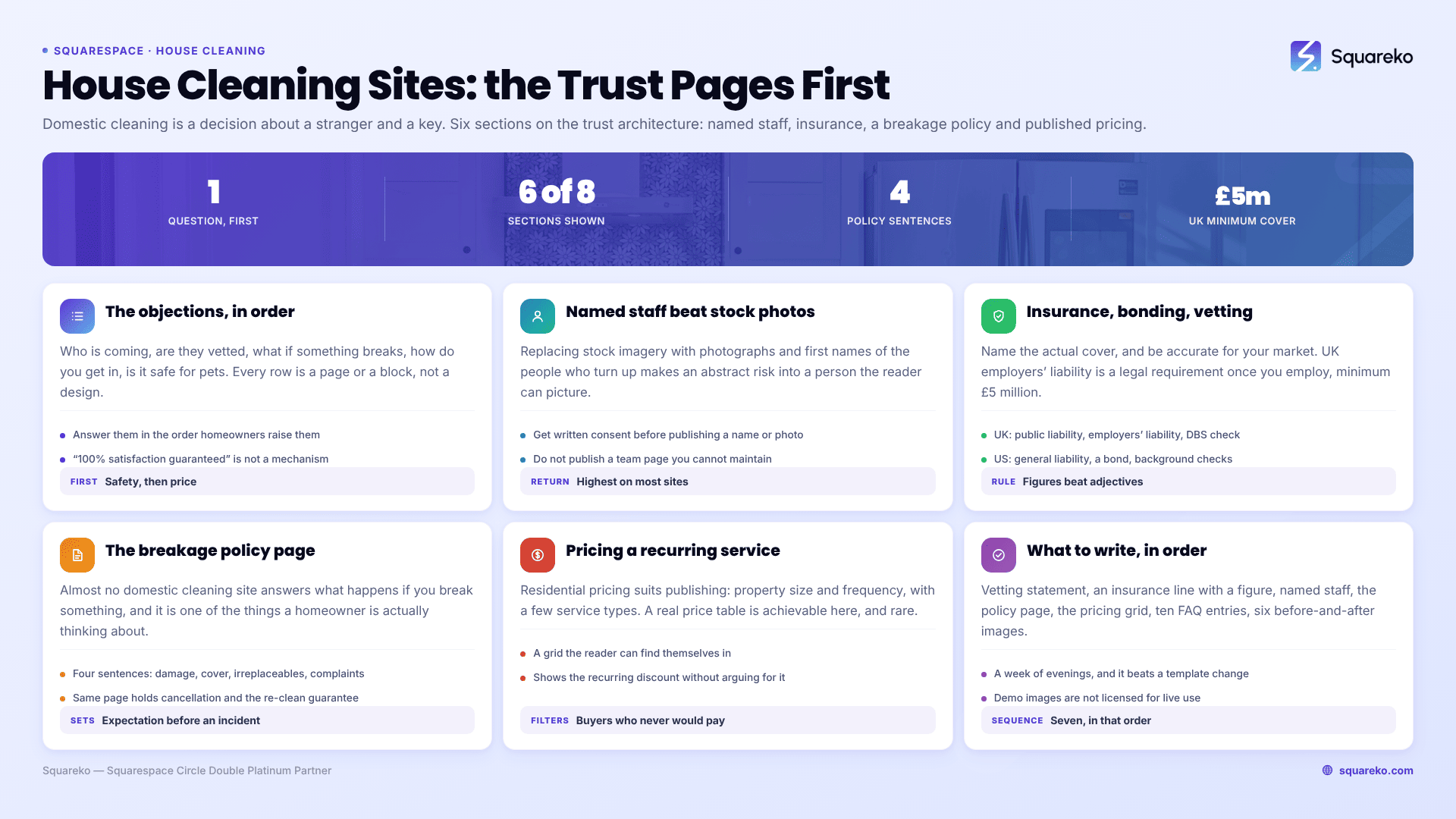
The objections, in the order homeowners raise them
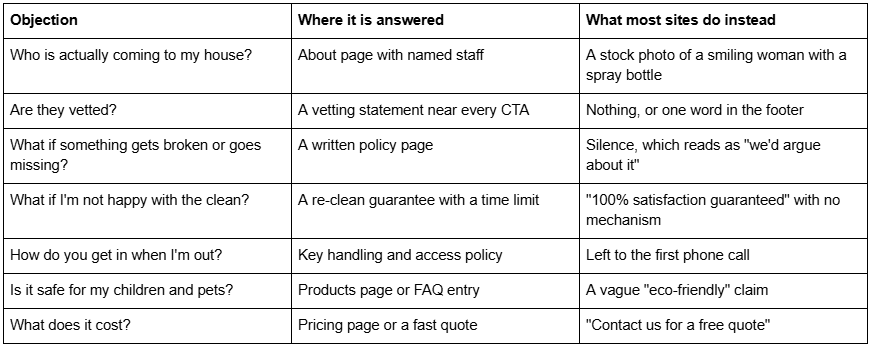
Every row is a page or a block. None of them is a design decision, which is why choosing a template on aesthetics is the wrong first move for a house cleaning business.
Named staff beat stock photography
The single highest-return change on most house cleaning websites is replacing the stock imagery on the About page with photographs and first names of the people who actually turn up.
It works because it converts an abstract risk into a specific person. "Our team is fully vetted" is a claim. "Maria has been with us four years, is DBS-checked, and covers the north of the city" is a person the reader can picture in their hallway.
Three practical notes.
Get consent, in writing, before publishing a cleaner's photograph or name. This is employment courtesy in every market and a data-protection obligation in some. First name and photograph is usually enough; there is no need for surnames.
Do not publish a team page you cannot maintain. Staff turnover in domestic cleaning is high. A team page listing three cleaners who left last year is worse than no team page, because the first thing a returning client notices is that the person on the site is not the person at the door.
If turnover makes named profiles impractical, publish the vetting process instead of the people. "Every cleaner is interviewed in person, reference-checked with two previous employers, and DBS-checked before their first job" does most of the same work and does not go out of date.
Squarespace-wise this is a Fluid Engine section with an image and a text block per person, and there is no plugin or special block required.
Insurance, bonding and vetting: say the specific thing
Homeowners look for this and cleaning websites consistently underplay it. Two rules: name the actual cover, and be accurate about your market, because the vocabulary genuinely differs.
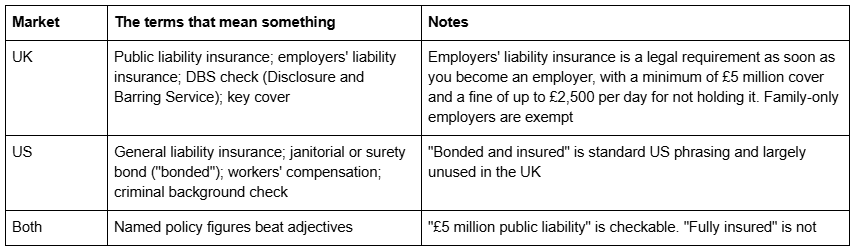
Write the sentence you can prove and put it where it is read — on the About page, in the FAQ, and as a short trust line near the quote button, not only in the footer. If you hold accreditations, name the body rather than only showing the badge, because a logo image is invisible to search engines and to anyone using a screen reader.
Do not overstate. Claiming to be bonded when you hold no bond, or implying DBS checks you have not run, is the kind of thing a competitor screenshots.
The breakage policy is a conversion page
Almost no domestic cleaning website answers "what happens if you break something", and it is one of the two or three things a homeowner is actually thinking about.
A short, plainly written policy does more for conversion than another testimonial. It needs four sentences:
What you do if something is damaged — who reports it and when
What your insurance covers and the excess, if any
What you do about items that cannot be replaced
How to raise a complaint, and how quickly you respond
Publishing it does two things at once. It reassures the reader, and it sets the expectation before there is an incident, which is worth more the first time something actually breaks. The same page is the right home for your cancellation policy and your re-clean guarantee — "if you're not happy, tell us within 24 hours and we'll re-clean the room at no charge" is a mechanism, where "100% satisfaction guaranteed" is a slogan.
Several of the better cleaning templates on the market ship a "Service Policies" page for exactly this. If yours does not, it is a standard page and takes twenty minutes.
Pricing a recurring domestic service on the page
Residential cleaning pricing has a shape that suits publishing: property size and frequency, with a small number of service types. That makes it one of the few local trades where a real price table is achievable, and publishing one is a genuine differentiator because so few competitors do.
The presentation that works is a grid the reader can find themselves in:

Three things this structure does. It shows the recurring discount without you having to argue for it, which moves people from one-off to regular. It sets expectation on minimum charge before the phone call. And it filters out the buyer who was never going to pay your rate, which is the most valuable filtering a website does.
State the minimum charge explicitly. A two-hour minimum discovered on the first call feels like a bait and switch; the same minimum stated on the page feels like a professional operation.
If your pricing genuinely varies by condition — first deep cleans, hoarding situations, end-of-tenancy work — publish the recurring prices and quote separately for the rest. Do not let the exceptions stop you publishing the 80% that are predictable. The mechanics of the quote form itself are covered in the booking and quote flow guide in this cluster.
Which Squarespace templates suit a house cleaning service
Scored against the residential trust requirements above — named staff space, policy pages, published pricing, FAQ depth, and a home for before-and-after proof. Each 1–5, maximum 25.
Cleanko — 22/25
Twelve pages: Home, Home 2, About, Services, Blog, Portfolio, Contact Us, FAQs, Pricing, Service Details, 404 and a Style Guide. Three of them carry most of the residential trust load.
The Pricing page ships as three tiers with a "what's included" list per tier — the layout that suits property-size-and-frequency pricing with the least reshaping. The FAQs page is built with Squarespace's native Accordion block, which renders server-side in 7.1, so the answers are crawlable rather than hidden behind JavaScript; the demo already carries genuinely residential questions such as whether you need to be home during the clean and who supplies the products. The Service Details page gives each service a full page with a scope breakdown and an add-ons section, which is where the "what a deep clean actually includes" answer belongs.
Its second homepage layout ships a team section, so named staff have a home without building one. You can walk the whole page set on the Cleanko demo.
Named staff space 4, policy pages 3, published pricing 5, FAQ depth 5, proof of work 5.
Worst for: a solo cleaner. Twelve pages is more site than one person with a full book needs, and the team section will sit empty.
Relief — 18/25
Eleven pages built for therapists and wellness coaches, with a Pricing page and an FAQs page already built. The relevance is that it is designed around a recurring appointment with a single trusted practitioner, which is structurally what a weekly domestic clean is. It reads warmer than most service templates, which suits a solo cleaner or a small two-person operation.
Named staff space 4, policy pages 3, published pricing 5, FAQ depth 4, proof of work 2.
Worst for: anyone selling on visible results. Relief has no portfolio or gallery, so before-and-after photography has nowhere to go.
Click Crafter — 16/25
Twelve pages with a Portfolio, Gallery, Blog and a Freebie page. The Freebie page is the reason to consider it for domestic work — a move-out cleaning checklist or a pre-clean preparation guide is the standard lead magnet in this trade and the page is already there.
Named staff space 3, policy pages 3, published pricing 1, FAQ depth 3, proof of work 4.
Worst for: anyone who wants published prices. Click Crafter has no pricing page, so the table above has to be built from sections.
Free Squarespace templates remain a real option and cost nothing — independent reviewers most often name Oranssi, Radian and Sawyer for cleaning. They give you a design. What they do not give you is a pricing layout, an accordion FAQ page and a per-service detail page already built, which is most of the build time.
What to write, in order
The vetting statement — one paragraph, on the About page and near every CTA
The insurance line, with the actual policy figure
Named staff, or the process if you cannot name people
The breakage, cancellation and re-clean policy page
The pricing grid, with the minimum charge stated
Ten FAQ entries in the Accordion block, written from real first-call questions
Six before-and-after images from real jobs, with the client's permission
That is a week of evenings and it will outperform any template change. Demo images are not licensed for live use in any case, so the photography is not optional — every image in a template demo has to be replaced before launch.
Where the template actually helps
The template does not build trust. What it does is remove the two or three days you would otherwise spend constructing a pricing layout, an accordion FAQ page and a repeatable per-service page in Fluid Engine before you can start writing.
If that trade is worth it to you, Cleanko sits in our premium Squarespace templates range at $249 with those pages already built, is installed for you rather than delivered as files — including onto an existing live site, which takes around 48 hours as a manual process — and includes 60 days of email support. Note that all sales are final on digital products, which is a reason to walk the demo properly first rather than a reason to avoid it.
If you are a solo cleaner with a full book and a waiting list, a free Squarespace template with a good About page and a published price will serve you just as well. The trust pages are the work, and nobody can sell you those.
FAQ
-
Name the specific cover and the figure. "£5 million public liability" is checkable; "fully insured" is not. UK businesses employing anyone must hold employers' liability insurance with a minimum of £5 million cover. In the US the equivalent phrasing is general liability insurance plus a janitorial bond. Never claim cover you do not hold.
-
Yes, with written consent, if your staff are stable. Named first names and photographs convert far better than stock imagery because they turn an abstract risk into a specific person. If turnover is high, publish the vetting process instead — it does similar work and does not go out of date.
-
Four things: how damage is reported and within what window, what your insurance covers and any excess, what you do about irreplaceable items, and how to complain and how fast you respond. Publishing it reassures the reader before booking and sets expectation before an incident happens.
-
Usually yes. Residential pricing is a grid of property size against frequency, which is simple enough to publish honestly, and very few competitors do. State the minimum charge explicitly. Quote separately for the genuinely variable work — first deep cleans, hoarding, end of tenancy — rather than publishing nothing.
-
Home, Services with a per-service detail page, Pricing or a fast quote, About with named staff and vetting, a Service Policies page covering breakage and cancellation, an FAQ built with the Accordion block, service areas in text, and a Contact page with a qualifying form rather than a generic contact form.
-
Cleanko, on page set rather than styling: twelve pages including a three-tier Pricing page, an Accordion FAQ page, a per-service Service Details layout and a job-type Portfolio. Relief suits solo cleaners selling recurring packages. Free templates such as Oranssi and Sawyer work but ship none of those layouts pre-built.

Author Bio
I'm Walid Hasan, a Certified Squarespace Expert and Squarespace Circle Platinum Partner with over 12 years of hands-on experience designing and optimizing high-performing websites. Over the years, I've had the privilege of building more than 2,000 Squarespace websites for clients around the world, always focusing on clean design, strong user experience, and conversion-driven results.
